

Best Local LLM in 2026: Which Model to Run for Your VRAM, from 8GB to 128GB
Which local LLM to run for each amount of VRAM or unified memory, from 8GB to 128GB, with download sizes from Ollama checked on October 28, 2026.
 bufferAbout the author4 min read
Short answer: the best local LLM depends on how much memory you have. With 8GB, start with Qwen3.5 4B. With 12GB, run Qwen3.5 9B or Gemma 4 12B. With 16GB, you can try gpt-oss-20b. With 24GB, pick Qwen3.8 27B or Gemma 4 26B-A4B. With 32GB, pick Qwen3.6 35B-A3B. Only at 96GB to 128GB do gpt-oss-120b and Qwen3.5 122B-A10B fit. All download sizes below come from the official Ollama library, and I checked each one on October 28, 2026.
This guide looks at one thing: whether the model file fits fully in your VRAM (unified memory on a Mac) with room left for context. A model that does not fit spills over to system RAM or disk, and it runs much more slowly. For an exact number, enter the parameter count, quantization and context length in the VRAM calculator.
Best local LLM for each amount of VRAM
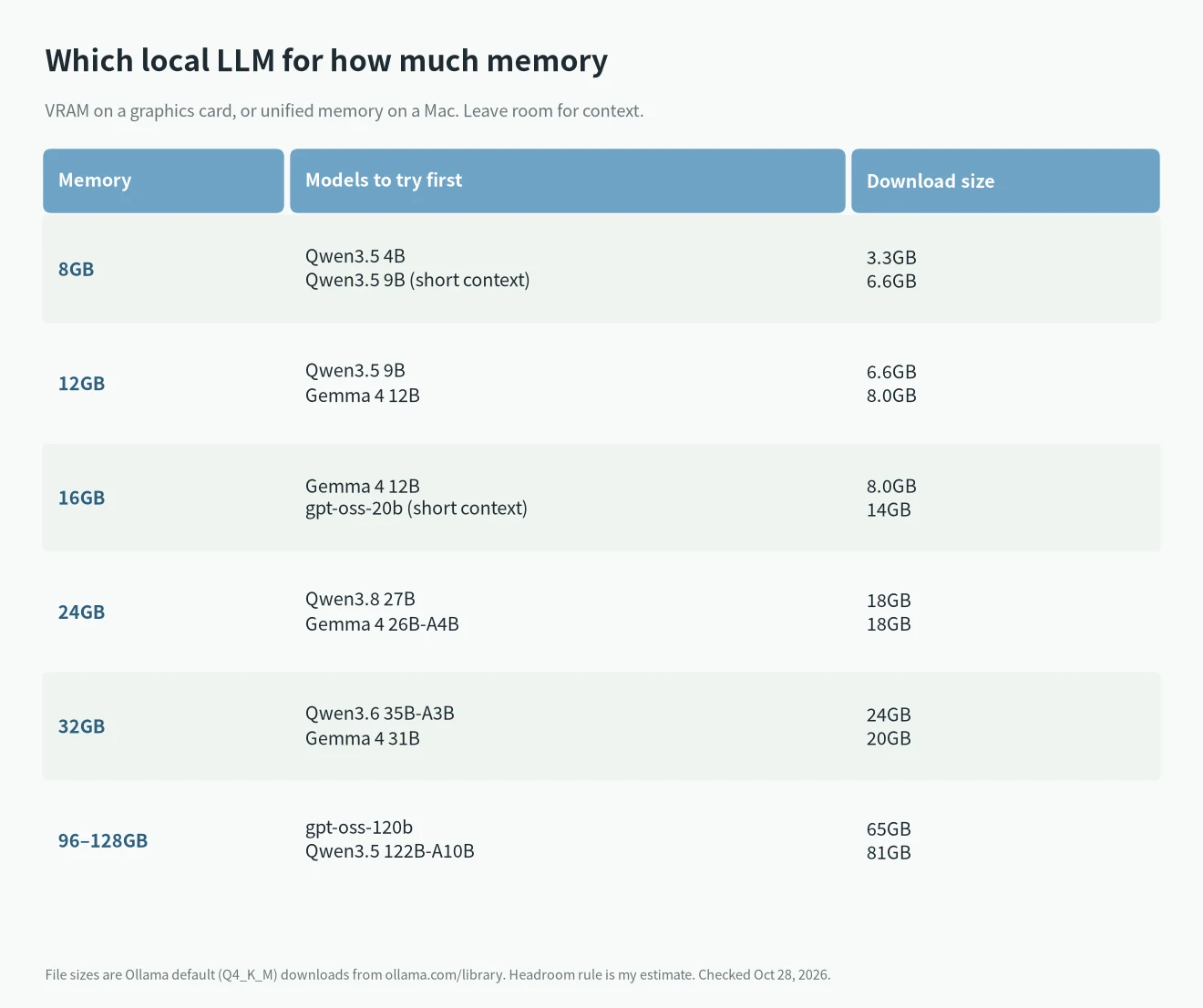
For each tier I list only the two or three models worth trying first. Sizes are Ollama’s default Q4_K_M downloads.
- 8GB: Qwen3.5 4B, a 3.3GB file with plenty of headroom. Qwen3.5 9B is 6.6GB and also fits, but only with a short context.
- 12GB: Qwen3.5 9B (6.6GB) or Gemma 4 12B (8.0GB). This is the best-value tier for chat, translation and document summaries.
- 16GB: Gemma 4 12B with a longer context. gpt-oss-20b is a 14GB file. It fits, but leaves only about 2GB for context.
- 24GB: Qwen3.8 27B (18GB) and Gemma 4 26B-A4B (18GB). The RTX 4090 and RTX 3090 sit here. See what models the RTX 4090 can run.
- 32GB: Qwen3.6 35B-A3B (24GB) or Gemma 4 31B (20GB). The RTX 5090 has 32GB. See the RTX 5090 for AI.
- 96GB to 128GB: gpt-oss-120b (65GB) and Qwen3.5 122B-A10B (81GB). This usually means a 128GB Mac Studio, a DGX Spark or an AI Max 395 machine. Compare them in DGX Spark vs Mac Studio.
The tiers use my own rule of thumb: the file size plus 2GB to 4GB for context and runtime overhead. If you run a context of tens of thousands of tokens, leave more room.
Download size by model
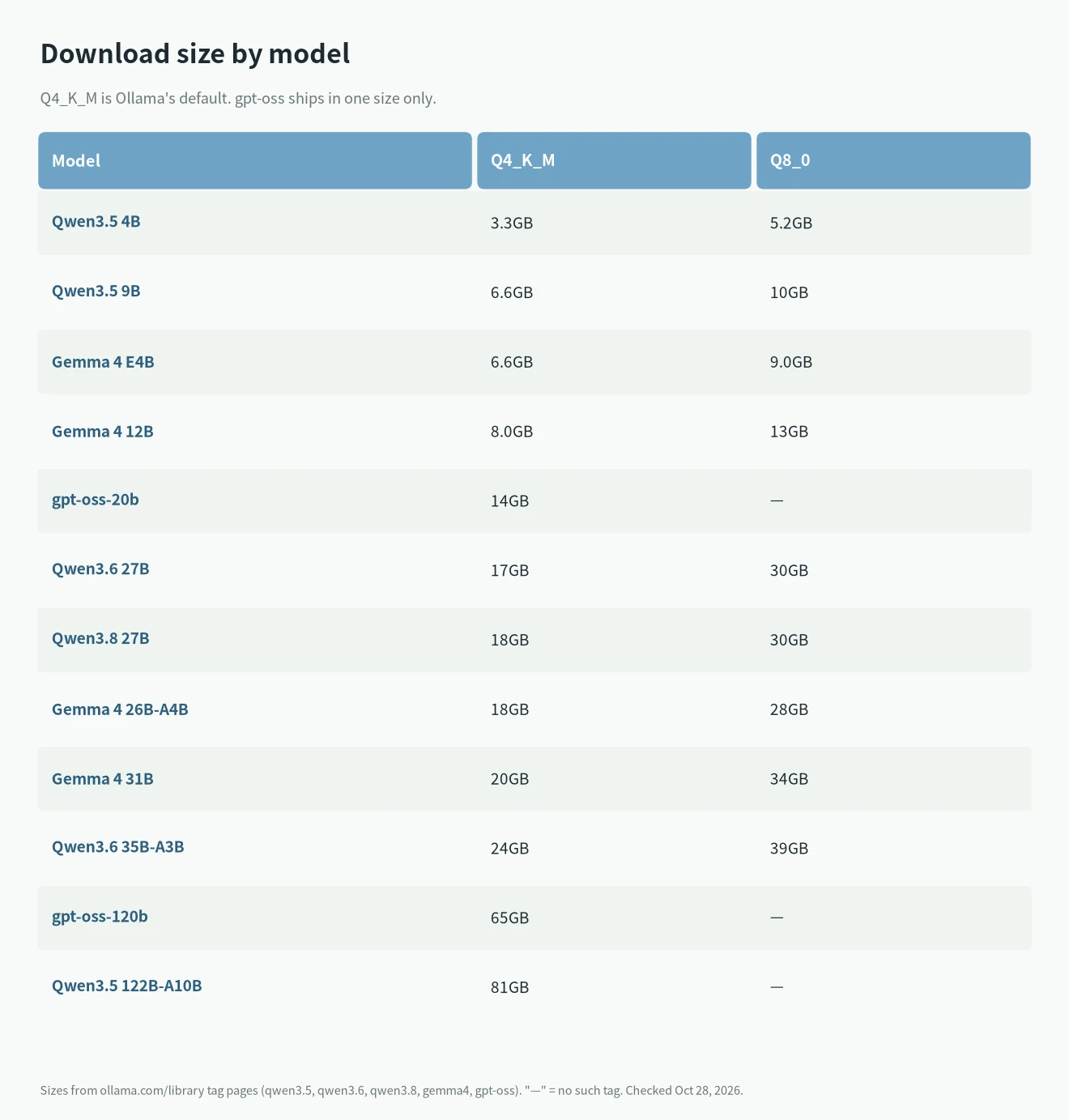
The Q8_0 version of a model is about 1.5 to 1.8 times the size of the Q4_K_M version. For example, Qwen3.8 27B is 18GB at Q4_K_M and 30GB at Q8_0. Q8_0 stays closer to full precision but needs much more memory. When memory is tight, use Q4_K_M. With 48GB or 64GB, you can move up to Q8_0.
gpt-oss comes in one size per model: gpt-oss-20b is 14GB and gpt-oss-120b is 65GB.
Models with A3B or A4B in the name
Qwen3.6 35B-A3B, Gemma 4 26B-A4B and Qwen3.5 122B-A10B are mixture-of-experts (MoE) models. A3B means about 3 billion parameters are active for each token. They generate text faster than a dense model of the same size, but the whole model still has to fit in memory, so pick the tier by file size.
What each model family is for
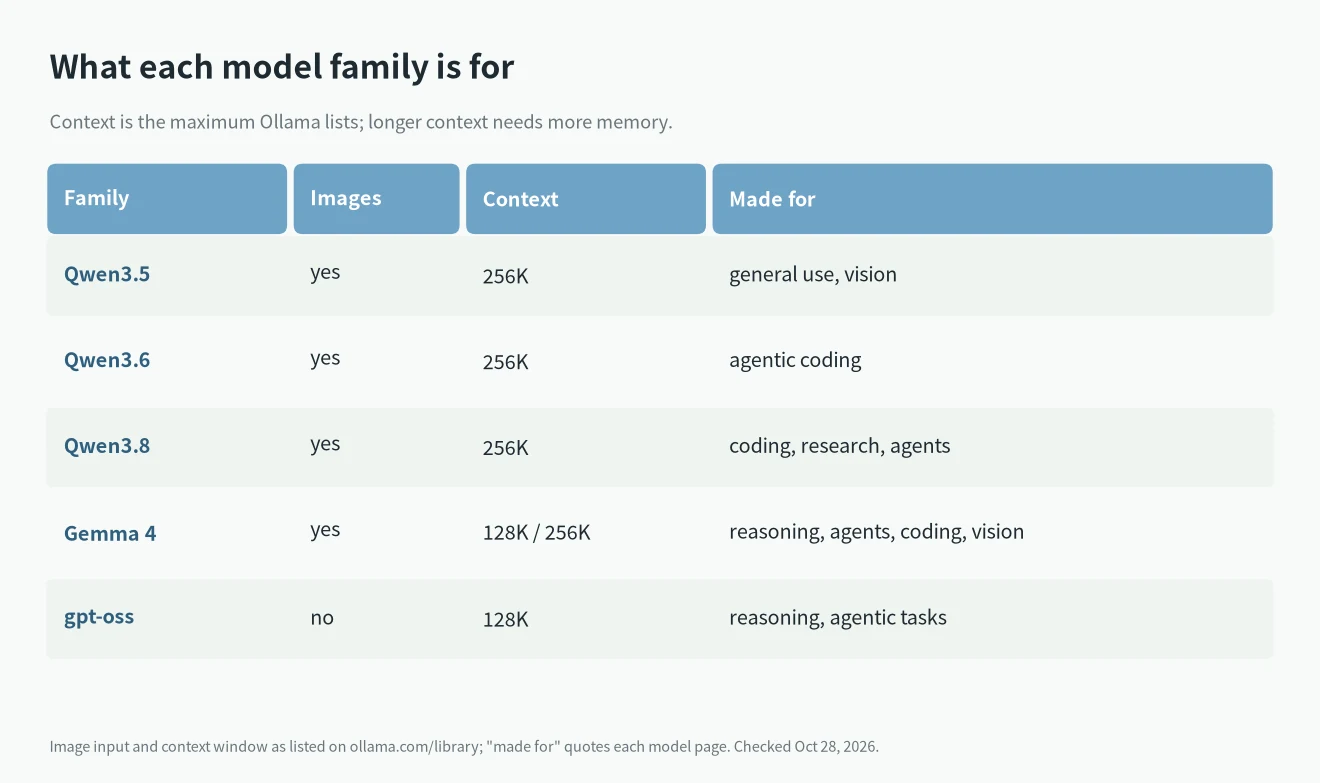
- Qwen3.8 27B: the Ollama page says it brings substantial gains in coding, professional work, research and long-horizon agentic tasks. It is my first pick for 24GB.
- Qwen3.6: its description focuses on agentic coding. It suits coding tools. For hardware, see the local LLM for coding guide.
- Gemma 4: Google’s family accepts images. The E models have a 128K context, and 12B and up have 256K.
- gpt-oss: OpenAI’s open-weight models take text only, with a 128K context.
If you need image input, choose Qwen or Gemma 4, because gpt-oss cannot read images.
Running on a Mac
On a Mac, unified memory doubles as VRAM, but macOS and your other apps use part of it. A 16GB Mac mini is safer in the 12GB tier, and a 24GB Mac in the 16GB tier. For specific configurations, see the Mac mini for local LLMs and the M5 for local LLMs.
How to start
Install Ollama, then run one command in a terminal, such as “ollama run qwen3.8:27b”. The first run downloads the model file, and after that it works offline. To run DeepSeek, see how to run DeepSeek locally.
FAQ
What is the best local LLM for 8GB of VRAM?
Qwen3.5 4B. It is only 3.3GB, so it runs on 8GB with plenty of room left.
Should I use Q4 or Q8?
Use Q8_0 if it fits, and Q4_K_M if it does not. Q4_K_M is Ollama’s default, and it is about 60% of the Q8_0 size.
The model fits, so why is it still slow?
Usually the context is too long and fills the remaining memory, so part of the work moves to the CPU. Shorten the context or choose a smaller model.
How often is this best local LLM list updated?
New models arrive quickly. The models and sizes here match the Ollama library on October 28, 2026, and I will update the list when new versions appear.