

M5 for Local LLMs: How Big a Model Fits and How Fast It Runs (2026)
Memory and bandwidth for all four M5 chips, how much memory Apple measured each model using, llama.cpp generation speeds, and how much memory to buy for what.
 bufferAbout the author6 min read
Choosing an M5 for local LLMs comes down to two numbers. Unified memory decides how big a model fits, and memory bandwidth decides how fast it writes. The base M5 tops out at 32GB and 153GB/s, which is enough for 8B to 14B models at 4-bit and for MoE models like Qwen3-30B-A3B. For a 70B-class model you need at least 64GB on an M5 Pro or M5 Max, and 128GB on an M5 Max or M5 Ultra if you want room for long context. On the same 7B model, an M5 Max generates about 3.8 times as fast as a base M5.
The specs below come from Apple’s tech specs pages for the 14-inch MacBook Pro with M5, the MacBook Pro with M5 Pro or M5 Max, the Mac mini and the Mac Studio. The speed numbers come from Apple’s MLX test and the llama.cpp Apple Silicon benchmark thread. I checked all of them on October 27, 2026. If you are weighing a Mac against a graphics card, start with what models an RTX 4090 can run.
Memory and bandwidth across the four M5 chips
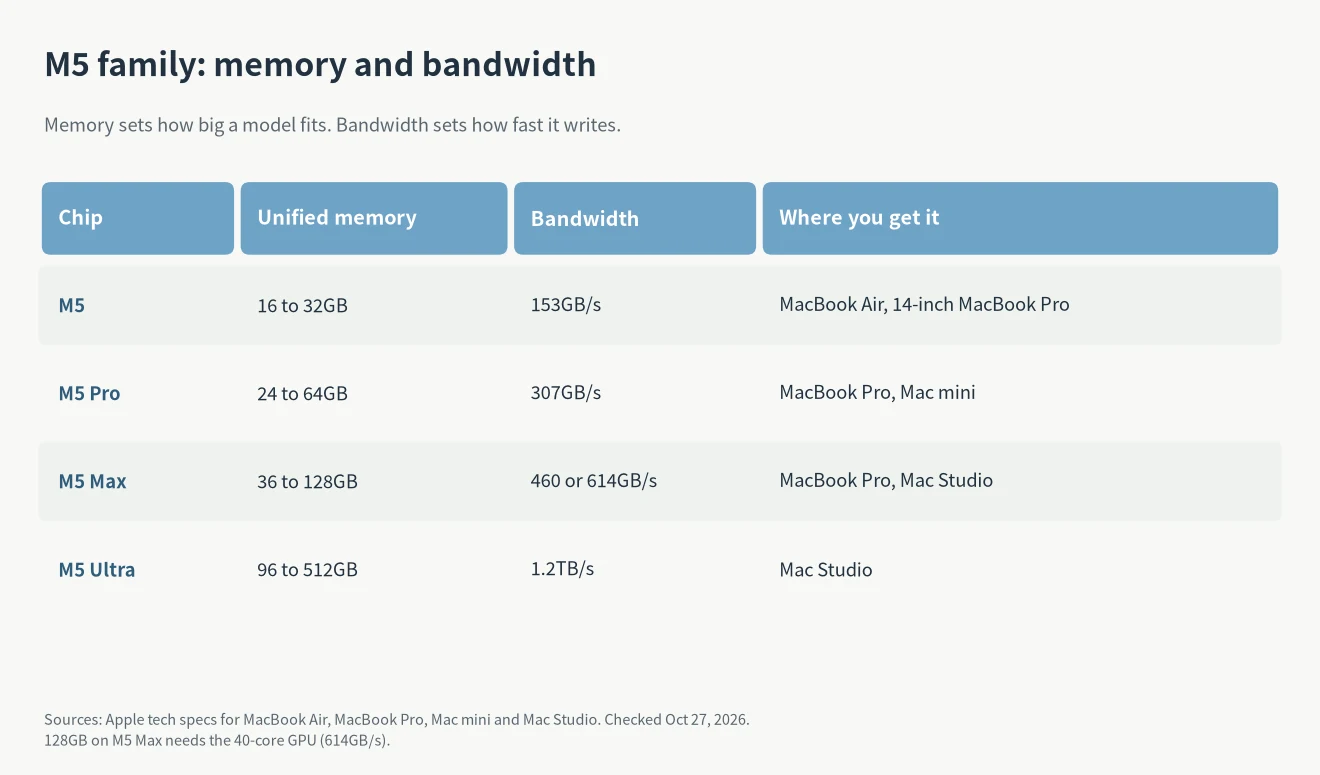
On a Mac the CPU and GPU share one pool of unified memory, and the GPU reads the model weights straight from it. So the first number to check is the size of that pool. The M5 goes up to 32GB. The M5 Pro goes up to 64GB at 307GB/s. The M5 Max goes up to 128GB at 460 or 614GB/s (Apple newsroom). The M5 Ultra is only in the Mac Studio, starts at 96GB and goes up to 512GB at 1.2TB/s.
One detail is easy to miss. The M5 Max needs the 40-core GPU to get 128GB; the 32-core version is fixed at 36GB (MacBook Pro specs). Also, the entry Mac mini now uses the M6, so for an M5-family Mac mini you need the M5 Pro model (Mac mini specs).
How big a model fits
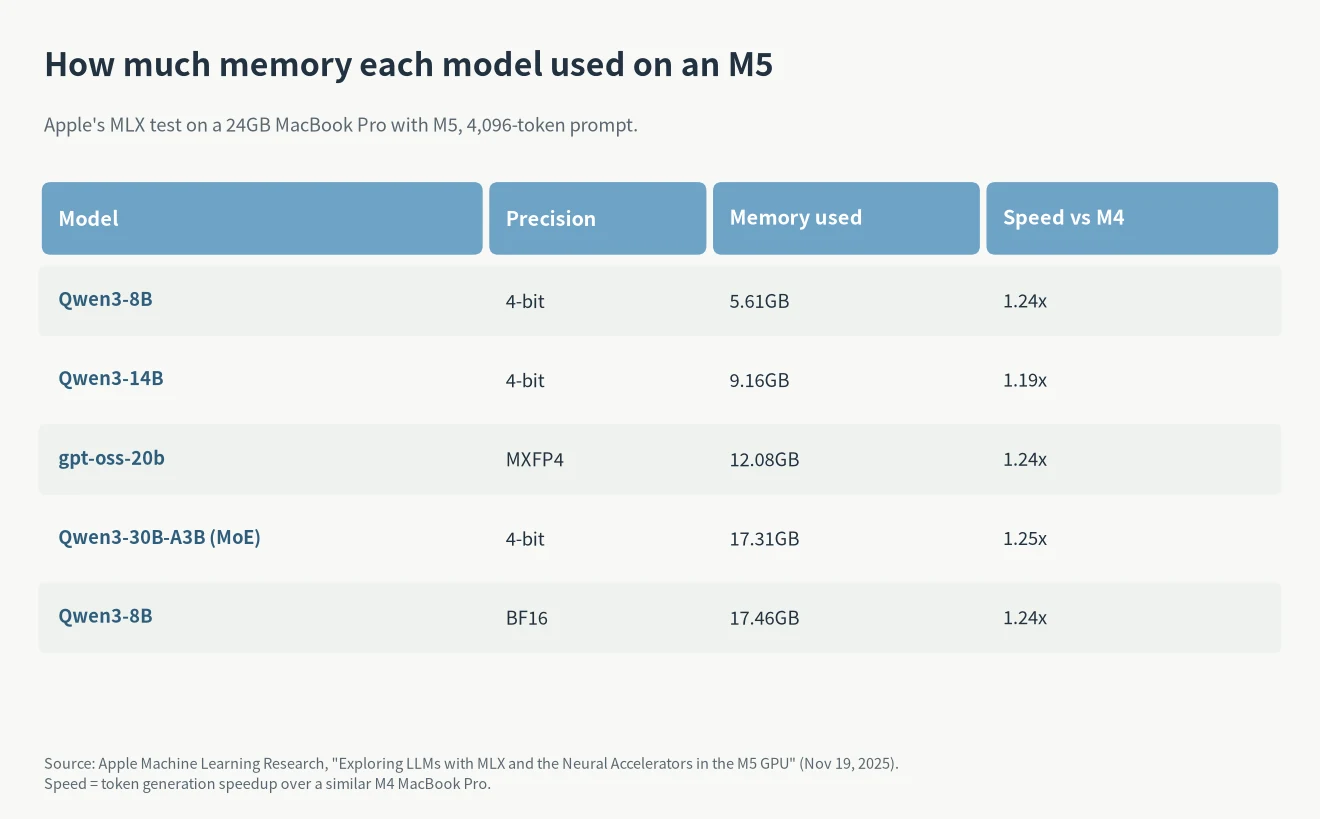
Apple tested six models with MLX on a 24GB MacBook Pro with M5. Qwen3-14B at 4-bit used 9.16GB. Qwen3-30B-A3B at 4-bit used 17.31GB. Qwen3-8B in full BF16 used 17.46GB. In Apple’s words, the 24GB machine can easily hold an 8B model in BF16 or a 30B MoE at 4-bit, keeping both under 18GB (Apple MLX test).
Working back from that table, 4-bit weights take roughly 0.65 to 0.7GB per billion parameters. By that ratio a 70B model at 4-bit needs more than 45GB before you add the system and the context, so 32GB won’t hold it and 64GB is the starting point. That’s an estimate; different quantization formats move it by a few GB.
By memory size:
- 16GB: 8B to 14B models at 4-bit. Good for trying local models.
- 24 to 32GB: gpt-oss-20b and Qwen3-30B-A3B. This is where 30B-class MoE models start to fit.
- 64GB: a 70B model at 4-bit, or longer context for 30B-class models.
- 128GB and up: MoE models above 100B, or several models at once. Only the M5 Max and M5 Ultra offer it.
How fast: generation follows bandwidth
Every new token means reading the model weights again, so generation speed is mostly limited by memory bandwidth. Apple says the same thing: the M5 has 153GB/s against 120GB/s on the M4, 28% more, and generates 19% to 27% faster (Apple MLX test).
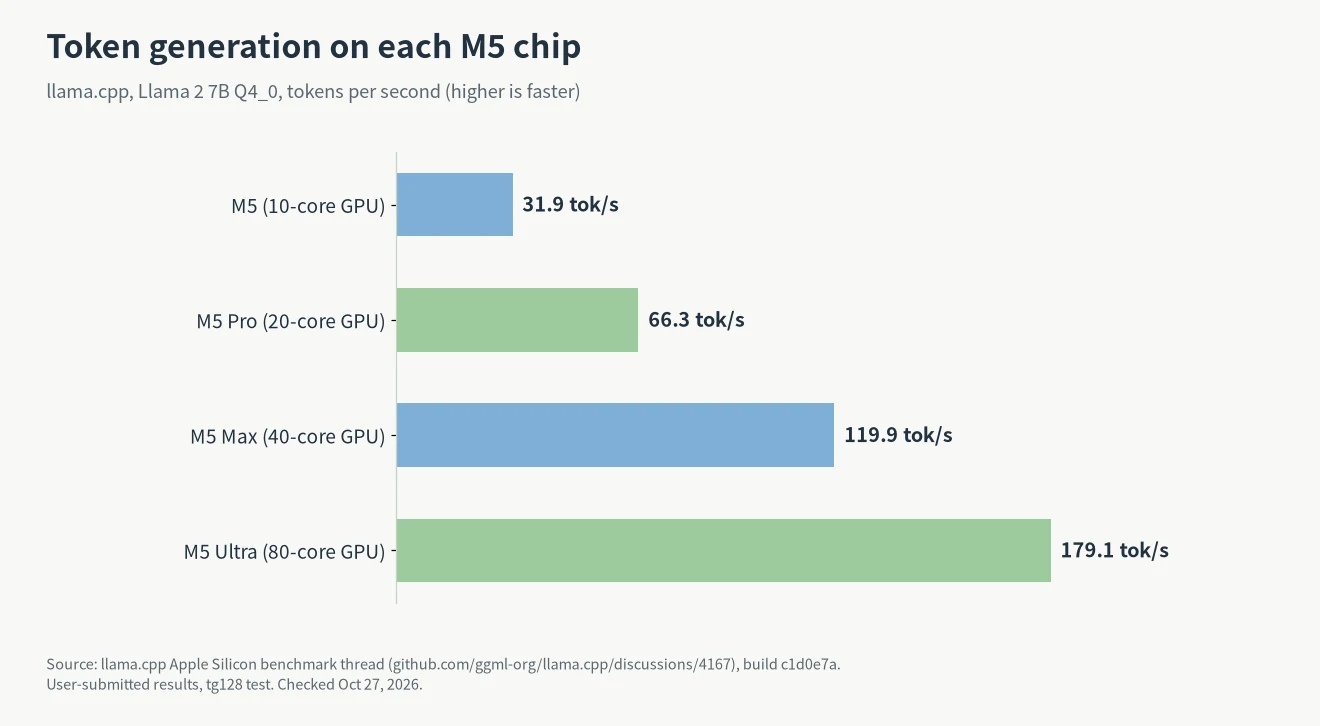
In the llama.cpp benchmark thread, the same Llama 2 7B Q4_0 model generates 31.9 tokens per second on a base M5, 66.3 on an M5 Pro, 119.9 on an M5 Max and 179.1 on an M5 Ultra (llama.cpp benchmarks). Double the bandwidth and the speed roughly doubles. These are user-submitted results, not Apple’s.
Reading the prompt is a different job, and it depends on compute. Every GPU core in the M5 has a Neural Accelerator. In Apple’s test the first token arrived 3.3 to 4 times faster than on the M4: under 10 seconds for a dense 14B model and under 3 seconds for a 30B MoE. If you feed in long documents or large codebases, that gain matters more than the generation speed.
What to run them with
The simplest option is MLX, Apple’s open-source framework. Install it with pip install mlx-lm, then run mlx_lm.chat to start chatting. It runs most LLMs on Hugging Face (mlx-lm on GitHub). To use the M5’s Neural Accelerators you need macOS 26.2 or later (Apple MLX test).
llama.cpp and the tools built on it also run on the M5 GPU through Metal; the speeds above were measured with it. Try both and keep whichever fits how you work.
Which M5 Mac to buy
- Just trying local models or writing: a 16GB or 24GB MacBook Air with M5 is fine.
- Coding locally: 32GB at least, ideally a 64GB M5 Pro. For which models to run, see local LLMs for coding.
- 70B models or bigger: a 128GB M5 Max, or a Mac Studio with M5 Ultra.
At 128GB there are non-Apple options too; I compared the AMD and NVIDIA mini PCs in AI Max 395 vs DGX Spark. Apple also has an event on October 28 (Pacific time); for timing, see buy a Mac now or wait.
M5 vs M6 for local LLMs
For local LLMs, the M6 does not raise the model-size limit. Apple’s 14-inch MacBook Pro with M6 starts with 16GB of unified memory and is configurable up to 32GB, the same ceiling as the base M5 (Apple newsroom). Memory bandwidth goes up to 170GB/s, against 153GB/s on the M5, but only the 24GB and 32GB configurations get 170GB/s; the 16GB model stays at 153GB/s (MacBook Pro specs). Apple says the MacBook Pro with M6 is up to 25 percent faster than the M5 on on-device AI workloads like LLM prompt processing. The “5x faster” figure belongs to the new iMac and is measured against the M4, using prompt processing in LM Studio, not against the M5 (Apple newsroom). The same models will run somewhat faster on an M6, but for 70B models, which need 64GB or more, you still need an M5 Pro or M5 Max.
FAQ
How much memory does an M5 for local LLMs need?
16GB runs 8B to 14B models at 4-bit, 32GB adds 30B-class MoE models, and 70B needs 64GB or more. In Apple’s test, Qwen3-14B at 4-bit used 9.16GB, and a 16GB machine also has to leave memory for macOS and your other apps.
How much faster is the M5 than the M4 for LLMs?
Generation is 19% to 27% faster and the first token arrives 3.3 to 4 times sooner, according to Apple’s MLX test on two similarly configured MacBook Pros.
M5 Pro or M5 Max?
It depends on whether you need more than 64GB. The M5 Pro tops out at 64GB; the M5 Max goes to 128GB with twice the bandwidth, and generates roughly twice as fast.