

What Models Can RTX 4090 Run? An Honest 2026 Guide to 24GB VRAM
An RTX 4090 runs 8B and 14B models with room to spare, 32B at Q4 up to about 16K context, and no 70B on a single card. The VRAM math, measured tokens per second, and what to do when 24GB is not enough.
 bufferAbout the author10 min read
What models can RTX 4090 run? Here is the short version. The RTX 4090 has 24GB of VRAM. It runs 8B to 14B models with room to spare. A 32B model fits at Q4, but context tops out around 16K. A 70B model does not fit on one card. I worked out the VRAM numbers from the real GGUF file sizes on Hugging Face and each model’s config.json. Speeds come only from published benchmarks. Everything was checked on October 27, 2026.
What models can RTX 4090 run: the short answer
- 8B (Qwen3 8B, Llama 3.1 8B): no problem. Even full F16 precision with 32K context needs about 21 GiB.
- 14B (Qwen3 14B): comfortable at Q8_0, about 21 GiB at 32K context. F16 weights alone are 27.5 GiB, so that does not fit.
- 30B-class MoE (Qwen3 30B-A3B): 17.3 GiB of weights at Q4_K_M, and it is fast.
- 32B (Qwen3 32B): Q4_K_M only. About 21.9 GiB at 8K context, and roughly 16K is the limit.
- 70B (Llama 3.3 70B): Q4_K_M weights alone are 39.6 GiB. It does not fit. A 2-bit quant squeezes in, but quality drops a lot.
If you are looking at the 32GB card instead, I covered that in my RTX 5090 for AI guide. This post sticks to the 4090 and only compares the 5090 briefly near the end.
The RTX 4090 specs that matter
From NVIDIA’s RTX 4090 page: 24GB of GDDR6X on a 384-bit bus, 16,384 CUDA cores, 450W total graphics power, and an 850W recommended power supply. Memory bandwidth is about 1,008 GB/s, as listed on Hardware Corner’s RTX 4090 benchmark page.
For local LLMs, the 24GB is what stops you first, not compute. If the whole model fits in VRAM, the 4090 is fast. If it does not, part of it moves to system RAM and speed falls hard. So the first step in working out what models can RTX 4090 run is the VRAM math.
How to calculate VRAM: weights plus KV cache
Two things use most of the memory: the model weights and the KV cache, which grows with context. You also need a small runtime buffer.
Weights: parameters times bytes per parameter
The llama.cpp quantize README lists the measured bits per weight for each format. F16 is 16 bits, or 2 bytes per parameter. Q8_0 is 8.5 bits, about 1.06 bytes. Q4_K_M is 4.89 bits, about 0.61 bytes.
That puts an 8B model at about 15 GiB in F16 and about 4.6 GiB at Q4_K_M. A 70B model at Q4_K_M is about 40 GiB. Many people assume 4-bit means 0.5 bytes per parameter. That undercounts by almost 20%.
KV cache: longer context, more memory
The formula is 2 × layers × KV heads × head_dim × context tokens × bytes per element. f16 is 2 bytes. This follows the Hugging Face post on KV cache quantization. Use the number of KV heads, not attention heads. Most current models use GQA, so they have far fewer KV heads.
Qwen3 32B: 64 layers, 8 KV heads, head_dim 128
Per token = 2 × 64 × 8 × 128 × 2 bytes = 256 KiB
8K context = 2 GiB, 16K = 4 GiB, 32K = 8 GiB
With the same math, Qwen3 8B uses 144 KiB per token, Qwen3 14B uses 160 KiB, and Llama 3.3 70B uses 320 KiB. Layer and head counts come from each model’s config.json, for example the Qwen3-32B config.
Then add about 1.5 GiB for the runtime buffer. That figure is my estimate. It changes with the tool and the batch size.
Which models fit in 24GB of VRAM
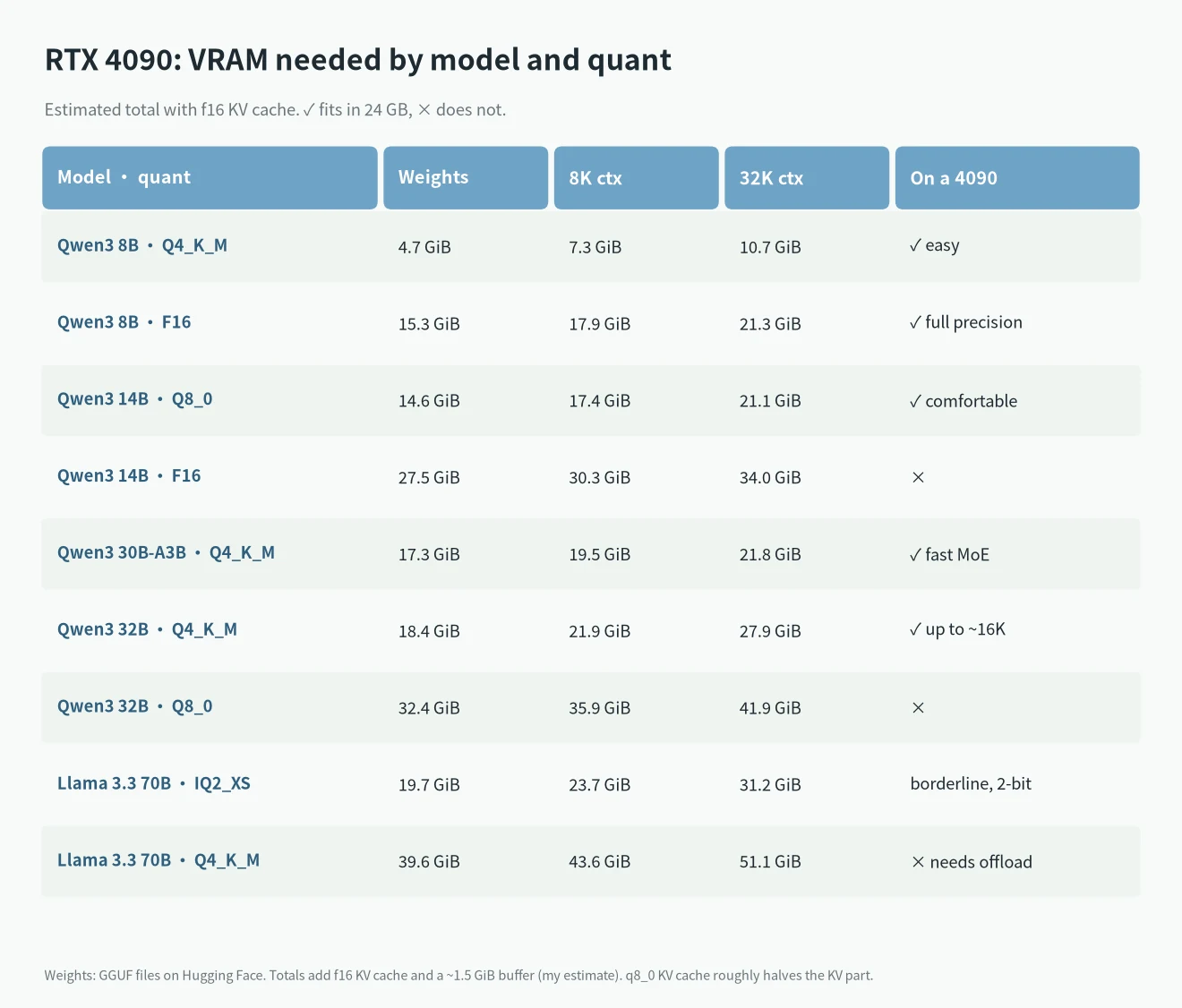
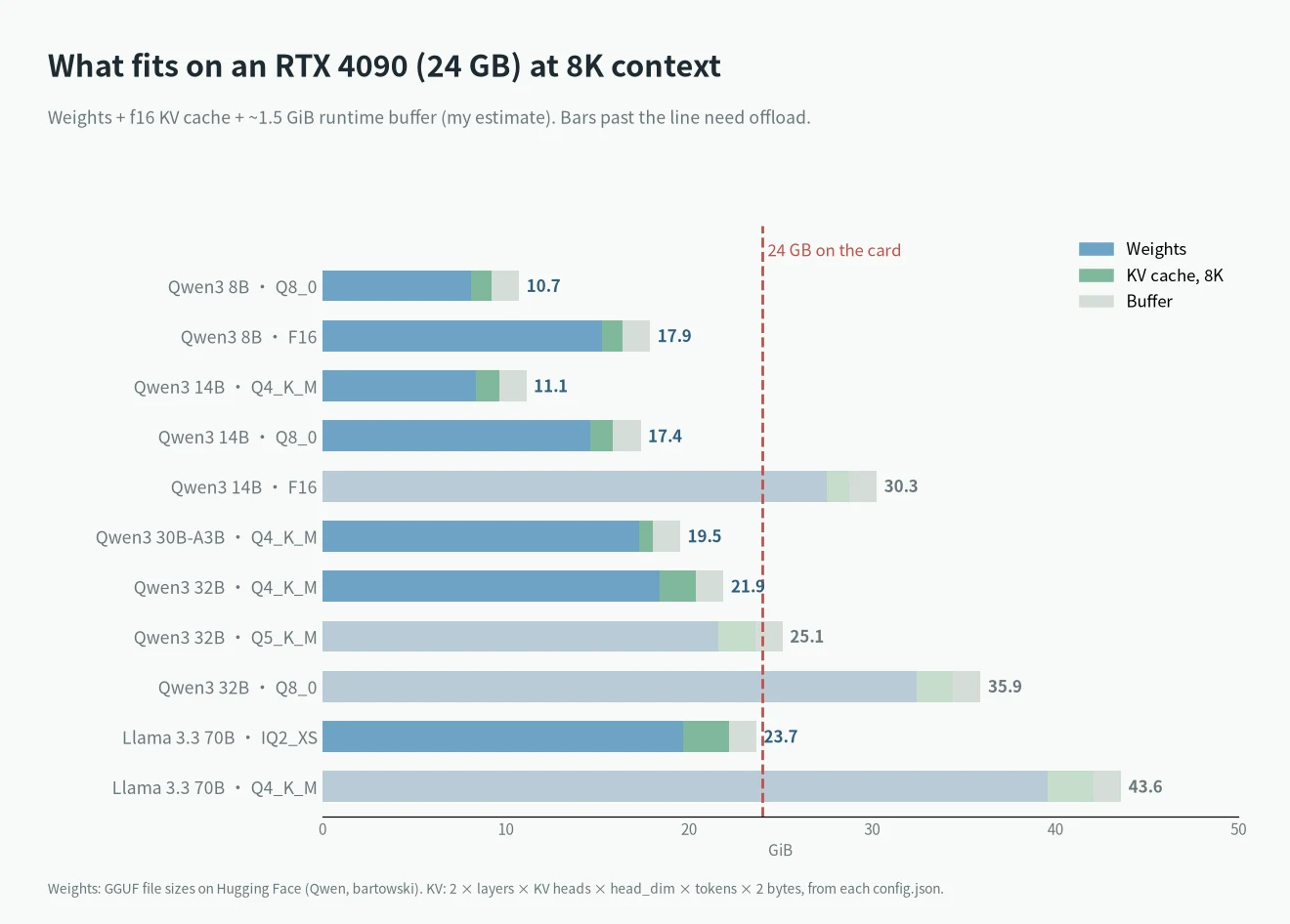
The weights column uses actual GGUF file sizes. In Qwen’s official Qwen3-32B-GGUF repo, Q4_K_M is 18.4 GiB and Q8_0 is 32.4 GiB. Three things to keep in mind when reading these charts:
- You cannot give all 24GB to the model. The Windows desktop and your browser use some VRAM too. A setup that lands right at 24 may not load.
- Qwen3 32B at Q4_K_M with 16K context comes to about 23.9 GiB by my math, right at the edge. Hardware Corner only tested Qwen3 32B up to 16K on the 4090, so the two agree.
- Qwen3 30B-A3B is a MoE model. It activates only about 3B parameters per token, which is why it is fast. For VRAM you still count all of its roughly 30B parameters.
Want more context? Use a q8_0 KV cache
The Ollama FAQ says a q8_0 KV cache uses about half the memory of f16 with a very small loss in precision. It needs Flash Attention turned on. In llama.cpp the flags are --cache-type-k q8_0 and --cache-type-v q8_0. With that, Qwen3 32B Q4_K_M at 32K comes to about 18.4 + 4 + 1.5 = 23.9 GiB. Still tight, but 16K becomes easy.
How fast the RTX 4090 actually is
I only use measured numbers here. This set comes from Hardware Corner’s RTX 4090 tests, run with llama.cpp and updated in March 2026. Figures are generated tokens per second.
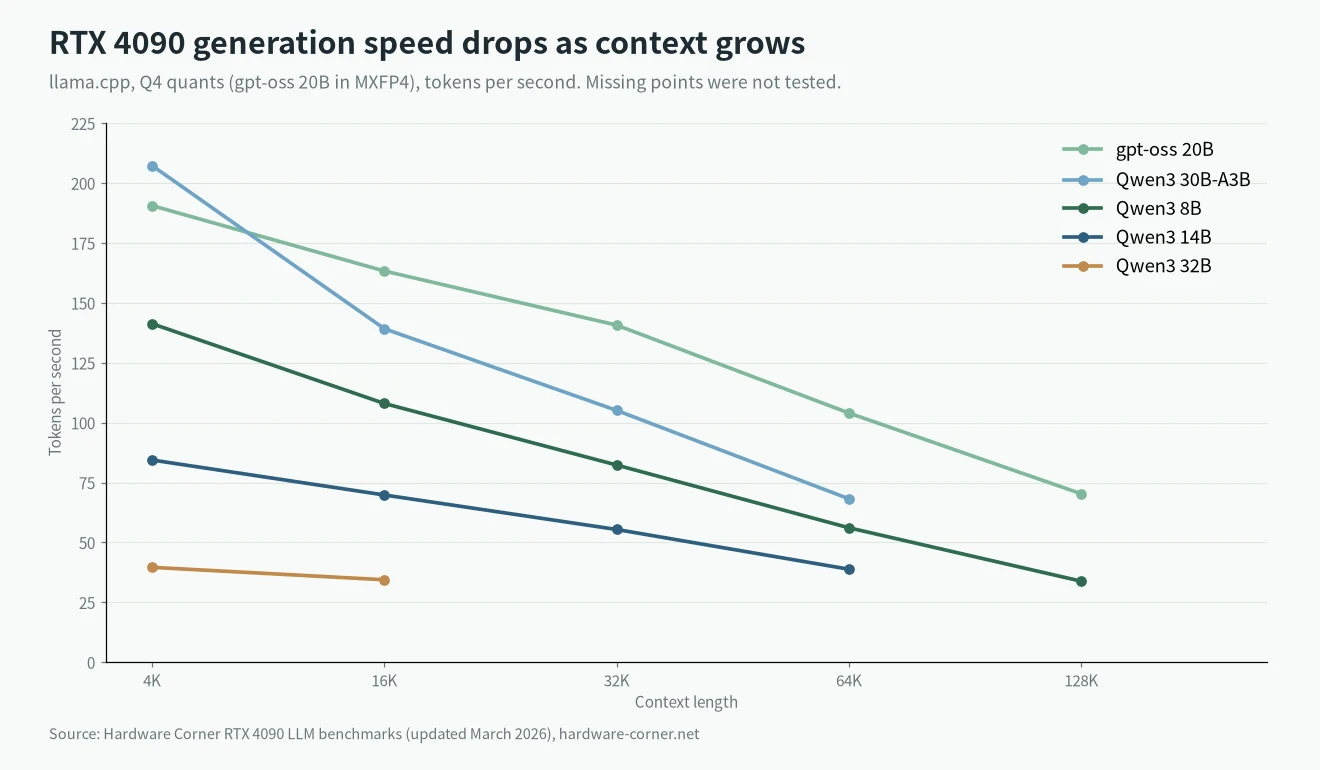
| Model (quant) | 4K | 16K | 32K | 64K |
|---|---|---|---|---|
| Qwen3 8B (Q4) | 141.3 | 108.0 | 82.3 | 56.1 |
| Qwen3 14B (Q4) | 84.4 | 69.8 | 55.4 | 38.8 |
| Qwen3 30B-A3B (Q4) | 207.3 | 139.2 | 105.1 | 68.2 |
| gpt-oss 20B (MXFP4) | 190.6 | 163.3 | 140.7 | 104.0 |
| Qwen3 32B (Q4) | 39.6 | 34.4 | not tested | not tested |
Two other sources line up. In XiongjieDai’s llama.cpp benchmarks from May 2024, one 4090 ran Llama 3 8B Q4_K_M at 127.74 tokens/s and F16 at 54.34 tokens/s. In the llama.cpp CUDA scoreboard, the 4090 generates 188.96 tokens/s on Llama 2 7B Q4_0 with Flash Attention.
Prompt processing is much faster than generation. Hardware Corner measured Qwen3 32B at 2,448 tokens/s at 4K and 1,707 tokens/s at 16K.
Longer context means slower output
Generation speed keeps dropping as context grows. Qwen3 8B goes from 141.3 tokens/s at 4K to 33.8 tokens/s at 128K. Every new token has to read the whole KV cache. So fitting is not the whole story. The context length you actually use decides how fast it feels.
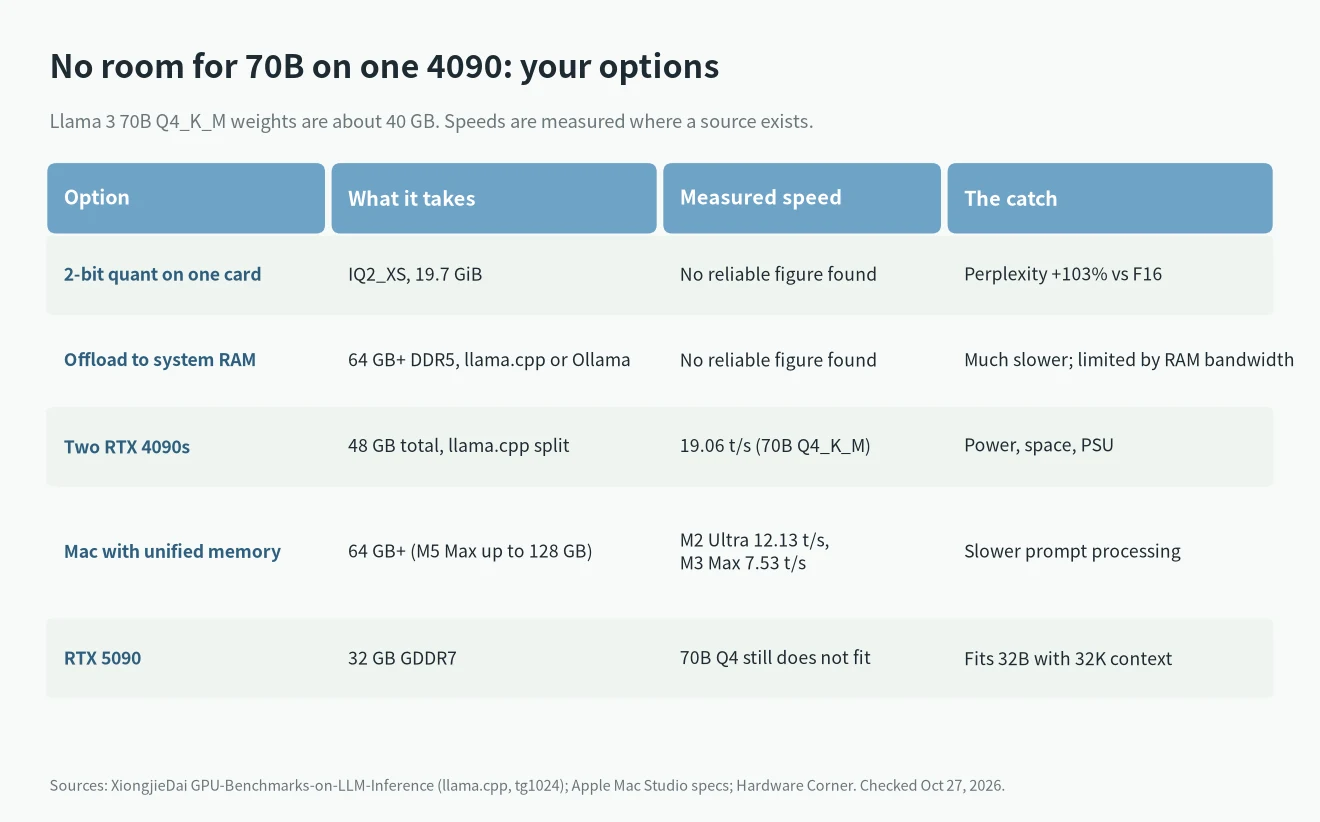
No room for 70B? Your options
Squeeze it in with a 2-bit quant
The IQ2_XS file for Llama 3.3 70B is 19.69 GiB. With 4K context that comes to about 22.4 GiB, so it loads on one card. The cost is quality. In the Llama 3 70B perplexity table that XiongjieDai cites, IQ2_XS is 103% worse than FP16, while Q4_K_M is only 4.83% worse. I could not find a solid test comparing it with a 32B Q4, so I will not call it either way. I would not run it this way myself.
Offload part of it to system RAM
When a model does not fit, Ollama puts some layers in system memory on its own. ollama ps then shows something like “48%/52% CPU/GPU”. In llama.cpp, -ngl sets how many layers go to VRAM. For MoE models, --n-cpu-moe keeps expert weights in RAM.
It works, but it is much slower. I did not find reliable speed numbers for a 4090 offloading a 70B model, so I am not quoting one. You need enough RAM for the part that spills over. For 70B Q4_K_M I would start at 64GB. RAM prices have been climbing, so read my DDR4 vs DDR5 price check before you buy.
Two RTX 4090s
Two cards give you 48GB, and llama.cpp can split the layers across them. XiongjieDai measured two 4090s running Llama 3 70B Q4_K_M at 19.06 tokens/s, with prompt processing at 905.38 tokens/s. The single card ran out of memory in the same test. The catch is two 450W cards, so the PSU, case and cooling all have to keep up.
A Mac with unified memory
On a Mac the CPU and GPU share one pool of memory, so it can hold far more than 24GB. Apple’s Mac Studio specs list the M5 Max with up to 128GB (460 or 614 GB/s) and the M5 Ultra with up to 512GB (1.2TB/s). In XiongjieDai’s older tests, an M2 Ultra ran 70B Q4_K_M at 12.13 tokens/s and a 64GB M3 Max at 7.53 tokens/s. I could not find M5 numbers measured the same way. If you are thinking about a Mac, see whether to buy a Mac now or wait.
Does an RTX 5090 fix it?
The 5090 has 32GB of GDDR7 and 1,792 GB/s of bandwidth. In Hardware Corner’s 5090 tests, Qwen3 32B Q4 runs at 61.4 tokens/s at 4K, 50.9 at 16K, and still 43.8 at 32K. The 4090 gets 39.6 and 34.4, and 32K was not tested. On the llama.cpp scoreboard the 5090 generates 300.40 tokens/s on Llama 2 7B.
But 70B Q4_K_M still does not fit on a 5090. What the 5090 fixes is long context on 32B and Q8 with long context on 14B. The full math is in the RTX 5090 post.
Running DeepSeek on an RTX 4090
The DeepSeek models people run locally are usually the R1 distills. They are built on Qwen or Llama and come in sizes from 1.5B to 70B. The same rules apply: 14B is easy, 32B needs Q4, and 70B does not fit. The full DeepSeek R1 is 671B, so a single 4090 is not an option. I covered setup and hardware for each size in how to run DeepSeek locally, so I will not repeat it here.
What I would do
So what models can RTX 4090 run well for you? It depends on which size you use most:
- Mostly 8B to 14B for coding, chat or RAG: the 4090 is plenty, with room for long context.
- 32B as your main model: it runs, and it feels good up to 16K. If you often need 32K or more, look at a 5090 or a q8_0 KV cache.
- You really need 70B: two 4090s or a Mac with lots of memory. Offloading on one card is fine for the odd test, not daily use.
- Tight budget: the RTX 3090 also has 24GB, so it fits the same model sizes, just slower. The llama.cpp scoreboard has it at 158.16 tokens/s on Llama 2 7B.
FAQ
What models can RTX 4090 run smoothly?
Going by Hardware Corner, models up to 14B stay above 55 tokens/s from 4K to 32K context. Qwen3 32B Q4 does 34.4 tokens/s at 16K, which is fine for chat.
Can an RTX 4090 run a 70B model?
Not fully in VRAM. The Q4_K_M weights are about 40 GiB. Your options are a 2-bit quant, offloading to RAM, or a second card.
How much context can a 4090 handle on a 32B model?
About 16K with an f16 KV cache. Switch the KV cache to q8_0 and you can reach about 32K, but you are right at the 24GB limit.
Can a 4090 run Qwen3 30B-A3B?
Yes. The Q4_K_M weights are 17.3 GiB. Hardware Corner measured 68.2 tokens/s even at 64K context. It is one of the best models to try on a 24GB card.
How does the 4090 compare with the 5090?
24GB against 32GB. The model sizes you can run day to day are about the same. The difference is how much context 32B gets, and speed. Neither card fits 70B at Q4.