

RTX 5090 for AI: Is It Worth It? The Simple, Honest 32GB VRAM Math (2026)
Is the RTX 5090 for AI worth it? The 32GB VRAM math by model and quantization, checked against a real benchmark, plus Mac Studio and DGX Spark specs.
 bufferAbout the author8 min read
Is the RTX 5090 for AI worth it? People ask me this like it’s a yes-or-no question, and it really isn’t. It’s a memory question. The card has 32 GB of VRAM, and whether that’s plenty or a wall depends entirely on which model you want, at what quantization, with how much context. So instead of vibes, I did the arithmetic for the models people actually run, checked it against one real benchmark, and put it in a chart. Specs and prices are from NVIDIA’s and Apple’s own pages, checked October 21, 2026 (Beijing time).
The card in one paragraph
The basics first, since every RTX 5090 for AI argument starts here. Per NVIDIA’s RTX 5090 page: 32 GB of GDDR7 on a 512-bit bus, 21,760 CUDA cores, 575 W total graphics power, and NVIDIA recommends a 1000 W power supply.
NVIDIA’s Blackwell whitepaper puts memory bandwidth at 1,792 GB/s, versus about 1,008 GB/s on the 4090. The official price was $1,999 when it launched in January 2025, per NVIDIA’s newsroom. As of October 21, 2026 (last checked), the product page shows no live price, and real store prices have been way above that, so I’m not going to quote a street number that’ll be wrong by next week.
How much VRAM a model needs: the actual math
Before buying an RTX 5090 for AI, know the two things that eat VRAM: the weights, and the KV cache that grows with your context. Weights are simple, parameters times bytes per parameter. llama.cpp’s quantize README measures Q4_K_M at 4.89 bits per weight, so about 0.61 bytes per parameter (not the 0.5 people love to assume). Q8_0 is 8.5 bits, 1.0625 bytes. F16 is 2 bytes.
The KV cache is where people get it wrong. The formula, as Hugging Face writes it, is 2 × layers × KV heads × head_dim × context length × bytes per element. Use the number of KV heads, not attention heads. Modern models use grouped-query attention, and plugging in hidden_size overcounts by a lot.
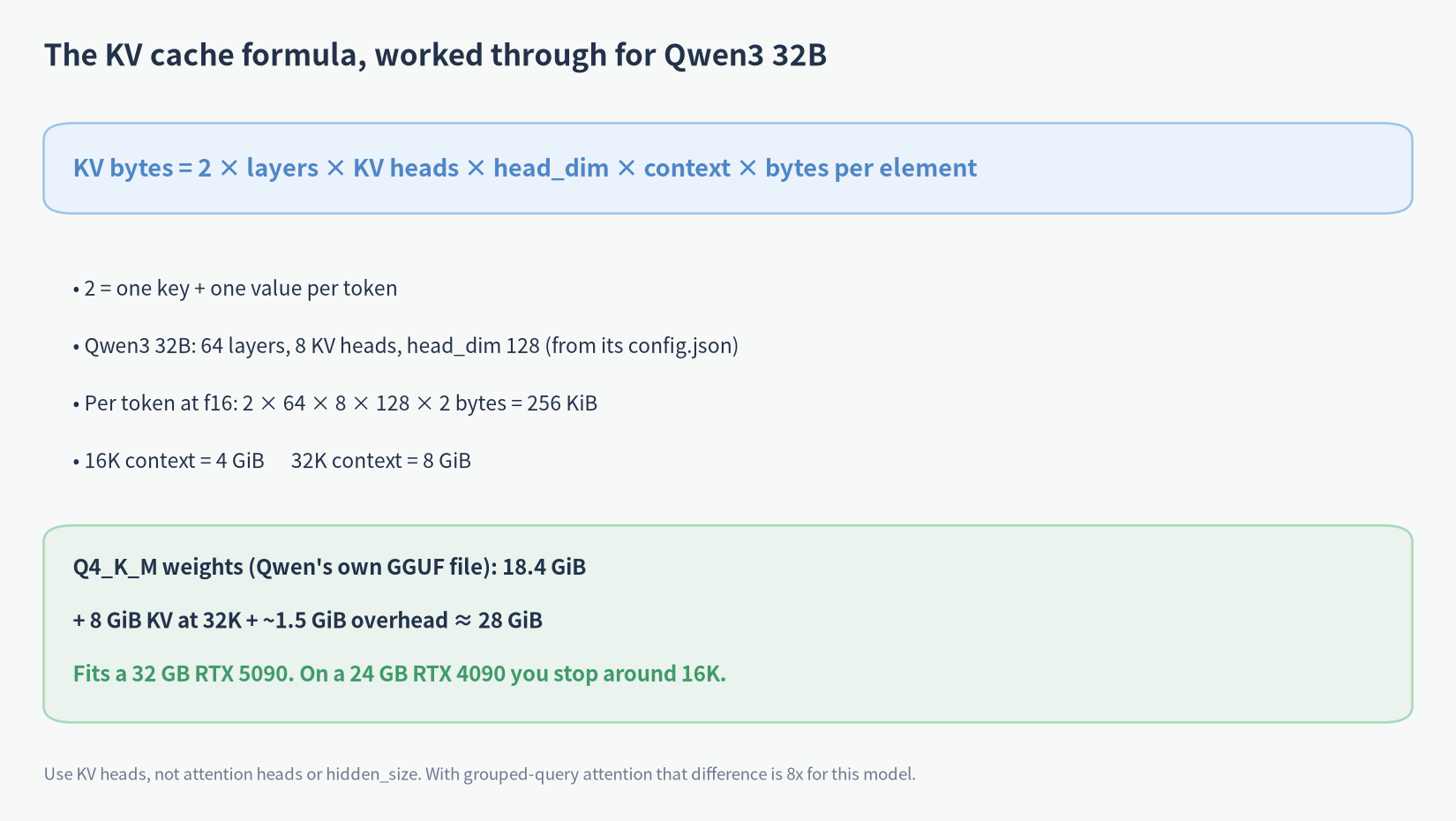
Worked example, Qwen3 32B. Its config.json says 64 layers, 8 KV heads, head_dim 128. At f16 that’s 256 KiB per token, so 16K of context is 4 GiB and 32K is 8 GiB. Qwen’s own Q4_K_M file is 18.4 GiB. Add a runtime buffer of roughly 1.5 GiB (my assumption; it varies by backend and batch size) and 32K lands around 28 GiB. That fits in 32 GB. On a 24 GB card the same model tops out around 16K.
And that matches a real measurement, which is the part I care about. Hardware Corner’s RTX 4090 tables max out Qwen3 32B Q4 at 16K context, and their RTX 5090 tables go to 32K (43.8 tokens/s there) with nothing at 64K. Formula and benchmark agree, so I trust the chart below.
RTX 5090 for AI: what fits in 32 GB
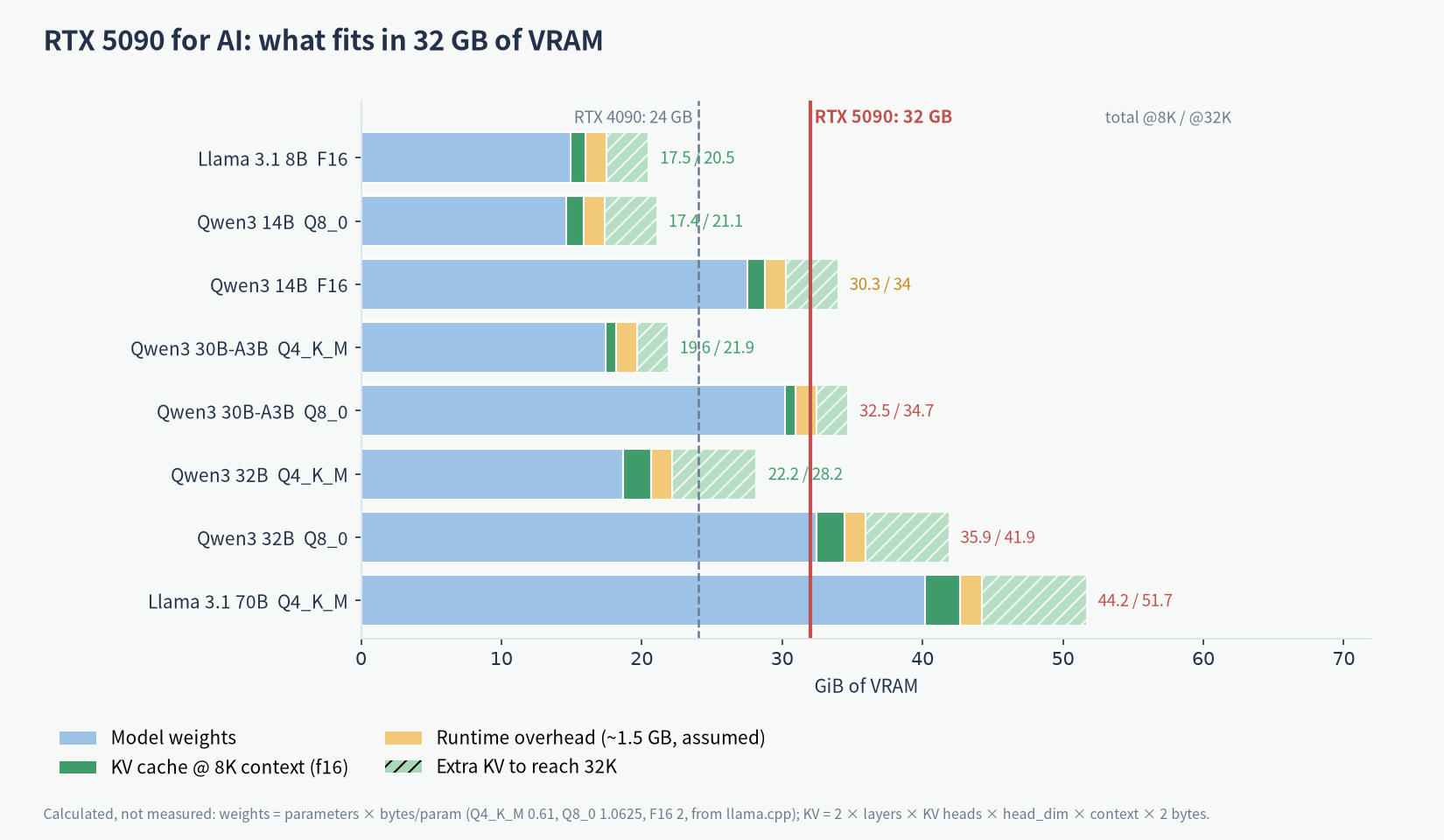
This chart is the whole RTX 5090 for AI story in one picture. Reading it roughly in order of how happy you’ll be. Anything 8B runs even at full F16 with a long context (about 20.5 GiB at 32K). Qwen3 14B at Q8_0 is comfortable, around 21 GiB at 32K. Qwen3 30B-A3B, the mixture-of-experts one, is easy at Q4_K_M, about 22 GiB at 32K, and since only ~3B parameters are active per token it’s quick too. Just remember to count all 30.5B parameters for memory, not the active ones.
Then the squeeze. Qwen3 32B at Q4_K_M fits up to about 32K, which happens to be close to its native 40,960-token limit anyway. Qwen3 14B at full F16 technically fits, but only with a short context. The same goes for gpt-oss-20b, whose official MXFP4 file is about 11.3 GiB, so it’s no drama at all.
And the stuff that doesn’t fit. Any 32B at Q8_0 (32.4 GiB of weights alone). Qwen3 30B-A3B at Q8_0, which needs ~30 GiB before context. And 70B at Q4_K_M, about 40 GiB of weights. You can offload layers to system RAM, and tools like Ollama do it automatically, but I couldn’t find reliable official numbers for how fast a 5090 runs 70B that way, so I won’t pretend. One trick that does help: Ollama’s FAQ says q8_0 KV cache uses about half the memory of f16 (you need Flash Attention on). That roughly doubles the context you can fit.
RTX 5090 vs 4090 for AI
If you’re weighing the RTX 5090 for AI against the card it replaced, the jump that matters isn’t compute, it’s the extra 8 GB and the bandwidth. 24 GB vs 32 GB is the difference between Qwen3 32B at 16K and at 32K, or between “14B at Q8” and “14B at F16, short context.” Bandwidth goes from about 1 TB/s to 1.79 TB/s, and token generation on a model that fits is mostly bandwidth-bound, so the 5090 is noticeably faster on the same model.
If you already own a 4090 and your models fit, I wouldn’t upgrade just for this. If you’re constantly 2–4 GB short, that’s the case for it.
RTX 5090 vs a Mac with unified memory vs DGX Spark
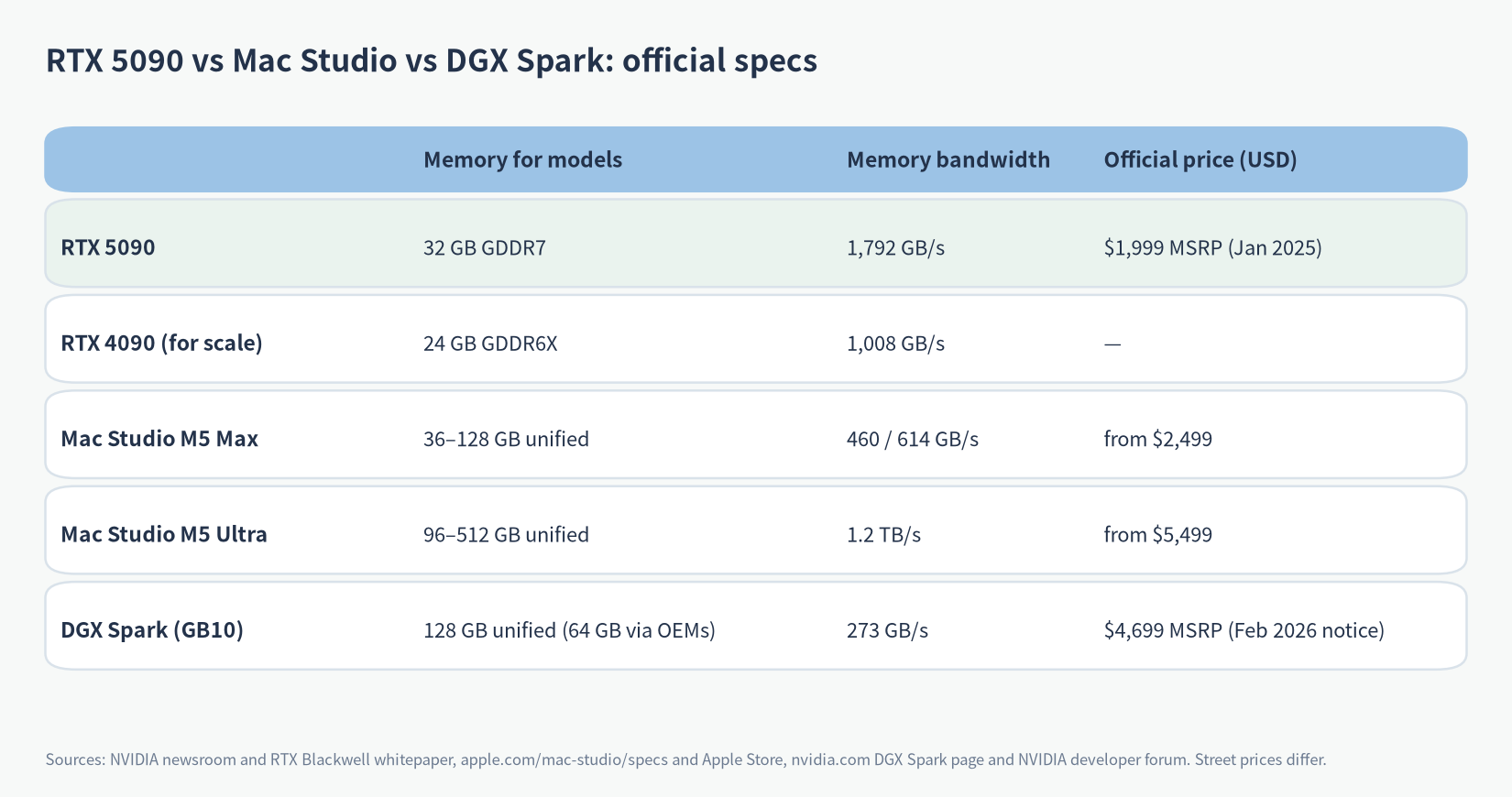
Here’s the real trade-off. A Mac shares one pool of unified memory between CPU and GPU, so it can hold much bigger models. Apple’s Mac Studio specs list the M5 Max at 36 GB up to 128 GB (460 or 614 GB/s) and the M5 Ultra at 96 GB up to 512 GB (1.2 TB/s); the Apple Store starts them at $2,499 and $5,499. NVIDIA’s DGX Spark has 128 GB of unified LPDDR5x at 273 GB/s, and NVIDIA says one unit runs models up to 200B parameters.
Its Founders Edition MSRP was raised to $4,699 in a February 2026 NVIDIA notice; the store page wouldn’t load for me when I last checked on October 21, 2026, so check the current price before you buy.
So for the RTX 5090 for AI versus these boxes: the 5090 has the most bandwidth by far, which means the fastest tokens on anything that fits in 32 GB. The Mac and the Spark hold 70B and beyond without breaking a sweat, but each token is slower because the memory is slower. Pick by the biggest model you actually plan to run, not the biggest one you’ve heard of.
Two Mac footnotes, since I keep seeing these. macOS doesn’t hand the GPU all of the unified memory by default. Apple doesn’t publish the ratio; on smaller machines llama.cpp logs show roughly two-thirds to three-quarters, and Apple’s MLX docs show how to raise the limit with sysctl iogpu.wired_limit_mb. And a couple of configs people quote don’t exist: the M4 Mac mini topped out at 32 GB (64 GB was M4 Pro only), and the M3 Ultra Mac Studio came in 96 GB or 256 GB, not 192 GB. If you’re weighing a Mac anyway, my buy-a-Mac-now-or-wait notes cover memory choices.
So, is the RTX 5090 worth it for AI?
The RTX 5090 for AI is worth it if your models live in the 8B to 32B range and you care about speed. It runs 32B at Q4 with real context, 14B at Q8 with tons of room, and does it faster than anything with unified memory. It’s a good fit if you also game or do image and video work, where 32 GB helps too. If you want to try this with DeepSeek’s distilled models, my run DeepSeek locally guide has the setup steps.
It’s not worth it if you’re buying it to run 70B or bigger. You’ll be offloading and waiting. A 128 GB Mac or a DGX Spark is the saner box for that. And honestly, at the prices cards have been selling for lately, compare against a plain subscription before you spend the money. I keep a running AI subscription and API price comparison for exactly that.
FAQ
Can the RTX 5090 run 70B models?
Not entirely in VRAM. Llama 3.1 70B at Q4_K_M needs about 40 GiB for weights alone. You can split it with system RAM, but expect it to be much slower; I couldn’t find a solid official number for how much.
How much VRAM does a 32B model need?
At Q4_K_M, about 18.4 GiB for weights, plus 256 KiB per token of context for Qwen3 32B. So roughly 22 GiB at 8K and 28 GiB at 32K. At Q8_0 the weights alone are over 32 GiB.
RTX 5090 vs Mac Studio for LLMs: which one?
5090 for speed on models up to ~32B. Mac Studio for capacity: up to 128 GB on M5 Max and 512 GB on M5 Ultra, slower per token. It depends on the biggest model you need.
RTX 5090 vs DGX Spark?
The Spark has 4x the memory (128 GB) but about a sixth of the bandwidth (273 vs 1,792 GB/s). Bigger models on the Spark, faster tokens on the 5090.
Can an RTX 5090 run DeepSeek?
The distilled R1 models up to 32B, yes. The full 671B DeepSeek V3/R1, no, not even close.
What did the RTX 5090 cost at launch?
$1,999, per NVIDIA’s January 2025 announcement. That’s the official MSRP; what stores charge has been a different story.
More on this: the AI Hardware category and the AI price comparison page.