

Mac Mini for Local LLMs in 2026: What 16GB to 64GB Can Run and How Fast
Mac mini for local LLMs, checked against Apple specs and prices, Ollama model sizes and llama.cpp results on October 28, 2026: what each memory size can run, how fast the M6 and M5 Pro are, and which one to buy.
 bufferAbout the author6 min read
Is a Mac mini for local LLMs a good idea? Yes, as long as you buy enough memory. The 16GB base model runs 8B to 14B models at 4-bit. For gpt-oss-20b or Qwen3-30B-A3B, get the M6 with 24GB or 32GB. For a 70B model at 4-bit, you need the M5 Pro with 64GB. A model like gpt-oss-120b is a 65GB file, so it does not fit in any Mac mini. On speed, the M6 generates about 36 tokens per second on a 7B 4-bit model and the M5 Pro about 68, which is plenty for chat. Specs and prices below come from Apple, model sizes from Ollama’s official model pages, and speeds from the llama.cpp benchmark thread. I checked every figure on October 28, 2026.
Short answer
- Can it run LLMs? Yes. The CPU and GPU share unified memory, so the GPU runs the model straight from system memory. You do not need a separate graphics card.
- How big? Memory decides it. 16GB suits 4-bit models up to 14B, 32GB fits a 4-bit 32B model, and 64GB fits a 4-bit 70B model.
- How fast? Memory bandwidth decides it. The M6 has 153GB/s or 170GB/s and the M5 Pro has 307GB/s, so the M5 Pro generates text almost twice as fast on the same model.
- What to buy: the 16GB M6 to try local models, at least 24GB for daily use, and the 64GB M5 Pro for 70B models.
Mac mini models, memory and bandwidth
The current Mac mini comes with two chips. According to Apple’s Mac mini tech specs, the M6 model has a 12-core CPU and 12-core GPU, starts at 16GB and can be configured with 24GB or 32GB. The 16GB version has 153GB/s of memory bandwidth, and the 24GB and 32GB versions have 170GB/s. The M5 Pro model has a 15-core CPU and 16-core GPU, starts at 24GB, can be configured with 48GB or 64GB, and has 307GB/s. You can also upgrade it to an M5 Pro with an 18-core CPU and 20-core GPU.
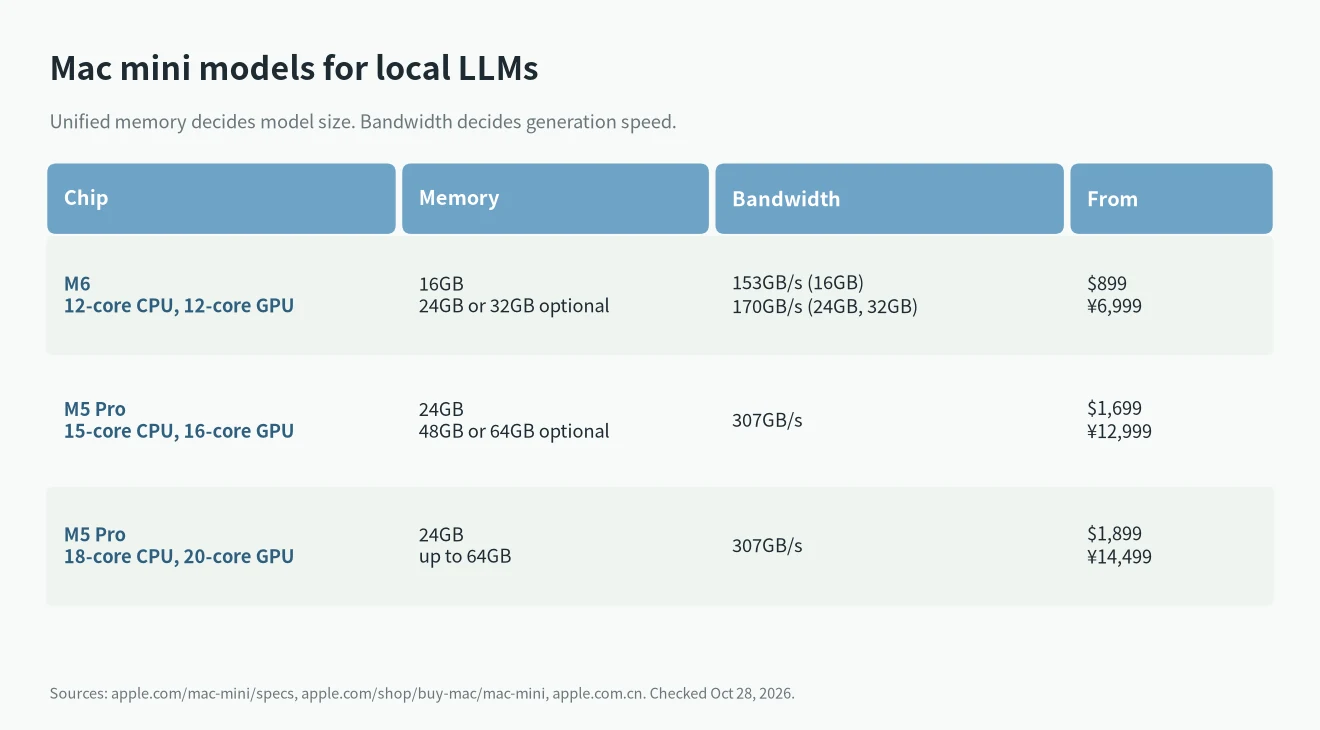
On Apple’s US store, the M6 model starts at $899, the M5 Pro model at $1,699, and the 20-core GPU M5 Pro at $1,899. Extra memory costs more, so check the price on the configuration page.
The memory is part of the chip package, so you cannot add more later. For local models, buy all the memory you will need on day one.
Mac mini for local LLMs: what fits in each memory size
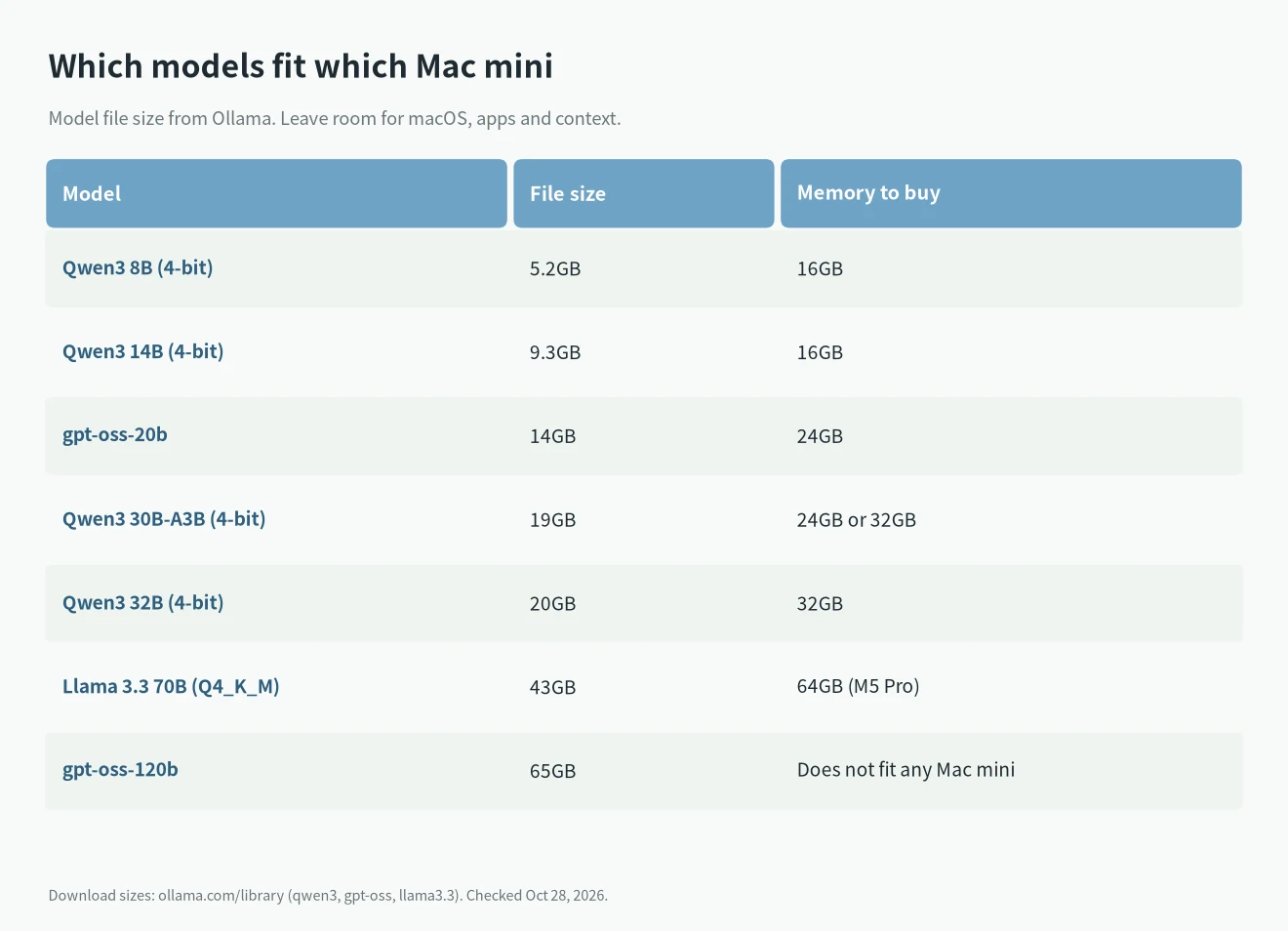
To tell whether a model will run, start with its file size. The sizes below come from Ollama’s model pages for Qwen3, gpt-oss and Llama 3.3. Real memory use is a bit higher, because the context also takes memory and macOS and your other apps need room too.
By memory size:
- 16GB: Qwen3 8B at 4-bit is 5.2GB and Qwen3 14B at 4-bit is 9.3GB. Both run. Anything larger gets tight.
- 24GB: gpt-oss-20b (14GB) and Qwen3 30B-A3B (19GB) both run. Apple measured Qwen3-30B-A3B at 4-bit using 17.31GB on a 24GB M5 MacBook Pro with MLX and said a 24GB machine holds it easily (Apple’s MLX tests).
- 32GB: Qwen3 32B at 4-bit is 20GB, so it fits with some room left for context. This is the most memory an M6 can have.
- 48GB and 64GB: only on the M5 Pro. Llama 3.3 70B in Q4_K_M is 43GB, so 64GB is the comfortable choice.
- Does not fit: gpt-oss-120b is 65GB, more than the 64GB maximum. For that class of model, look at 128GB machines, which I compared in AI Max 395 vs DGX Spark.
How fast: M6 vs M5 Pro
Each new token requires reading the model weights from memory, so generation speed depends mostly on memory bandwidth. If you are not sure what a token is, see what is a token in AI.
The llama.cpp Apple Silicon benchmark thread has results for two Mac minis, both running Llama 2 7B. The 32GB M6 generates 35.74 tokens per second at 4-bit (Q4_0). The 64GB M5 Pro with a 16-core GPU generates 67.59. At full F16 precision the numbers are 11.59 and 21.39. These results were submitted by users, not measured by Apple.
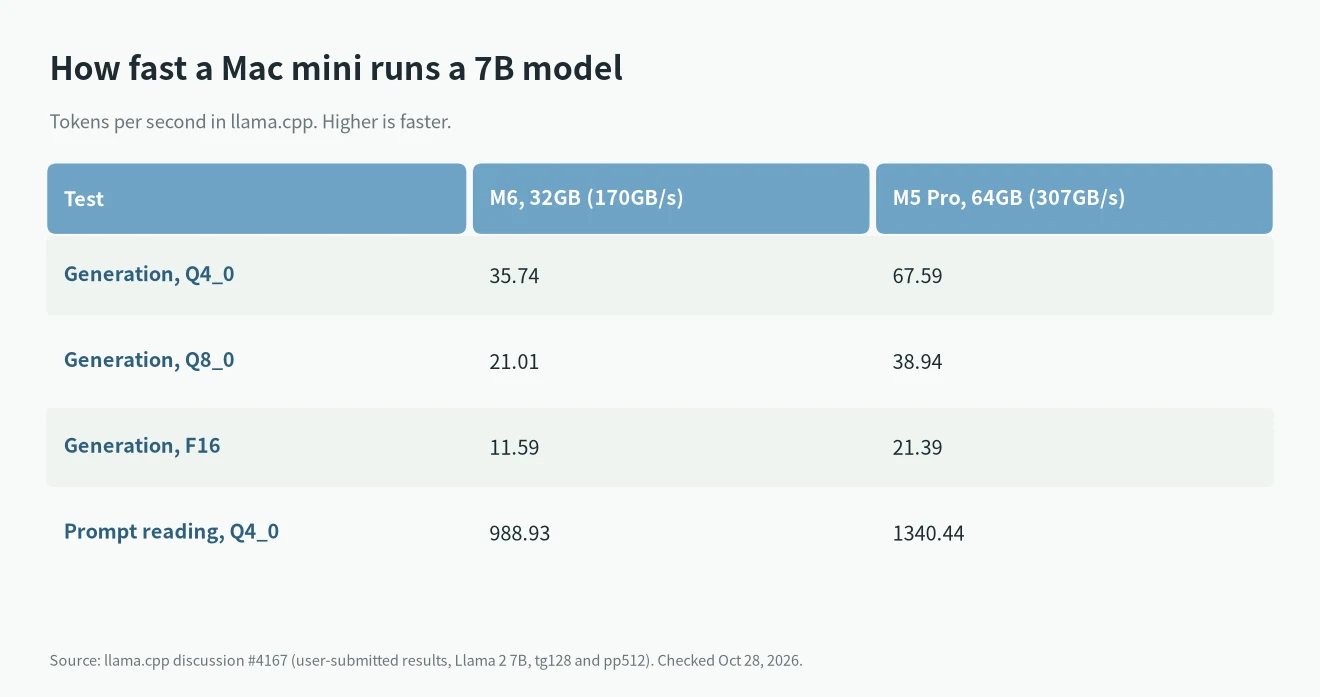
Larger models generate more slowly. As a rough rule, speed falls in proportion to model file size, so a 70B model is much slower than a 7B model on the same machine. Prompt reading depends more on GPU compute, and the M5 Pro is faster there too. Both the M6 and M5 Pro GPUs include Neural Accelerators (Apple specs), which MLX can use.
Which software to use
- Ollama: has a macOS app. One command downloads and runs a model, and the model sizes in the table above come from it.
- MLX: Apple’s open-source framework. Run pip install mlx-lm, then mlx_lm.chat to start chatting. See the mlx-lm project.
- llama.cpp: the speeds above were measured with it. It suits people who want to tune settings.
If this is your first time, start with Ollama. After installing it, type ollama run qwen3:8b in Terminal. It downloads the 5.2GB model file and then lets you chat in the terminal. While it runs, open Activity Monitor and check Memory Pressure on the Memory tab. If it stays yellow or red, the model is too large for the machine, so pick a smaller model or a lower quantization.
Mac mini for local LLMs: 16GB, 24GB, 32GB or 64GB
- To try local models: the 16GB M6, from $899. It runs 8B to 14B models for writing and translation.
- For daily use and coding: at least 24GB, ideally 32GB. For which coding models to run, see local LLMs for coding.
- For 70B models or more speed: the 64GB M5 Pro. With 307GB/s, it generates text almost twice as fast as the M6.
For the other M5 Macs, see M5 for local LLMs. If you are deciding whether to buy now, see buy a Mac now or wait.
FAQ
Is a 16GB Mac mini enough for local LLMs?
It is enough for 4-bit models up to 14B. Qwen3 14B at 4-bit is 9.3GB, and the machine still needs memory for macOS and other apps, so larger models are not recommended.
Can a Mac mini run a 70B model?
Yes, with the 64GB M5 Pro. Llama 3.3 70B in Q4_K_M is 43GB, and the M6 tops out at 32GB, so it cannot hold it.
What is the difference between the M6 and M5 Pro Mac mini?
Maximum memory and bandwidth. The M6 goes up to 32GB and 170GB/s. The M5 Pro goes up to 64GB and 307GB/s. On the same 7B model, the M5 Pro generates text almost twice as fast.
What I could not confirm
- Apple does not publish LLM speeds for the Mac mini. The speeds above were submitted by llama.cpp users, and results change with software and model.
- I found no benchmarks for the 24GB M6 or the 48GB M5 Pro, so those can only be estimated from bandwidth.
- I did not check each memory upgrade price on the store page, so this article lists starting prices only.