

12GB VRAM LLM: Which Local Models Fit and How Much Context You Can Afford (KV Cache Measured)
A 12 GB card fits 8B to 14B models, but the context window decides how far. We read GGUF headers, matched the KV cache formula to Ollama 0.40.16 logs, and worked out the maximum context for seven models.
 bufferAbout the author6 min read
A 12GB VRAM LLM setup is a tight fit, and the file size on Ollama’s library page is only half the answer. The context window needs memory too, and it grows with every token. We read the GGUF headers of seven popular models, checked our cache formula against what Ollama 0.40.16 actually allocated, and worked out how much context each model leaves you on a 12 GB card.
The short answer
- Qwen3.5 9B leaves the most room. Its download is 6.6 GB and its KV cache is only 1 GiB at 32K context, because most of its layers do not keep one. By formula the upper bound is about 155K tokens; the real limit is lower and we did not test it, because the compute buffer grows with context and 128K failed to load on our test box.
- 8B models are comfortable. qwen3:8b and llama3.1:8b leave room for 32K or more at default precision.
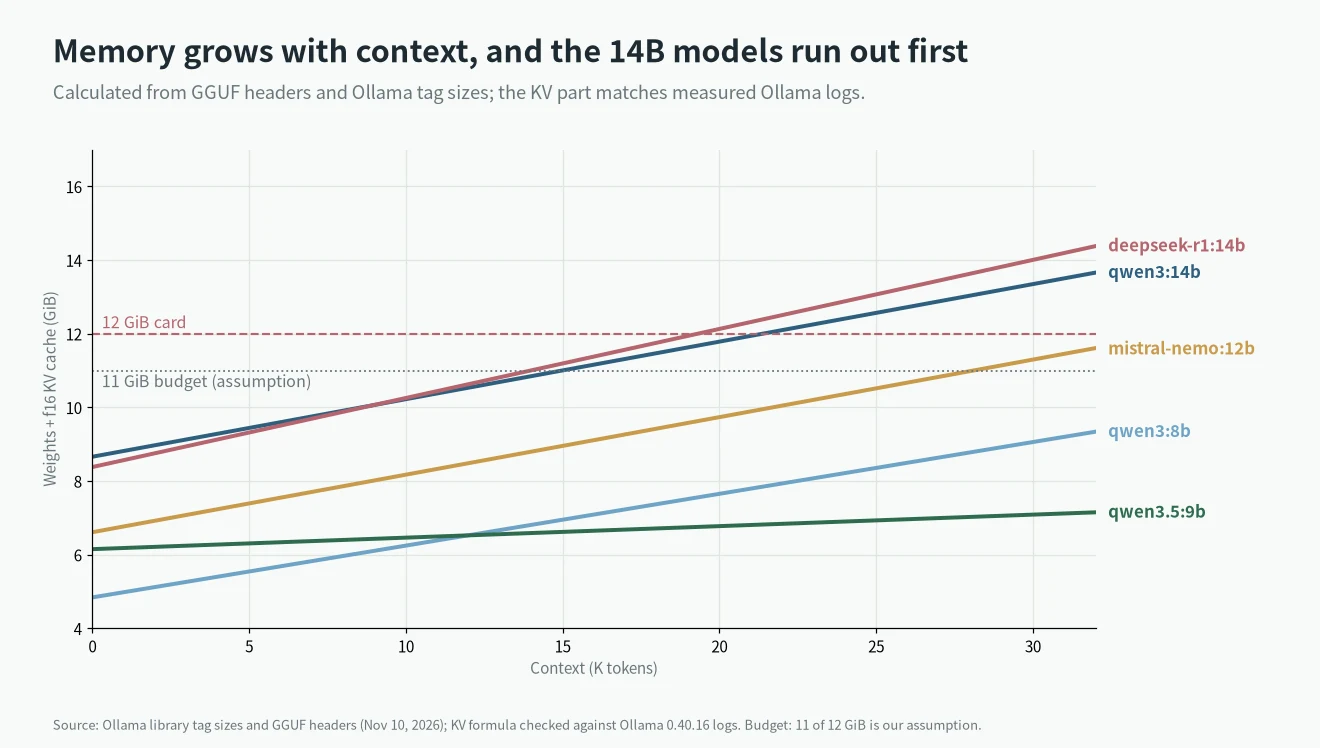
- 12B to 14B models fit, but with a short context. On our budget, mistral-nemo:12b gets about 28K, qwen3:14b about 14K, deepseek-r1:14b about 13K and phi4:14b about 12K, all with an f16 cache.
- An 8-bit cache roughly doubles that. Ollama’s
OLLAMA_KV_CACHE_TYPE=q8_0cut the cache to 53% in our test. - gpt-oss:20b does not fit. Its weights alone are 12.85 GiB.
Why the download size is not enough
A model in memory is the weights plus the KV cache, plus a compute buffer. The weights are the file. The KV cache stores the keys and values of every token so far, and for a standard transformer it costs 2 x layers x KV heads x head size x bytes per token. For qwen3:14b that is 2 x 40 x 8 x 128 x 2 = 163,840 bytes per token, which is 5 GiB at 32K tokens, more than half of the file again.
We read each model’s numbers from its GGUF header on the Ollama registry. Models that do not keep a cache in every layer need their own rule. Qwen3.5 keeps one in every fourth layer, from full_attention_interval = 4 in its header, so its cost is 32,768 bytes per token.
We checked the formula against Ollama
A formula is only useful if it matches what the software does. We loaded models in Ollama 0.40.16 at several context sizes and read the llama_kv_cache: size line from the server log. It matched our formula exactly, including for the hybrid Qwen3.5 and for the 8-bit cache.
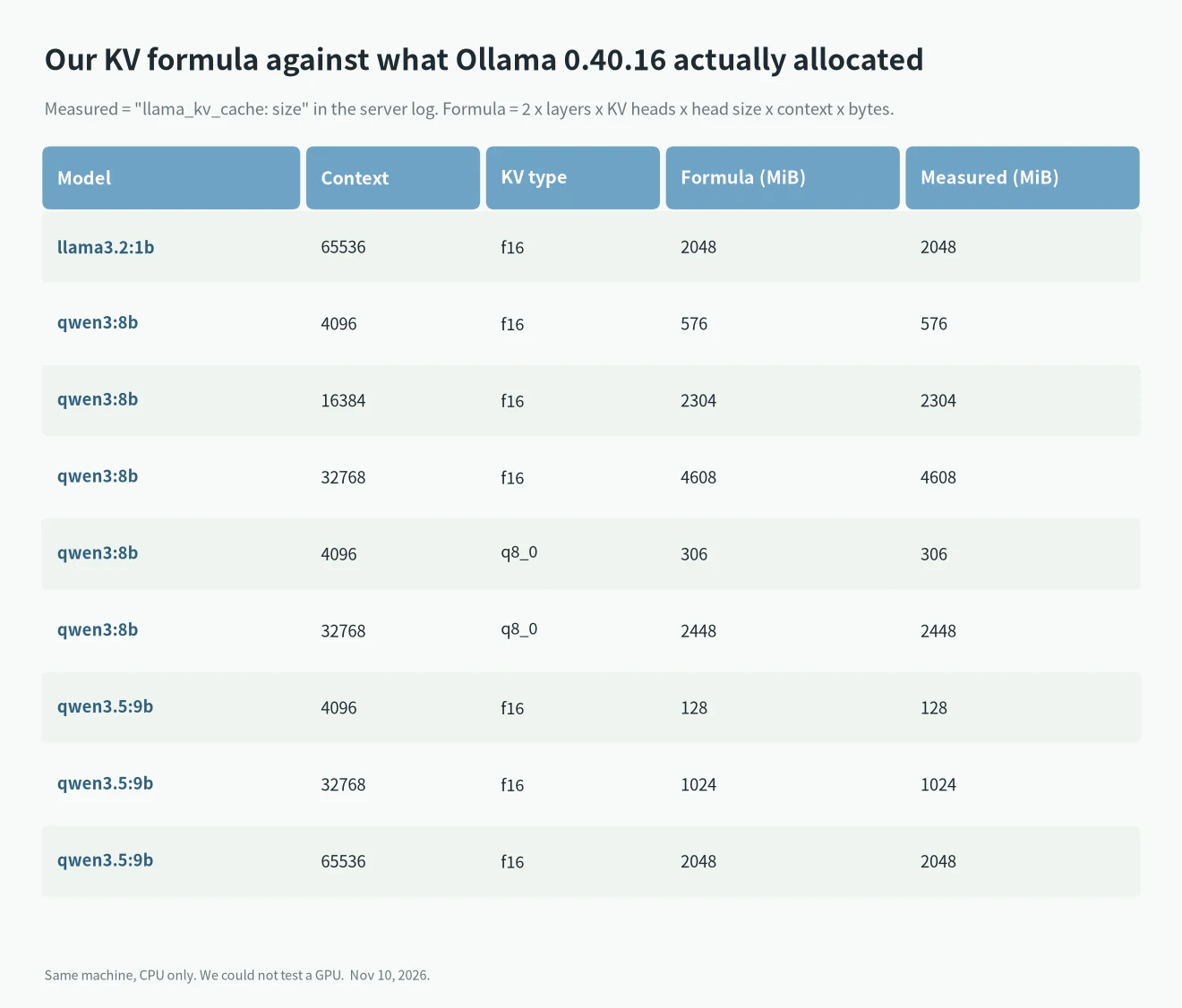
This box has no GPU, so the numbers are RAM, not VRAM. The cache is allocated by the same code, but we could not confirm the GPU side. The log also showed the compute buffer: 116 MiB at 4K and 288 MiB at 32K for qwen3:8b, and 704 MiB at 64K for qwen3.5:9b. That is why we keep 1 GiB of the card free in the table below.
What fits in 12 GB
We took a 12 GiB card and kept 1 GiB for the driver, the display and the compute buffer. That 11 GiB budget is our assumption, not a measurement. Windows with several monitors can eat more of it. The table shows what is left for context. K means 1,024 tokens, rounded down: qwen3:14b works out at about 15.3K and shows as 14K. For qwen3.5:9b the figures are a formula upper bound only. The real limit is lower and untested, since the compute buffer grows with context and 128K did not run on our test box.
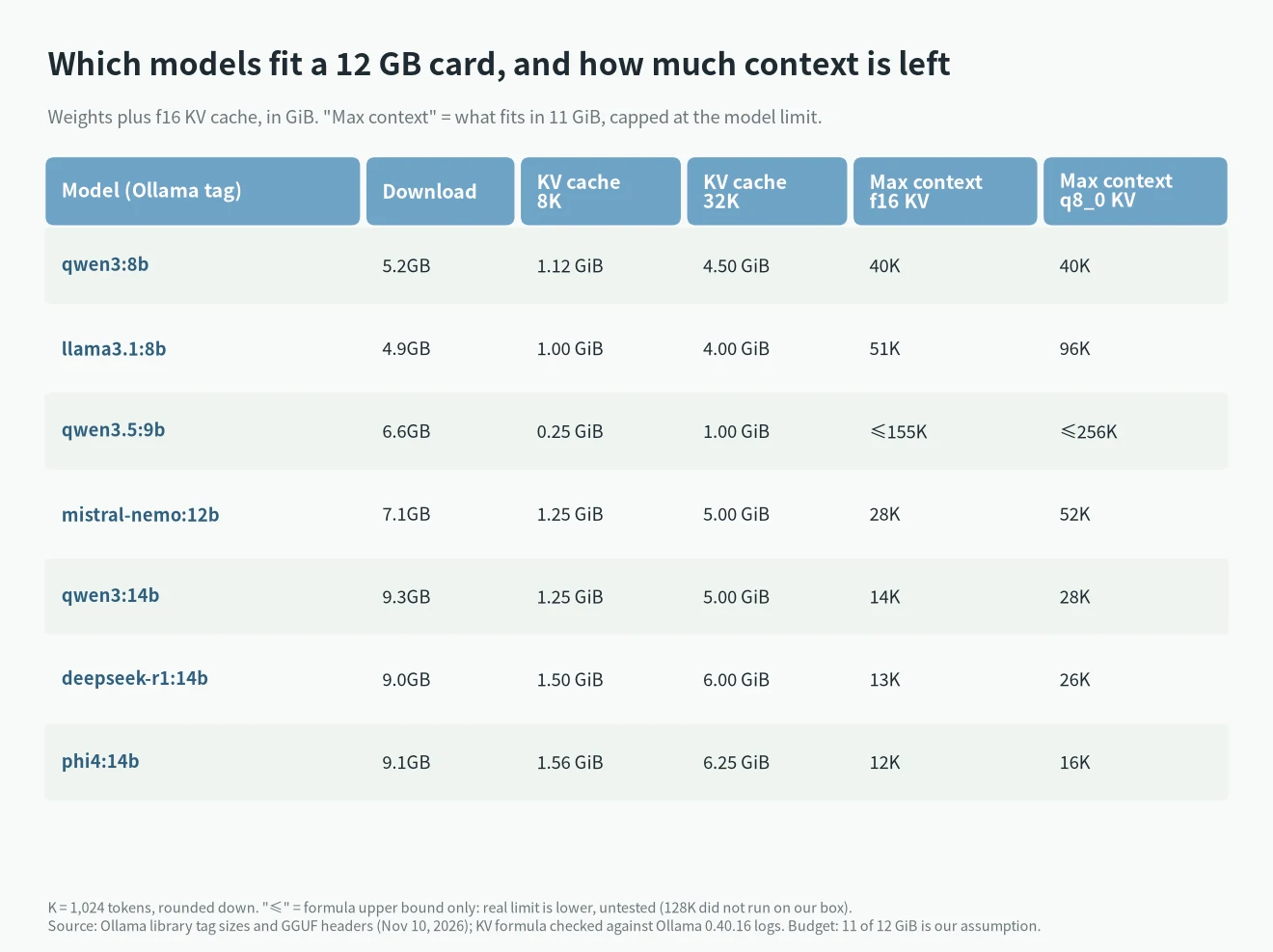
Two things stand out. First, a bigger model is not simply “better on 12 GB”: qwen3:14b at 14K and qwen3.5:9b at up to 155K (formula upper bound, real limit lower, untested) are different tools. Second, the cache type matters as much as the model. If you need long documents, use the 9B hybrid or turn on an 8-bit cache.
The 8-bit cache: what it saves and what it costs
Ollama’s FAQ says OLLAMA_KV_CACHE_TYPE can be f16 (default), q8_0 or q4_0, needs Flash Attention, and applies to all models at once. It describes q8_0 as about half the memory with very little precision loss. We measured the memory side on qwen3:8b: 306 MiB against 576 MiB at 4K, and 2,448 against 4,608 at 32K.
We did not measure quality. The same FAQ warns that models with a high GQA count, and it names Qwen2, may be affected more. The deepseek-r1:14b header says its architecture is qwen2, so test it on your own prompts before you rely on q8_0.
How to choose
- Long documents or agents: qwen3.5:9b. Check that your Ollama build and client handle it, since its architecture is new.
- Best quality that still fits: a 14B model with the context set to about 12K to 14K, and an 8-bit cache if you need more. Set
num_ctxyourself; see Ollama context length. - Safe and fast: an 8B model. If a model does not fit, Ollama may put some layers on the CPU and it gets slower; Ollama not using GPU covers how to check.
For a wider list of models, see best local LLMs by VRAM. For other card sizes, see Ollama GPU requirements by VRAM and our VRAM calculator, and if you are still choosing the card, best value GPU for LLM inference.
What we tested and what is calculated
- Measured on November 10, 2026, Ollama 0.40.16, CPU only: KV cache size for llama3.2:1b, qwen3:8b (f16 and q8_0) and qwen3.5:9b at several contexts. All matched the formula.
- Calculated: every number for the 14B, 12B and llama3.1:8b models, and the “max context” column. Inputs are the GGUF headers and Ollama’s tag sizes.
- Assumed: the 11 GiB budget. We have no 12 GB card here and did not measure real VRAM use, speed or quality.
- Left out: Gemma 3 and Gemma 4. Their layers mix local and global attention, and our gemma4:12b run logged several cache buffers (64, 480, 8 and 36 MiB at 4K) that we could not reduce to one number. qwen3:8b at 64K and qwen3.5:9b at 128K also failed to load on this box, so those points are not measured.
- Sources: Ollama’s model library tags, the Ollama FAQ, and the GGUF headers served by registry.ollama.ai.
FAQ
What LLM can I run on 12GB of VRAM?
Models up to about 14B parameters at 4-bit quantization fit, but the 14B ones leave only 12K to 14K tokens of context with an f16 cache. 8B and 9B models leave far more.
Does qwen3:14b fit in 12GB VRAM?
The weights do (about 8.7 GiB). With an f16 cache and 1 GiB of headroom, the context tops out near 14K tokens. With a q8_0 cache it is near 28K.
How much VRAM does the context window use?
For a standard model, 2 x layers x KV heads x head size x 2 bytes per token. qwen3:8b uses 147,456 bytes per token, 4.5 GiB at 32K.
Does gpt-oss:20b run on 12GB?
Not fully on the GPU. Its weights alone are 12.85 GiB, which is more than the card.
Should I use a q8_0 KV cache?
It halves cache memory in our test. Ollama’s FAQ calls the precision loss very small but warns that some models, Qwen2 for one, may be affected more. Test your own prompts.