

Ollama GPU Requirements: How Much VRAM per Model Size (4 to 80 GB, Tested on v0.40.16)
Ollama's docs list supported GPUs, not a minimum VRAM. This guide gives the official requirements, then what fits at nine VRAM sizes from 4 to 80 GB using library download sizes, and our measurement on v0.40.16 of how context length grows memory use.
 bufferAbout the author7 min read

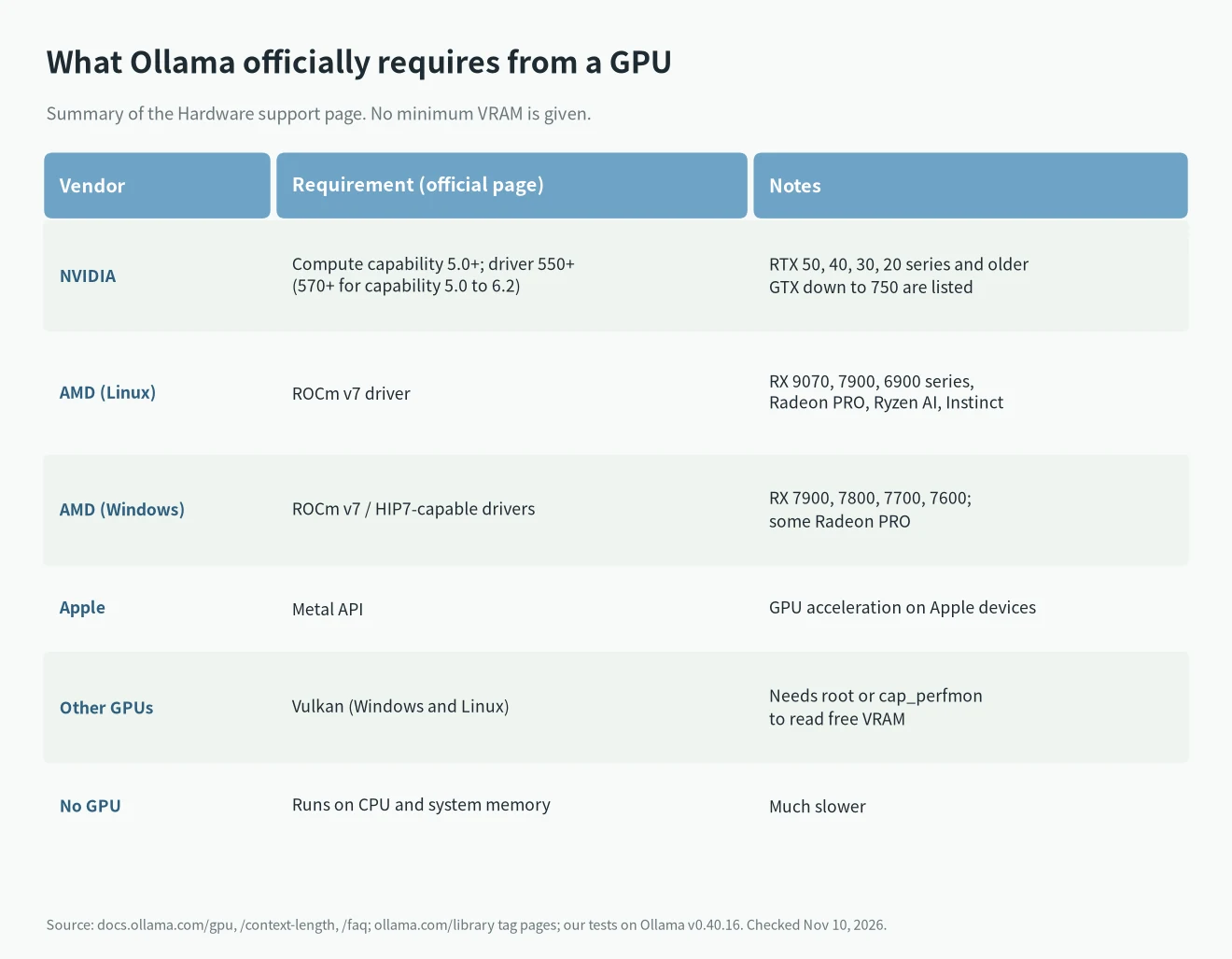
The official Ollama GPU requirements list which GPUs are supported, not a minimum amount of VRAM: NVIDIA needs compute capability 5.0 or higher and driver 550 or newer (570 or newer for cards from 5.0 to 6.2), AMD goes through ROCm v7, Apple through Metal, and other cards can use Vulkan. How much VRAM you need depends on whether the model plus its context fits. So this guide has two halves: the official requirements, then nine VRAM tiers (4, 6, 8, 12, 16, 24, 32, 48 and 80 GB) with real download sizes from the Ollama library. We also measured one thing on Ollama v0.40.16: for the same 1.3 GB model, raising the context from 4096 to 131072 took the memory shown by ollama ps from 2.0 GB to 6.9 GB. Sources checked November 10, 2026.
What Ollama officially requires from a GPU
This is the summary of Ollama’s official Hardware support page.
Things that are easy to miss:
- There is no official minimum VRAM. If the model doesn’t fit, Ollama doesn’t refuse to run; it puts part of it in system memory, and speed drops.
- If a fresh install isn’t using your GPU, check the driver version and compute capability first. Older cards (compute capability 5.0 to 6.2) need driver 570 or newer, which is where many people get stuck. Look up your card on NVIDIA’s CUDA GPUs page.
- The Windows AMD list is shorter than the Linux one: RX 7900, 7800, 7700 and 7600 series plus some PRO cards.
- The Vulkan path needs extra capability (root, or
cap_perfmon) to read free VRAM. Without it, Ollama estimates from model sizes.
What fits at each VRAM size
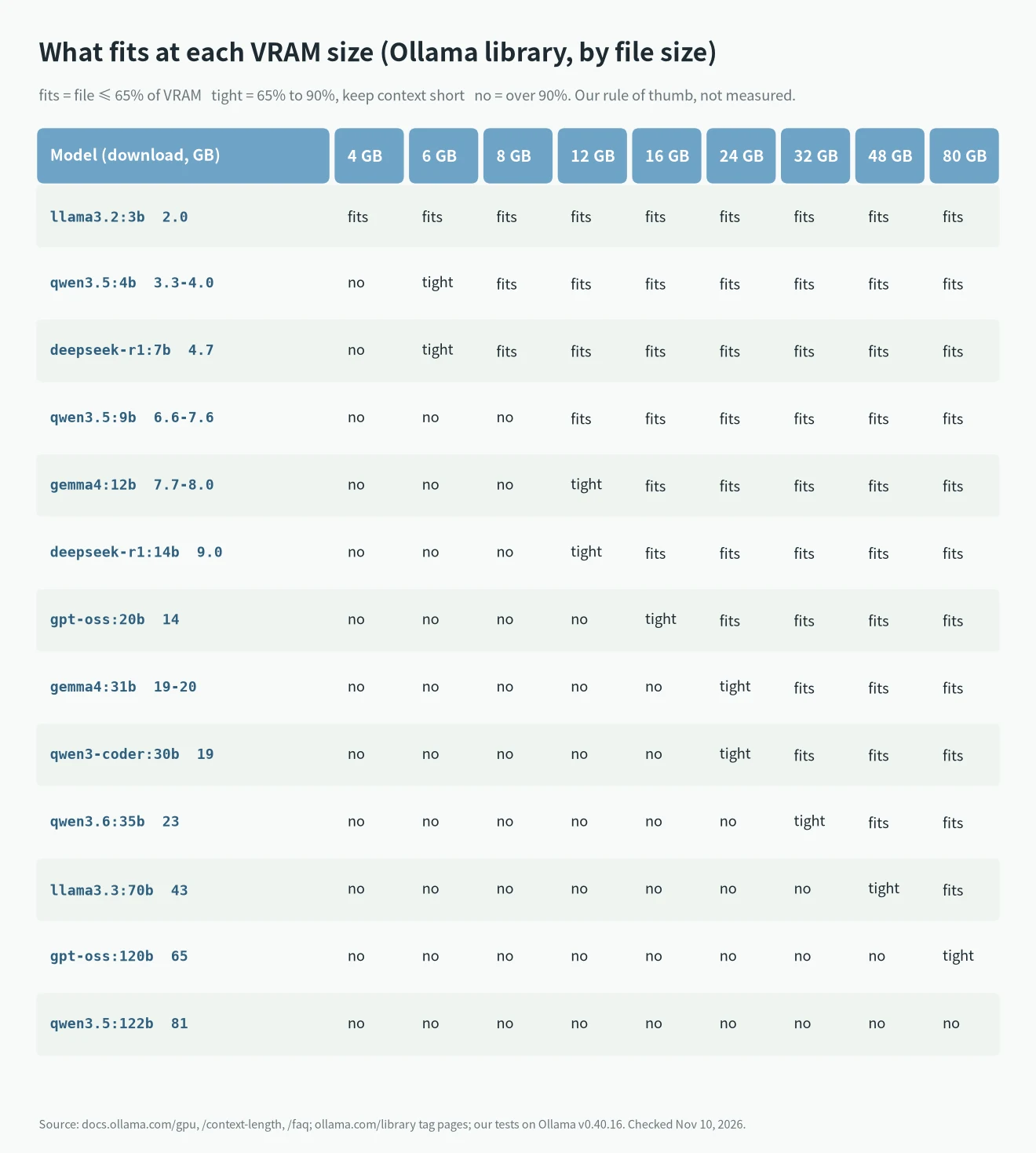
Model sizes in this table come from the tag pages in the Ollama library (default quantization, November 10, 2026) and don’t include context. The labels follow our own rule of thumb, not an official standard: “fits” means the file is at most 65% of VRAM, “tight” means 65% to 90% so keep the context short, and “no” means more than 90%, so expect part of the model to spill to CPU.
How to read it:
- 4 GB: small models under 3B, such as llama3.2:3b (2.0 GB).
- 6 to 8 GB: the 7B to 8B class. deepseek-r1:7b (4.7 GB) is comfortable at 8 GB, and tight at 6 GB unless you keep the context low.
- 12 GB: gemma4:12b (7.7 to 8.0 GB) and deepseek-r1:14b (9.0 GB) fit, though the 14B leaves little room.
- 16 GB: gpt-oss:20b (14 GB) fits with little room; the 14B class is easy.
- 24 GB: the 27B to 31B class, such as gemma4:31b (19 to 20 GB), qwen3-coder:30b (19 GB) and qwen3.6:27b (18 to 19 GB). Context decides how much room is left.
- 32 GB: the 35B class: qwen3.6:35b (23 GB), qwen3.5:35b (22 GB).
- 48 GB: the 70B class (llama3.3:70b and deepseek-r1:70b are both 43 GB) just fits, with little room for context.
- 80 GB: gpt-oss:120b (65 GB) fits; qwen3.5:122b (81 GB) doesn’t.
Apple silicon and unified-memory machines such as Ryzen AI Max have their own usable-memory rules, which this guide doesn’t cover. For exact numbers use the VRAM calculator, and for model picks per tier see Best local LLM by VRAM.
How much VRAM context eats
Ollama’s official Context length page says the default context depends on VRAM: 4k under 24 GiB, 32k from 24 to 48 GiB, and 256k at 48 GiB or more. For coding and agents it recommends at least 64000 tokens. A longer context needs more memory.
We measured this on Ollama v0.40.16 on a Linux machine with no GPU. The model was llama3.2:1b (1.3 GB in the library), each run generated one token, only num_ctx changed, and we read the SIZE column of ollama ps.
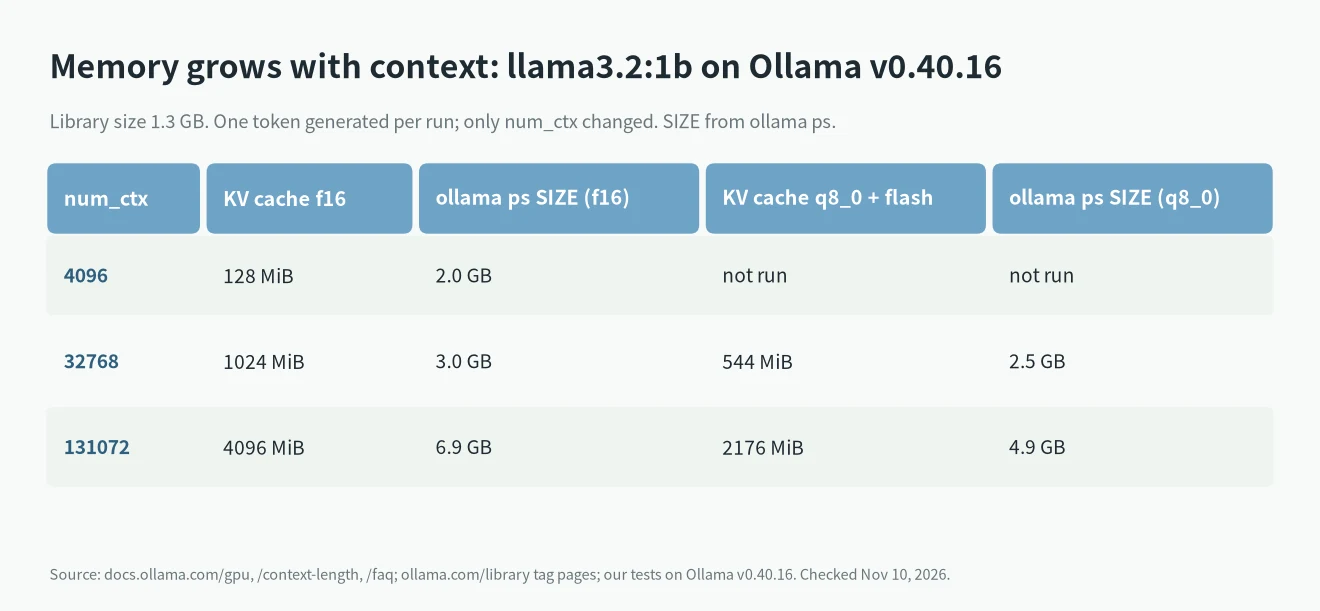
Result: the same model took 2.0 GB at a 4096 context, 3.0 GB at 32768 and 6.9 GB at 131072. The KV cache (the llama_kv_cache line in the log) was 128 MiB, 1024 MiB and 4096 MiB. Quantizing the cache to q8_0 with Flash Attention on (the official FAQ’s OLLAMA_KV_CACHE_TYPE and OLLAMA_FLASH_ATTENTION) cut the 131072 cache to 2176 MiB, and ollama ps showed 4.9 GB.
This model is tiny, so fixed runtime overhead is a large share of it. Don’t apply the 1.3 GB to 2.0 GB ratio to big models. What carries over is the trend: memory use is larger than the download and grows with context. The official FAQ adds that with OLLAMA_NUM_PARALLEL above 1, required memory scales with OLLAMA_NUM_PARALLEL times OLLAMA_CONTEXT_LENGTH.
Settings are covered in Ollama context length.
When it doesn’t fit, and how to check
The official FAQ explains that when loading a model, Ollama compares the VRAM it needs with what’s free: if the model fits on one GPU it goes there, otherwise it is spread across GPUs, and what still doesn’t fit goes to system memory. The PROCESSOR column of ollama ps shows the result: 100% GPU, 100% CPU, or a mix like 48%/52% CPU/GPU.
One catch we hit: on our machine with no GPU, the PROCESSOR column also printed 25%/75% CPU/GPU, 52%/48% and 79%/21%, while the server log of the same runs said inference compute id=cpu and total_vram="0 B". So don’t use the PROCESSOR column alone to decide whether the GPU is used. Also read the inference compute line in the server log, and nvidia-smi on NVIDIA machines. That’s our observation on v0.40.16, and we didn’t confirm the cause.
For the “model requires more system memory” error, see that troubleshooting guide. Other Ollama messages are in the error lookup. If Ollama runs on the CPU even though you have a card, see Ollama not using GPU.
What we tested and what is from the docs
- Tested (Ollama v0.40.16, Linux, 8 cores, 15.6 GiB RAM, no GPU): the
inference compute id=cpuandvram-based default context total_vram="0 B" default_num_ctx=4096log lines; thatOLLAMA_CONTEXT_LENGTH=64000appears in the server config; llama3.2:1bollama psSIZE and KV cache size at different contexts; q8_0 cache with Flash Attention; and the PROCESSOR column behavior above. - Not tested: VRAM use on any real GPU, NVIDIA driver and compute capability requirements, AMD ROCm support, Vulkan, and whether each model actually fits at each tier. Model sizes come from the Ollama library pages, and fits, tight and no come from our rule of thumb, not from measurements.
- Also: downloading models on this machine needed a proxy set on the Ollama server process, in line with our “max retries exceeded” guide.
- Sources: Hardware support, Context length, FAQ, Ollama Library (tag pages for gemma4, qwen3.5, qwen3.6, qwen3-coder, deepseek-r1, gpt-oss, llama3.2, llama3.3). Looked up November 10, 2026.
If you’re shopping for a card, see the GPU value guide and what models an RTX 4090 can run.
FAQ
What GPU does Ollama need at minimum?
The official page says NVIDIA compute capability 5.0 or higher with driver 550 or newer (570 or newer for older cards), the AMD ROCm support list, Apple Metal, and Vulkan as a fallback. It gives no minimum VRAM number.
Can I use Ollama without a GPU?
Yes, it runs on the CPU and system memory. Our test machine did exactly that, and the log showed inference compute id=cpu. It is much slower.
What runs on 4 GB of VRAM?
Small models with a download around 2 GB, such as llama3.2:3b (2.0 GB). Anything bigger spills into system memory.
Why doesn’t a model fit when its file is smaller than my VRAM?
Because of the KV cache. In our test, a 1.3 GB model needed 6.9 GB at a 131072 context. Shorten the context, quantize the cache, or step down a model size.
Does Ollama require an NVIDIA GPU?
No. AMD goes through ROCm, Apple through Metal, and other cards can use Vulkan. The official page has the exact supported models.