

RAM for Local LLM: What 8, 16, 32, 64 and 128 GB Can Run, With Measured Memory
A model file is only part of the bill. We measured four models at three context lengths, tested a formula, and estimated what fits in 8 to 128 GB of RAM.
 bufferAbout the author8 min read
RAM for local LLM use comes down to four things added together: the model file, a KV cache that grows with context, about 0.1 to 0.3 GB of working buffers, and whatever your system and apps already use. We measured this on four models from 1B to 9B with Ollama on a CPU-only box, and the estimate landed within about 12% of the memory the machine actually lost. The part that surprises people is context: qwen3:4b has a 2.5 GB file, took 3.2 GB at 4K context and 7.4 GB at 32K.
The short answer
- The rule: RAM needed = model file + KV cache + about 0.1 to 0.3 GB of buffers + system and apps. The KV cache is
2 x layers x KV heads x head size x 2 bytes x tokenswith the default f16 cache. - Why the file size alone misleads: at 32K context,
qwen3:4bneeded about three times its file size. A 70B model with 128K context can need nearly as much again as the file. - What to buy, by our estimate: 16 GB for models up to about 9B, 32 GB for about 20B to 27B, 64 GB for 35B and a 70B at moderate context, 128 GB for
gpt-oss:120band larger. Only the 1B to 9B rows were tested. - If it does not fit: lower the context first, then quantize the KV cache to q8_0, which halved it in our test.
The formula, and how close it got
Four parts add up. The model file is the download size shown in the Ollama library. The KV cache stores the attention state of every token in the context, so it grows in a straight line with context length: 2 x layers x KV heads x head size x 2 bytes per token. The working buffers were 0.08 to 0.27 GB in our runs. The system and apps are your own: on our box other processes held about 6 GB while we measured.
We checked the KV formula against the numbers llama.cpp prints. qwen3:4b and qwen3:8b have 36 layers, 8 KV heads and a head size of 128, which is 147,456 bytes per token, or 576 MiB at 4K. The log said 576 MiB. llama3.2:1b has 16 layers, 8 KV heads and a head size of 64, and the formula gives 128 MiB at 4K, again what the log said.
What four models took
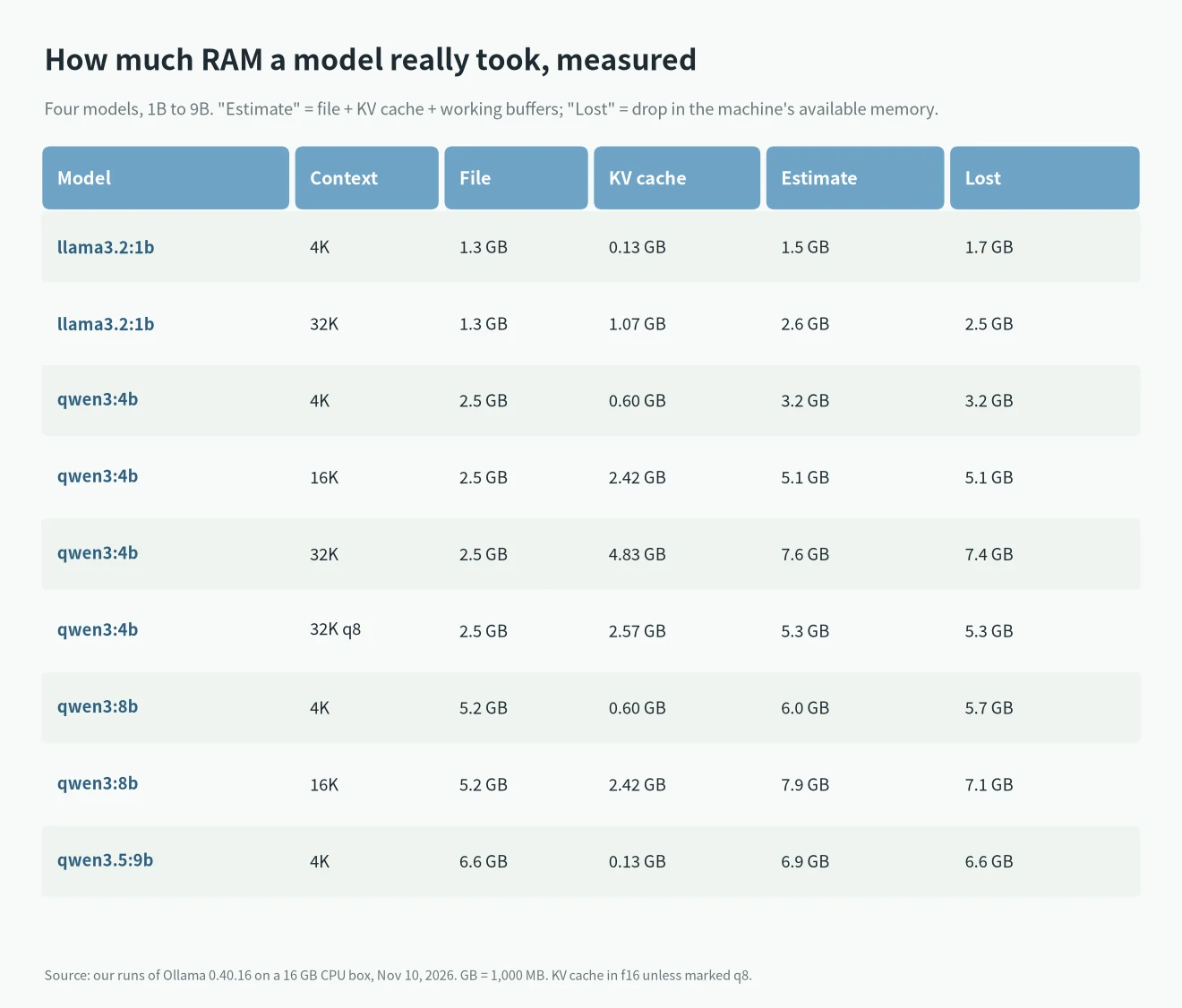
“Lost” is how much the machine’s available memory dropped when the model loaded and answered one short prompt. Our estimate (file + KV + buffers) was within about 12% of it in every row, high or low, which is close enough to size a purchase. Three things stand out:
- Context is the second bill.
qwen3:4btook 3.2 GB at 4K, 5.1 GB at 16K and 7.4 GB at 32K. The file stayed at 2.5 GB. - A quantized KV cache helps a lot. With Flash Attention on and the cache set to q8_0, the same 32K run took 5.3 GB instead of 7.4 GB. Ollama’s FAQ says q8_0 uses about half the memory of f16 with a very small loss in precision.
- Newer hybrid models can have a small KV cache.
qwen3.5:9blogged 0.13 GB of KV at 4K, about a fifth of whatqwen3:8bneeded, so the usual per-token formula does not apply to it. We did not get a 32K run on it.
We also lost runs. On this shared 16 GB box, 32K requests for qwen3:4b, qwen3:8b and qwen3.5:9b were killed in the first pass: Ollama’s log says “llama-server process has terminated: signal: killed”. We did not read the kernel log, so we cannot say for certain it was the out-of-memory killer, but it fits the numbers. qwen3:4b completed when we re-ran it, with 2.4 GB of memory still available. The other two we did not retry. If you see that message, see Ollama “llama runner process has terminated” and “model requires more system memory”. We do not publish tokens per second, because other processes shared the CPU and the speeds swung from under 1 to 70 tokens per second.
What fits in 8 to 128 GB
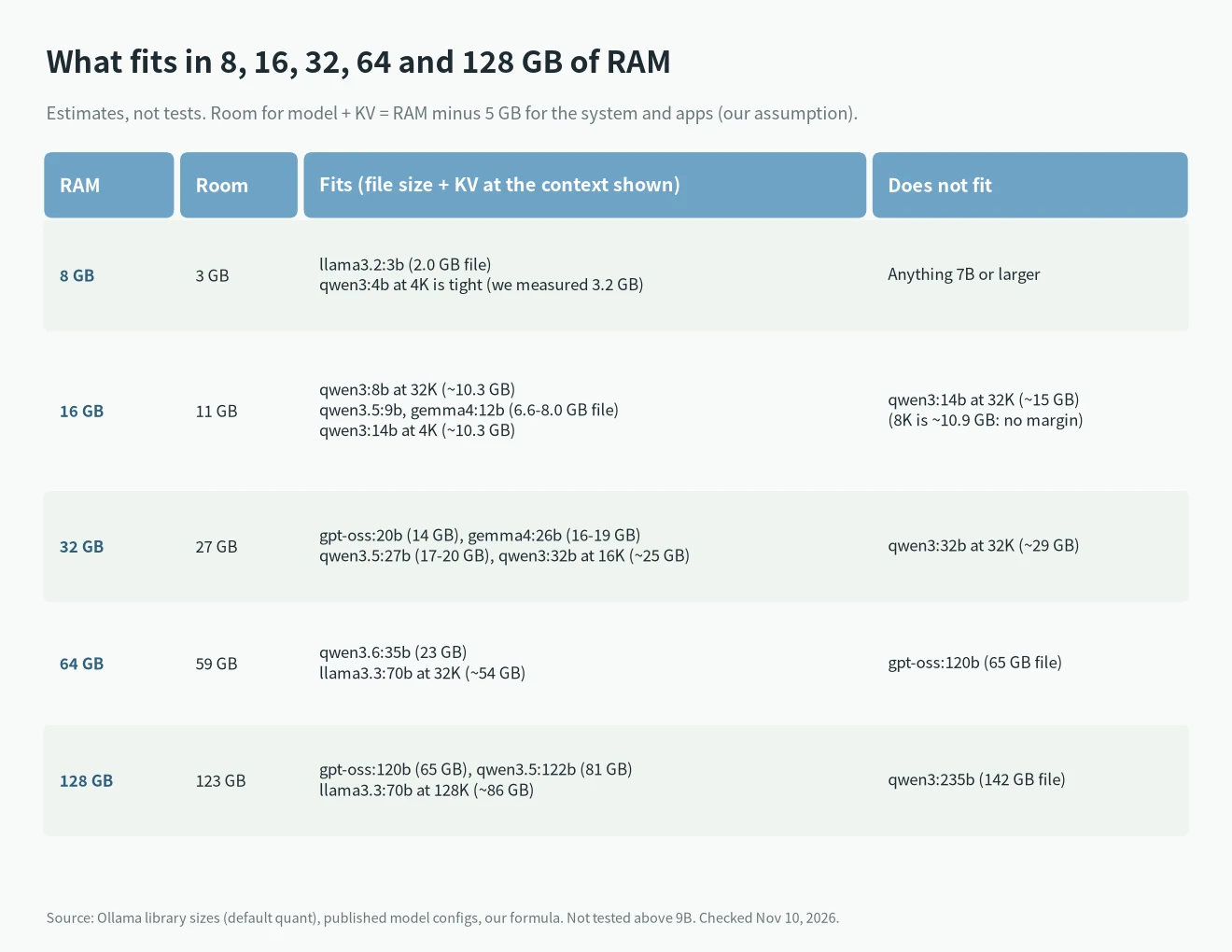
This table is an estimate, and we tested nothing above 9B. We took each model’s default file size from the Ollama library, added the KV cache by the formula using the layer counts in the models’ published configs on Hugging Face (Qwen3-14B, Qwen3-32B, Llama 3.3 70B), and 0.3 GB of buffers. The 5 GB we leave for the system and apps is our assumption; a browser and a chat app can take more.
- 8 GB: small models only.
qwen3:4btook 3.2 GB at 4K, which leaves little for anything else. - 16 GB: the sweet spot for 8B to 9B models.
qwen3:8bat 32K comes to about 10.3 GB by our math, tight but possible. A 14B model such asqwen3:14bfits at 4K (about 10.3 GB), sits right at the 11 GB limit at 8K (about 10.9 GB, no margin) and does not fit at 32K (about 15 GB). - 32 GB: the 20B to 27B class (
gpt-oss:20b,gemma4:26b,qwen3.5:27b).qwen3:32bfits at 16K, not 32K. - 64 GB: a 70B model such as
llama3.3:70bfits at 32K (about 54 GB by our math).gpt-oss:120bhas a 65 GB file and does not fit. - 128 GB:
gpt-oss:120bandqwen3.5:122bfit, and a 70B model can run its full 128K context.qwen3:235b(142 GB) does not fit.
Model sizes change with each release, so check the library page before you buy. For GPU memory instead of system RAM the same sums apply to VRAM; see what fits in 12 GB of VRAM, the Ollama GPU requirements and the VRAM calculator.
If it does not fit
1. Lower the context. Ollama’s default is 4096 tokens, and you set it with num_ctx or OLLAMA_CONTEXT_LENGTH. See Ollama context length.
2. Quantize the KV cache. Start the server with OLLAMA_FLASH_ATTENTION=1 and OLLAMA_KV_CACHE_TYPE=q8_0. It is a global setting for all models.
3. Pick a smaller model or file. A smaller tag, or a lower-bit file, saves more than any setting. For choices by task, see best local LLM and local LLM for coding.
4. Close what you can. The 5 GB we assume for the system is the easiest to shrink on a desktop.
Running an agent on a CPU is slow whatever the RAM: see our Claude Code on a local model test. If you are thinking about buying memory, the RAM price trend and Mac mini for local LLMs may help.
What we tested and what is an estimate
- Tested on November 10, 2026: Ollama 0.40.16 on a Linux box with 8 CPU cores and 16 GB of RAM, no GPU, other processes using about 6 GB, one parallel request, f16 KV cache unless marked. Models:
llama3.2:1b,qwen3:4b,qwen3:8bandqwen3.5:9bat 4K, 16K or 32K. Memory is the drop in available memory after one short answer, and KV and buffer sizes come from Ollama’s own log. - Not tested: anything larger than 9B, a GPU, Apple unified memory, Windows, a long prompt that fills the context, or any 32K run for
qwen3:8bandqwen3.5:9b. Every figure in the tier table comes from library file sizes, published model configs and the formula. - Assumed: 5 GB for the system and apps, and 0.3 GB of buffers for the larger models. Your figures will differ.
- Sources: the Ollama library tag pages for Qwen3, Qwen3.5, Gemma 4, gpt-oss and Llama 3.3, and Ollama’s FAQ, all read on November 10, 2026.
FAQ
How much RAM do I need to run a local LLM?
Add the model file, the KV cache for your context length, about 0.1 to 0.3 GB of buffers and what your system uses. As a guide: 16 GB for models up to about 9B, 32 GB for 20B to 27B, 64 GB for a 70B at moderate context.
Is 16 GB of RAM enough for a local LLM?
Yes for 8B to 9B models at moderate context. We measured qwen3:8b at 16K at 7.1 GB lost, which leaves room on a 16 GB machine if the system uses 5 GB or less.
Why does context length use so much memory?
The KV cache stores the attention state of every token, so it grows in a straight line with context. qwen3:4b went from 0.6 GB of KV at 4K to 4.8 GB at 32K.
Does a quantized KV cache save memory?
Yes. In our test q8_0 cut the KV cache of qwen3:4b at 32K from 4.8 GB to 2.6 GB. Ollama says the loss in precision is very small.
Can 64 GB run a 70B model?
By our estimate, yes at 32K context with a default 4-bit file, about 54 GB in total. It is an estimate; we did not run a 70B model.