

Selected Model Is at Capacity in Codex: What It Means and 5 Simple Things to Try
"Selected model is at capacity. Please try a different model." isn't your usage limit. What the Codex error means in the source code, what OpenAI staff said, why October 2026 was so bad, and 5 things to try in order.
 bufferAbout the author7 min read
The first time Codex stopped me with “Selected model is at capacity. Please try a different model.”, I assumed I had burned through my plan. I hadn’t. My usage page still had plenty left, and a lot of people on GitHub this month have had the same confused moment. So I went through the Codex source code, the OpenAI status page and what OpenAI staff have said, and wrote down only what I could check.
What “Selected model is at capacity” means
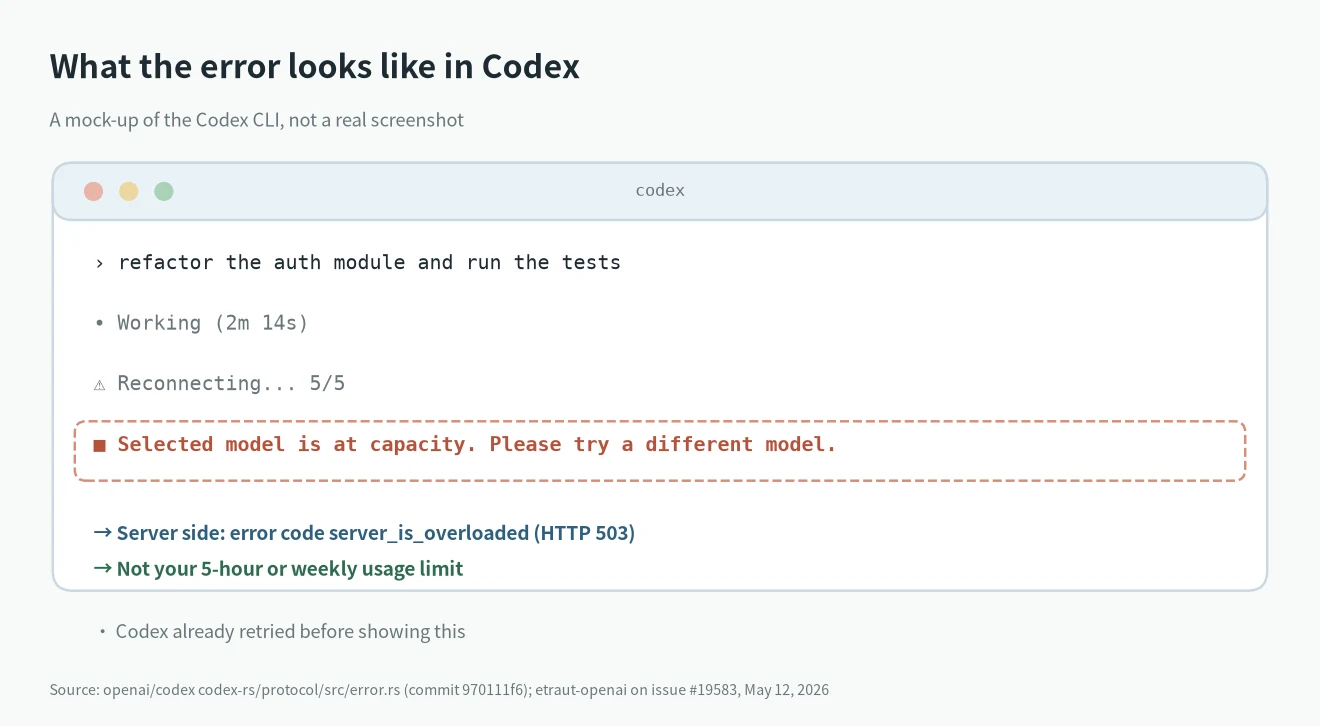
This is OpenAI’s side running short of servers for the model you picked. It is not your quota.
The message is a fixed string inside Codex. In the Codex source code it belongs to an error called ServerOverloaded.
Codex shows it when OpenAI’s backend answers with the error code server_is_overloaded. That can come back as an HTTP 503 or in the middle of a streamed reply.
A Codex maintainer, etraut-openai, said it directly on GitHub issue #19583 on May 12, 2026: “If you receive this message, it does not mean that you are being rate limited or are out of usage. It means that we are running low on capacity to serve this model in your region.”
How it differs from a usage limit
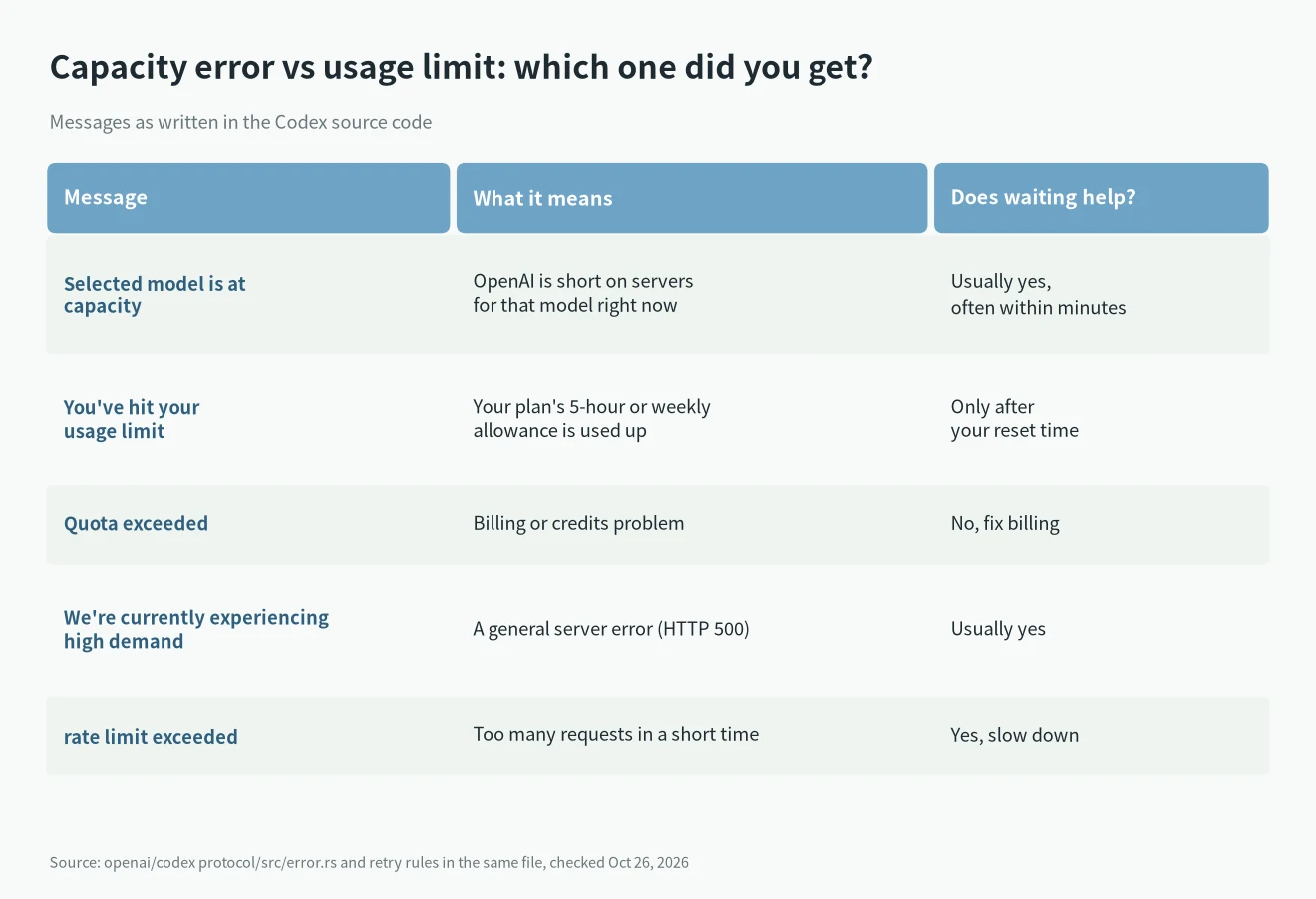
I find this the most useful part, because the fix depends on which error you got. Codex has separate messages for each case, and they are worded differently.
| Message you see | What it means | Does waiting help? |
|---|---|---|
| Selected model is at capacity. Please try a different model. | OpenAI is short on servers for that model right now (server_is_overloaded) | Usually yes, often within minutes |
| You’ve hit your usage limit | Your plan’s 5-hour or weekly allowance is used up | Only after your reset time |
| Quota exceeded. Check your plan and billing details. | Billing or credits problem on the account | No, fix the billing |
| We’re currently experiencing high demand, which may cause temporary errors. | A general server error (HTTP 500) | Usually yes |
| rate limit exceeded | Too many requests in a short time | Yes, slow down |
In the source code, usage limits and quota errors are treated as “don’t retry”. The capacity error is different. Codex will only wait and retry it on its own when the server sends a retry hint.
If you want to see where you stand on usage, type /status in the Codex CLI. It shows your session settings, token usage and rate limits. How the 5-hour and weekly windows work is in my AI subscription quota rules guide, and I log resets on the Claude & Codex usage limit tracker.
Why it keeps happening in October 2026
The error isn’t new. The oldest GitHub issue with it in the title that I found is #11635, opened on February 12, 2026.
October has been much worse, though. On GitHub, 175 issues in the openai/codex repo mention the phrase and were opened between September 26 and October 26. 107 of them have it right in the title.
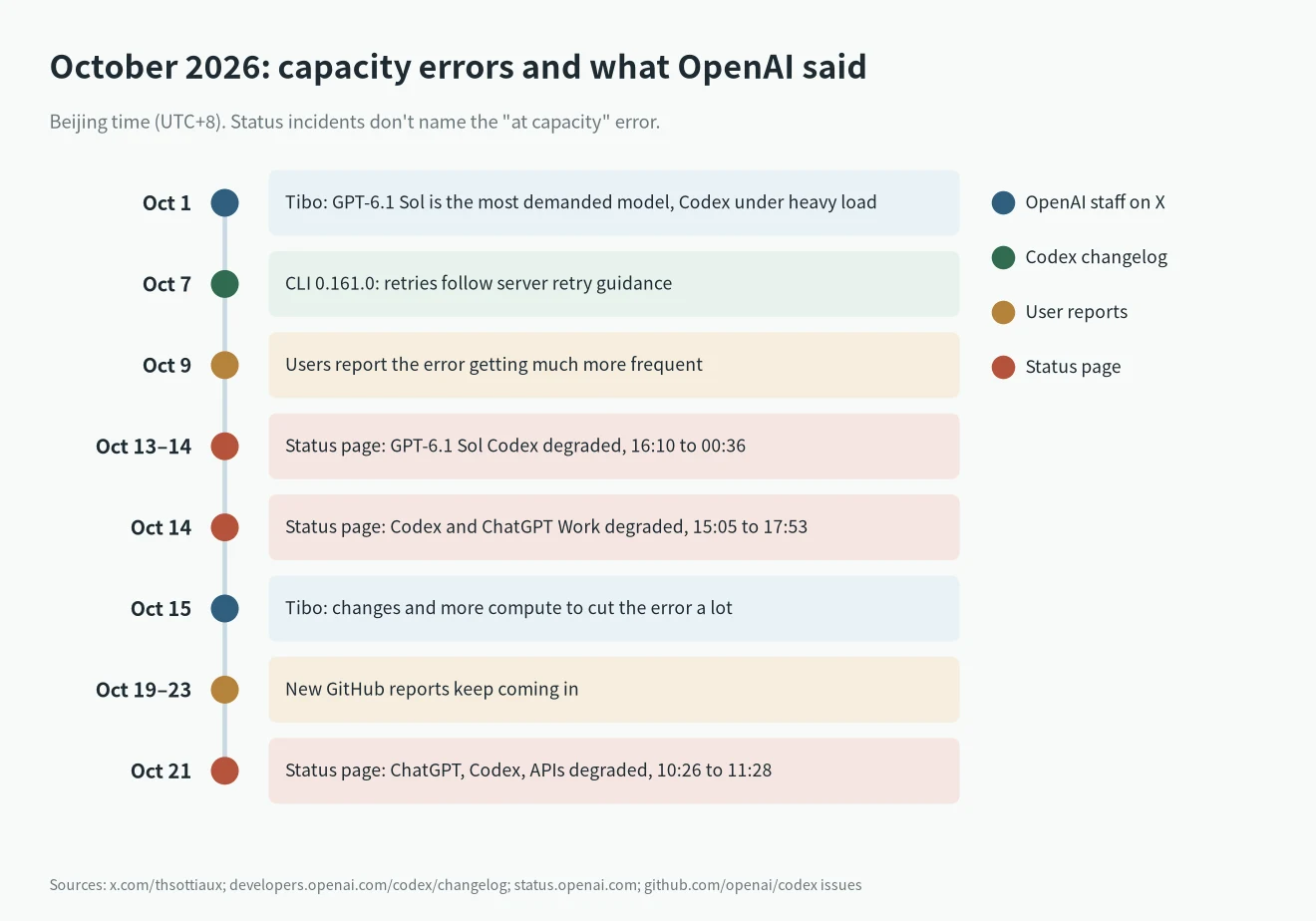
The likely reason is demand. On October 1, Tibo (@thsottiaux), who works on Codex at OpenAI, wrote that GPT-6.1 Sol was their most demanded model “pretty much ever” and that Codex had been “under heavy load”.
The OpenAI status page also logged problems. Times below are Beijing time (UTC+8).
- October 13, 16:10 to October 14, 00:36: degraded performance in GPT-6.1 Sol Codex and Work mode. It hit Codex Web, the CLI, the VS Code extension and the Codex API.
- October 14, 15:05 to 17:53: degraded performance in Codex and ChatGPT Work, with elevated errors.
- October 21, 10:26 to 11:28: degraded performance in ChatGPT, Codex and the APIs.
None of these incident notes uses the words “at capacity”. I’m listing them because they line up with the days people reported the error most.
On October 15 at 23:11 Beijing time, Tibo posted that OpenAI had “landed a series of changes and more compute to very significantly decrease the occurrence” of the error. He also said that when it does happen, Codex “should also eventually just continue by itself”. He asked people to say so if they still see it.
People still did. New reports came in on GitHub from October 19 to October 23, including #55260, #55544, #55583, #55740 and #56410.
What people report (not confirmed by OpenAI)
These come from user reports on GitHub. OpenAI hasn’t confirmed them, so treat them as patterns, not facts.
- Many people see it while their usage page shows lots left. One reporter in #52394 still had about 70% left.
- One reporter in #55544 measured about 30% of requests failing on a Plus plan. An immediate retry usually worked.
- Several people say switching models didn’t help, because every model gave the same error.
- Some saw it on one Codex client but not another, for example the CLI working while the desktop app failed.
- A few people think certain accounts get flagged, because switching accounts fixed it for them. Nobody at OpenAI has said this, so I’d treat it as a guess.
- In #55832 the person who opened the issue later said their case was a temporary local network problem. So it’s worth ruling your own network out.
5 simple things to try, in order
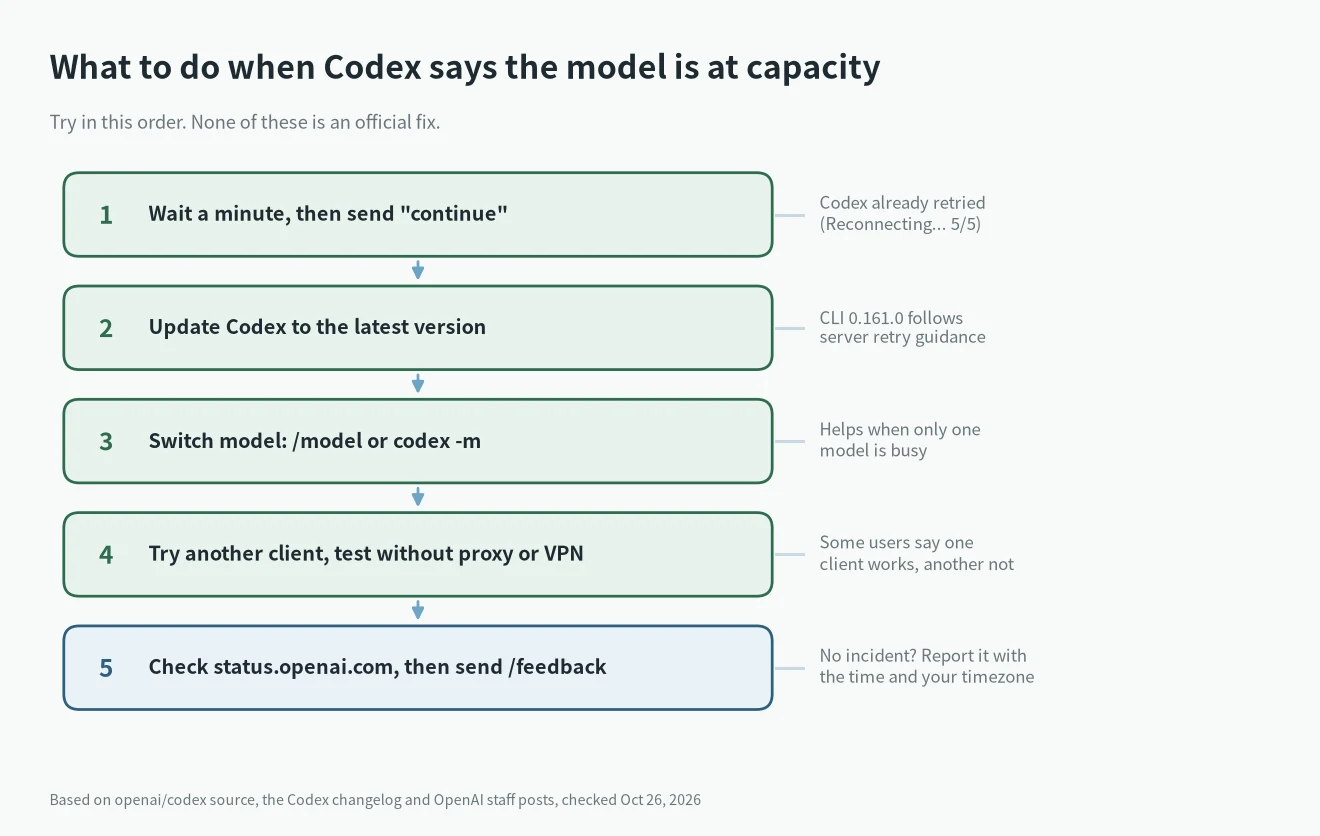
None of these is an official fix. They are the steps that line up with how the error works in the code and with what OpenAI staff have said.
1. Wait a minute and send “continue”
Codex already retries a few times before it shows you the error. Its defaults are 4 request retries and 5 stream retries, which is why you sometimes see a Reconnecting... 5/5 line first. Because the problem is on the server side, a short wait is the most common cure.
2. Update Codex
The Codex changelog for CLI 0.161.0 (October 7) says retries now “honor server retry guidance, reducing premature failures during overload”. Tibo’s October 15 post also points to Codex continuing on its own. Both only help if you’re on a recent build. A community pull request for longer automatic retries (#31058) is still open and hasn’t shipped.
3. Switch to a different model
The message itself suggests this. In the CLI, use /model or start with codex -m . It helps when only one model is busy. Many October reports say every model failed at the same time, so don’t expect too much from it.
4. Try another Codex client and check your network
Try the CLI if the desktop app keeps failing, or the other way round. Turn off a proxy or VPN for one test if you use one. If you’re setting up the CLI for the first time, my Codex CLI install guide covers login.
5. Check the status page and report it
Look at status.openai.com first. If there’s no incident and it keeps happening, type /feedback in Codex to send logs to the team, or open a GitHub issue with the time and your timezone. Tibo asked for exactly this kind of report.
What I wouldn’t do
I wouldn’t upgrade your plan just because of this error. Reports in October came from Plus and Pro users alike, and the error isn’t about your allowance.
I also wouldn’t put Codex in a tight retry loop in a script. If you automate it, wait longer between each try.
If you’re still deciding which tool to pay for, I compared them in Claude Code vs Codex, and the ChatGPT plans in ChatGPT Go vs Plus vs Pro. Claude Code has its own version of this problem, the 529 Overloaded error, which is in my Claude Code errors list.
FAQ
Does this error mean my account is banned?
No source I found says so. OpenAI’s maintainer described it as low capacity for the model in your region.
Does a failed request count against my usage?
I couldn’t find an OpenAI statement on this, so I can’t say either way.
Will OpenAI fix it?
On October 15 Tibo said OpenAI had added more compute and made changes to cut it down a lot. Reports kept coming after that date, so I’m still watching it.