

Codex CLI Install: 4 Easy Ways to Set Up and Log In (2026)
Codex CLI install guide from OpenAI's docs (Oct 21, 2026): four official install methods, which ChatGPT plans include the CLI, ChatGPT vs API key vs device code login, Windows support and headless SSH login.
 bufferAbout the author6 min read
This is a plain Codex CLI install guide: four official ways to get it on your machine, how to log in, and what to do on a server with no browser. I went through OpenAI’s Codex CLI docs and authentication page on October 21, 2026 and only kept what’s written there. The npm package was at version 0.163.0 when I checked.
First, the plan question, because it decides everything else. Per OpenAI’s Codex pricing page, Codex CLI is included with ChatGPT Plus, Pro, Business and Enterprise, and you can also use it with an API key. Free and Go only get Codex in the desktop app right now. So if you’re on Free and the CLI won’t let you in, that’s why. My breakdown of the ChatGPT plans is in ChatGPT Go vs Plus vs Pro.
For reference, OpenAI pitches Plus ($20 a month) as enough to “power a few focused coding sessions each week”. That’s their wording, not mine, and it’s a fair warning: if you plan to live in the terminal all day, Plus will feel tight, and that’s when people start looking at Pro or at an API key.
Codex CLI install: the four official ways
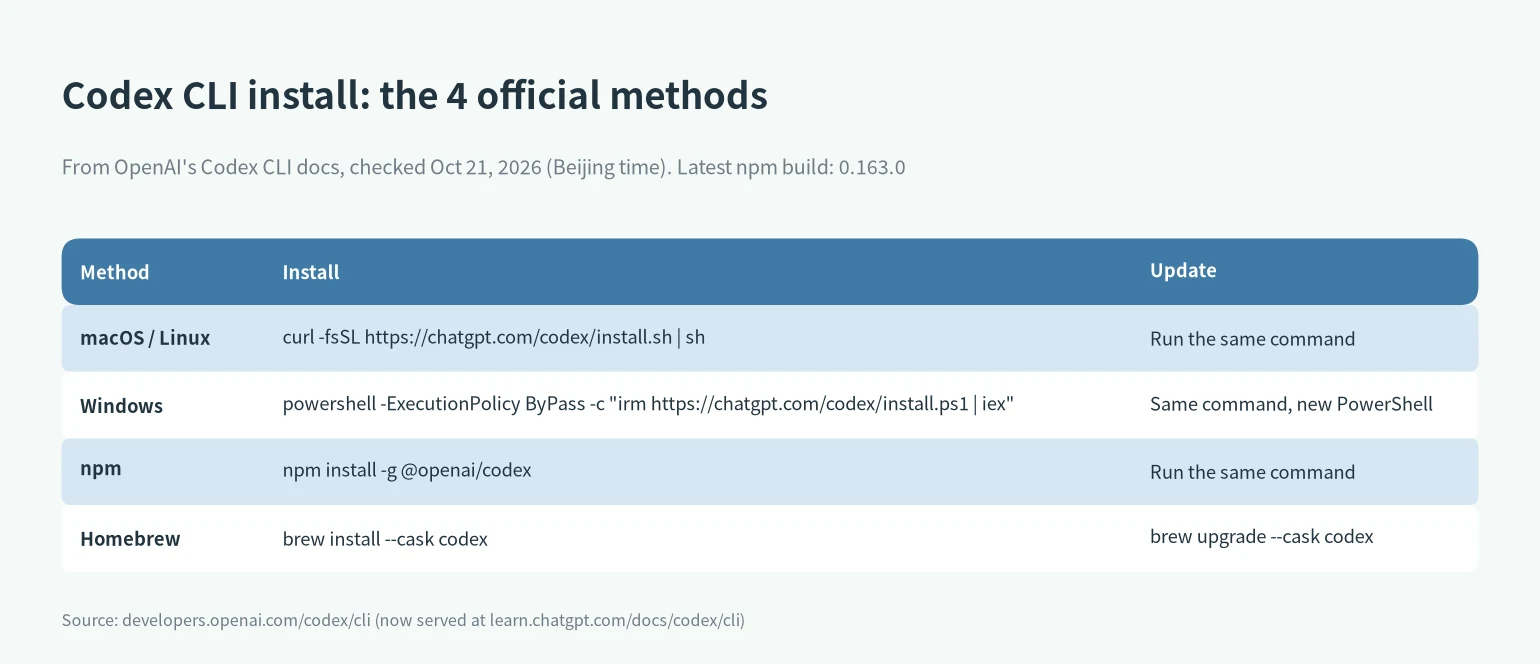
macOS or Linux, standalone installer:
curl -fsSL https://chatgpt.com/codex/install.sh | shWindows, from a new PowerShell window:
powershell -ExecutionPolicy ByPass -c "irm https://chatgpt.com/codex/install.ps1 | iex"npm (any OS with Node):
npm install -g @openai/codexHomebrew:
brew install --cask codexWhich one? I use the standalone installer. It doesn’t care about Node at all, and you update it by running the same line again. If you’re already a Node person, npm is fine; the package declares Node 16 or newer in its package.json, which is much more relaxed than Claude Code’s Node 22. To update: rerun the install script, rerun npm install -g @openai/codex, or brew upgrade --cask codex. There’s also codex update for releases that support self-update.
A small gripe: the docs show the update command as literally the install command again. It works, it just looks like a copy-paste mistake the first time you read it.
Log in: ChatGPT account, API key or device code
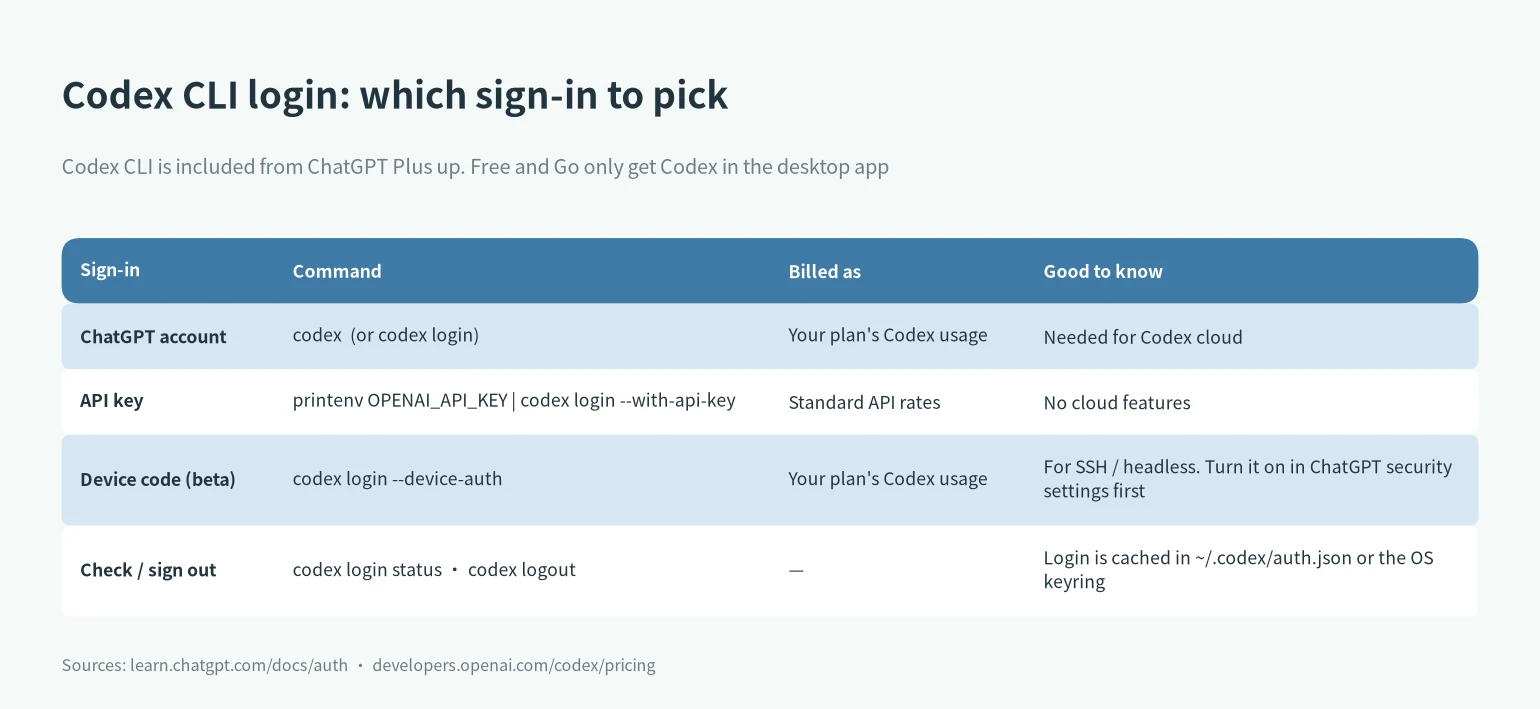
Open a project folder and run codex. The first time, it asks you to pick a sign-in method. Most people want Sign in with ChatGPT, which uses your plan’s Codex usage. You can also start that flow directly with codex login.
If you’d rather pay per token, use an API key. The documented way pipes it in so it doesn’t sit in your shell history:
printenv OPENAI_API_KEY | codex login --with-api-keyOpenAI bills that at standard API rates through your Platform account, not your ChatGPT plan, and some features that depend on ChatGPT workspace or cloud services are limited or unavailable (source). Their own suggestion is API keys for CI and scripts, ChatGPT login for day-to-day work. I agree.
Two commands worth memorizing: codex login status shows which method is active, codex logout clears stored credentials. Login details are cached in ~/.codex/auth.json or your OS credential store, and the CLI and IDE extension share them. Treat that file like a password. Don’t commit it, don’t paste it in a ticket.
One more account thing: if you sign in to ChatGPT with email and password, you need multi-factor authentication turned on before you can use Codex cloud. Google, Microsoft or Apple logins don’t require it on the ChatGPT side.
Your first Codex session
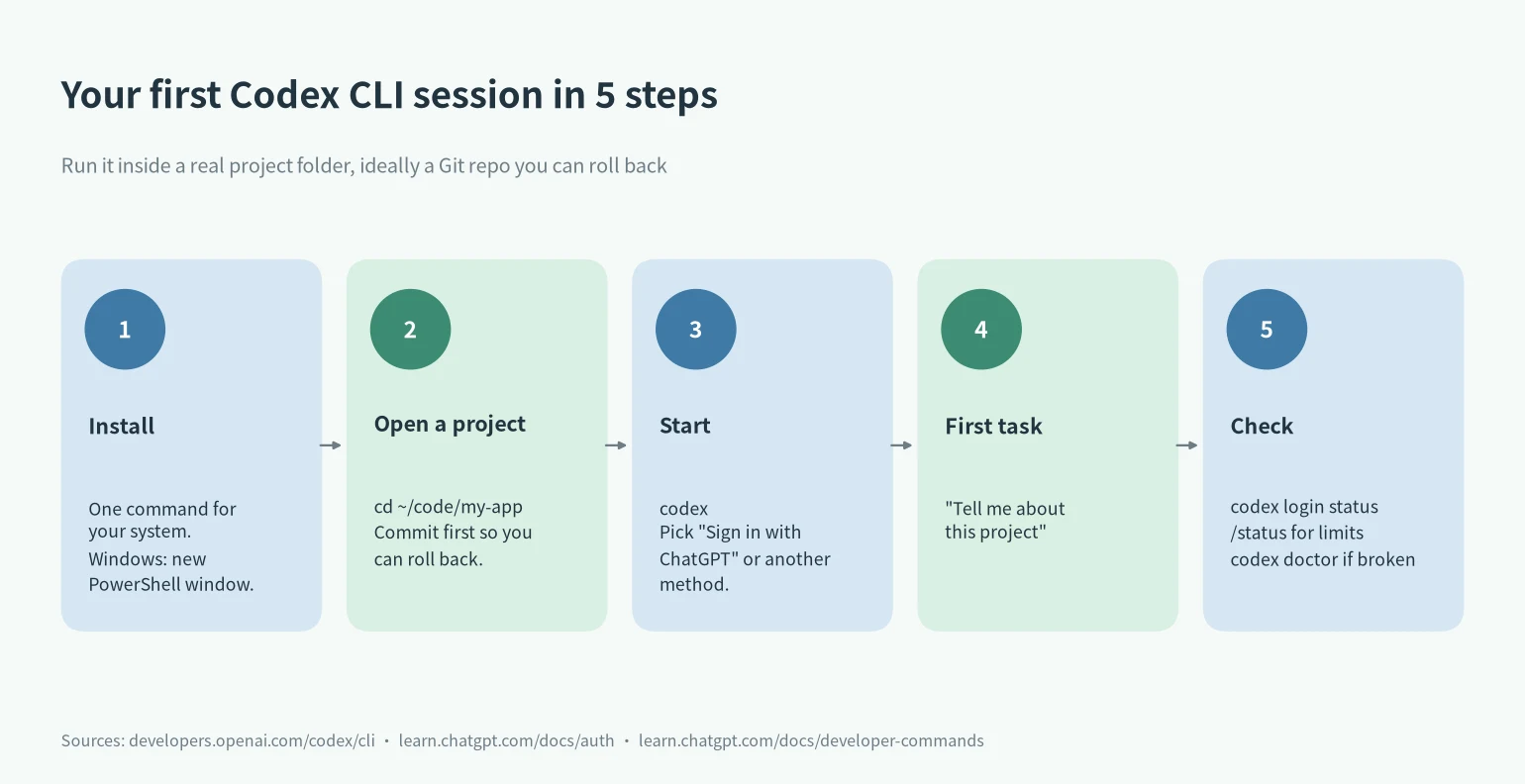
cd into a repo, run codex, and ask something low-stakes like “Tell me about this project”. OpenAI suggests making a Git checkpoint before and after a task so you can roll back, and that’s the one habit I’d actually insist on. Then type /status: it shows the model, approval policy, writable folders and your remaining limits for the session. The full usage picture lives on the usage dashboard. The full command list is in the CLI reference.
A few things I found useful once the Codex CLI install was done: codex resume reopens a recent chat from the same repo, codex --image lets you attach a screenshot to the first prompt, and codex cloud hands work to Codex cloud from the terminal (that one needs the ChatGPT sign-in, not an API key). codex mcp manages MCP servers if you use them.
Codex CLI on Windows
Codex runs natively in PowerShell with its own Windows sandbox by default. OpenAI’s Windows page lists Windows 11 as recommended, fully updated Windows 10 as best effort (version 1809 or newer, because it needs modern console support), and older builds as not recommended. Use WSL2 if your workflow is already Linux-based or you need Linux-native tools. Otherwise the native setup is the default for a reason.
Logging in on a server or over SSH
The browser login sends a token back to a localhost callback, which doesn’t work on a headless box. OpenAI’s preferred fix is device code login (still beta): turn it on in your ChatGPT security settings first, then run codex login --device-auth, open the link on any device and enter the code. If that’s not available, the docs give two fallbacks: log in on a machine with a browser and copy ~/.codex/auth.json over, or forward the callback port with ssh -L 1455:localhost:1455 user@remote and run codex login in that session.
When the Codex CLI install or login breaks
Start with codex doctor. It writes a local report covering installation, config, authentication, Git and terminal health. A direct codex login also writes a codex-login.log in your log directory, which is what support will ask for. Behind a corporate TLS proxy, set CODEX_CA_CERTIFICATE to your PEM bundle before logging in. If the limits look off, check my Claude and Codex usage limit tracker, where I log official changes.
Codex CLI next to Claude Code
Plenty of people run both. If you’re moving from Codex to Claude Code, Claude Code has an official /import codex command that brings over instructions, MCP servers and more (commands reference). Installing the other one is in the Claude Code install guide. And if you’re trying to pick just one, I compared them in Claude Code vs Codex.
Codex CLI install FAQ
Is Codex CLI free? The tool is open to install, but using it needs ChatGPT Plus or higher, or an API key billed per token. Free and Go only get Codex in the desktop app.
Does the Codex CLI install need Node.js? Only for the npm route (Node 16+ per the package). The curl, PowerShell and Homebrew installs don’t.
How do I install Codex CLI on Windows? New PowerShell window, then the irm ... install.ps1 line above. Windows 11 recommended.
How do I log in to Codex CLI without a browser? codex login --device-auth after enabling device code login in ChatGPT security settings.
Where do I see my Codex limits? /status in a session, or the usage dashboard.
How much does it cost overall? Plan prices across vendors are in my AI subscription and API price comparison.
More on this: Claude Code vs Codex · Claude and Codex usage limit tracker · AI subscription and API price comparison · OpenAI category