

Oracle Cloud Free Tier Sign Up (2026): What You Get and Where We Stopped Testing
We walked the Oracle Cloud Free Tier sign-up on November 10, 2026 (Beijing) until the password and home-region screen, then stopped. Disposable email fails. Later steps (phone, card hold, Always Free VM) come from Oracle docs and are marked as such. Quotas below were checked against official pages the same day.
 bufferAbout the author7 min read
Oracle Cloud Free Tier is the official “Always Free + optional Free Trial” offer from Oracle. Chinese and English searchers often look for “oracle cloud free tier sign up” and permanent free VMs. On 10 November 2026 (Beijing time) we walked signup.cloud.oracle.com until the password / Home Region screen, then stopped. We did not enter an address, phone number, or card, and we did not create an instance. Everything after that step—and every Always Free quota number—comes from Oracle’s official pages opened the same day, and is marked from official docs, not tested. Screenshots have names, emails, and verification tokens masked.
What we tested vs what comes from docs
Tested (2026-11-10, Beijing)
- Opened the sign-up home and read the eligibility panel.
- A disposable email (Guerrilla Mail / sharklasers.com) received the verification message, but the link returned “email address entered is not supported.”
- With a normal mailbox we reached “Email verification link sent,” then the Account Information page (password rules, customer type, Home Region list).
- Stopped there—no password submitted, no address / SMS / card screens.
From official docs (not tested)
- Phone SMS verification, credit/debit card identity checks and authorization holds.
- Console after provisioning, creating Always Free Ampere A1 / AMD Micro instances, “out of host capacity,” idle-instance reclamation, upgrading to Pay As You Go.
- All quota figures cite Always Free Resources and Free Tier FAQ as fetched that day. No invented numbers.
What Free Tier officially includes
Oracle’s FAQ splits Free Tier into:
- Free Trial: up to US$300 of credit for up to 30 days in eligible countries (whichever comes first: credits spent or 30 days).
- Always Free: selected resources that remain free for the life of the account when you stay within the rules; new Always Free resources must be in the tenancy home region.
Always Free compute and storage (docs, 2026-11-10)
| Resource | Always Free amount (official) |
|---|---|
| — | — |
Ampere A1 (Arm, VM.Standard.A1.Flex) | First 1,500 OCPU hours and 9,000 GB hours per month; for Always Free tenancies that equals 2 OCPUs + 12 GB total (one 2-OCPU VM or up to two 1-OCPU VMs) |
AMD Micro (VM.Standard.E2.1.Micro) | Up to two VMs; each about 1/8 OCPU and 1 GB RAM |
| Block Volume (boot + data) | 200 GB total; five volume backups |
| Outbound data transfer | 10 TB per month |
| Autonomous AI Database | Two instances, each 1 OCPU + 20 GB (not scalable) |
| Object Storage | Always Free–only accounts: about 20 GB combined across tiers; paid/trial accounts are listed as 10+10+10 GB in the same doc |
Source: Always Free Resources. The developer portal developer.oracle.com/free.html may still show older “up to 4 A1 / 24 GB” wording; this article follows the Always Free Resources doc.
If you are comparing local LLM hardware instead of a free cloud VM, see our VRAM calculator and best-value GPU guide.
Official eligibility and payment rules
We only restate what Oracle publishes—no workarounds:
- One Free Trial or Always Free account per person. Creating or attempting to create multiple free accounts is prohibited (sign-up page + FAQ).
- Contact and billing details must be accurate, valid, and used with consent; otherwise the account may be suspended or terminated.
- Accounts idle for 30 days or more may be treated as abandoned and become eligible for suspension or termination (FAQ).
- Home Region cannot be changed later. Availability varies; Free Tier is unavailable in some regions. The sign-up UI states you must not create multiple accounts to change region.
- Do not use disposable email (see our test below).
- Payment methods (FAQ only): Oracle accepts credit cards and debit cards that function like credit cards. It does not accept PIN debit cards, or virtual, single-use, or prepaid cards. Oracle may place a temporary authorization hold; banks typically remove it in three to five days, with no actual charge. This article does not discuss any way around those rules.
- Whether a specific China-issued card works, or which region is fastest from mainland China: not verified here.
Open the sign-up page
Go to Oracle Cloud Free Tier sign-up. The form asks for billing country/territory, first name, last name, email, hCaptcha, then Verify my email. The left panel states one free account per person and that multiple free accounts are prohibited.
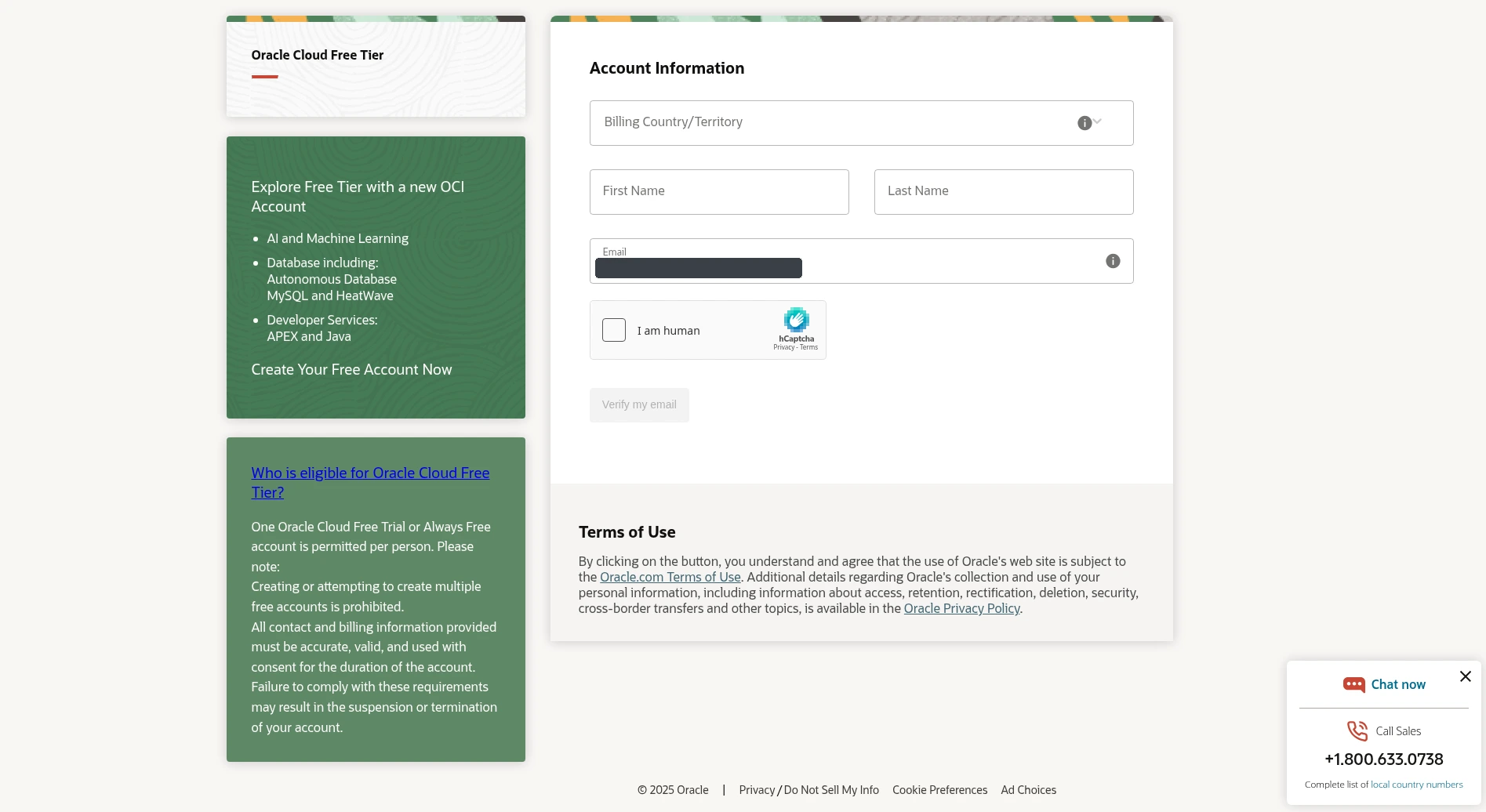
Billing country is for billing if the account later becomes paid; Home Region is chosen later—do not confuse the two.
Email verification (disposable domains fail)
Disposable email — tested failure
With Guerrilla Mail (sharklasers.com) the verification email arrived (from a [email protected]…oci.oraclecloud.com address). Clicking the link showed:
> Email verification unsuccessful
> The email address entered is not supported. Please try signing up with a different email address or email domain.
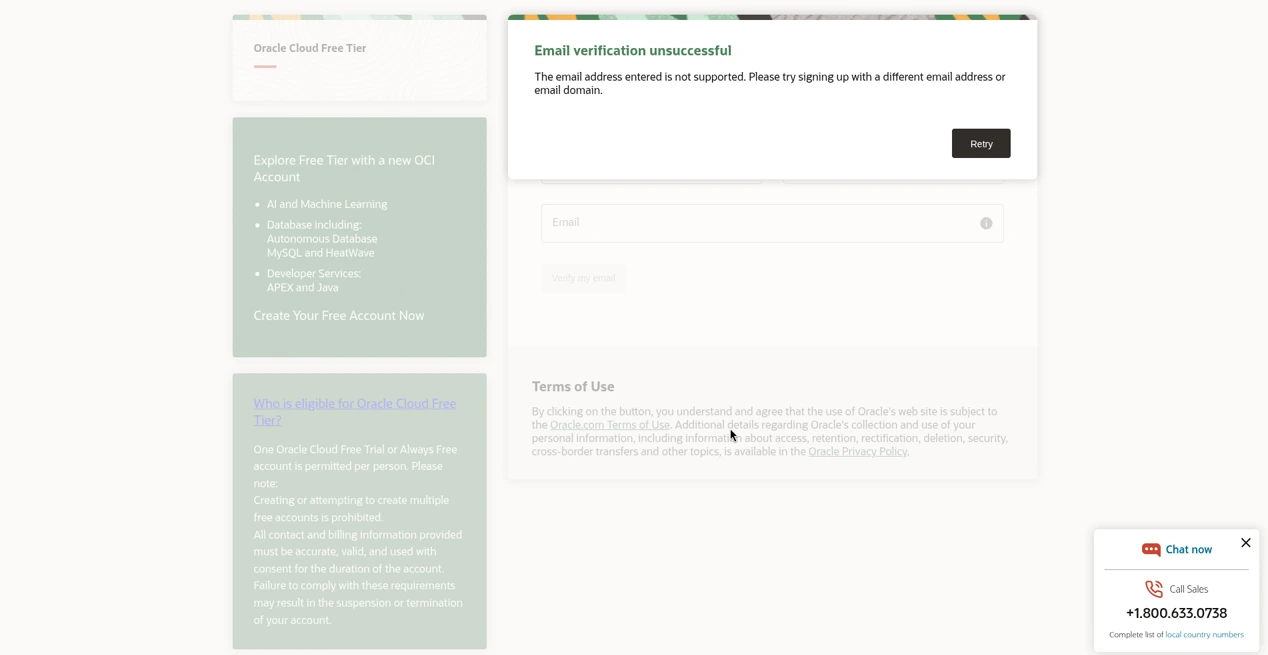
Tested takeaway: use a normal provider (Gmail, Outlook, etc.), not a throwaway domain.
Normal email — link sent
After a normal address and captcha, the form shows Email verification link sent. Resend is available after about two minutes; the link is valid for 30 minutes.
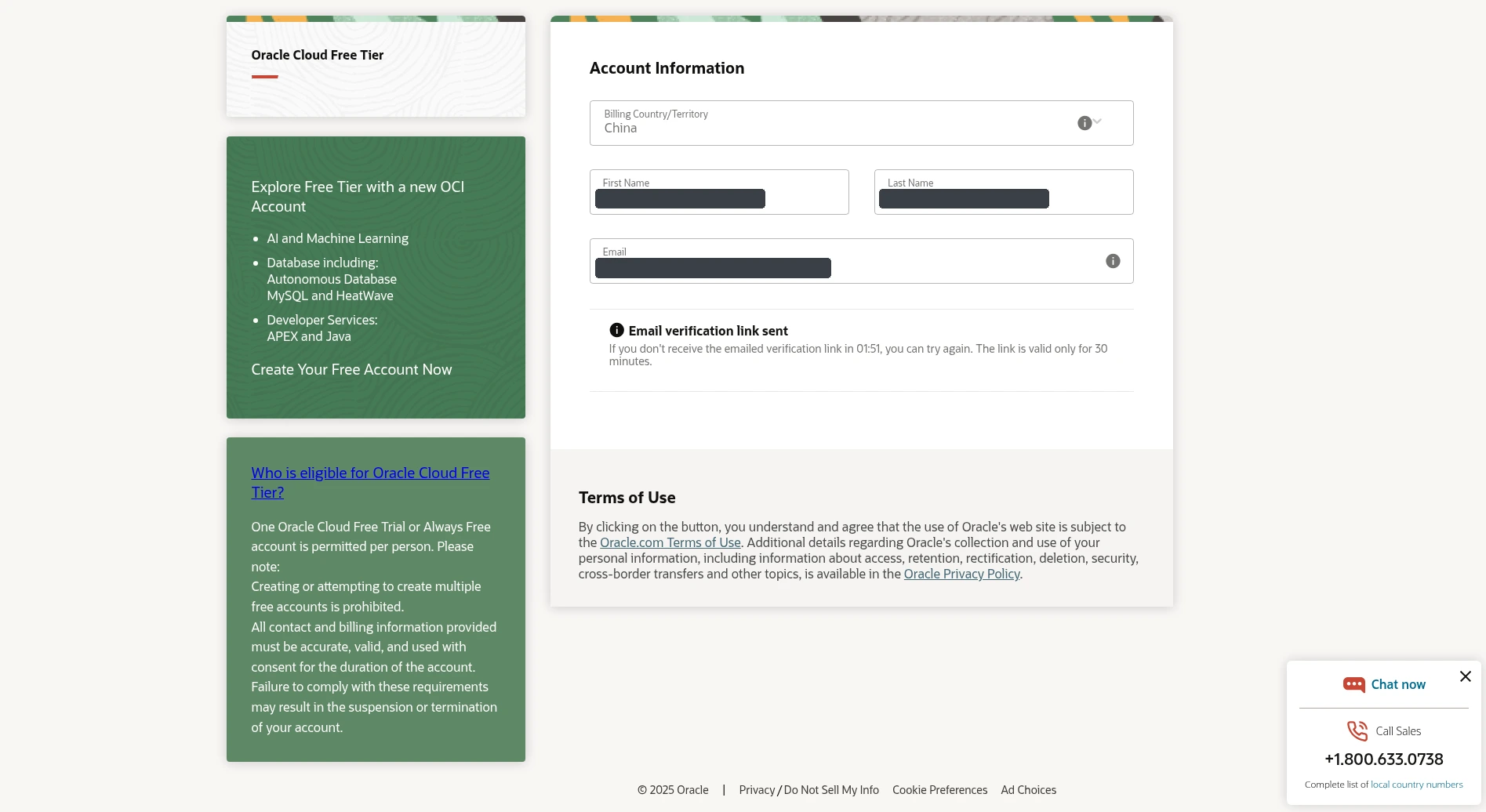
Password, customer type, Home Region (end of our test)
After verification you get Account Information. Country, name, and email are locked. You set:
- Password / Confirm: min 8 characters with lower, upper, digit, special; max 40; must not contain first/last name, email, spaces, or `
- Customer type: Corporate (default) or Individual; corporate needs a legal company name.
- Cloud Account / Tenancy Name: auto-suggested.
- Home Region: long regional list. UI notes: cannot be changed later; availability varies; Free Tier missing in some regions; Oracle prohibits creating multiple accounts to switch region.
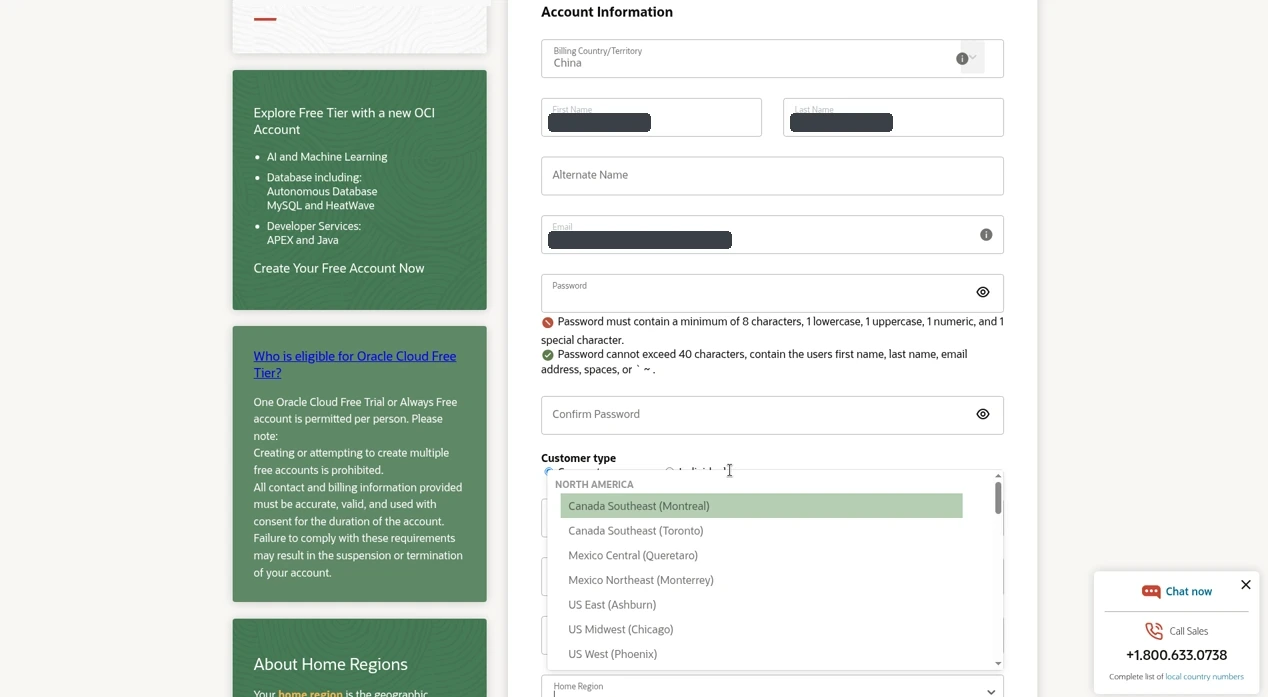
We did not submit a password. The next section is documentation only.
Later steps (official docs, not tested)
Address, phone, card
Per the FAQ, contact info and a credit/debit card are used for setup and identity verification. Temporary authorization holds may appear and are typically cleared by the bank in 3–5 days without a real charge. Accepted/not-accepted card types are exactly as quoted above from the FAQ—nothing else.
Creating Always Free instances
See Oracle’s Creating an Instance. Always Free compute must be in the home region. Out of host capacity means a temporary shortage of Always Free shapes; try another availability domain or wait (FAQ). Idle Always Free compute may be reclaimed after a 7-day window if CPU (95th percentile), network, and (A1 only) memory utilization stay under 20%. After Free Trial ends, stay within Always Free A1 limits or upgrade—FAQ details reclaim rules for oversized A1 fleets.
Related free-tier reading on this site
API free tiers (no VM required): Gemini API Free Tier Limits. Cloud CLI workflows: Cloudflare cf CLI tutorial.
FAQ
Is Oracle Cloud Free Tier really free forever?
Always Free resources can be used for an unlimited time under Oracle’s rules. The US$300 / 30-day Free Trial is separate. Idle accounts and rule violations can lead to suspension or termination per the FAQ.
Why did a disposable email fail?
In our test the message arrived, but verification returned *email address entered is not supported*. Use a common personal domain.
Which Home Region should I pick?
Pick for latency and Always Free capacity; it cannot be changed. We did not benchmark regions from mainland China.
Do I need a credit card?
The FAQ says Free Tier sign-up uses a credit card or a debit card that works like a credit card for identity verification, with possible temporary holds. Card types Oracle rejects are listed in the FAQ excerpt above.
How many free Ampere A1 OCPUs?
Per Always Free Resources on 2026-11-10: 2 OCPUs + 12 GB for Always Free tenancies (1,500 OCPU hours / 9,000 GB hours monthly). Older “4 OCPU / 24 GB” lines may be outdated marketing copy—prefer the docs page.
Stuck on out of host capacity?
Try another AD, wait and retry, or consider Pay As You Go for broader capacity (FAQ). Always Free resources themselves are not billed after an upgrade; usage above Always Free limits is.