

Gemini API Free Tier Limits: The Honest 2026 Guide to What’s Still Free
Gemini API free tier limits in 2026: Gemini 3.8 Flash, Flash-Lite, Gemma 4 and Embedding 2 are free, Pro and Argon are not. Google no longer publishes the numbers, so here are the measured figures, how to read your own, the data trade-off and how paid tiers work.
 bufferAbout the author7 min read
Gemini API free tier limits in short: the free tier still exists in 2026, and it needs no card. You get Gemini 3.8 Flash, 3.6 Flash, the Flash-Lite models, Gemma 4 and Embedding 2 at $0. You don’t get Gemini 4 Argon, 3.1 Pro or the image and video models. Google no longer prints the per-model RPM and RPD numbers. A third-party test in September read them from 429 errors: about 5 requests a minute and 20 a day on Flash, and 15 a minute and 500 a day on Flash-Lite. Your own numbers are in AI Studio. I checked every figure below on October 27, 2026 (Beijing time), and each one links to where it came from.
The short answer
- Free models: Gemini 3.8 Flash, 3.6 Flash, 3.5 Flash-Lite, 3.1 Flash-Lite, 3 Flash Preview, Gemma 4, Embedding 2, plus the Live, transcribe and TTS models. Source: the “Free Tier” column on Google’s Gemini API pricing page.
- Not free: Gemini 4 Argon, Gemini 3.1 Pro Preview, Nano Banana image models, Omni video and Lyria music. The same page says “Not available” for each.
- How much: Google doesn’t say. The rate limits page only tells you to look in AI Studio and adds that limits are “not guaranteed”.
- The catch: on the free tier your prompts may be used to improve Google’s products, and human reviewers may read them.
- When to pay: once 20 requests a day on Flash stops being enough. Linking billing takes a $5 prepay and moves you to Tier 1 right away.
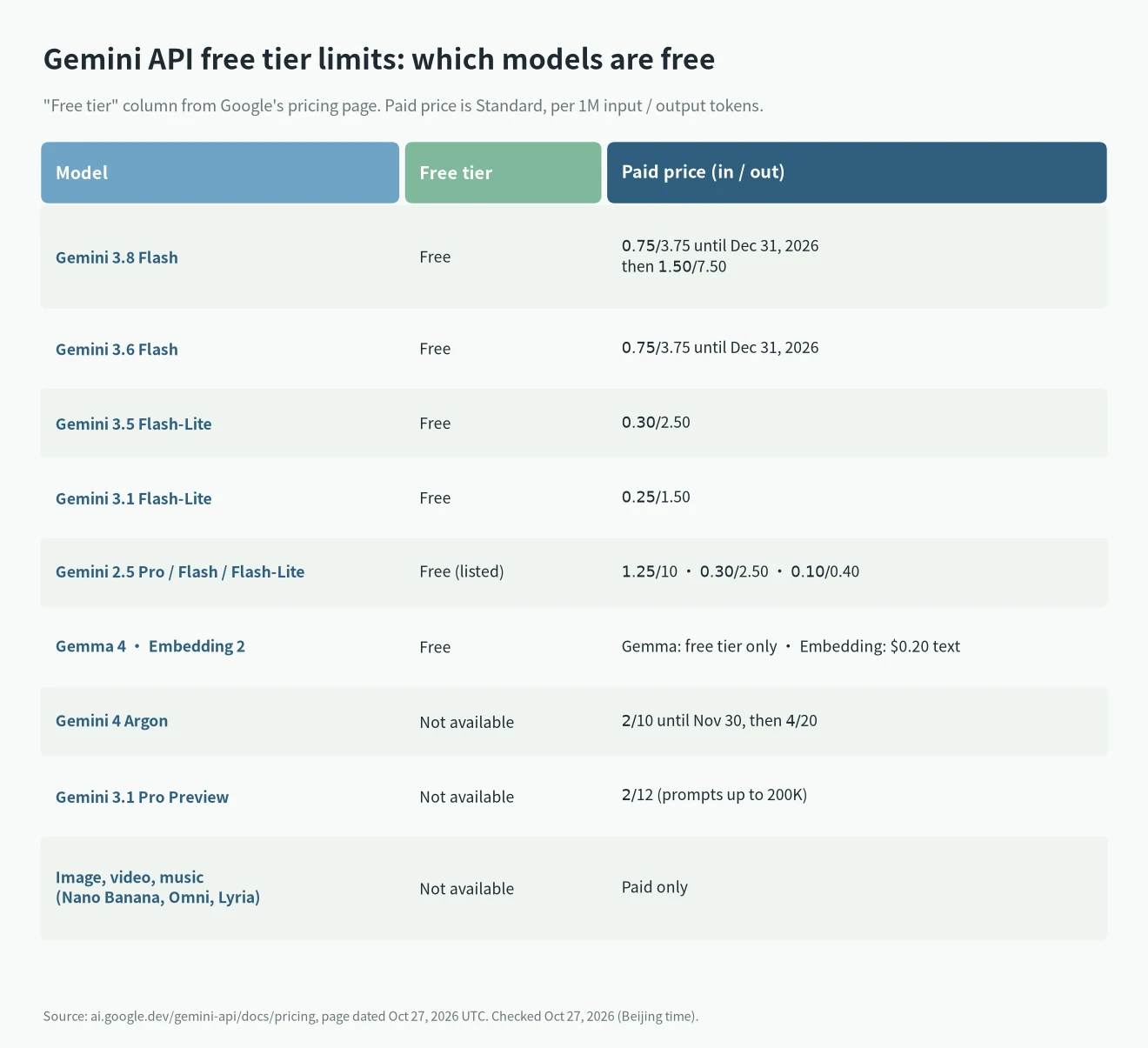
Which models are free, and what they cost later
The table above copies the free column from the pricing page. Two details are easy to miss.
First, the Flash prices are promotional. Gemini 3.8 Flash costs $0.75 per million input tokens and $3.75 per million output tokens through December 31, 2026. From January 1, 2027 it doubles to $1.50 and $7.50. Gemini 4 Argon has a similar deal that ends sooner, on November 30.
Second, the 2.5 models are still listed as free, but that may not help you. The third-party test I cite below got a 404 “no longer available to new users” on Gemini 2.5 for a new key. I couldn’t confirm this on an official page, so treat 2.5 as “maybe” and build on 3.x.
Search grounding is also split. On the free tier, Google Search grounding works only on Gemini 2.5 Flash and Flash-Lite, with 500 requests a day shared between them. For Gemini 3 and newer it says “Not available” on free. Code execution, URL context and file search are free.
What the rate limits actually are
Google used to publish a table of free RPM (requests per minute) and RPD (requests per day). It doesn’t anymore. The Continuum Code guide to RESOURCE_EXHAUSTED noticed the same thing: the free-tier tables are gone from the docs.
The best public numbers I found come from AIPlug’s test on September 2, 2026. They sent requests until they hit 429 errors, then read the quotaValue field in the error. That’s a real reading, not a guess, but it is one project on one day.
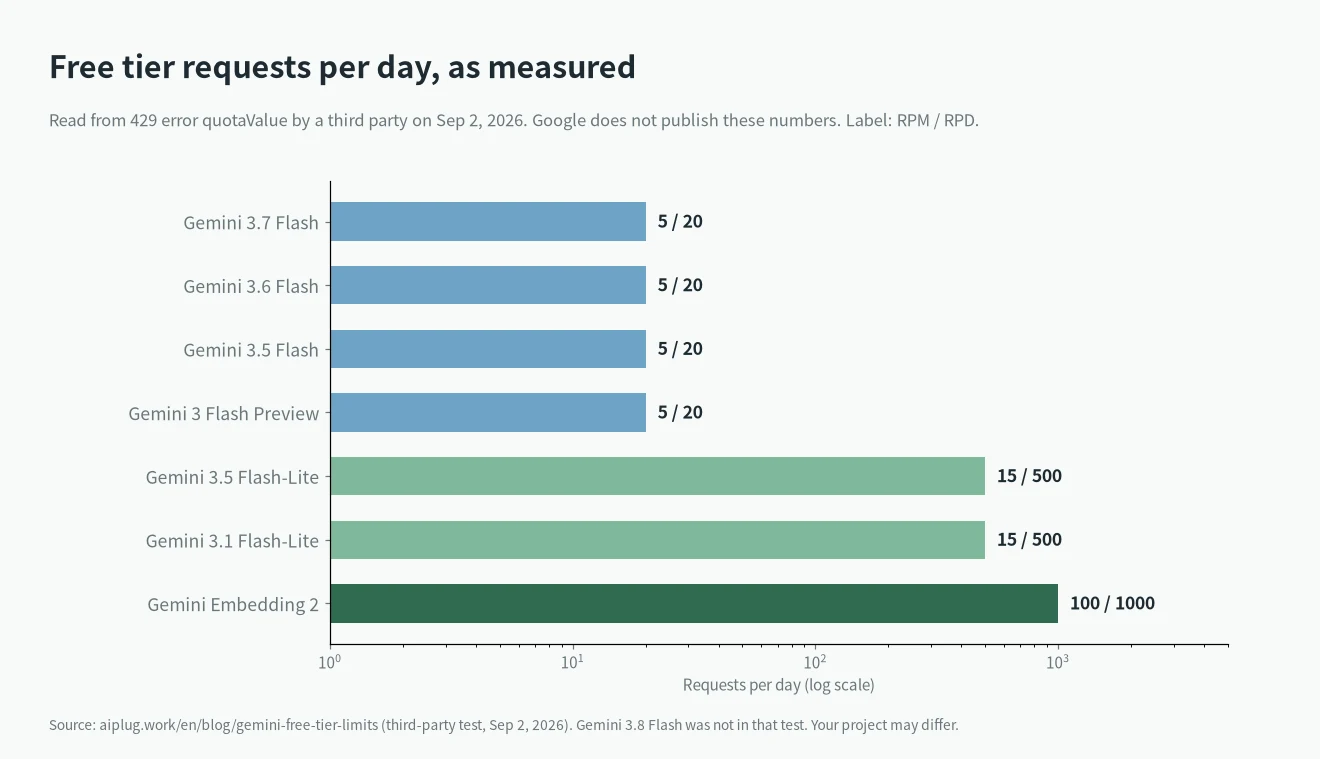
- Flash models (3.7, 3.6, 3.5 Flash and 3 Flash Preview): 5 RPM and 20 RPD.
- Flash-Lite (3.5 and 3.1): 15 RPM and 500 RPD.
- Embedding 2: 100 RPM and 1,000 RPD.
Gemini 3.8 Flash wasn’t in that test, so I don’t know its free number. If it matches the other Flash models, it’s 20 a day. The same test also saw very slow free responses on 3.7 Flash: 27 to 148 seconds.
Three rules from Google’s docs
These come straight from the rate limits page, and they matter more than the exact numbers.
- Per project, not per key. Making a second API key in the same project gives you nothing extra.
- The daily count resets at midnight Pacific time. That’s 15:00 Beijing time until November 1, then 16:00 after US daylight saving ends.
- Every limit counts on its own. Going over RPM, TPM (tokens per minute) or RPD each triggers an error. Preview models get tighter limits.
Failed requests are not free for quota either. The billing FAQ says 400 and 500 errors aren’t charged but still count against your limits.
How to see your own limits
Your Gemini API free tier limits in AI Studio
Open Google AI Studio, go to your project, and open the rate limit page. It shows the limits for your project and tier. This is the only official number you will get.
From a 429 error
When you go over, the API returns 429 RESOURCE_EXHAUSTED. The error details include a QuotaFailure block. Look for these quota ids and the quotaValue next to them:
GenerateRequestsPerMinutePerProjectPerModel-FreeTier
GenerateRequestsPerDayPerProjectPerModel-FreeTier
If the error says per day, waiting a minute won’t help. Wait for the reset or switch to a Flash-Lite model, which has a bigger daily allowance. I explained the same kind of error for another tool in my Claude Code 429 guide.
The privacy trade-off
This part matters more than the limits for some people. The pricing page lists “Used to improve our products: Yes” for every free model. The Gemini API terms go further: for unpaid services, human reviewers may read your inputs and outputs, so don’t send sensitive or personal data.
There is one exception. In the EEA, Switzerland and the UK, the paid data terms apply even when you use the free tier. And if your app serves users there, the terms say you must use the paid service.
The terms also say the API is for professional or business use, and you must be 18 or older.
Where the free tier works
The free tier is available wherever the API is. Google’s list of available regions includes Taiwan, Singapore and Japan. Mainland China and Hong Kong are not on it. The billing FAQ also confirms the free tier is available in the EEA, the UK and Switzerland.
When to switch to paid, and how
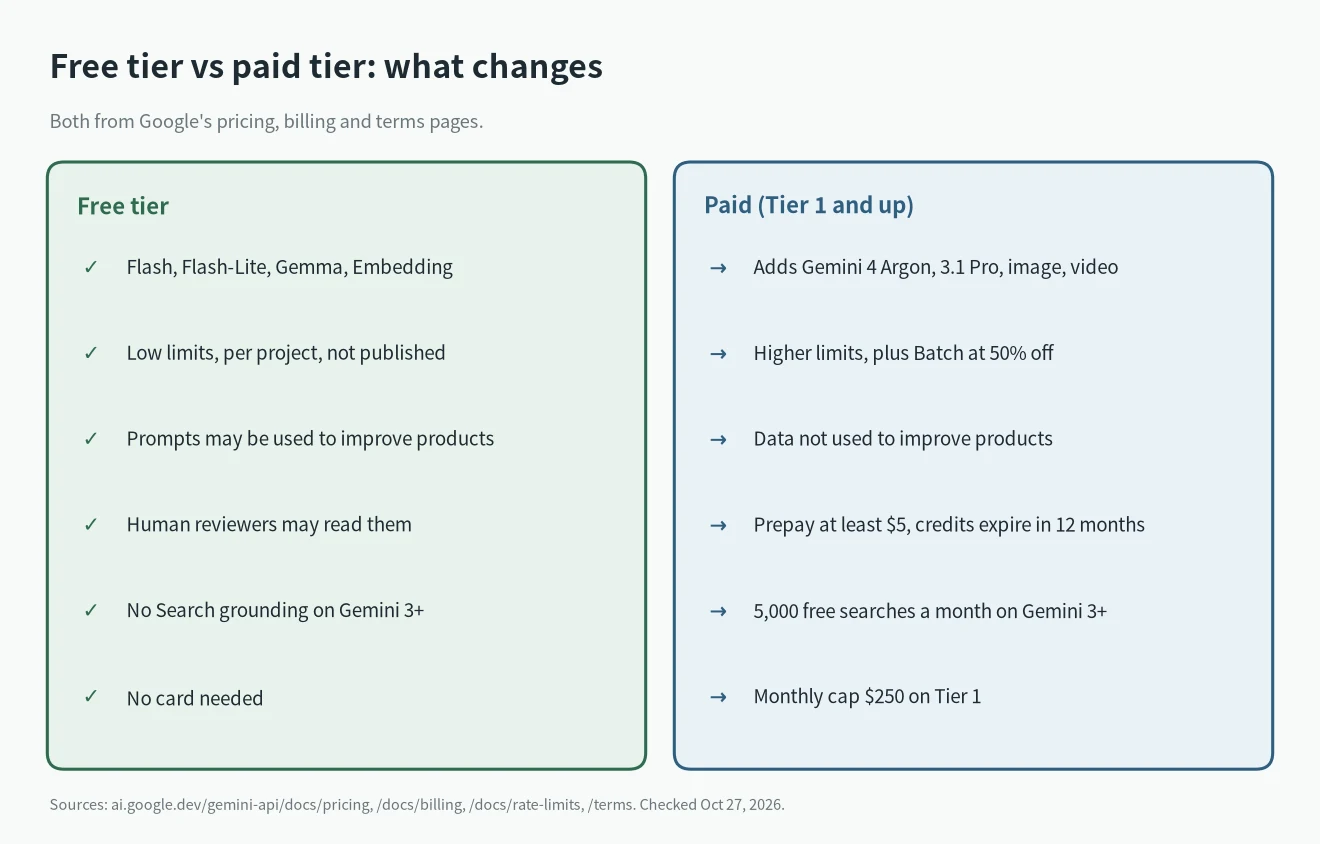
You move up by linking a billing account in AI Studio. The move from free to Tier 1 usually happens right away, according to the rate limits page. A few rules from the billing FAQ:
- Prepay first. The minimum is $5. Credits expire after 12 months and can’t be refunded.
- At $0 your calls stop. Requests fail with a 402 error until you top up.
- The $300 Google Cloud welcome credit doesn’t work here. That applies to accounts created after March 2, 2026.
- You can go back. Turn off billing on the project and it returns to the free tier.
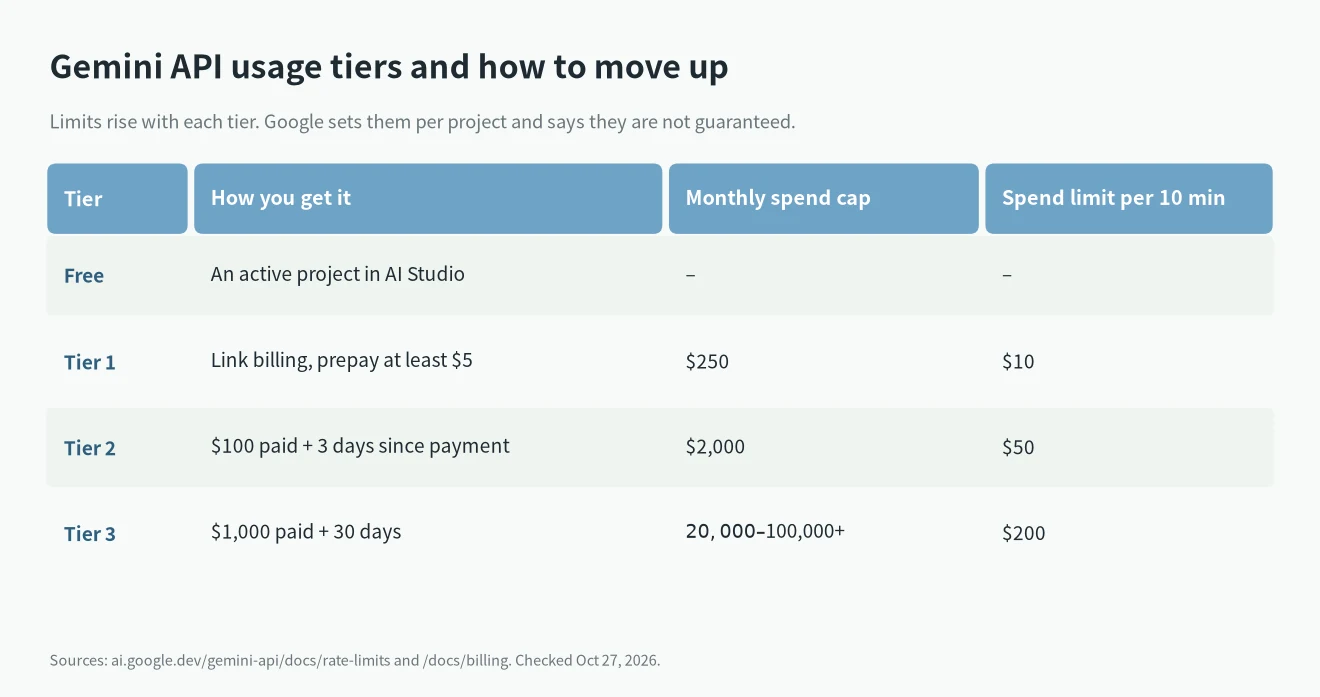
Tier 1 also adds a spend limit of $10 per 10 minutes and a monthly cap of $250. That protects you from a runaway loop. Tiers 2 and 3 come automatically as your total spend grows.
If you are comparing what a subscription gets you instead, I wrote about Google AI Pro vs Ultra. For an example of subscription-or-API maths, see ChatGPT subscription vs API.
My advice
- For learning and prototypes, the free tier is fine. Use Flash-Lite for anything that loops, because 500 a day goes a lot further than 20.
- For a side project with real users, pay. Twenty Flash requests a day won’t survive a small launch, and the free data terms are a bad fit for user data.
- If you’re in the EU or UK and building for users there, you need the paid service anyway.
- Before the January price change, test your costs on 3.8 Flash at the new $1.50 / $7.50 rate, not the promo price.
- For cheap API alternatives, my Kimi K3.1 Pro API pricing post compares it with Claude and DeepSeek.
FAQ
Is the Gemini API free?
Yes, for some models. Flash, Flash-Lite, Gemma 4 and Embedding 2 cost $0 on the free tier. The top models need billing.
Do I need a credit card for the free tier?
No. An active project in AI Studio is enough. You only link billing to move to Tier 1.
What are the free tier limits for Gemini 3.8 Flash?
Google doesn’t publish them, and I haven’t seen a dated test for 3.8 Flash. Check the rate limit page in AI Studio for your project.
Will more API keys give me more quota?
No. Limits are per project. Keys in the same project share one quota.
Is Google AI Studio free?
Yes. The pricing page says AI Studio use is free in all available regions.