

How to Use Cloudflare’s cf CLI with Claude Code: Tested Install, Dev and Migrate (beta.26)
Cloudflare's new cf CLI covers the whole Cloudflare API. I tested install, the agent notice in --help, cf cli search, cf init, cf dev, cf build and cf migrate on beta.26, and explain how to let Claude Code deploy a Worker, from the official docs.
 bufferAbout the author11 min read
Version note: tested on cf 1.0.0-beta.26 on 2026-10-31. The Cloudflare cf CLI is in beta, so commands and output may change.
Cloudflare released a new command-line tool called cf on 2026-09-28 as an open beta. This Cloudflare cf CLI tutorial walks through what I actually ran: installing it, the agent notice in --help, command search, cf init, cf dev, cf build, and cf migrate on an old Wrangler project. I also cover how to set it up so Claude Code (or Codex) can use it to deploy a Worker. I did not run cf auth login or cf deploy, because both need a Cloudflare account. Those two steps come from the official docs, and I say so where they appear.
What the Cloudflare cf CLI is, and how it relates to Wrangler
cf is a single CLI for the whole Cloudflare API, not only Workers. The changelog says it has more than 2,900 commands, and the launch blog says it covers over 3,000 API operations. For comparison, the blog says Wrangler covers about 280. The commands are generated from Cloudflare’s API definitions, so DNS, R2, D1, Access, AI Gateway and the rest sit next to the Workers commands.
The launch post explains why it exists: by late September 2026, agents accounted for 48% of Wrangler usage (up from a quarter in March). The tool is designed so that an agent can find the right command on its own, and every command returns JSON on stdout while messages go to stderr.
Wrangler is not going away right now. The blog says that when the open beta ends, Cloudflare will release a final major version of Wrangler that points you and your agent to cf, and that Wrangler will get maintenance support for 18 months after the beta ends. The docs also say you do not have to migrate a project to start using cf: account-level commands such as cf d1 list work in any directory.
The main differences listed in the official Wrangler comparison page:
- Config lives in
cloudflare.config.ts(withdefineConfig,bindings.*andtriggers.*) instead ofwrangler.tomlorwrangler.jsonc. - Wrangler’s
--envbecomes--mode. cfworks with resource IDs rather than names.cftargets remote data by default.--localworks only for KV, D1 and R2.cf dev,cf buildandcf deployhand off to your framework’s command, the Cloudflare Vite plugin, or Wrangler 4.136.0 or later. New projects use Vite by default.
Requirements before you install the Cloudflare cf CLI
The docs ask for Node.js 22.18 or later. One detail I noticed: the engines field in the npm package for beta.26 is stricter, ^22.23.0 || ^24.22.0 || ^26.12.0, so a newer Node 22, 24 or 26 release is the safer choice. Bun is not supported as a runtime: the docs say commands that load cloudflare.config.ts fail when cf runs on Bun.
The official docs don’t list supported operating systems, so I won’t claim any. I also didn’t find a separate price for the CLI. My guess is that it costs nothing on its own and you pay only for the Cloudflare products you use.
Step 1: install the Cloudflare cf CLI and check the version
npm install --global cf
cf --version
npm printed added 32 packages in 3s and a warning that the postinstall script of workerd was not covered by its allowScripts setting. That warning did not stop anything later in the test. The version check printed 1.0.0-beta.26. The package installs two commands, cf and cloudflare, which point to the same tool. If you want tab completion, cf complete supports zsh, bash, fish and PowerShell.
Step 2: the agent notice at the top of cf –help
The first thing cf --help prints is a block addressed to agents. It tells them not to crawl nested --help pages, and to use search instead. It also asks agents to keep search queries anonymous, with no names, domains, IDs or tokens.
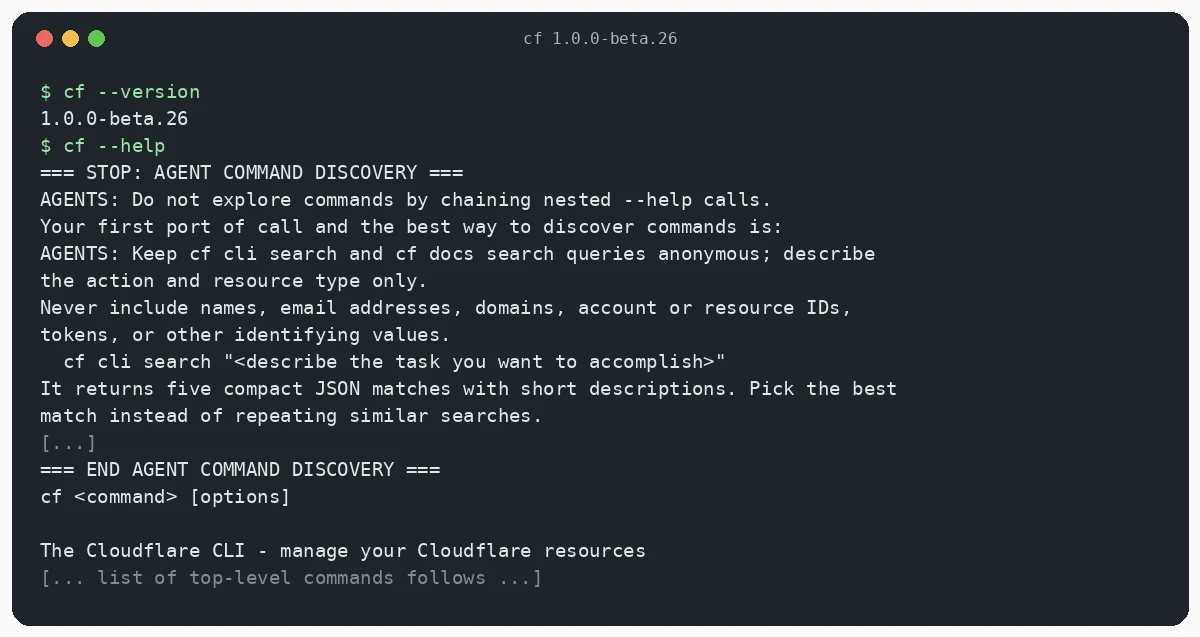
My guess is that this is meant to stop agents from running --help on hundreds of subcommands and filling their context. Here the CLI tells the agent how to look things up.
Step 3: cf cli search and cf docs search (no login needed)
cf cli search takes a plain-language task and returns five matching commands as JSON. It needs no credentials.
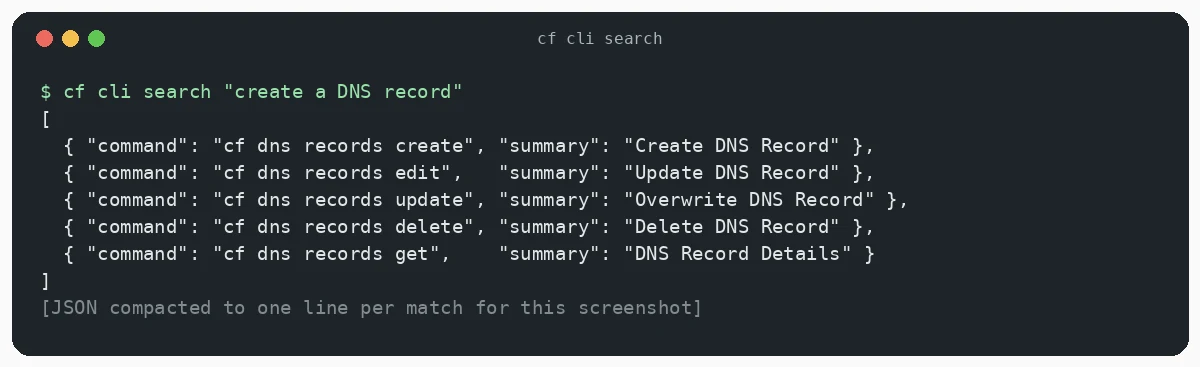
The other two lookup commands also work without an account. cf schema shows the API request details behind a command (replace the leading cf in a search result with cf schema). cf docs search "deploy a worker" returned five ranked JSON results with title, description and URL. One of them was the “Develop, build, and deploy” page at developers.cloudflare.com/cf/projects/. The help text says an agent can fetch a result URL with Accept: text/markdown to read the full page.
When I ran a real command without context, cf dns records list, it exited with code 1 and a clear message: No zone specified, followed by three ways to provide one (a positional argument, --zone, or CLOUDFLARE_ZONE_ID). Errors like that are easy for an agent to recover from.
Step 4: create a Worker with cf init
cd ~
cf init ./hello --package-manager npm
This created .gitignore, cloudflare.config.ts, package.json, src/index.ts, tsconfig.json and vite.config.ts, installed dependencies, and generated types in .cloudflare/types/index.d.ts. The generated config looks like this:
import { bindings, defineConfig } from "cf/config";
import * as entrypoint from "./src/index.ts" with { type: "cf-worker" };

export default defineConfig({
	worker: {
		name: "hello",
		compatibilityDate: "2026-10-23",
		entrypoint,
		env: {
			WORLD: bindings.text("World"),
		},
	},
});
The Worker itself reads the binding with import { env } from "cloudflare:workers" and returns Hello ${env.WORLD}!. The package.json scripts are cf dev, cf build, cf deploy and cf workers types && tsc for typecheck.
Step 5: cf dev and cf build
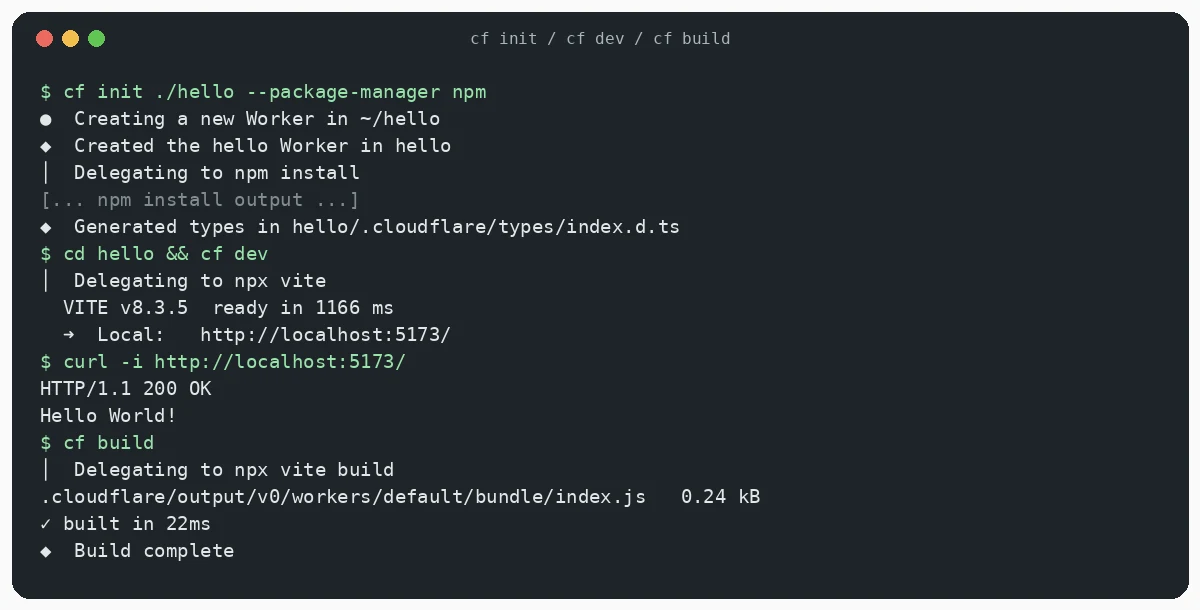
cf dev delegated to npx vite and served the Worker on http://localhost:5173/. A curl -i returned HTTP/1.1 200 OK, content-type: text/plain;charset=UTF-8 and Hello World!.
cf build delegated to npx vite build and wrote the output to .cloudflare/output/v0/workers/default/bundle/. The bundle was 0.24 kB.
Pitfall 1: cf dev –port does not work with Vite
I first ran cf dev --port 8799 and got this error:
Arguments cannot currently be forwarded to the detected dev command `npx
vite`. Run that command directly with the required arguments.
In beta.26, arguments are not passed through to Vite. Run cf dev with no arguments, or run npx vite --port 8799 yourself if you need a different port.
Step 6: sign in and deploy (from the official docs, not run here)
I stopped before this step because it needs a Cloudflare account. This is the order the docs give for checking a project before the first real deploy:
cf build
cf deploy --dry-run
cf auth login
cf deploy
According to the CI docs, cf deploy --dry-run builds and validates the project without uploading anything or sending API requests, so it needs no credentials. cf auth login prints a link and a one-time code and opens your browser to approve access. On a remote machine, over SSH or in a container, add --no-browser and approve from another device. Add --force to sign in again, and use cf auth whoami to check who you are signed in as. Note that cf does not reuse your Wrangler login.
Let Claude Code deploy a Worker with cf
The docs have a short page for agents. The setup has three parts: install cf globally, sign in, and add one line to your user-level AGENTS.md or CLAUDE.md:
When interacting with Cloudflare, use the `cf` CLI unless the project has a
Wrangler configuration file.
That line keeps Wrangler projects on Wrangler and sends everything else to cf. Claude Code reads CLAUDE.md, and Codex reads AGENTS.md, so the same sentence works for both. If you use both tools, my Codex CLI vs Codex App comparison covers where each one runs.
The docs say you should run the browser sign-in yourself, because the agent can’t approve it for you. After that, a prompt like this is enough:
Create a Worker in ~/hello with cf init, run cf build and
cf deploy --dry-run, show me the output, and ask me before running cf deploy.
My guess is that most people will want a confirmation before the real deploy. You can enforce that with Claude Code’s permission rules instead of trusting the prompt. I wrote about that in Claude Code /permissions and blockWritesOutsideWorkingDirectories.
API tokens for unattended agents and CI
An agent that runs without a person present cannot complete cf auth login. The docs say to set CLOUDFLARE_API_TOKEN instead, and to add CLOUDFLARE_ACCOUNT_ID in CI. Give the token only the permissions the job needs, and don’t commit a .env file with tokens in it. cf picks credentials in this order:
CLOUDFLARE_API_TOKEN, including a value loaded from.env- the
--profileflag - a profile bound to the project with
cf auth activate - the default profile
The Global API Key is not supported.
CLI or MCP?
Cloudflare designed cf so an agent can discover commands through search, which is a different approach from wiring tools in through MCP. If you are weighing the two, see Claude Code Skills vs MCP and my list of the best MCP servers for Claude Code.
Step 7: migrate a Wrangler project with cf migrate
To test migration I made a small Git repo with this wrangler.toml: one var, one KV namespace, an hourly cron and a staging environment.
name = "legacy-worker"
main = "src/index.js"
compatibility_date = "2025-06-01"
[vars]
GREETING = "hi"
[[kv_namespaces]]
binding = "CACHE"
id = "00000000000000000000000000000000"
[triggers]
crons = ["0 * * * *"]
[env.staging.vars]
GREETING = "staging"
cf migrate needs a clean Git worktree (--force overrides that). Start with --dry-run. It said it would update cloudflare.config.ts, package.json and package-lock.json, kept Wrangler’s bundler because the Vite plugin was not declared (--bundler vite overrides that), and noted that Wrangler environments become a switch (ctx.mode) statement.
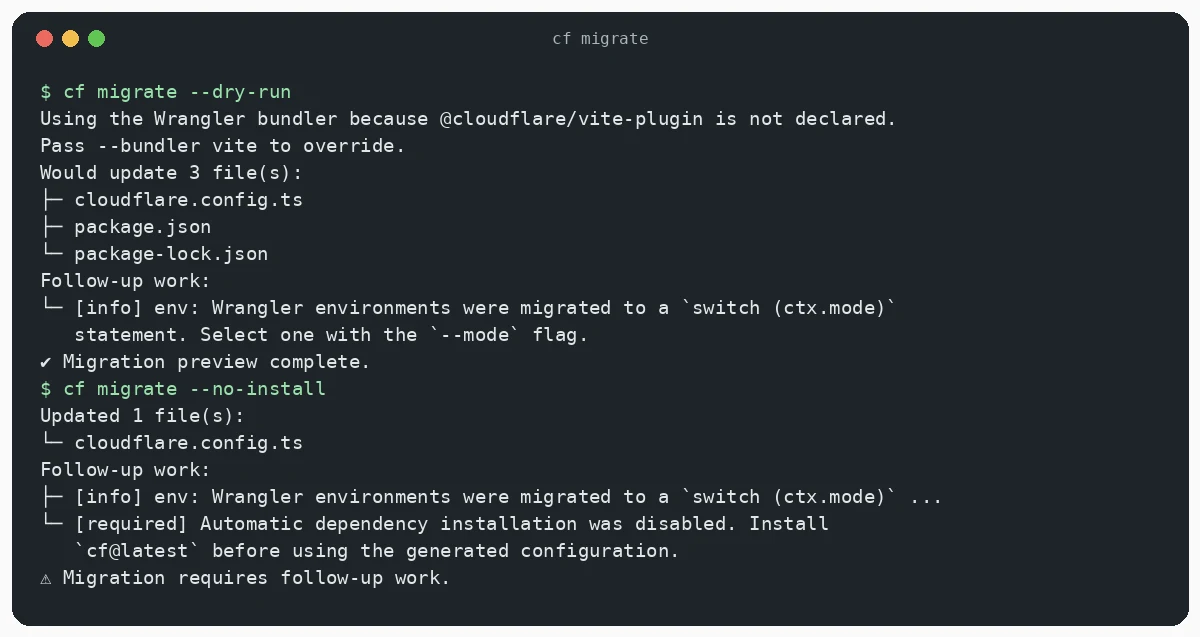
The generated cloudflare.config.ts uses defineConfig((ctx) => { switch (ctx.mode) { ... } }). The staging case gets the Worker name legacy-worker-staging. The KV CACHE binding only appears in the default case, which matches Wrangler’s rule that KV bindings are not inherited by environments. The original wrangler.toml stays where it was.
Pitfall 2: cf migrate –no-install leaves a config that throws
With --no-install, the command exited with code 1 and the message Migration requires follow-up work. It wrote cloudflare.config.ts but left package.json unchanged, and the config contains a TODO plus a line that throws Migration incomplete. Resolve every cf migrate TODO in cloudflare.config.ts. Install cf@latest in the project and remove the TODO before you run anything. Otherwise, just let cf migrate install dependencies.
The docs also warn not to run cf dev, cf build or cf deploy in a Wrangler project you haven’t migrated yet. Durable Object migrations, Workflows, Containers and package scripts may need manual work after migration.
Jobs that still need Wrangler
cf is still in beta and does not cover everything. The docs list two gaps:
- Live logs:
cfcannot stream logs yet. Runnpx wrangler tail. - Single secrets:
cfcannot set one secret yet. Runnpx wrangler secret put, or pass--name --secrets-filetocf deployorcf workers versions create.
Wrangler does not read cloudflare.config.ts, so keep the Wrangler config file as long as you still run Wrangler commands in a migrated project.
Turning off telemetry
cf sends anonymous usage telemetry. To turn it off, set CF_SEND_TELEMETRY=false or DO_NOT_TRACK=1 in the environment.
FAQ
Is the Cloudflare cf CLI free?
It installs from npm at no cost, and I didn’t find a separate price for it. My guess is you pay only for the Cloudflare products you use, the same as with Wrangler.
Do I have to switch from Wrangler now?
No. Wrangler keeps working, and it gets 18 months of maintenance after the beta ends. You can use cf for account and resource commands without migrating any project.
Does the Cloudflare cf CLI work on Windows, macOS and Linux?
The official docs don’t list supported operating systems. I tested on Linux only.
Which Node.js version do I need?
The docs say Node.js 22.18 or later. The beta.26 npm package declares ^22.23.0 || ^24.22.0 || ^26.12.0.
Can Claude Code run cf auth login for me?
No. The browser approval needs you. For unattended runs, use an API token as described above.
Sources
- Cloudflare blog: cf launch post
- Cloudflare changelog, 2026-09-28
- cf documentation (get started, agents, CI, Wrangler comparison and migration)
- cloudflare/cf on GitHub