

Codex CLI vs Codex App: A Clear, No-Hype 2026 Comparison
Codex CLI vs Codex App, checked against OpenAI docs on October 27, 2026: where each surface runs, what only the CLI or the desktop app can do, how the IDE extension and Codex Cloud fit in, which plans include what, and how usage is shared.
 bufferAbout the author6 min read
Codex CLI vs Codex App, short version: they run the same Codex agent with the same ChatGPT plan, so the choice is about where you work, not what you pay. Pick the CLI if you live in a terminal or need Codex inside scripts and CI. Pick the App if you want several projects, files and long tasks in one window, plus control from your phone. And the standalone Codex App is changing: its next update turns it into the new ChatGPT desktop app, with Codex as its own view next to Chat and Work. I checked everything below against OpenAI’s docs on October 27, 2026 (Beijing time), and each claim links to its page.
The short answer
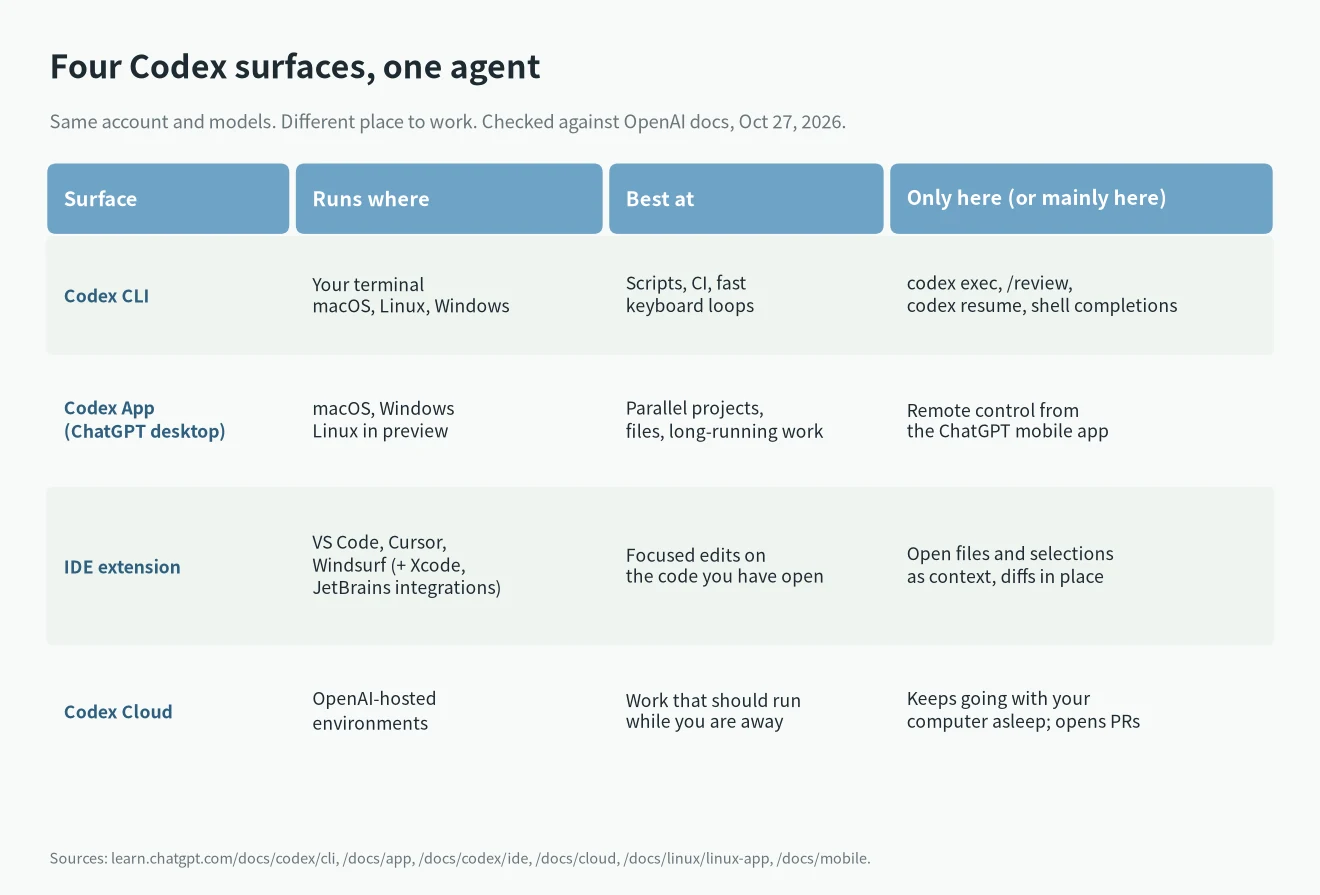
- Same agent, same plan. The CLI, the desktop app and the IDE extension all accept ChatGPT sign-in or an API key for local work, per the authentication docs.
- CLI wins for scripts, CI, code review from the terminal and anything you want to pipe.
- App wins for parallel projects, viewing files and steering work from your phone.
- The IDE extension is the third option if your editor is where you already think.
- Codex Cloud is the fourth. It runs tasks on OpenAI’s machines while yours is asleep.
- Free and Go list Codex only in the desktop app. That decides it for some people.
What “Codex App” means now
OpenAI’s help article on moving to the new ChatGPT desktop app says it plainly. If you use the Codex app, update it as usual and it becomes the new ChatGPT desktop app with Chat, Work and Codex. Your Codex chats and projects should stay. Codex stays a separate view with its own history.
So when people search for the Codex App today, they mean the Codex view inside the ChatGPT desktop app. It runs on macOS and Windows. A Linux build is in preview for Ubuntu 24.04 and 26.04, Debian 13, Fedora 43 and 44, and Arch.
The same article says Codex is not selectable on web or mobile. You can still reach supported desktop Codex chats from the Remote tab in the ChatGPT mobile app.
What only the CLI does well
The Codex CLI is a terminal program. You install it with a one-line script on macOS, Linux or Windows, or with npm or Homebrew. My Codex CLI install guide walks through each method.
Things that are easiest or only possible here:
- codex exec. The non-interactive mode runs a task from a script. Progress goes to stderr and only the final answer goes to stdout, so you can pipe it into a file or another tool.
- /review. A dedicated review of uncommitted changes, a commit or a base branch. It reports findings without touching your working tree.
- codex resume. Reopen a saved chat from the current repo.
- Terminal fit. Shell completions, themes and your own editor for long prompts.
- codex cloud. Send a task to Codex Cloud and apply the result locally, without leaving the terminal.
The trade-off is the interface. You see commands and diffs as text. If you are happy with that, the CLI is the lightest way to run Codex.
What only the App does well
The desktop app is built for more than one thing at a time. The docs list parallel projects, a file viewer for documents, spreadsheets and images, browser and computer use, and scheduled tasks inside a chat.
The part the CLI can’t match is mobile. The Codex on mobile page explains how to connect a Mac or Windows PC from the desktop app’s settings, scan a QR code, and then start, approve and review tasks from the ChatGPT iOS app. Your computer has to stay awake and online.
On Windows, the Windows app docs describe a native sandbox when the agent runs in PowerShell and Linux sandboxing when it runs in WSL2.
Plans, sign-in and usage
Codex CLI vs Codex App on each plan
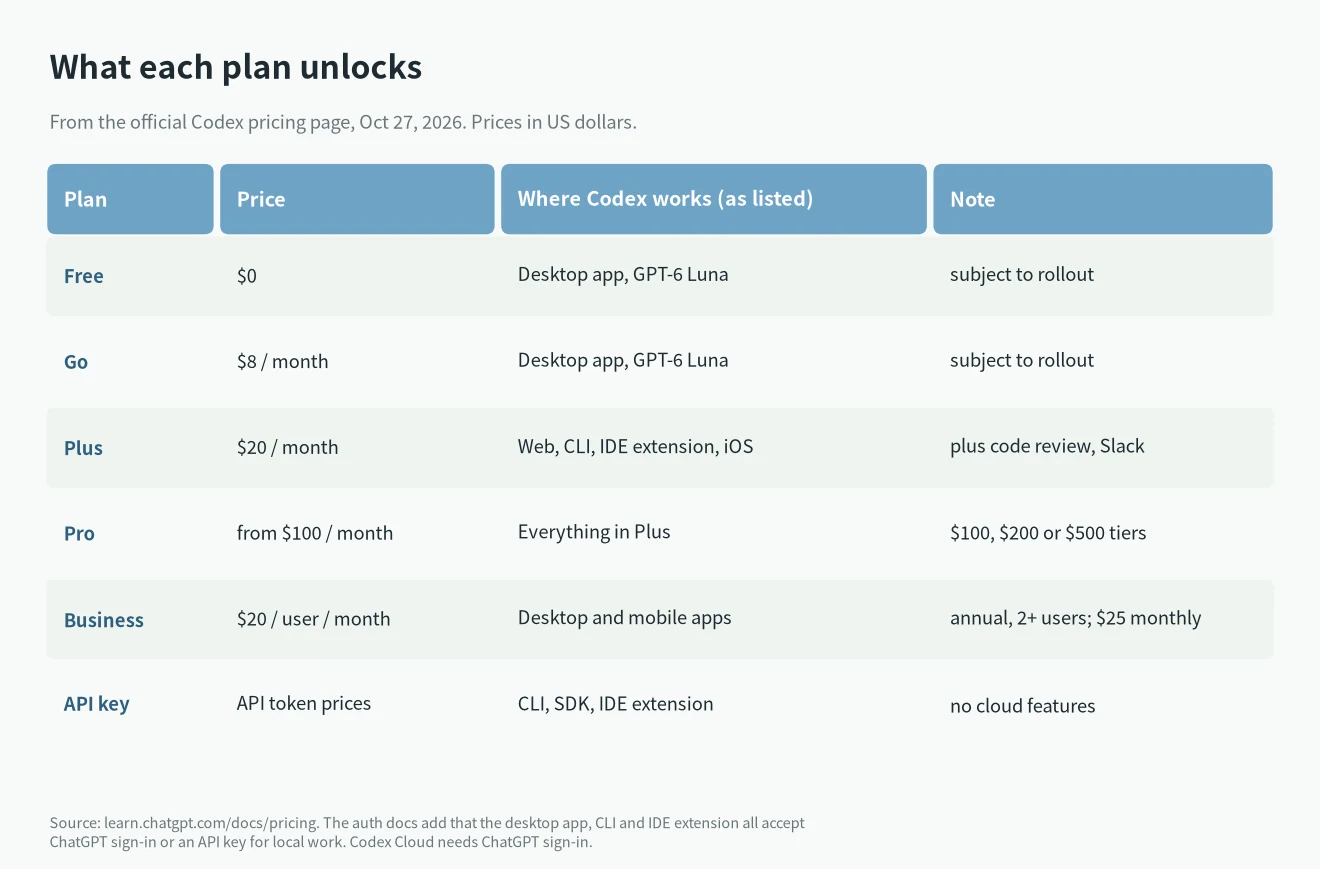
The Codex pricing page lists Codex for Free ($0) and Go ($8 a month) only in the desktop app, with GPT-6 Luna, subject to rollout. Plus at $20 lists the web, the CLI, the IDE extension and iOS. Pro starts at $100, with tiers at $100, $200 and $500. Business is $20 per user per month billed annually, or $25 monthly.
One thing doesn’t line up. The API key card on the pricing page lists the CLI, SDK and IDE extension, while the auth docs say the desktop app accepts an API key too. I couldn’t settle that from the docs, so check the sign-in screen if it matters to you. If you are weighing a subscription against API billing in general, see ChatGPT subscription vs API.
Usage is shared. The pricing page says local messages and cloud chats share your plan’s allowance. It doesn’t give a separate allowance for the CLI or the app, so switching surfaces won’t get you more messages.
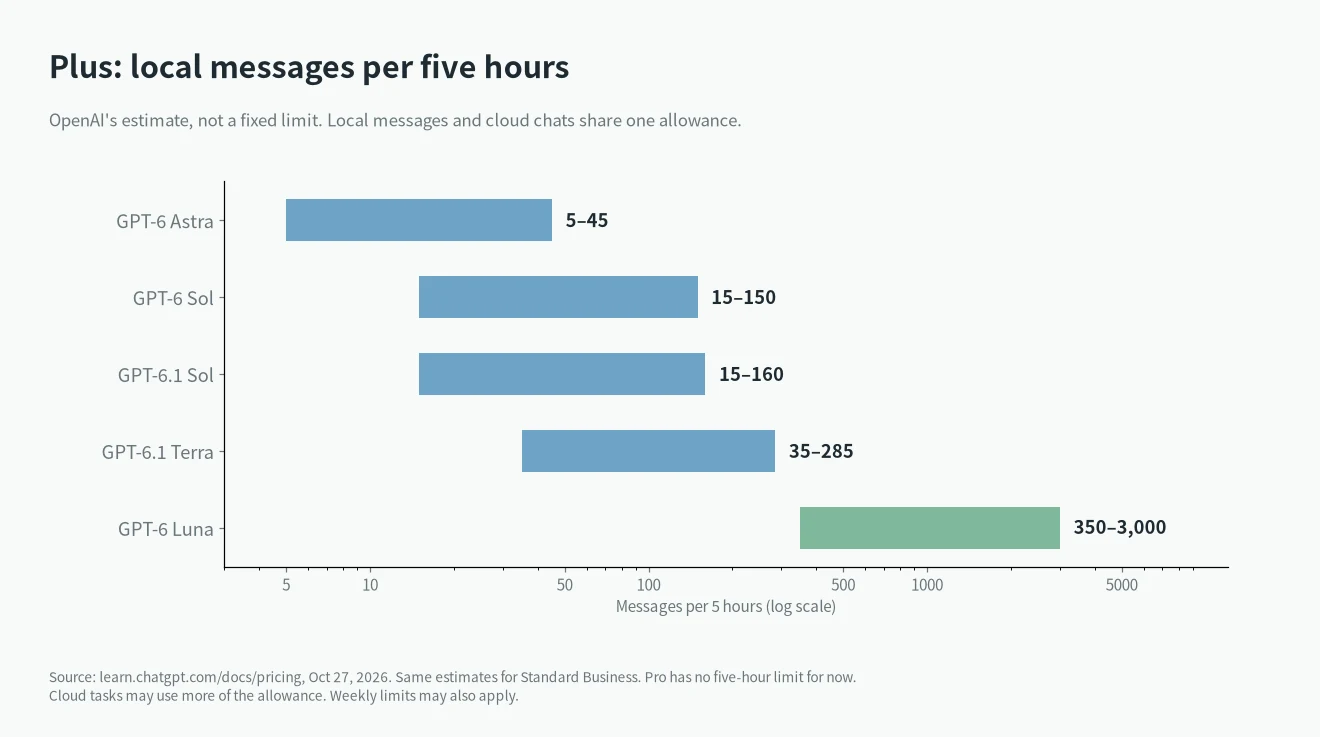
These ranges are OpenAI’s estimates for Plus, not fixed caps. Pro has no five-hour limit for now. In the CLI, /status shows what you have left.
Where the IDE extension and Cloud fit
The IDE extension works in VS Code, Cursor and Windsurf. Xcode and JetBrains IDEs have their own Codex integrations. Its strength is context: open files and selections go into the prompt, and you review diffs next to the code.
Codex Cloud runs each task in its own workspace from an environment you publish. It keeps working while your computer sleeps, and you finish with a commit or a pull request. It requires ChatGPT sign-in. With an API key, the pricing page says there are no cloud features.
How to choose
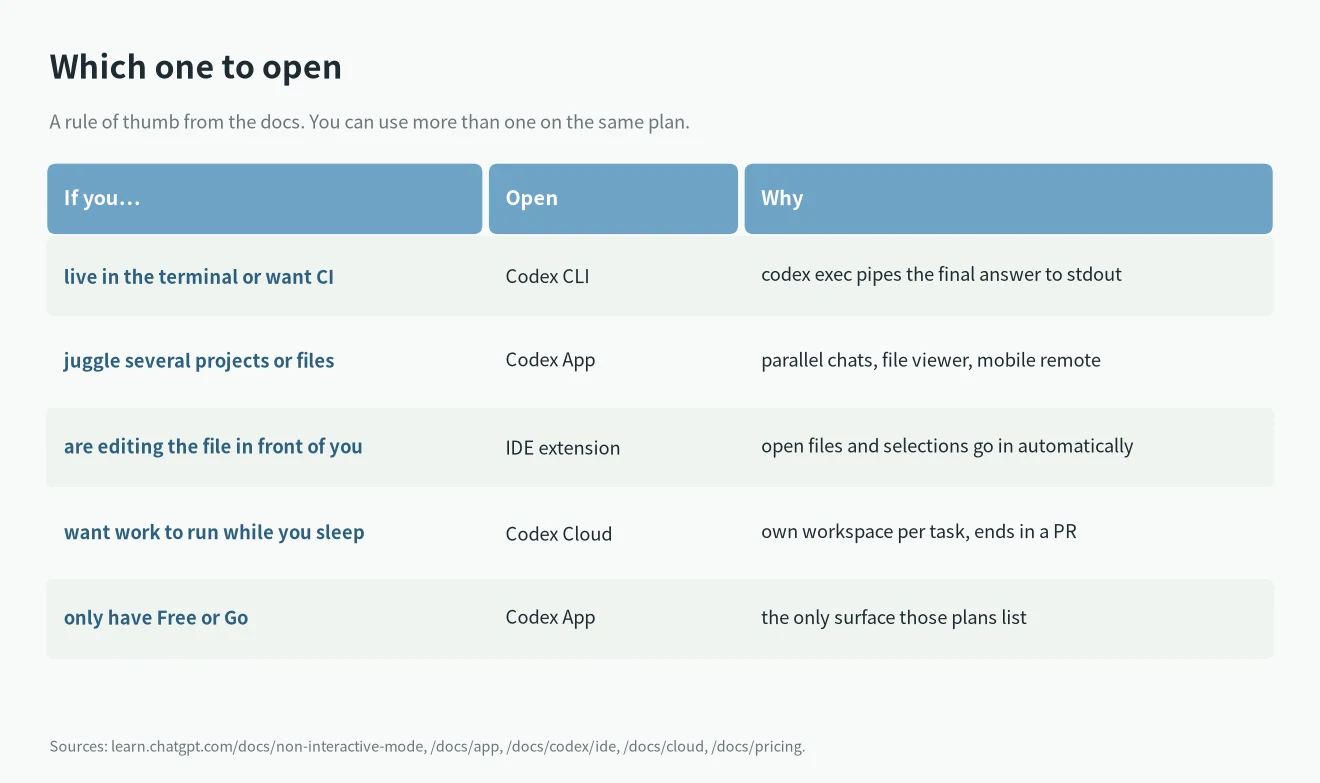
- Mostly terminal work, or anything automated: start with the CLI.
- Several projects at once, or you want your phone in the loop: use the App.
- Small, focused edits in one file: the IDE extension is less friction.
- Long jobs you don’t want to babysit: hand them to Cloud from any of the three.
You don’t have to choose only one. Nothing stops you from keeping the CLI for scripts and the App for day-to-day work, on the same plan. If you also use Claude Code, the trade-offs in Claude Code skills vs MCP and the best Claude Code mods carry over to Codex skills and plugins.
What I couldn’t confirm
- Whether the desktop app accepts API key sign-in on every plan. The auth docs say yes, the pricing card doesn’t list it.
- Exact message limits. OpenAI only gives ranges, and they depend on the model and the task.
- Whether every Codex feature has reached the new ChatGPT desktop app on all platforms. Linux is still a preview.