

The Best MCP Servers for Claude Code in 2026: 6 Worth Installing, With Commands and Limits
Six MCP servers picked by job: Playwright and Chrome DevTools for the browser, GitHub for PRs, Context7 for docs, Figma for designs and DBHub for databases. Each comes with its official command, cost and the catch to know about.
 bufferAbout the author6 min read
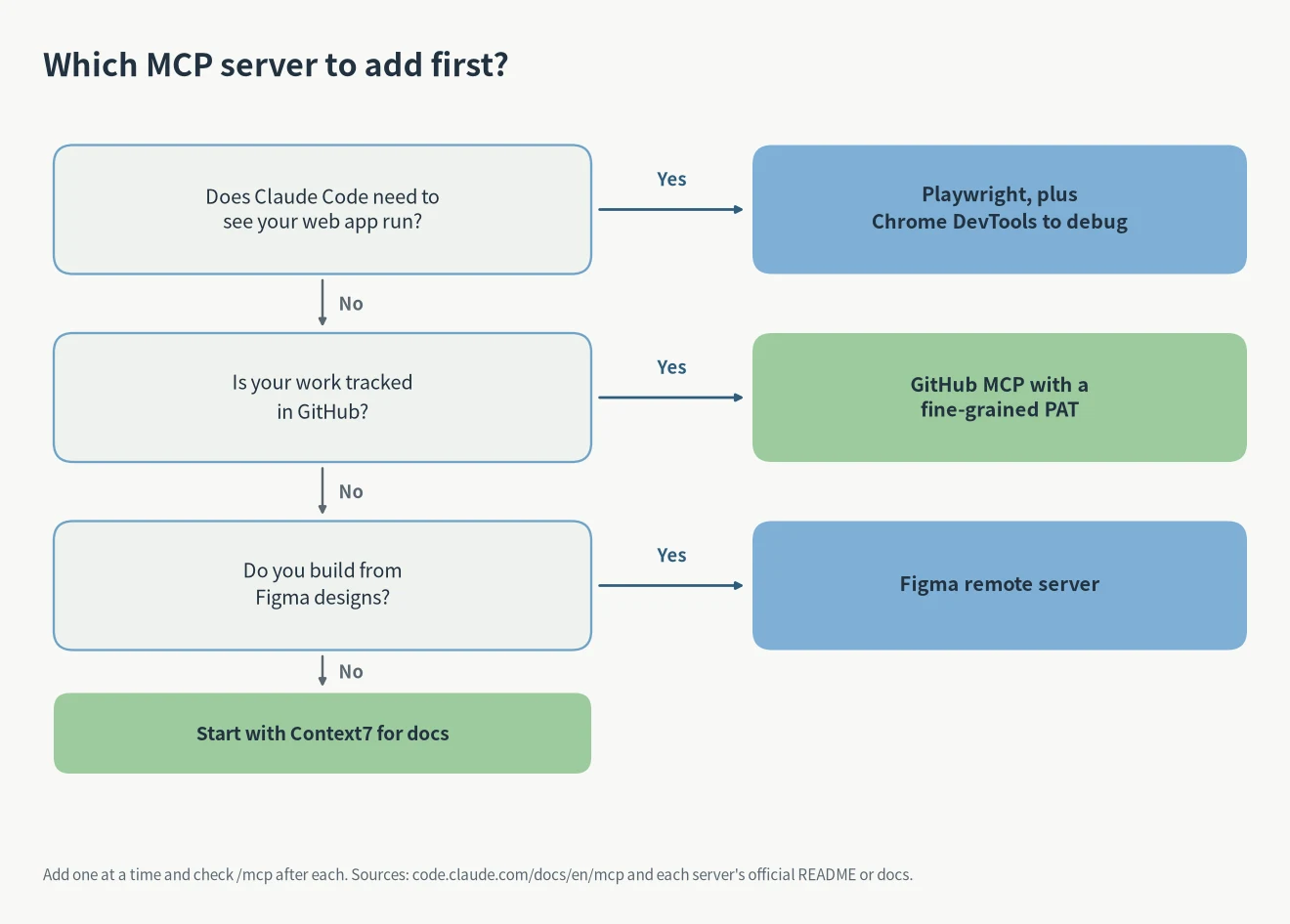
The best MCP servers for Claude Code depend on the job. For web work, add Playwright, and Chrome DevTools when you need to debug. If your code lives on GitHub, add the GitHub server. Add Context7 if you keep looking up library docs, Figma if you build from designs, and DBHub with a read-only user if you query a database. All six have official docs. Playwright, Chrome DevTools and DBHub are free and open source, Context7 has a free key, GitHub uses your own token and Figma counts calls by plan. Don’t install all of them at once: every server adds tools Claude Code has to keep track of.
I checked every command and number below on October 27, 2026 against the Claude Code MCP docs and each server’s own README. If Claude Code isn’t set up yet, start with the Claude Code install guide. If you’re not sure whether you need an MCP server or a skill, read Claude Code skills vs MCP first.
The six servers at a glance
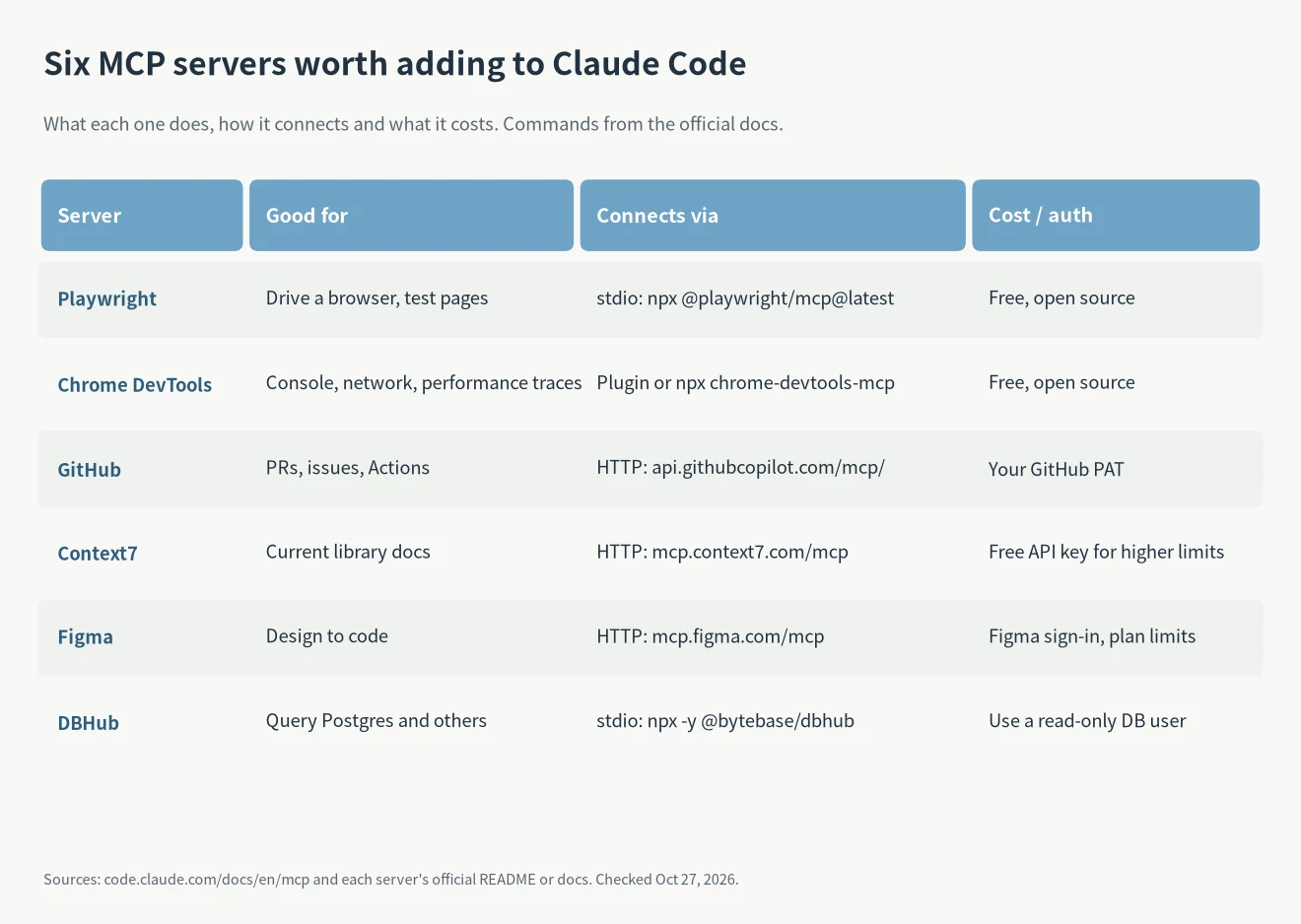
They fall into three pairs: two for the browser, two for code and docs, two for design and data. In the table, stdio means a local process on your machine and HTTP means a remote server run by the vendor.
Browser: Playwright and Chrome DevTools
Playwright MCP lets Claude Code open pages, click and fill forms. It reads the page’s accessibility tree instead of screenshots, so it doesn’t need a vision model (Playwright MCP README). The official Claude Code command is:
- claude mcp add playwright npx @playwright/mcp@latest
The README is upfront about one thing: for coding agents, the Playwright CLI with skills uses fewer tokens, because it doesn’t load big tool schemas and accessibility trees into context. MCP fits long tasks that need to keep a browser session alive. If you only check a page now and then, the CLI is enough.
Two Playwright options are worth knowing. –caps turns on extra capabilities: vision, pdf or devtools. –allowed-origins and –blocked-origins control which sites the browser may request, but the README says the allowlist is not a security boundary, so don’t treat it as a sandbox (Playwright MCP README).
Chrome DevTools MCP is the debugging half. It reads network requests and console messages with source-mapped stack traces, and records performance traces (Chrome DevTools MCP README). For Claude Code the project recommends its plugin: run /plugin marketplace add ChromeDevTools/chrome-devtools-mcp, then /plugin install chrome-devtools-mcp@chrome-devtools-plugins. The generic config runs npx -y chrome-devtools-mcp@latest instead.
Code and docs: GitHub and Context7
The GitHub server lets Claude Code read and act on pull requests, issues and Actions. The Claude Code docs connect to GitHub’s remote server with a fine-grained personal access token (Claude Code docs):
- claude mcp add –transport http github https://api.githubcopilot.com/mcp/ –header “Authorization: Bearer YOUR_GITHUB_PAT”
Give the token only the repos and permissions it needs. If you run the local Docker version, –read-only exposes only read tools, and GITHUB_TOOLSETS limits it to groups such as repos and issues. Without it you get the default toolsets (GitHub MCP Server README).
Context7 feeds current library docs to the model so it stops writing against old APIs. The server URL is https://mcp.context7.com/mcp and the API key goes in an Authorization: Bearer header. The key is free at context7.com/dashboard and raises your rate limits (Context7 README). In Claude Code that’s claude mcp add –transport http context7 https://mcp.context7.com/mcp plus the –header flag. Add use context7 to a prompt to make it look things up.
Design and data: Figma and DBHub
Figma recommends its remote server. You don’t need the desktop app; you sign in with your Figma account the first time you connect (Figma docs):
- claude mcp add –transport http figma https://mcp.figma.com/mcp
- Add –scope user to use it in every project
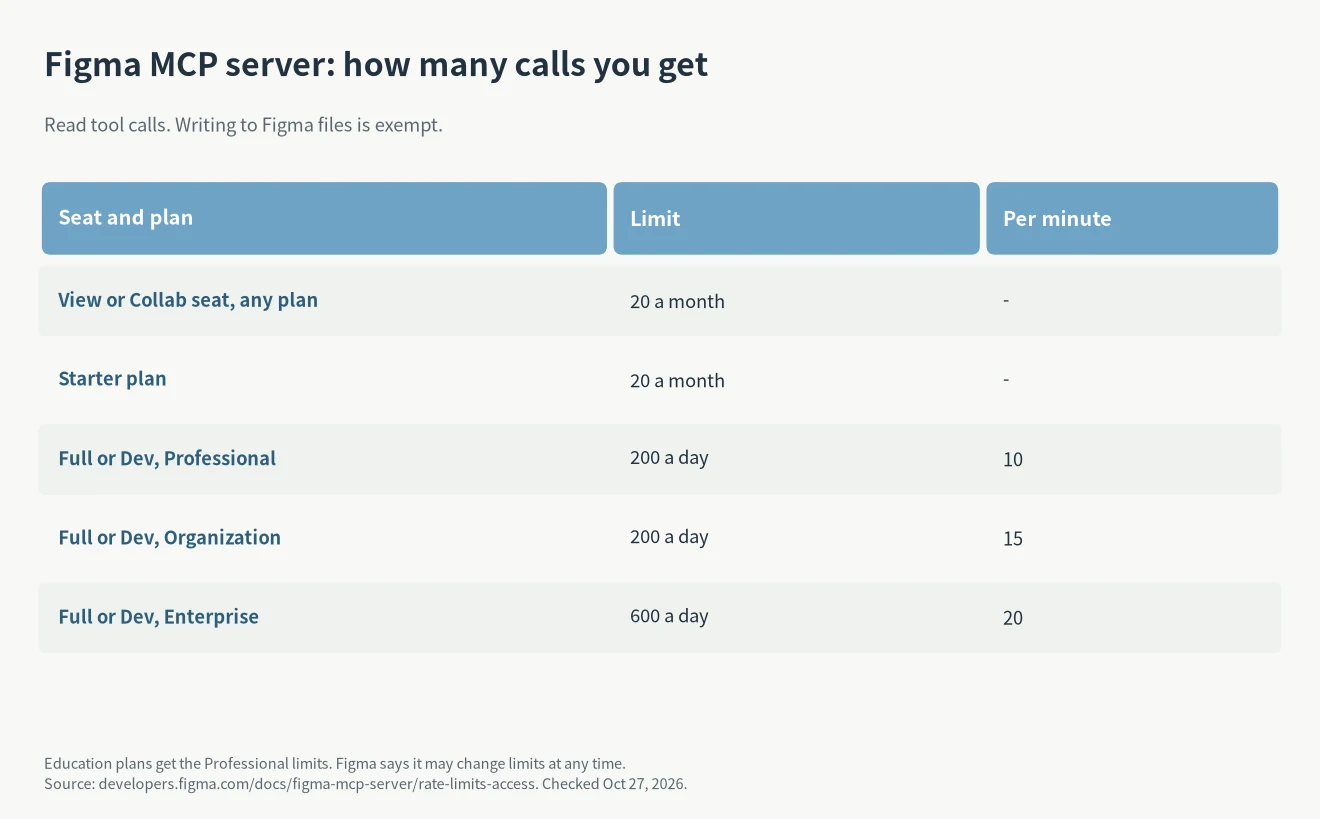
Watch the call limits. View and Collab seats, and the Starter plan, get 20 calls a month. A Full or Dev seat on Professional gets 200 a day and 10 a minute, and Enterprise gets 600 a day (Figma rate limits). Only read tools count; tools that write to Figma files are exempt.
DBHub queries Postgres and other databases. The Claude Code docs example is claude mcp add –transport stdio db — npx -y @bytebase/dbhub –dsn “postgresql://readonly:pass@host:5432/db”, with a read-only user in the connection string (Claude Code docs). Never hand it an account that can drop tables.
If your team uses Sentry, its remote server is a good seventh: claude mcp add –transport http sentry https://mcp.sentry.dev/mcp/your-org/your-project, signed in through OAuth (Sentry docs).
Where servers live and how to manage them
Keeping the best MCP servers for Claude Code under control
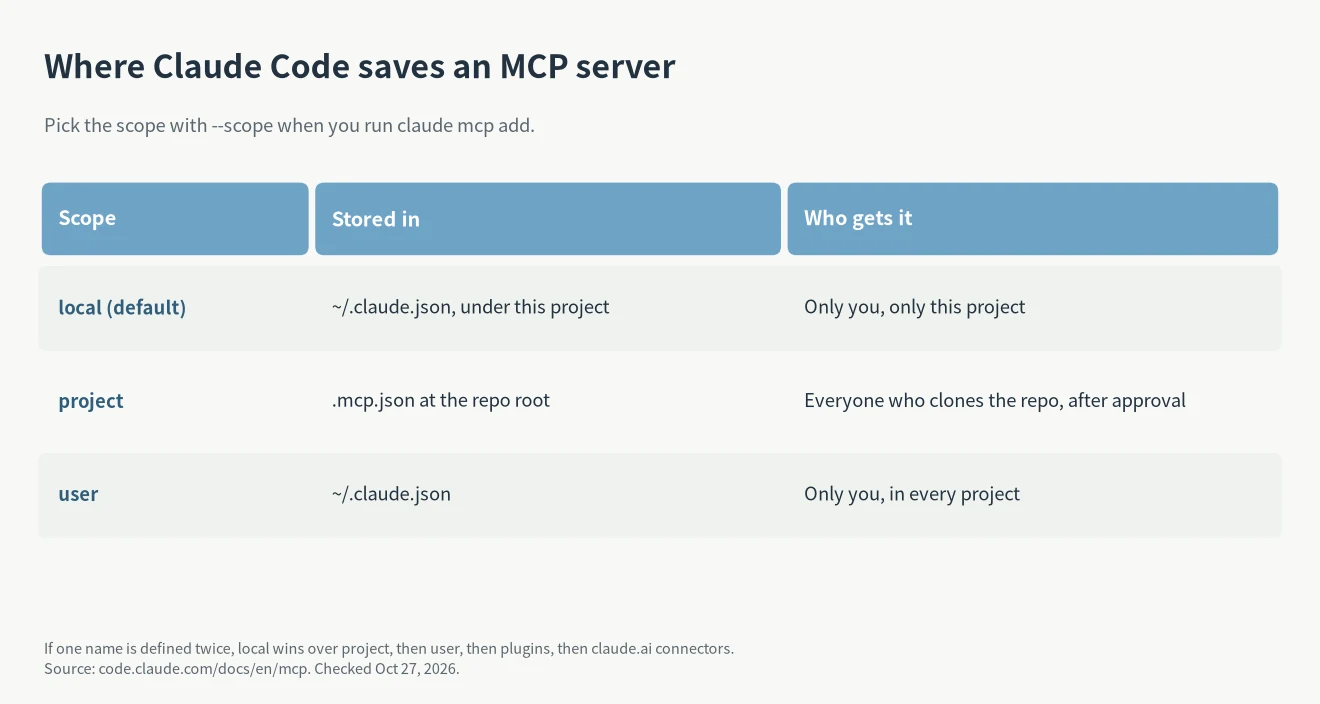
- The default scope is local: only you, only this project. Project scope writes to .mcp.json at the repo root so the team shares it, and Claude Code asks for approval before using it (Claude Code docs).
- If the same server name is defined in more than one place, Claude Code uses the local entry first, then project, then user, then plugins, then claude.ai connectors. That is why a teammate’s .mcp.json can seem to be ignored on your machine: an older local entry with the same name wins.
- Run claude mcp list, or /mcp inside a session, to see what’s connected. claude mcp get NAME shows one server.
- Claude Code warns when an MCP tool returns more than 10,000 tokens and caps output at 25,000 by default. Raise it with MAX_MCP_OUTPUT_TOKENS, for example 50000.
- Anthropic’s own warning: only connect servers you trust, because servers that fetch outside content can expose you to prompt injection. Reviewed connectors are listed at claude.ai/directory.
FAQ
Do MCP servers cost anything on top of my Claude plan?
The servers here don’t charge for the connection itself, except that Figma counts calls against your Figma plan and Context7 works better with its free key. The cost you do pay is context: tool definitions and tool output take up tokens in each session, which counts against your Claude Code limits like any other text.
Should I use project scope for a team?
Yes, if everyone needs the same server. Put it in .mcp.json and commit it, but keep tokens out of the file. Each person approves the server the first time, and claude mcp reset-project-choices clears those choices if you need to approve again (Claude Code docs).
Playwright or Chrome DevTools, if I only want one?
Pick Playwright if you mostly want Claude Code to click through flows and check that pages work. Pick Chrome DevTools if you mostly chase slow pages, failed requests and console errors. They overlap on basic navigation, so keeping both is fine if you use both kinds of work.
If a server won’t connect or its tools don’t show up, check /mcp first, then the Claude Code errors guide. For other ways to extend Claude Code, see the best Claude Code mods; to run it on a cheaper model, see DeepSeek API for Claude Code.