

Local LLM for Coding: An Honest 2026 Guide to Models and Hardware
Which local LLM for coding fits your machine in 2026: gpt-oss-20b on a 16 GB card, Qwen3.8-27B on 24 GB, Qwen3-Coder-Next on 64 GB. Memory at 64K context, measured speeds, Claude Code setup, and when a $20 subscription is the better deal.
 bufferAbout the author9 min read
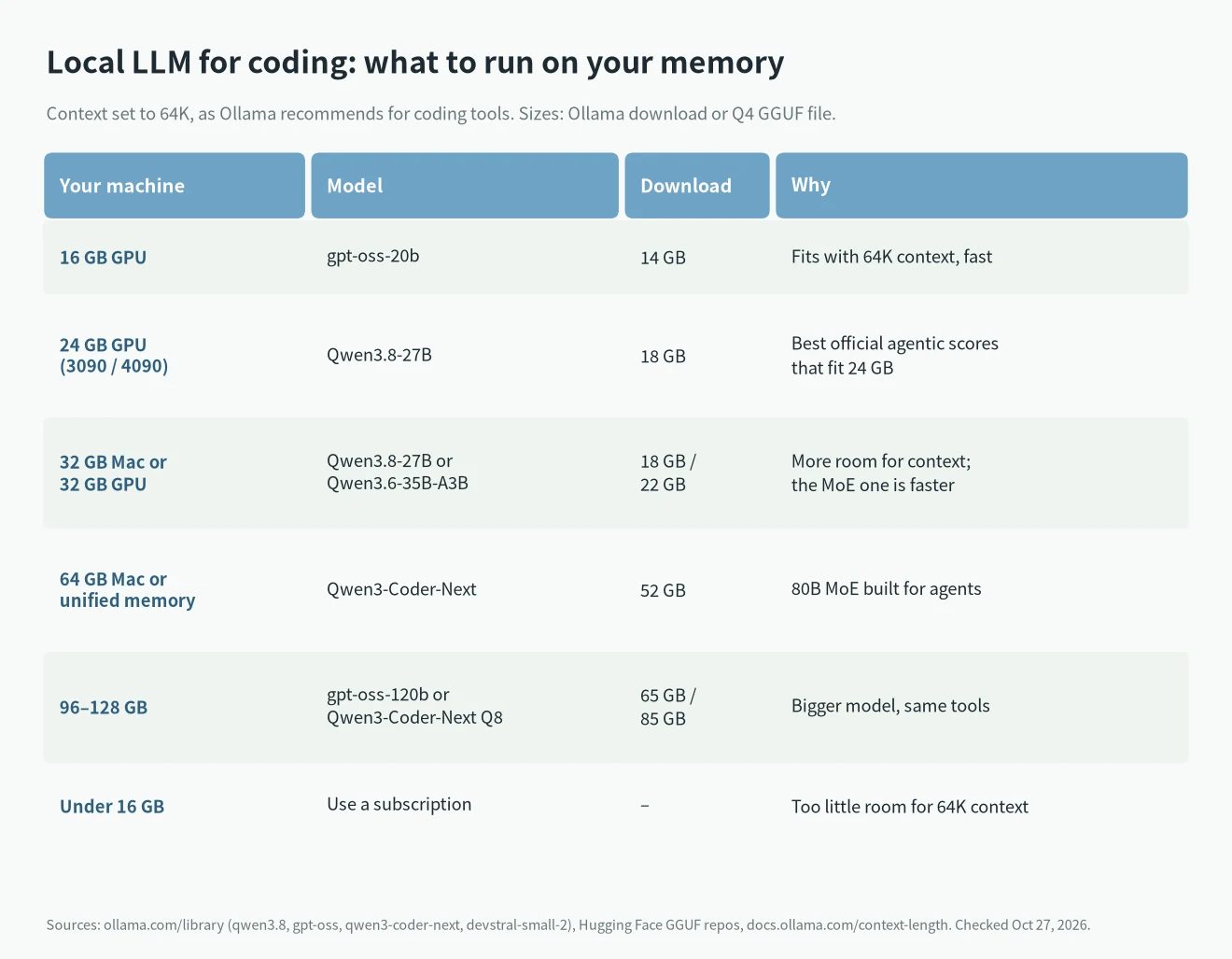
Picking a local LLM for coding comes down to how much memory you have. On a 16 GB GPU, run gpt-oss-20b. On a 24 GB card like the RTX 3090 or 4090, run Qwen3.8-27B. With a 64 GB Mac or similar unified-memory machine, run Qwen3-Coder-Next. Below 16 GB, a $20 subscription is the better deal. Set the context to at least 64K, because coding agents need it and Ollama’s default is smaller. I checked every number below on October 27, 2026, and each one links to where it came from.
The short answer: which local LLM for coding fits your machine
- 16 GB GPU: gpt-oss-20b. The official model card says it runs within 16 GB. By my math it needs about 14.3 GiB with a 64K context.
- 24 GB GPU (RTX 3090, RTX 4090): Qwen3.8-27B at Q4_K_M. About 20.8 GiB at 64K context, so it fits with a little room left.
- 32 GB Mac or 32 GB GPU: Qwen3.8-27B with more context, or Qwen3.6-35B-A3B, which is faster because only 3B parameters are active per token.
- 64 GB Mac or unified memory: Qwen3-Coder-Next. It is an 80B mixture-of-experts model with 3B active, built for coding agents. About 48 GiB at 64K.
- 96 to 128 GB: gpt-oss-120b, about 62.8 GiB at 64K, or Qwen3-Coder-Next at Q8.
- Under 16 GB: I would not bother for agent-style coding. There is not enough room for the model and a 64K context together.
If you only want to know what else a 24 GB card can run, I covered that in what models the RTX 4090 can run. This post is only about coding.
Why 64K context matters more than you think
Coding tools like Claude Code send a lot of text with every request: the system prompt, tool definitions, the files they read, and the conversation so far. Ollama’s own context length page says tasks like agents and coding tools should be set to at least 64,000 tokens. The Claude Code integration page says the same: choose a model and set a 64K+ context window.
The catch is Ollama’s default. The same page lists it: 4K context under 24 GiB of VRAM, 32K between 24 and 48 GiB, and 256K at 48 GiB and above. So on a 16 GB or 24 GB card, the default is too small for coding agents. You have to raise it yourself:
OLLAMA_CONTEXT_LENGTH=64000 ollama serveHow much memory the KV cache takes
More context means a bigger KV cache. I worked it out from each model’s config.json: 2 × full-attention layers × KV heads × head size × 2 bytes per token. Models with hybrid attention only count their full-attention layers, which is why some of them need very little.
- Qwen3.8-27B: 16 of its 64 layers use full attention, with 4 KV heads. That is 64 KiB per token, or 4 GiB at 64K.
- Devstral Small 2 24B: 40 full-attention layers with 8 KV heads. That is 160 KiB per token, or 10 GiB at 64K.
- gpt-oss-20b and Qwen3-Coder-Next: both about 24 KiB per token, or 1.5 GiB at 64K.
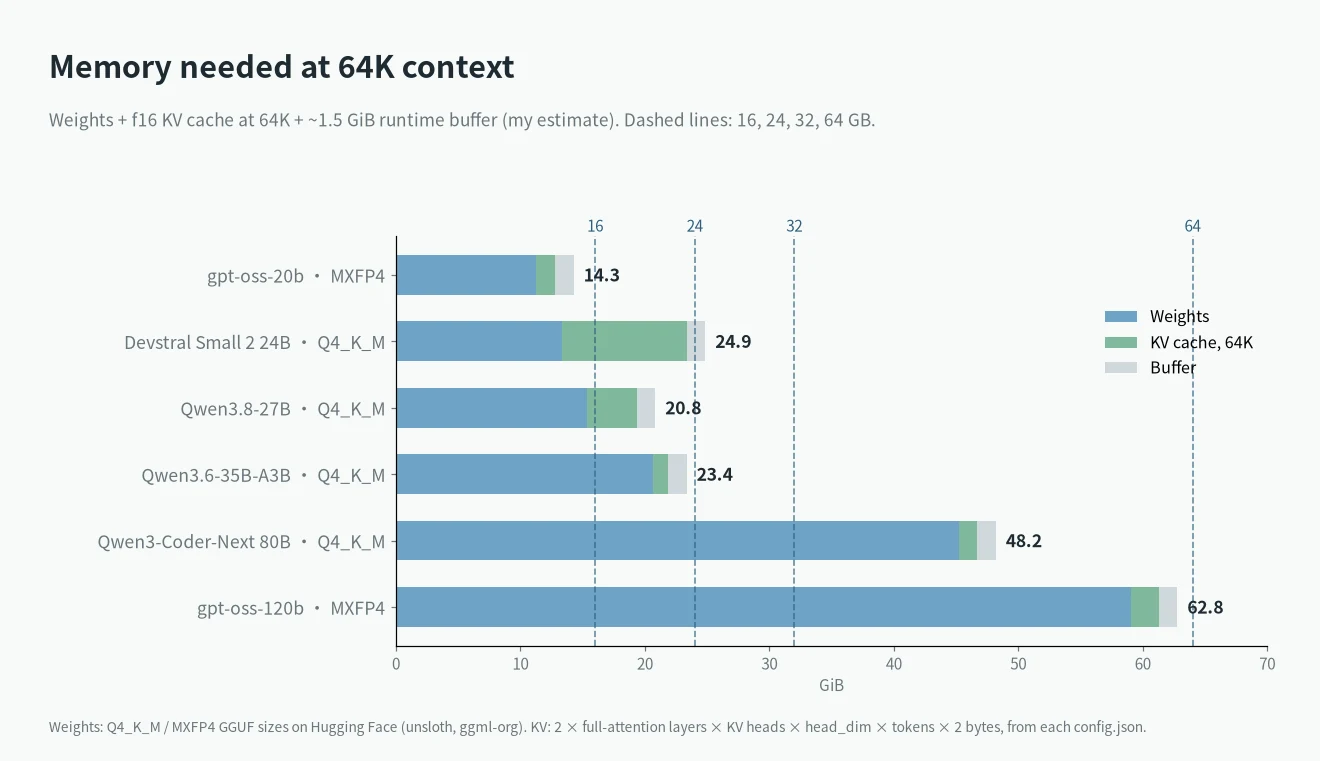
This is why Devstral Small 2 is harder to fit than its 13.35 GiB file suggests. At 64K it comes to about 24.9 GiB, just over a 24 GB card. Ollama can store the KV cache at 8 bits instead, which halves it. The Ollama FAQ covers the OLLAMA_KV_CACHE_TYPE setting, which needs flash attention on. With q8_0 my estimate drops to about 19.9 GiB.
These totals are my estimates: file size plus f16 KV cache plus about 1.5 GiB of buffer. Real use can differ by a gigabyte or two.
The models worth trying in 2026
Qwen3.8-27B: the pick for a 24 GB card
Qwen released Qwen3.8-27B on August 5, 2026. It is a 27B dense model with 262,144 tokens of native context. On its Hugging Face card, it scores 61.7 on SWE-bench Pro, tested in a Claude Code harness with 256K context. It scores 73.0 on Terminal Bench 2.1 and 90.3 on LiveCodeBench v6. The same card lists Qwen3.6-27B at 53.5 on SWE-bench Pro. The card does not give a SWE-bench Verified number for 3.8.
The unsloth GGUF at UD-Q4_K_M is 15.33 GiB. Q8_0 is 27.05 GiB, which needs a 32 GB card or a bigger Mac. In Ollama’s library the 27B download is 18 GB, and there is an MLX build for Apple silicon.
Qwen3.6-27B and Qwen3.6-35B-A3B
The older Qwen3.6-27B scores 77.2 on SWE-bench Verified. The 35B-A3B mixture-of-experts version scores 73.4. The MoE model has 3B active parameters, so it generates faster than a 27B dense model. Its Q4_K_M file is 20.61 GiB, which comes to about 23.4 GiB at 64K. That is tight on a 24 GB card and easy on 32 GB.
Devstral Small 2 24B
Mistral’s Devstral Small 2 scores 68.0% on SWE-bench Verified and 22.5% on Terminal Bench 2. It is Apache 2.0, and the card says it runs on one RTX 4090 or a Mac with 32 GB. Watch the KV cache, as shown above.
Qwen3-Coder-Next: for 64 GB machines
Qwen3-Coder-Next came out on January 30, 2026. It has 80B total parameters and 3B active, with 256K context. The card says it works with Claude Code, Qwen Code and Cline. Qwen’s official GGUF is 45.09 GiB at Q4_K_M and 78.99 GiB at Q8_0. Ollama lists it at 52 GB.
gpt-oss-20b and gpt-oss-120b
OpenAI’s gpt-oss-20b has 21B parameters with 3.6B active and a 131,072-token context. Its MXFP4 file is 11.28 GiB. The bigger gpt-oss-120b has 117B parameters with 5.1B active and fits on one 80 GB GPU. Its file is 59.03 GiB.
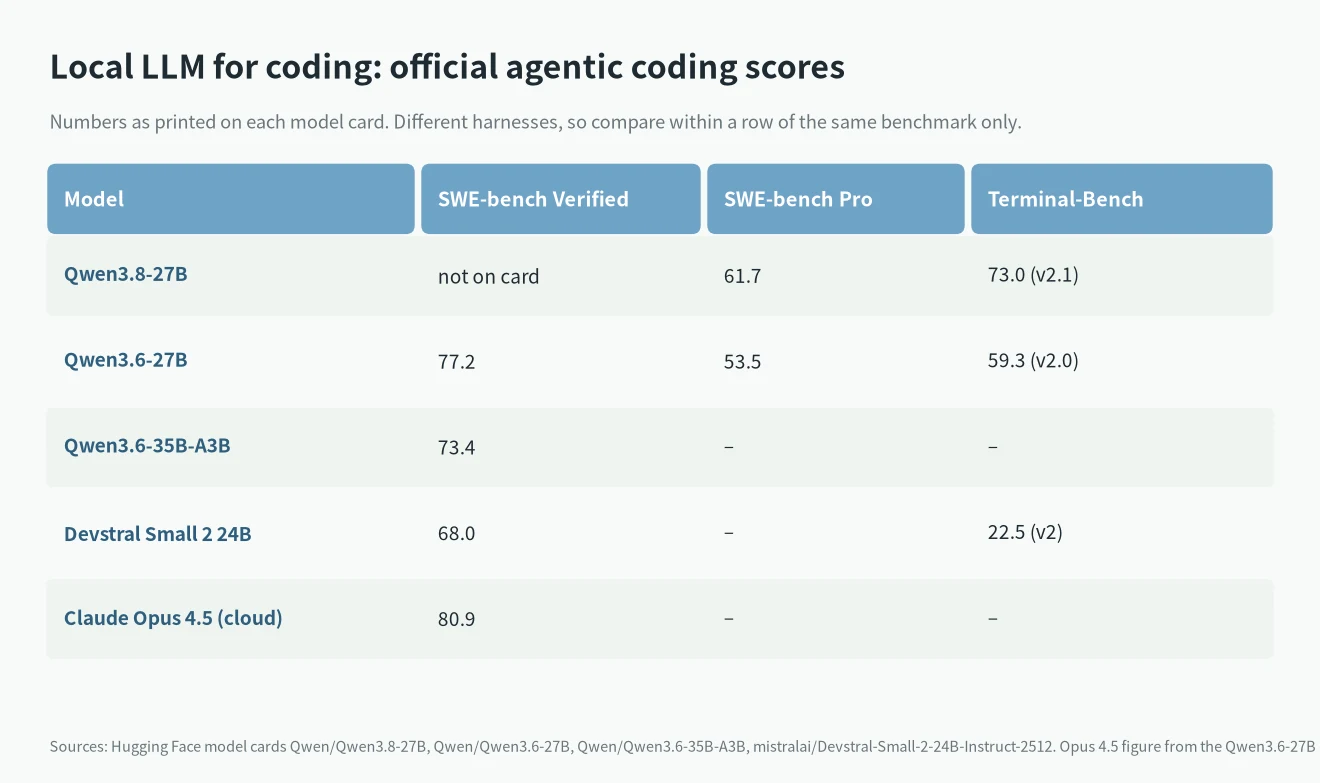
A word on these scores. Each vendor tests with its own setup, so a 3-point gap between two cards does not mean much. The useful reference is the top cloud model: the Qwen3.6-27B card lists Claude Opus 4.5 at 80.9 on SWE-bench Verified. The best local models are close on paper. In daily use, a cloud model still handles long, messy tasks better.
How fast a local LLM for coding runs
I only use measured numbers here. For Qwen3.8-27B at Q4_K_M in llama.cpp, llm-speed records 43 to 44 tokens per second on an RTX 4090, with a best run of 44.2. Peak VRAM was 18.7 GiB at 8K context. The model page shows 38.61 tok/s on an RTX 3090 and 75.19 tok/s on an RTX 5090, though the 5090 run used an older build. A community run with MTP speculative decoding hit 84.5 tok/s on a 4090, per this llm-speed post.
For gpt-oss-20b, Hardware Corner measured 190.6 tok/s on an RTX 4090 at 4K context. Speed falls as context grows: 104.0 tok/s at 64K and 70.3 tok/s at 128K.
I did not find a measured Qwen3-Coder-Next speed from a source I trust, so I am not giving one.
If you are thinking about a 32 GB card, see my RTX 5090 for AI guide. For 128 GB boxes, I compared AI Max+ 395 vs DGX Spark.
Setting up a local LLM for coding with Ollama and Claude Code
Ollama 0.15 added ollama launch, according to the launch announcement. One command sets up the coding tool and points it at a local model:
ollama pull qwen3.8
ollama launch claude --model qwen3.8
The same works for OpenCode and OpenClaw. The OpenClaw page also asks for at least 64K context with local models.
ollama launch opencode --model qwen3.8
ollama launch openclaw --model qwen3.8
If you prefer to run Claude Code yourself, Ollama has offered an Anthropic-compatible API since version 0.14.0, as explained in Ollama’s Claude Code post:
export ANTHROPIC_AUTH_TOKEN=ollama
export ANTHROPIC_BASE_URL=http://localhost:11434
claude --model qwen3.8
Remember to start Ollama with a 64K context first. If Claude Code loses track of files or repeats itself, a too-small context is the first thing I would check.
Local vs a subscription: the money
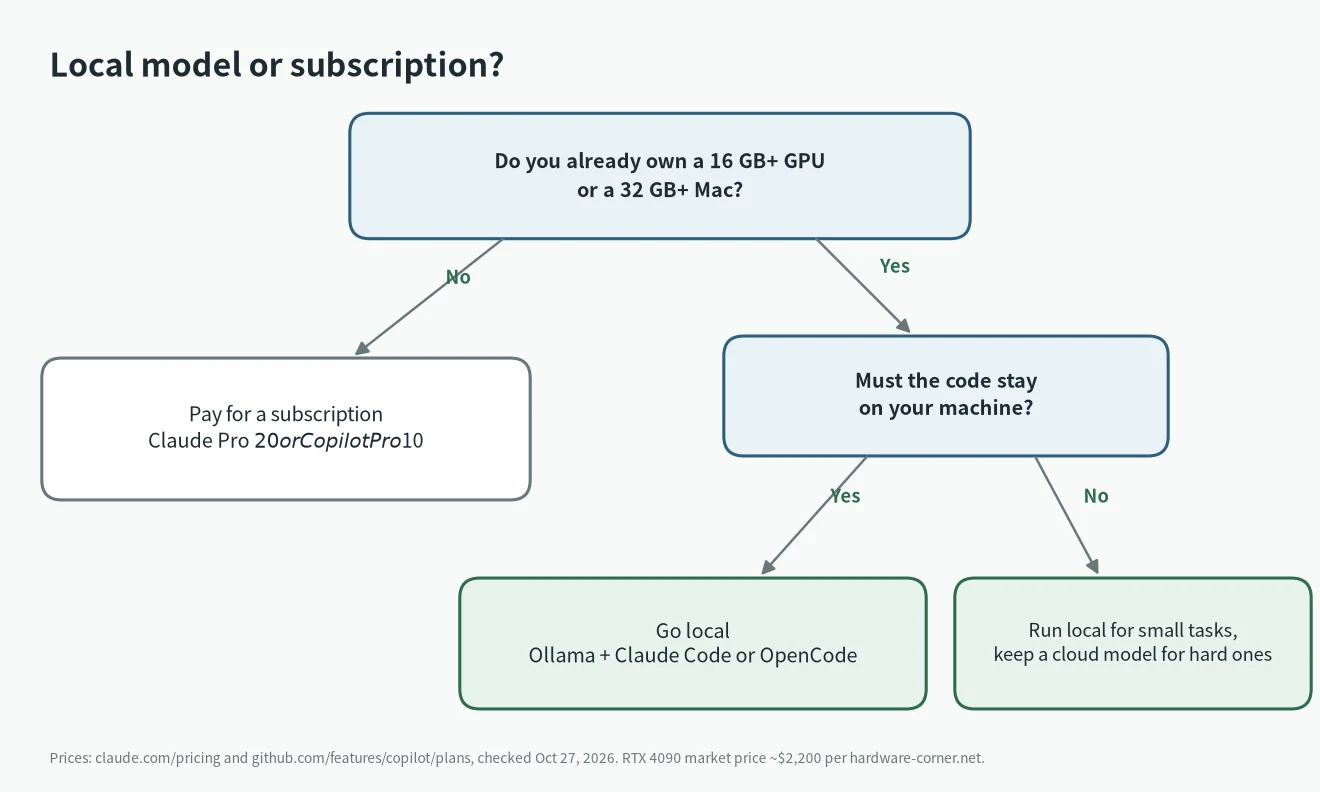
Claude Pro costs $20 a month, or $17 a month billed yearly, and it includes Claude Code. GitHub Copilot Pro is $10 a month. Hardware Corner puts the average RTX 4090 market price at $2,200. That is 110 months of Claude Pro.
So I would not buy a GPU just to run a local LLM for coding. It makes sense if you already own the hardware, if your code cannot leave your machine, or if you want to work offline. I compared the paid options in Claude Code vs Codex and which AI subscription is worth it.
My advice
- If you have a 3090 or 4090, try Qwen3.8-27B with a 64K context today. It costs nothing to test.
- If you have a 16 GB card, use gpt-oss-20b for small edits and questions. Do not expect it to handle big refactors.
- If you plan to buy a Mac for this, 64 GB opens up Qwen3-Coder-Next. My notes on buying a Mac now or waiting cover the timing.
- Keep a cloud model for hard tasks. Many people run a local model for routine work and switch when it gets stuck.
FAQ
What is the best local LLM for coding on a 24 GB GPU?
Qwen3.8-27B at Q4_K_M. It is about 20.8 GiB with a 64K context by my estimate, and it has the strongest official agentic scores of the models that fit.
Can I use Claude Code with a local model?
Yes. Ollama 0.14.0 and later speak the Anthropic API, and ollama launch claude --model qwen3.8 sets it up in one step on Ollama 0.15 or later.
Is 16 GB of VRAM enough?
For gpt-oss-20b, yes. The official card says it runs within 16 GB, and my estimate is about 14.3 GiB at 64K context. Larger coding models do not fit with a usable context.
Is a local LLM for coding as good as Claude?
On paper the gap is smaller than it used to be: Claude Opus 4.5 scores 80.9 on SWE-bench Verified, and Qwen3.6-27B scores 77.2. Those come from different setups, though, so treat them as a rough guide.