

macOS 27 fm Command: The Free Local AI Already on Your Mac (and Its Pipe Trap)
The macOS 27 fm command puts Apple’s on-device model in Terminal for free. Copy-paste setup, fm serve examples, the pipe trap that makes it invent summaries, and when you still need a bigger model.
 bufferAbout the author11 min read
The macOS 27 fm command is the most interesting thing Apple shipped this year that almost nobody noticed. Open Terminal on a Mac running macOS 27, type fm respond "something", and Apple’s on-device language model answers. No Ollama, no API key, no bill. Apple says it plainly in its WWDC26 session on the fm CLI: the tool “comes pre-installed with macOS 27.”
I went through Apple’s session videos, the man page and a handful of third-party teardowns so you don’t have to. Short version: it’s a genuinely useful free tool for small text jobs, it will not replace a paid AI subscription, and there’s one shell habit that makes it silently make things up. More on that below.
The short answer
- What it is:
/usr/bin/fm, a command-line front end to Apple Foundation Models. Ships with macOS 27 (released September 14, 2026). Nothing to install. - What it costs: nothing. The default
systemmodel runs on your Mac and works offline. - What it’s good at: summarizing text you give it, pulling fields out of text, rewriting, tagging, sorting messy file names inside a script.
- What it’s bad at: facts about the world, code, math, long documents. The context window is 4,096 or 8,192 tokens depending on your Mac.
- The catch: it uses Apple Intelligence’s model, so it only works where Apple Intelligence works. That excludes China mainland.
First run: license, then check the model
Before the macOS 27 fm command does anything, you have to accept Apple’s terms. It refuses even --help until you do. The agreement covers every user on the Mac, so it needs sudo. This is straight from the fm(1) man page (a public mirror of Apple’s page):
sudo fm license          # read the terms, answer y
fm license --status      # check whether this Mac has agreed
Then check whether the model is actually on your disk. It’s a separate background download. On macOS 27.0, testers at Mac Install Guide (third-party) used:
fm available
# System model available            -> you're good
# System model unavailable: modelNotReady  -> still downloading, try later
Small wrinkle: the man page from the June beta lists this subcommand as models, not available. If one doesn’t work, run fm --help and use whatever your build shows.
How big is the download? Apple’s Apple Intelligence support page says up to 14 GB on Macs with M3 or later and at least 12 GB of unified memory, and up to 8 GB on other Macs. Two things people miss: that’s the Apple Intelligence model set, so it downloads whether or not you ever type fm, and several outlets have measured 20 GB or more in Storage settings. Apple doesn’t offer a way to delete it. If you’re on a 256 GB Mac, that matters more than anything in this article.
The macOS 27 fm command cheat sheet
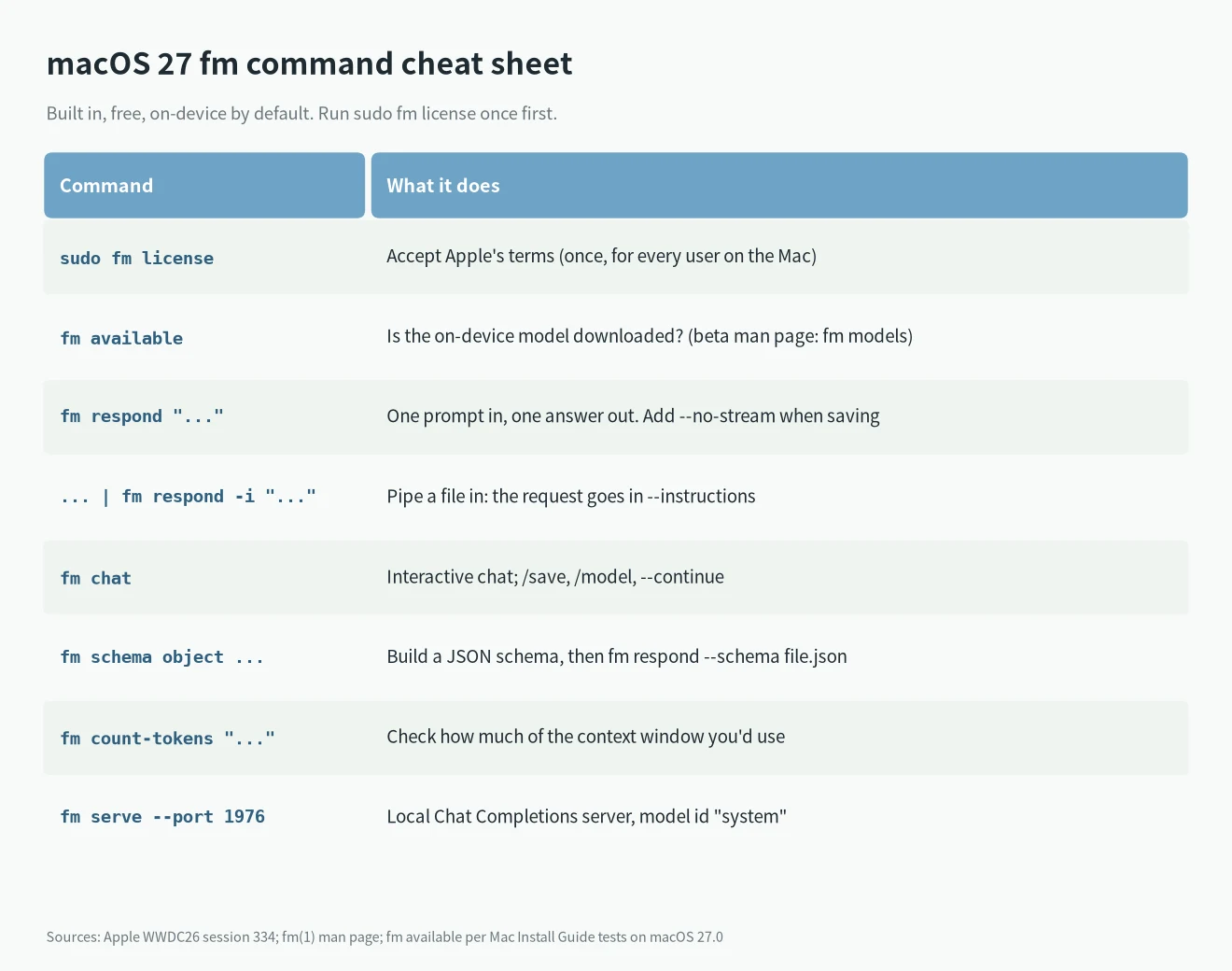
These are the parts of the macOS 27 fm command I’d actually use. Everything here is in Apple’s session or the man page:
fm respond "Rewrite this in plain English: ..."         # one-shot answer
fm respond --no-stream "..." > answer.txt               # don't stream when saving to a file
fm chat --instructions "You are a terse Unix tutor"     # interactive; /save, /model inside
fm chat --continue                                      # pick up the last chat
fm count-tokens "Hello world"                           # how much of the window you're using
fm schema object --name Invoice --string vendor --string due_date --double total > invoice.json
fm respond --schema invoice.json "$(cat invoice.txt)"   # get JSON back, not prose
--greedy gives you deterministic-ish output, which is nice for scripts. --image lets you attach a picture. Sessions live in ~/.fm/sessions/ and settings in ~/.fm/config.json.
The pipe trap: when fm quietly ignores your file
This one is worth the whole article, because it’s the easiest way to get a confidently wrong answer out of the macOS 27 fm command. Mac Install Guide tested the obvious thing:
cat notes.txt | fm respond "Summarize this in two sentences." # DON'TWith a prompt on the command line, the piped text is silently discarded. Exit status 0, no warning, and the model summarizes a document it never saw. Their three runs produced summaries of a story about someone named Alex, a text about goal setting and one about exercise. None of it was in the file.
The version that works puts your request in --instructions and lets stdin be the content:
cat notes.txt | fm respond --instructions "Summarize the input in two sentences."Two more script habits from the same tests. If the license isn’t accepted, fm exits with status 69 and writes to stderr, so output=$(fm respond ...) just gets an empty string. Use set -e or check $?. And when you ask it to sort a list, count what comes back; in Apple’s own file-sorting demo the model dropped two of ten names.
fm serve: a free local Chat Completions endpoint
The macOS 27 fm command also has a server mode. fm serve starts “a Chat Completions API server for Foundation Models”, per the man page. Apple documents --host, --port and --socket but doesn’t state a default port, so I pass one explicitly. Third-party testers used 1976:
fm serve --port 1976In another terminal:
curl -s http://127.0.0.1:1976/v1/models

curl -s http://127.0.0.1:1976/v1/chat/completions \
  -H 'Content-Type: application/json' \
  -d '{"model":"system","stream":false,
       "messages":[{"role":"user","content":"Give me 3 tags for: quarterly budget review notes"}]}'
The "stream": false part matters. According to third-party tests, the server streams by default, so a client that expects a normal JSON reply gets server-sent events instead. Here’s the same call from Python with only the standard library:
import json, urllib.request

body = {
    "model": "system",
    "stream": False,
    "messages": [
        {"role": "system", "content": "Extract the sender and the deadline. Reply as JSON."},
        {"role": "user", "content": open("email.txt").read()},
    ],
}
req = urllib.request.Request(
    "http://127.0.0.1:1976/v1/chat/completions",
    data=json.dumps(body).encode(),
    headers={"Content-Type": "application/json"},
)
print(json.load(urllib.request.urlopen(req))["choices"][0]["message"]["content"])
Two warnings. The same testers found no authentication at all, so don’t bind it to 0.0.0.0 on a network you don’t control. And it isn’t a full OpenAI drop-in: requests with tool definitions either fail or come back as raw JSON in the text, depending on who tested. Point a chat-only script at it, not an agent framework. If you live in Python anyway, Apple also ships an SDK (pip install apple_fm_sdk, Python 3.10+, Xcode, Apple silicon) that does support tool calling.
Context window: 4,096 or 8,192 tokens, depending on your Mac
You’ll see “8K context” in posts about the macOS 27 fm command. It’s only half right. In Apple’s WWDC26 Private Cloud Compute session, the sample code reads contextSize as “4096 on 26.0, 8192 on 27.0 (newer devices)”, while the narration still says the on-device model “offers 4k”.
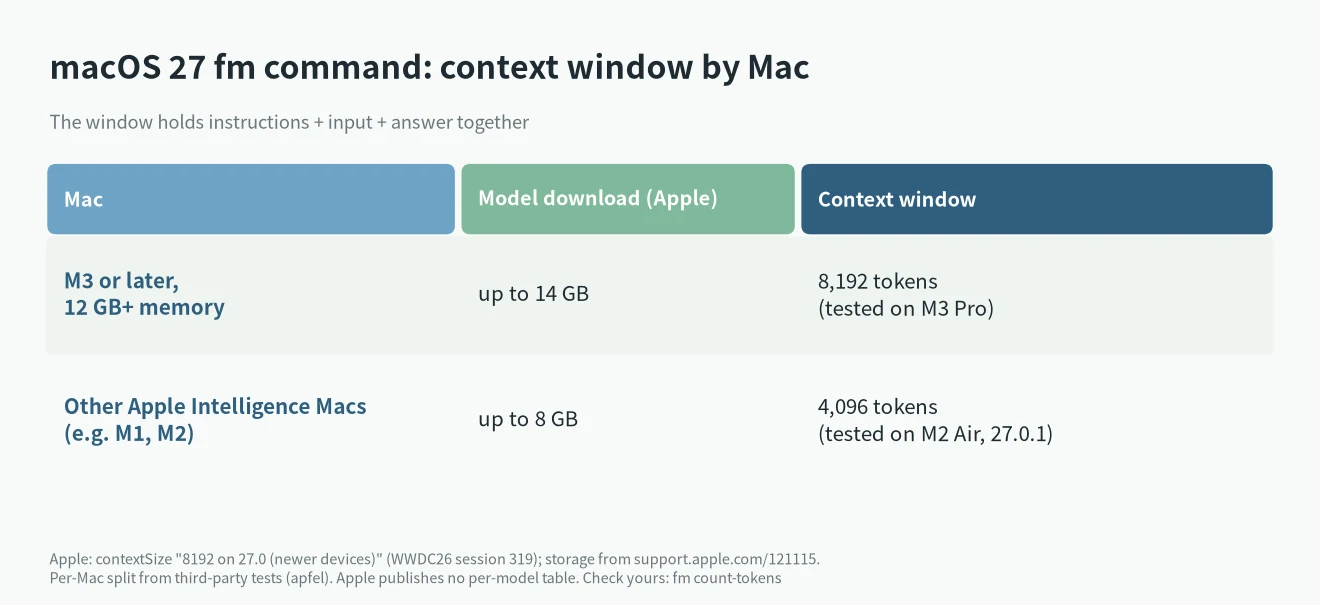
Independent testing fills in the gap. The developer of apfel measured 8,192 on an M3 Pro and 4,096 on an M2 MacBook Air running 27.0.1, where Apple’s own fm rejected a 4,039-token prompt. That lines up with Apple’s storage tiers (M3 or later with 12 GB+ gets the bigger download), but Apple hasn’t published a model-by-model table, so treat the split as tested, not official. Either way, the window covers instructions, input and answer together. On an M2, think “two or three pages”, not “a report”. Run fm count-tokens first.
What it can do for free, and what still needs a bigger model
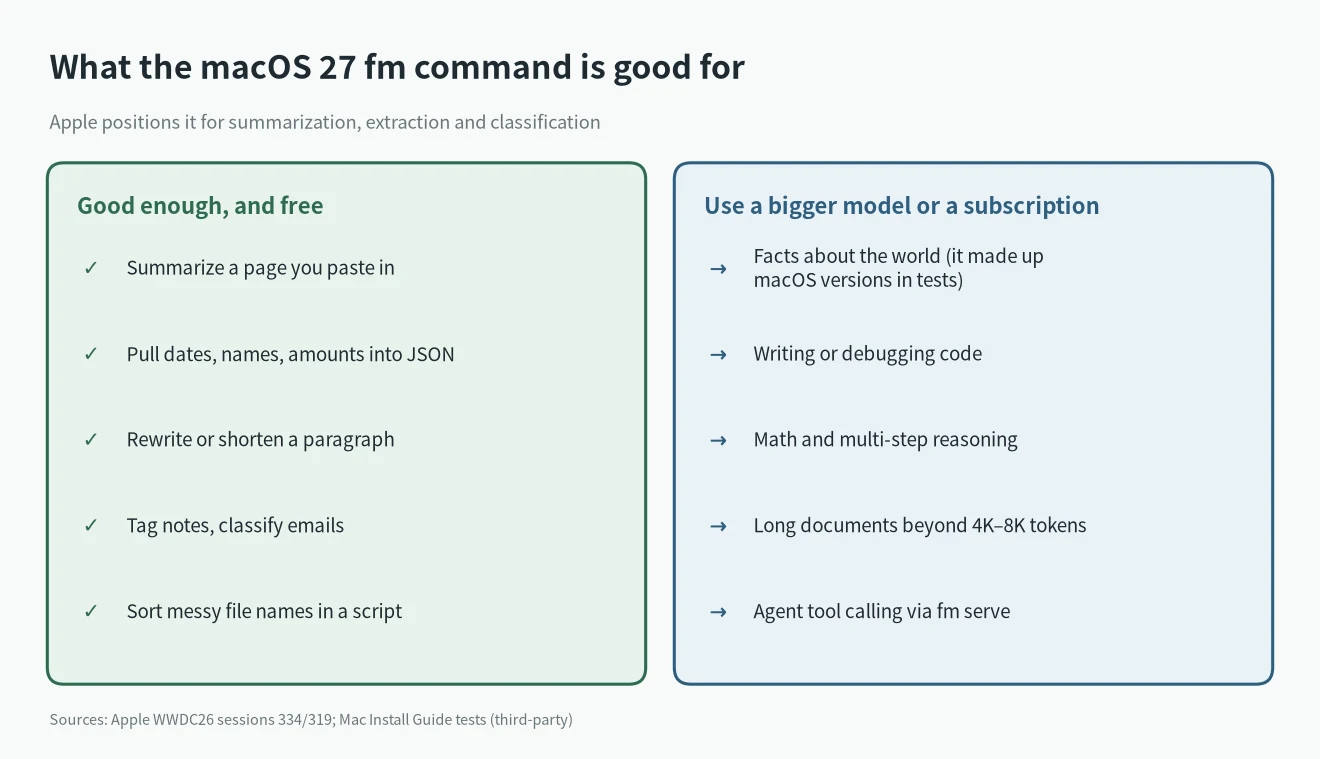
Apple’s guidance for the model behind the macOS 27 fm command is summarization, extraction, classification, short rewrites. Mac Install Guide asked it real beginner Terminal questions and it got none fully right: it explained how to use a Homebrew command that doesn’t exist and, on a Mac running macOS 27, named Sonoma as the latest macOS. On a real summary task it did fine. That matches what Apple says.
So here’s how I’d split the work, money-wise:
- Let fm do it: the “glue” calls inside scripts that you might otherwise send to a paid API. Tag 200 notes, pull a date and an amount out of each receipt email, rename screenshots, turn meeting notes into three bullets. Per-call cost: zero.
- Use a bigger local model: anything that needs more context or real reasoning but should stay on your machine. Ollama or LM Studio with a Qwen or DeepSeek model, if you have the memory. My run DeepSeek locally guide covers what fits on what hardware.
- Keep paying: coding, research, anything where being wrong costs you. The $20-a-month tiers still earn their keep here; my AI subscription and API price comparison has the current numbers.
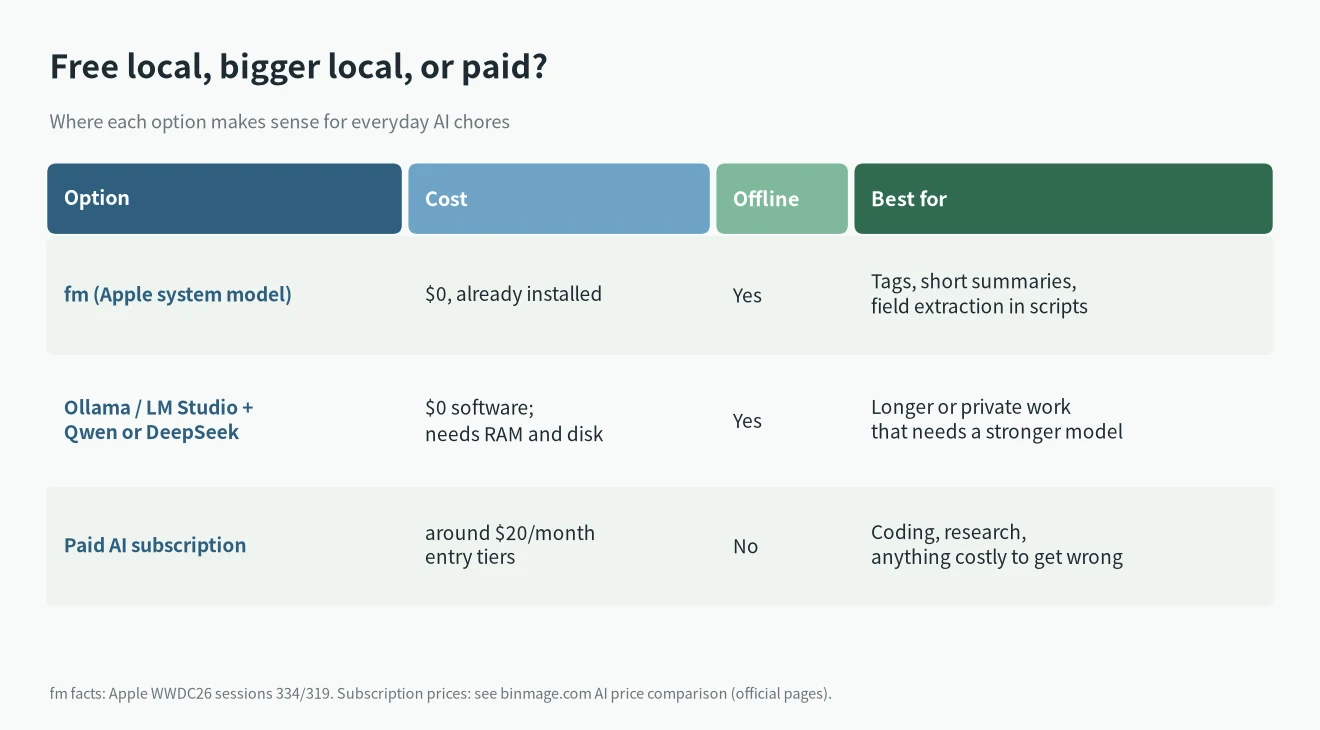
There’s a nice middle path, too. fm can talk to other Chat Completions servers with --model-provider, so the same command can hit your Ollama model when the Apple one isn’t enough. I haven’t run this combination myself; the flag is in the man page, and Ollama’s OpenAI-compatible URL is the usual one:
fm respond --model-provider http://localhost:11434/v1 --model qwen3:8b "Explain this stack trace: ..."What about --model pcc, Apple’s much bigger cloud model? Apple demoed it at WWDC with usage limits. On macOS 27.0, third-party testers report it as unavailable from the CLI (“PCC inference is not available in this context”). I wouldn’t plan around it yet.
Region, language and Mac requirements
The macOS 27 fm command only works where Apple Intelligence does. macOS 27 runs only on Apple silicon Macs, and Apple Intelligence needs M1 or later (or the A18 Pro MacBook Neo), per Apple. Your Mac’s language and Siri’s language have to match a supported language. If Apple Intelligence can’t run, fm reports appleIntelligenceNotEnabled and that’s that.
On China mainland, Apple’s page is explicit: Apple Intelligence doesn’t currently work on supported devices bought there, or on devices bought elsewhere when you’re in China mainland and your Apple Account region is also China mainland. Apple also says new Apple Intelligence features won’t be available in China while it works through regulatory requirements. I’m not going to suggest ways around that.
Does it eat your RAM?
Barely, when idle, and that’s a nice surprise for the macOS 27 fm command. Mac Install Guide measured Apple’s inference service at about 450 MB idle and 650 MB while answering on a 16 GB M3 MacBook Air, and leaving fm serve running didn’t keep the model loaded. The fm binary itself is 3.2 MB. So it won’t fight your Ollama models for memory. Storage is the real cost, as covered above. If you’re choosing how much memory to buy for local AI in general, I wrote about that in buy a Mac now or wait.
My take
The macOS 27 fm command is a free little worker for boring text chores, and it’s already on your Mac. Use --instructions with pipes, ask for JSON with --schema, check exit codes, and keep its inputs short. Don’t ask it questions you can’t verify. For anything harder, a bigger local model or the subscription you already pay for is still the right tool.
Checked October 22, 2026 (Beijing time) against Apple’s WWDC26 sessions 334 and 319, the fm man page and Apple Support article 121115. Third-party test results are labeled as such.
macOS 27 fm command: FAQ
Is the fm command free?
Yes. The macOS 27 fm command uses the default on-device model, which has no API key, no per-request cost and no request limit, and it works offline. The cloud pcc model has usage limits.
Which Macs can run fm?
Any Apple silicon Mac that can run macOS 27 and Apple Intelligence (M1 or later). Apple Intelligence has to be available in your region and language.
Why does fm say modelNotReady?
The model hasn’t finished its background download. Keep the Mac on power and Wi-Fi and try fm available again later. Apple gives no time estimate.
What port does fm serve use?
Apple’s man page doesn’t state a default. Pass --port, for example fm serve --port 1976, and call http://127.0.0.1:1976/v1/chat/completions with model system.
What is the fm context window?
8,192 tokens on newer Macs on macOS 27 and 4,096 on older ones, per Apple’s sample code and third-party tests (M3 Pro 8,192, M2 4,096). Check with fm count-tokens.
Can fm replace Ollama or ChatGPT?
For short summaries, extraction and tagging, often yes. For coding, reasoning, long documents or factual questions, no.
Does fm work in China mainland?
No. It depends on Apple Intelligence, which Apple says doesn’t currently work in China mainland under the conditions on its support page.
More on this: RTX 5090 for AI, the AI price comparison, and everything in AI Hardware.