

llama.cpp “error: --model or -hf is required”: The Simple Fix for llama-cli (2026)
llama.cpp shows "error: --model or -hf is required" when llama-cli starts without a model. Give it a local GGUF with -m or a Hugging Face repo with -hf. llama-server is different: with no model it starts in router mode. Checked against the ggml-org/llama.cpp source on October 28, 2026.
 bufferAbout the author6 min read
Short answer: llama.cpp prints error: --model or -hf is required when you start llama-cli (or the new llama cli) without telling it which model to load. Add a local GGUF file with -m /path/to/model.gguf, or a Hugging Face repo with -hf user/repo:quant, and it starts. llama-server is the exception: with no model it does not stop, it starts in router mode. Everything below was checked against the ggml-org/llama.cpp source and the Ollama docs on October 28, 2026.
What the error says and why it appears
The full message is one line:
error: --model or -hf is requiredIt comes from the argument parser in common/arg.cpp. After reading your flags, llama.cpp checks whether a model was given through -m/--model, -hf, --model-url or --docker-repo. If none was given, it throws this error and exits.
The wording is new. Pull request #31242, merged on October 27, 2026, changed the old message error: --model is required to error: --model or -hf is required, so the error now names both ways to fix it. The v0.8.0 release notes list it as “CLI: --model or -hf is now required”. If you are on an older build and see error: --model is required, it is the same check and the same fix.
The most common ways to hit it:
- Running
llama-cliorllama clion its own to “see what happens”. - A script or service that relies on the
LLAMA_ARG_MODELenvironment variable, but the variable is not set in that shell, systemd unit or container. - Copying a command from an old tutorial that loaded the model in a separate step.
What we got when we ran it
We downloaded the official Linux x64 build b11963 (llama-cli --version prints version: 0.8.0-dev (build 11963, commit 39febd2ad)) on a test machine on October 28, 2026 and ran the cases above:
llama-cliwith no flags printederror: --model or -hf is requiredand exited with code 1.llama-cli -mwith nothing after it gave a different error:error while handling argument "-m": expected value for argument. If you see that one, the flag is there but the path is missing, which usually means a shell variable such as$MODELwas empty.llama-cli -hf ggml-org/Qwen3.5-0.8B-GGUF -p "Reply with one word: hello" -n 16 -stdownloaded the model and answered in about 51 seconds. That repo has no Q4_K_M file, so llama.cpp pickedQwen3.5-0.8B-Q8_0.gguf, as the help text says it will.llama-cli -clthen listedggml-org/Qwen3.5-0.8B-GGUF:Q8_0, and the file was under~/.cache/huggingface/hub/models--ggml-org--Qwen3.5-0.8B-GGUF/.LLAMA_ARG_MODEL=ran withoutllama-cli -p "Say OK" -n 4 -st -m.llama-serverwith no model did not fail. It loggedstarting server in router mode. models will be automatically loaded on-demand.
We did not test the Ollama blob route or Windows and macOS builds.
How to fix –model or -hf is required
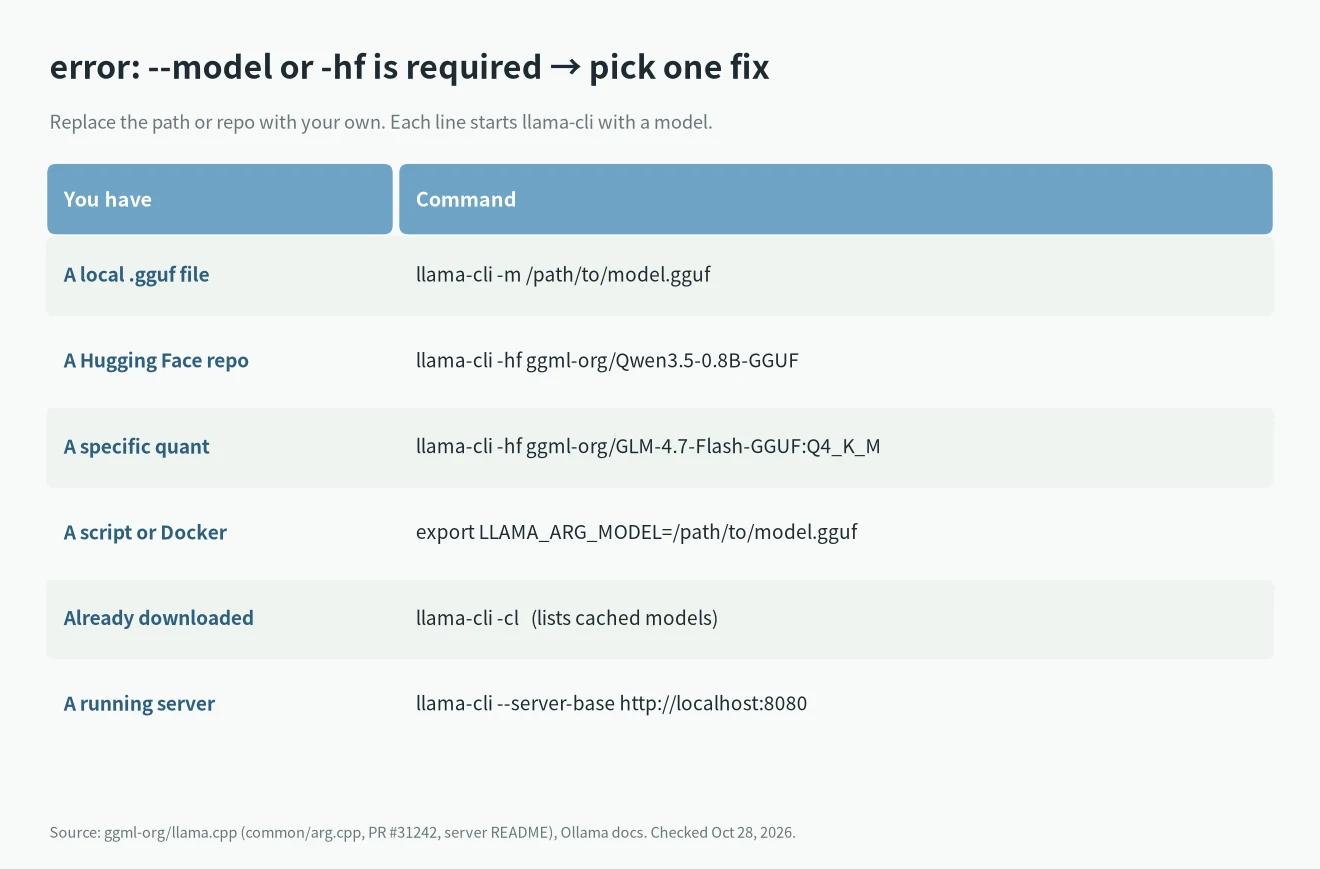
Pick the line that matches what you have. Replace the path or repo name with your own.
You have a GGUF file on disk
llama-cli -m /path/to/model.gguf-m and --model are the same flag. The help text describes it as “model path to load”.
You want to download from Hugging Face
llama-cli -hf ggml-org/Qwen3.5-0.8B-GGUFThis is the example in the llama.cpp README. To choose a quantization, add it after a colon:
llama-cli -hf ggml-org/GLM-4.7-Flash-GGUF:Q4_K_MAccording to the help text, the quant is case-insensitive and defaults to Q4_K_M. If the repo has no Q4_K_M file, llama.cpp takes the first file in the repo. A vision projector (mmproj) is downloaded too if the repo has one; add --no-mmproj to skip it. For gated repos, pass a token with -hft or set HF_TOKEN.
You start llama.cpp from a script or Docker
Every flag also has an environment variable. Set one of these before the command runs:
export LLAMA_ARG_MODEL=/path/to/model.gguf
# or
export LLAMA_ARG_HF_REPO=ggml-org/Qwen3.5-0.8B-GGUF
The server README uses LLAMA_ARG_MODEL: /models/my_model.gguf in its Docker Compose example. If you still get --model or -hf is required, the variable is not reaching the process: check the environment: block, the systemd Environment= line, or whether you exported it in a different terminal.
You already have a server running
llama-cli can talk to an existing server instead of loading its own copy of the model:
llama-cli --server-base http://localhost:8080The check in arg.cpp skips the model requirement when --server-base is set. Use the address and port your server actually listens on.
Does llama-server need –model or -hf?
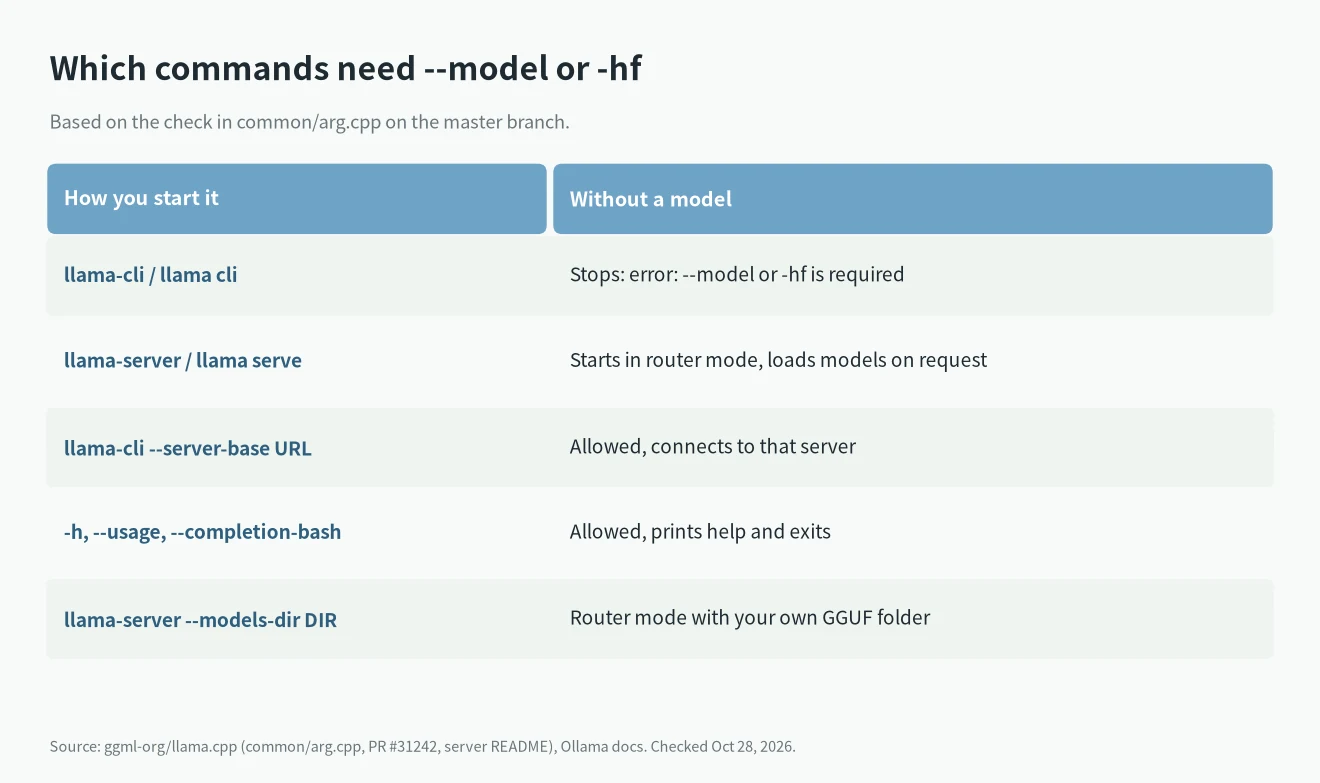
No. The server is excluded from this check. The server README says: “To start in router mode, launch llama-server without specifying any model“. In router mode the server loads models on request. It finds them in three places:
- The cache, which you fill with
llama-server -hf(restart the server after adding a model)./ : - A folder of GGUF files:
llama-server --models-dir ./models_directory. - A preset file:
llama-server --models-preset ./my-models.ini.
The catch is on the request side. In router mode every API request must include a model field. If it does not, the server answers with model name is missing from the request. If you want the old single-model behavior, start it with -m or -hf as above.
Help-only flags such as -h, --usage and --completion-bash also run without a model.
Find a model you already downloaded
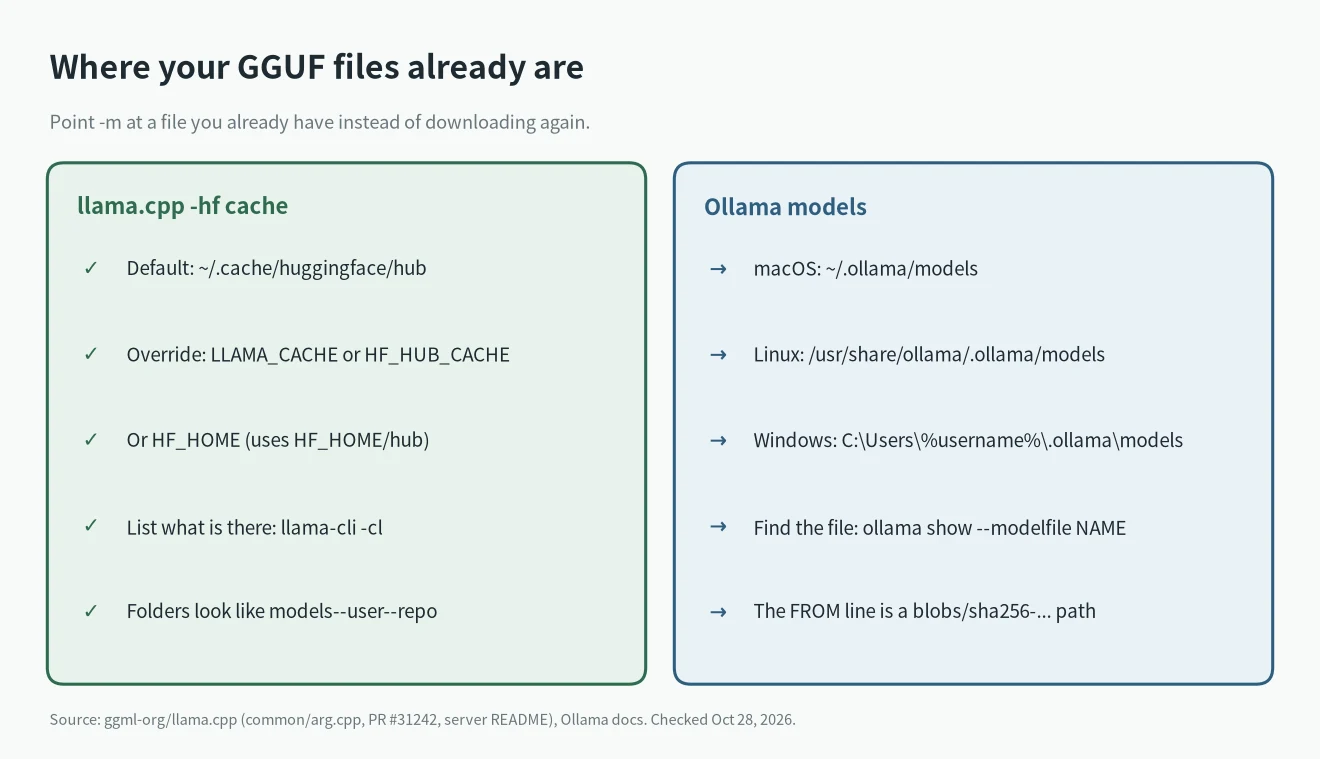
Before you download gigabytes again, check what is on disk.
Models from llama.cpp -hf
List the cache:
llama-cli -clBy default, -hf downloads go to ~/.cache/huggingface/hub. llama.cpp checks LLAMA_CACHE first, then HF_HUB_CACHE, HUGGINGFACE_HUB_CACHE, HF_HOME/hub and XDG_CACHE_HOME/huggingface/hub. Running the same -hf command again reuses the cached file.
Models from Ollama
The Ollama FAQ lists where models are stored:
- macOS:
~/.ollama/models - Linux:
/usr/share/ollama/.ollama/models - Windows:
C:\Users\%username%\.ollama\models
The OLLAMA_MODELS variable changes that location. The files are named by hash, so ask Ollama for the exact path:
ollama show --modelfile llama3.2The Modelfile docs show the output: the FROM line points to a file such as ~/.ollama/models/blobs/sha256-.... Pass that path to llama.cpp:
llama-cli -m ~/.ollama/models/blobs/sha256-<hash>Neither project documents this as a supported workflow, so a blob may fail to load if Ollama’s version of the model needs something llama.cpp does not handle. If it fails, download the GGUF with -hf instead.
FAQ
Why did this start after I updated?
The check itself is older. What changed on October 27, 2026 is the wording (PR #31242) and the README, which now starts users on llama cli -hf .... If an old command worked before, look for a missing -m or an environment variable that is no longer set.
Which model should I load?
For a first test, a small model such as ggml-org/Qwen3.5-0.8B-GGUF loads on almost any machine. For a longer list, see our best local LLM picks and local LLMs for coding.
Will the model fit in my GPU?
Check before downloading with our VRAM calculator. A model that does not fit gives a different error at load time, not --model or -hf is required.