

Codex “Token exchange failed” (403 Forbidden): 5 Proven Fixes From the GitHub Issues
Codex shows "Token exchange failed" when the request it sends by itself to auth.openai.com skips your proxy or never connects. Here is how to tell 403 from "error sending request" and fix each, based on openai/codex issues and our tests on codex-cli 0.165.0.
 bufferAbout the author8 min read
You signed in, the browser said you can close the tab, and the terminal still prints Token exchange failed. That is the codex token exchange failed error. In most cases the one request that Codex sends by itself did not go through your proxy, or it left from a region OpenAI does not serve. The two common forms are Token exchange failed: token endpoint returned status 403 Forbidden and Token exchange failed: error sending request for url (https://auth.openai.com/oauth/token). This guide sorts them by the exact message, using the openai/codex GitHub issues, the official Codex sign-in docs, and our own runs of codex-cli 0.165.0 on a Linux test machine.
Where codex token exchange failed happens
ChatGPT sign-in for Codex has two parts. In the browser you sign in and approve, and the browser hands a one-time code back to Codex on local port 1455. Then the Codex process itself sends that code to https://auth.openai.com/oauth/token and gets your credentials back. That second request is the token exchange, and codex token exchange failed means it did not work.
A working browser tells you little about the second request. The browser uses its own or the system proxy settings. Codex uses the environment variables it can see. On our test machine, codex doctor lists respect system proxy disabled under Connectivity, so the system proxy is ignored by default. In the openai/codex source, the respect_system_proxy feature is marked as under development and off by default, and the token exchange only retries through the system proxy after a connection error, not after an HTTP 403. That last point is our reading of the source code, not something the docs state.
The two messages mean different things:
Token exchange failed: token endpoint returned status 403 Forbidden
Token exchange failed: error sending request for url (https://auth.openai.com/oauth/token)
With 403, the request reached the server and was refused. With “error sending request”, it never got there.
403 Forbidden: the request left without your proxy
openai/codex issue #10466 tracks this exact error. It was opened in February 2026 and is still open. Almost every fix in the replies is about proxies. In a September 2026 reply, user aweng126 sums it up: the token exchange is done by the Codex process, which reads only https_proxy, http_proxy and all_proxy (upper or lower case). It ignores browser and system proxy settings. If those variables are missing, the request goes out from your real IP and comes back 403.
That fits OpenAI’s region rules. OpenAI publishes a list of supported countries and territories, and requests from places not on it get a 403. See our guide to the OpenAI 403 country, region, or territory not supported error. Our test machine is in the US. A direct POST to https://auth.openai.com/oauth/token with an invalid code returned 401 with token_expired, not 403. So when a request reaches the server from a supported place, a bad code gets a 401, and a 403 more likely points at the exit IP or a network policy. That is an inference. OpenAI does not document when this endpoint returns 403.
To fix the 403 form of codex token exchange failed, set the proxy variables in the same terminal, then sign in:
export https_proxy=http://127.0.0.1:YOUR_PORT
export http_proxy=http://127.0.0.1:YOUR_PORT
export no_proxy=127.0.0.1,localhost,::1
codex login
Keep the no_proxy line. The browser has to reach localhost:1455, and if that local call is sent into the proxy, the callback fails. In issue #10466, UnCrownGod fixed it on Ubuntu with Clash Verge by setting NO_PROXY=127.0.0.1,localhost,::1 and using the HTTP port of the proxy. Use the HTTP or mixed port shown in your own proxy app.
For the VS Code extension or the Codex desktop app, the variables must exist before the app starts. Exporting them in a terminal next to an already open app does nothing. Quit the app and start it from the terminal where the variables are set. In issue #50994, a Windows user reports the desktop app ignoring the proxy, and afukuda1111 got around it by launching the app with HTTP_PROXY, HTTPS_PROXY and ALL_PROXY set.
For SOCKS, write socks5://
Another reply in issue #10466 is easy to miss. chenzhaoqiJM changed all_proxy from socks:// to socks5://127.0.0.1:7897 and the 403 went away. We checked why. With nothing listening on 127.0.0.1:7897, we ran codex login --device-auth with each form:
all_proxy=socks5://127.0.0.1:7897failed witherror sending request for url (https://auth.openai.com/api/accounts/deviceauth/usercode), so Codex was using the proxy.all_proxy=socks://127.0.0.1:7897worked and printed a device code. A dead proxy port cannot work, so the variable was ignored and Codex connected directly.
From a blocked region, a direct connection means a 403. Write socks5://, or use the proxy’s HTTP port instead.
error sending request: stale ports, certificates and remote machines
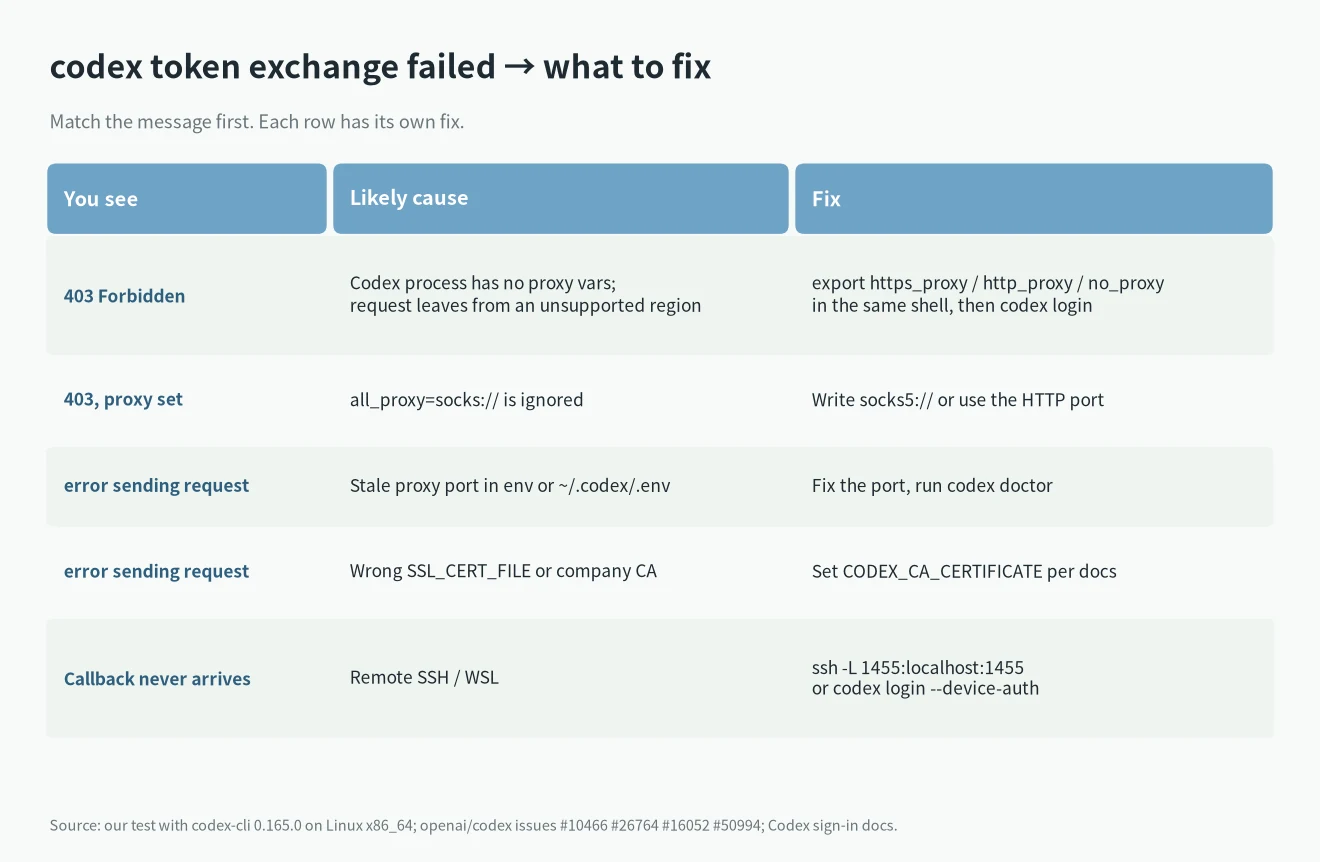
error sending request for url (https://auth.openai.com/oauth/token) is issue #26764, which has 25 replies. In this form of codex token exchange failed, the request never connected. The causes people found:
- A stale proxy port. One user still had
HTTP_PROXYset to 127.0.0.1:6850 while the proxy app had moved to 7892. Another had an old port in~/.codex/.envon macOS. Codex reads that file at startup, so changing the port in the proxy app is not enough. - A bad
SSL_CERT_FILE. The official docs say Codex takes a custom CA fromCODEX_CA_CERTIFICATEand falls back toSSL_CERT_FILE. On a company network that inspects HTTPS, point it at the company CA as the docs describe. - Signing in on a remote machine. With VS Code Remote SSH, the browser is on your laptop and Codex is on the server, so the callback never arrives. The docs suggest
ssh -L 1455:localhost:1455or device code sign-in. - An old version. One WSL user fixed it by updating the bundled CLI from 0.142 to 0.144.5.
- A Cloudflare challenge. In issue #16052, a user in Australia hit a Cloudflare challenge on the token exchange. A different network usually helps more than config changes here.
We reproduced the stale port case of codex token exchange failed. We put a proxy port with nothing behind it into ~/.codex/.env (our CODEX_HOME points to a test folder) and ran codex doctor and codex login --device-auth:
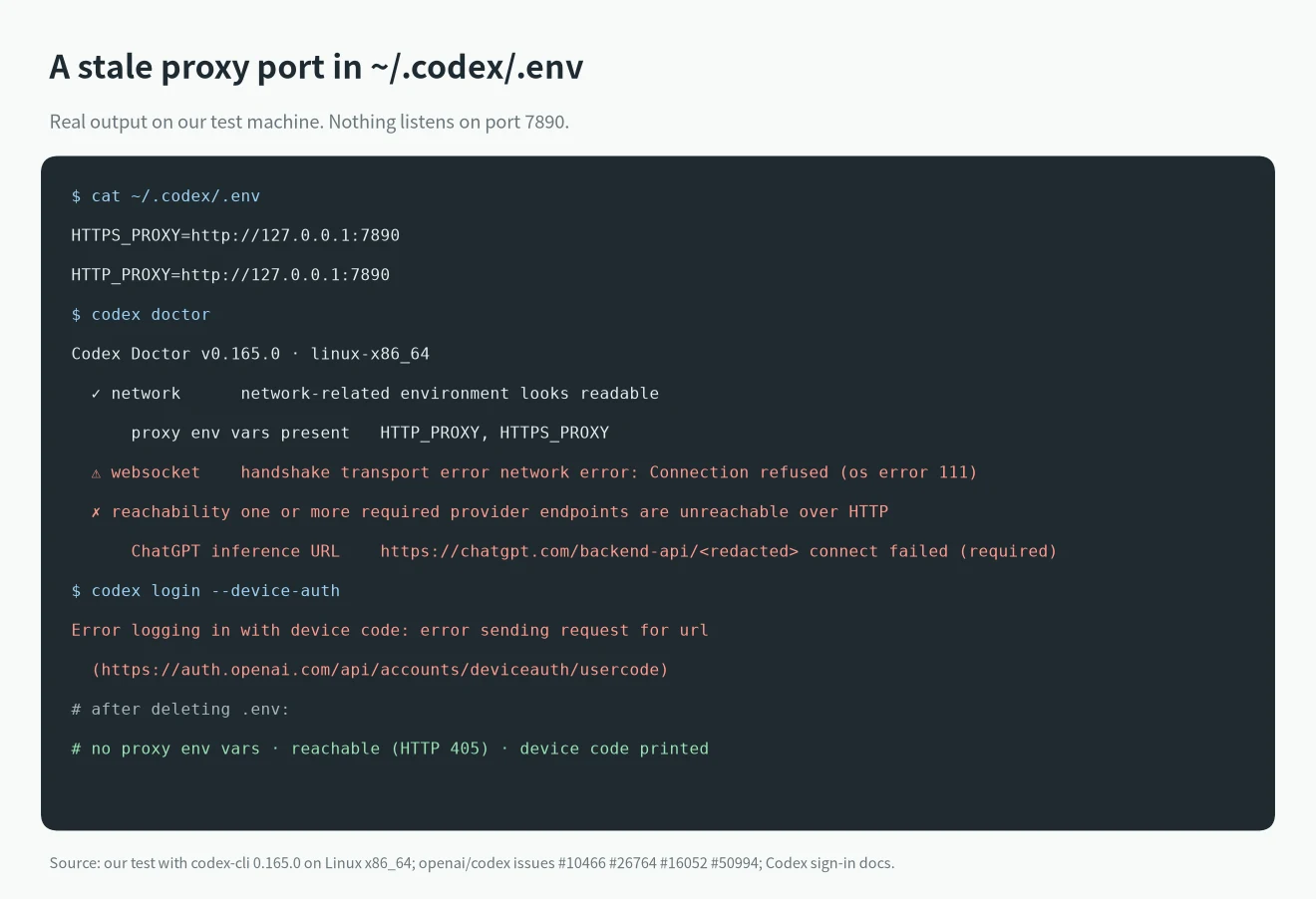
codex doctor showed HTTP_PROXY, HTTPS_PROXY read from .env, the WebSocket handshake failed with Connection refused (os error 111), and reachability marked the ChatGPT endpoint as unreachable. Device sign-in failed with error sending request for url. After we removed the file, codex doctor showed no proxy env vars, the endpoint was reachable, and device sign-in printed a code.
Check in this order
- Read the full message. Is it 403 or “error sending request”?
- Run
codex doctorand look at Connectivity: which proxy variables it found and whetherreachabilityhas a ✓. This is what Codex sees, which matters more than whether a website opens in your browser. - Check
~/.codex/.envand your shell profile for old proxy ports or a staleSSL_CERT_FILE. - Export
https_proxy,http_proxyandno_proxyin one terminal, write SOCKS assocks5://, then runcodex login. - If the local callback keeps failing, use
codex login --device-auth. The docs call it beta, and you have to turn on device code sign-in in your ChatGPT security settings first. It skips the port 1455 callback, but Codex still sends the token request, so you still need the proxy variables. - After a failure, read
~/.codex/log/codex-login.log. The docs say sign-in logs go there. - Confirm with
codex login status. - As a last resort, the docs allow signing in on a machine that works and copying
~/.codex/auth.jsonto the target machine. That file is your login. Do not share it or commit it.
In issue #26764 someone fixed it by deleting all of ~/.codex. We would not start there, since it holds your config and session history. Finding the cause usually means changing one or two variables.
If you do not need your ChatGPT account, codex login --with-api-key is an option. The API has the same region rules, so the proxy still matters. For a 401 on the key, see how to fix OpenAI 401 Incorrect API key provided.
FAQ
Does codex token exchange failed mean my account is banned?
Usually not. The solved cases in issues #10466 and #26764 changed proxy, certificate or port settings. Nothing changed on the account.
ChatGPT opens in my browser. Why does Codex still show codex token exchange failed with 403?
They do not share proxy settings. By default Codex reads only environment variables, which is what respect system proxy disabled in codex doctor means.
Will it still fail with TUN mode on?
TUN mode routes all traffic on the machine, so it does not rely on environment variables. If you still get 403 with TUN on, check whether your exit node is in a country OpenAI supports. We did not test TUN mode; this follows from how it works.
Once codex token exchange failed is gone, for other Codex messages see the OpenAI Codex error codes lookup. If Codex is not installed yet, start with how to install Codex CLI and sign in.