

OpenAI API 403 “Country, region, or territory not supported”: The Honest Answer and What to Check (2026)
The OpenAI API returns 403 "Country, region, or territory not supported" when a request comes from a country or territory that is not on OpenAI's supported list. A new key or a retry will not change it. Checked against OpenAI's docs on October 29, 2026.
 bufferAbout the author4 min read
Short answer: OpenAI returns 403 Country, region, or territory not supported when your API request comes from a country or territory that is not on OpenAI’s supported list. It is not a key problem and not a billing problem, so a new key or a retry will not change it. What counts is where the machine that sends the request is, which is often a server or cloud function, not your laptop. This guide sticks to what OpenAI’s docs say, plus what we could test ourselves on October 29, 2026.
What the error says
OpenAI’s error codes page lists it as:
403 - Country, region, or territory not supported
Cause: You are accessing the API from an unsupported country, region, or territory.
Solution: Please see this page for more information.
“This page” is the supported countries and territories list. The response body, as a developer posted it on the Google Developer forums, looks like this:
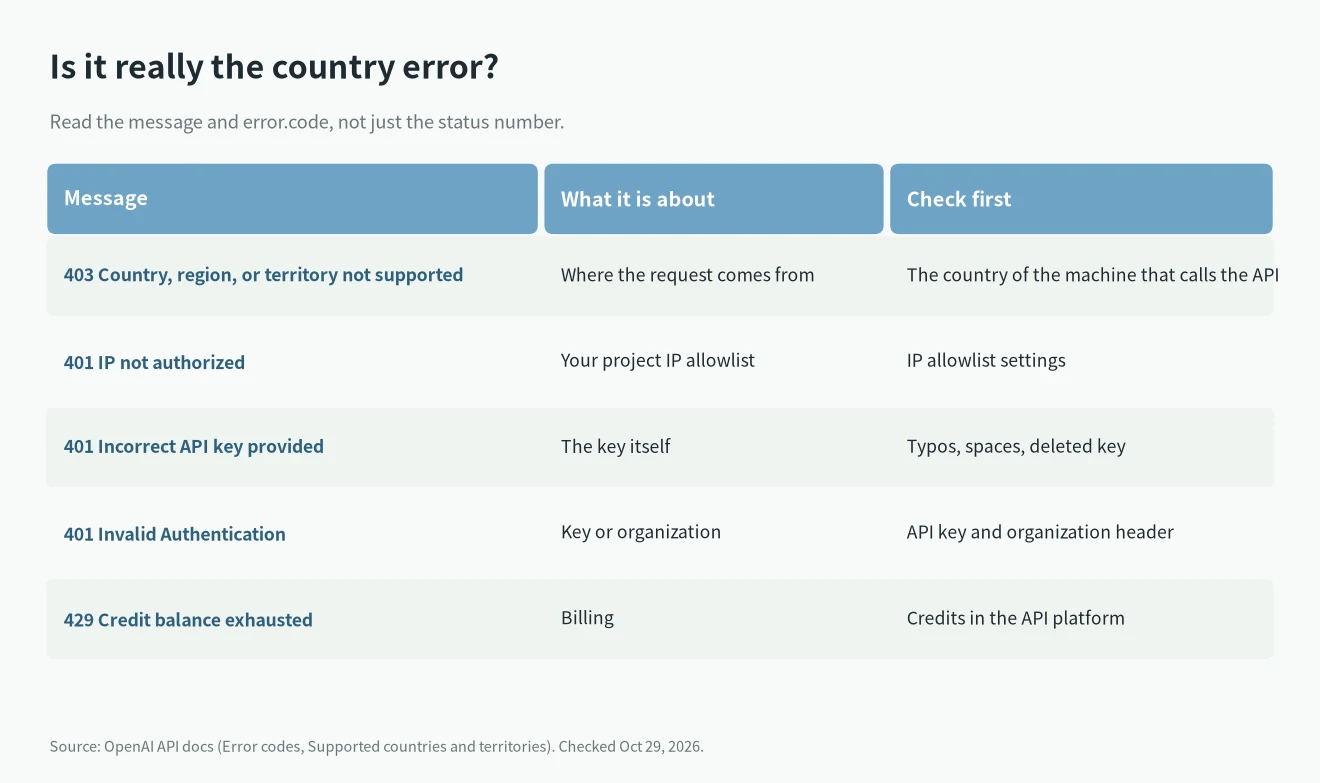
Error code: 403 - {'error': {'code': 'unsupported_country_region_territory', 'message': 'Country, region, or territory not supported', 'param': None, 'type': 'request_forbidden'}}The code field, unsupported_country_region_territory, is the part to match in your logs. Other OpenAI errors also use 401 or 403, so the number alone does not tell you it is the country check.
Which places are on the list
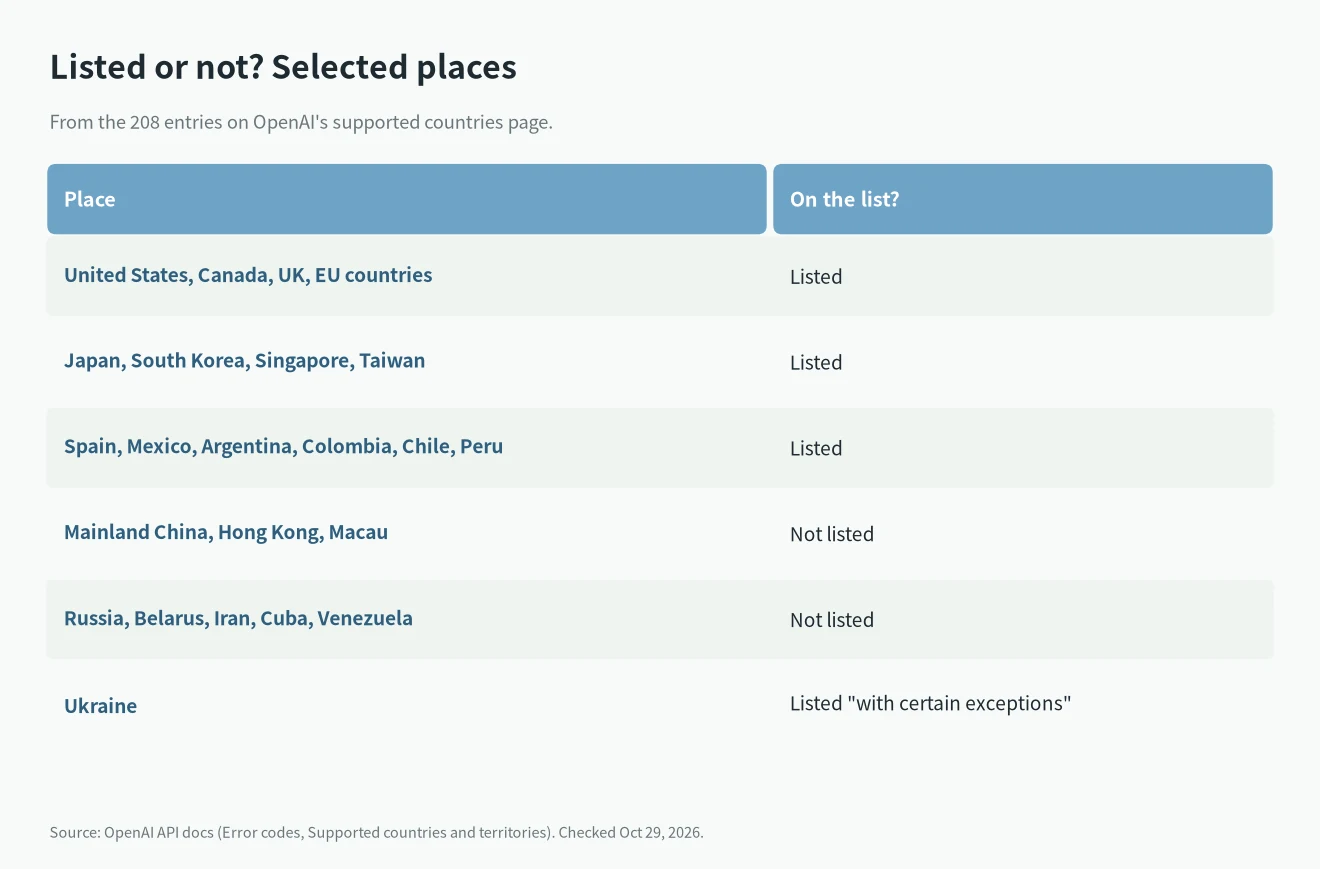
On October 29, 2026 the list had 208 entries. Above the list, OpenAI writes: “Accessing or offering access to our services outside of the countries and territories listed below may result in your account being blocked or suspended.”
A few entries people often ask about:
- Not listed: mainland China, Hong Kong, Macau, Russia, Belarus, Iran, Cuba and Venezuela.
- Listed: Taiwan, Japan, South Korea, Singapore, Spain, Mexico and most of Latin America.
- Ukraine is listed “with certain exceptions”, and the page does not name them.
The list changes, so open the page itself before you plan around it.
What we tested ourselves
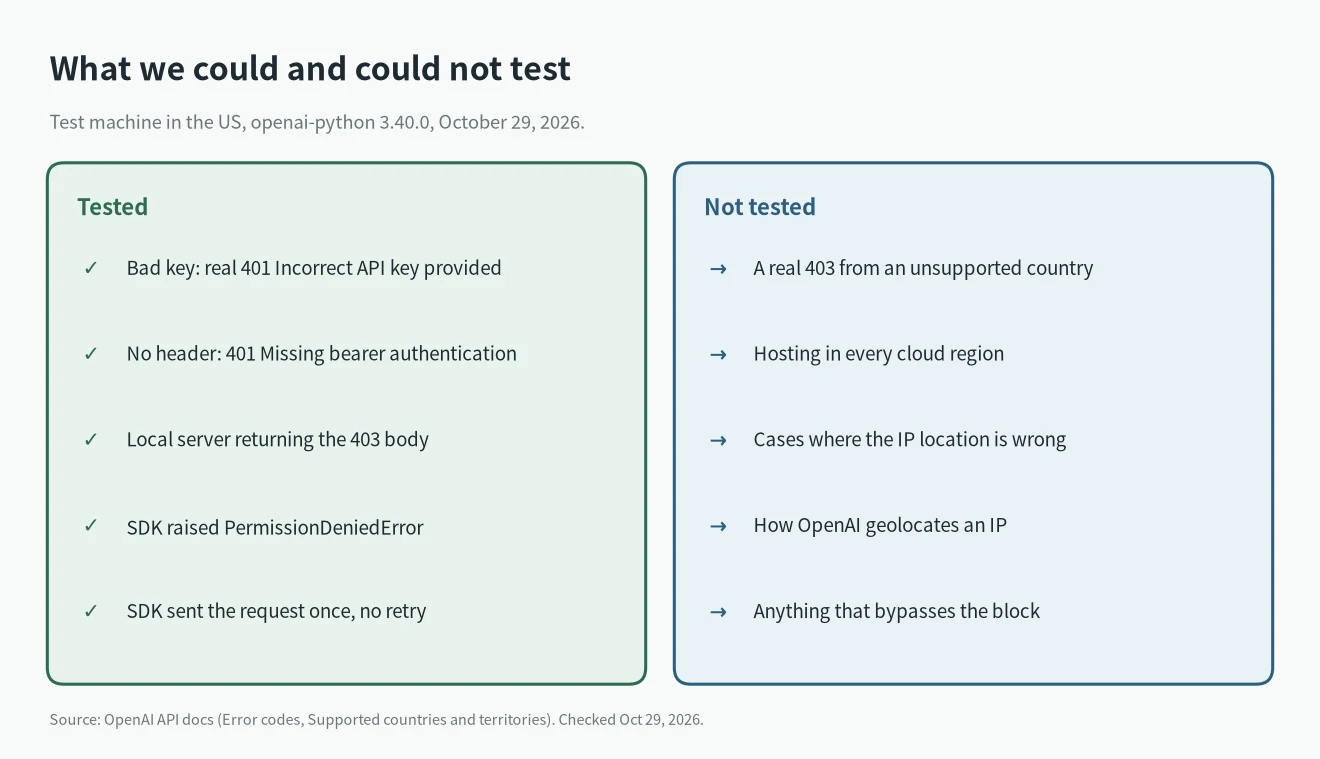
Our test machine is in the US, a supported country, so we could not trigger a real Country, region, or territory not supported response. We tested the parts around it instead.
First, a request with a fake key:
curl https://api.openai.com/v1/models -H "Authorization: Bearer sk-test123"It came back as HTTP 401 with "message": "Incorrect API key provided: sk-test123..." and "code": "invalid_api_key". With no Authorization header at all, the 401 said Missing bearer authentication in header. Neither is the country error, which shows how different the bodies look.
Second, we ran a small local server that returns the same 403 body as the forum post, and pointed openai-python 3.40.0 at it with base_url. The SDK raised:
PermissionDeniedError | Error code: 403 - Country, region, or territory not supported
code= unsupported_country_region_territory status= 403
Our server logged one request. The SDK did not retry the 403, so if your code wraps calls in its own retry loop, it will just get the same answer again.
What to check
OpenAI’s own fix is one line: see the supported list. In practice that means:
1. Find out where the request is sent from. If your code runs on a cloud function, container or CI runner, look up that service’s region. Your own location does not matter if the call is made from somewhere else.
2. Compare that place with the official list.
3. If the machine is in a listed country and you still get Country, region, or territory not supported, the IP may be placed in the wrong country. The developer on the Google forum found that an IP from Google Cloud’s Seoul region (asia-northeast3) was being identified as a Hong Kong IP. In a related OpenAI community thread, the poster said switching to a different region fixed it. If that happens to you, contact OpenAI support through help.openai.com with the IP.
4. If you are actually in an unlisted place, the API is not offered there. We do not cover ways around it. OpenAI warns that access from outside the list can get an account blocked or suspended.
Once requests get through, a 429 is a separate problem. If you then see “Rate limit reached for requests” or insufficient_quota, see how to tell those two OpenAI 429 errors apart.
FAQ
Will a new API key fix Country, region, or territory not supported?
No. The error is about where the request comes from. A new key from the same place gets the same 403. Our guide to 401 Incorrect API key provided covers the key errors.
Is it the same list as ChatGPT?
OpenAI publishes a separate page for ChatGPT on web and mobile. This article is about the API. If you are deciding between the two, see ChatGPT subscription vs API.
Which other model APIs can I compare?
Our LLM API pricing comparison lists six providers’ official prices. Each provider has its own country list, so check it before you sign up.