

“Codex could not start its user interface” in VS Code: The Frustrating Bug and the Rollback That Works (2026)
"Codex could not start its user interface" appeared for many VS Code users after the Codex extension updated to 26.1021.22027. The GitHub issue is still open with no reply from OpenAI. What works for most people is rolling back to 26.1007.21434 and turning off auto update for that one extension.
 bufferAbout the author5 min read
Short answer: “Codex could not start its user interface” is a bug in the Codex VS Code extension, version 26.1021.22027. It is not your account or your network. The GitHub issue is still open and OpenAI has not replied there as of October 29, 2026. What fixed it for most users in that thread is rolling back the extension to 26.1007.21434 and turning off auto update for that one extension. If the old version also fails, a few users fixed it by going back to VS Code 1.142.
What you see
When you open the Codex sidebar, the panel shows:
Codex could not start
The extension could not start its user interface.
VS Code also shows a pop-up: “Codex could not start its user interface.” In the Output panel, choose the Codex channel. The matching log line looks like this one, posted in openai/codex issue #56691:
[CodexWebviewProvider] Webview renderer did not become ready elapsedMs=30004 extensionVersion=26.1021.22027 reason=renderer_ready_timeout receivedWebviewMessage=false role=sidebar stage=renderer timeoutMs=30000If your log shows a different reason, this article may not be your problem.
Is it fixed yet?
No. We checked right before publishing:
- Issue #56691 is open, with dozens of user comments and no reply from an OpenAI member. Other reports are open for macOS (#56660) and Remote-SSH (#56736).
- The newest stable version on the VS Marketplace is still 26.1021.22027, published October 23, 2026 (UTC). No newer build has shipped.
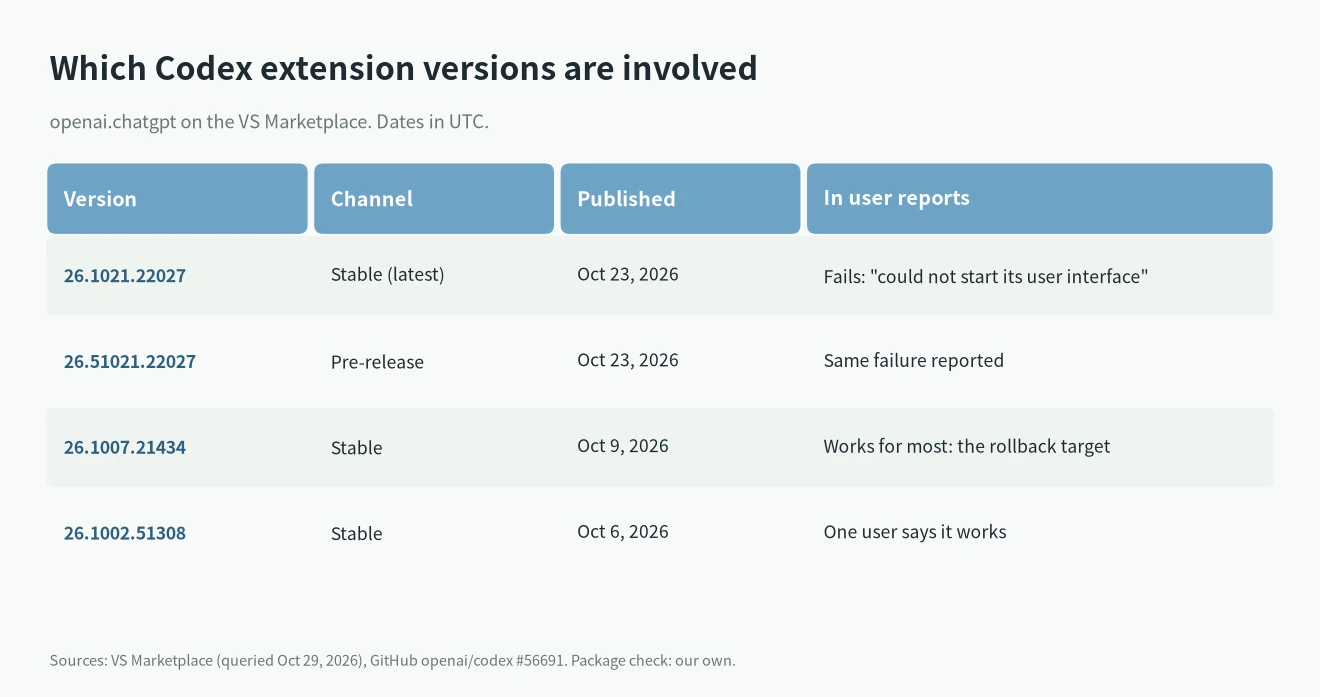
Reports come from Windows 10 and 11, Ubuntu, Fedora, Linux Mint, Intel Macs and Remote-SSH, so it is not a Windows-only bug.
Fix “Codex could not start its user interface”: roll back to 26.1007.21434
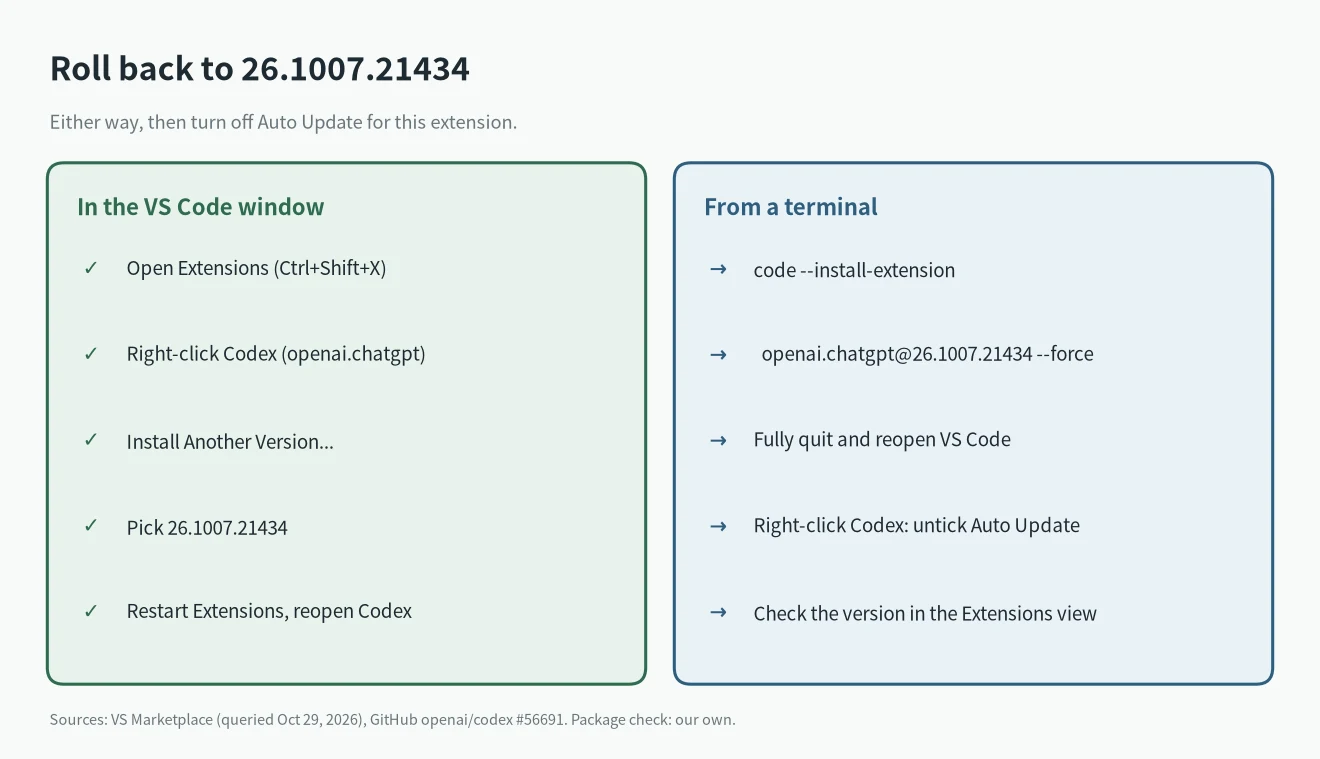
VS Code’s extension docs describe the UI way: “right-click the extension and select Install Another Version.”
1. Open the Extensions view with Ctrl+Shift+X (Cmd+Shift+X on a Mac).
2. Right-click the Codex extension. Its ID is openai.chatgpt.
3. Choose Install Another Version… and pick 26.1007.21434.
4. Restart extensions when VS Code asks, then open Codex again.
Or from a terminal. The VS Code command line docs say to “append @{version}” to install a specific version:
code --install-extension [email protected] --forceOne user reported “code –install-extension [email protected] –force, pb fixed” (comment). Another said the old version only worked fully after a reboot.
Stop VS Code from updating it back
If you skip this, VS Code reinstalls 26.1021.22027. Per the VS Code docs, you can turn off updates for one extension “by right-clicking on an extension and toggling the Auto Update item”. Do that for Codex only. When a fixed version appears, turn it back on.
What we checked ourselves
We could not run VS Code with a screen on our test machine, so we did not reproduce the pop-up. Instead, on October 29, 2026, we queried the VS Marketplace and downloaded both Linux x64 packages to compare them.
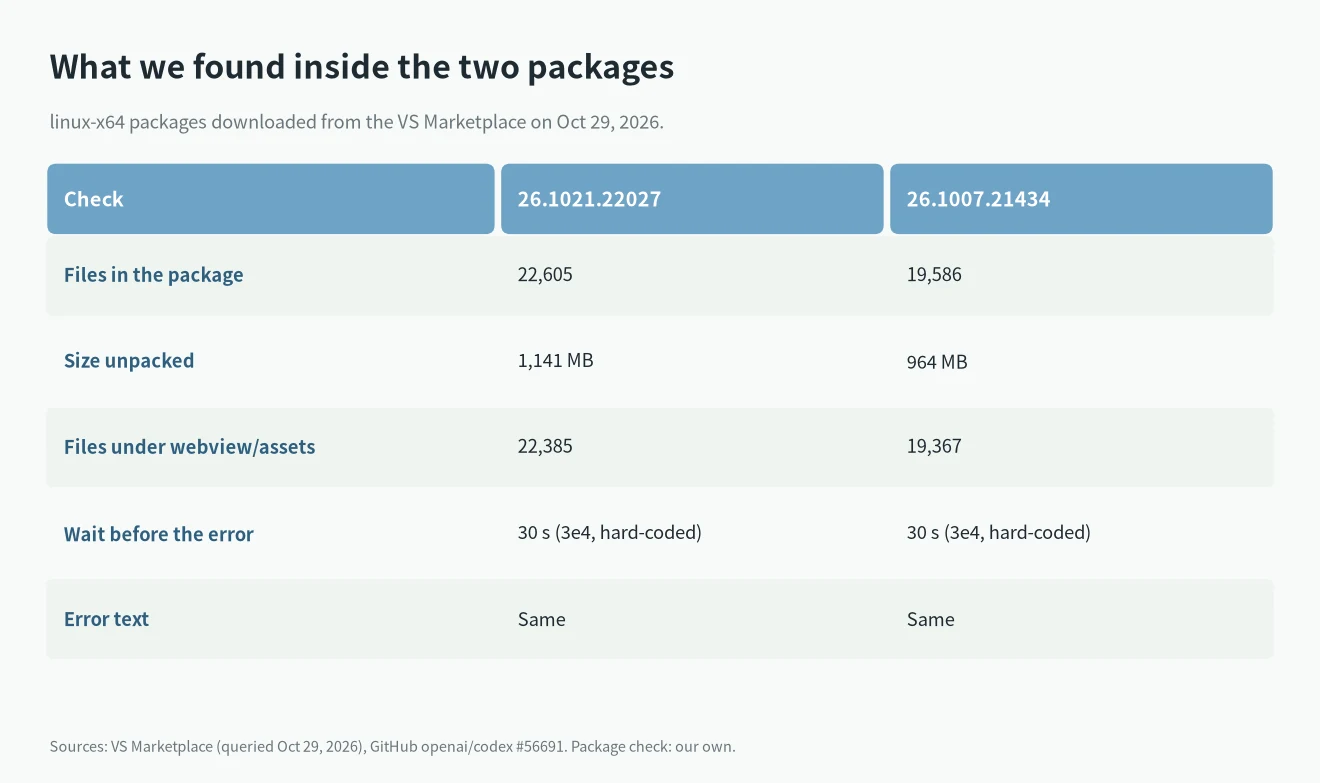
What we found:
- Both packages download fine from the Marketplace, and each package.json reports its own version (26.1021.22027 and 26.1007.21434). So the rollback target is still available.
- The new package is bigger: 22,605 files and 1,141 MB unpacked, against 19,586 files and 964 MB. Almost all of the extra files are under
webview/assets, the code the Codex panel loads. - The error comes from a fixed 30-second timer in the extension code (
3e4ms). If the panel does not report “ready” within 30 seconds, you get this message. The timer and the message are the same in both versions, and there is no setting to change them. - In the new version, the panel’s entry file (
webview/assets/app-main-*.js) carries a preload list of 3,203 files. The old entry file has no such list and imports 4 files directly.
That matches a user who measured it on a 2-core laptop from 2010: the new panel took 45 to 142 seconds to load, and it worked once he raised the 30-second limit for testing (comment). So on slow or busy machines the error may be a slow start, not a broken build. OpenAI has not confirmed a cause.
If 26.1007.21434 also fails
Several users say VS Code 1.143.1 is part of the problem. One Windows 11 user logged the old extension failing on 1.143.1 and loading in about 2 seconds after going back to VS Code 1.142.0 (comment with the log table). A Linux user confirmed the same (comment). That is a bigger step, so try the extension rollback first.
Meanwhile you can keep working in a terminal. The Codex CLI does not use the VS Code panel; our Codex CLI install guide covers setup, and Codex CLI vs the Codex app explains the differences.
FAQ
Does reinstalling the extension help?
Not by itself. Reinstalling gets you 26.1021.22027 again. Pick 26.1007.21434 on purpose.
Will clearing the VS Code cache fix it?
For the original reporter it did not. They cleared caches and Service Worker data, used a fresh profile and disabled GPU acceleration before rolling back.
Is it my ChatGPT plan?
Nothing in the reports points to the plan. The same users, on the same accounts, got Codex working again just by changing the extension version.