

Claude Code Unable to Connect to API: What It Means and 5 Simple Fixes (Tested)
Claude Code Unable to connect to API means the connection to the API never completed. Usually the network is fine and a leftover ANTHROPIC_BASE_URL, a dead proxy variable, a VPN or DNS sends the request to the wrong place. We reproduced it with Claude Code 2.1.312 and list the checks in order, based on the official error reference.
 bufferAbout the author6 min read
Short answer: Claude Code Unable to connect to API means the TCP connection from Claude Code to the API never completed. In most cases the network is fine and something local is sending the request to the wrong place: a leftover ANTHROPIC_BASE_URL, a proxy variable pointing at a proxy app that is no longer running, a VPN, or broken DNS. Run curl -I https://api.anthropic.com in the same terminal first. If curl gets any HTTP status back and Claude Code still fails, check ANTHROPIC_BASE_URL and your proxy variables before anything else. We reproduced the error on a test box with Claude Code 2.1.312 and show the exact output below. Messages and fixes are checked against the official Claude Code error reference on October 29, 2026.
What the Claude Code Unable to connect to API message looks like
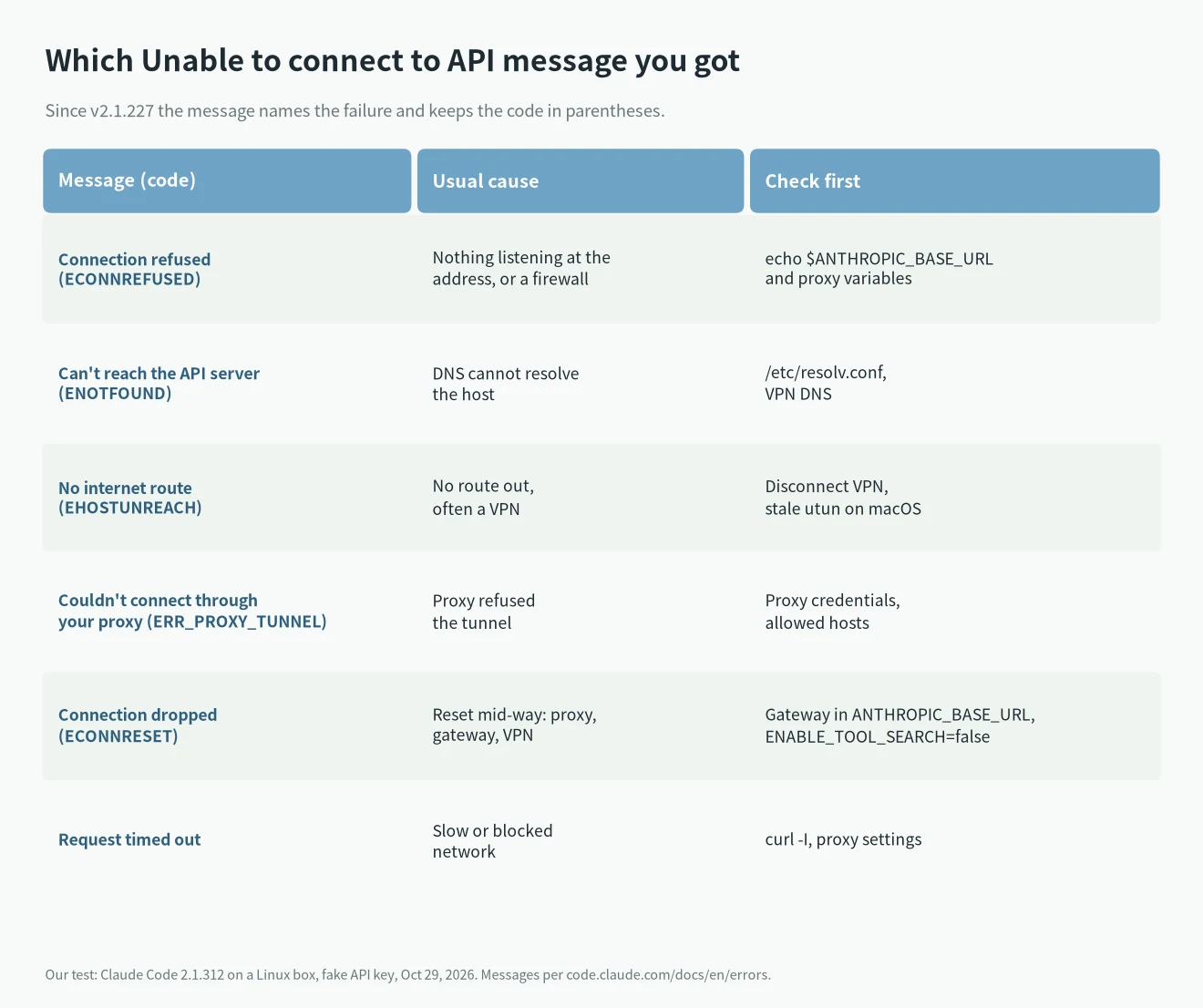
Since v2.1.227 the message names the kind of failure and keeps the error code in parentheses. These are the forms listed in the official docs:
Unable to connect to API. Check your internet connection
Connection refused — a firewall or proxy may be blocking it (ConnectionRefused)
Can't reach the API server — check your internet or DNS (ENOTFOUND)
No internet route — check your connection or VPN (EHOSTUNREACH)
Couldn't connect through your proxy (ERR_PROXY_TUNNEL) — the proxy refused the tunnel: check its credentials and that it allows this host
Connection dropped (ECONNRESET)
Request timed out. Check your internet connection and proxy settings
On versions before v2.1.227 you will see the older form, for example Unable to connect to API (ECONNREFUSED). A code Claude Code doesn’t recognize still appears as Unable to connect to API plus the code. Claude Code also retries connection failures automatically (up to 10 times, per the docs), so by the time you see the message the retries are already used up.
We reproduced it: a dead base URL or proxy gives Connection refused
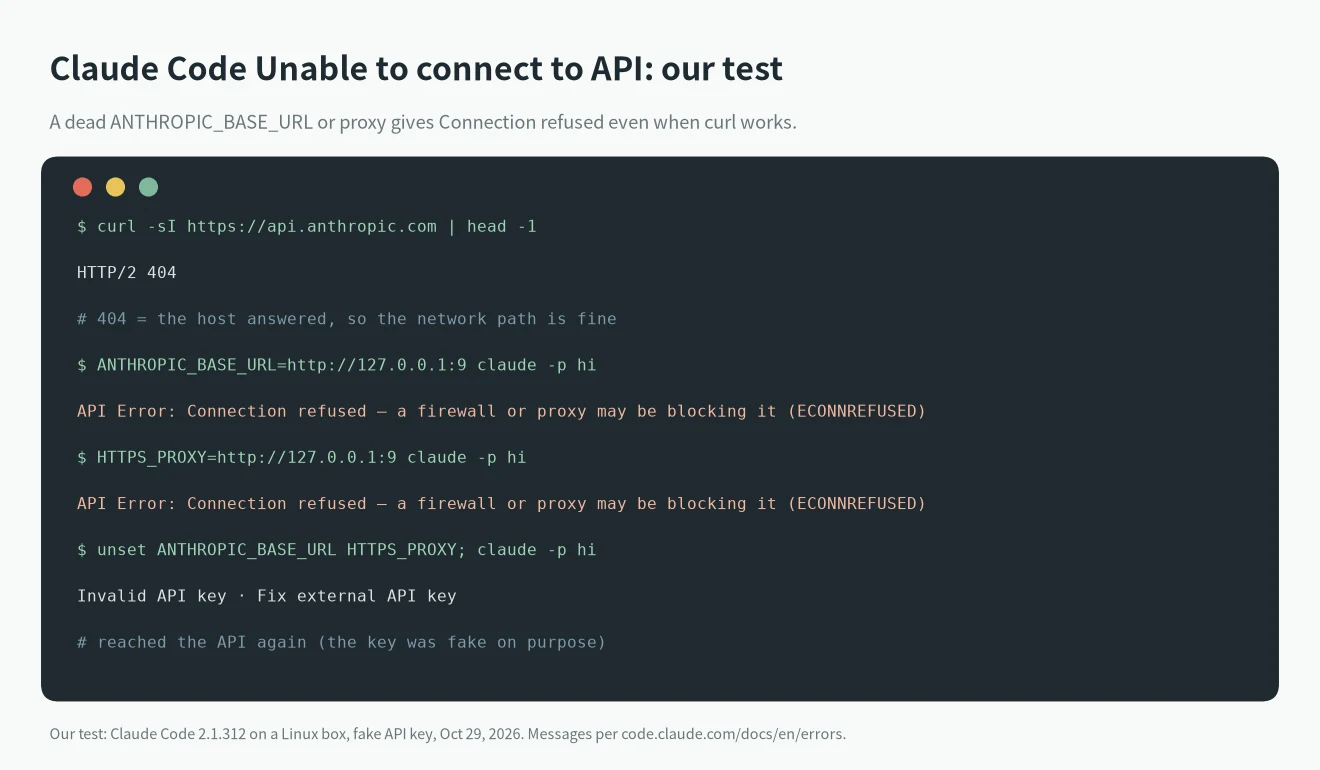
On a Linux test box with Claude Code 2.1.312 and a fake API key, we ran four commands. We set CLAUDE_CODE_MAX_RETRIES=0 so the error shows at once instead of after the retries.
curl -sI https://api.anthropic.comreturnedHTTP/2 404. A 404 here is fine: the host answered, so the network path works.- With
ANTHROPIC_BASE_URL=http://127.0.0.1:9(a port where nothing listens),claude -p hiprintedAPI Error: Connection refused — a firewall or proxy may be blocking it (ECONNREFUSED). - With
HTTPS_PROXY=http://127.0.0.1:9instead, we got the same Connection refused line. - After
unset ANTHROPIC_BASE_URL HTTPS_PROXY, the same command printedInvalid API key · Fix external API key. That means the request reached the API again; the key was fake on purpose.
So the most common Claude Code Unable to connect to API case is one where curl works and Claude Code doesn’t, because Claude Code reads extra settings that curl ignores. One more result: with ANTHROPIC_BASE_URL=https://api.anthropic.invalid (a host that does not exist) our box returned Connection dropped (ECONNRESET). Check the gateway set in ANTHROPIC_BASE_URL rather than ENOTFOUND, because our box sends traffic through an egress proxy. On a normal home network you would more likely see the ENOTFOUND form. The code in parentheses depends on what sits between you and the API.
Claude Code Unable to connect to API: fixes in order
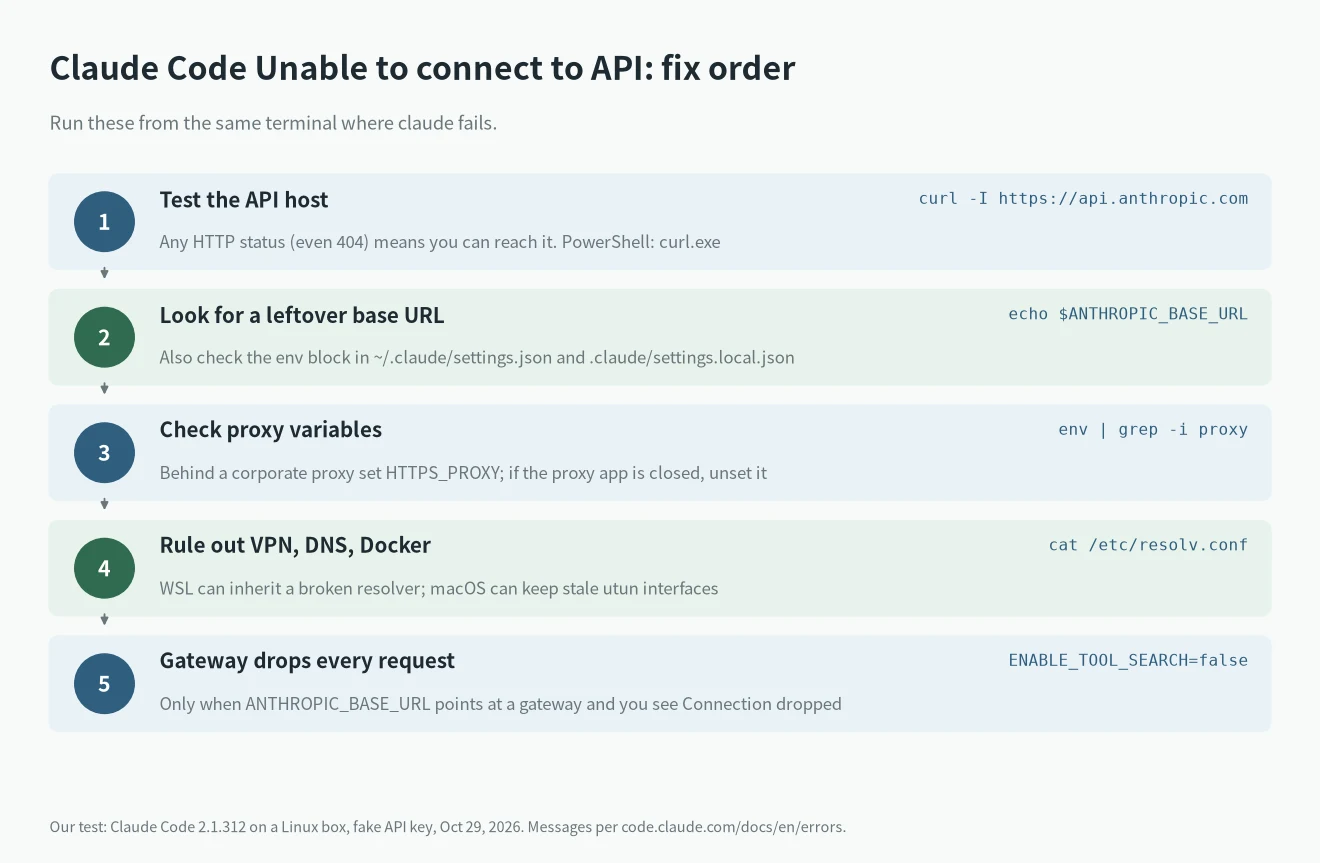
Run these in the terminal where claude fails, in this order:
curl -I https://api.anthropic.com
echo $ANTHROPIC_BASE_URL
env | grep -i proxy- curl fails too. It is the network: Wi-Fi, firewall, VPN or a corporate proxy. On Windows PowerShell use
curl.exe -I https://api.anthropic.comso theInvoke-WebRequestalias isn’t used. Behind a corporate proxy, setHTTPS_PROXYbefore starting Claude Code (see Network configuration). - curl works, Claude Code doesn’t,
ANTHROPIC_BASE_URLis set. Claude Code sends model requests to that address instead of api.anthropic.com. If the relay or local proxy behind it is gone, remove the variable from your shell profile, and also check theenvblock in~/.claude/settings.jsonand the project’s.claude/settings.local.json(see where settings.json lives). Then open a new terminal. - A proxy variable points at a closed app.
unset HTTPS_PROXY HTTP_PROXYand try again. - WSL or Linux. Check
/etc/resolv.conffor a nameserver you can’t reach. WSL can inherit a broken resolver from Windows. - macOS after removing a VPN. Look for stale
utuninterfaces inifconfigand remove the VPN’s network extension in System Settings. - Docker Desktop. Quit it and retry to rule out traffic interception.
- Gateway and every request ends in Connection dropped. Set
ENABLE_TOOL_SEARCH=falseand retry. The docs say some gateways reject the tool search fields Claude Code sends by default.
Real cases from GitHub
Two reports in public issue trackers match our test:
- In anthropics/claude-code issue #74120, the reporter first suspected a macOS update. The cause turned out to be a project-local
.claude/settings.local.jsonwithANTHROPIC_BASE_URLset tohttp://127.0.0.1:8787, where nothing was running. Only sessions started in that repo failed. Removing theenvblock fixed it. - In issue #84211, a Windows user found that 2.1.221 and 2.1.222 failed with ECONNRESET while 2.1.220 worked. The reporter traced it to a leftover Winsock LSP from an uninstalled network accelerator. Removing it fixed the problem. This is the reporter’s diagnosis; Anthropic has not confirmed it in that thread.
If you use a third-party relay through ANTHROPIC_BASE_URL, read our Claude Code errors hub for the other messages a relay can trigger, such as 401 and credit errors.
Similar messages that are not the same error
- Unable to connect to Anthropic services. This appears during first-run setup, when Claude Code checks
api.anthropic.comandplatform.claude.combefore the sign-in step. Work through the same checks. The docs add that if your network is open and it still fails, Claude Code may not be available in your country. - 529 Overloaded. The connection worked and the server said it is busy. See Claude Code 529 Overloaded.
- 429. The connection worked and you hit a rate limit. See Claude Code 429 errors.
FAQ
Why does curl work but Claude Code says Unable to connect to API?
Claude Code reads ANTHROPIC_BASE_URL, proxy variables and the env block in its settings files. curl ignores all of them. In our test a dead base URL produced Connection refused while curl reached the API.
Does Claude Code retry before showing the error?
Yes. The official docs say Claude Code retries transient failures up to 10 times with exponential backoff. You can lower that with CLAUDE_CODE_MAX_RETRIES.
Is a 404 from curl -I https://api.anthropic.com a problem?
No. We got HTTP/2 404 on a working connection. Any HTTP status means the host answered.
Do I need to reinstall Claude Code?
Usually not. Reinstalling doesn’t clear environment variables or settings files. If you want a clean setup anyway, follow our Claude Code install guide.