

Claude Code settings.json Location: The Easy 2026 Guide to Every File and Path
Claude Code settings.json location, checked against Anthropic docs on October 27, 2026: the user, project, local and managed file paths on each system, why the file may not exist yet, which file wins, and how to confirm what loaded.
 bufferAbout the author6 min read
Claude Code settings.json location, short version: your personal file is ~/.claude/settings.json, which on Windows is %USERPROFILE%\.claude\settings.json. Each project can add .claude/settings.json (shared with your team) and .claude/settings.local.json (just you). Your organization can push a managed file that beats all of them. If you can’t find any of these, that’s normal: installing Claude Code doesn’t create a settings file. I checked every path and rule below against Anthropic’s settings documentation on October 27, 2026 (Beijing time).
The short answer
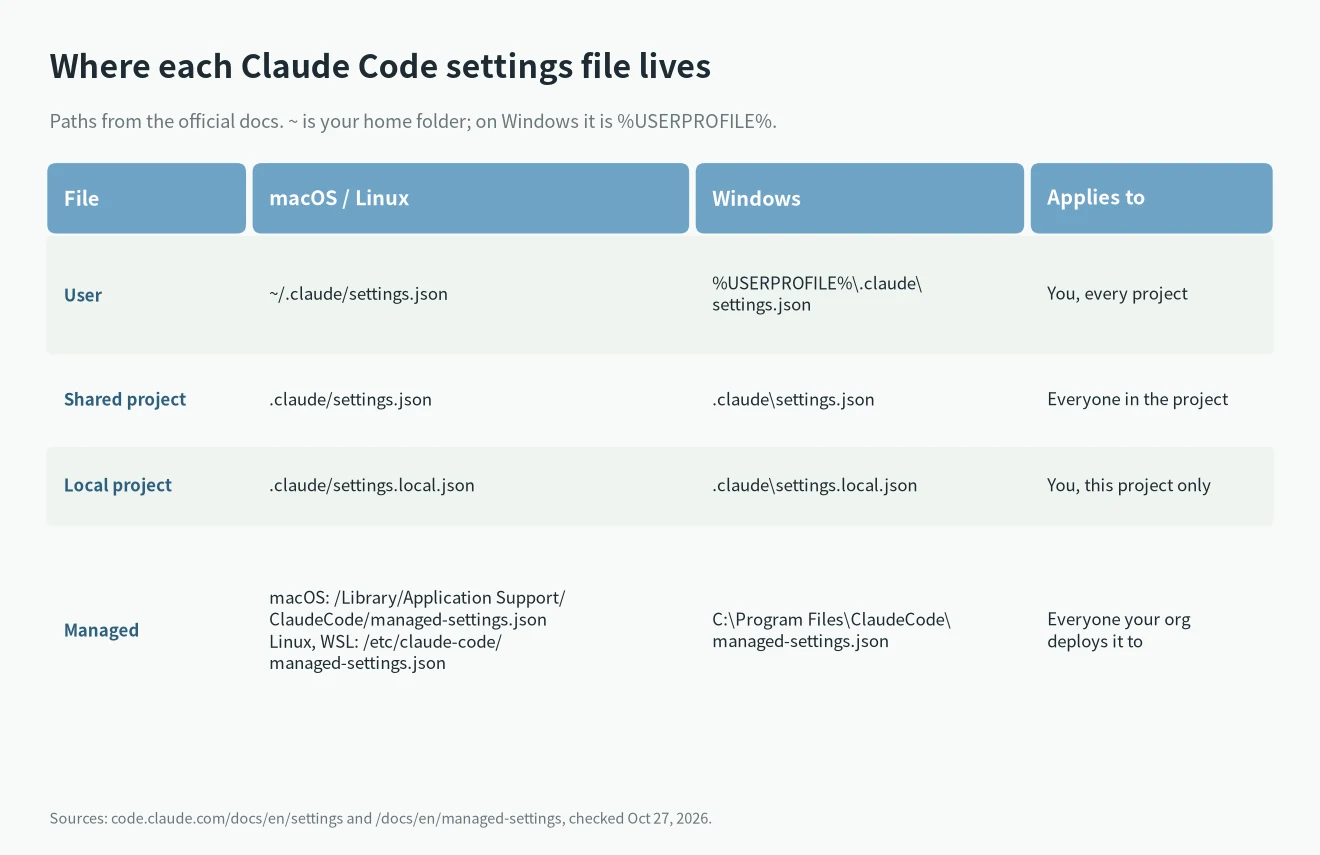
Here is the Claude Code settings.json location for each file:
- User file:
~/.claude/settings.json. It applies to you in every project on this machine. - Shared project file:
.claude/settings.jsoninside the project. Commit it and teammates get it. - Local project file:
.claude/settings.local.json. Only you, only this project, kept out of git. - Managed file:
managed-settings.jsonin a system folder, set by your organization. Nothing you write overrides it. - Not a settings file:
~/.claude.json. Claude Code writes it for itself. You don’t need to edit it.
Claude Code settings.json location on each system
The user file lives in the .claude folder in your home directory. On macOS and Linux that’s ~/.claude/settings.json. On Windows, ~/.claude means %USERPROFILE%\.claude, so the file is %USERPROFILE%\.claude\settings.json.
You can move it. Set the CLAUDE_CONFIG_DIR environment variable and Claude Code keeps your settings, session history and plugins in that folder instead of the home one.
The project files don’t depend on the operating system. They sit in a .claude folder at the top of your project: .claude/settings.json and .claude/settings.local.json.
Where the managed settings file goes
The managed file is the one place where the Claude Code settings.json location changes by system. According to the managed settings docs:
- macOS:
/Library/Application Support/ClaudeCode/managed-settings.json - Linux and WSL:
/etc/claude-code/managed-settings.json - Windows:
C:\Program Files\ClaudeCode\managed-settings.json
Claude Code doesn’t read the old Windows path C:\ProgramData\ClaudeCode\managed-settings.json anymore. Next to the managed file there can be a managed-settings.d/ folder. Claude Code merges managed-settings.json first, then every .json file in that folder in alphabetical order. Managed settings can also come from an MDM policy or from the claude.ai admin console, with no file on your disk at all.
Why you can’t find the file
A fresh install has no settings file. Claude Code creates them as you go:
- It writes
~/.claude/settings.jsonthe first time you change an option in/configthat it stores in user settings, such as the theme. - It writes
.claude/settings.local.jsonthe first time you pick “Yes, and don’t ask again” on a permission prompt. - A few
/configoptions, such as Show tips, go to the local file instead.
You can also just create the file yourself. The Claude Code settings.json location doesn’t change if you make it by hand. Use strict JSON: a // comment or a trailing comma is a syntax error, and Claude Code shows a Settings Error at the next start.
Here is the example from the docs. It lets Claude Code run lint and tests without asking and blocks it from reading .env files:
{
  "$schema": "https://json.schemastore.org/claude-code-settings.json",
  "permissions": {
    "allow": [
      "Bash(npm run lint)",
      "Bash(npm run test *)"
    ],
    "deny": [
      "Read(./.env)",
      "Read(./.env.*)"
    ]
  }
}
The $schema line gives you autocomplete and validation in VS Code, Cursor and other editors that read JSON schemas. The docs note the schema can lag behind new releases, so a warning on a brand-new key doesn’t always mean you got it wrong.
The local file in a git repository
For the local file, the Claude Code settings.json location depends on git. If you start Claude Code in a subfolder of a git repository, it reads and writes the local file at the repository root. In a worktree it uses the main checkout’s root. This changed in v2.1.211. Before that, the file lived in the folder where you started.
There are exceptions. The file stays next to .claude/settings.json outside a git repository, when the repository root is your home folder, on Windows, or when the root isn’t owned by your user.
When Claude Code writes the local file for the first time, it adds **/.claude/settings.local.json to your global git excludes. If you created the file by hand, add it to .gitignore yourself.
The shared .claude/settings.json works differently. Claude Code reads it from the folder you started the session in. To use a file committed at the repository root, start Claude Code there.
Which file wins
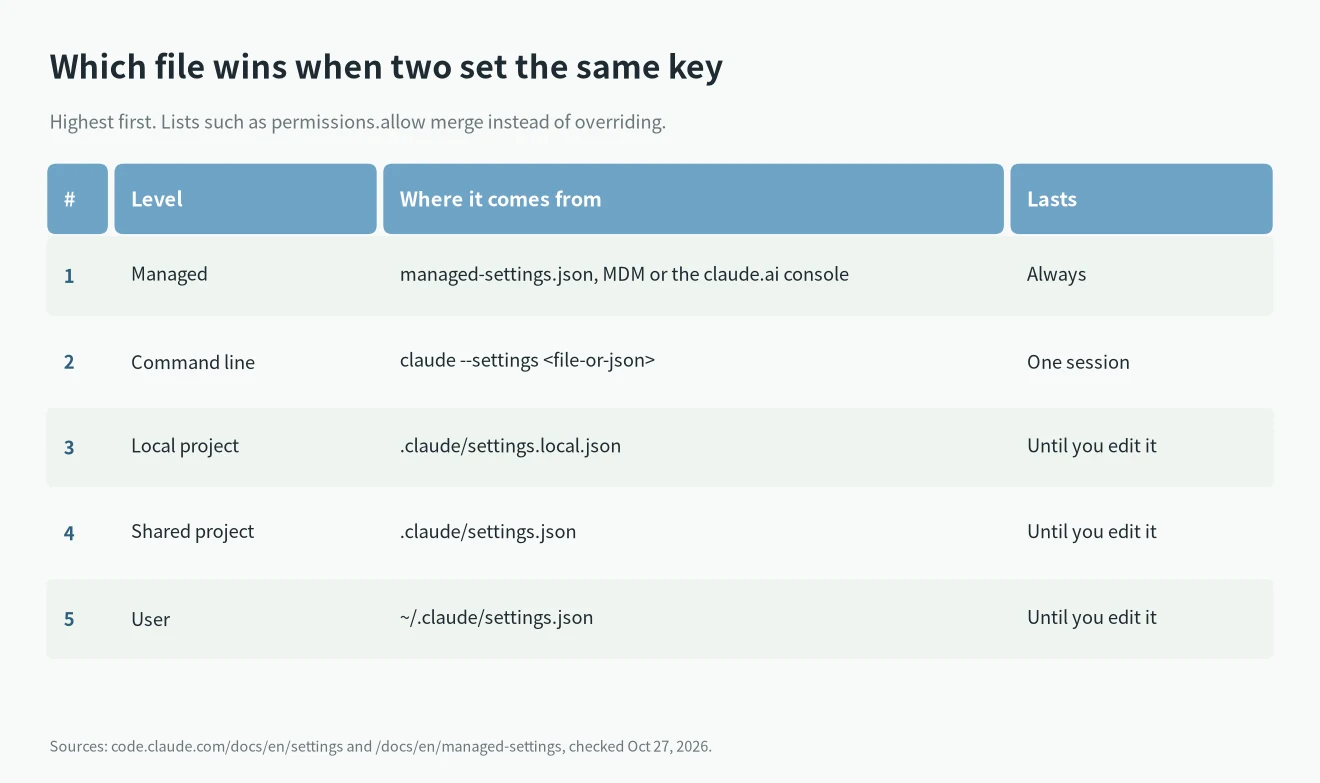
Knowing the Claude Code settings.json location isn’t enough when two files set the same key. When the same key is set in more than one place, Claude Code uses the highest level, from the top:
- Managed settings: your organization. Nothing below overrides them.
- Command line:
claude --settingswith a file or inline JSON, for one session. - Local project:
.claude/settings.local.json. - Shared project:
.claude/settings.json. - User:
~/.claude/settings.json.
Lists such as permissions.allow merge instead of overriding, so each file can add rules without removing another file’s. Environment variables aren’t a level in this stack. For example, ANTHROPIC_MODEL exported in your shell applies over the model key from any file. An env block inside a settings file follows the normal order.
Some keys ignore a file on purpose. permissions.defaultMode set to auto or bypassPermissions doesn’t take effect from project or local settings. Put it in user or managed settings, or use --permission-mode for one session.
How to check what loaded
Once you know the Claude Code settings.json location, confirm Claude Code actually read the file. Run /status inside Claude Code. The Setting sources line lists every settings file it loaded for this session, and names the managed source if there is one. It doesn’t tell you which file supplied each key. To see entries Claude Code rejected, run claude doctor.
Most edits apply without a restart, because Claude Code watches the files. A few keys are read only at start, including model and effortLevel. Use /model and /effort to change those mid-session.
One more catch: a cloud session doesn’t read your user or local file. It only sees what’s committed to the repository, plus server-managed settings.
Which file to edit
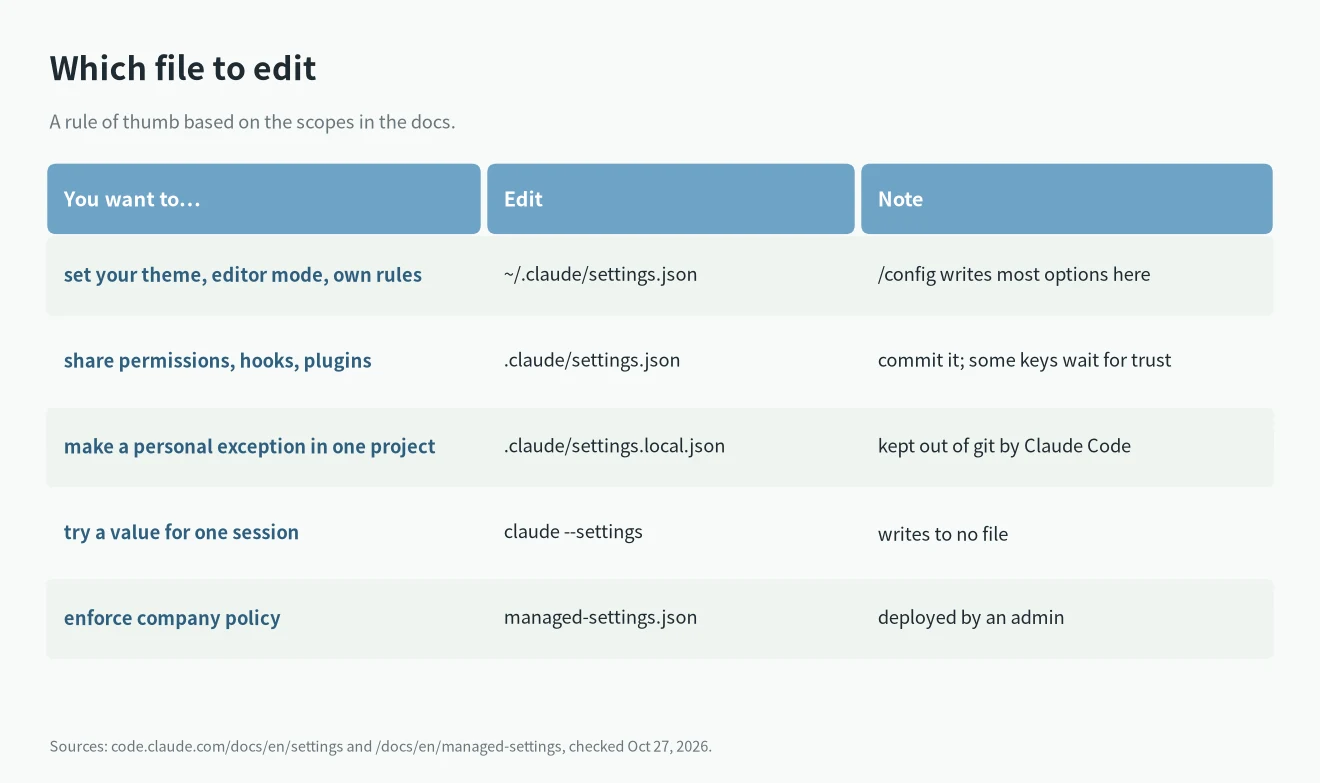
- Personal defaults like theme, editor mode or your own permission rules: the user file.
- Team permissions, hooks and plugins: the shared project file, committed.
- A personal exception in one project: the local file.
- Company policy: managed settings, deployed by an admin.
If you’re pointing Claude Code at a different model provider through the env block, I covered that in DeepSeek API for Claude Code and local LLMs for coding. Hooks and plugins in these files come up in Claude Code Skills vs MCP, and effort settings in the ultrathink article.
What I couldn’t confirm
- WSL home folder. The docs give the WSL path for the managed file. They don’t spell out which home folder the user file uses inside WSL, so I won’t guess.
- Exact schema coverage. Anthropic says the JSON schema can trail new releases. I didn’t test which keys it misses today.
The Claude Code settings.json location rules change from version to version, as the v2.1.211 change shows. If something here doesn’t match what you see, run /status and check the official page.