

Claude Code auto mode temporarily unavailable: What It Means and 5 Easy Fixes (Tested)
Claude Code auto mode temporarily unavailable means the classifier model that checks actions in auto mode did not answer, so the action was skipped. We reproduced it on Claude Code 2.1.312 with a mock API and explain each category, the fixes and GitHub reports.
 bufferAbout the author7 min read
Short answer: Claude Code auto mode temporarily unavailable errors, such as claude-opus-5-5 is temporarily unavailable (overloaded), so auto mode cannot determine the safety of Bash right now, mean the model that auto mode uses to check actions didn’t answer, so the action was not run. Nothing is wrong with your settings or your command. Wait a few seconds and retry (Claude usually does this on its own), keep going with reads and edits, which skip the check, or press Shift+Tab to leave auto mode and approve the action yourself. If the same model fails on every retry, check CLAUDE_CODE_AUTO_MODE_MODEL and, on Bedrock, your model access. This follows the official Claude Code error reference, checked on October 29, 2026, plus our own test against a mock API.
What Claude Code auto mode temporarily unavailable means
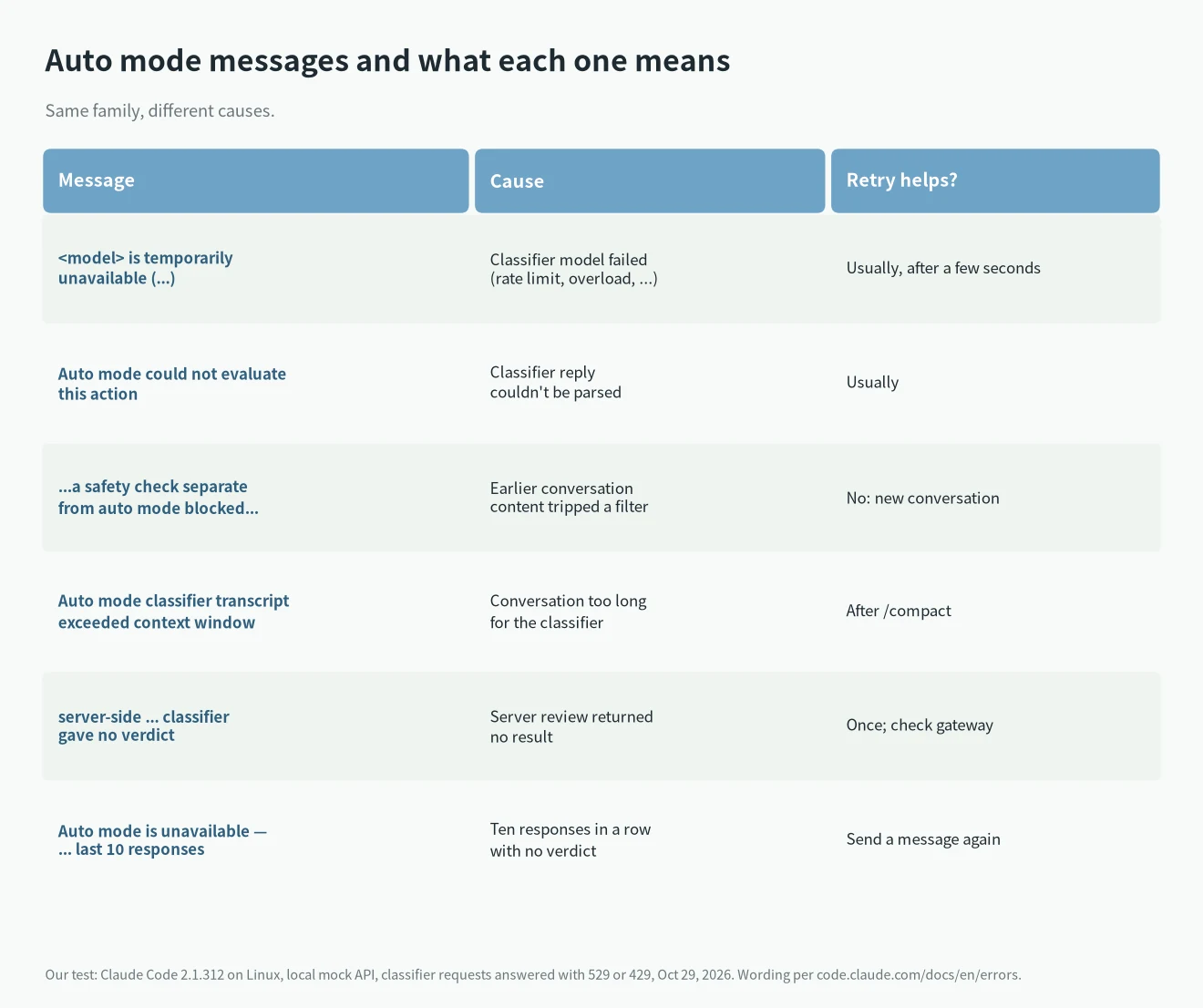
In auto mode, Claude Code sends actions that could change things, such as most shell commands, to a classifier model before running them. When that classifier can’t produce a decision, auto mode refuses to approve the action. The documented message is:
<model> is temporarily unavailable, so auto mode cannot determine the safety of <tool> right now. Wait a moment and then try this action again.Since v2.1.229 the message names a category in parentheses when Claude Code can tell what failed: (rate-limited), (overloaded), (server error), (timed out) or (connection failed). In an interactive session you may only see a dim Not run · auto mode's check had no usable answer row under the tool call; press Ctrl+O to read the full text in the transcript viewer. Per the docs, reads, searches and edits inside your working directory skip the classifier, so they keep working.
The model in the message is not always the one you picked. By default the classifier runs on Claude Sonnet 5, and if that isn’t available Claude Code falls back to your session’s model, so the name you see is often the fallback.
Our test: reproducing Claude Code auto mode temporarily unavailable
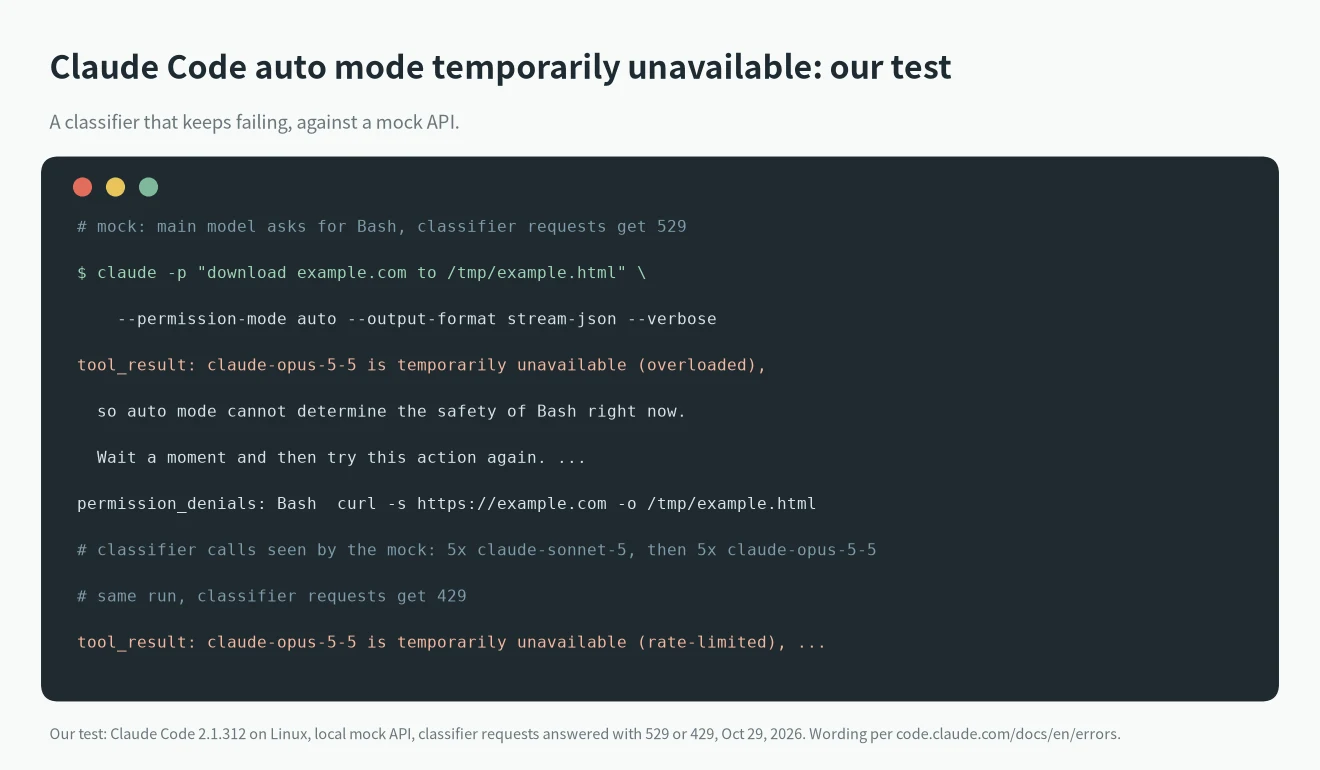
We pointed Claude Code 2.1.312 on Linux at a local mock API with ANTHROPIC_BASE_URL. The mock told the main model to run a Bash command (curl -s https://example.com -o /tmp/example.html) and answered every classifier request with a 529 overloaded error. We ran:
claude -p "download example.com to /tmp/example.html" --permission-mode auto --output-format stream-json --verboseThe Bash call never ran. Claude got this tool result, and the final result listed the call under permission_denials:
claude-opus-5-5 is temporarily unavailable (overloaded), so auto mode cannot determine the safety of Bash right now. Wait a moment and then try this action again. If it keeps failing, continue with other tasks that don't require this action and come back to it later. Note: reading files, searching code, and other read-only operations do not require the classifier and can still be used.The mock’s log showed five classifier requests to claude-sonnet-5 and then five to claude-opus-5-5, our session model, which matches the documented fallback. That’s why the message named Opus. When the mock answered classifier requests with a 429 instead, the only change was the category: (rate-limited). Setting CLAUDE_CODE_AUTO_MODE_MODEL=claude-haiku-4-5 sent the classifier requests to claude-haiku-4-5 instead. We didn’t test a real outage; the mock only shows how Claude Code reacts.
How to fix Claude Code auto mode temporarily unavailable
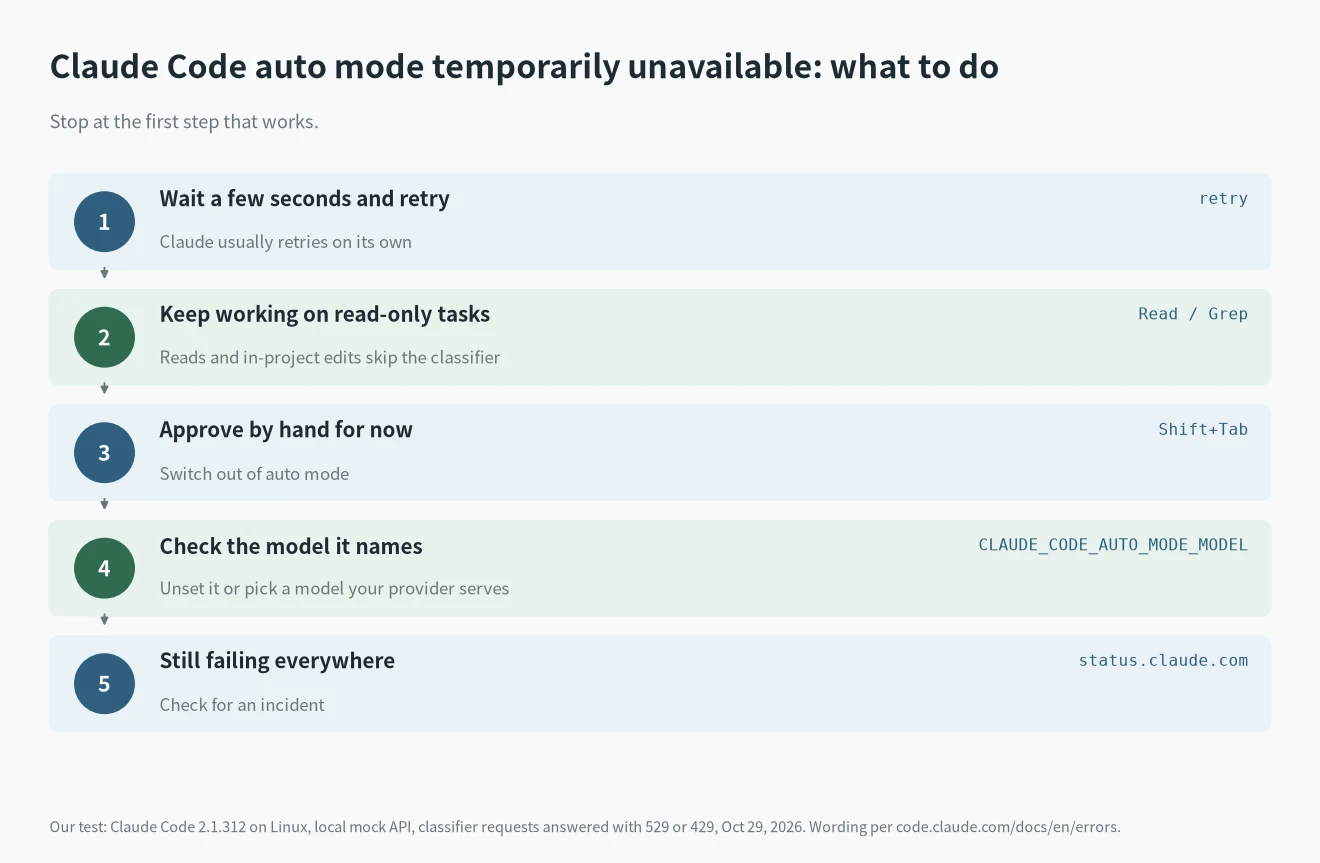
Try these in order when you see Claude Code auto mode temporarily unavailable.
- Wait and retry. The docs say a transient failure has nothing to do with auto mode eligibility, so you don’t need to change settings. Claude usually retries by itself.
- Keep working. Have Claude do reads, searches and in-project edits while the classifier is down, and come back to the blocked command later.
- Approve it yourself. Press
Shift+Tab; from auto mode the first press switches to manual mode, where Claude Code asks before running the command. Switch back once the check works again. - Check the model it names. If the message fails on every retry and names the model you set in
CLAUDE_CODE_AUTO_MODE_MODEL, your API or cloud provider may not serve that ID. Set one it does, or remove the variable to use the default. The variable can live in theenvblock of settings.json. - On Amazon Bedrock, a message with no category on every retry can mean your AWS account can’t invoke the named model. Check the IAM policy, or contact your AWS account team for Mantle model IDs.
What the category in parentheses tells you
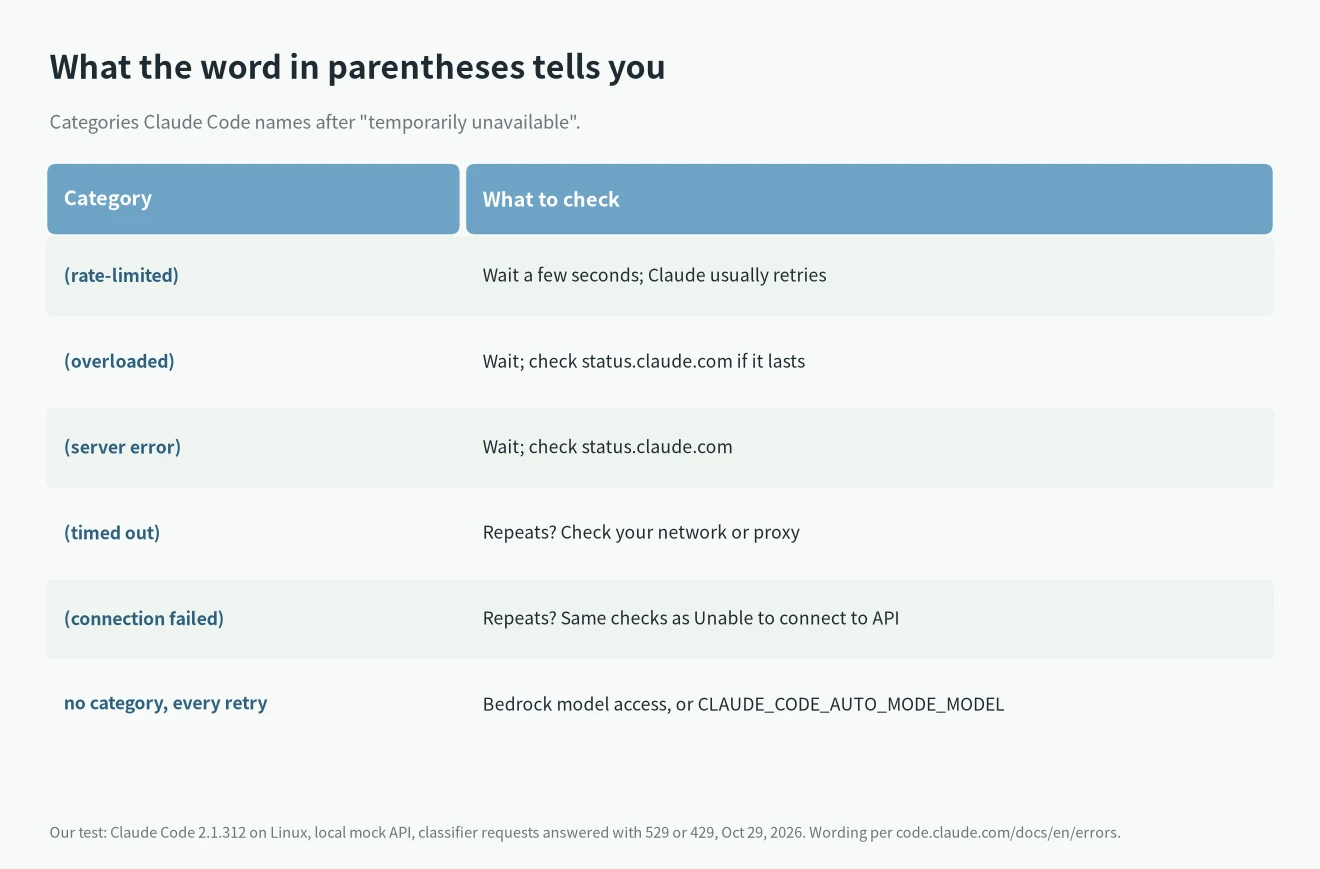
The category is the quickest way to tell what caused a Claude Code auto mode temporarily unavailable message.
(rate-limited),(overloaded),(server error): a problem on the provider side. Wait, and if it lasts, check the status page. Our Claude Code 529 overloaded guide covers the same kind of failure in the main conversation.(timed out)or(connection failed)again and again: the docs point to your network; go through the Unable to connect to API checks.- Related messages that need different steps:
Auto mode could not evaluate this action and is blocking it for safety(an unreadable classifier reply, retry usually works), the variant that saysa safety check separate from auto mode blocked this request(retrying won’t help; start a fresh conversation or switch modes), andAuto mode classifier transcript exceeded context window(run/compact). - Under server-side review you may instead see
The server-side auto mode classifier gave no verdict. After ten responses in a row with no verdict, auto mode stops the turn; the docs suggest checking any LLM gateway that cuts or rewrites streams, or settingCLAUDE_CODE_AUTO_MODE_SERVER=0so Claude Code makes its own classifier requests.
What users reported on GitHub
Claude Code auto mode temporarily unavailable reports on GitHub mostly look like this:
- Issue #69950 (open): every Bash and MCP tool call was refused with the
claude-opus-4-8 is temporarily unavailablemessage for an extended period, through many retries and a full machine restart, then it recovered on its own. Read-only tools kept working, per the report. - Issue #95118 (open): the
(timed out)form withclaude-opus-5[1m]as the classifier, blocking Bash while the main session and read-only tools kept working. The reporter says retrying doesn’t always help. - Issue #97872 and #97766 (both open, September 28): a server-side variant,
The server-side auto mode classifier is temporarily unavailable (error), blocked Write, Bash and Edit. In #97766 four retries of the same Edit over several minutes all failed, it happened in other sessions too, and changing the permission mode was the way out. - Issue #84673 (open): the reporter traced the message in 2.1.222, in folders with a CLAUDE.md, to a classifier request the API rejected with a 400, not to an unavailable model; 2.1.220 worked in the same folder. If it shows up right after an update and never clears,
claude --debugshows what the classifier request got back. - Issue #101083 (open): a user on a third-party Anthropic-compatible endpoint (Fireworks) says
CLAUDE_CODE_AUTO_MODE_MODELwas ignored. In our mock test the variable did take effect, so check the debug log forclassifier_request_startedto see which model your session used.
For other errors, see our Claude Code errors hub.
FAQ
Is Claude Code auto mode temporarily unavailable a problem with my command?
No. The docs say it isn’t a decision about your action; the check just didn’t run.
Do I lose my work?
No. Only the action that needed the check is skipped. Reads and in-project edits keep going.
Should I switch to bypassPermissions?
That skips all checks. Switching to manual mode with Shift+Tab and approving the command yourself is the safer stopgap.
Does it cost tokens while it retries?
Each retry is another request. One reporter in #97872 said repeated retries across several jobs burned a good deal of tokens before they stopped.