

Ollama “llama runner process has terminated”: Fix It by the Exit Status (3 Causes Reproduced on v0.40.16)
The message only says the model process died. The cause is in what follows: exit status 1 and an error-loading line, a Windows code, or a Linux signal. We reproduced three failures on Ollama v0.40.16 and sorted 65 GitHub issues by code.
 bufferAbout the author8 min read

“Error: llama runner process has terminated” is Ollama telling you the process that runs the model died; it does not say why. The reason is in what comes right after it: exit status 1 plus an “error loading model” line, a Windows code such as 0xc0000409, or a Linux signal such as signal: killed. On Ollama v0.40.16 the message reads “llama-server process has terminated” (56 of the 65 GitHub issues filed since June 2026 use that wording), but it is the same failure people still search for as “llama runner process has terminated”. This guide sorts those reports by what follows the colon, and shows three failures we reproduced on v0.40.16 with the exact text each one prints. Everything was checked on November 10, 2026.
Same error, new wording
Older Ollama versions printed llama runner process has terminated. Current ones print llama-server process has terminated, and sometimes llama-server process no longer running when the process is already gone. The binary of v0.40.16 contains the two llama-server strings and not the old one. In the GitHub issues filed since June 1, 2026, 56 use the new wording and one uses the old one. So if your message differs from a guide you found, you are probably reading the same error.
The message is built from three parts, and only the last two help:
Error: 500 Internal Server Error:is just the API returning a failure.llama-server process has terminated:says the model process exited.- Everything after that is the exit code or signal and the last lines the process printed. That is the clue.
Where to find the full text: run ollama serve in a terminal and read it there, or open the logs described in Ollama’s troubleshooting page (~/.ollama/logs/server.log on a Mac, journalctl -u ollama on Linux, %LOCALAPPDATA%\Ollama on Windows, docker logs in a container). The line just above “terminated” is often the real cause.
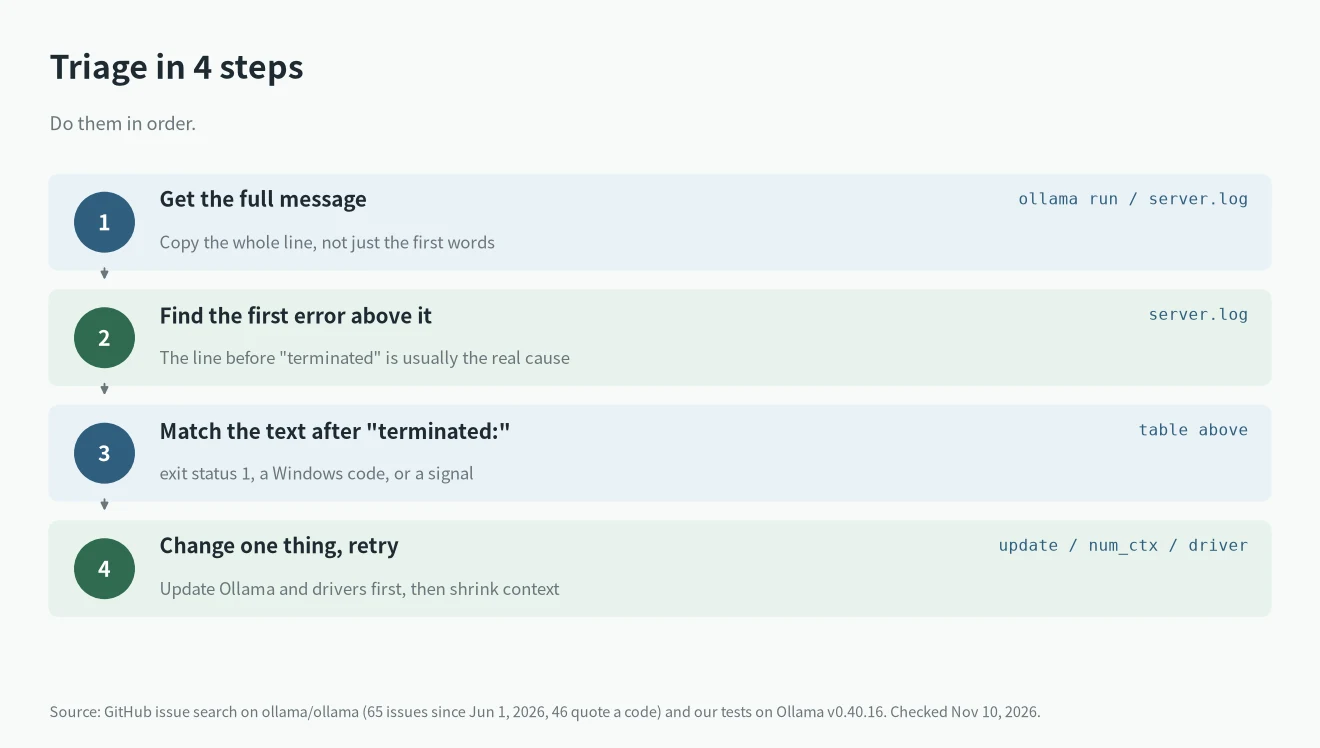
Match the text after “terminated:”
We searched the ollama/ollama repository for issues containing “process has terminated” created since June 1, 2026. That gave 65 issues, and 46 of them quote a status or signal. The table groups them.
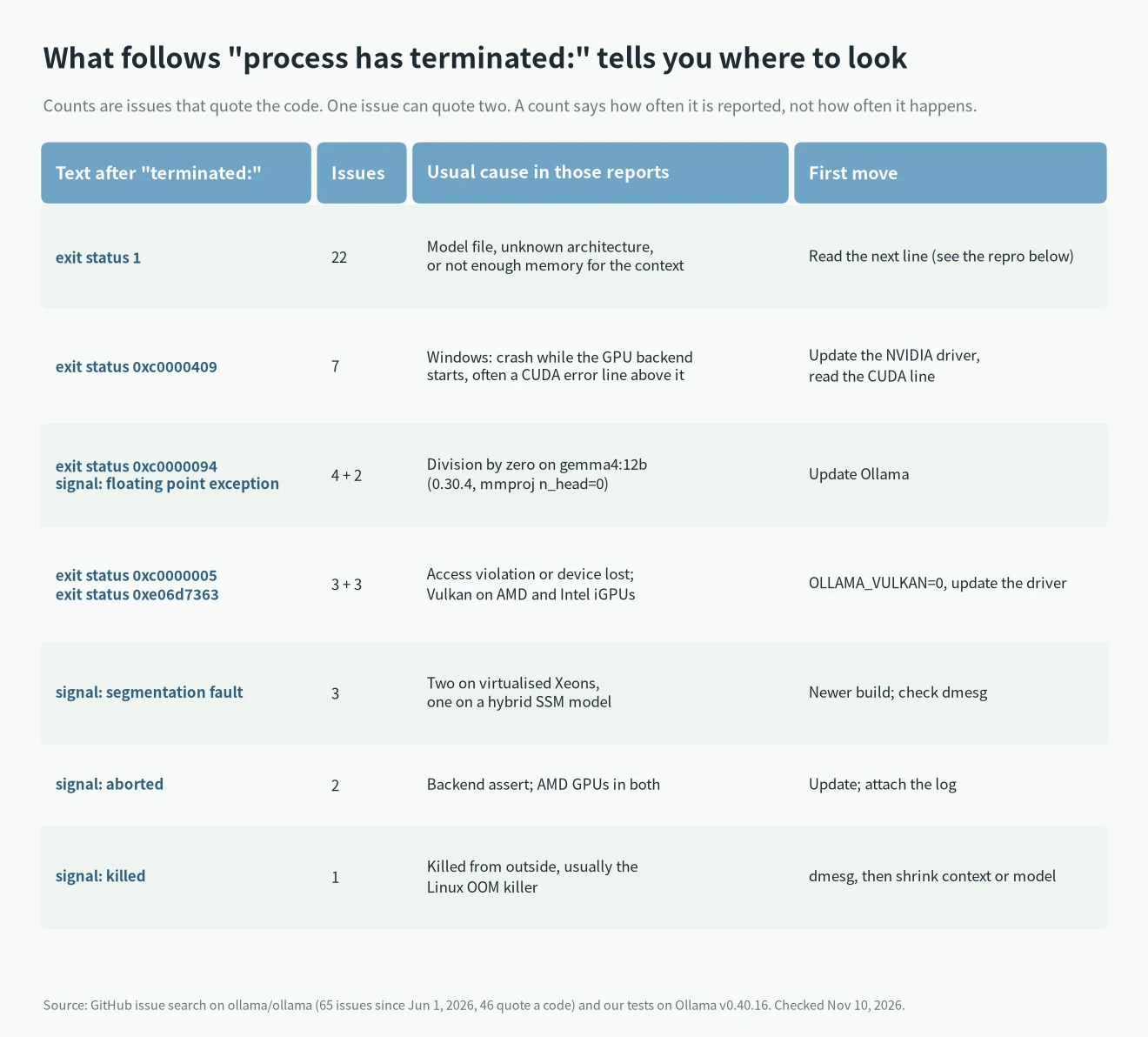
The counts show how often each code is reported, not how often it happens, and one issue can quote two codes. We did not find “exit status 2” in any of the 65. If your message says exit status 2, copy the whole text and look at the lines above it; we couldn’t reproduce that code on v0.40.16.
exit status 1: what we reproduced
This is the biggest group (22 issues), and the line after it names the cause. We reproduced three.
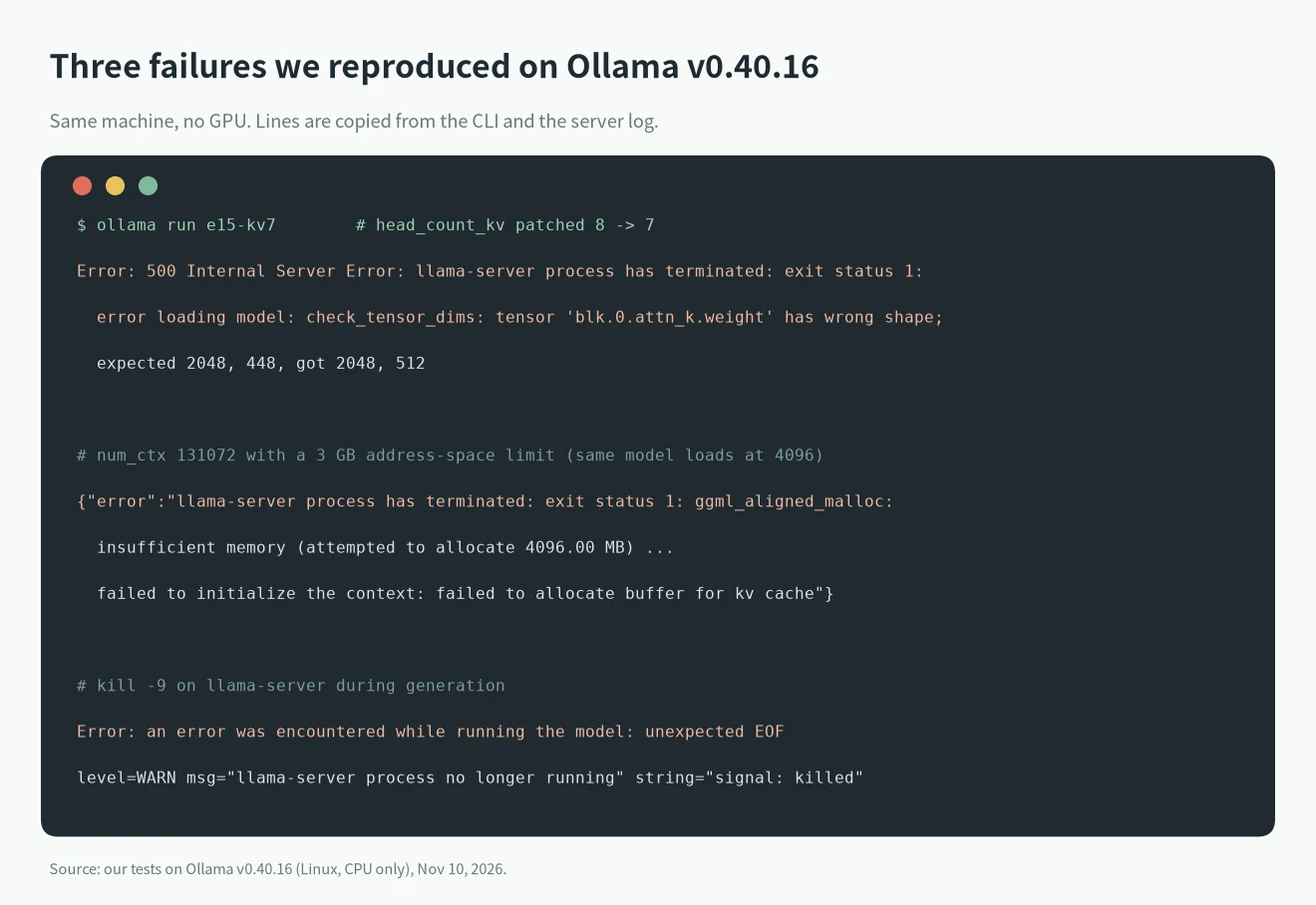
1. The model file doesn’t match its own metadata. We copied llama3.2:1b (1.3 GB), changed one number in the GGUF header, and imported it with ollama create. Creation succeeded in all five cases, and ollama run failed:
attention.head_count_kvfrom 8 to 7:check_tensor_dims: tensor 'blk.0.attn_k.weight' has wrong shape; expected 2048, 448, got 2048, 512block_countfrom 16 to 17:tensor 'blk.16.attn_norm.weight' not foundembedding_lengthfrom 2048 to 1024:tensor 'token_embd.weight' has wrong shapeattention.head_countto 0:tensor 'blk.0.attn_q.weight' has wrong shape; expected 2048, 0attention.key_lengthto 7:error loading model hyperparameters: invalid n_rot: 64, expected 7
Truncated or random files never got that far. A 600 MB copy of the 1.3 GB file, a 5 MB random file and a header-only file were all refused by ollama create with offset+size exceeds file size, unsupported file type and error reading GGUF item 25: EOF. So on a current version, a “terminated” error with check_tensor_dims usually points to a file that was converted or edited wrongly, or a model whose metadata was written for another build. Re-pull the model from the library, or re-download the GGUF and check its size and SHA-256 against the source.
2. Unknown architecture. error loading model: unknown model architecture: 'name' means your Ollama build is older than the model. Issue #19347 (v0.40.12, lfm3) and #19186 (v0.40.8-rc0, flint) are two examples. Update Ollama; our unknown model architecture guide covers the pull-versus-run mismatch.
3. Not enough memory for the context. We started a second server with a 3 GB address-space limit (prlimit --as=3000000000, a stand-in for a memory limit) and loaded the same 1.3 GB model. At the default 4096 context it loaded and answered. With num_ctx at 131072, whose KV cache is 4 GiB, it failed:
llama-server process has terminated: exit status 1: ggml_aligned_malloc: insufficient memory (attempted to allocate 4096.00 MB) ... failed to initialize the context: failed to allocate buffer for kv cache
When you see failed to allocate or unable to allocate CUDA_Host buffer (as in #16455), shorten the context first. Ollama context length shows how, and Ollama GPU requirements by VRAM shows how much memory context takes. The separate “model requires more system memory” message is covered here.
Another exit status 1 case is a new model on an old build: #18898 (Gemma4Assistant requires ctx_other to be set, v0.40.2) was closed after the reporter confirmed it works on 0.40.4.
Windows codes: 0xc0000409, 0xc0000094, 0xc0000005
Microsoft’s NTSTATUS list names 0xc0000409 STATUS_STACK_BUFFER_OVERRUN, 0xc0000005 STATUS_ACCESS_VIOLATION and 0xc0000094 STATUS_INTEGER_DIVIDE_BY_ZERO. In the Ollama reports, the name tells you less than the text printed before it:
- 0xc0000409 with a CUDA line. #19485 (v0.40.13, GTX 1080) printed
CUDA error: the provided PTX was compiled with an unsupported toolchain, and the reporter wrote that updating the NVIDIA driver (to 582.78) fixed it. #19122 and #17627 printCUDA error: shared object initialization failed; in #19122 other users linked it to low free commit memory (RAM plus page file), and that issue is still open. So: update the driver, close other programs, and make sure the page file isn’t capped. - 0xc0000409 without a CUDA line. #16650 hit it on Phi4 with a quantized KV cache (
OLLAMA_KV_CACHE_TYPE); try removing that variable. #16576 reports a Windows race with Gemma 4 and a workaround of startingollama servein a terminal before running the model. Both are user reports, and we haven’t tested them. - 0xc0000094 or
signal: floating point exception. Six issues in early June, allgemma4:12bon 0.30.4 builds; #16495 traced it tommproj n_head=0. All six are closed. Update Ollama. - 0xc0000005 and 0xe06d7363. In #18557, #19158 and #19558 the failures happen with Vulkan on AMD or Intel integrated GPUs (
ggml_vulkan: device lostin #19158). The official GPU page says to disable Vulkan withOLLAMA_VULKAN=0orGGML_VK_VISIBLE_DEVICES=-1, and to force the CPU on NVIDIA withCUDA_VISIBLE_DEVICES=-1. We have no GPU, so we couldn’t test these switches.
If Ollama ends up on the CPU after you apply them, that is a different problem; see Ollama not using GPU.
Linux and Mac signals
- signal: killed. Something outside Ollama killed the process; on Linux that is usually the out-of-memory killer. Check
dmesg | grep -i -E "out of memory|killed process". We usedkill -9on llama-server to see how Ollama reports it: during generation the API returned500 an error was encountered while running the model: unexpected EOF, the server log showedWARN llama-server process no longer running ... string="signal: killed", and the next request started a new runner and worked. So a kill doesn’t always say “has terminated” to the client. If it keeps happening, use a smaller model or context. - signal: segmentation fault. Three issues: #17249 (a Granite Rapids virtual machine on GCP) and #17006 (Sapphire Rapids under VMware ESXi) are virtualised Xeons, and #17236 a hybrid SSM model that worked in mainline llama.cpp. Try a newer build and report the CPU and hypervisor.
- signal: aborted. Two issues, both AMD GPUs (#16572, #16626). Update, and attach the log.
What we tested and what is from the reports
- Tested on Ollama v0.40.16 (Linux, 8 cores, 15.6 GiB RAM, no GPU), llama3.2:1b: refusal of truncated, random and header-only files at
ollama create; five header edits that load-fail withexit status 1; the 3 GB address-space limit with 4096 versus 131072 context;kill -9during generation and when idle; the wording inside the binary. - Not tested: any GPU, Windows or Mac behavior, CUDA, ROCm and Vulkan fixes, and the variables in the table. Those come from GitHub issues and the official docs, and we say so where it matters. The address-space limit is not the same as running out of RAM; it produces the same allocation failure on one machine.
- Issue counts come from GitHub search on November 10, 2026 (
repo:ollama/ollama "process has terminated" created:>2026-06-01 is:issue). Search matches words, not an exact phrase, so treat the numbers as a snapshot. - Sources: Ollama’s troubleshooting, GPU pages, Microsoft’s NTSTATUS list, and the issues named above on github.com/ollama/ollama.
For other Ollama messages, see the error lookup.
FAQ
What does “llama runner process has terminated” mean?
The process that loads and runs the model exited, so your request failed. The cause is in the text after the colon: an exit status plus a log line, or a signal.
Is it “llama runner” or “llama-server” now?
Current versions say llama-server. Our v0.40.16 test and 56 of 65 recent issues use that wording; the meaning is the same.
How do I fix “exit status 1: error loading model”?
Read the next line. unknown model architecture needs a newer Ollama; check_tensor_dims points to a bad or edited file, so re-pull it; failed to allocate means a smaller context or model.
What does exit status 0xc0000409 mean in Ollama?
Windows labels it a stack buffer overrun. In the reports it comes with CUDA errors, so update your NVIDIA driver and read the line above it first.
Does “signal: killed” mean I ran out of RAM?
Often yes on Linux, but check dmesg to be sure.