

OpenAI 401 “Incorrect API key provided”: The Official 3-Step Fix, Tested (2026)
OpenAI returns 401 "Incorrect API key provided" when the key your request sends is wrong: a typo, a deleted key, or a key from another organization or project. OpenAI's fix is three steps. We also sent bad keys ourselves on October 29, 2026 and show what came back.
 bufferAbout the author4 min read
Short answer: OpenAI returns 401 Incorrect API key provided when the key your request sends does not match a working key. OpenAI’s fix is three steps: clear your browser cache and cookies, check the key in your request header, and if you are not sure it is right, generate a new key and replace the old one everywhere. The error message shows the last four characters of the key that was sent, so you can see which key your code is actually using. We sent bad keys to the API ourselves on October 29, 2026 and show the real responses below.
What the error says
A request with a wrong key returned this, exactly:
{
  "error": {
    "message": "Incorrect API key provided: sk-test123. You can find your API key at https://platform.openai.com/account/api-keys.",
    "type": "invalid_request_error",
    "param": null,
    "code": "invalid_api_key"
  }
}
OpenAI’s error codes guide gives the cause as “The requesting API key is not correct” and lists four ways it happens:
- The key has a typo or an extra space.
- The key belongs to a different organization or project.
- The key was deleted or deactivated.
- An old, revoked key is cached locally.
The official 3-step fix
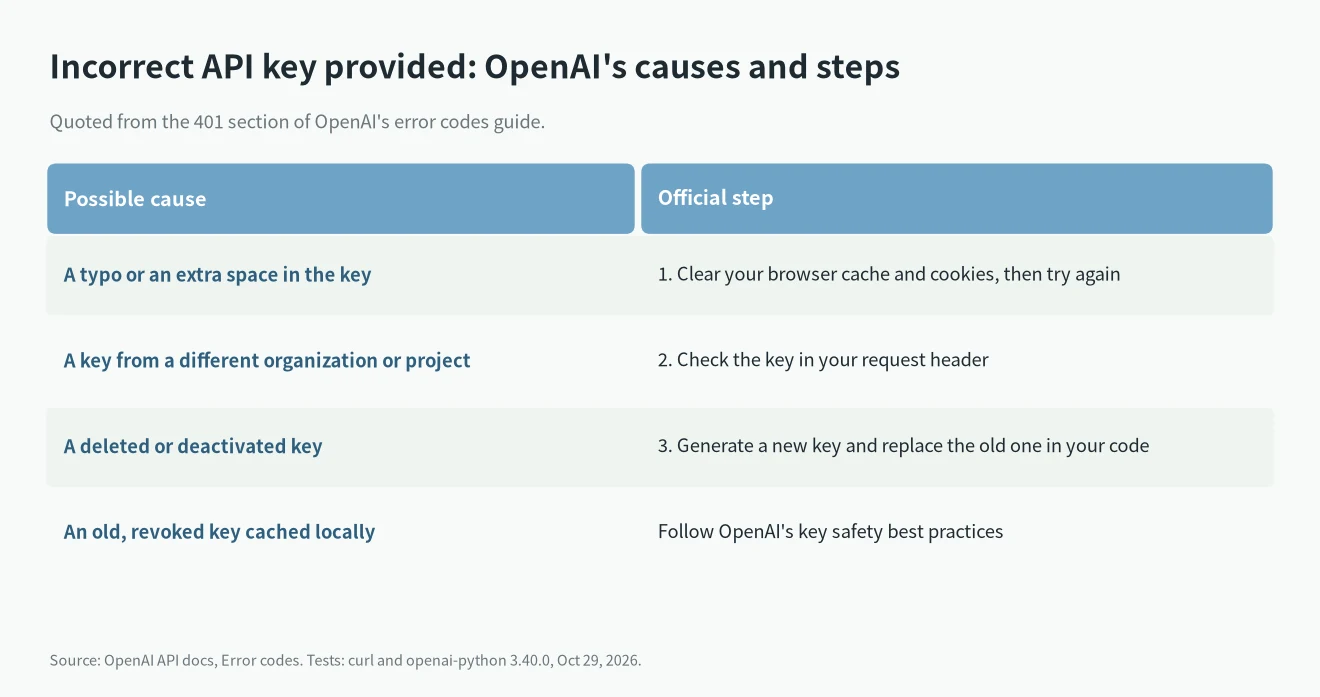
1. Clear your browser’s cache and cookies, then try again. This matters if you copy the key from the dashboard or use a web tool that stored an old one.
2. Check that you are using the correct API key in your request header. The header must be Authorization: Bearer .
3. If you are unsure whether the key is correct, generate a new one on the API keys page. Then replace the old key in your code and in every place it is stored, following OpenAI’s best practices for API key safety.
What we got when we tested it
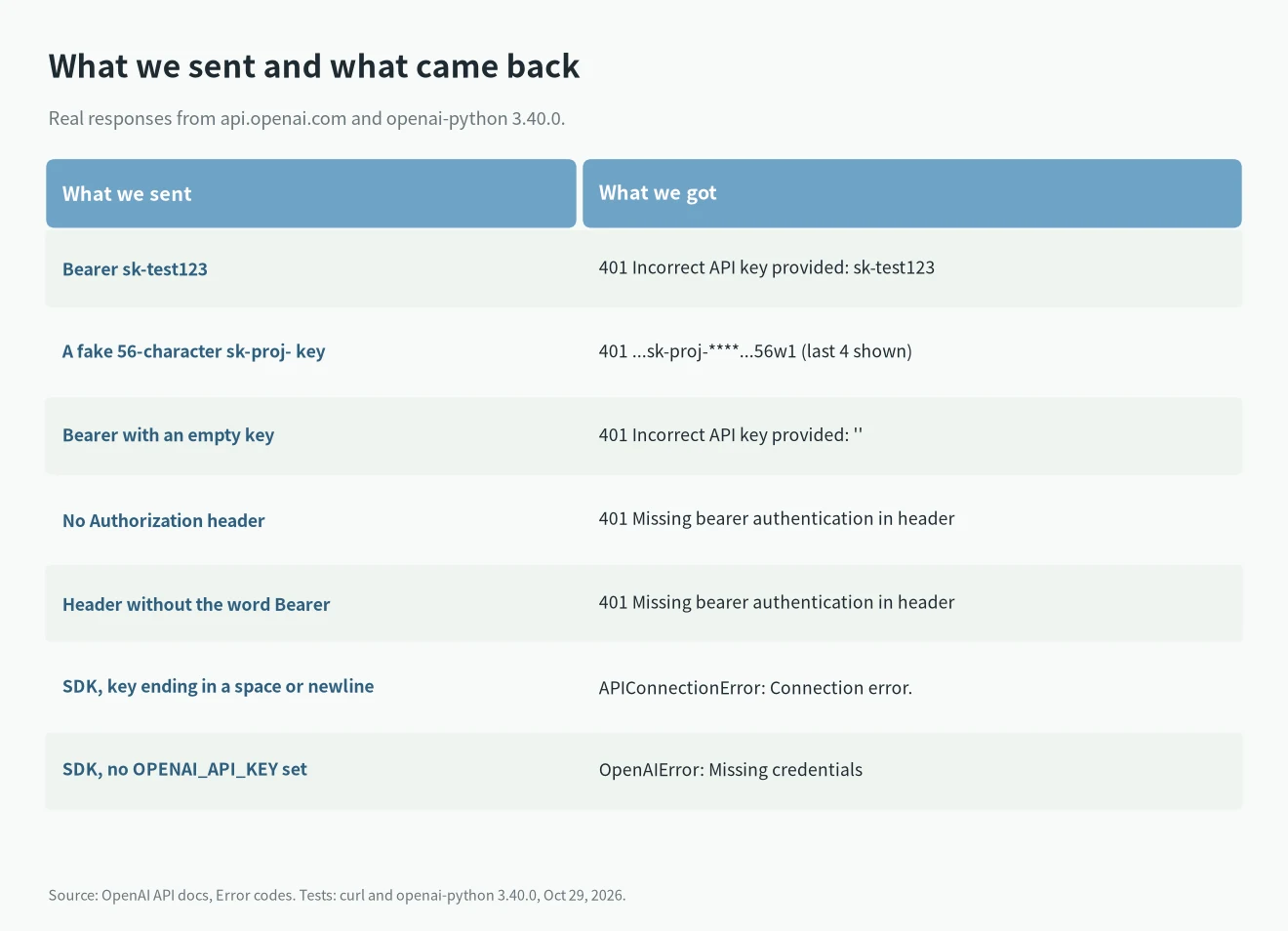
We ran these requests from a test machine on October 29, 2026, using curl and openai-python 3.40.0.
The message shows the last 4 characters
With a fake 56-character project key, the message masked the middle and kept the end:
"message": "Incorrect API key provided: sk-proj-********************************************56w1. ..."That is the quickest check. Compare those four characters with the key on the API keys page. If they differ, your code is reading a different key from the one you think. Short test strings like sk-test123 come back in full.
Missing bearer is a different message
With no Authorization header, or with the header but without the word Bearer, the API did not say Incorrect API key provided. It said:
"message": "Missing bearer authentication in header"With Bearer and an empty key, it said Incorrect API key provided: ''. That usually means the variable you put in the header was empty.
A trailing space or newline never reaches OpenAI
When we put the key in OPENAI_API_KEY with a space or a newline at the end, openai-python did not get a 401. It failed before sending:
APIConnectionError | Connection error. | LocalProtocolError("Illegal header value b'Bearer sk-test123 '")So “Connection error” from the SDK can be a key problem. Run printf '%s' "$OPENAI_API_KEY" | od -c | tail -3 to see hidden characters at the end. With no key set at all, the SDK stops with OpenAIError: Missing credentials.
We could not test a key that is real but deleted, or one from another organization, because we would need an account’s live keys for that. OpenAI’s docs say both give the same Incorrect API key provided error.
Find which key your code sends
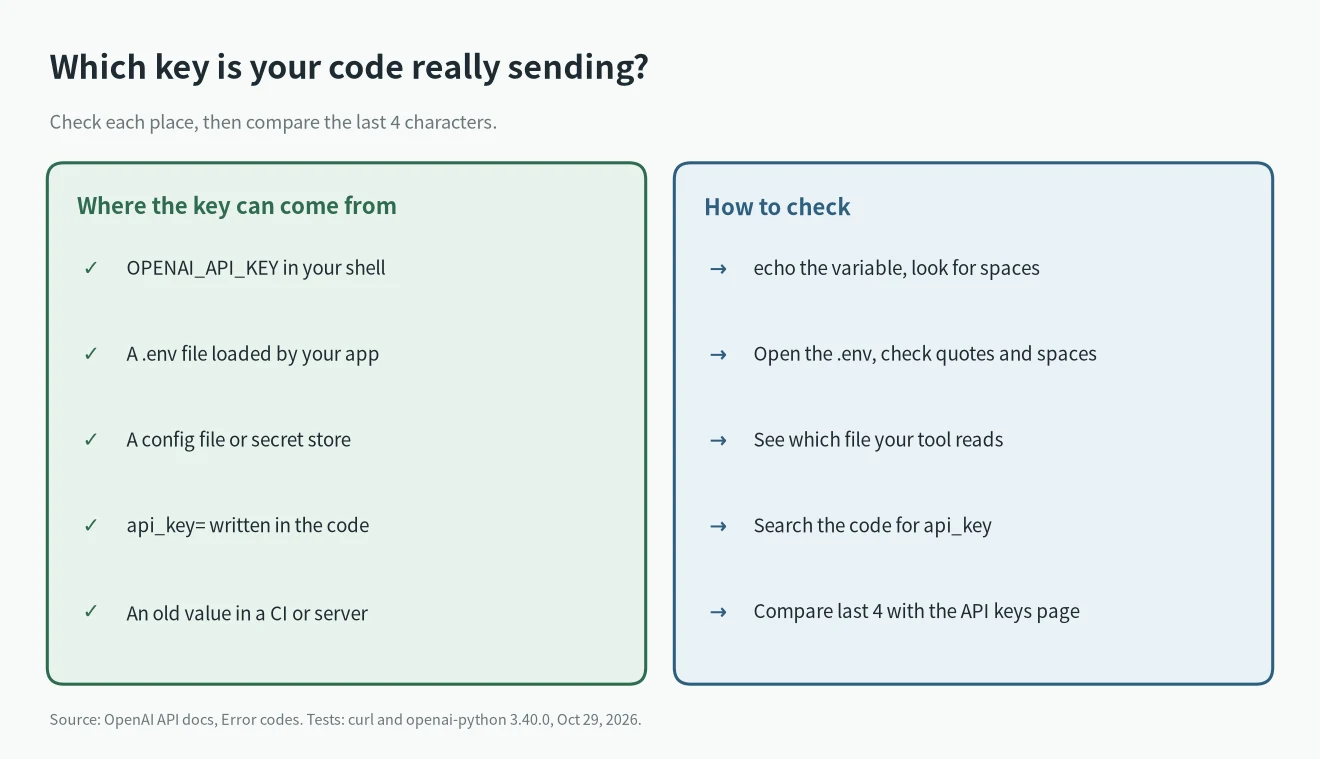
Tools and libraries often read the key from more than one place, and an old value can win. Check:
OPENAI_API_KEYin the shell where the program runs.- A
.envfile. Look for quotes copied into the value and spaces after it. - The tool’s own config. For example, Codex CLI can log in with an API key; our Codex CLI install guide shows where it is set.
- CI secrets and server environment variables that still hold a key you deleted.
If the old key was ever pushed to a public repo or pasted somewhere others can see, don’t just swap it out; delete it on the API keys page and follow what to do when an API key leaks. And if the 401 goes away but you start getting a 429, that is a rate or billing limit instead, which we cover in OpenAI API 429: rate limit or insufficient_quota.
FAQ
Is 401 Incorrect API key provided the same as “Invalid Authentication”?
No. OpenAI lists “401 – Invalid Authentication” separately, with the fix “Ensure the correct API key and requesting organization are being used”. Incorrect API key provided is about the key itself.
Can a 403 be a key problem?
Not the country one. 403 Country, region, or territory not supported is about where the request comes from, and a new key does not change it. See our guide to that 403.
Does a ChatGPT Plus subscription give me an API key?
No. ChatGPT plans and the API are billed separately. Our ChatGPT subscription vs API comparison explains the difference.