

Leaked API Key? 5 Steps to Take Now on Anthropic, OpenAI and DeepSeek (2026)
A leaked API key costs money for as long as it stays active. Delete or disable it first, make a new one, then check what it was used for. Anthropic and OpenAI often revoke keys found in public GitHub repos on their own; DeepSeek does not get that alert, so you have to act. Steps checked against official docs on October 28, 2026.
 bufferAbout the author6 min read
Short answer: if you have a leaked API key, delete or disable it right now, before you work out how it leaked. A key keeps working, and keeps billing you, until you revoke it. Then create a new key, swap it into your app, and check the usage for the old key. Anthropic and OpenAI often catch keys pushed to public GitHub repos and switch them off for you. DeepSeek isn’t in GitHub’s partner alert program, so a leaked DeepSeek key stays live until you delete it. Everything below comes from the official help pages, checked October 28, 2026.
Leaked API key: the 5 steps in order
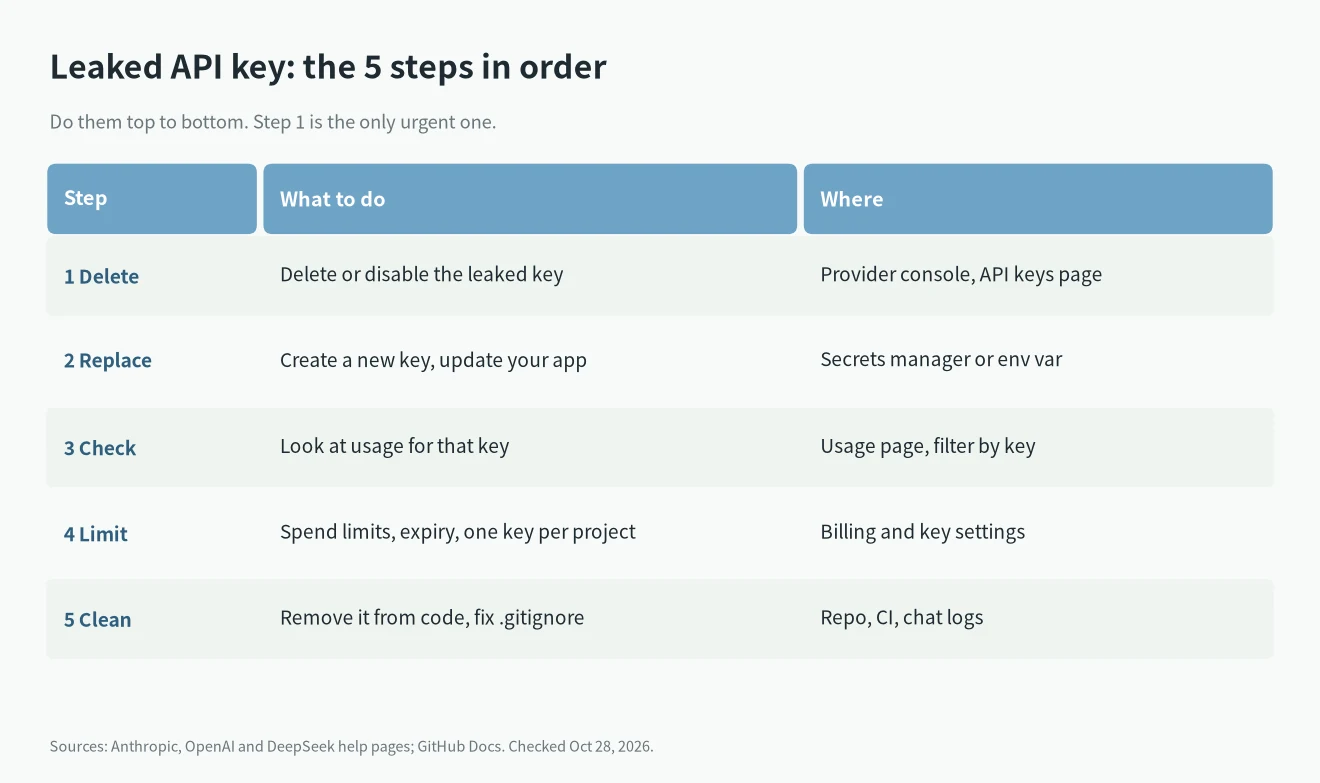
- 1. Delete or disable the key. This is the only urgent step. Rewriting Git history or finding the culprit can wait.
- 2. Create a new key and replace it. Put the new key in an environment variable or a secrets manager, not in the code.
- 3. Check usage for the old key. All three platforms let you look at usage per key, so you can see whether someone actually used it.
- 4. Add limits. Spend limits, an expiry date, and one key per project make the next leak cheaper.
- 5. Clean up where it leaked. Repo, CI logs, screenshots, chat messages. Rotating the key matters more than scrubbing it, more on that below.
I’ve seen people spend an hour on git-filter-repo while the key was still active. Do step 1 first, even if it breaks your app for a few minutes.
Where to delete a leaked API key on each platform
Anthropic (Claude API)
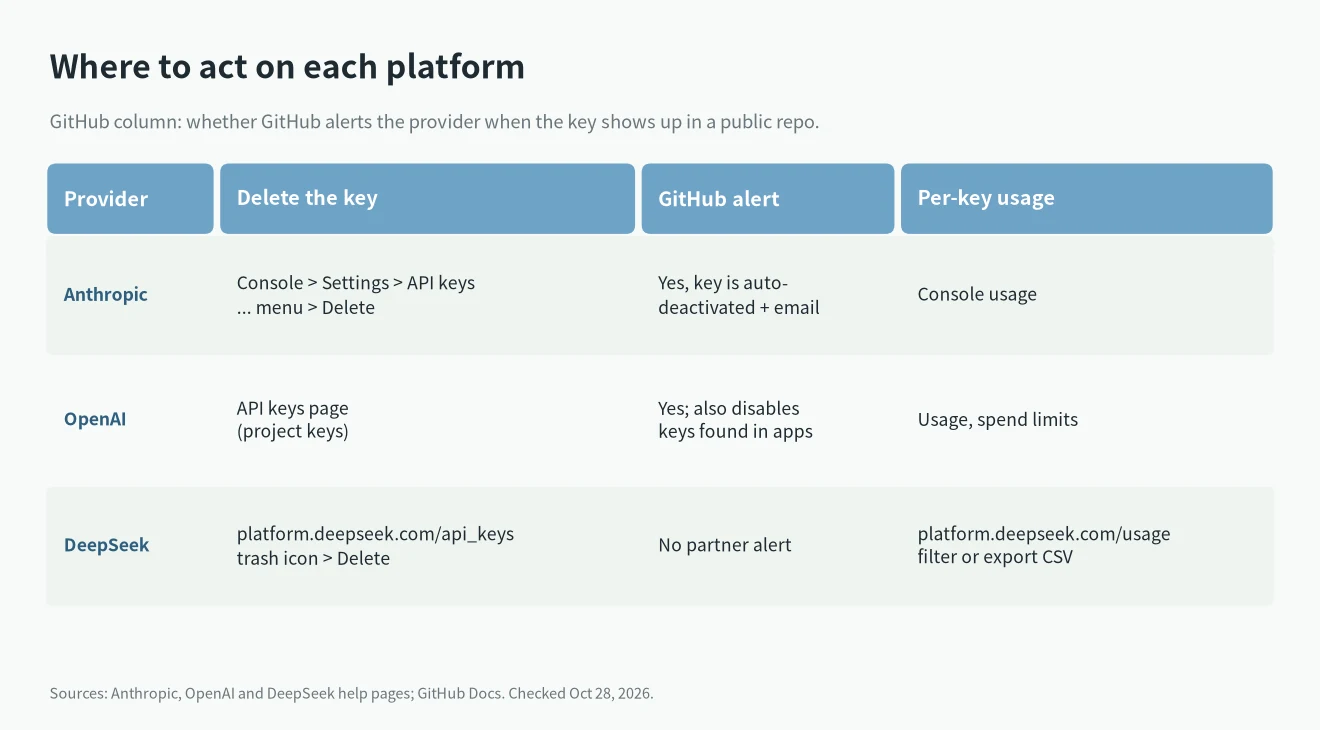
Anthropic’s help page on compromised keys says to revoke it immediately. Go to the API keys page in the Claude Console (platform.claude.com/settings/keys), open the three-dot menu next to the key, and choose Delete API key. Then make a new key and keep it in a secrets manager. If you still see suspicious activity, contact Anthropic Support.
The authentication docs also mention two useful details. Disabling a key is reversible, deleting is permanent. And you can give a new key an expiration date when you create it.
Anthropic is a GitHub secret scanning partner. Per Anthropic’s key safety article, when GitHub finds a Claude key in a public repo it tells Anthropic, the key is deactivated automatically, and you get an email. If you got that email, the key is already dead. You still need a new one.
OpenAI
OpenAI’s API key safety guide says to rotate a leaked key from the API keys page right away, never put keys in client-side code, and never commit them. Use the OPENAI_API_KEY environment variable instead. Project keys can have an expiration date.
OpenAI also says that when it finds a key on the public internet, or leaked inside an app in an app store, it disables the key immediately. On spend limits, OpenAI lets you set alert thresholds and a hard limit, but notes enforcement isn’t instant, so a busy attacker can go slightly over.
DeepSeek
The DeepSeek FAQ says to delete a leaked key immediately. Log in to the platform, open platform.deepseek.com/api_keys, select the key, click the trash icon, and confirm Delete. Once it confirms the key is deleted, it stops working at once and can’t be viewed or edited again. Then create a new key and switch your app over.
The part people miss: GitHub’s supported patterns list does not mark DeepSeek as a partner. So if your DeepSeek key lands in a public repo, nobody revokes it for you. GitHub can still block the push in private repos with push protection, but that only helps before the push. If you use DeepSeek through other tools, like the setup in DeepSeek API for Claude Code, check every config file that holds the key.
Check what the old key was used for
- DeepSeek: open platform.deepseek.com/usage, pick a time range, and pick the key in the API Key menu. You can also export a zip; the CSV named amount has usage split by key.
- OpenAI: check the Usage page and your limits. If spend jumped, that’s your answer.
- Anthropic: check usage in the Console. If you can’t explain the activity, contact Support, as the help page suggests.
If usage on the old key looks normal, you probably caught it in time. If not, raise it with the provider’s support. Prices per million tokens differ a lot by model, so a few hours of abuse can cost very different amounts. My LLM API pricing comparison has the current rates.
Leaked API key in Git: rotate first, rewrite later
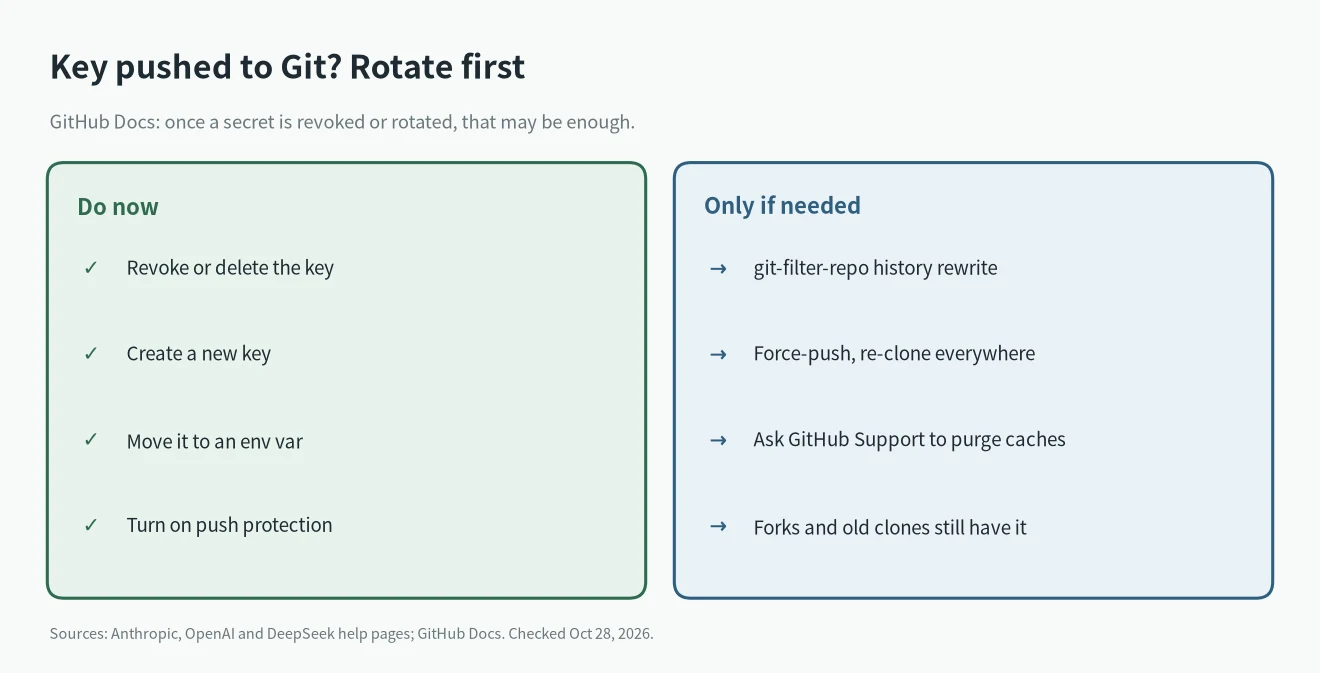
GitHub’s own guide on removing sensitive data says the first step for a leaked secret is to revoke or rotate it, and that this may be enough on its own. Rewriting history with git-filter-repo changes commit hashes, needs a force-push, and old clones and forks keep the secret anyway.
So after rotating:
- Move the key out of the code into an environment variable or secrets manager.
- Add the config file to .gitignore.
- Turn on push protection, or use a pre-commit tool like gitleaks.
- Rewrite history only if the repo is public and you care about the old value being visible.
How to avoid the next one
- One key per project or per tool, so you can kill one without breaking everything.
- Set an expiry on keys where the platform allows it (Anthropic and OpenAI project keys do).
- Don’t paste keys into chats, tickets, or AI agents. Anthropic says not to share keys even in support tickets.
- Be careful with third-party tools: giving them a key gives them access to your account. The LiteLLM supply chain attack is a good example of keys stolen through a dependency.
- If AI agents run with your keys, go through my AI agent security checklist.
Leaked API key FAQ
Does deleting the key stop the charges immediately?
On DeepSeek, yes. The FAQ says a deleted key stops working right away. Anthropic and OpenAI also stop accepting a deleted key, but OpenAI notes spend limits themselves aren’t enforced instantly.
GitHub emailed me that my Claude key was found. Is it still active?
Per Anthropic, keys found by GitHub in public repos are deactivated automatically and you get an email. Create a new key and update your app.
Will DeepSeek refund usage from a leaked API key?
The FAQ doesn’t promise that. It does say unused balance can be refunded and that top-up balance doesn’t expire. For abuse charges, contact DeepSeek support directly.
Do I have to rewrite Git history?
Not always. GitHub says revoking or rotating the secret may be enough. Rewrite only if you also need the old value gone from a public repo.