

Cursor Pro Usage Limit Reached? 5 Options and How to Avoid Surprise Charges (2026)
When you hit the Cursor Pro usage limit, nothing is charged until you act. Pro is now a legacy plan with two monthly pools, and on-demand usage is off by default. You can wait for the reset, turn on on-demand usage with a spend limit, switch to Cursor models, use your own API key, or upgrade. Checked against Cursor docs on October 28, 2026.
 bufferAbout the author6 min read
Short answer: when you hit the Cursor Pro usage limit, Cursor doesn’t charge you anything extra unless you change a setting. On-demand usage is off by default on individual plans, so requests simply stop until your included usage resets with your next billing cycle. If you can’t wait, you have four other options: turn on on-demand usage with a monthly spend limit, switch to Cursor’s own models (Grok and Composer), use your own API key, or upgrade to Pro+ or Ultra. Pro is now a legacy plan with two separate monthly pools, which changes which of these options helps. All prices and rules below come from Cursor’s own pricing page and help center, checked October 28, 2026.
Cursor Pro usage limit reached: 5 options
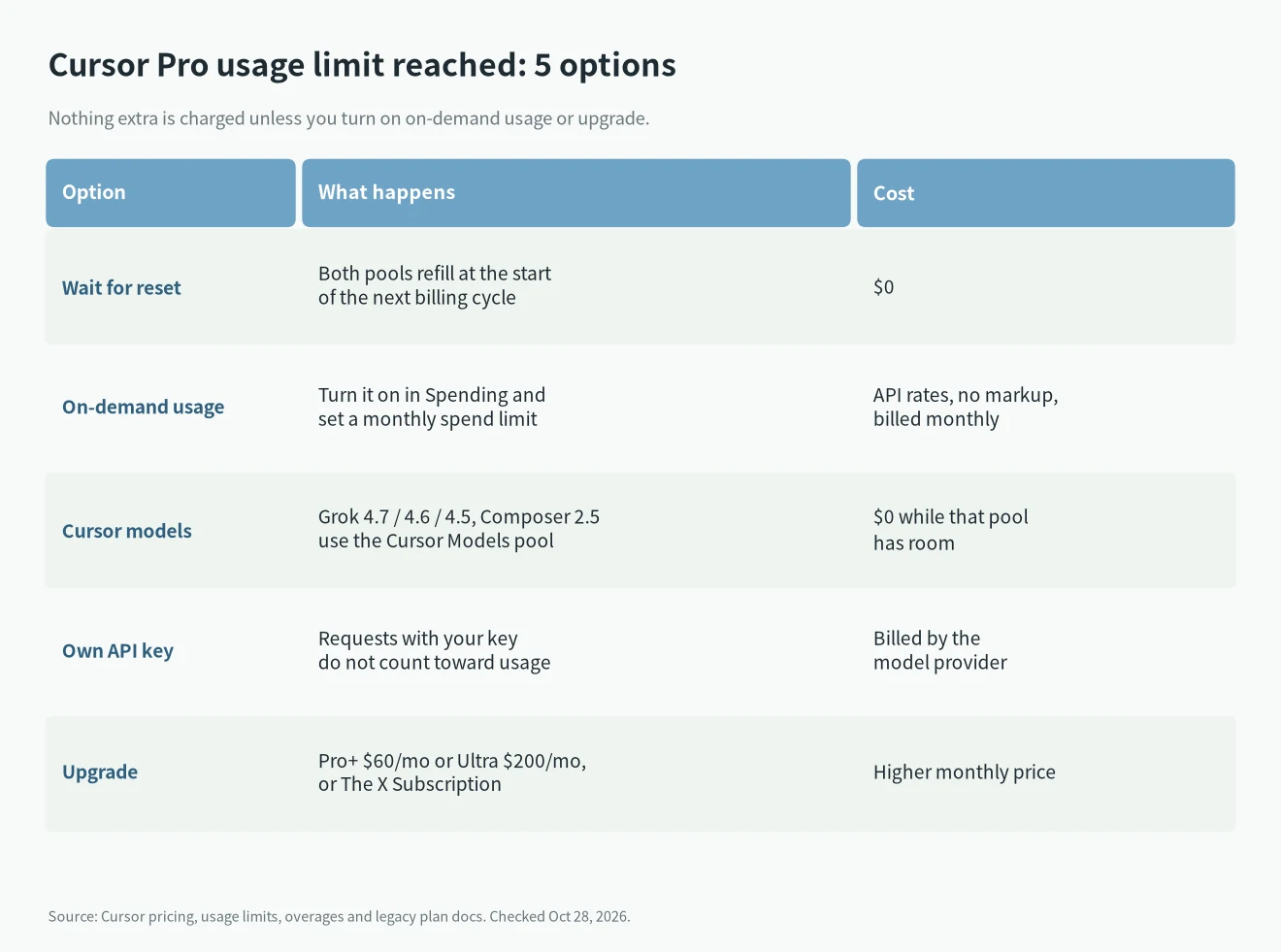
- Wait for the reset. On legacy plans, usage resets monthly with your billing cycle. The reset date is on the Spending tab of your dashboard. This costs nothing.
- Turn on on-demand usage. Cursor bills it at API rates with no markup, monthly in arrears. Set a spend limit at the same time.
- Switch to Cursor models. If only your third-party pool is empty, Grok and Composer still run from the Cursor Models pool.
- Use your own API key. On individual plans, requests made with your own key don’t count toward your usage. The provider bills you directly.
- Upgrade. Pro+ ($60/month) and Ultra ($200/month) include more usage in both pools. The X Subscription is another route, covered below.
Before picking one, open the dashboard and look at which pool ran out. That decides most of it.
Why the Cursor Pro usage limit has two pools
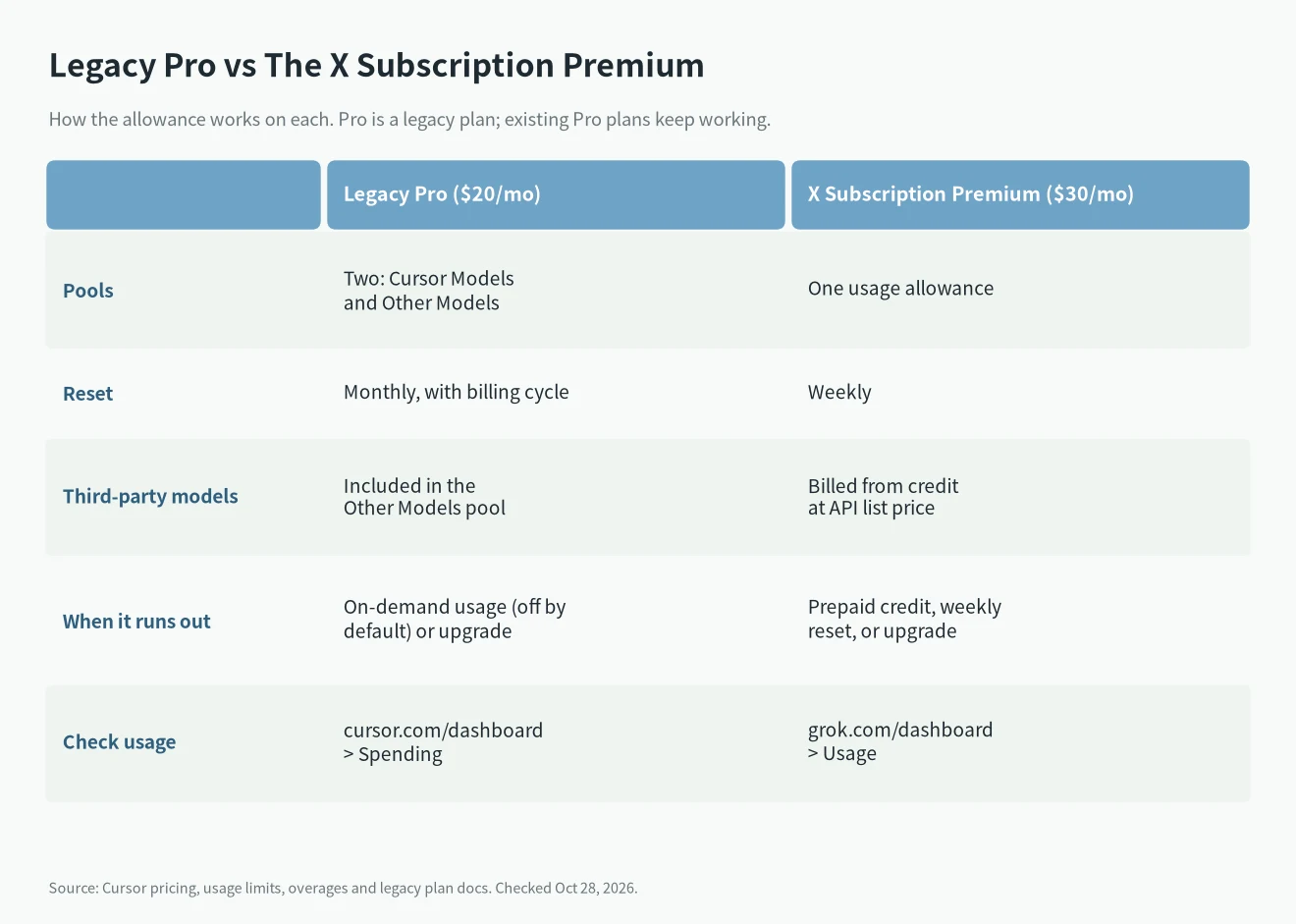
Cursor’s legacy plans page lists Pro at $20/month. Each legacy plan has two monthly pools that reset with the billing cycle:
- Cursor Models: Grok 4.7, Grok 4.6, Grok 4.5 and Composer 2.5.
- Other Models: third-party models, charged against the pool at API price.
So you can be out of one pool and fine on the other. If you mostly picked a third-party model, the Other Models pool goes first, and switching to Grok or Composer gets you working again right away. If both pools are empty, switching models won’t help.
One catch from Cursor’s usage limits help page: Auto in Cost mode bills as a Cursor-model request, but subagents can run a named third-party model while the picker still shows Auto, Grok or Composer. Those requests bill as third-party usage at that model’s list price. If your Other Models pool drained faster than you expected, check whether subagents did it.
Where to check your usage and reset date
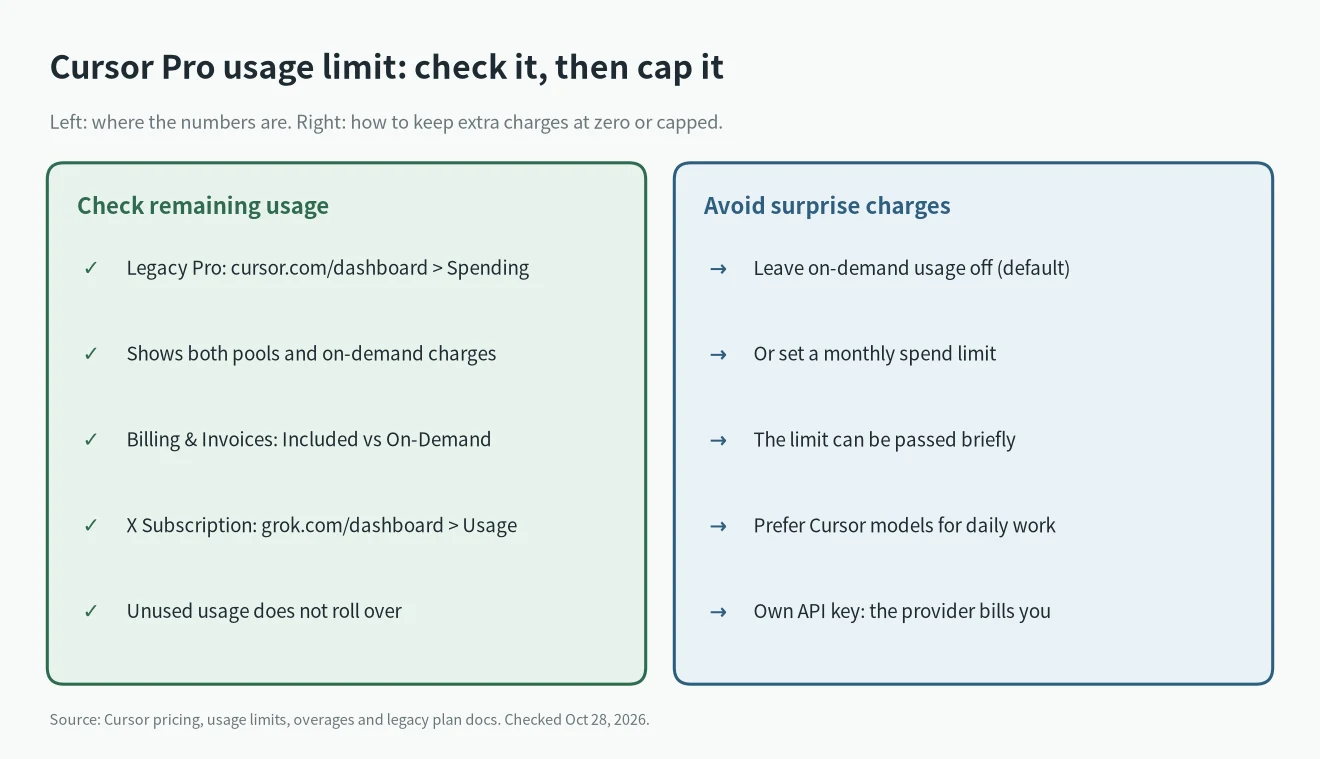
On a legacy Pro plan, go to cursor.com/dashboard and open the Spending tab. It shows both pools, any on-demand charges, and the reset date. Under Billing & Invoices you’ll see Included Usage, covered by your plan, and On-Demand Usage, charged on top.
If you already moved to The X Subscription, usage lives at grok.com/dashboard under Usage, which shows your weekly pool, the next reset date and your prepaid credit.
Unused usage doesn’t roll over to the next period on either plan.
Turn on on-demand usage with a spend limit
On individual plans (Pro, Pro+, Ultra), on-demand usage has to be switched on in your spending settings at cursor.com/dashboard/spending. According to Cursor’s overages page, it’s billed at API rates with no markup, at the end of the month.
Set a monthly spend limit when you turn it on. Two details are worth knowing:
- Enforcement isn’t instant. Usage can go a little over the limit before Cursor stops it. On legacy plans, that small overage is credited as a temporary spend-limit credit.
- Raising the limit mid-cycle can cost you. If you raise it in the same cycle, Cursor may bill some or all of that credit. Leave the limit alone, or turn on-demand off again, to keep it.
To go back to zero extra charges, just turn on-demand usage off. Requests then stop once the included usage is used up.
Use your own API key
On individual plans, requests made with your own API key don’t draw from your included usage at all. The model provider bills you for the tokens. This works well if you already pay for an Anthropic or OpenAI API account. For per-token prices, see our LLM API pricing comparison. Keep the key out of shared repos; if one ever leaks, here’s what to do with a leaked API key.
Upgrade, or switch to The X Subscription
If you hit the Cursor Pro usage limit every month, a bigger plan is usually cheaper than paying on-demand. The legacy options are Pro+ at $60/month and Ultra at $200/month. Cursor says both include more of each pool but doesn’t publish exact numbers on the legacy page.
The other route is The X Subscription on Cursor’s pricing page. Moving from Pro maps to Premium at $30/month. Cursor says each new paid plan includes at least 2x the coding usage with Cursor models, but there’s no included third-party pool: third-party models are billed from prepaid credit at API list price. The pool also resets weekly instead of monthly. Two things to check before you switch:
- The switch is permanent. You can’t go back to the legacy Pro plan afterwards.
- Uninvoiced on-demand usage is billed at the switch. The old subscription is cancelled with a prorated refund, but App Store subscriptions have to be cancelled by you.
If you live on Claude or GPT models inside Cursor, staying on legacy Pro or Pro+ may work out better. If you mostly use Grok or Composer, Premium gives you more for the money. If Cursor is the wrong tool altogether, compare it with Cursor vs Claude Code, or Claude Code vs Codex for terminal agents. And if you decide to leave, see how to cancel or downgrade an AI subscription.
FAQ
Will Cursor charge me automatically when I hit the Cursor Pro usage limit?
No. On individual plans, on-demand usage is off until you turn it on. With it off, requests stop when the included usage runs out.
When does the Cursor Pro usage limit reset?
Monthly, with your billing cycle. The exact date is on the Spending tab at cursor.com/dashboard.
Does Max Mode use more?
Current plans don’t include Max Mode. On legacy request-based plans, Cursor bills Max Mode at the API rate plus 20%.
Is the free Hobby plan different?
Yes. Hobby has no on-demand usage. AI features pause until your pool resets.