

DGX Spark vs Mac Studio for Local LLMs: Which to Buy at the Same Budget (2026)
DGX Spark vs Mac Studio, checked against NVIDIA and Apple specs, store prices and llama.cpp benchmarks on October 28, 2026: the Mac Studio writes tokens about three times faster, the DGX Spark brings CUDA.
 bufferAbout the author9 min read
DGX Spark vs Mac Studio comes down to what you do with the machine. If you mostly chat with local models and use them for coding, the Mac Studio is the better buy at the same budget. The Mac Studio with an 80-core M5 Ultra starts at $6,799, writes tokens more than three times faster than the DGX Spark in llama.cpp tests, and can take 256GB or 512GB of memory. The 128GB DGX Spark now sells for $6,950. Its strength is not speed but NVIDIA’s CUDA stack: buy it if you need vLLM, TensorRT-LLM or fine-tuning, or if you want to link two machines. With about $3,000 to spend, a Mac Studio with the 40-core M5 Max still writes tokens twice as fast as the DGX Spark. The specs below come from NVIDIA and Apple, the prices from their stores and a price tracker, and the speed numbers from benchmark threads in the official llama.cpp repository. I checked all of them on October 28, 2026.
Short answer
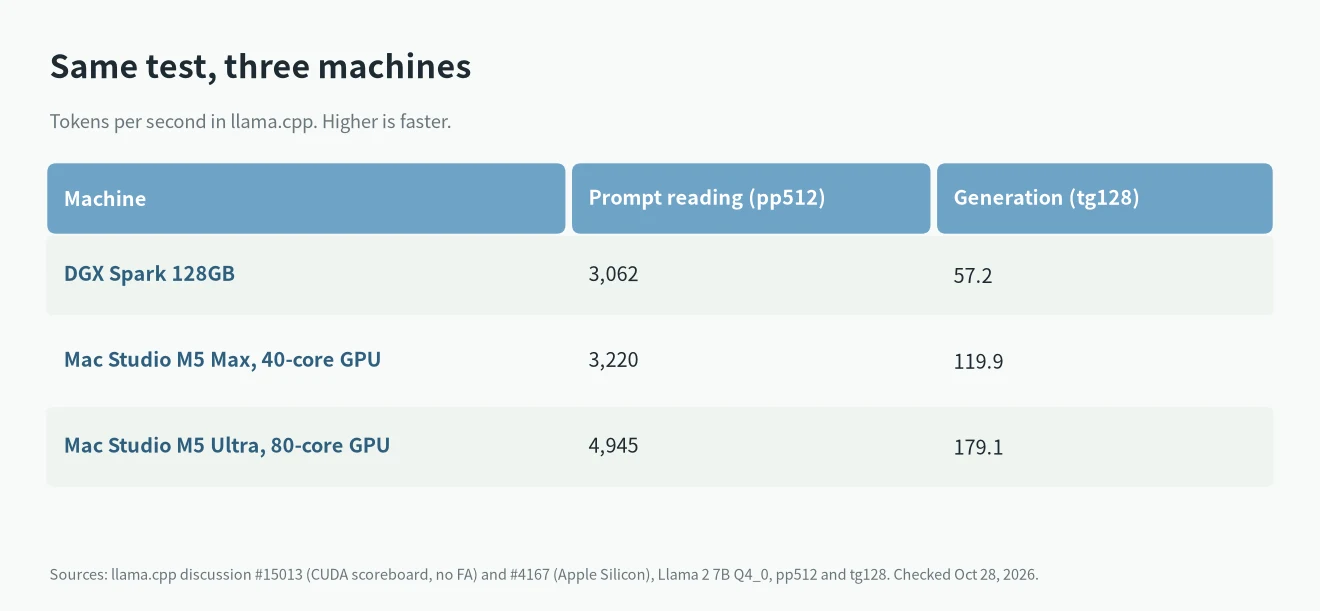
- Generation speed: the Mac Studio is faster. In the same test, the DGX Spark writes 57.2 tokens per second, the M5 Max writes 119.9 and the M5 Ultra writes 179.1.
- Prompt reading: the gap is smaller. The DGX Spark reads 3,062 tokens per second, the M5 Max 3,220 and the M5 Ultra 4,945.
- Model size: the DGX Spark has a fixed 128GB. The M5 Ultra Mac Studio can have 256GB, and the 80-core version up to 512GB.
- Software: the DGX Spark runs CUDA, so most AI frameworks work out of the box. The Mac Studio uses Metal and MLX. llama.cpp, Ollama and LM Studio all work, but CUDA tools such as vLLM and TensorRT-LLM do not.
- What to buy: for running models yourself, buy the Mac Studio. If your work depends on CUDA, buy the DGX Spark.
DGX Spark vs Mac Studio specs
According to the NVIDIA DGX Spark User Guide, the DGX Spark uses the GB10 chip with 128GB of LPDDR5X unified memory and 273 GB/s of bandwidth. It has a 4TB SSD and a ConnectX-7 network card at up to 200Gb/s, so two units can work as one. The GB10 has a 140W TDP, and the machine ships with a 240W power adapter.
According to Apple’s Mac Studio tech specs, the Mac Studio comes with two chips. The M5 Max with a 32-core GPU has 36GB of memory and 460GB/s of bandwidth. The 40-core GPU version has 614GB/s and goes up to 128GB. The M5 Ultra starts at 96GB with 1.2TB/s of bandwidth and can be configured with 256GB. The version with a 36-core CPU and 80-core GPU can also take 512GB. Apple’s store says the 512GB option arrives in late October.
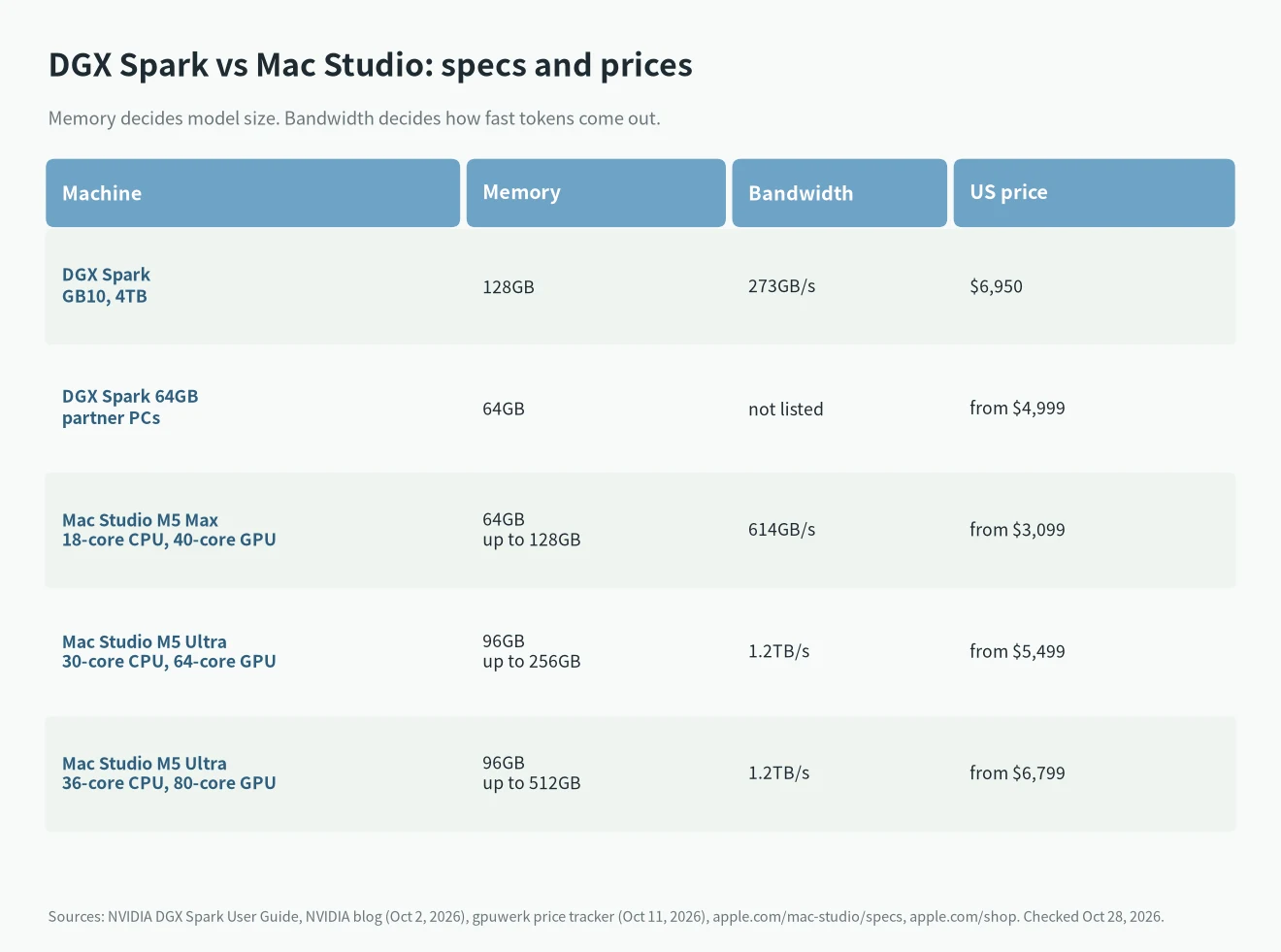
Bandwidth is the most important number in this comparison. To write each new token, the machine has to read the model weights from memory once, so more bandwidth means faster generation. The M5 Ultra’s 1.2TB/s is more than four times the DGX Spark’s 273GB/s. The 40-core M5 Max, at 614GB/s, has more than twice as much.
Prices in October 2026
The DGX Spark price has gone up several times. It launched at $3,999 in October 2025. According to gpuwerk’s price tracker, NVIDIA’s own store now lists the 128GB, 4TB model at $6,950 (checked October 11). On October 2, 2026, NVIDIA also announced a 64GB model, sold by partner PC makers from October 23, starting at $4,999. NVIDIA says it handles models up to 100 billion parameters (NVIDIA blog).
Mac Studio prices come from Apple’s US store, checked October 28:
- M5 Max (18-core CPU, 32-core GPU, 36GB, 512GB): from $2,499.
- M5 Max (18-core CPU, 40-core GPU, 64GB, 1TB): from $3,099.
- M5 Ultra (30-core CPU, 64-core GPU, 96GB, 1TB): from $5,499.
- M5 Ultra (36-core CPU, 80-core GPU): from $6,799.
More memory costs extra; Apple’s configurator shows the exact price. So the same-budget match-up is the $6,950 DGX Spark against the 80-core M5 Ultra Mac Studio from $6,799.
Real speed: the same test on both
The fairest way to compare machines is the same model and the same test. The llama.cpp repository has two long-running benchmark threads: the CUDA scoreboard, #15013 and the Apple Silicon scoreboard, #4167. Both use Llama 2 7B in Q4_0. pp512 is how fast the machine reads a 512-token prompt, and tg128 is how fast it writes 128 new tokens.
Generation: the Mac Studio is 2 to 3 times faster
The 128GB DGX Spark writes 57.2 tokens per second. The 40-core M5 Max writes 119.9, about 2.1 times as many. The 80-core M5 Ultra writes 179.1, about 3.1 times as many. The gap matches the gap in bandwidth.
Prompt reading: a smaller gap
Reading a prompt depends mostly on compute. The DGX Spark reads 3,062 tokens per second without Flash Attention and 3,661 with it. The M5 Max reads 3,220 and the M5 Ultra 4,945. Apple added neural accelerators to the GPU in the M5 chips, so the Mac Studio does not fall behind here either. The two threads used different llama.cpp builds, so read these numbers as a rough gap, not an exact percentage.
Numbers for a large model
The DGX Spark’s gpt-oss-120b results are in llama.cpp’s official DGX Spark benchmark file. With an empty context, it writes 58.7 tokens per second and reads a 2,048-token prompt at 2,444 tokens per second. With 32K tokens of context, generation drops to 42.8. I did not find an official M5 Ultra result for the same test, so I am not comparing them here. Based on bandwidth, the Mac Studio should also be faster on large models.
DGX Spark vs Mac Studio: what fits in memory
To know whether a model will run, start with its file size. The numbers below come from Ollama’s gpt-oss page, Llama 3.3 page and Qwen3 page. The model takes a bit more than the file size in use, because the context and the system need memory too.
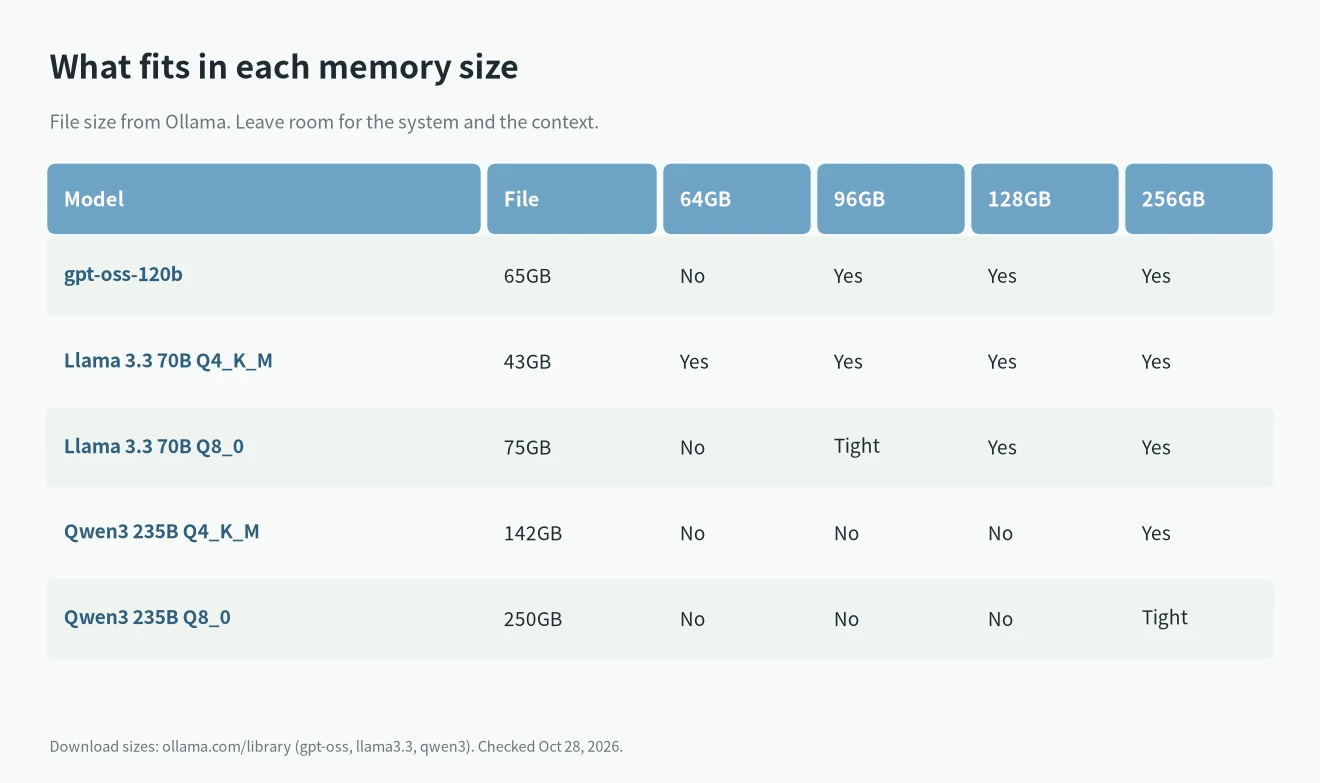
- 64GB (the 64GB DGX Spark or a base M5 Max): Llama 3.3 70B in Q4_K_M, at 43GB, runs. gpt-oss-120b, at 65GB, does not fit.
- 96GB and 128GB (a base M5 Ultra or the DGX Spark): gpt-oss-120b and the 75GB Llama 3.3 70B Q8_0 both run.
- 256GB (an M5 Ultra with more memory): the 142GB 4-bit Qwen3 235B runs. A single DGX Spark cannot hold it; you need two linked together.
If you want to run models above 200 billion parameters, the Mac Studio is the simpler choice, because one machine is enough.
Software: CUDA vs Metal
The DGX Spark ships with NVIDIA DGX OS, and CUDA, PyTorch, vLLM and TensorRT-LLM are all supported. If your work will be deployed on NVIDIA data center GPUs, code you write on the DGX Spark moves over directly. For fine-tuning and training, there are also far more CUDA tools than Mac tools.
The Mac Studio runs local models mainly through llama.cpp, Ollama, LM Studio and Apple’s MLX. For downloading models to chat, code or answer questions, these tools are enough and work right after install. The downside is that there is no CUDA, so a lot of research code needs changes before it runs on a Mac.
DGX Spark vs RTX 5090 for LLMs
Many people compare the DGX Spark with an RTX 5090 rather than a Mac. The short answer: for models that fit in 32GB, the RTX 5090 is about five times faster and far cheaper. The DGX Spark only wins when the model needs more than 32GB.
| DGX Spark | RTX 5090 | |
|---|---|---|
| Memory | 128GB unified | 32GB GDDR7 |
| Memory bandwidth | 273 GB/s | 1,792 GB/s |
| Llama 2 7B Q4_0, tg128 | 57.2 tok/s | 290 tok/s |
| Power | 140W chip (240W adapter) | 575W card, plus the PC |
| Price | $6,950 (NVIDIA store) | $1,999 card (launch price) |
Both speed numbers come from the same test in llama.cpp’s CUDA scoreboard. The gap follows memory bandwidth: the 5090 moves about 6.6 times as much data per second. The 5090 price is NVIDIA’s launch price for the card alone; you still need a PC around it.
Memory size flips the result. gpt-oss-120b needs more than 60GB at its native 4-bit format, so it does not fit on one 5090. You would have to push most of it into system RAM, which is much slower. On the DGX Spark it runs fully in memory at 58.7 tokens per second, per llama.cpp’s DGX Spark benchmark. So buy the 5090 for models up to 32B, and look at the DGX Spark (or a Mac Studio) for 70B to 120B models on one quiet box. Numbers checked October 28, 2026.
Who should buy which
Buy a Mac Studio if
- You mainly chat, write code or work with documents, and Ollama or LM Studio is enough.
- Generation speed matters. At the same price, the M5 Ultra writes about three times as fast as the DGX Spark.
- You want to run models above 200 billion parameters and need 256GB or 512GB.
- Your budget is about $3,000. The 40-core M5 Max is already faster than the DGX Spark.
Buy a DGX Spark if
- Your work depends on CUDA, vLLM or TensorRT-LLM.
- You fine-tune or train models, or your code will be deployed on NVIDIA servers.
- You plan to link two units later to run larger models.
Consider something else if
If you want 128GB for less money, look at AMD Ryzen AI Max+ 395 mini PCs. I compared one with the DGX Spark in AI Max 395 vs DGX Spark. For models up to 32B on a graphics card, see my RTX 5090 for AI post. If you are choosing between M5 Macs, read my M5 for local LLMs guide first, and for a smaller budget, see Mac mini for local LLMs.
FAQ
Is the DGX Spark or the Mac Studio faster for LLMs?
The Mac Studio is faster at generating tokens. In the same llama.cpp test, the 80-core M5 Ultra writes 179.1 tokens per second and the DGX Spark writes 57.2. The M5 Ultra also reads prompts a little faster.
How much do the DGX Spark and the Mac Studio cost?
The 128GB DGX Spark now costs $6,950. The M5 Ultra Mac Studio starts at $5,499, the 80-core version at $6,799, and the 40-core M5 Max at $3,099.
Can the DGX Spark run gpt-oss-120b?
Yes. In llama.cpp’s official benchmark, the DGX Spark writes 58.7 tokens per second with gpt-oss-120b. A Mac Studio with 96GB or more can run it too.
Is the DGX Spark faster than an RTX 5090?
No. On models that fit in 32GB, the RTX 5090 generates about five times as many tokens per second (290 vs 57.2 on Llama 2 7B Q4_0). The DGX Spark is the better choice only for models larger than 32GB, such as gpt-oss-120b.
Should I buy the 64GB DGX Spark?
It starts at $4,999, which is $1,900 more than a 64GB M5 Max Mac Studio, and its bandwidth is much lower. Unless you need CUDA, it is not good value.