

Claude & Codex Usage Limit Reset and Ban Tracker
When Claude and Codex limits reset (5-hour and weekly), official status pages, a dated Codex update log and verified Claude region and ban rules. Sources linked.

Two questions keep coming up. “When does my Claude limit come back?” and “Did I just get banned?” Fair questions. The answers are scattered across three help centers, and each of them likes to update quietly.
So this is the page I check myself. Claude usage limit reset rules first, then a dated Codex log, then status pages, then the ban stuff. Everything below links to the official page it came from. If I can’t confirm something from an official page, it doesn’t go on this page. I’d rather leave a gap than guess.
Contents
How the Claude usage limit reset works
Short version from Anthropic’s own help center (usage and length limits, Pro plan, Max plan):
- Two limits on paid plans. A session limit that resets every five hours, and a weekly limit that resets once a week.
- The weekly reset is fixed per account. Anthropic says the day and time are assigned to your account and don’t move based on when you start using Claude or when you subscribed. Your next Claude usage limit reset is in Settings > Usage. Go look there instead of counting days.
- One pool for everything. claude.ai, Claude Desktop and Claude Code all count toward the same limit. Yes, that means a long Claude Code session eats your chat budget too, and it all comes back at the same Claude usage limit reset.
- No fixed message count. It depends on conversation length, model, features and effort level. The pricing page says Pro gives at least 5x the Free usage per 5-hour session, and Max gives 5x or 20x Pro per session.
- Anthropic can tighten things anyway. Both plan pages say they may limit usage “in other ways, such as weekly and monthly caps or model and feature usage, at our discretion.” I don’t love that sentence, but it’s there.
When you hit a limit you can wait, upgrade (new limits apply right away), or turn on usage credits on a paid plan, which bills at standard API rates.
If you’re weighing that upgrade, check where you buy it first. Max costs about 25% more in the US App Store than on claude.com, and I keep the numbers in my AI subscription and API price comparison.
There’s also a thing called a limit reset (help article). Anthropic hands these out occasionally to eligible plans. Using one puts either your 5-hour or your weekly limit back to full. You click “Reset for free” under Settings > Usage on the web or in Claude Desktop. Not in Claude Mobile, and not in Claude Code in the terminal. Your normal weekly reset still happens on its usual day. Think of it as a bonus Claude usage limit reset, not a replacement for the regular one.
About the 5-hour clock: Anthropic only says the session limit resets every five hours, and that claude.ai, Claude Code and Claude Desktop share the same quota. You’ll often read that the clock “starts at your first message”. That’s a popular claim, not something Anthropic’s help pages say. For your exact Claude usage limit reset time, check Settings > Usage or the limit message itself. The weekly reset is a fixed weekly time assigned to your account, independent of when you start or subscribe (Max plan page), also shown in Settings > Usage.
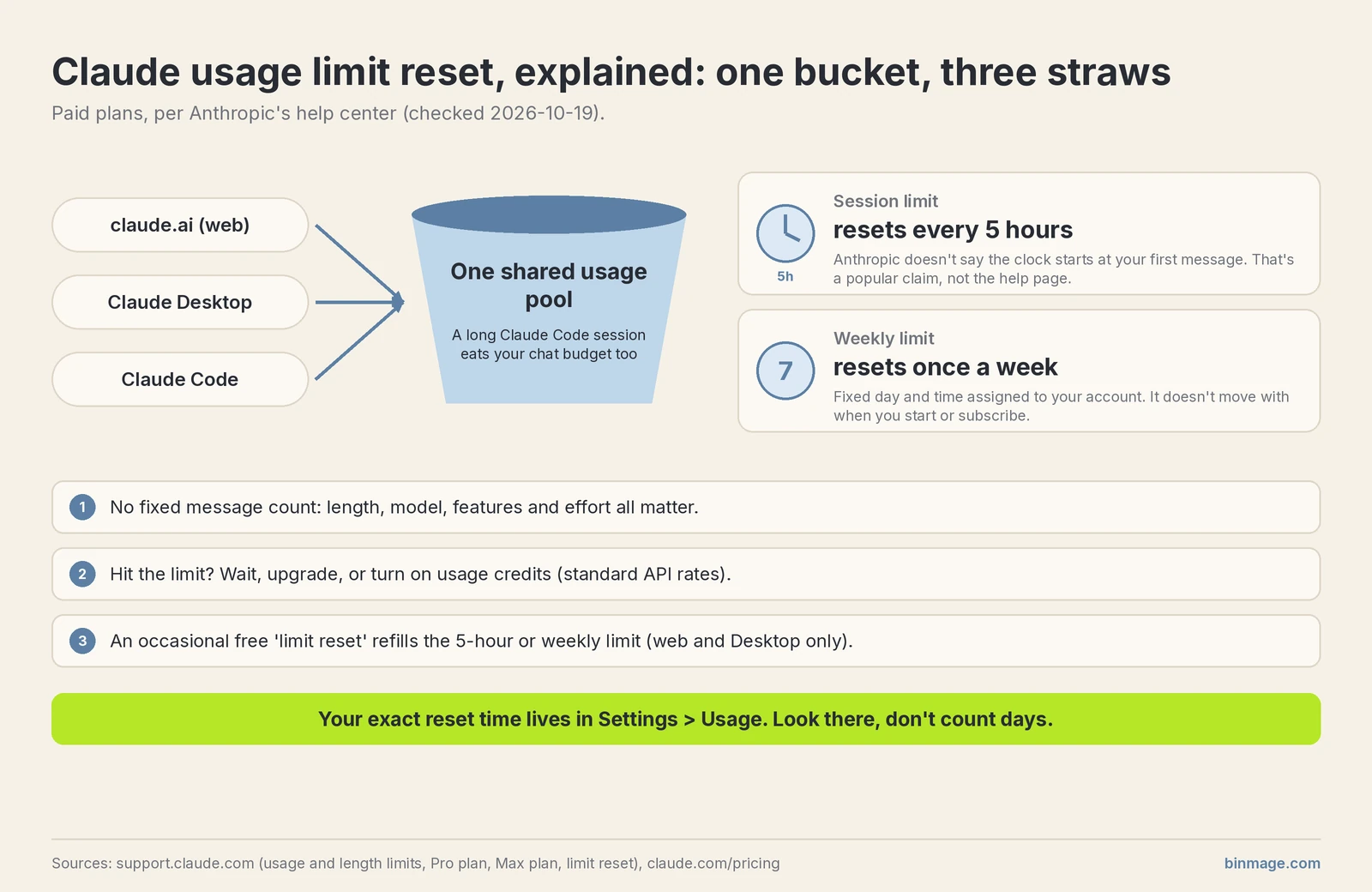 One pool, two clocks. Your own Claude usage limit reset times are in Settings > Usage.
How Codex usage limits reset
OpenAI’s version lives in Managing usage in Work and Codex and Using Codex with your ChatGPT plan. Checked 2026-10-19.
- Codex and ChatGPT’s Work mode share one allowance. It’s included with Plus and Pro, and with Business Standard and Premium seats.
- Depending on plan there’s a five-hour window and a weekly window, and you need allowance left in both to keep going.
- The five-hour window is not a clock that ticks from midnight. A new window starts when you send your first Work or Codex message after the previous window ended. You can also hit it well before five hours pass.
- Pro 100, Pro 200 and Pro 500 currently have no five-hour limit in Work and Codex. Still an included allowance, though.
- For Plus, OpenAI’s own estimate is about 5–45 local messages per five-hour window on GPT-6 Astra and 15–160 on GPT-6.1 Sol. Estimates, not promises, and cloud tasks can cost more.
- Where to check: Settings → Usage, or type
/statusin an active Codex CLI session.
Resets on the OpenAI side come in three flavors, and people mix them up constantly:
- Banked reset: promo, saved to your account until you use it or it expires. A full one refreshes both windows and moves your weekly reset date (details).
- Automatic/global reset: OpenAI applies it for you, it never shows up as a saved reset. Example from their own page: an automatic reset on 2026-09-07 during the Astra launch.
- Purchased instant reset: eligible personal Plus and Pro accounts, depending on billing country (details). It applies immediately, can’t be saved, and your new weekly period starts with your next request. So your next weekly reset is 7 days after that. Buy one with half your week still left and that unused half does not carry over. Read the checkout screen twice.
For how the limits compare across plans, I wrote the longer version here: Codex vs Claude vs Gemini usage limits.
Codex daily updates
A dated log of Codex changes that affect how much you get out of your plan. Newest on top.
The authoritative source is the openai/codex GitHub releases page. @Codex_Changelog on X describes itself as an “Unofficial Changelog for OpenAI’s Codex CLI”, so treat it as a convenience feed, not a source.
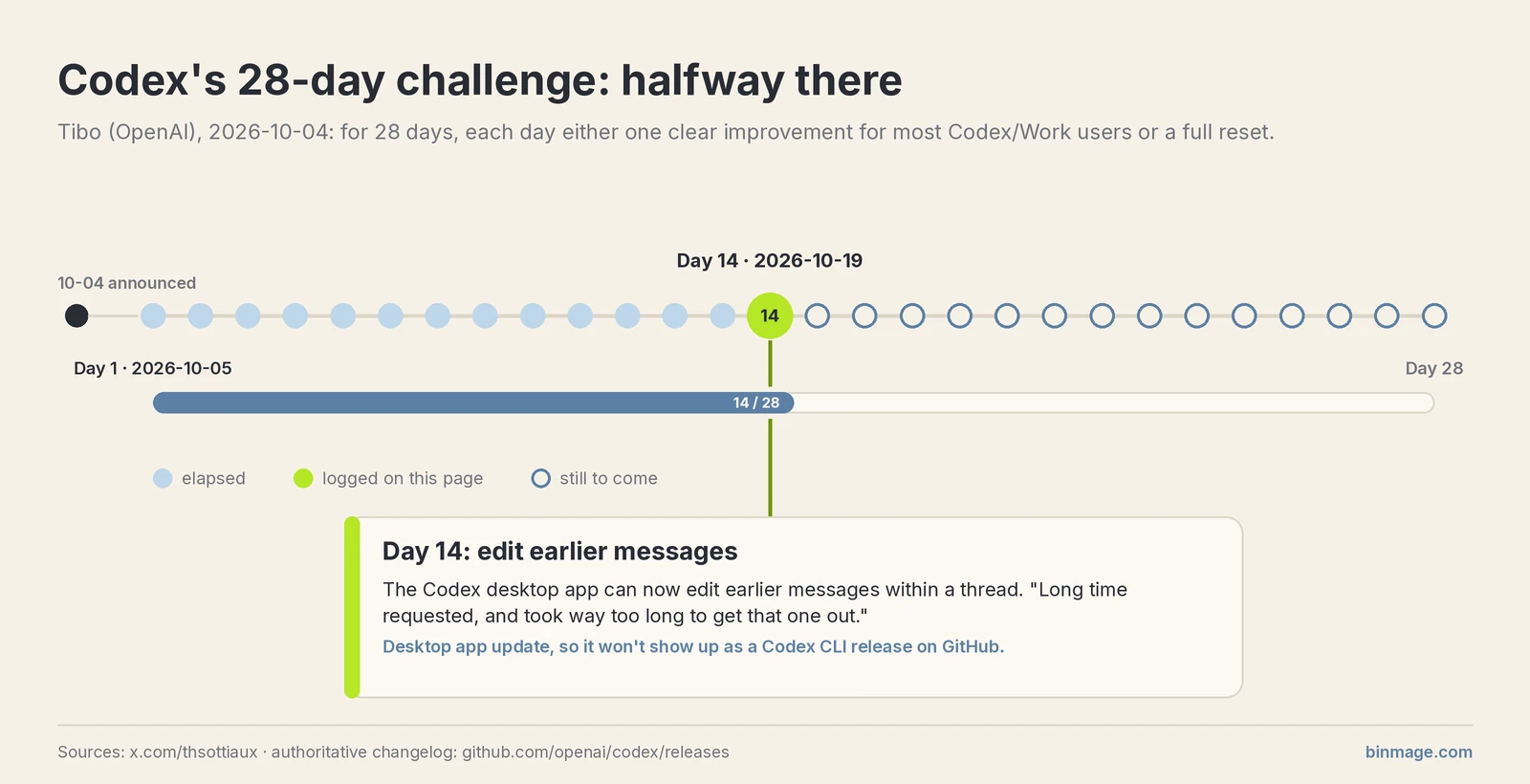
Context for the current entries: on 2026-10-04 Tibo (@thsottiaux, OpenAI) posted that over the next 28 days the team would ship, each day, either one clear improvement for most Codex/Work users or a full reset. Day 1 went out on 2026-10-05.
- 2026-10-19: Day 14 of Tibo’s 28-day challenge. The Codex desktop app can now edit earlier messages within a thread. His words: “Long time requested, and took way too long to get that one out.” Source: x.com/thsottiaux/status/2111990254408434095. This is a desktop app update, so it won’t show up as a Codex CLI release on GitHub.
Is Claude, ChatGPT or DeepSeek down? Official status pages
Before you assume your limit got cut or your Claude usage limit reset didn’t happen, check whether the service is just having a bad day.
- Claude / Anthropic: status.claude.com (status.anthropic.com redirects there)
- ChatGPT / Codex / OpenAI API: status.openai.com
- DeepSeek: status.deepseek.com. If you keep getting “server busy”, this is the first place to look. DeepSeek doesn’t explain the cause on that page, and I won’t guess.
And if it’s your own Mac that’s crawling, fans screaming while you’re not running anything heavy, that’s not a Claude problem. Here’s how I’d check a Mac for a hidden crypto miner.
Bans and region rules (verified facts only)
Anthropic only serves listed countries
Anthropic’s Supported Regions Policy is a whitelist. If a country isn’t on it, it’s unsupported. Not on the list: mainland China, Hong Kong, Macau, Russia, Iran, North Korea, Cuba, Venezuela, Belarus. Spain and Mexico are on it.
The version marked effective November 12, 2026 spells out three cases that count as unsupported:
- using it while physically in an unsupported region, even if you work for an otherwise supported company;
- entities incorporated or headquartered in an unsupported region, and their people, wherever they sit;
- entities majority-owned or controlled, directly or indirectly, by people or entities in unsupported regions.
That third one is the one small companies tend to miss.
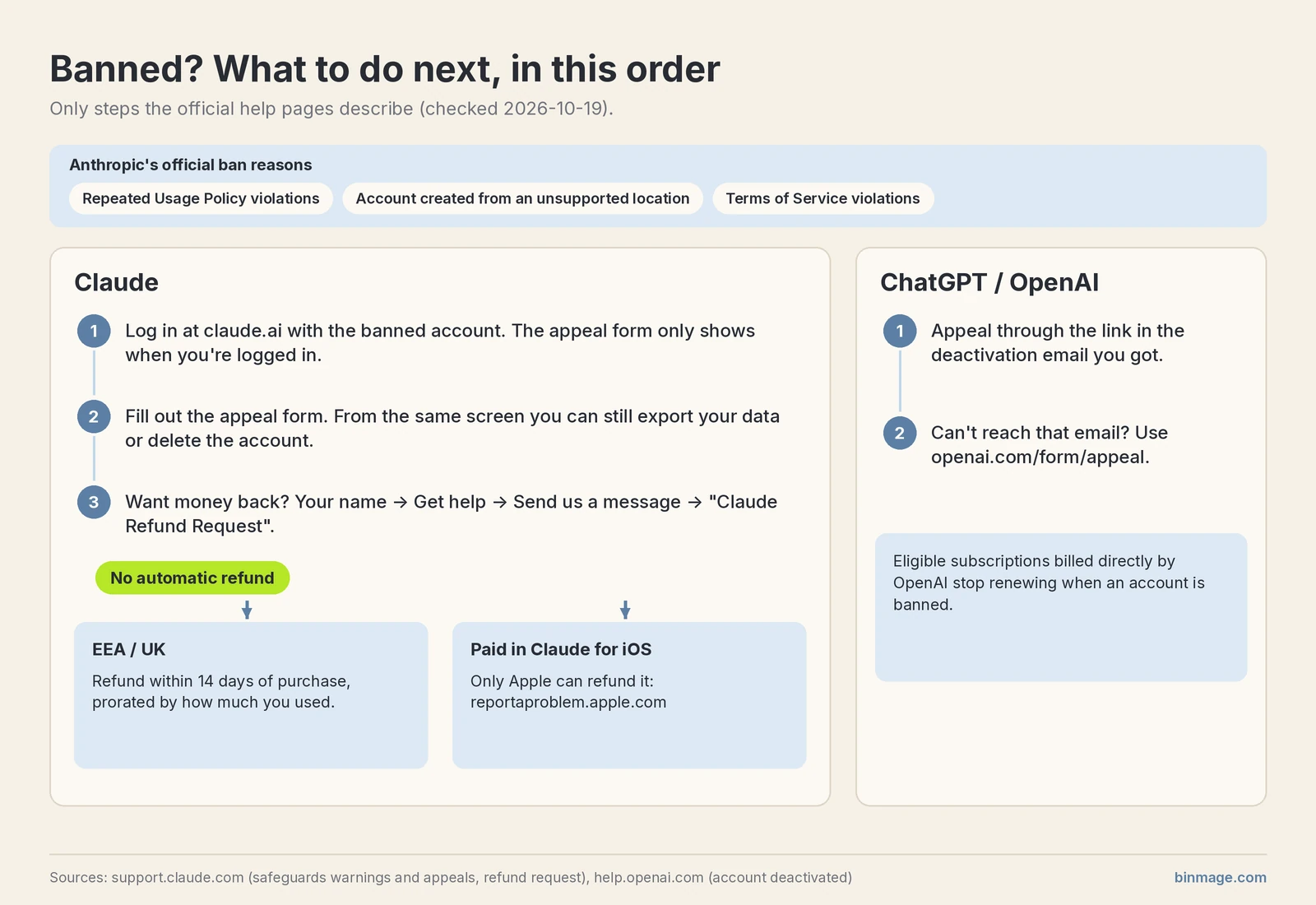
The official ban reasons (Safeguards warnings and appeals) are: repeated Usage Policy violations, account creation from an unsupported location, and Terms of Service violations. To appeal, log in at claude.ai with the banned account and use the appeal form there. You can still export your data or delete the account from that screen.
Refunds after a ban. There is no automatic refund. Anthropic’s refund article says that, except as expressly provided in the Consumer Terms or where required by law, all payments are non-refundable. To ask anyway: log in, click your name, then Get help → Send us a message → “Claude Refund Request”, and follow the eligibility prompts. In the EEA and the UK you can get a refund within 14 days of purchase, prorated by how much you used. If you paid on Claude for iOS, only Apple can refund it, via reportaproblem.apple.com.
One user’s account of how this goes, not verified by me: in claude-code issue #91411 someone says they paid $249 for Max 20x on 2026-09-01, were banned the next day, and got no refund.
On the OpenAI side, the deactivation article says to appeal through the link in the email you got, or openai.com/form/appeal if you can’t reach it. Eligible subscriptions billed directly by OpenAI stop renewing when an account is banned.
Distillation and why normal users get caught
- On 2026-09-10 (US time) Anthropic published its September threat intelligence report, which says it disrupted distillation attacks against Claude from seven labs based in China. CNBC’s write-up names Alibaba, Moonshot and DeepSeek among them. I’m only naming the labs CNBC named.
- On 2026-10-12 Anthropic posted Strengthening our defenses against distillation attacks. The defenses “focus almost entirely on making Claude’s reasoning harder for distillers to access”, meaning the chain of thought. People who keep trying to pull out the reasoning get stricter usage limits, and repeated attempts get accounts banned.
- They also admit it isn’t free for regular users. Their classifiers can wrongly block benign requests in fewer than 0.1% of cases, and since September 24 Anthropic charges for requests blocked before Claude responds in those areas. “Preserved thinking” also forced some developers to update their integrations.
My own observation, not an Anthropic rule: from what I’ve seen, very vague, goal-less prompts (“build me a CRM”, “tell me a story”) with nothing else around them seem like the kind of traffic that could look like reasoning harvesting to a classifier. That’s my guess. Anthropic hasn’t said anything like that. Still, giving Claude an actual task, your context and what “done” looks like costs you nothing and gets better answers anyway.
FAQ
When does my Claude usage limit reset?
The session limit resets every five hours, and the weekly limit resets at a fixed day and time assigned to your account. Your next Claude usage limit reset is shown in Settings > Usage, on the web or in Claude Desktop.
What is the 5-hour limit in Claude?
It’s the session limit on paid plans. Your usage allowance resets every five hours. On top of that there’s a weekly limit. See Anthropic’s explanation.
Does Claude have a limit per day?
Not a daily one, officially. It’s a 5-hour session window plus a weekly limit. Anthropic does reserve the right to add other caps, weekly or monthly, at its discretion.
Can I get unlimited usage on Claude?
No plan is unlimited. On paid plans you can turn on usage credits so work continues at standard API rates after you hit the limit, or move to a bigger plan.
Is there a limit on how much I can use Codex?
Yes. Codex shares an allowance with ChatGPT’s Work mode, with a five-hour window and a weekly window on most plans. Pro 100/200/500 currently have no five-hour limit but still have an allowance. Check Settings → Usage or /status in the CLI.
How does the Codex 5-hour limit work?
Per OpenAI, a new five-hour window starts when you send your first Work or Codex message after the previous window ended, and you need allowance left in both the five-hour and the weekly window to keep going. You can hit it before five hours pass. Pro 100/200/500 currently have no five-hour limit.
Why is my Claude account disabled?
Anthropic lists three reasons: repeated Usage Policy violations, account creation from an unsupported location, and Terms of Service violations.
How to get unbanned from Claude?
Log in at claude.ai with the banned account and fill out the appeal form linked from Anthropic’s appeals page. You have to be logged in to see it. Response times can be slow.
How do I know if ChatGPT is down?
Check status.openai.com. Same idea for Claude (status.claude.com) and DeepSeek (status.deepseek.com).
Last updated: 2026-10-19. I re-check the Claude usage limit reset rules, the Codex rules and the status links weekly. If something here is out of date, it’s on me, tell me.