

Codex “Model Is Not Supported” With a ChatGPT Account: 7 Causes From 157 Reports, and the 2 Ways Out
OpenAI's server, not the CLI, refuses the model name. We went through 157 GitHub reports, grouped them into seven causes, and tested which Codex CLI setting sends the name.
 bufferAbout the author8 min read

“The ‘gpt-6.1-sol’ model is not supported when using Codex with a ChatGPT account” is a refusal from OpenAI’s servers, not a bug in your install. We searched the Codex CLI 0.167.0 program for that sentence and it is not in there, so the CLI sends the model name you picked and the server says no. Users reported the same message in 157 issues and pull requests on openai/codex. The model name can be old, wrong or not yet open to your plan, and you have two ways out: pick a model your sign-in can use, or sign in with an API key.
The short answer
- Who says no: OpenAI’s server. In our test of Codex CLI 0.167.0 the sentence appears nowhere in the program, and a mock server we wrote showed the CLI sends whatever model name it finds in your settings.
- What it means: the model name in the request is not available for this ChatGPT sign-in, on this client, right now. OpenAI’s docs say model access depends on the client, your plan, workspace settings and rollout.
- Fastest fix: replace the model with one your plan lists. The models page names GPT-6.1 Sol for Plus, Pro, Business, Enterprise and Edu “when available”, and GPT-6 Luna in the desktop app for Free and Go.
- Check for old names first:
gpt-5.5(retired Oct 14, 2026),gpt-5.4(Aug 31),gpt-5.3-codex-spark(Sep 14) andgpt-5.3-codexstill sit in many configs. - Other way out:
codex login --with-api-key. Model access then follows your API organization, and usage is billed at API rates, not against your plan.
Seven causes users reported
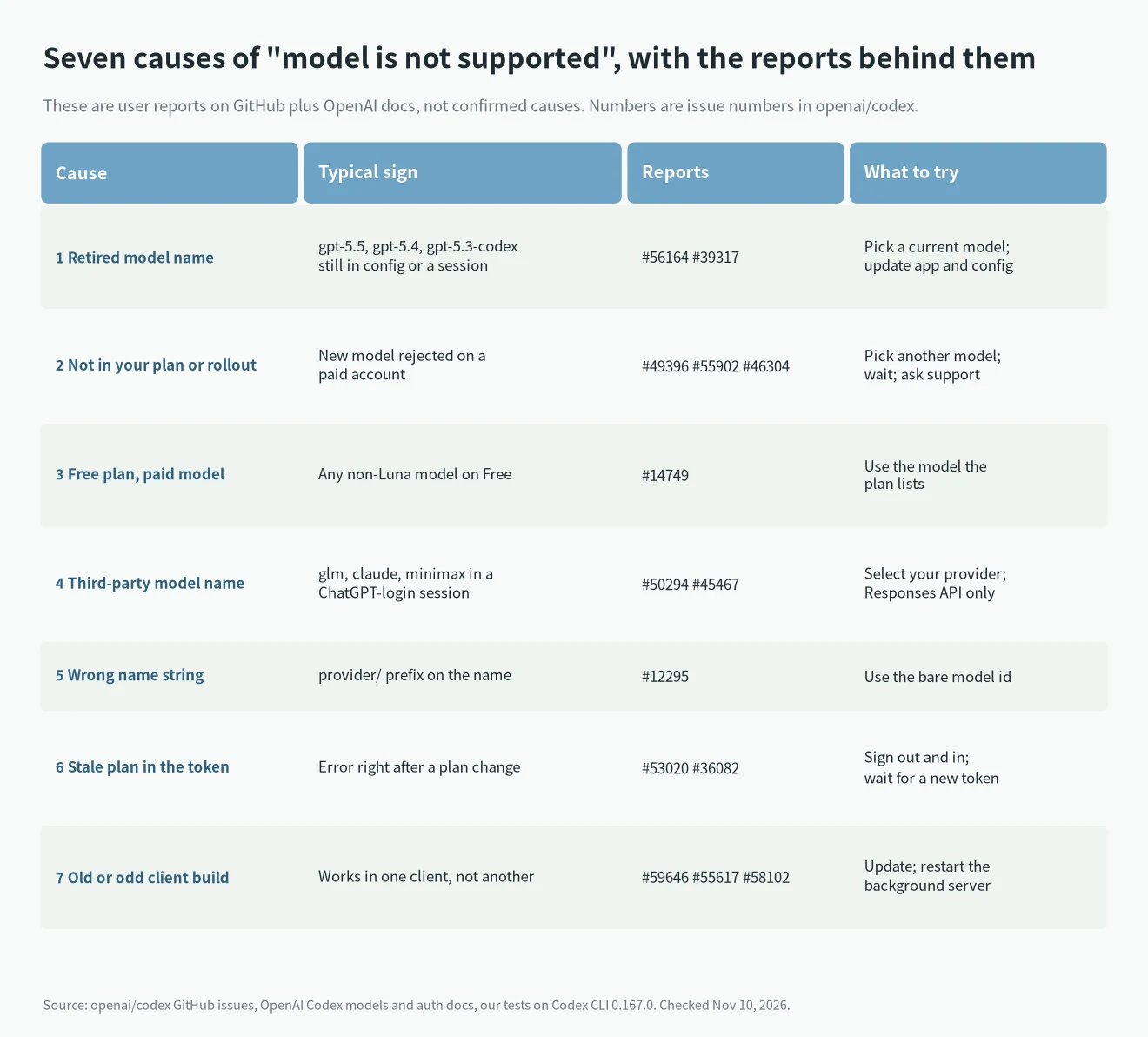
These are reports, not proof. Each issue number links to the GitHub thread, where you can read what the reporter tried. The causes are grouped by what you can do about them.
- Retired model name. In #56164 a Plus user reopened an older conversation, switched to 5.6 Sol, and the remote compaction step still asked for
gpt-5.5. In #39317 the app moved a task from Chat to Work and triedgpt-5.3-codex. OpenAI’s models page says gpt-5.5 left Codex with ChatGPT sign-in on October 14, 2026, and that API-key sessions are not affected. - Not open to you yet. #49396 reports
gpt-6.1-solrefused with no explanation of eligibility. In #55902 a Business Premium team lost Sol from the picker and got the error even though-m gpt-6.1-solput the name in the status line. In #46304 a Pro user was refused Sol and Astra while Terra worked; the reporter says OpenAI Support described it as a backend access or gating issue. #42944 is the same refusal for Astra on an Enterprise account. OpenAI’s docs say Enterprise and Edu administrators must enable some models first. - Free plan. #14749 asks OpenAI to change a message that makes Free-plan refusals look like a bug. The pricing page lists only GPT-6 Luna in the desktop app for Free and Go.
- A third-party model sent to the ChatGPT route. #50294 used a custom provider block for
glm-5.3and got the OpenAI sentence anyway (closed). #45467 reports that tasks started remotely from the ChatGPT web or phone app ignored the configured provider. Current Codex releases need a Responses API endpoint for custom providers;wire_api = "chat"is no longer supported. - A wrong name string. In #12295
openai-codex/gpt-5.1-codexfailed andgpt-5.1-codexworked, on a CLI from February. The 0.167.0 build in our test sends a prefixed name unchanged, so the server sees exactly what you type. - A stale plan in the sign-in token. #53020 and #36082 report the error right after a plan change. In #53020 it went away when a new access token was issued.
- An old or unusual client. #59646 says
gpt-6.1-solfails in daemon mode and works with--no-daemon. #55617 reports Sol missing from the model catalog on Windows with CLI 0.163.0. #58102 is a Termux fork based on 0.106.0. OpenAI’s docs say GPT-6.1 Terra needs Codex CLI 0.159.0 or later.
What the 157 reports mention
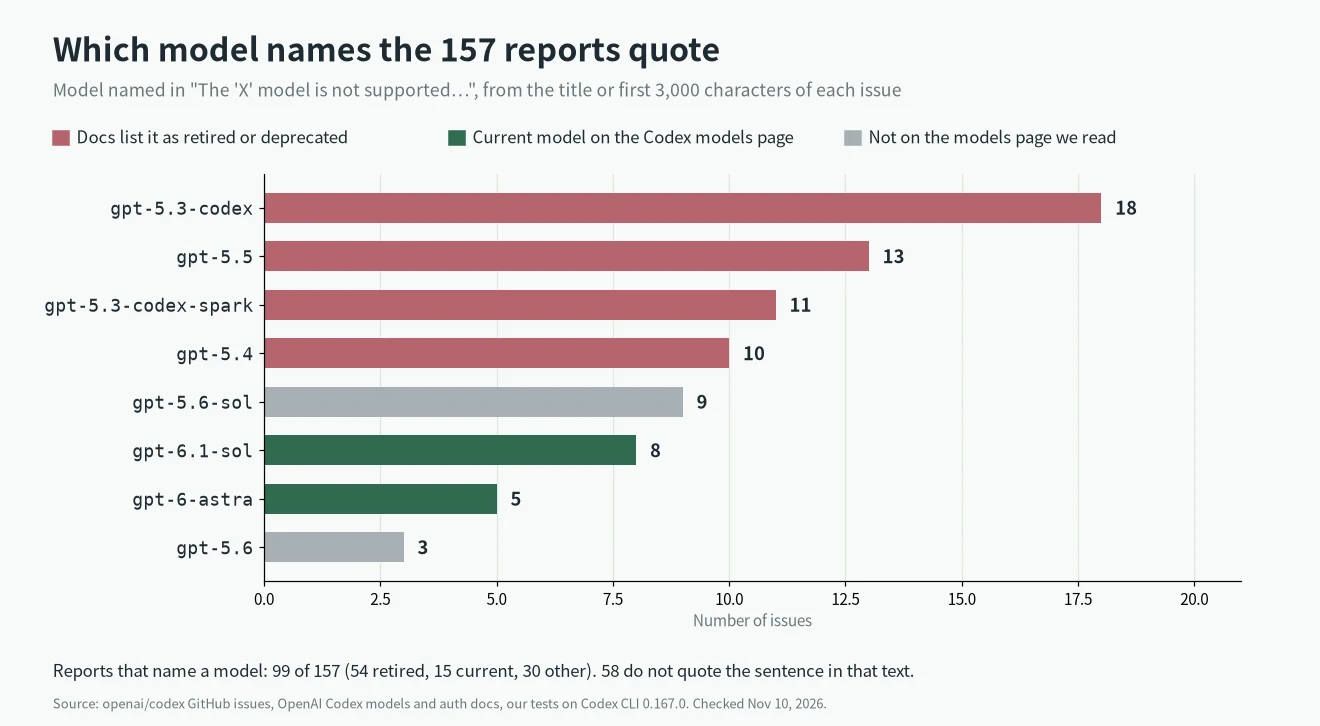
We counted the model named in the sentence, using each issue’s title and first 3,000 characters. Of the 157, 99 name a model: 54 name one the docs now list as retired or deprecated (gpt-5.2, gpt-5.3-codex, gpt-5.3-codex-spark, gpt-5.4, gpt-5.5), 15 name a current GPT-6 model and 30 name something else, including gpt-5.6-sol and custom provider models. The other 58 do not quote the sentence in that text. A report can be filed when a model is retired, so these counts say what people ran into, not how often it happens. 71 of the 157 are closed and 86 open; 72 were opened in September and October 2026.
Where the model name comes from
Before you change anything, find which setting is sending the name. We wrote a small mock server that refuses any model name containing “astra” with OpenAI’s exact sentence and logs the model of every request, then pointed Codex CLI 0.167.0 at it. This shows what the CLI sends. It cannot show what OpenAI’s server accepts for your account.
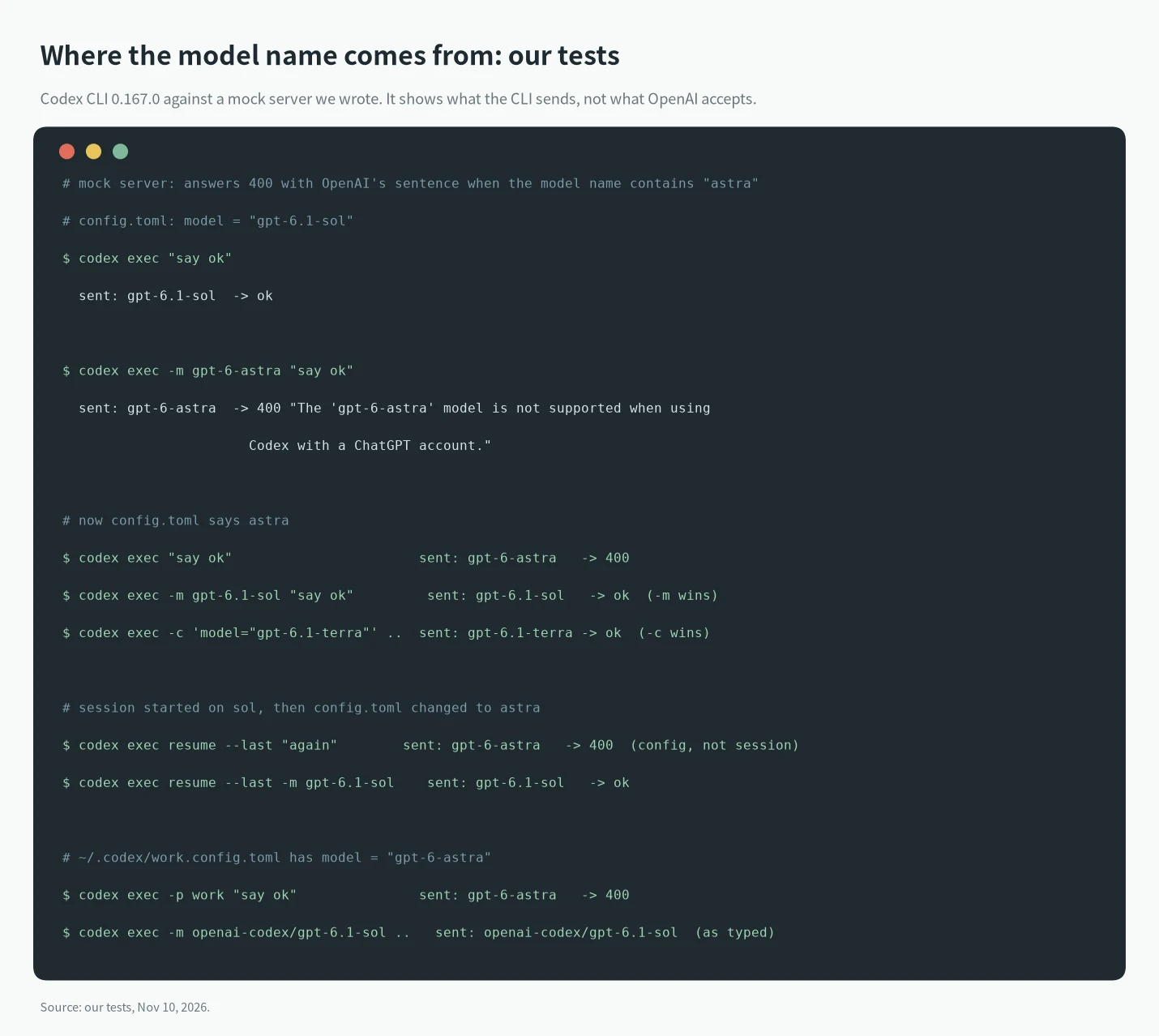
-mbeatsconfig.toml, and-c 'model="..."'also beats it. A model set only inconfig.tomlis what a plaincodex execsends.codex exec resume --lastsent the model from the currentconfig.toml, not the one the session started on. If you changed the config, an old session can pick up the new name, and the reverse.-mon the resume command overrides it.--profile workreads~/.codex/work.config.tomlon top ofconfig.toml. A[profiles.work]table insideconfig.tomlis refused with an error in this version, which matches the docs for Codex 0.134.0 and later.- A provider prefix is not removed:
openai-codex/gpt-6.1-solreached the server as typed.
How to fix it, in order
1. Read the quoted model name. It is the one that was refused, so start from it.
2. Find where it comes from. Look at -m or -c on your command, then the profile file if you use --profile, then model = "..." in ~/.codex/config.toml. In the desktop app or an IDE extension, check the model picker and any resumed chat.
3. Switch to a model on your plan’s list. In the CLI run /model, or start with codex -m gpt-6.1-sol. If the name you want is not in the list, your account does not have it yet; do not keep retrying.
4. Update the client. npm i -g @openai/codex, then restart any background Codex process and run codex doctor. Several reports above are old builds.
5. After a plan change, sign out and back in. codex logout and codex login get you a fresh token. The docs say tokens refresh automatically; we did not test a plan change, and #53020 is a single report.
6. Use an API key if you must have a model your sign-in cannot reach. Run printenv OPENAI_API_KEY | codex login --with-api-key. Model availability then follows your API organization, and the docs say usage is billed at API rates instead of included plan credits. See Codex pricing for what that costs, and Is Codex free? for what each plan includes.
7. On Enterprise or Edu, ask an admin. OpenAI’s docs say workspace defaults are not permissions, and a model can be off until an administrator enables it.
If the error text is different, such as a 403 or a localhost callback problem, use the Codex error code lookup or the token exchange fix. To see how much of your plan you have left, see how to check Codex usage limits. Install and login steps are in Codex CLI install.
What we tested and what comes from elsewhere
- Tested on November 10, 2026: Codex CLI 0.167.0 on Linux. A search of the program for the OpenAI sentence found nothing. A mock server we wrote showed which model name the CLI sends from
-m,-c,config.toml, a profile file andexec resume. - From GitHub issues, not tested: every cause in the table. They are what reporters said, and some threads are still open. We counted the 157 results with a script, from the issue title and the first 3,000 characters of each body.
- From the docs, not tested: which models each plan can use, the retirement dates, the Enterprise rules and the API-key behaviour. We have no ChatGPT account on the box, so we could not trigger the real error.
- Sources: OpenAI’s Codex models, authentication, pricing and advanced configuration pages and the workspace model availability guide, read on November 10, 2026. Model names and retirement dates change often.
FAQ
What does “model is not supported when using Codex with a ChatGPT account” mean?
OpenAI’s server refused the model name in the request for the account you signed in with. The name can be retired, not yet available to your plan or workspace, spelled with a prefix, or a third-party model sent through the ChatGPT route.
Why does it say not supported when my plan includes Codex?
Including Codex does not mean every model is open. OpenAI says availability varies by plan, client, workspace settings and rollout. Check the model against the list for your plan, and try another one.
Is the error caused by the Codex CLI?
Not by the CLI’s own checks: the sentence is not in the 0.167.0 program. An old CLI or app can still send an old model name or lack a new one, so update it.
Will an API key fix it?
It avoids the ChatGPT model rules, because model access then follows your API organization. It also switches billing to API rates, so check the price first.
Does the GPT-5.5 retirement affect API-key sessions?
OpenAI says it does not. GPT-5.5 left Codex for ChatGPT sign-in on October 14, 2026, and stays available through the API and in API-key sessions.