

How to Check Codex Usage Limits: 4 Places, and Why /status Says “Data Not Available” (Tested on 0.167.0)
There are four places to check Codex usage: the usage page in ChatGPT settings, /status and /usage in the CLI, and a status-line item. We ran Codex CLI 0.167.0 and show what /status and /usage print with an API key or a custom provider, why Limits says "data not available yet", and what OpenAI documents about the 5-hour and weekly windows.
 bufferAbout the author8 min read

Short answer on how to check Codex usage limits: there are four places. The usage page in your ChatGPT settings, /status and /usage inside the Codex CLI, and an optional rate-limit item in the CLI footer (/statusline). Which one works depends on how you signed in. We ran Codex CLI 0.167.0 in a terminal without a ChatGPT account, so we can show what /status and /usage print for an API key and for a custom provider, and why the “Limits” line says data not available yet. What a ChatGPT-signed-in session prints we could not test. Everything about plan allowances comes from OpenAI’s pricing page and help center, read on November 10, 2026.
The four places that show your Codex usage
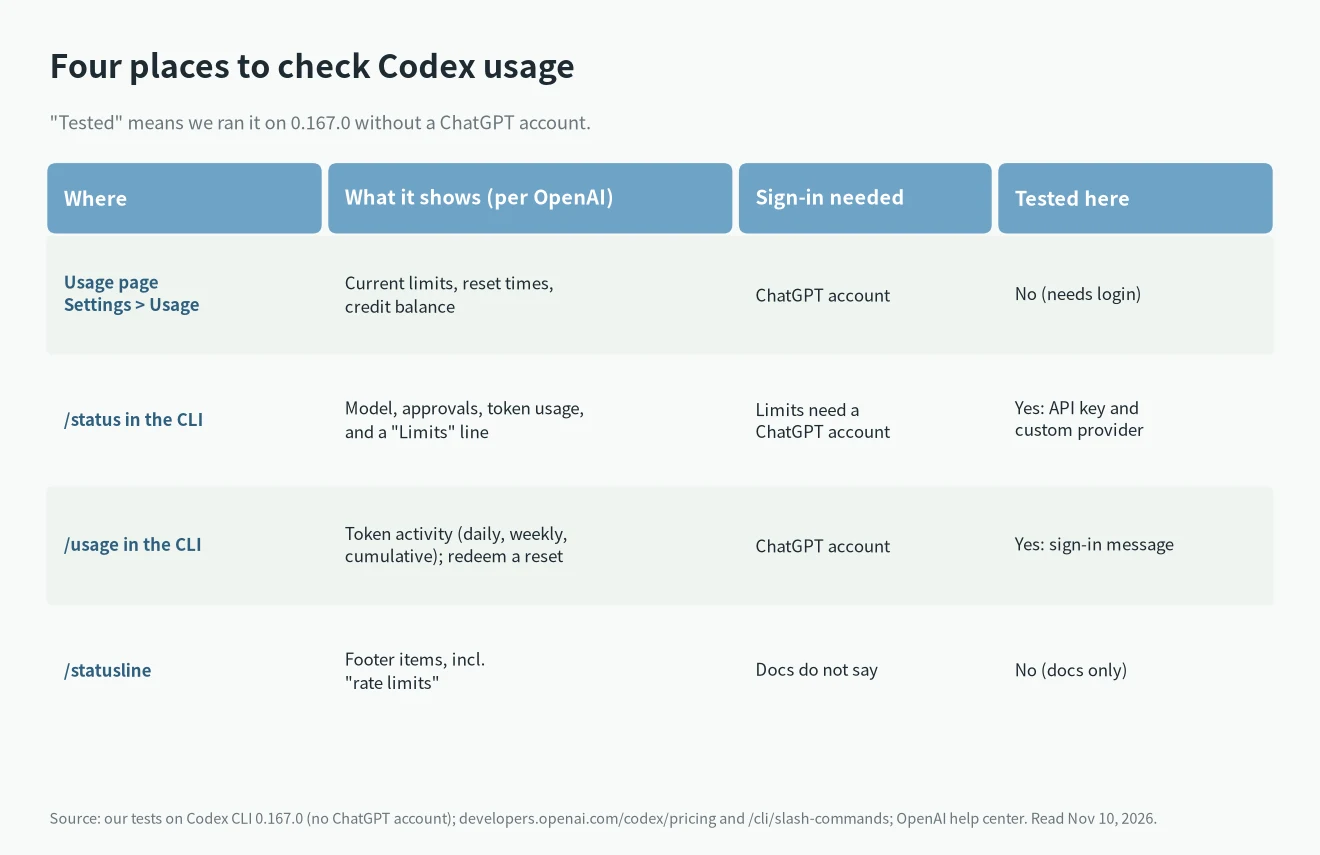
- Usage page (Settings → Usage). OpenAI’s pricing page says this is where to find your current limits, and links it as
chatgpt.com/codex/settings/usage. The help center says the same thing with a different path: Settings → Usage, where combined ChatGPT and Codex usage will appear. The CLI itself printschatgpt.com/settings/usagein its messages. We can’t open any of them without a ChatGPT login, so we can’t say which URL is canonical. If one doesn’t open, go through Settings in ChatGPT. /statusin the CLI. The pricing page says to use it to see your remaining limits during an active session. The slash-command reference describes it more narrowly (model, approval policy, writable roots, token usage). In 0.167.0 the output has aLimits:line, so the pricing page is right that it is the place to look. What that line prints for a ChatGPT account, we did not see./usagein the CLI. Opens a menu: show token activity, or redeem an earned reset if you have one./usage daily,/usage weeklyand/usage cumulativejump straight to a view. It needs ChatGPT sign-in, and the CLI says so when you don’t have it./statusline. Lets you pick footer items. The docs list “rate limits” among them, next to model, context, git branch and token counters. The choice is saved inconfig.tomlundertui.status_line. We didn’t change it, so this one is docs only.
When you actually run into the limit, the CLI also prints a message, and the version we tested contains this text: “You’ve hit your usage limit. Upgrade to Pro (…), visit https://chatgpt.com/settings/usage to purchase more credits”. We found it in the program’s strings, we didn’t trigger it.
What the numbers mean
Codex doesn’t give you a fixed message count. OpenAI’s pricing page describes an allowance that depends on the model, the size of the task, whether it runs locally or in the cloud, and context length. Two windows matter:
- A five-hour window. The pricing page gives estimates for Plus and Standard Business, and says Pro plans currently have no five-hour limit.
- A weekly limit that may also apply (“Weekly limits may also apply” in the table footnote).
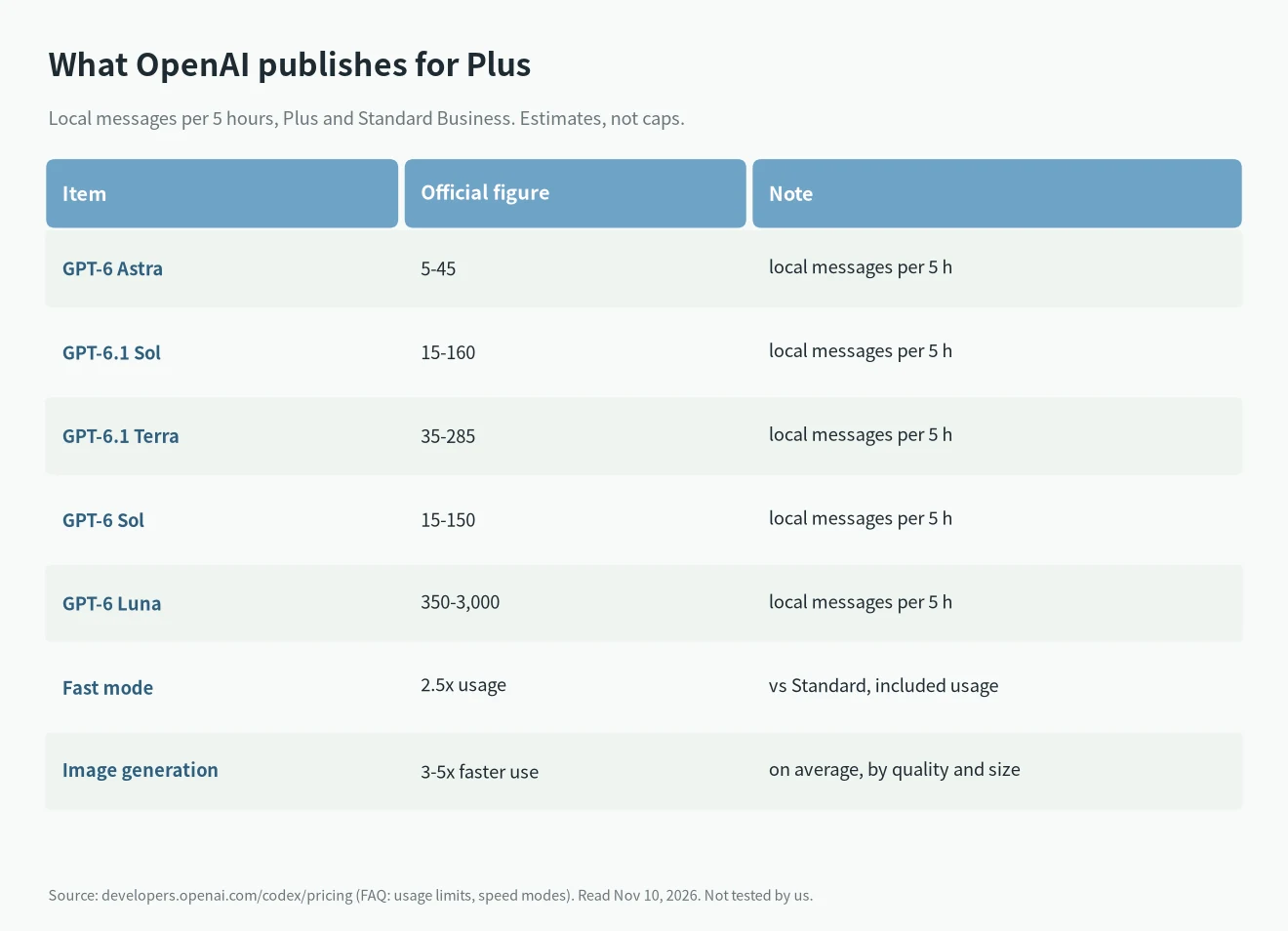
The model figures are OpenAI’s estimates of local messages per five hours on Plus and Standard Business, not caps. Cloud tasks can use more. Fast mode uses included subscription usage at 2.5x the Standard rate, and image generation uses it three to five times faster on average. Don’t compare these with API prices: the pricing page says API token prices are separate from subscription usage and shouldn’t be used to estimate included tasks.
Usage is also shared. Per the pricing page, ChatGPT Work and Codex use the same usage limits. The help center adds that starting in December, Plus, Pro and Business allowances will be shared across ChatGPT and Codex, with combined remaining usage and reset times in Settings → Usage. Instant chat doesn’t draw from it.
What /status and /usage printed on 0.167.0
We installed Codex CLI 0.167.0 on Linux and drove the interactive screen through a pseudo-terminal, once against a local mock server and once with a fake API key (codex login --with-api-key). In the second run we sent no prompt, only the two commands.
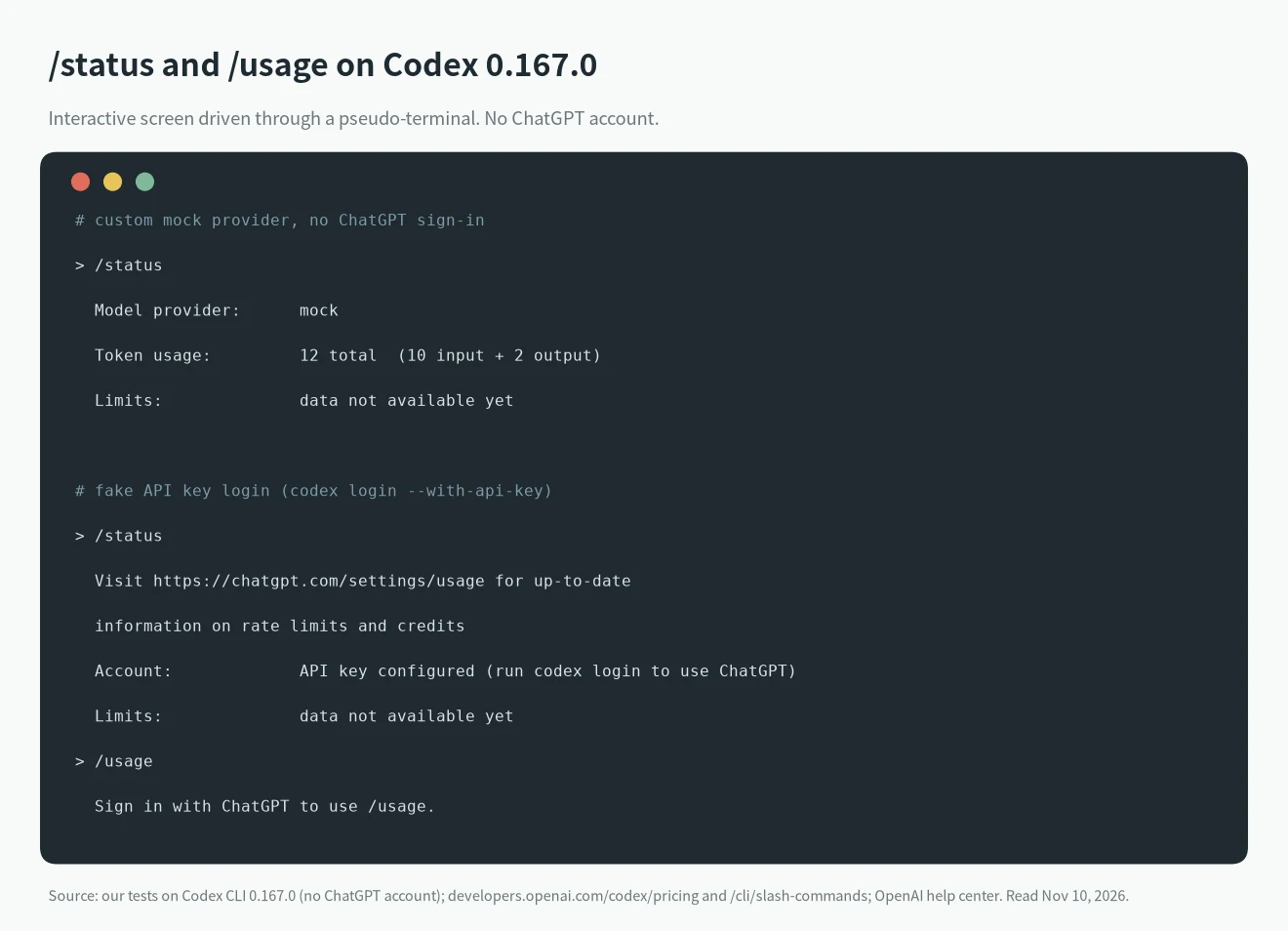
The /status screen with the API-key login looked like this:
Visit https://chatgpt.com/settings/usage for up-to-date
information on rate limits and credits
Model provider:      openai
Account:             API key configured (run codex login to use ChatGPT)
Token usage:         0 total  (0 input + 0 output)
Limits:              data not available yet
Two things to take from it. First, with an API key or a custom provider, /status has no ChatGPT allowance to show, and it points you to the usage page instead. We also sent the mock server six x-codex-primary-* and x-codex-secondary-* rate-limit headers (our guess at the names) and the Limits line stayed the same. That means nothing about a real account: the names may be wrong, or the CLI may only read them for ChatGPT sign-in. Second, /usage exits with “Sign in with ChatGPT to use /usage”, which matches the docs.
The program also contains the messages “limits may be stale – start new turn to refresh” and “refresh requested; run /status again shortly”, so with a ChatGPT login a stale reading is something to expect. We didn’t see either on screen.
If /status says “data not available yet”
1. Check how you signed in. /status shows Account: API key configured when you use an API key. Run codex login and choose ChatGPT sign-in if you want plan limits. With an API key, usage is billed at API rates, so the ChatGPT allowance doesn’t apply.
2. Check the provider. With a custom model_provider, as in our mock, there is no ChatGPT account for /status to read either.
3. Send one message and run /status again. The CLI text says to start a new turn when the data is stale, which is OpenAI’s own wording; we haven’t verified it with a real account.
4. Open the usage page in ChatGPT and compare. The help center says to look at which allowance is exhausted, your credit balance and any reset time shown, and to use /status in a CLI session.
After you hit the limit
- If you reach the limit during a turn, Codex can finish that turn, subject to fair-use limits (pricing page and help center).
- Then, per the help center, the options are adding credits, applying an available reset, upgrading, or waiting for the displayed reset time. Plus and Pro users can buy credits without changing plans.
- You can also run extra local chats with an API key, charged at standard API rates.
- OpenAI Support does not reset usage limits. Contact them if access hasn’t come back after the stated reset time or the numbers look wrong, and include the limit you’re questioning, the reset time shown, a screenshot, the client and model, and your time zone.
- Starting a new chat doesn’t reset anything either, per the help center.
To make the allowance last longer, the pricing page suggests shorter prompts, only the relevant files, a smaller AGENTS.md, fewer MCP servers and, from the table above, a plain Standard speed when you don’t need Fast.
Related guides
For when resets happen and what people have reported, see the Claude and Codex usage limit tracker. To compare what you get for the money, see Claude Code vs Codex. The CLI and the desktop app share one allowance, as explained in Codex CLI vs Codex app. For error messages that look like limits but aren’t, use the OpenAI Codex error codes lookup. If you also use Claude Code, the same question is answered in “You’ve hit your session limit” and how much Claude Code costs per month. The Claude Code counterpart of a rate-limit status line is in the Claude Code usage monitor.
Tested vs docs
- Tested on Codex CLI 0.167.0 (Linux, no ChatGPT account): the
/statuslayout, theLimits: data not available yetline with a mock provider and an API-key login, theAccount:line, the usage-page hint, and the/usagesign-in message. - From the docs, not tested: the usage page, what
/statusprints for a ChatGPT account, the/usagemenu and token views,/statusline, the plan estimates, the speed multipliers, and the December shared allowance. - Not tested and not found in docs: the real names of the rate-limit headers. The six we sent were a guess.
- Sources: OpenAI Codex pricing, the CLI slash commands reference, and the help center articles Using Codex with your ChatGPT plan and Understanding ChatGPT and Codex usage limits. Read on November 10, 2026. Plans and limits change often, so check the pricing page before you rely on a number.
FAQ
Where is the Codex usage page?
OpenAI’s pricing page links chatgpt.com/codex/settings/usage, and the help center says Settings → Usage. Sign in with the account you use for Codex.
Does /status show my remaining Codex limits?
That is what the pricing page says. On 0.167.0 the output has a Limits: line. With an API key or a custom provider it read data not available yet; we haven’t seen it with a ChatGPT account.
Why does Codex say “Sign in with ChatGPT to use /usage”?
/usage reads ChatGPT account data. With an API key there’s no such account in the session, so the CLI asks you to sign in with ChatGPT.
Do Codex limits reset every five hours?
There is a five-hour window on plans that have one, plus a weekly limit that may also apply. Pro plans currently have no five-hour limit. The exact reset time is the one your usage page shows.
Can OpenAI Support reset my Codex limit?
No. The help center says Support doesn’t reset ChatGPT or Codex limits, though it will investigate if the count looks wrong or access hasn’t returned after the stated reset time.
Is there a way to see Codex usage when I use an API key?
Codex’s ChatGPT limits don’t apply, because usage is billed at API rates. We didn’t test any API usage dashboard, so check OpenAI’s API billing pages.