

There’s an Issue with the Selected Model in Claude Code: 5 Causes and Tested Fixes
Claude Code was working, you pointed it at Ollama or OpenRouter, and now every prompt ends with There's an issue with the selected model. We reproduced the error five ways with Claude Code 2.1.312 and Ollama 0.40.13 and list the fix for each.
 bufferAbout the author7 min read
You pointed Claude Code at Ollama or OpenRouter, sent your first prompt, and got back There's an issue with the selected model (qwen3:8b). It may not exist or you may not have access to it. Changing the model name a few times did nothing. The message reads like an account permission problem, but with a third-party backend, there’s an issue with the selected model almost always means a wrong model name or a wrong URL.
We installed Claude Code 2.1.312 on Linux, connected it to a local Ollama 0.40.13 server, and reproduced the error five different ways. Below is the fix for each one. We had no OpenRouter key, so the OpenRouter section comes from OpenRouter’s own docs, and we say so there.
What there’s an issue with the selected model means
Claude Code’s error reference says the configured model name was not recognized, or your account lacks access to it. The hint at the end changes with the surface: Run /model in the interactive CLI, Run --model in non-interactive -p mode.
In our tests, the message appeared every time the backend answered Claude Code’s request with a 404. Calling Ollama’s /v1/messages directly with curl and a model we hadn’t pulled returned {"type":"error","error":{"type":"not_found_error","message":"model 'qwen3:8b' not found"}}. Claude Code shows that response as this error.
When the backend can’t be reached at all, you get a different message. With Ollama stopped we got API Error: Connection refused — a firewall or proxy may be blocking it (ECONNREFUSED). For that kind of error, see Claude Code unable to connect to API.
How we tested
Setup: Claude Code 2.1.312 with its own CLAUDE_CONFIG_DIR so no existing config was touched, and Ollama 0.40.13 on port 11434 with only qwen2.5:0.5b pulled. We set the three variables from the Ollama docs:
These tests ran on the cloud computer of one of our Grok Bot agents. It has no GPU, which is why we used such a small model. What that bot costs and what else it does is in our Grok Bot pricing review.
export ANTHROPIC_AUTH_TOKEN=ollama
export ANTHROPIC_API_KEY=""
export ANTHROPIC_BASE_URL=http://localhost:11434
Then we changed only the model name or the URL between runs and sent the same prompt with claude -p:
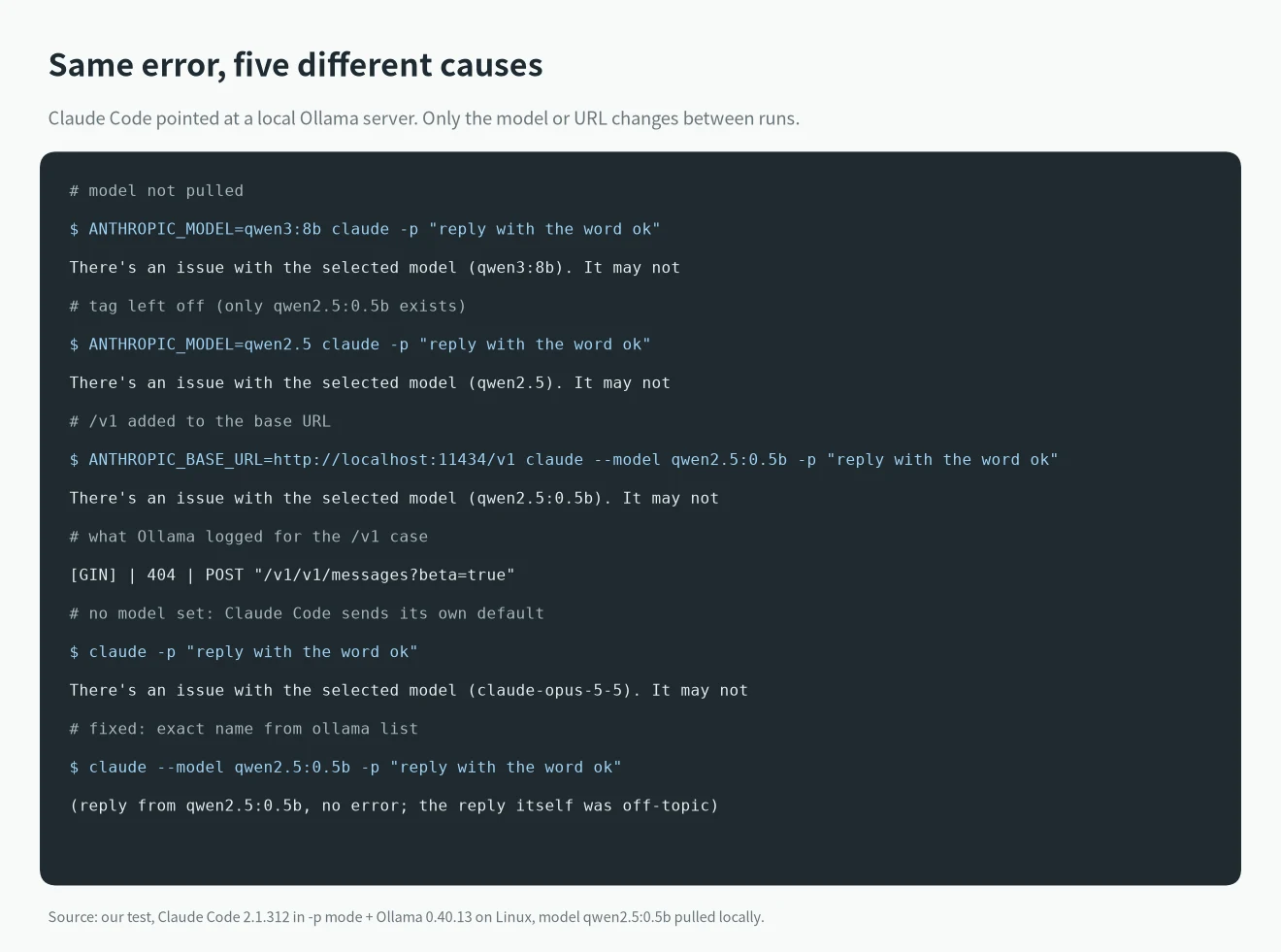
With the right model name the request went through. Claude Code also printed a warning that it doesn’t recognize the model and assumes a 200k-token context window. A 0.5B model is too small to follow Claude Code’s tool prompt, so its replies were off-topic. We used it only to check the connection; for real coding work you need a bigger model.
Four causes when you use Ollama
1. The model isn’t pulled, or the tag is missing
ANTHROPIC_MODEL=qwen3:8b with no qwen3:8b on disk fails. Plain qwen2.5 when what you have is qwen2.5:0.5b fails too. Without a tag Ollama looks for :latest, so a model pulled under another tag doesn’t match.
Fix: run ollama list and copy the NAME column exactly into --model or ANTHROPIC_MODEL, colon and tag included. If the model isn’t there, ollama pull it first.
2. ANTHROPIC_BASE_URL ends in /v1
Many guides give http://localhost:11434/v1 as the address of Ollama’s OpenAI-compatible API, and copying it here breaks things. Claude Code appends /v1/messages itself. Ollama’s log showed the request as POST "/v1/v1/messages?beta=true" with a 404, and Claude Code showed the same error. A comment on anthropics/claude-code#26408 describes the same /v1/v1 problem.
Fix: ANTHROPIC_BASE_URL=http://localhost:11434, with no /v1 and no trailing slash.
3. No model set, so Claude Code sends its own default
If you set only the URL, Claude Code sends its own default model name to Ollama. In our run that was claude-opus-5-5, which Ollama of course doesn’t have.
Fix: start with --model your-model or set ANTHROPIC_MODEL. Ollama’s Claude Code integration docs also offer ollama launch claude, which sets the variables and starts Claude Code for you. Our 0.40.13 install has the command, but the results in this article come from the manual setup above.
4. An old model is still in settings.json
We put {"model":"claude-sonnet-4-6"} in settings.json in the config directory. Running against Ollama without flags, the error named claude-sonnet-4-6. With the same file and --model qwen2.5:0.5b, the request worked.
That matches the priority order in Claude Code’s model configuration docs: /model in the session wins, then the --model flag, then ANTHROPIC_MODEL, and only then the model key in settings. There are several settings.json files, project-level ones included; see where Claude Code settings.json lives.
Causes and fixes at a glance
We reproduced the first five rows with Ollama. The last three come from the docs:
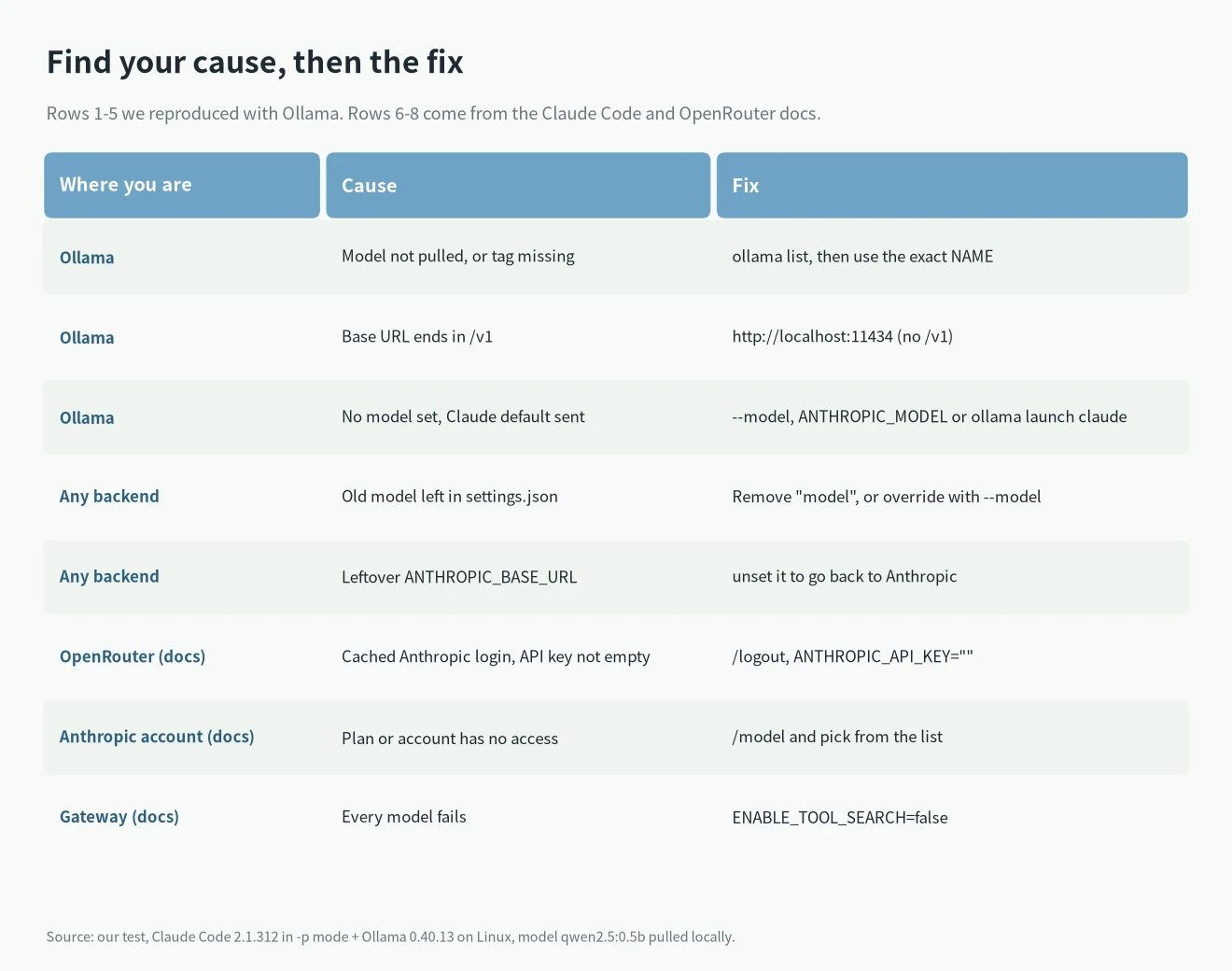
“Leftover ANTHROPIC_BASE_URL” means you once exported the Ollama address in your shell profile, later went back to your Anthropic account, and Claude Code still sends requests to Ollama, so every Claude model name gets a 404. One user in #26408 fixed it with unset ANTHROPIC_BASE_URL.
OpenRouter setup (from the official docs)
We didn’t test this section. OpenRouter’s Claude Code integration guide uses:
export ANTHROPIC_BASE_URL="https://openrouter.ai/api"
export ANTHROPIC_AUTH_TOKEN="your OpenRouter key"
export ANTHROPIC_API_KEY=""- The address is
https://openrouter.ai/api. Don’t turn it into/api/v1. - Set
ANTHROPIC_API_KEYexplicitly to an empty string. The docs stress “explicitly”; leaving it unset doesn’t count. - If you were logged in with an Anthropic account before, run
/logoutin Claude Code first. The docs say a cached login causes model-not-found errors like this one. - To pick models, set
ANTHROPIC_DEFAULT_OPUS_MODEL,ANTHROPIC_DEFAULT_SONNET_MODELandANTHROPIC_DEFAULT_HAIKU_MODELto OpenRouter model names. - Run
/statusin Claude Code to confirm it is talking to OpenRouter.
The docs also warn that Claude Code is only guaranteed to work with Anthropic’s own models. Other Anthropic-compatible providers work the same way; for DeepSeek, Kimi and GLM addresses and model names, see DeepSeek API for Claude Code.
No third-party backend: you’re on an Anthropic account
If you never changed ANTHROPIC_BASE_URL, the official error reference suggests:
- In the CLI, run
/modeland pick from the models your account has. In-pmode, pass an alias or full ID with--model. - Prefer aliases such as
sonnetoropus. The docs say aliases point to a maintained default and don’t go stale; a hard-coded full ID can. - If the wrong model keeps coming back, a stale ID is set somewhere. Go through the priority order above.
- Before v2.1.206, an expired login that couldn’t be refreshed failed every model with this error. Run
/login. Newer versions show Login expired instead. - If the URL points at an LLM gateway and every model fails this way, try
ENABLE_TOOL_SEARCH=false. According to the docs, since v2.1.304 Claude Code sends tool search fields through gateways by default, and some gateways reject them.
Issue #62035 on GitHub reports model_not_found 404 for every model on a Pro account. That looks like an account or server-side case; compare against it if config changes don’t help. For other messages, look them up in our Claude Code errors list.
Once a local model is running
After this error, the next problem is usually context. The Ollama docs recommend at least 64000 tokens of context for tools like Claude Code, while Ollama defaults to 4096 when you have less than 24 GiB of VRAM. Here’s how to change it: Ollama context length.
FAQ
Why does the error name a model I never set?
Something with higher priority sets another model, or you set none and Claude Code used its default. The name in parentheses is the name that was actually sent. Check it against /model, --model, ANTHROPIC_MODEL and each settings.json.
ollama run works, but Claude Code says there’s an issue with the selected model?
ollama run doesn’t go through ANTHROPIC_BASE_URL. Check that Claude Code’s URL has no extra /v1, then check that the model name matches ollama list exactly.
How do I see which URL Claude Code actually requested?
Read the Ollama server log: each request gets a GIN line with the path and status code. Running Claude Code with --debug also records the 404 in its debug log.