

Ollama “model requires more system memory”: 6 Proven Fixes, Tested on Real Hardware
Ollama refuses to load a model with "model requires more system memory (X GiB) than is available (Y GiB)". We reproduced it with qwen2.5:14b on 15.6 GiB of RAM, measured how the context size moves the estimate, and checked each fix against Ollama's source, FAQ and GitHub issues.
 bufferAbout the author8 min read
You pulled the model, you type ollama run, and instead of a prompt you get ollama model requires more system memory: Error: 500 Internal Server Error: model requires more system memory (14.0 GiB) than is available (10.3 GiB). Buying more RAM is not the only way out, because a good part of that first number is settings. We reproduced the error on a Linux box with 15.6 GiB of RAM, no swap and no GPU, running Ollama 0.24.0 and qwen2.5:14b (a 9.0 GB model file). Every number below comes from that machine. The fixes are checked against Ollama’s source code, its official FAQ and GitHub issues.
What the two numbers in ollama model requires more system memory mean
The first number is what Ollama estimates this load will need. The second is the memory it thinks you have free. In the Ollama v0.24.0 source, the check sits in verifyLayout in llm/server.go. The requirement is the model weights placed on the CPU side plus the KV cache (the memory the context uses) plus the compute graph. The available figure is free memory plus free swap. If the first is bigger, Ollama refuses to load and returns the ollama model requires more system memory error. The check is skipped on macOS, so you will mostly see it on Linux and Windows.
On Linux, “free memory” is MemAvailable from /proc/meminfo, the same value as the available column in free -h. During our test free -h showed 10Gi available and the Ollama log said available="10.3 GiB", so the two agree. Containers are calculated differently; see fix 6.
That leaves two ways out: shrink the first number or grow the second. The weights are mostly fixed. The part that moves the most is the context length.
Our test: same model, only the context changes
With default settings qwen2.5:14b loaded and answered. We then restarted the server with OLLAMA_CONTEXT_LENGTH=32768 and ran it again, and the error appeared. Passing num_ctx in an API request does the same. This is the real terminal output. Port 11435 belongs to the second Ollama instance we used for testing; yours is 11434 by default.
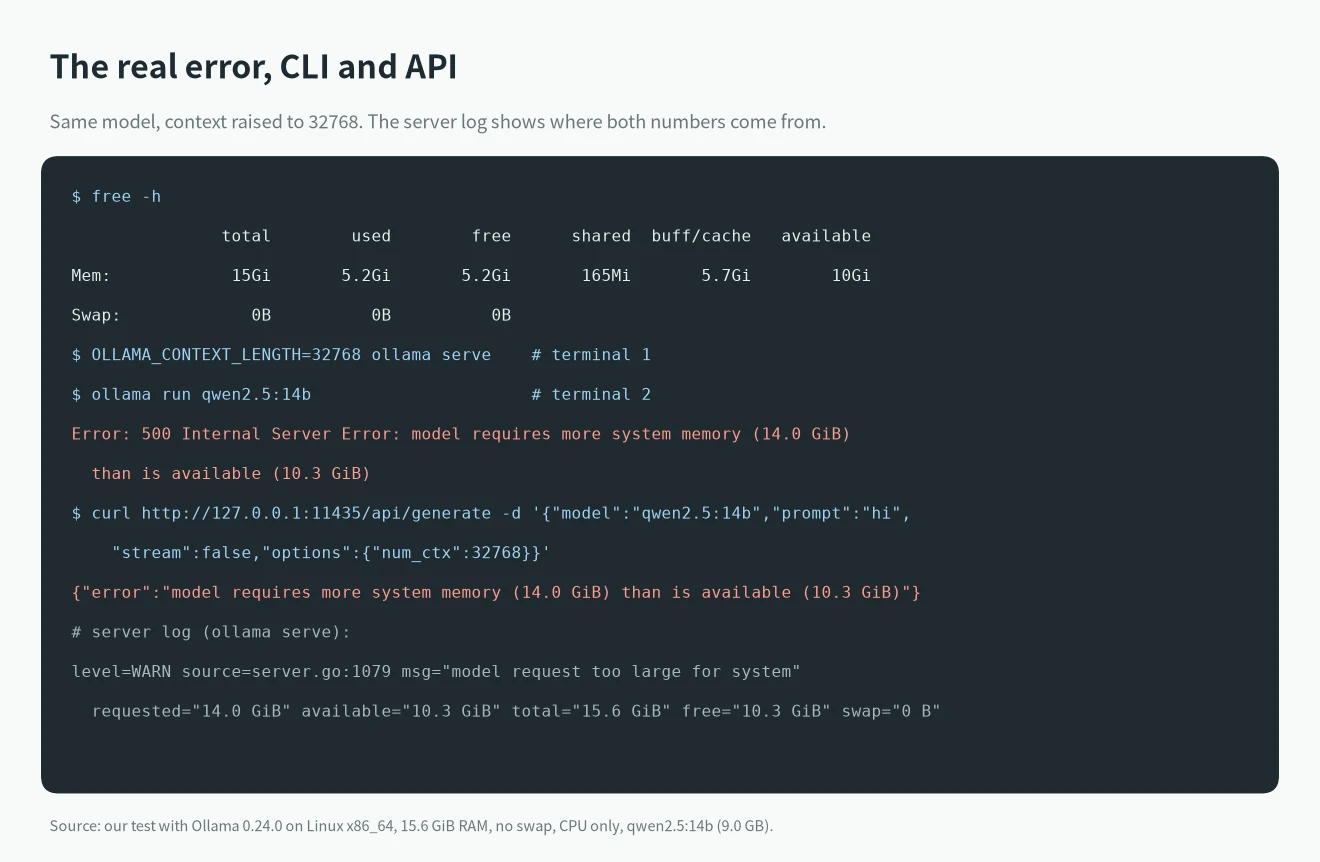
The server log line model request too large for system spells out the numbers: requested="14.0 GiB" available="10.3 GiB" total="15.6 GiB" free="10.3 GiB" swap="0 B". Next we changed only num_ctx and tried several sizes:
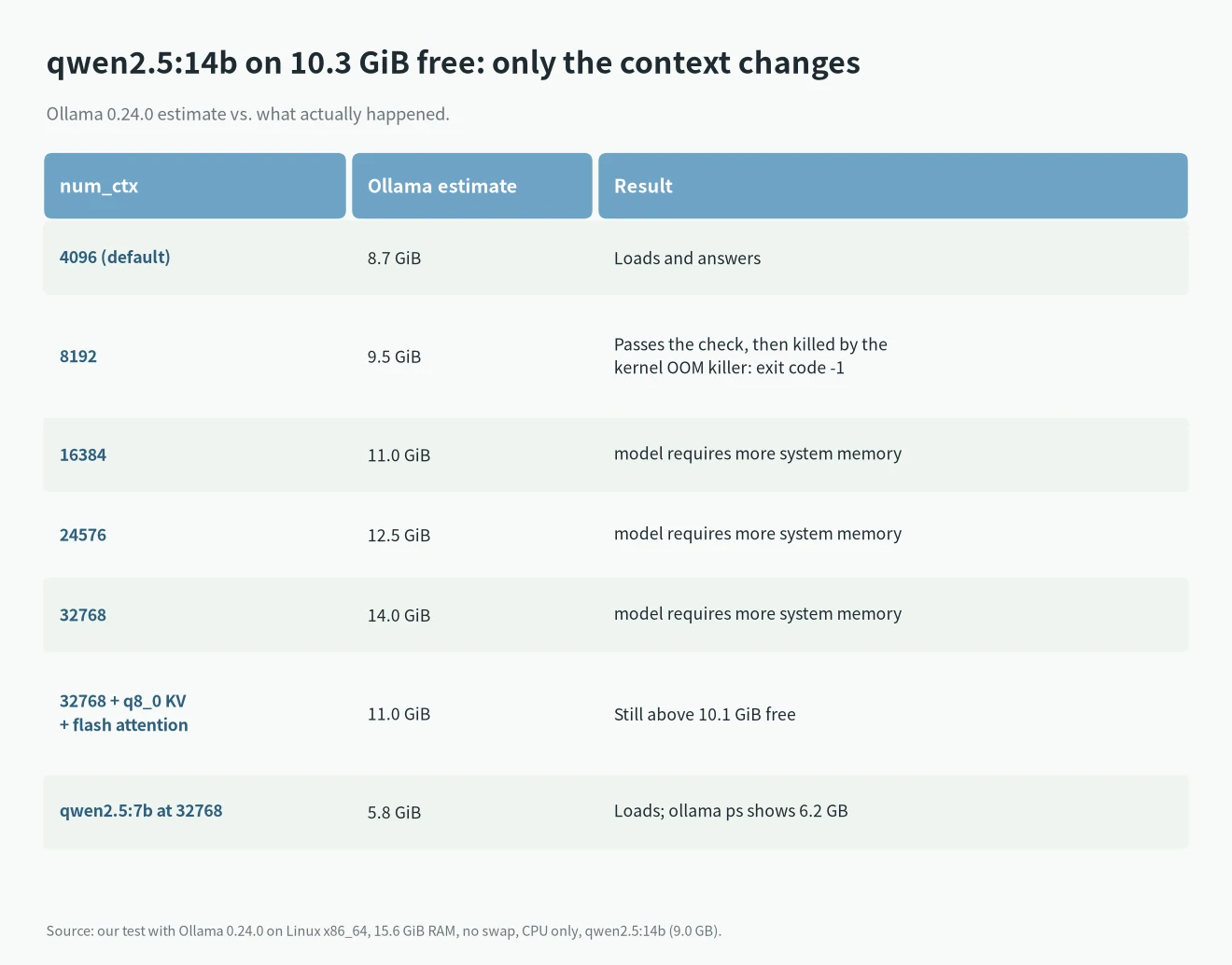
Going from 4096 to 32768 pushed the estimate from 8.7 GiB to 14.0 GiB with the same model file. One result deserves a warning. At 8192 the estimate was 9.5 GiB, which passed the check, but the kernel’s OOM killer stopped the process during loading. The API returned llama runner process has terminated with exit code -1 and dmesg showed Out of memory: Killed process. An estimate that only just fits can still fail, so leave some headroom.
6 fixes for ollama model requires more system memory
1. Lower the context length (num_ctx)
This is the fastest fix. Ollama’s FAQ gives the default context as 4096 tokens. If you or one of your tools raised it, the memory requirement went up with it. You can set it in three places; change the one you actually use:
# server-wide (affects every request)
OLLAMA_CONTEXT_LENGTH=8192 ollama serve

# inside an ollama run session
/set parameter num_ctx 8192

# per API request
curl http://localhost:11434/api/generate -d '{"model":"qwen2.5:14b","prompt":"hi","options":{"num_ctx":8192}}'
Often you never touched it and a plugin did. In issue #7423, a user calling a Dockerized Ollama from the Continue plugin in IntelliJ hit this error, and Ollama maintainer rick-github pointed to Continue using a large context window. If the CLI works but your editor plugin fails, check the plugin’s context setting first. Afterwards, the CONTEXT column in ollama ps shows the value that was actually applied.
All five ways to set the context, and the order Ollama applies them in, are in our Ollama context length guide.
2. Check OLLAMA_NUM_PARALLEL
The official FAQ says required RAM scales with OLLAMA_NUM_PARALLEL * OLLAMA_CONTEXT_LENGTH. The default today is 1, and our 0.24.0 startup log showed OLLAMA_NUM_PARALLEL:1. If you set 4 or 8 in a systemd unit, a Docker compose file or your shell, the KV cache is multiplied by that. Issue #7423 dates from 2024, when the default was still 4, and that user got it working after setting OLLAMA_NUM_PARALLEL to 1 and switching to a smaller model. For a single user, 1 is enough.
3. Quantize the KV cache
The FAQ describes OLLAMA_KV_CACHE_TYPE=q8_0, which requires Flash Attention (OLLAMA_FLASH_ATTENTION=1). On the same machine this cut the estimate for qwen2.5:14b at 32768 context from 14.0 GiB to 11.0 GiB:
OLLAMA_FLASH_ATTENTION=1 OLLAMA_KV_CACHE_TYPE=q8_0 ollama serveThat saved 3 GiB, yet it was still above the 10.1 GiB free at that moment, so the error stayed. It helps when you are close; when you are far off, combine it with fix 1. The FAQ says q8_0 uses about half the memory of the default f16 with a very small loss in precision that usually is not noticeable, and warns that models with a high GQA count such as Qwen2 may be affected more.
4. Use a smaller model or a lower quantization
If you really need a long context, the weights have to shrink. We switched to qwen2.5:7b (4.7 GB file) at the same 32768 context. The estimate was 5.8 GiB, it loaded, and ollama ps showed 6.2 GB, 100% CPU, CONTEXT 32768. To estimate memory for a given model and context, try our VRAM calculator for local LLMs; for what fits on a 16 GB machine, see our picks for the best local LLMs.
5. Free up memory or add swap
Available memory is measured at load time, so other programs shrink it. Run ollama ps to see whether another model is still resident and unload it with ollama stop . A browser with many tabs also takes a lot. The reporter of issue #7423 eventually found that closing a browser with too many windows was what fixed it.
Since the source adds free swap to the available figure, adding swap also gets you past the check. In issue #7942 a user had set useMmap and still got model requires more system memory (17.7 GiB) than is available (13.6 GiB); rick-github replied that mmap does not affect the check and suggested adding swap. In issue #8667, about running deepseek-r1:671b (446.3 GiB required) on 40 GB of RAM, the suggested workaround was also a large swap file. We did not measure speed with swap. All we can say is that the check counts it; it does not give you more RAM.
6. Raise the memory limit in Docker or LXC
Inside a container Ollama does not use MemAvailable. In the v0.24.0 source, discover/cpu_linux.go reads the cgroup files memory.max and memory.current and treats total minus memory.current as free. The catch is that memory.current includes the page cache. After the model file has been read once, the cache can hold several GB, so Ollama sees little free memory even though most of it could be reclaimed.
Issue #15704 describes exactly this: a Proxmox LXC container with 32 GiB, MemAvailable around 31.9 GiB, and still model requires more system memory (18.3 GiB) than is available (12.6 GiB). In August 2026 another user confirmed the same code path on 0.32.9 in Docker. The fix in PR #13782 has not been merged and the issue is still open. Until it lands, give the container a higher memory limit or run Ollama on the host, and use fixes 1 to 4 to bring the requirement down.
Does upgrading Ollama make the error go away?
We compared the source across versions. From v0.21.2 to v0.24.0, llm/server.go contains model requires more system memory (%s) than is available (%s). From v0.30.0 through v0.40.0 that exact string no longer appears in the production code. Newer versions load models through llama-server and fail differently when memory runs out.
On the same machine we tried the current 0.40.13 with llama3.2:3b and a 131072 context. The log first said projected to use 15468 MiB of host memory vs. 16002 MiB of total host memory, then failed to fit params to free device memory: was unable to fit model into system memory by reducing context, abort, and the API returned llama-server process has terminated: signal: killed. So after an upgrade the ollama model requires more system memory message may disappear, but running out of memory does not, and the fixes above still apply. According to the source, newer versions retry with a smaller context after a load OOM only when you did not set num_ctx yourself.
If your load error is something else, look it up by its exact text in our list of Ollama and llama.cpp errors.
FAQ
The model file is 9 GB. Why does it need 14 GB?
The file holds only the weights. Loading also allocates the KV cache and the compute graph, and the KV cache grows with context length and parallel requests. In our test the same 9.0 GB qwen2.5:14b was estimated at 8.7 GiB with a 4096 context and 14.0 GiB with 32768.
Do Macs get this error?
In the v0.24.0 source this check runs only on Linux and Windows. macOS (darwin) uses a different rule, and the code comment says that is because macOS allocates swap dynamically. So you will rarely see this message on a Mac.
Can it happen with a GPU?
Yes. Layers that do not fit in VRAM go to system RAM, and the check counts the part placed on the CPU side. Our test machine has no GPU, so this answer is based on the source code.