

Ollama “pull model manifest: 412”: The Simple Fix, and Why Upgrading Is Not Always Enough
Ollama shows "Error: pull model manifest: 412" when the model you are pulling needs a newer Ollama than the one you run. Upgrade the official way, then check with ollama -v. We reproduced it on Linux with 0.40.8 and pulled the same model on 0.40.12.
 bufferAbout the author6 min read
Short answer: Ollama shows Error: pull model manifest: 412 when the model you are pulling needs a newer version of Ollama than the one you have. The registry checks your client version and refuses the download. Upgrade Ollama the official way, run ollama -v to confirm the new version, then pull again. We reproduced the error on a Linux test box on October 29, 2026 (Beijing time) with Ollama 0.40.8, and the same model got past this step on 0.40.12.
The exact pull model manifest: 412 message
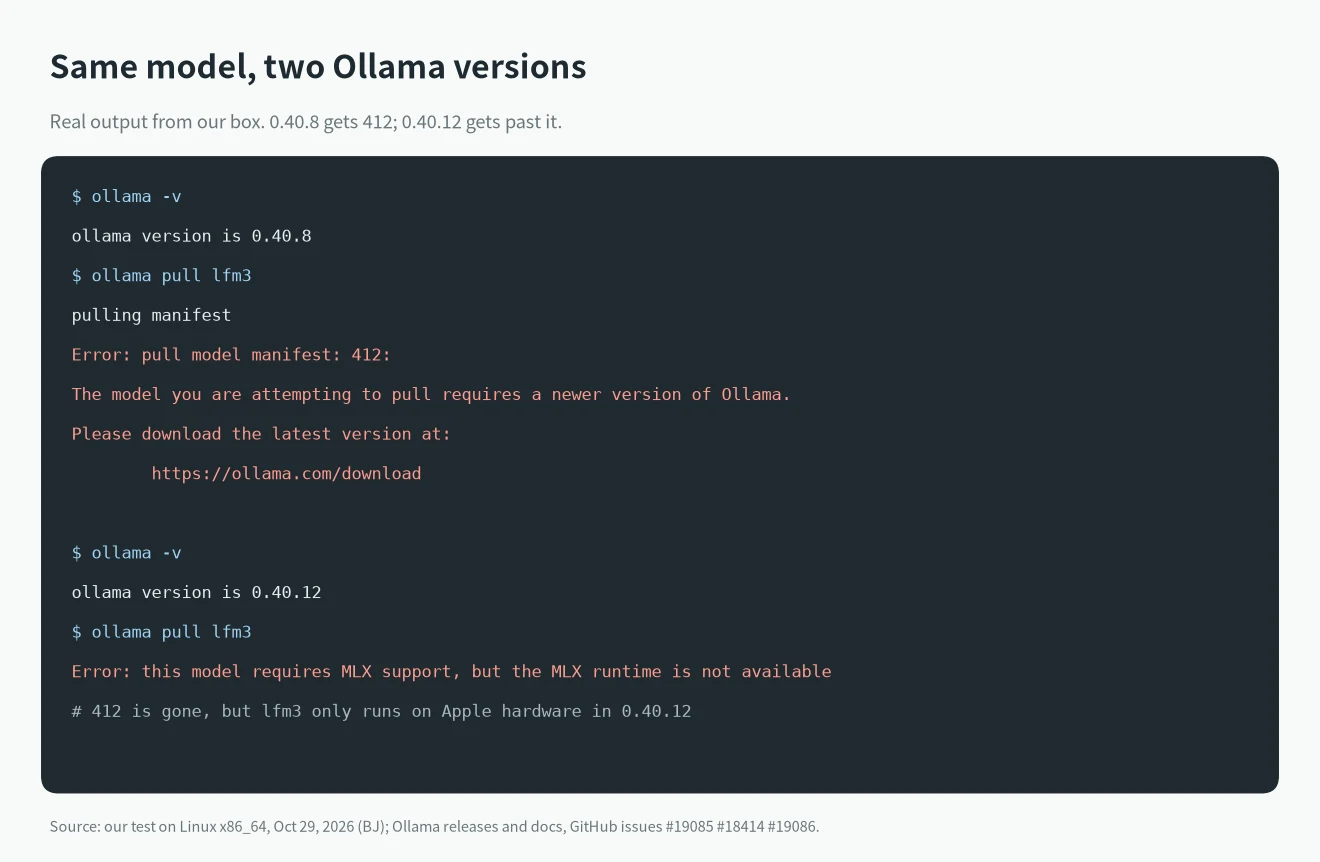
On a release that is too old, the full output looks like this:
pulling manifest
Error: pull model manifest: 412:
The model you are attempting to pull requires a newer version of Ollama.

Please download the latest version at:

        https://ollama.com/download
HTTP 412 means “precondition failed”. Here the precondition is your Ollama version. The model page does not always say which version a model needs. One user raised exactly that in issue #18414, where qwen3.8:27b returned pull model manifest: 412 on Ollama 0.32.3 with no version listed on the model page.
There is a second wording. If the model needs a release that is still a pre-release, the last lines change:
Error: pull model manifest: 412:
The model you are attempting to pull requires a newer version of Ollama that may be in pre-release.

Please see https://github.com/ollama/ollama/releases for more details.
That one was reported in issue #19085 for bonsai-2:9b on 0.40.5, which was the latest stable version at the time. The issue was closed after a newer release shipped. If you see “may be in pre-release”, the stable installer is not enough yet. You either install the pre-release or wait.
Our test: 0.40.8 vs 0.40.12
We installed two official Linux builds side by side and pulled lfm3, a model added in Ollama v0.40.12 (released October 27, 2026).
- On 0.40.8,
ollama pull lfm3printed the pull model manifest: 412 message above, word for word. Calling the API (POST /api/pull) returned the same text in itserrorfield. - On the same 0.40.8 client,
nemotron-3.5-boltandd3got past the manifest step. So the 412 check is per model, not a blanket “your Ollama is old” block. - On 0.40.12, the 412 was gone, but the pull stopped with a different line:
Error: this model requires MLX support, but the MLX runtime is not available.
That last line matters. The v0.40.12 release notes say: “lfm3 and d1 2b are supported on Apple hardware in this release. Support for Linux/Windows coming soon.” Our box runs Linux, so upgrading fixed the version check and then hit the platform limit. If you are on Linux or Windows and pull a brand-new model, read the release notes for the version that added it before you spend time on the 412.
How to fix pull model manifest: 412
1. Check what you run: ollama -v. If the client and server versions differ, the output says so. The server version is the one the registry sees.
2. Compare it with the latest release on GitHub releases. Search the notes for your model name to see which version added it.
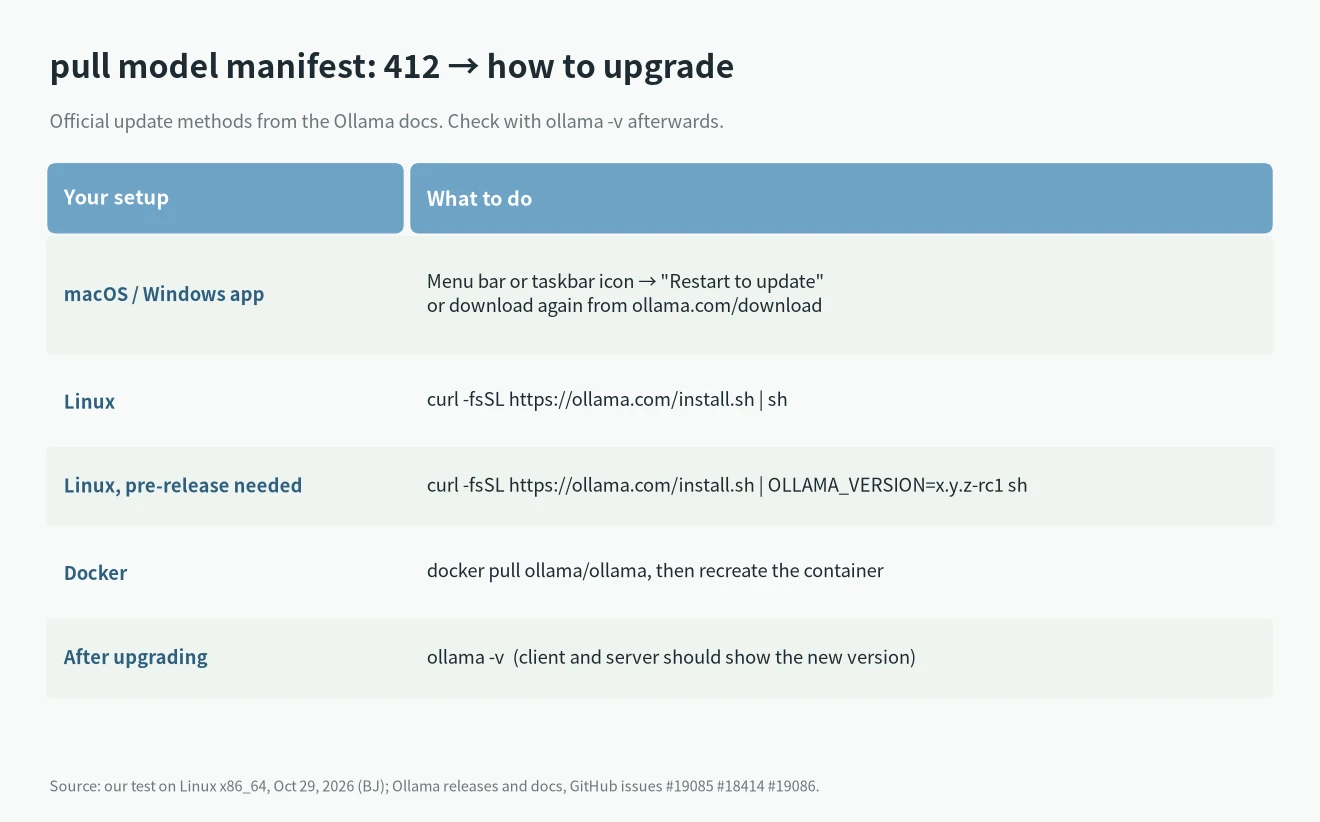
3. Upgrade. The official FAQ gives the method for each system.
4. Run ollama -v again, then repeat the pull.
macOS and Windows
The desktop app updates itself. Click the menu bar icon (macOS) or the taskbar icon (Windows) and choose “Restart to update” when it appears. You can also download the latest installer from ollama.com/download and install it over the old one.
Linux
Run the install script again. It replaces the old binary:
curl -fsSL https://ollama.com/install.sh | shIf the model needs a pre-release, the Linux docs show how to pin a version, including release candidates:
curl -fsSL https://ollama.com/install.sh | OLLAMA_VERSION=0.40.12 shReplace the number with the version you need from GitHub releases. If Ollama runs as a systemd service, check systemctl status ollama after the upgrade so you know the new server is the one answering.
Docker
The image is ollama/ollama. Pull the newer image and recreate the container. Keep your model volume mounted at the same path so models you already have stay in place.
Models you import yourself
A Modelfile can also declare a minimum version with the REQUIRES instruction. When a model built that way is pulled by an older client, Ollama prints model requires ollama version X or newer (current version is vY). The fix is the same: upgrade to at least X. In our test, a locally created model with REQUIRES 0.99.0 still ran, because Ollama checks this during pull, not during a local create.
Errors that look like 412 but are not
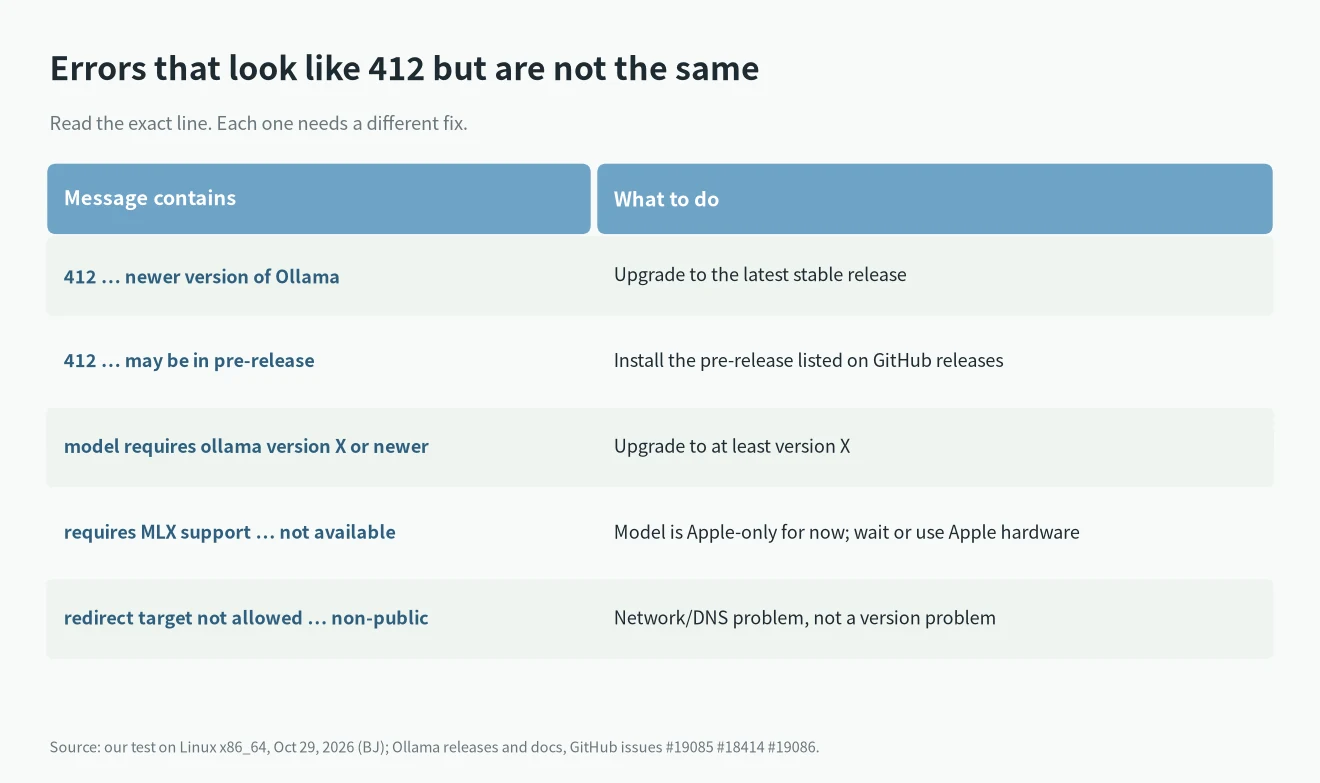
redirect target not allowed … resolves to non-public
This is a network problem, not a version problem. Ollama refuses to download model files from a host that resolves to a private or reserved IP. In issue #19086, a user whose VPN tool used fake-IP DNS in the 198.18.0.0/15 range got redirect target not allowed: … resolves to non-public 198.18.x.x. We saw the same line on our test box, which also uses fake-IP DNS. The reporter closed the issue saying the --insecure flag bypasses the check. It did not work on our network: ollama pull --insecure d3:2b on 0.40.12 returned Error: pull model manifest: 500:. The flag’s help text is “Use an insecure registry”, so we would not make it a habit. What helps is making the download host resolve to its real public address, for example by excluding *.r2.cloudflarestorage.com and registry.ollama.ai from fake-IP mode in your proxy tool.
unknown model architecture
If the pull works but the model will not load and the log says unknown model architecture, the model file is newer than the inference engine inside your Ollama. That is a separate fix, covered in our guide to Ollama’s unknown model architecture error.
Quick answers
Does pull model manifest: 412 mean the model is broken?
No. The model is fine. Your Ollama is older than the version the model was published for.
I upgraded and still get pull model manifest: 412
Run ollama -v. On Linux the old service may still be running, and on macOS or Windows the app may not have restarted. If the version is already the latest stable, the model probably needs a pre-release. Check the “may be in pre-release” wording above.
Can I run the model without upgrading?
Not from the Ollama library. If you have the GGUF file, you can run it directly with llama.cpp, see how to start llama.cpp with a local GGUF. For choosing a model that fits your hardware, see our local LLM for coding guide and the best local LLM by VRAM.