

Ollama “unknown model architecture”: The Frustrating Error Explained, With Real Fixes (2026)
Ollama shows "error loading model: unknown model architecture" when the model file uses an architecture its bundled llama.cpp does not know yet. Upgrade Ollama, use the library version, or run the GGUF in a newer llama.cpp. We reproduced it with the LFM3 GGUF on Ollama 0.40.12.
 bufferAbout the author5 min read
Short answer: Ollama shows error loading model: unknown model architecture: 'name' when the model file uses an architecture that the llama.cpp engine bundled inside your Ollama does not know yet. It happens most with brand-new models: either a GGUF you pulled from Hugging Face, or a library model on an Ollama build that has not added support. Check ollama -v, upgrade if a newer release lists the model, and if it is a GGUF that no release supports yet, run it in a current llama.cpp or wait. We reproduced the error on October 29, 2026 (Beijing time) with the LFM3 GGUF on Ollama 0.40.12, and ran the same file in llama.cpp.
The full unknown model architecture message
You usually see it when you run or load a model, not when you pull it:
Error: 500 Internal Server Error: llama-server process has terminated: exit status 1: error loading model: unknown model architecture: 'lfm3'The name in quotes is the architecture stored in the GGUF file. ollama show prints the same value on its architecture line, so you can check it before running anything.
The message comes from llama.cpp, not from Ollama itself. Ollama runs many models through a bundled copy of llama.cpp, and each Ollama release pins one llama.cpp build. When the file’s architecture was added to llama.cpp after that build, loading fails with this error. An Ollama maintainer put it in one line in issue #19347: “GGUF support depends on llama.cpp.”
Our test: LFM3 GGUF in Ollama vs llama.cpp
We took the official LFM3-1.7B-Q4_K_M.gguf from LiquidAI’s Hugging Face repo and imported it into Ollama 0.40.12 with a one-line Modelfile (FROM ./LFM3-1.7B-Q4_K_M.gguf), the method in the official import docs.
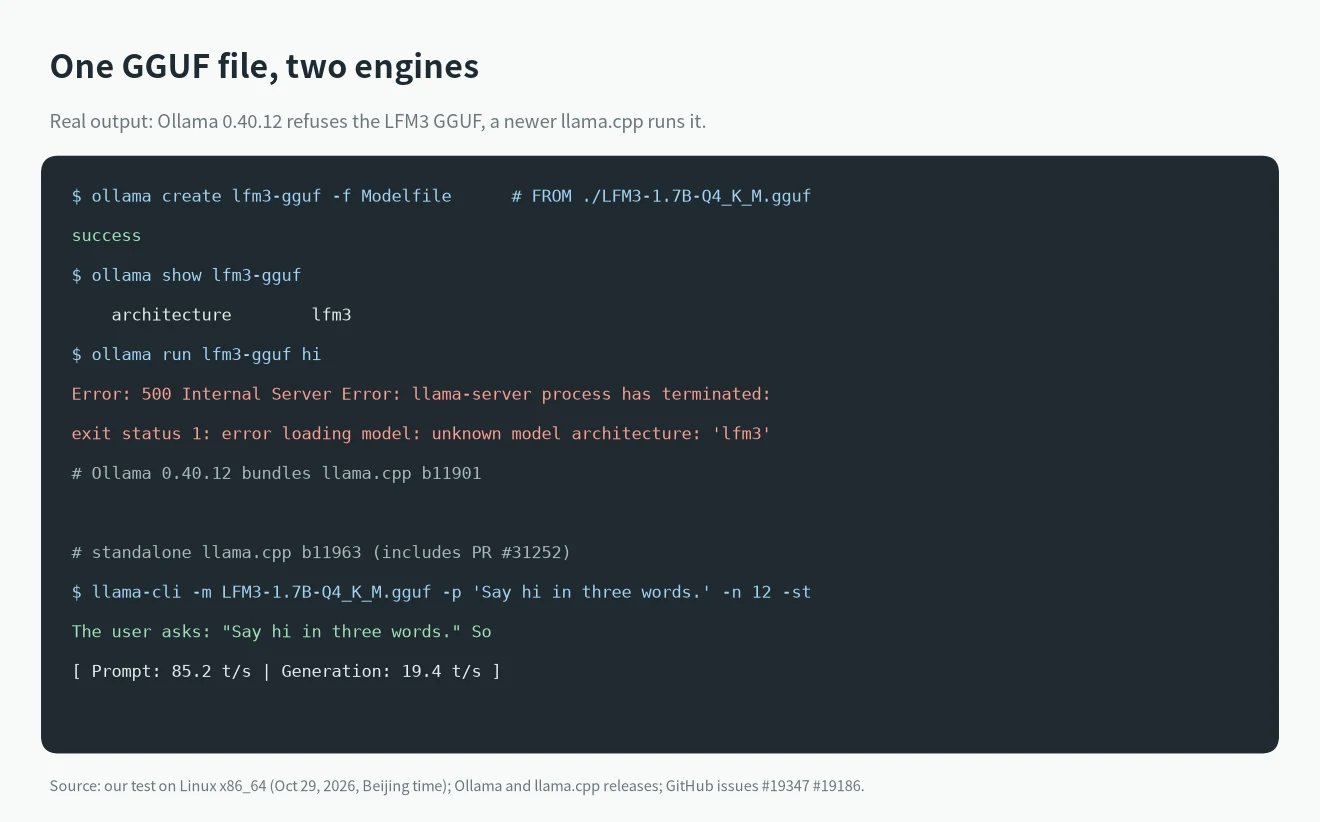
ollama createsucceeded andollama showlisted architecturelfm3, 1.7B parameters, context length 262144. Import does not check whether the engine can load the file.ollama run lfm3-gguf hifailed withunknown model architecture: 'lfm3', the same line reported in #19347.- The Ollama v0.40.12 source pins llama.cpp
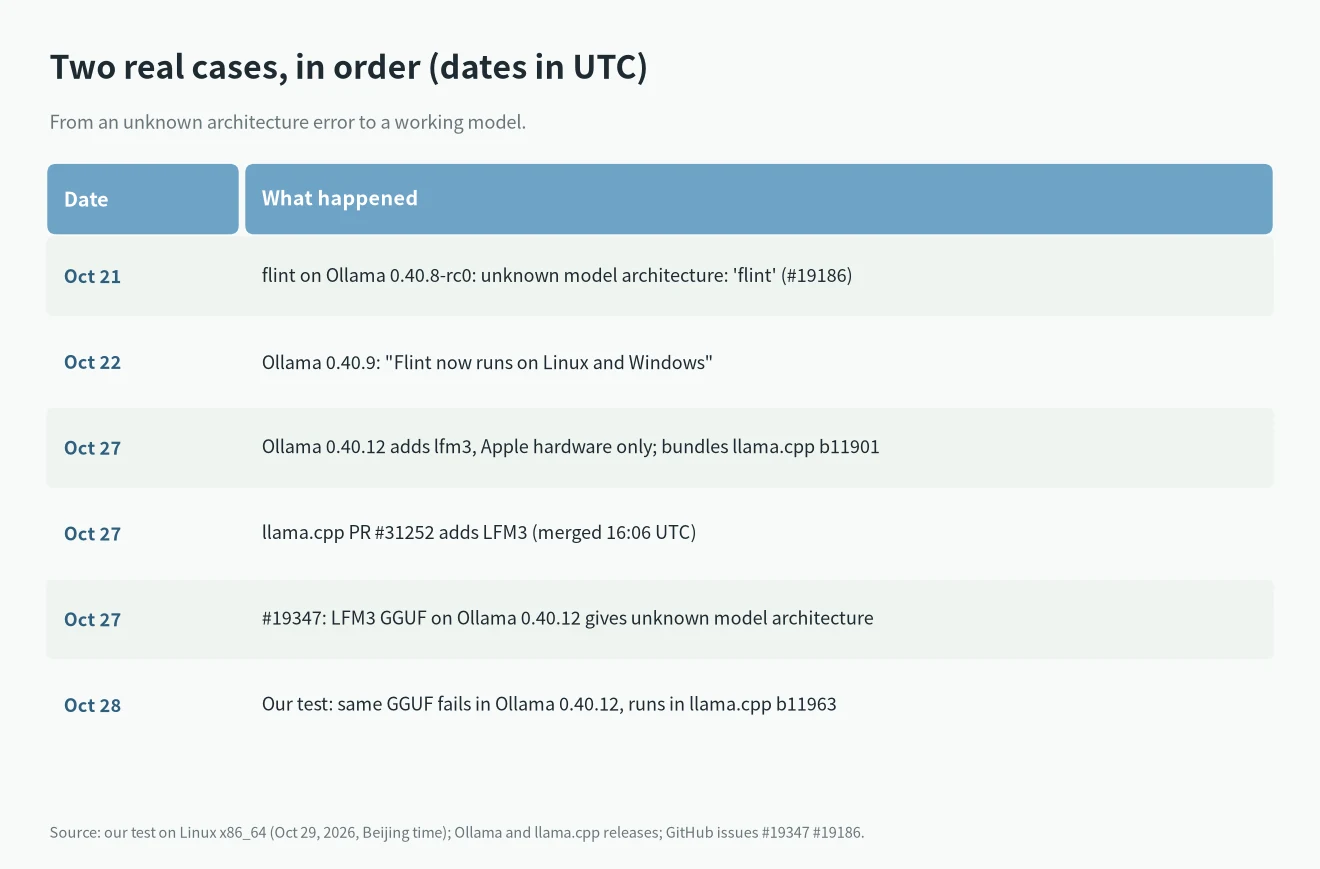
b11901. LFM3 support was added to llama.cpp in PR #31252, merged on October 27, 2026 at 16:06 UTC, well after that build. - A standalone llama.cpp build
b11963loaded the same file and generated text at about 85 tokens/s for the prompt and 19 tokens/s for generation on our CPU-only box.
So the file is fine. The engine inside this Ollama release is simply older than the model.
The three common causes
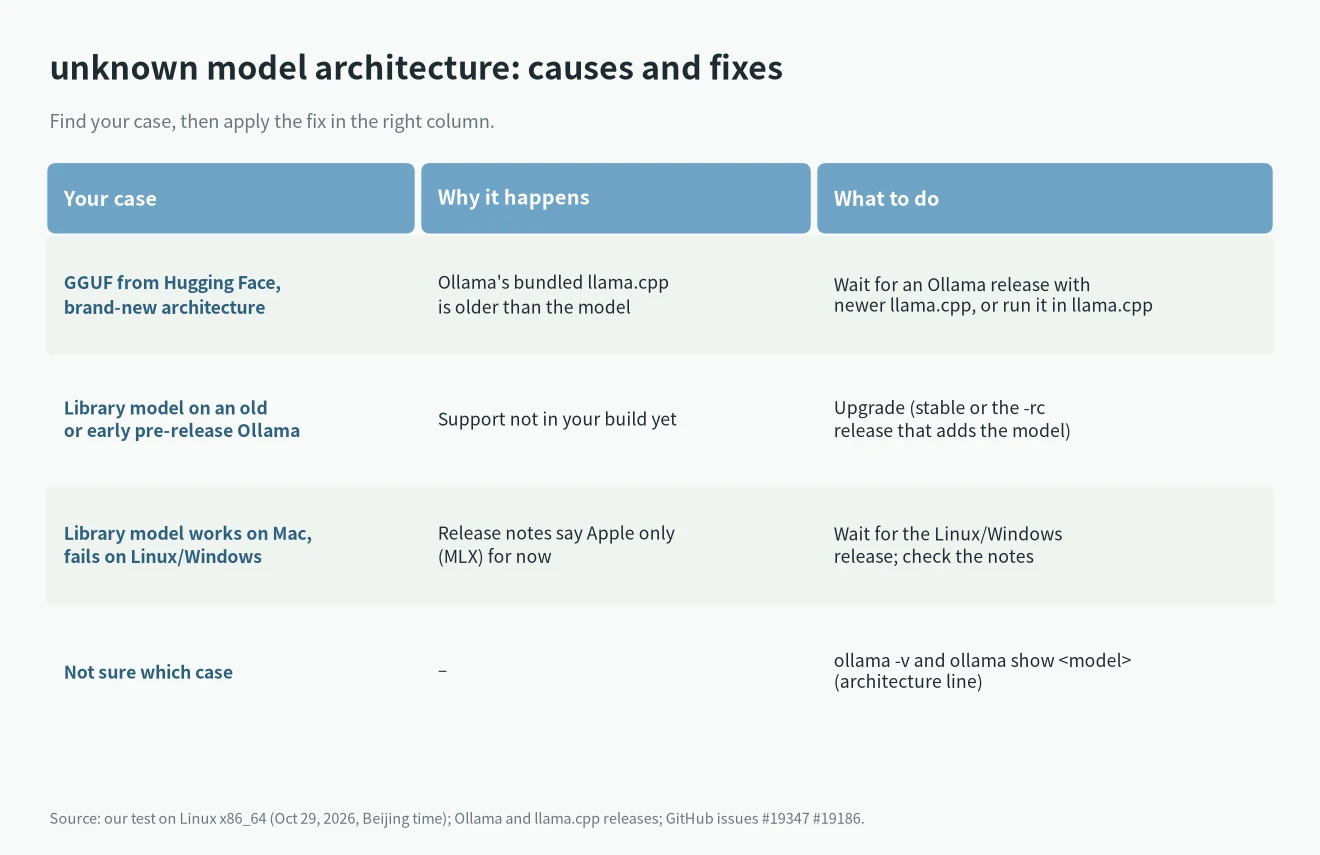
1. A Hugging Face GGUF newer than Ollama’s llama.cpp
This is our test case and #19347. It applies to ollama run hf.co/... too, since the issue’s author hit it with ollama run hf.co/LiquidAI/LFM3-1.7B-GGUF:Q8_0. Upgrading Ollama helps only once a release ships a llama.cpp build that includes the architecture. Until then, every Ollama version fails to load that file.
2. A library model on a build that does not support it yet
In issue #19186, a user installed the 0.40.8-rc0 pre-release to try the new flint model and got unknown model architecture: 'flint'. A maintainer replied that it was “not supported in llama.cpp yet” and linked the llama.cpp pull request. The next day, the v0.40.9 release notes said “Flint now runs on Linux and Windows”. The fix was simply upgrading.
3. The model is Apple-only for now
Some new library models run first through MLX on Apple hardware. The v0.40.12 release notes say lfm3 and d1 2b “are supported on Apple hardware in this release. Support for Linux/Windows coming soon.” On Linux the library pull fails with this model requires MLX support, but the MLX runtime is not available, and the GGUF route fails at load time. Both mean the same thing: not on this platform yet.
How to fix unknown model architecture
1. Run ollama -v and ollama show . Note the version and the architecture name.
2. Search the Ollama release notes for the model or architecture name. If a newer release mentions it, upgrade with the method in the official FAQ. On Linux that is curl -fsSL https://ollama.com/install.sh | sh.
3. If the support is only in a pre-release, pin it as the Linux docs show. Use the exact tag. In #19186, OLLAMA_VERSION=0.40.9 returned a 404 because the tag at that time was 0.40.9-rc1.
4. Prefer the library model over a third-party GGUF when one exists. For library models, the release notes say which version added them and on which platforms they run.
5. If no Ollama release supports the architecture yet, run the GGUF in llama.cpp directly: llama-cli -m model.gguf. Our llama.cpp model loading guide covers the flags.
6. Re-downloading the same file will not help. The file is not damaged; the engine is old.
Quick answers
Why did ollama create succeed if the model cannot load?
In our test, ollama create only imported the file and ollama show read its metadata. Neither loaded the weights, so the error only appeared at run time.
Is unknown model architecture the same as a 412 error?
No. A 412 (pull model manifest: 412) happens at pull time and means the registry wants a newer Ollama; upgrading fixes it. This error happens at load time and means the bundled engine does not know the file.
Which model should I use meanwhile?
Pick one your Ollama already supports. Our local LLM for coding guide and best local LLM list sort current models by VRAM.