

AI Agent Security: Don’t Give an Agent Your Bank Password (7 Essential Checks)
Bank of America told customers not to share their login with AI agents. Here is what to do instead: bank-approved connections, app-specific passwords, virtual cards, confirmations and revoking access.
 bufferAbout the author7 min read
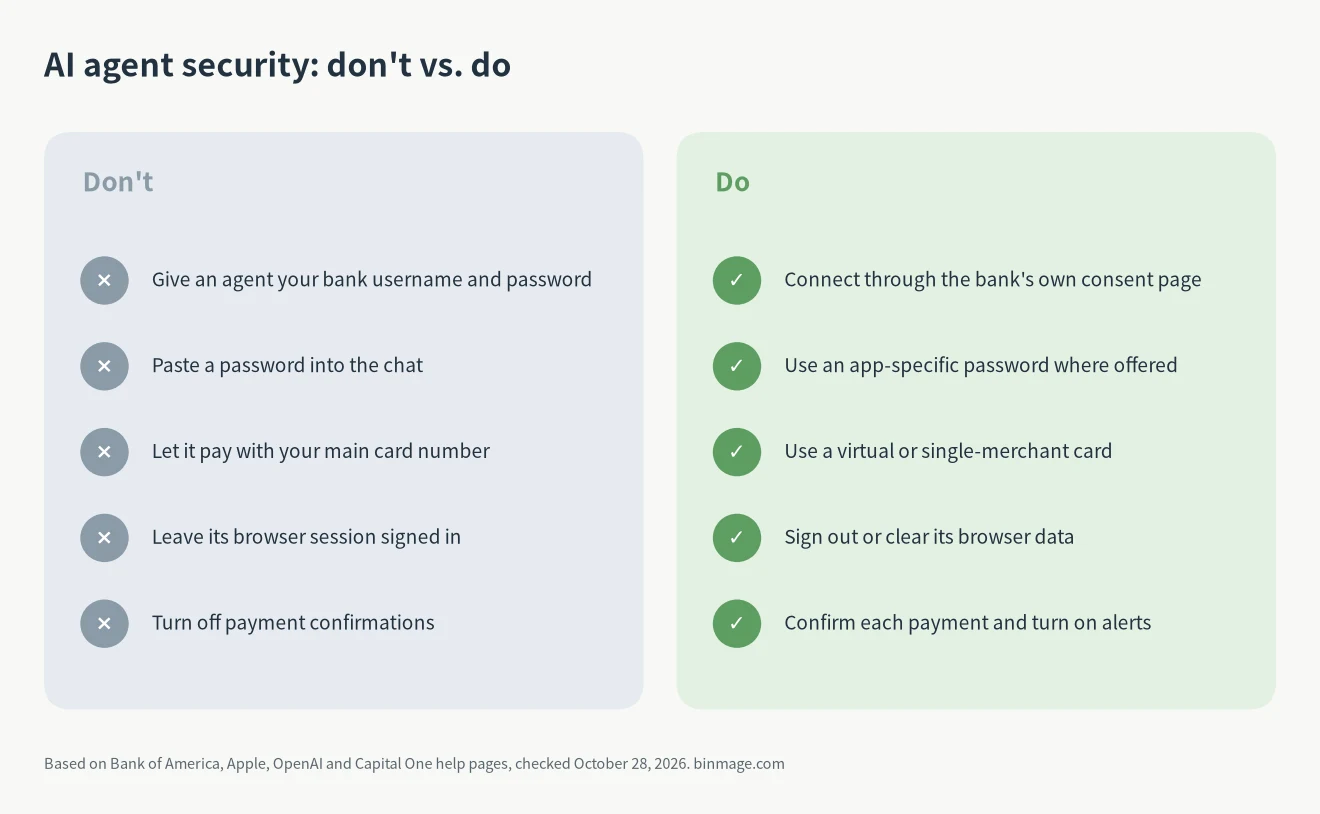
The first rule of AI agent security for your money is short: don’t give an AI agent your bank username and password, and don’t paste them into a chat. If an agent needs your financial data, connect it through the bank’s own sharing screen. If it needs to pay for something, give it a virtual or single-merchant card, make it ask before every payment, and remove its access when the task is done.
Bank of America just sent its customers the same message. This guide covers what the email says, according to TechCrunch, and then seven checks you can do today. Each one links to the bank’s or vendor’s own help page, all checked on October 28, 2026. If you want to see what happens when stored credentials leak, read our breakdown of the LiteLLM supply chain attack.
What Bank of America’s email says
TechCrunch reported on October 27, 2026 that Bank of America sent customers an email titled “Protecting your finances in the AI World.” The email asks customers never to share their username and password with another person or an outside service, “including an AI-enabled tool or agent that offers to act on your behalf.” A Bank of America spokesperson confirmed to TechCrunch that the email, which had been posted on social media, is real (TechCrunch post on X).
The email, as quoted by TechCrunch, also says: “If you do share your credentials, keep in mind that you’re responsible for activity resulting from that access.” In other words, if an agent logs in with your password and something goes wrong, the bank is telling you up front that the activity is on you.
TechCrunch lists three risks of giving an assistant your banking login: it could do something with your money without you knowing, the bank could think someone is breaking in and lock you out, and a security flaw in the assistant could leak your credentials to attackers.
The AI agent security checklist
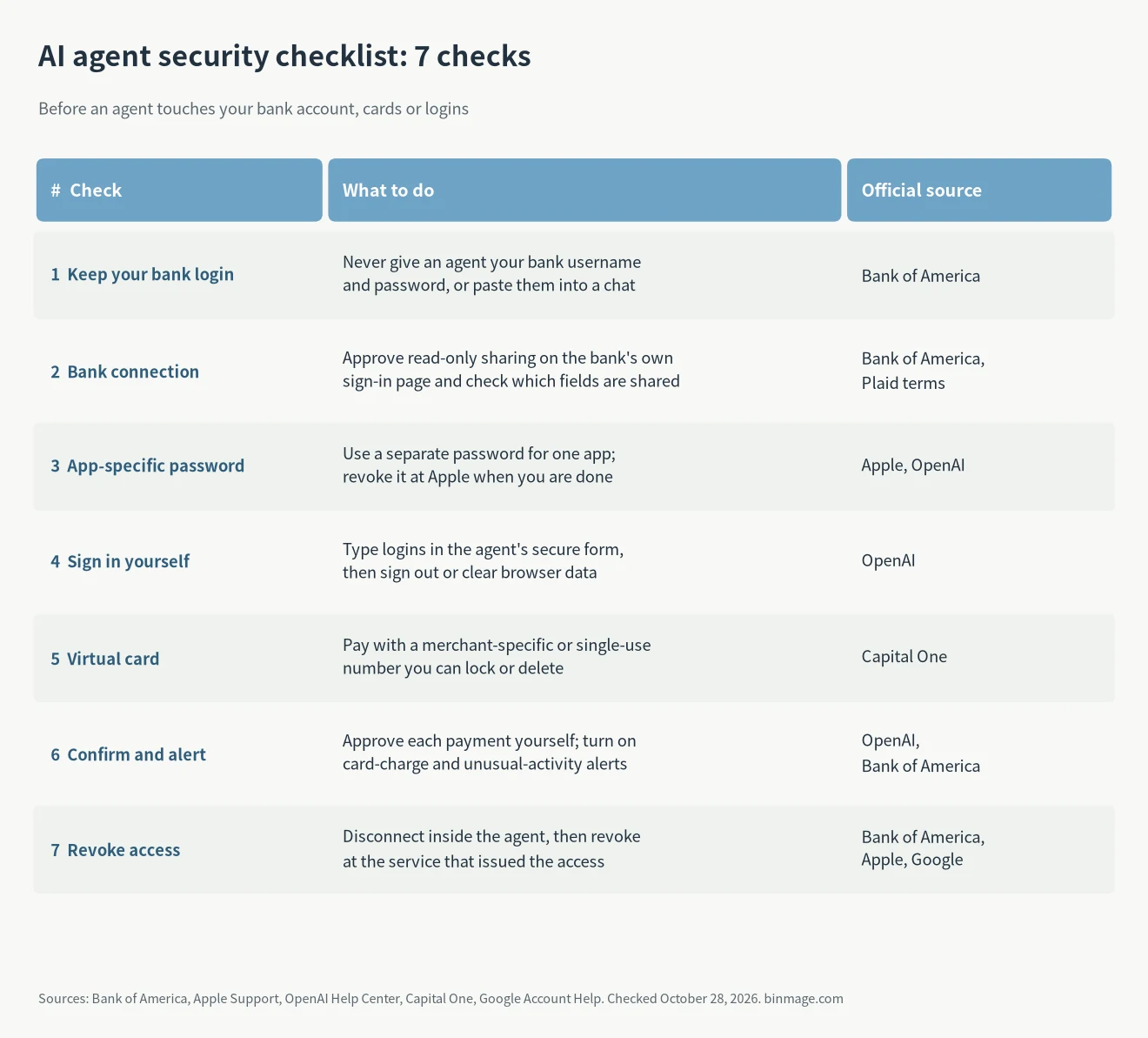
You don’t need all seven AI agent security checks for every task. An agent that only reads your spending needs checks 1, 2 and 7. An agent that buys something needs 1, 4, 5, 6 and 7.
1. Keep your bank login to yourself
Bank of America’s third-party data sharing page explains why. When you share your login with a third party, it gets the same access to your information that you have, and you usually can’t limit how much it sees. The service also stores your login, which could leak if it is breached, and it could keep accessing your account even after you stop using it. The same applies to an AI agent. This also means not typing the password into a chat window, where it ends up in the conversation history.
2. Use the bank’s own connection for read-only data
If you want an agent or budgeting app to see balances and transactions, look for a connection that sends you to your bank’s own sign-in page and asks you to approve what gets shared. Bank of America says this method reduces how much data the third party can access, removes the need for it to store your login, shows which data is shared, and lets you revoke consent at any time.
Read what is actually shared before you approve. Bank of America’s information-sharing terms for Plaid list the data fields, and for checking and savings accounts they include the account number and routing number, with a note that the two together could be used to make a payment or transfer. The same terms say consent lasts a rolling 365 days from your most recent approval and expires on its own if the app doesn’t access your data for 180 days.
3. Use an app-specific password where it exists
Some services issue a separate password that works for a single app. Apple says the point is to make sure your main Apple Account password can’t be stored or collected by the app, which is what you want from an AI agent security point of view. Apple calls these app-specific passwords: they require two-factor authentication on your Apple Account, you can have up to 25 active at once, and you can remove them one at a time or all at once. Changing your main Apple Account password revokes all of them.
OpenAI’s help page on connecting apps in ChatGPT uses this for iCloud Mail and Calendar. It tells you to enter an Apple app-specific password in the connection form, not your regular Apple password, and not to paste a password into the conversation. It also notes that disconnecting iCloud in ChatGPT does not revoke the password at Apple, so you have to remove it at account.apple.com as well.
4. Sign in yourself, then sign out
When a browsing agent reaches a login page, it should hand the screen back to you. OpenAI’s cloud browser help page says ChatGPT pauses at supported sign-in pages and asks you to sign in through a secure form, that the model can’t see the username and password entered there, and that ChatGPT doesn’t store them. The same page says the signed-in session persists for future tasks until it expires. After a session involving money, sign out of the site or clear the agent’s browser data.
5. Pay with a virtual or single-merchant card
If an agent has to pay, don’t give it your main card number. Capital One’s virtual card help page is one example of what card issuers offer: a virtual number that hides your physical card number, store-specific numbers that work at one merchant only and can be single-use, and controls to lock or delete each number without affecting your physical card. Deleting a number also makes recurring charges on it fail, so you can cut off an agent’s purchases without replacing your card. Check whether your own bank or card issuer offers something similar.
6. Confirm every payment and turn on alerts
Keep any setting that makes the agent ask before it pays. OpenAI says ChatGPT is designed to ask for confirmation in chat before actions that create a financial commitment, such as making a payment. Read the merchant and the amount every time before approving. For coding agents, the same idea is a hook that blocks a risky command until you approve it; see our Claude Code hooks guide.
On the bank side, set up account alerts. Bank of America offers alerts for card charges and unusual activity, lets you set dollar amounts where applicable, and sends them by app notification, text or email.
7. Revoke access when the task is done
For AI agent security, removing an agent usually takes two steps: disconnect it inside the agent, then revoke the token or password at the service that issued it. The table further down lists where to do that for each type of access.
Shared password vs. bank connection
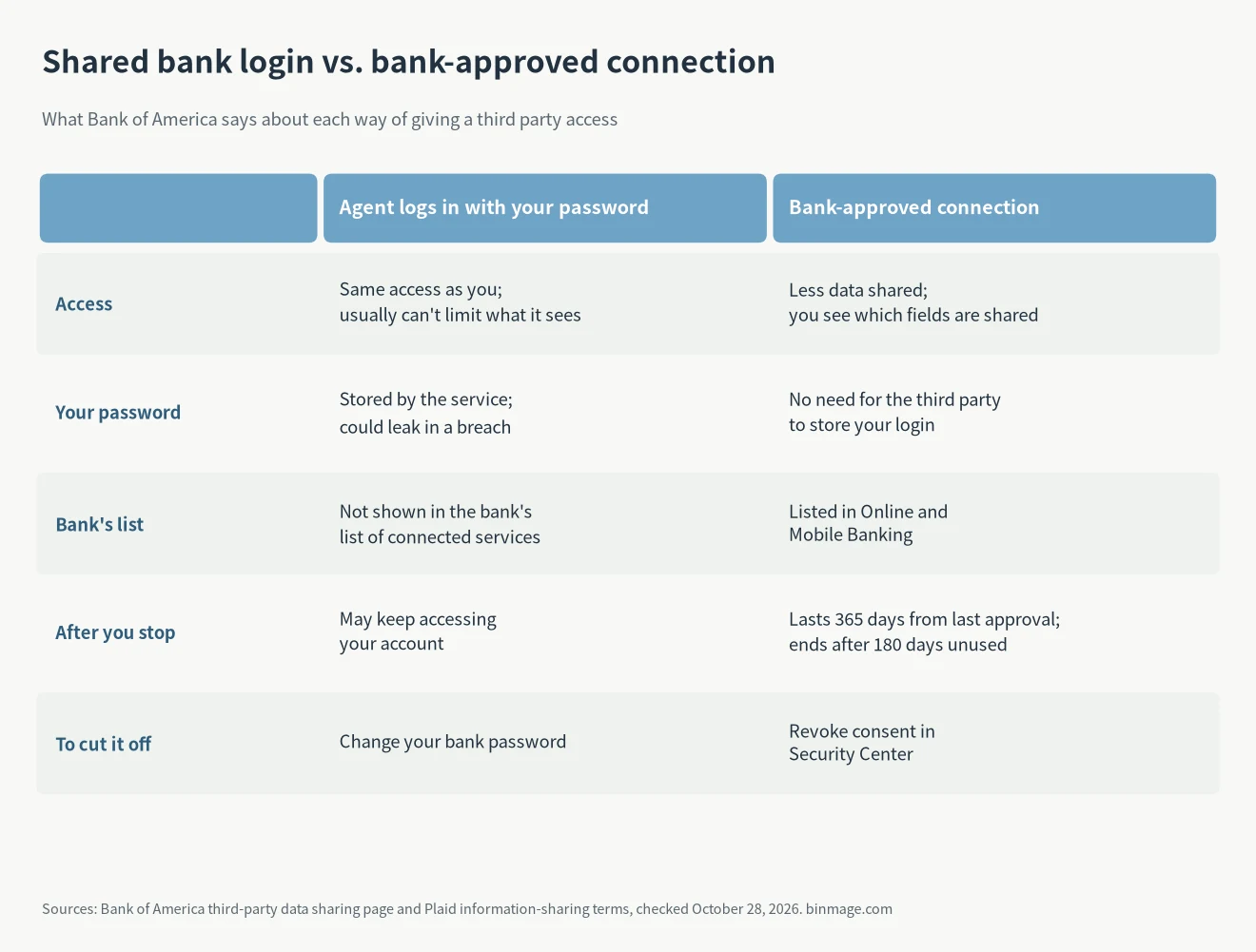
For AI agent security, the difference comes down to who holds your password. With a shared login, the service stores your password and has the same access you do. With a bank connection, the third party never gets your password, less data is shared, and the bank lists the connection so you can revoke it.
Where to revoke access
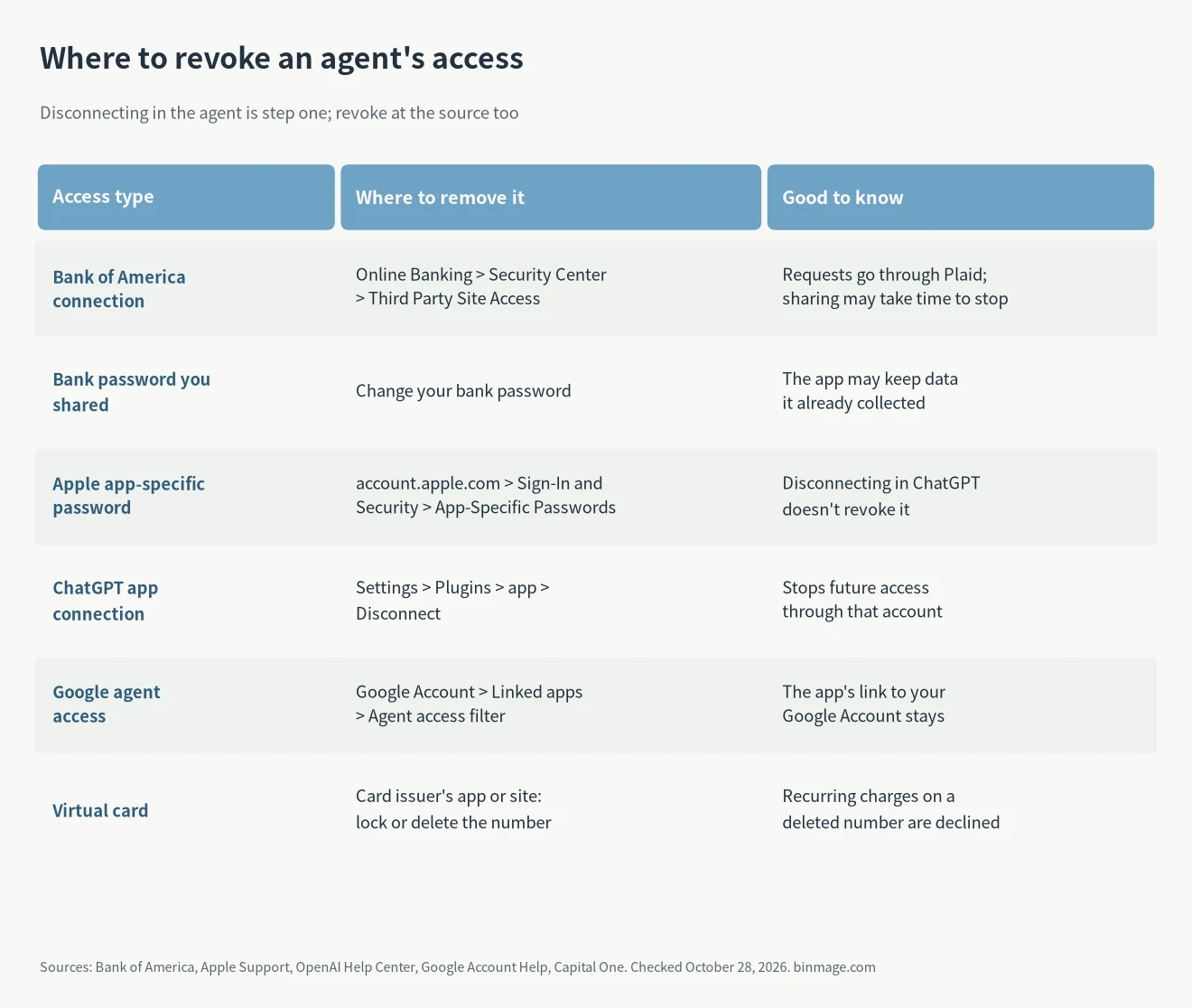
For Bank of America, consent-based connections are listed under Security Center > Third Party Site Access in Online Banking. If an app used your actual login, Bank of America says you can try removing access in the app, but the safest step is to change your Bank of America password, because the third party may keep data it already collected.
For Google, the linked apps page has an “Agent access” filter that shows apps linked to Gemini or Google agents. Google notes that removing an agent’s access does not remove your Google Account’s link with that app, so remove that link separately if you no longer want it.
FAQ
Can I let an AI agent read my bank balance?
Yes, if you connect it through the bank’s own consent screen instead of giving it your password. Check which fields are shared first, because some connections include your account and routing numbers.
I already gave an agent my bank password. What now?
Change your bank password. Bank of America says this is the safest way to stop a third party that used your login. Then turn on two-factor authentication if you haven’t, review recent transactions, and remove the saved password from the agent.
Is a virtual card enough for AI agent security on its own?
No. It limits where a card number works, but at that merchant the agent can still make purchases you didn’t intend. Combine it with payment confirmations and card alerts.
Good AI agent security comes down to giving an agent only what the task needs and taking it back afterwards. Attackers already target banks directly, as in the ARTEX case, so there is no reason to give them a second way in through an agent’s saved password.