

ChatGPT iCloud Mail: How to Connect It Safely, and the Essential Step Most People Miss When Disconnecting (2026)
ChatGPT iCloud Mail connects with an Apple app-specific password, never your regular Apple password. Disconnecting it in ChatGPT does not revoke that password, so remove it at account.apple.com too. Checked against OpenAI and Apple help pages on October 28, 2026.
 bufferAbout the author4 min read
Short answer: ChatGPT iCloud Mail connects with an Apple app-specific password, not your regular Apple password. You create that password at account.apple.com and paste it into ChatGPT’s connection form. The part most guides skip: disconnecting iCloud Mail in ChatGPT does not revoke that password at Apple. If you stop using it, remove the password at account.apple.com as well. Everything below was checked against the OpenAI Help Center and Apple Support on October 28, 2026. If you are weighing which plan to pay for first, see which AI subscription is worth it.
What ChatGPT iCloud Mail is
iCloud Mail and iCloud Calendar are two separate plugins in ChatGPT. According to OpenAI, they are rolling out to all ChatGPT plans on web, desktop and iOS, and workspace admins can still restrict them. Both plugins include read-only contact lookup. Standalone Contacts and Reminders plugins are not part of this launch.
Connecting Mail does not connect Calendar. If you want both, you connect each one on its own.
How to connect ChatGPT iCloud Mail
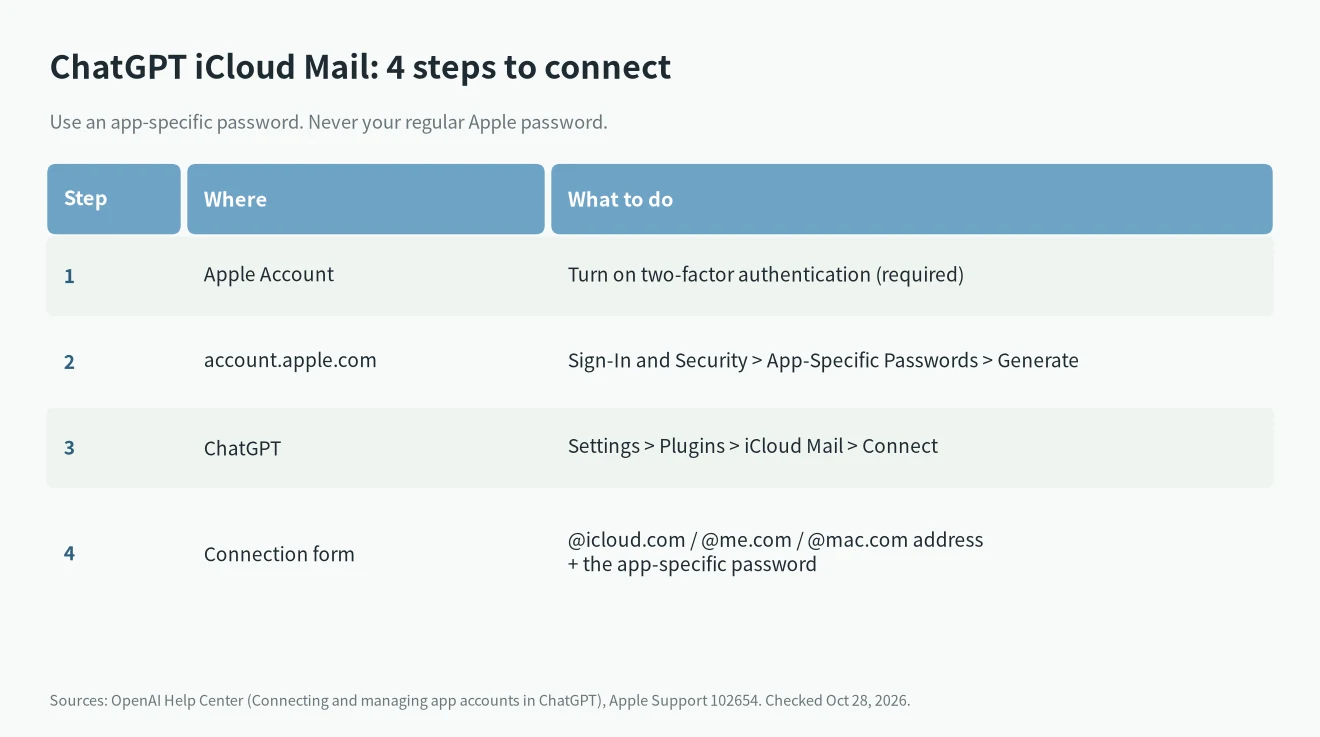
- Turn on two-factor authentication. Apple only lets you create app-specific passwords when your Apple Account uses it.
- Generate the password. Sign in at account.apple.com, open Sign-In and Security, select App-Specific Passwords, then Generate an app-specific password. Give it a clear label such as “ChatGPT Mail”.
- Open ChatGPT. Go to Settings > Plugins, select iCloud Mail, install it if asked, then select Connect.
- Fill in the form. For Mail, enter your iCloud Mail address ending in @icloud.com, @me.com or @mac.com. For Calendar, enter your primary Apple Account email, which can be different. Paste the app-specific password into the form.
OpenAI is explicit on two points: do not use your regular Apple password, and never paste a password into the chat itself. It only goes in the connection form.
Disconnecting does not revoke the password
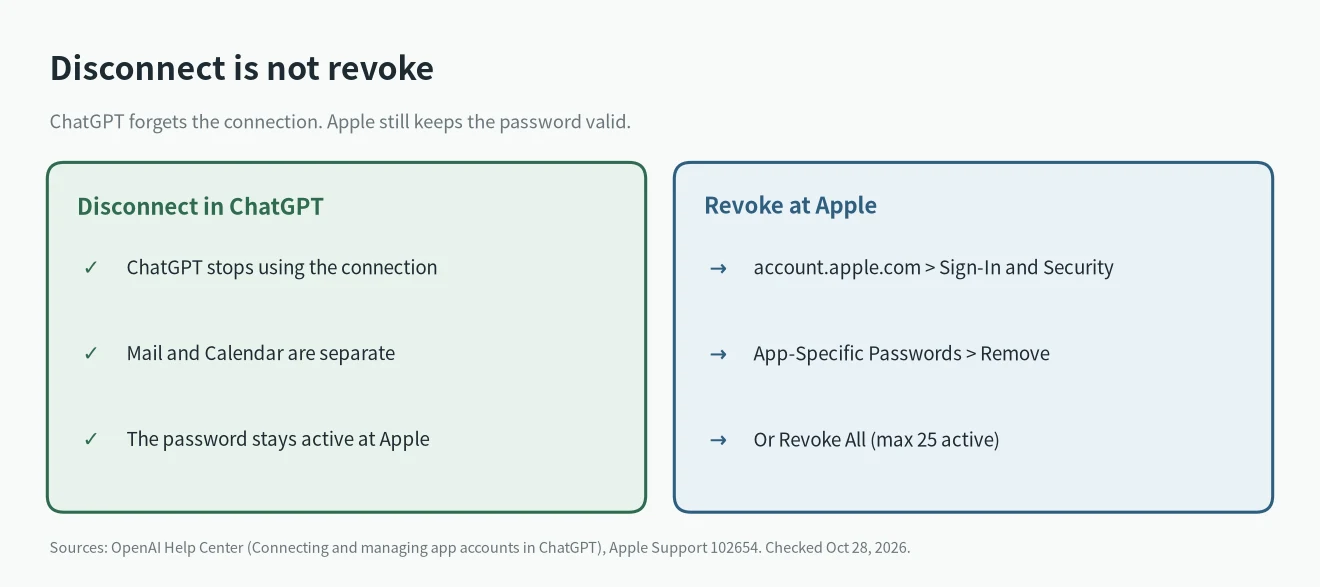
The OpenAI help page says it plainly: disconnecting an iCloud connection in ChatGPT does not revoke its password at Apple. ChatGPT stops using the connection, but the password itself stays valid until you remove it.
To fully cut access:
- Sign in at account.apple.com.
- Open Sign-In and Security, then App-Specific Passwords.
- Select Remove next to the ChatGPT password, or Revoke All.
Two things to know before you click. If you reused the same app-specific password for another app, that app will stop working too, which is a good reason to create one password per app. And you can have up to 25 active app-specific passwords, so old unused ones are worth cleaning up anyway. For a wider checklist on what to lock down when you give an AI tool account access, read the AI agent security checklist.
ChatGPT iCloud Mail not connecting
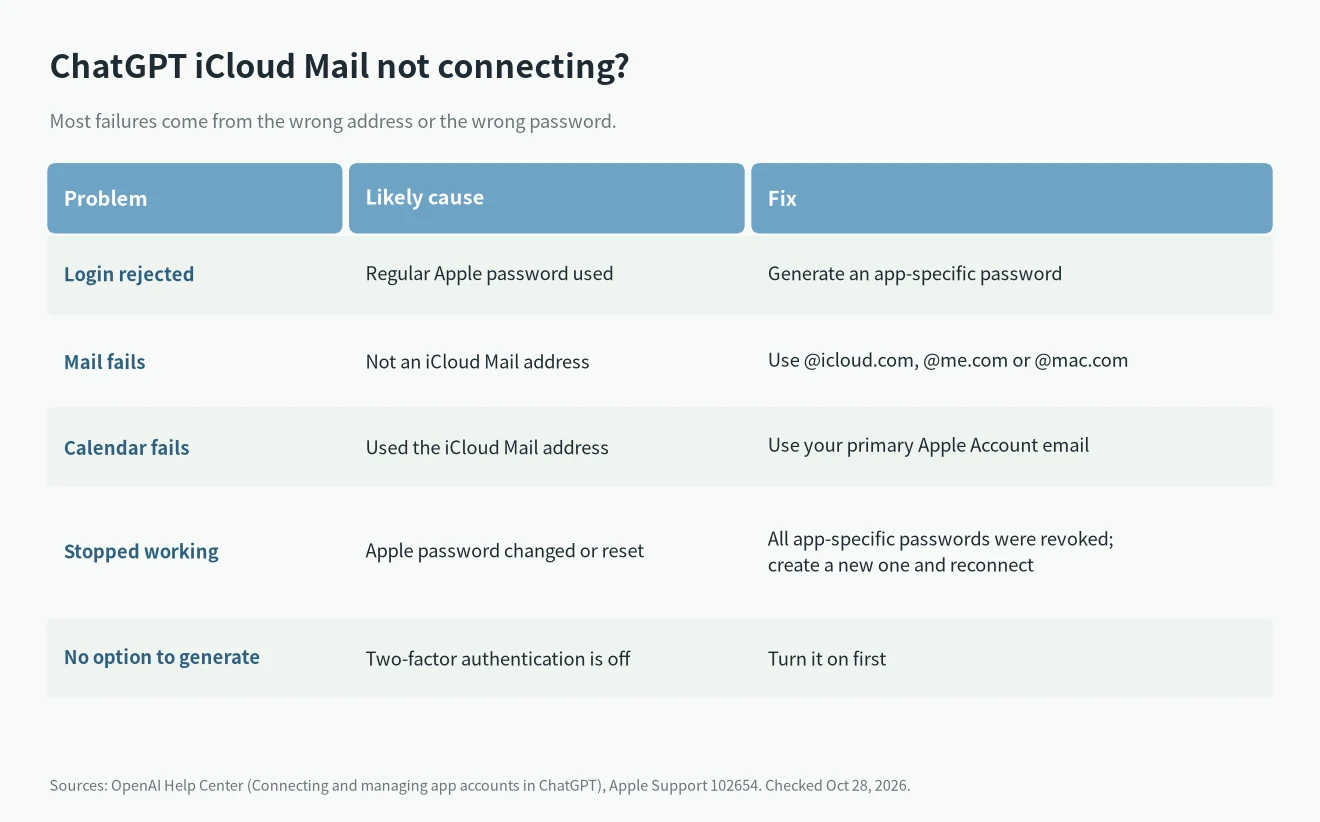
- Login rejected: you probably used your regular Apple password. Generate an app-specific password instead.
- Mail fails but Calendar works: the Mail form needs your iCloud Mail address, not a Gmail or work address.
- Calendar fails: use the primary Apple Account email, which may differ from your iCloud Mail address.
- It worked, then stopped: changing or resetting your main Apple password revokes every app-specific password automatically. Create a new one and reconnect. Reconnecting Mail does not fix Calendar, so redo each one.
FAQ
Is it safe to give ChatGPT my Apple password?
You should not. The app-specific password exists so ChatGPT never sees your main Apple password, and you can cut it off on its own at any time.
Why does Apple mention “authorize with your Apple Account” instead?
Apple lets some third-party apps connect by authorizing with your Apple Account instead of a password. According to OpenAI’s help page, ChatGPT’s iCloud form currently asks for an app-specific password, so follow that.
I cancelled ChatGPT. Do I still need to revoke it?
Yes. Cancelling a plan or disconnecting the plugin does not touch Apple’s side. Remove the password at account.apple.com. If you are also cancelling the subscription, here is how to cancel or downgrade an AI subscription.