

Liquid AI d1: The Fastest Decision Can Still Cost More
A hypothetical routing setup cuts processing costs by 76%. A small increase in errors wipes out the savings. That's the test I'd put Liquid AI's new decision models through before deploying them.
 bufferAbout the author7 min read
Does a support ticket belong in billing or technical support? For plenty of AI workflows, that’s the whole answer you need.
A conventional language model can already return a constrained label. Liquid AI’s new d1 models go a step further: they skip generating answer text altogether and return structured decisions with probabilities.
The company released the weights for d1-3B and d1-omni-600M on October 7, 2026. The headline number is easy to like: 8 milliseconds for a single question on an RTX 4090.
I’m interested. Routing, filtering and sorting account for a lot of useful work that doesn’t need a paragraph attached to it. But before putting a cheaper model at the front of a workflow, I’d want to know whether the savings survive the decisions it gets wrong.
What Liquid AI d1 does—and what to compare it with
You give d1 some material, questions and possible answers. It returns choices, scores or probabilities in one forward pass through the model. Multiple questions about the same input can be handled together.
“Zero output tokens” means it doesn’t generate its answer as a sequence of text tokens. It still has to process the input. Reading a long document or analyzing an image hasn’t become free.
The d1-3B model card lists about 3.12 billion parameters and support for text and images. d1-omni-600M has about 587 million parameters and is experimental; it supports text with images or text with audio. Its audio training centers on English assistant requests, with clips truncated to 30 seconds. That isn’t validation for every language, accent or noisy support call.
A fair test should include the unglamorous alternatives. A rule might solve a fixed-format problem. A dedicated classifier might work well for stable categories with labeled data. A small language model restricted to the same choices is another reasonable baseline.
What appeals to me about d1 is the combination of multimodal input, decision criteria expressed in natural language and probability outputs. It still has to earn its place on the task. Comparing it only with a large model asked to write a long explanation makes the contest too easy.
Eight milliseconds depends on what you send it
Here are three devices from Liquid’s published d1-3B latency measurements. These are vendor-reported results, in milliseconds; each column is a different input scenario.
| Device | 1 Q | Long text | Image |
|---|---|---|---|
| RTX 4090 | 8 | 102 | 17 |
| Jetson AGX Orin 64GB | 26 | 560 | 83 |
| Jetson Orin Nano | 50 | 1,640 | 202 |
The model card specifies warm calls and, for GPU measurements, BF16 with the median of 20 runs. The 4090’s 8 ms result uses compilation; the single-question call takes 16 ms without it. The first call with a new input shape may also incur compilation overhead.
So “50 ms on an Orin Nano” and “1.64 seconds on an Orin Nano” can both be true. Input length matters. An application also has work around the model call, including preparing requests, queuing and acting on the answer. A router shouldn’t receive the entire chat history just because it’s available; send the information the routing decision actually needs.
Quality needs context too. Liquid reports 48.57 on the public split of Decision Index v0.2.1. The model card describes this as a self-evaluation using the official scorer, not a formal leaderboard submission. That number isn’t an accuracy estimate for your support queue.
A routing example: 76% cheaper can turn into more expensive
Every price and error rate in this example is hypothetical. The figures are in US dollars, chosen to make the tradeoff visible. They are neither d1 pricing nor measured d1 performance.
Suppose you handle 100,000 requests a day. Sending all of them to a larger model costs $0.01 each, or $1,000 a day.
Now put a local small model in front. Assume its hardware and operating costs work out to $0.0004 per request at this volume, and 20% of requests still go to the larger model. Base processing cost becomes 100,000 × $0.0004 + 20,000 × $0.01 = $240. You’ve saved $760, or 76%.
There are 80,000 requests left to be handled automatically. If routing introduces additional mistakes on 0.2% of that group compared with the original workflow, that’s 160 extra mistakes. At an assumed $3 to resolve each one, add $480. Total cost is now $720. Still cheaper, but the saving has dropped to 28%.
At an additional error rate of 0.5%, you get 400 extra mistakes and $1,200 in extra handling costs. Add the $240 base cost and the daily total becomes $1,440—$440 more than the original workflow.
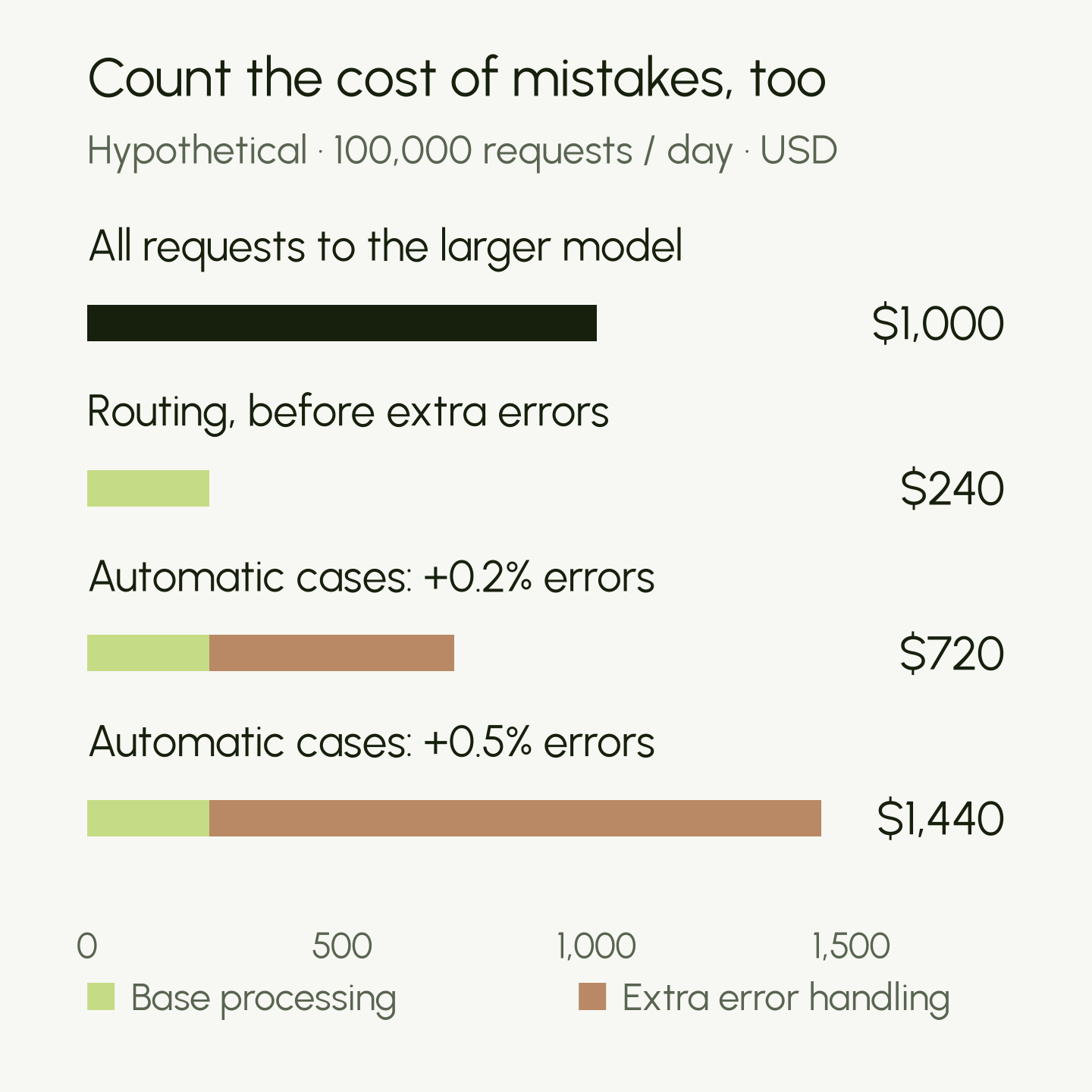
Under these assumptions, an additional error rate of about 0.32% among the automatically handled requests uses up the entire saving: $760 ÷ (80,000 × $3). Errors already present in the original workflow aren’t charged again. Real mistakes also have different costs; a mislabeled research note and a mishandled refund don’t belong in the same bucket.
This is why I’d choose the task before choosing the model. The same router can make economic sense in a reversible sorting job and fail the cost test when it controls a consequential action.
The mistakes your confidence threshold won’t catch
Escalating low-confidence cases is sensible. But it only catches the cases the model knows it is uncertain about.
Suppose a router assigns an account-takeover complaint to ordinary billing support with 97% confidence. A 90% escalation threshold lets it straight through. Raising the alarm only when the model hesitates leaves this failure untouched.
I’d therefore sample the automatically accepted decisions too, including the confident ones. Reviewing only complaints or borderline cases won’t tell you how often the apparently successful flow goes wrong. Rare, costly outcomes deserve additional targeted review; keep that separate from the random sample when estimating an overall error rate.
The probability itself also needs checking. Calibration asks whether, across comparable cases, predictions given 90% confidence are correct about 90% of the time. Guo and colleagues’ ICML 2017 paper is a useful reference. A confidence score doesn’t establish calibration on your data, and a change in language or request mix can require a fresh check.
There’s an even simpler failure: the right answer may be missing from the menu. If the available labels are billing, technical support and general questions, a fraud complaint has nowhere appropriate to go. I’d include an “other / needs review” route and test whether the model actually uses it on cases outside the defined categories.
Where I’d try d1 first
For this blog, I’d start with research triage: grouping incoming links, flagging likely duplicates and suggesting which pieces deserve a closer read. Those decisions are easy to reverse. I would initially run the model alongside the existing process, logging its suggestions without letting them determine what gets discarded or published.
That trial would produce the information I actually need: how often it disagrees with a checked answer, which errors are expensive and whether the savings remain after review. I haven’t run that experiment yet.
Local deployment is appealing for latency and control over data, but the whole workflow has to stay local for that privacy benefit to hold. Logging and fallback services can still send material elsewhere. Hardware costs also include idle time and maintenance, not just the moments when the GPU is busy.
One licensing detail belongs in the deployment decision: the weights use the LFM Open License v1.0, which has a $10 million annual-revenue threshold for commercial use. “Open weights” shouldn’t be read as unrestricted commercial use for every organization; check the license’s entity definition and conditions.
In my DeepSeek and Huawei piece, I asked how lower AI costs reach the user. Routing gives that question another line item: the work created by a bad decision.
I’d start d1 somewhere a mistake is cheap to catch and easy to undo. Then I’d compare the full bill. Eight milliseconds is a promising place to begin that test; it can’t finish it for us.