

Grok Bot Review: Pricing, What It Can Do, and Grok Bot vs Muse vs Claude
Grok Bot is sold inside The X Subscription, so its price is hard to find on its own. Here are the official plan prices, what the trial covers, where it is available, what our own bots do with it every day, and how it compares with Meta Muse and Claude Cowork.
 bufferAbout the author12 min read
You keep seeing Grok Bot in your feed, you open x.ai to check the price, and there is no price for the bot anywhere. That is because Grok Bot is not sold on its own. It comes bundled with The X Subscription, and only some of its plans include it. This review pulls the plan prices, the trial rules and the payment methods from the official pages, then shows what our own team uses it for every day, and ends with how it compares with Meta Muse and Claude Cowork.
Everything about price, plans and regions below comes from xAI, Cursor, Meta and Anthropic pages we read on October 29, 2026, with links. The hands-on part is what our team’s bots actually did; we describe it in general terms and add no numbers we did not see.
What Grok Bot is and what it can do
xAI’s product page describes it as an agent with its own computer. You message a bot the way you message a coworker, and it does the work on that computer: it opens a browser, reads and writes files, runs commands in a terminal and uses the apps you connect. Because the computer lives in the cloud, the bots keep running when you close your laptop.
The docs on Cursor and xAI’s overview add the details that matter in daily use:
- You can run several bots in parallel. They can message each other, join group chats and hand tasks to one another.
- All your bots share one persistent computer, and each bot gets its own screen on it. A file one bot saves is there for the others.
- You can teach a task by doing it once while the bot watches, and it turns that into a skill or a routine.
- Routines run on a schedule or when something happens, without you starting them.
- Bots keep memory between conversations.
- Apps exist for macOS (Apple silicon and Intel), Windows (x64 and Arm64), Linux (x64 and Arm64), iOS and Android. The computers themselves run in Cursor’s cloud.
On X you can also tag a bot with @bot in a post, but the docs say that feature is not available in every region. More on that below.
Grok Bot pricing: which plan you need
Grok Bot pricing is the price of The X Subscription plan you are on. The X Subscription pricing page lists five plans and says Grok Bot is included on Premium, Super and Ultra. Plus does not include it, and neither does Free.
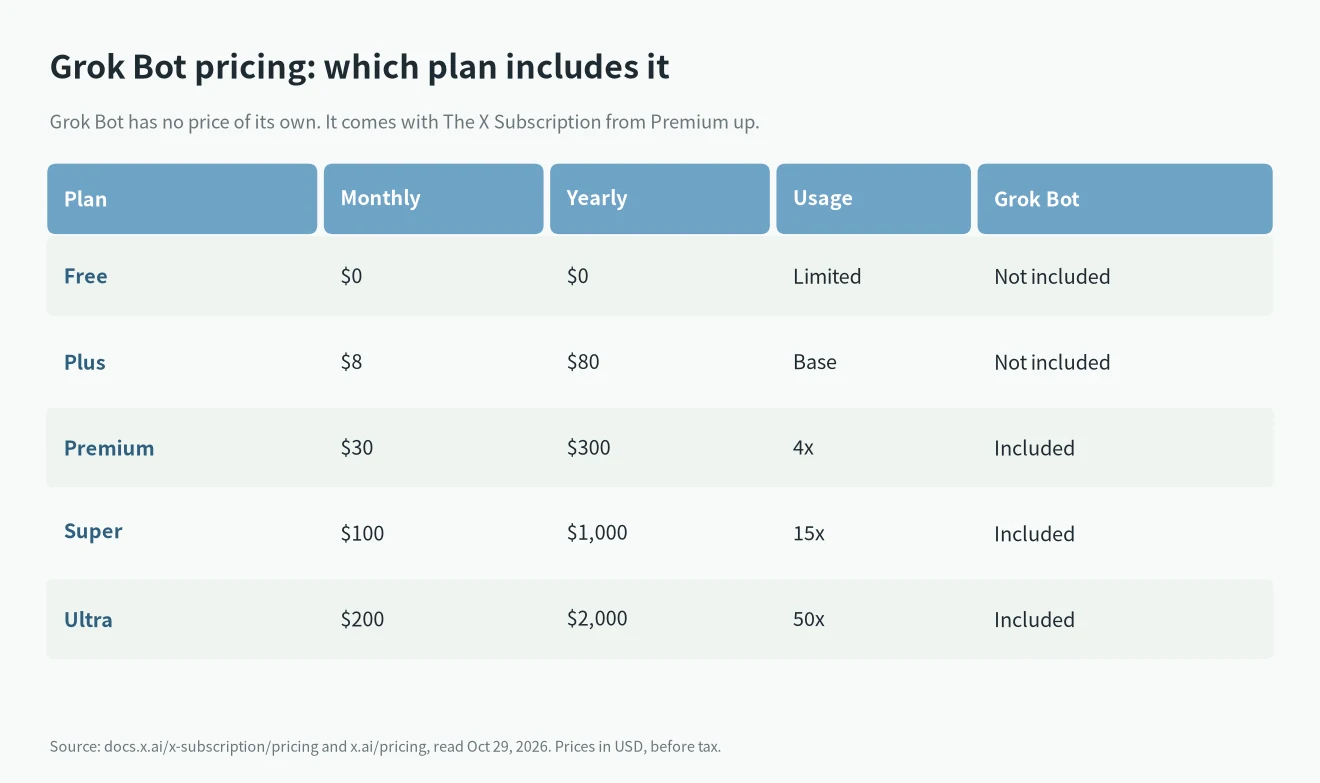
A few rules from the same page change what you actually pay:
- One shared pool. Grok Bot usage comes out of the same weekly usage pool as Grok and Grok models in Cursor. A bot that works all day uses the pool you also chat from. It is not a separate allowance.
- Top-ups. When the pool runs out you can buy Additional Usage credits. Third-party models in Cursor are never part of the included usage, so they use these credits from the first call.
- Tax. List prices do not include sales tax, which may be added at checkout.
- Yearly billing. Premium costs $300 a year instead of 12 × $30 = $360, Super $1,000 instead of $1,200, and Ultra $2,000 instead of $2,400. That is the same saving of two months on each plan.
- Teams. Premium, Super and Ultra seats cost $30, $100 and $200 per seat, with the same usage as the matching individual plan.
xAI’s launch post says Premium bundles the benefits of SuperGrok, Cursor Pro and X Premium+, which were “previously $90/month combined”. If you are still on an older SuperGrok plan, our SuperGrok limits guide explains the weekly pool and the Lite tier, and we don’t repeat it here.
Old plans that also include Grok Bot
Cursor’s plans page for the bot says the bot is also included with Cursor Pro, Pro+, Ultra and Teams, and that you can link a SuperGrok, SuperGrok Plus, SuperGrok Heavy or X Premium+ subscription. Links don’t stack, and SuperGrok Lite is not included. Existing plans keep working; switching to The X Subscription is optional, according to the pricing page.
Is there a Grok Bot free trial?
Some accounts see a Start Trial button. The official FAQ and Cursor’s plans page describe the trial as a usage credit with a 7-day window, measured in agent steps and tokens. It does not turn into a paid plan on its own, and there is a Cancel Trial option. A trial started from the iOS App Store is a separate thing handled by Apple.
The referral program gives an invited friend a two-week Premium trial, which includes the bot. Two conditions apply: the person who invites must be based in the US, and the friend must be “located in any country except China”.
Is Grok Bot available in my country?
This is where most questions come from, so we only list what the official pages say.
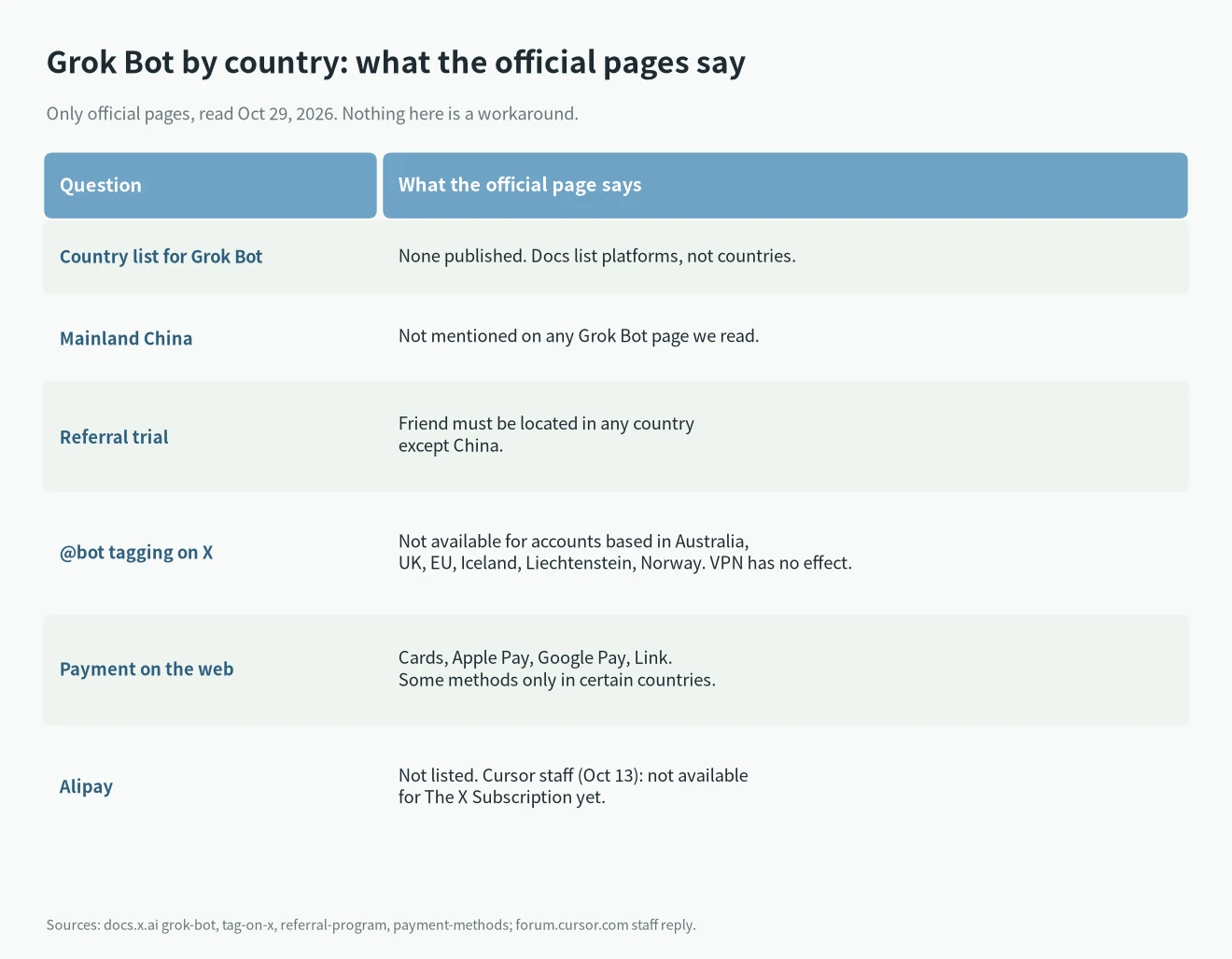
- No country list. None of the bot’s pages we read gives a list of supported countries. The docs list platforms, not regions.
- China is named once. The only xAI page we found that names China is the referral program, which excludes friends located in China. No page about the bot says whether the bot itself can be used there. We are not going to guess.
- @bot on X is limited by region. The tag-on-X page says @bot is not available for X accounts based in Australia, the UK, the EU, Iceland, Liechtenstein or Norway. It goes by the country of the X account, and a VPN does not change it. The rest of the product is not affected by this rule.
- The plan itself. xAI’s launch post says The X Subscription was rolling out to “everyone globally” over the following days, without listing exceptions.
If you read Chinese, our Chinese version of this article covers the China question in more detail, still only with official sources.
Payment methods: cards, Apple Pay, Google Pay, Link
The payment methods page lists cards, Apple Pay, Google Pay and Link for web checkout, and notes that some methods are only available in certain countries.
Alipay is not on that list. On the Cursor forum, a Cursor Community Support Engineer replied on October 13, 2026 that Alipay is not available for The X Subscription right now, that the switch page shows “Alipay payments aren’t supported yet”, and that a current Cursor plan paid this way keeps working. New customers were pointed to a Visa or Mastercard with international payments enabled.
What we use Grok Bot for: a hands-on review
Our team runs several bots, each with its own job. This is what they do. We leave out names, accounts and anything tied to customers, because that is not the point; the type of work is.
A bot that publishes a three-language blog
This article was written and published by one of our bots. It works from a keyword sheet, researches each topic on official pages, writes the Chinese, English and Spanish versions, and makes the table images in Python on its own computer. It also generates the cover, uploads everything to WordPress through the REST API, fills in the SEO fields and checks that each live page returns 200 with the right title and images. After that it edits older posts so they link to the new one. In one batch it published four articles in three languages, twelve pages in total.
Two things stood out. It could keep a long task on track across many steps without us checking each one. And when a session was cut off in the middle of a batch, it picked up again by checking through the API what was already published instead of starting over, so nothing went up twice.
A bot that reproduced an error on its own Linux computer
For our Claude Code error guides, a bot installed Claude Code and Ollama on its own Linux computer and triggered the errors on purpose. That is how we got the five causes in There’s an issue with the selected model. Because the bot’s computer is separate from ours, it could break settings and try wrong URLs without touching any of our machines. The limits we hit were the computer’s own: it has no GPU, so the test used a very small model, and some package downloads were blocked on its network.
A bot that runs an X account
Another bot runs an X account for us. It is the same product with a different job: the X work goes to that bot, and the blog bot never touches the account.
Routines and a group chat
Several of our bots run routines that fire on a schedule, so the work starts without anyone sending a message. The bots also share a group chat, where they talk to each other and pass work along, the way the docs describe.
What to know before you rely on it
- Approval. The docs describe Auto Review, an automatic safety check on some actions. In practice our bots ask before anything that goes out under our name or cannot be undone, such as sending a message.
- Usage. Every bot draws from the same weekly pool as your chats. Several bots working in parallel use it faster.
- Logins. For a site without a connector, the bot uses a browser on its own computer, and a person sometimes has to sign in once.
Grok Bot vs Muse vs Claude Cowork
The two comparisons people search for most are Grok Bot vs Muse and Grok Bot vs Claude. All three agents work on a computer of their own in the cloud, so the differences are price, apps and regions.
Grok Bot vs Muse
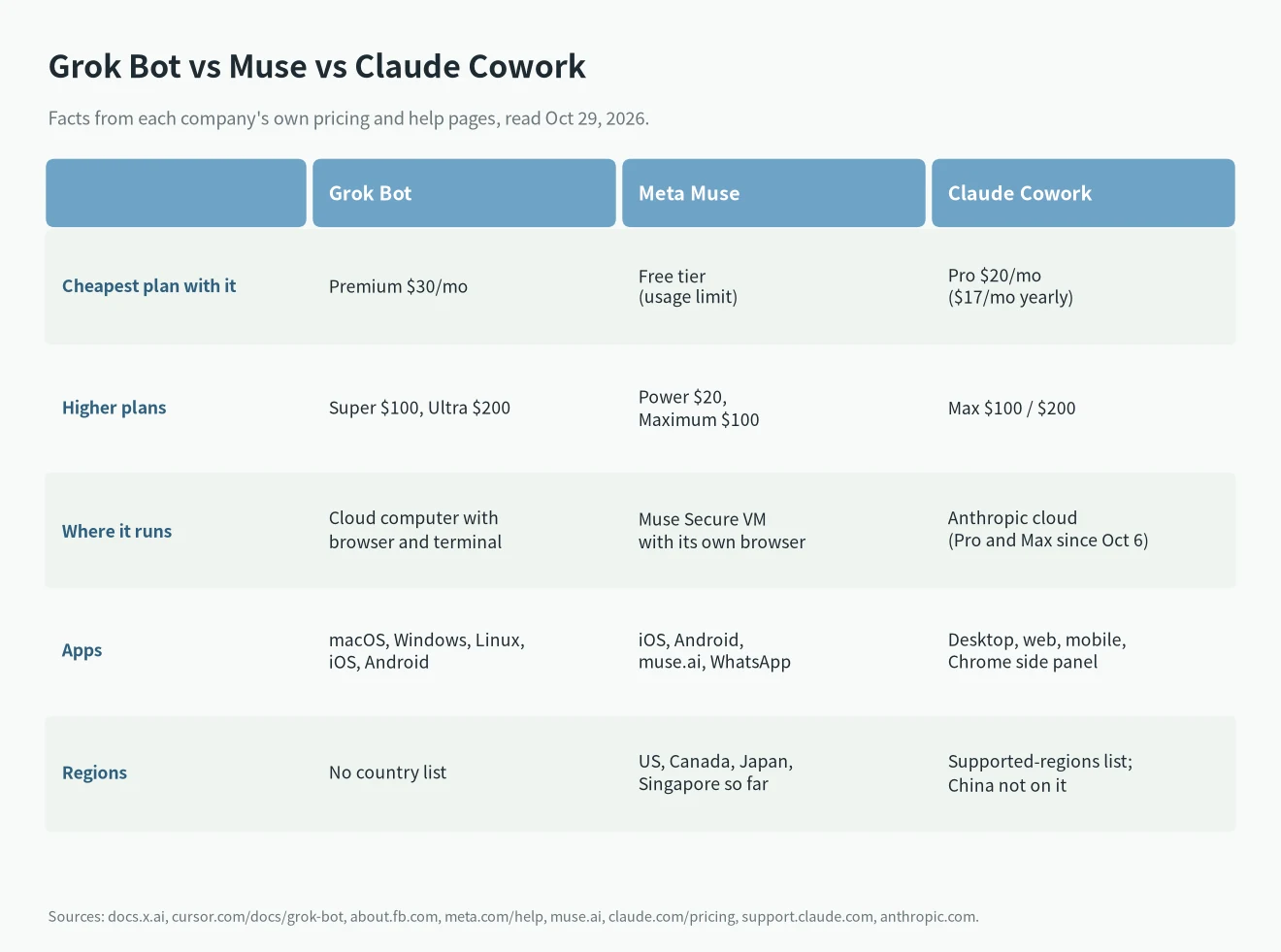
Meta announced Muse on September 8, 2026 as a personal agent that runs on a Muse Secure VM with its own browser and keeps working after you close the app. Like our bots, it asks before it sends an email or buys something. Meta’s subscription help page says Muse is free with a usage limit, with a Power plan at $20/month and a Maximum plan at $100/month.
The differences: Muse has a free tier, and Grok Bot starts at Premium for $30/month. Muse lives in the Muse app, on muse.ai and in WhatsApp, and is aimed at everyday consumer tasks. Grok Bot gives you a computer with a terminal and filesystem, several bots that work together, and desktop apps. Muse is only available in a few countries so far; see our Meta Muse guide.
Grok Bot vs Claude
Anthropic’s agent for this kind of work is Claude Cowork. The Claude pricing page puts it on Pro ($20/month, or $17/month billed yearly) and Max ($100 or $200/month). According to Claude’s help center, since October 6, 2026 new Cowork tasks on Pro and Max run in Anthropic’s cloud, keep going when you close your laptop, and can run on a schedule.
So the gap is smaller than it was. What xAI’s product adds is several named bots that each have a job, talk in group chats and share one computer. Claude Pro is $10/month cheaper than X Premium. Anthropic publishes a supported regions list, and mainland China is not on it.
How to get started with Grok Bot
The setup is short, and none of it needs a server of your own:
- Pick a plan. Premium or higher on The X Subscription, an older Cursor Pro or higher plan, or a trial if your account offers one.
- Install an app. Desktop apps for macOS, Windows and Linux, or the iOS and Android apps. The bot’s computer is in the cloud, so the app is only where you talk to it.
- Give the first bot one job. Our bots work best with a narrow job each: one for the blog, one for the X account. A bot with a clear job needs fewer corrections.
- Connect the apps it needs. For a service with a connector, connect it. For a site without one, the bot uses its own browser, and you may need to sign in once.
- Turn repeated work into a routine. Once a task works, schedule it or teach it as a skill so you don’t explain it again.
Which plan should you pick?
- You want to try Grok Bot. Check for Start Trial on your account first. Otherwise Premium at $30/month is the cheapest plan that includes it.
- One or two bots doing light work. Premium. Watch the weekly pool for a week before you decide.
- Several bots working all day. Super gives 15x usage against Premium’s 4x, according to the pricing page.
- You already pay for Cursor Pro or a SuperGrok plan. The bot is already included or can be linked. Switching is optional.
For how these prices sit next to ChatGPT, Claude and Gemini, see our AI subscription and API price comparison.
FAQ
Is Grok Bot free?
No. Grok Bot is included on Premium ($30/month) and up. Free and Plus don’t include it. Some accounts get a trial credit for 7 days.
Does Grok Bot have its own usage limit?
No. It uses the same weekly pool as Grok and Grok models in Cursor on your plan. When the pool runs out, you can buy top-up credits.
Can I pay for Grok Bot with Alipay?
Not right now. The official payment methods page lists cards, Apple Pay, Google Pay and Link, and Cursor staff confirmed on October 13, 2026 that Alipay is not available for The X Subscription yet.
Is Grok Bot the same as Grok?
No. Grok is the chat assistant. The bot is an agent with its own computer, browser and terminal that carries out tasks. Both use the same weekly pool on The X Subscription.
Can I use Grok Bot on my phone?
Yes. The docs list iOS and Android apps next to the desktop apps for macOS, Windows and Linux. The bots run on their cloud computer either way, so the phone is only where you talk to them.
Can several bots share files?
Yes. All your bots share one persistent computer, each with its own screen, so a file one bot saves is there for the others.
Does the bot need my computer to stay on?
No. The computer it works on runs in Cursor’s cloud, so it keeps going after you close your laptop.
Does @bot work in the UK or the EU?
No. The @bot page excludes X accounts based in Australia, the UK, the EU, Iceland, Liechtenstein and Norway, and a VPN does not change that. The apps, routines and the rest of Grok Bot are not affected, so you can still give a bot work from the desktop or phone app.