

Claude Code monthly spend limit: Fix “You’ve hit your monthly spend limit” Fast (Tested)
Claude Code monthly spend limit means your plan usage ran out and your usage credits hit their monthly cap. We tested the message family on Claude Code 2.1.312 with a mock API and list who can raise each limit, the lookalike errors, and GitHub reports.
 bufferAbout the author6 min read
Short answer: the Claude Code monthly spend limit message, You've hit your monthly spend limit · raise it at https://claude.ai/settings/usage?from=cc_cli_limit_message, means your plan’s included usage can’t cover the request and your usage credits have reached the monthly cap you set. On Pro or Max, raise the cap in claude.ai Settings > Usage or run /usage-credits. Before you do, read the end of the line: if it says something like · your session limit resets 3:45pm, a plan window is what ran out, and you can also just wait. Adding funds doesn’t help when the cap itself is what’s full. The wording and fixes come from the official Claude Code error reference, checked on October 29, 2026. We couldn’t trigger a real account’s monthly limit, so our test uses a mock API; details below.
What the Claude Code monthly spend limit message means
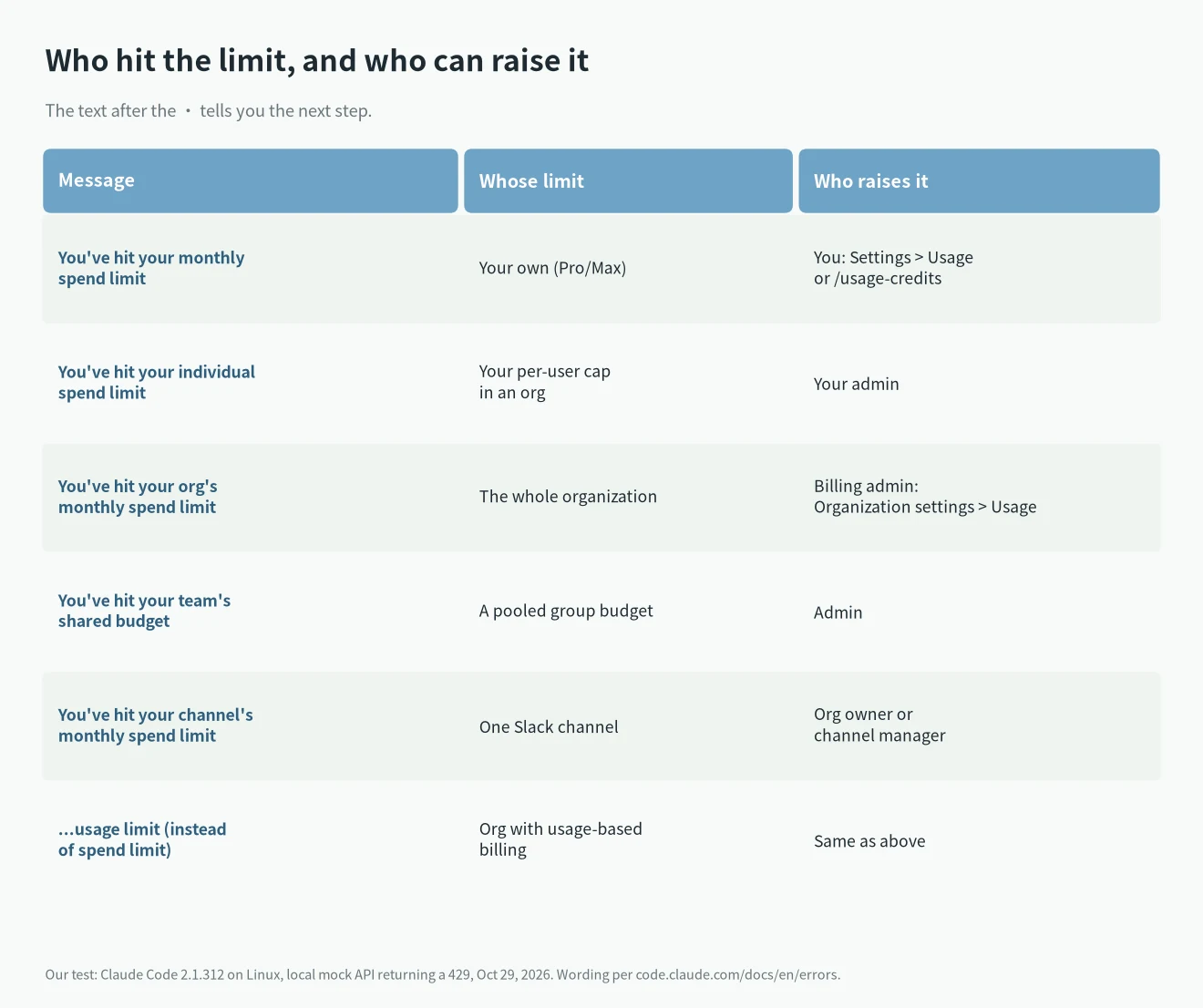
Per the docs, the message shows up in two cases: one of your plan’s usage windows has run out and the usage credits that would pay for the rest are at their spend limit, or the request is one that only usage credits pay for. The first words tell you whose limit it is, and the text after the · tells you who can raise it:
You've hit your monthly spend limit · raise it at https://claude.ai/settings/usage?from=cc_cli_limit_message
You've hit your individual spend limit · ask your admin for a higher limit
You've hit your org's monthly spend limit · visit https://claude.ai/admin-settings/usage to raise it
You've hit your team's shared budget · ask your admin to raise it at https://claude.ai/admin-settings/usage
You've hit your channel's monthly spend limit · an org owner or channel manager can raise it in the channel's Claude settings
On organizations with usage-based billing, spend limit becomes usage limit. The help center article adds one detail that matters here: with usage credits on, work continues until you reach your monthly spend limit or, with auto-reload off, your balance runs out. The cap and the balance are two separate things.
Our test: Claude Code monthly spend limit messages against a mock API
A real monthly limit needs a real claude.ai subscription with usage credits at their cap, and we didn’t have one in that state. Faking a stored Pro login didn’t work either: Claude Code tried to refresh it and stopped with Failed to authenticate: OAuth session expired and could not be refreshed. So the exact Pro/Max line above comes from the docs, not from our screen.
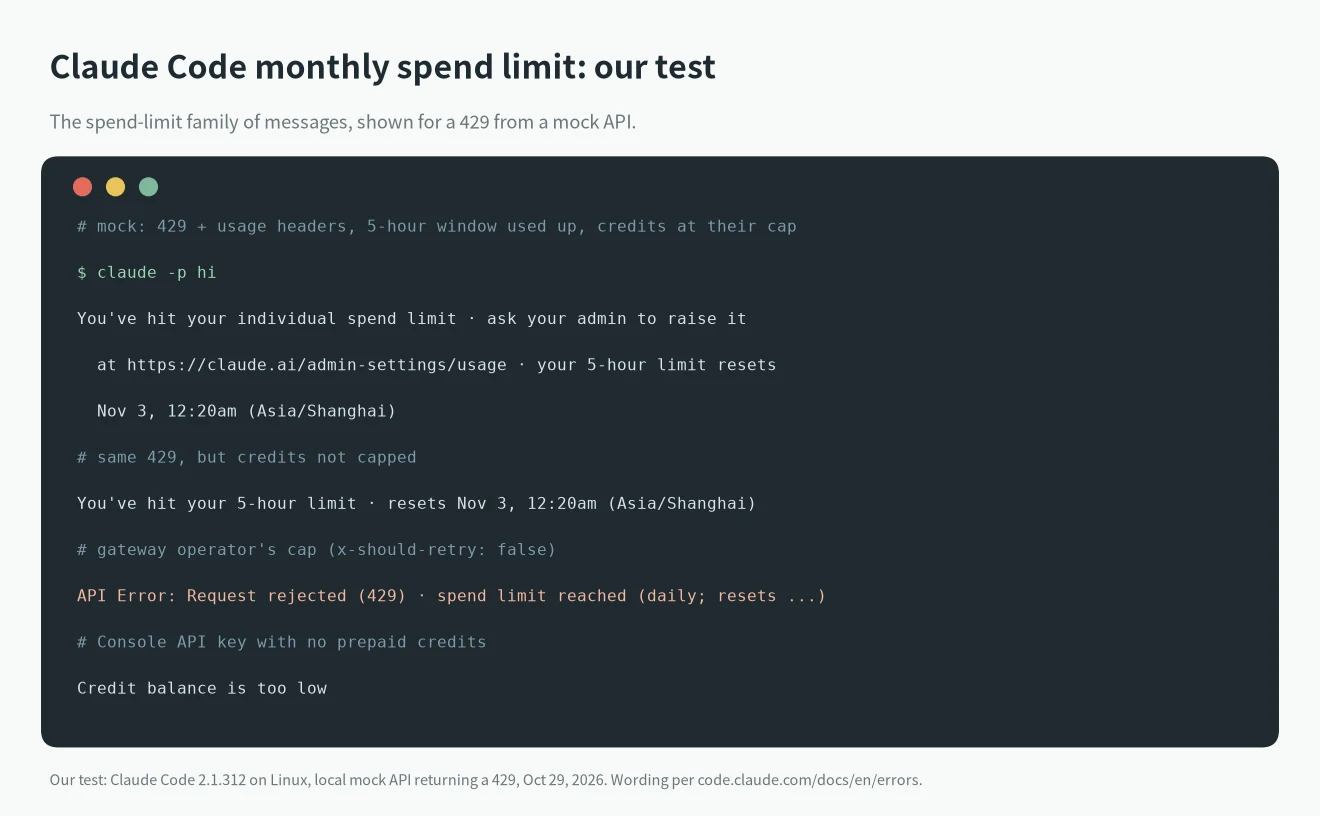
What we could do was point Claude Code 2.1.312 at a local mock with ANTHROPIC_BASE_URL, using a test CLAUDE_CODE_OAUTH_TOKEN, and have the mock answer with a 429 plus the usage headers the CLI reads. With the 5-hour window rejected and credits marked as capped, claude -p hi exited with:
You've hit your individual spend limit · ask your admin to raise it at https://claude.ai/admin-settings/usage · your 5-hour limit resets Nov 3, 12:20am (Asia/Shanghai)Without a plan type (a token from the environment carries none), Claude Code picked the individual wording and pointed to the admin page; the docs say the text varies with your plan and whether you manage billing. The reset time is the one the mock sent, printed in the test machine’s time zone. When the mock gave the reason as credits out of balance instead of at their cap, the message became You've hit your 5-hour limit · resets Nov 3, 12:20am (Asia/Shanghai). Two lookalikes from earlier runs: a gateway-style 429 gave API Error: Request rejected (429) · spend limit reached (daily; resets 2026-10-29 00:00 UTC), and a Console key with no credits gave Credit balance is too low.
How to fix the Claude Code monthly spend limit
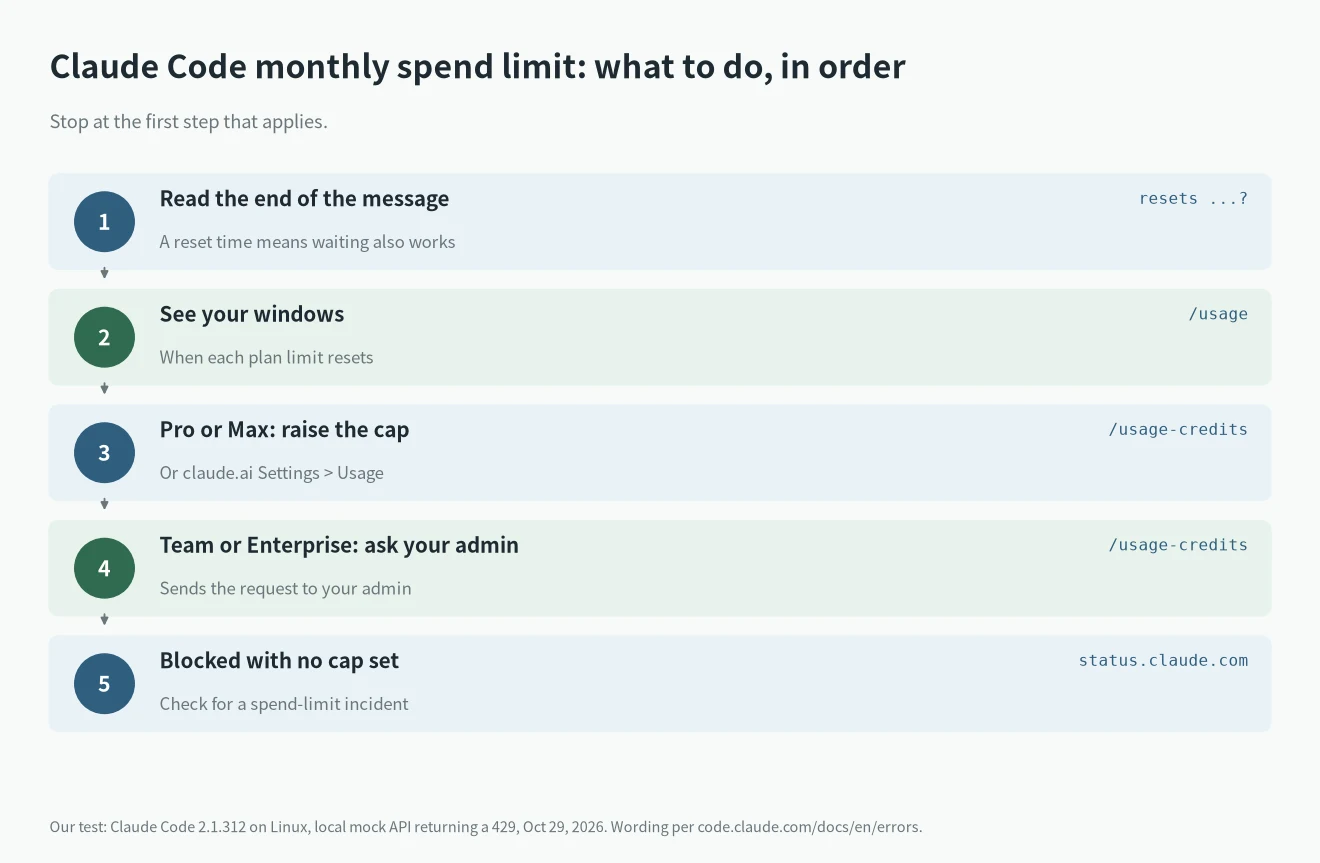
- Read the end of the message. A
· your ... limit resets ...part means access comes back at that time without anyone raising anything. Run/usageto see each window and when it resets. - Pro or Max: raise the cap on claude.ai in Settings > Usage, under Usage credits (“Adjust limit”), or run
/usage-creditsfrom Claude Code. - Bought the plan in the iOS or Android app? The help center says usage credits can only be turned on in Claude on the web, after adding a payment method there.
- Team or Enterprise: if you manage billing, raise it in Organization settings > Usage. If not, run
/usage-credits; it sends the request to your admin. - Channel limit: an org owner or the channel’s manager raises it on claude.ai. Other channels in your org may still have budget.
- Unattended runs: the docs say Claude Code fails at once on a spend-limit 429, even with
CLAUDE_CODE_RETRY_WATCHDOG=1, so retry loops won’t wait it out.
Check it’s really the Claude Code monthly spend limit
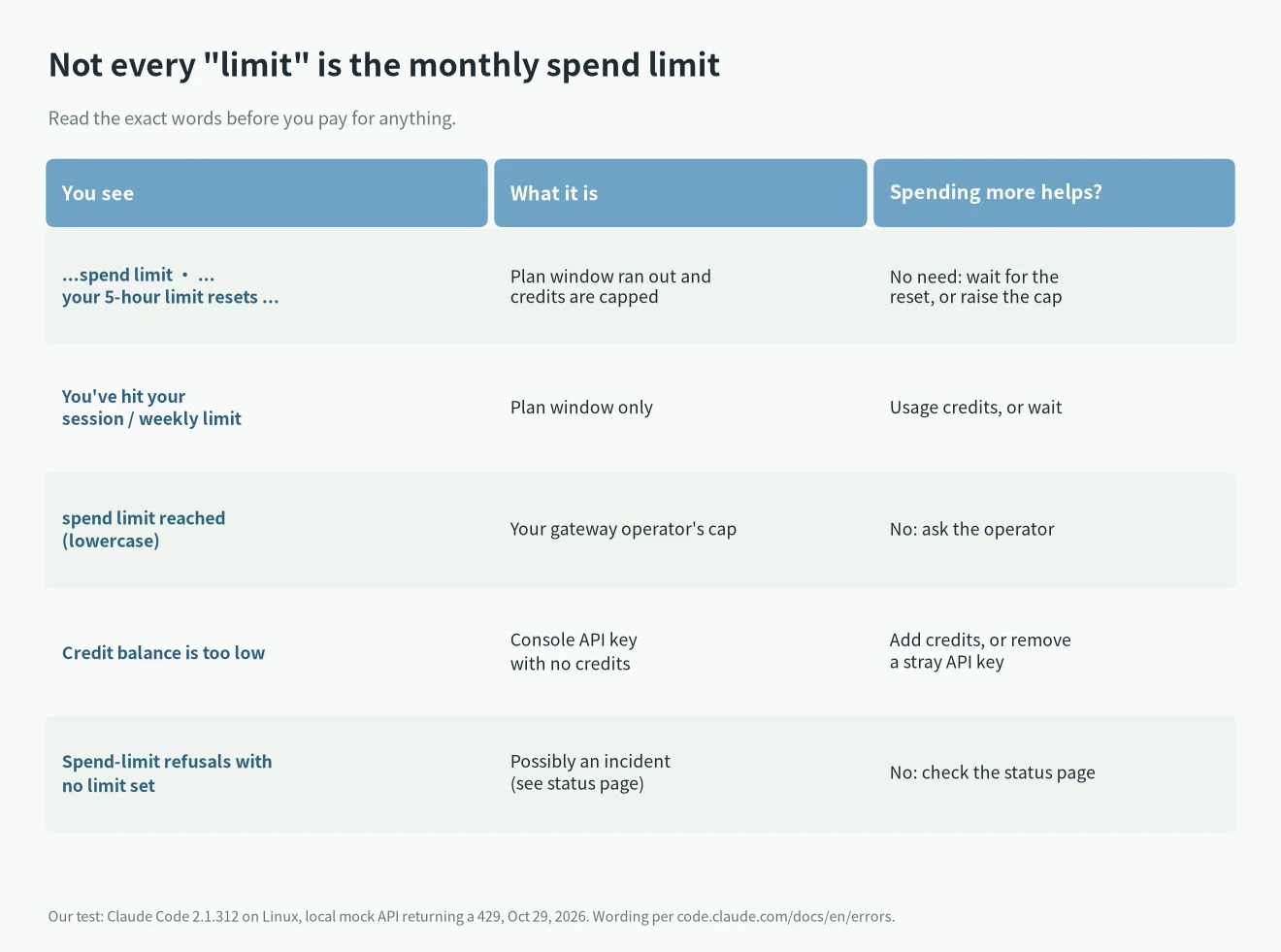
Several messages say “limit” and need different fixes:
You've hit your session limitorweekly limitalone: only the plan window ran out. See our Claude usage limits guide for how the windows work.- Lowercase
spend limit reached: a cap set by the operator of a Claude apps gateway. Only they can raise it; see the gateway section of the docs. Credit balance is too low: a Console API key with no prepaid credits, or a strayANTHROPIC_API_KEYused instead of your subscription. Run/statusto check.- A bare
Request rejected (429): rate limiting, covered in our Claude Code 429 guide.
Also note that the monthly API credits included with Max are a different pool and, per the help center, don’t pay for usage credits in Claude Code; see Claude Max API credits.
What users reported on GitHub
- Issue #75730 (open, v2.1.204): a subagent stopped with the monthly spend limit message while, per the reporter, only the 5-hour window had run out; work resumed at the reset. Under the current docs that combination is expected when credits are also at their cap, and the reset suffix is the hint.
- Issue #101270 (open, v2.1.296): the reporter bought $100 of usage credits twice and kept working; the third time, with credit still on the account, Claude Code still said the monthly limit was hit. That fits the help center’s split between balance and cap: check the cap before you add more money.
- Issue #101923 (open): a Max 20x user reports 18 refusals on October 7 while Settings > Usage now shows “No spend limit” (they say they had set one at some point and are checking when). That day the status page posted “Issue with spend limits”, saying some organizations were “incorrectly paused for having reached their spend limit”. If you see this message and your cap looks fine, check the status page before you buy anything.
More errors are listed in our Claude Code errors hub.
FAQ
Does the Claude Code monthly spend limit reset by itself?
The help center describes it as a cap on what you spend each month. If the message also names a plan window reset, access comes back at that time even if nobody raises the cap.
Will adding funds fix it?
Not if the cap is what’s full. Raise the cap first; adding funds only helps when the balance ran out.
Can I remove the cap?
The help center says you can pick “Set to unlimited” when adjusting the limit, if you’re fine with no spending ceiling.
Is this a rate limit?
No. A rate limit is a short-term throttle. This message is about billing, so retrying doesn’t help.