

Claude Code Prompt is too long: What It Means and 6 Simple Fixes (Tested)
Claude Code Prompt is too long means the request, including system prompt, tools and CLAUDE.md, is bigger than the model's context window. We reproduced the variants on Claude Code 2.1.312 against a mock API and list the fixes in order, from /compact to setting the window for gateway models.
 bufferAbout the author6 min read
Short answer: Claude Code Prompt is too long means the request (your conversation plus everything Claude Code sends with it) is bigger than the model’s context window. In an interactive session it usually shows up as Context limit reached · /compact or /clear to continue. Run /compact first. If that doesn’t help, run /context to see what fills the window, turn off MCP servers you don’t use, trim CLAUDE.md, or /clear and resend with less pasted text. If you use a gateway or a non-Anthropic model, check whether Claude Code knows the model’s real window. We tested the main variants on Claude Code 2.1.312 against a local mock API; the outputs are below. Wording and fixes follow the official Claude Code error reference, checked on October 29, 2026.
Which Claude Code Prompt is too long message you got
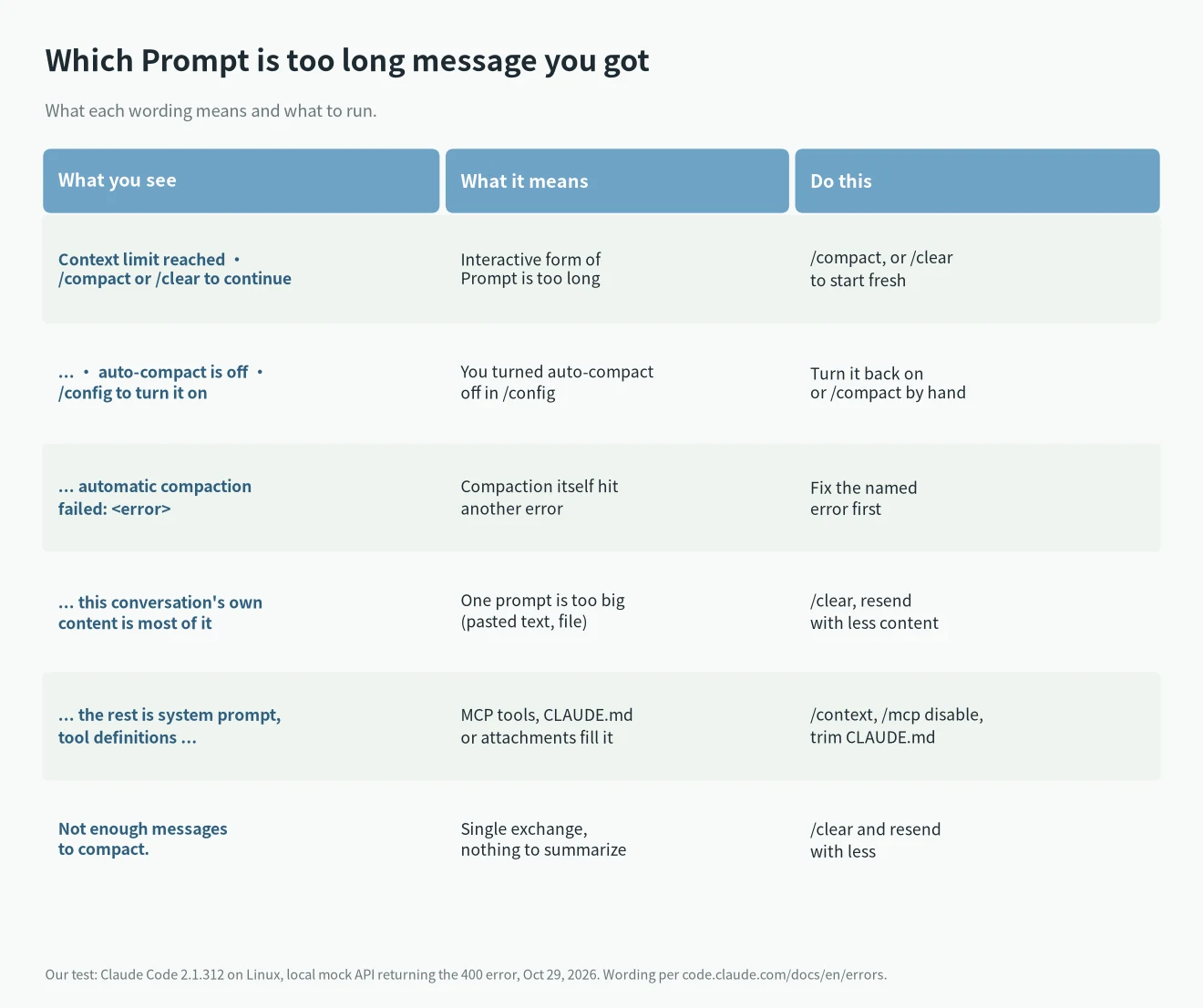
The plain API error is Prompt is too long. In -p output and in the transcript it stays that way. In an interactive session Claude Code shows one of these instead:
Context limit reached · /compact or /clear to continue
Context limit reached · /compact or /clear to continue · auto-compact is off · /config to turn it on
Prompt is too long · automatic compaction failed: <the underlying error>
When the conversation is a single exchange, there is nothing earlier to summarize, so Claude Code tells you what fills the request. The docs list three forms: one when the API reports no token counts, one where your own content is most of the request, and one where the system prompt, tools and attachments are most of it. Amazon Bedrock reports the same condition as Input is too long for requested model. and Claude Code handles it the same way.
Our test: the same 400 gives two different messages
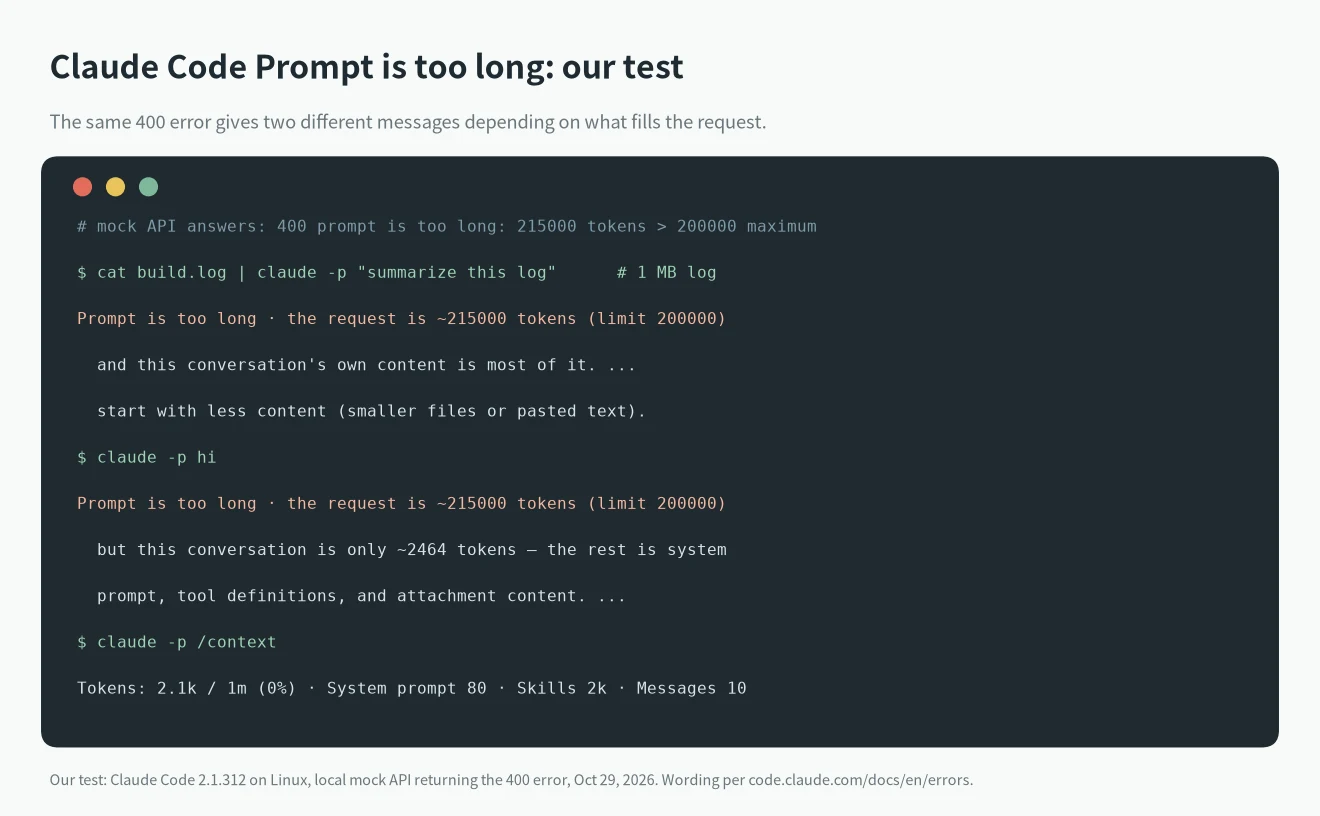
We can’t fill a real 1M-token window on a test key, so we pointed Claude Code 2.1.312 at a small local mock server with ANTHROPIC_BASE_URL. The mock always answers with the API’s 400 error prompt is too long: 215000 tokens > 200000 maximum. The 215000 and 200000 come from our mock, not from a real model.
- We piped a 1,040,001-byte log into
claude -p "summarize this log". Claude Code answered:Prompt is too long · the request is ~215000 tokens (limit 200000) and this conversation's own content is most of it. A single-exchange conversation cannot be compacted; start with less content (smaller files or pasted text). - With a short
claude -p hi, the same 400 produced:Prompt is too long · the request is ~215000 tokens (limit 200000) but this conversation is only ~2464 tokens — the rest is system prompt, tool definitions, and attachment content. A single-exchange conversation cannot be compacted; reduce attached files/tools or start with less context.
So the message already tells you where to look: your own text, or what Claude Code adds around it. One side note from the test: passing the 1 MB log as a command-line argument instead of through a pipe failed earlier with Argument list too long. That is a shell limit, not Claude Code.
How to fix Claude Code Prompt is too long
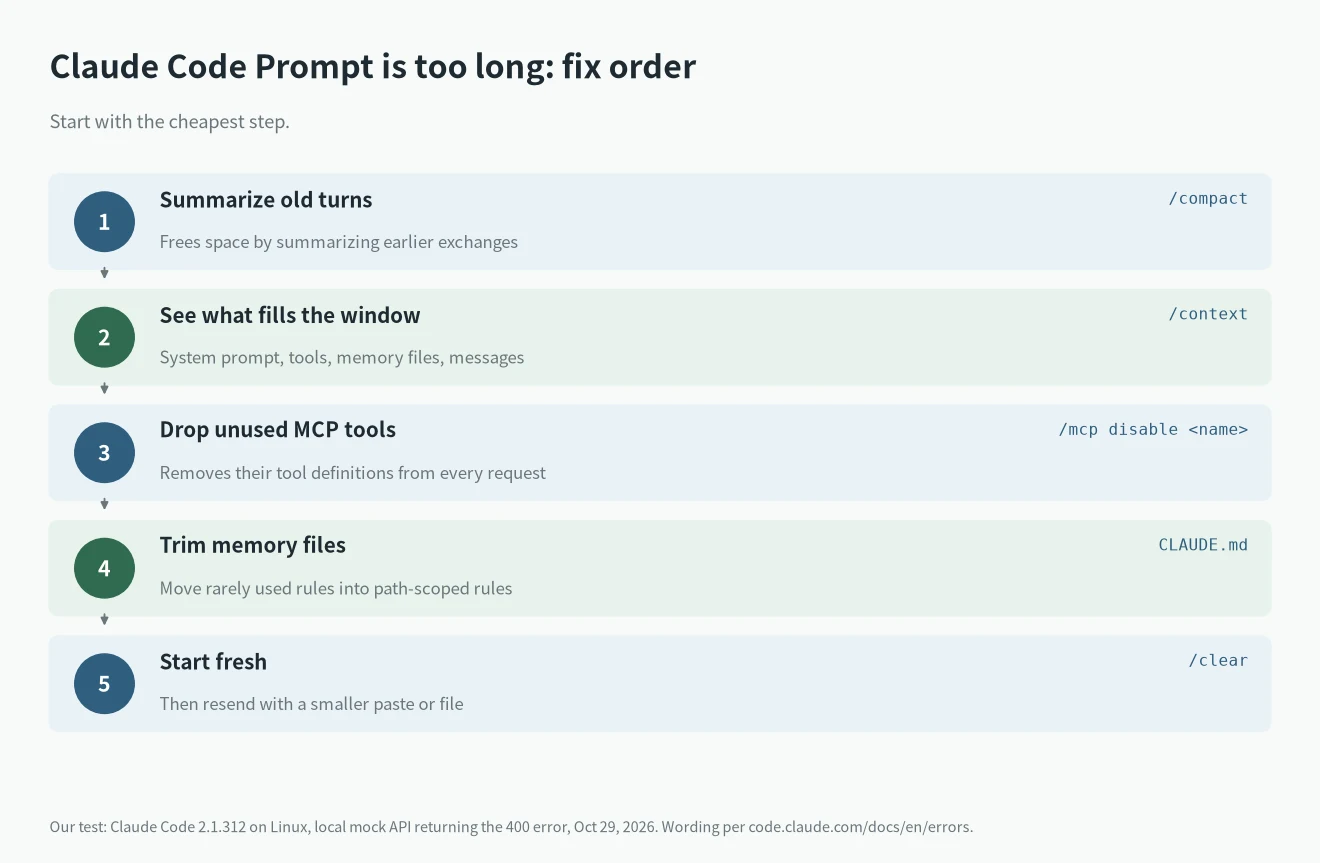
Work through these in order:
/compactsummarizes earlier turns and frees space. If it answersNot enough messages to compact., the conversation is a single exchange. Run/clearand resend with less pasted text or smaller attachments./contextshows a breakdown: system prompt, tools, memory files and messages. On our clean test install it showedTokens: 2.1k / 1m (0%), with built-in skills at about 2k tokens. A real project with MCP servers and a longCLAUDE.mdwill show much more./mcp disableremoves an unused MCP server’s tool definitions from every request. If you followed a list like our best MCP servers for Claude Code, turn off the ones you aren’t using in this project.- Trim
CLAUDE.md. Move rarely used instructions into path-specific rules that load only when relevant. - Turn auto-compact back on if you turned it off in
/configor withDISABLE_AUTO_COMPACT. It is on by default and normally prevents this error. - Update Claude Code (
claude update). The docs list several fixed cases: stopping Claude while it was compacting (fixed in v2.1.304), and on v2.1.305 this error could hide an unrelated 400 or 422 from the API (fixed in v2.1.306).
Gateways and non-Anthropic models: tell Claude Code the real window
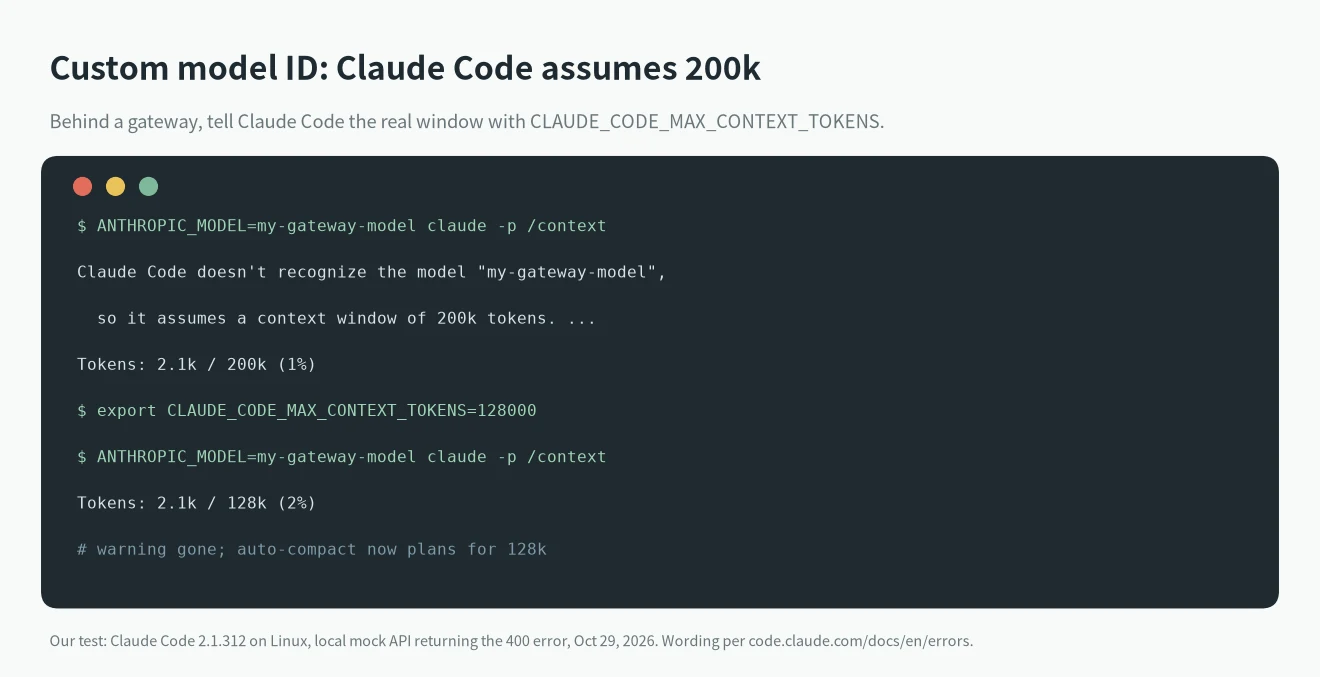
If the error appears around 200K tokens, or the server’s own “maximum context length” error appears, check the model ID. When Claude Code doesn’t recognize a model ID, it assumes a 200K window. We tested this with ANTHROPIC_MODEL=my-gateway-model and got this warning on startup:
Claude Code doesn't recognize the model "my-gateway-model", so it assumes a context window of 200k tokens. Update Claude Code, or see https://code.claude.com/docs/en/model-config#correct-the-window-for-a-gateway-or-custom-model-id to set the window./context then showed Tokens: 2.1k / 200k (1%). After export CLAUDE_CODE_MAX_CONTEXT_TOKENS=128000 the warning was gone and /context showed / 128k. Set the variable to the window your provider documents. The model configuration docs also cover modelOverrides and the [1m] suffix. This matters if you run Claude Code on another provider’s model, as in our DeepSeek API for Claude Code setup.
Real cases from GitHub
- Issue #103279: two long sessions in the VS Code extension 2.1.301 on a 1M-context model never auto-compacted, reached about 976,000 prompt tokens, and then every turn failed with
Prompt is too longuntil/clear. Earlier sessions on the same machine had auto-compacted at roughly 967,000 to 971,000 tokens. The issue is open. - Issue #101897: on a self-hosted model with a 262,144-token window, the server’s OpenAI-style “maximum context length” error did not trigger compaction after an update to 2.1.296. The reporter says downgrading to 2.1.269 fixed it.
For other Claude Code errors, see our Claude Code errors hub.
FAQ
Is Claude Code Prompt is too long the same as a usage limit?
No. It is about the size of one request. Usage limits are about how much you use over 5 hours or a week; see Claude usage limits explained.
Why does /compact say Not enough messages to compact?
The conversation has only one exchange, so there is nothing earlier to summarize. Run /clear and send a smaller prompt.
Is Request too large (max 32MB) the same error?
No. That one is about the raw request body passing 32MB before tokenization, usually from large pasted content, tool results or attachments. Prompt is too long is about tokens.
Will a bigger plan fix it?
Not by itself. The limit is the model’s context window. Compacting, trimming context or choosing a model with a larger window is what helps.