

SuperGrok Limits in 2026: How the Weekly Pool Works, Lite vs SuperGrok, and the New Plans
SuperGrok limits are now one weekly usage pool shared across Grok products, and xAI doesn't publish message counts. How to read your usage, what happens when it runs out, what SuperGrok Lite leaves out, and how the October 2026 X Subscription plans compare.
 bufferAbout the author6 min read
SuperGrok limits don’t come as a fixed number of messages any more. Since xAI’s change that was rolling out in June 2026, every paid Grok plan gets one weekly usage pool shared by Chat, Imagine, Voice and Build, and different actions use up different amounts of it (Grok FAQ). xAI doesn’t publish how many messages or videos a tier gets. The only exact figure you can see is the percentage in Settings → Usage.
The plan lineup also changed on October 12, 2026. New customers now pick from The X Subscription: Plus at $8, Premium at $30, Super at $100 and Ultra at $200 a month, with included usage of 1x, 4x, 15x and 50x of Plus (xAI announcement). Existing SuperGrok Lite, SuperGrok, SuperGrok Plus and SuperGrok Heavy subscribers keep their plans unless they switch (X Subscription pricing). I read every source below on October 27, 2026.
How SuperGrok limits work now
Before June 2026 each Grok product had its own daily cap. You could run out of Imagine while Chat still had room. The FAQ describes the new system like this:
- One weekly pool per paid account, usable on any mix of Grok products.
- A chat message uses little compute. A high-quality video or a long coding task uses far more, so it takes a bigger bite out of the pool.
- The pool resets every week on a schedule shown in the Usage tab. It is not a monthly allowance.
- Settings → Usage, on the web and in the apps, shows a progress bar, a percentage split by product, the next reset time and any Extra Usage Credits balance.
On The X Subscription the same pool also covers Grok models in Cursor and Grok Bot. Third-party models in Cursor never draw from it; they are paid from top-up credit from the first request (usage limits doc). The Grok API is separate too: paid plans include API access, but API calls are billed at standard model rates and don’t use the plan’s pool (x.ai/pricing FAQ).
If you are used to Claude’s or ChatGPT’s caps, the logic is close to the weekly windows I covered in Claude Code 429 errors: a rolling allowance, not a hard monthly quota.
SuperGrok Lite vs SuperGrok and the new X Subscription tiers
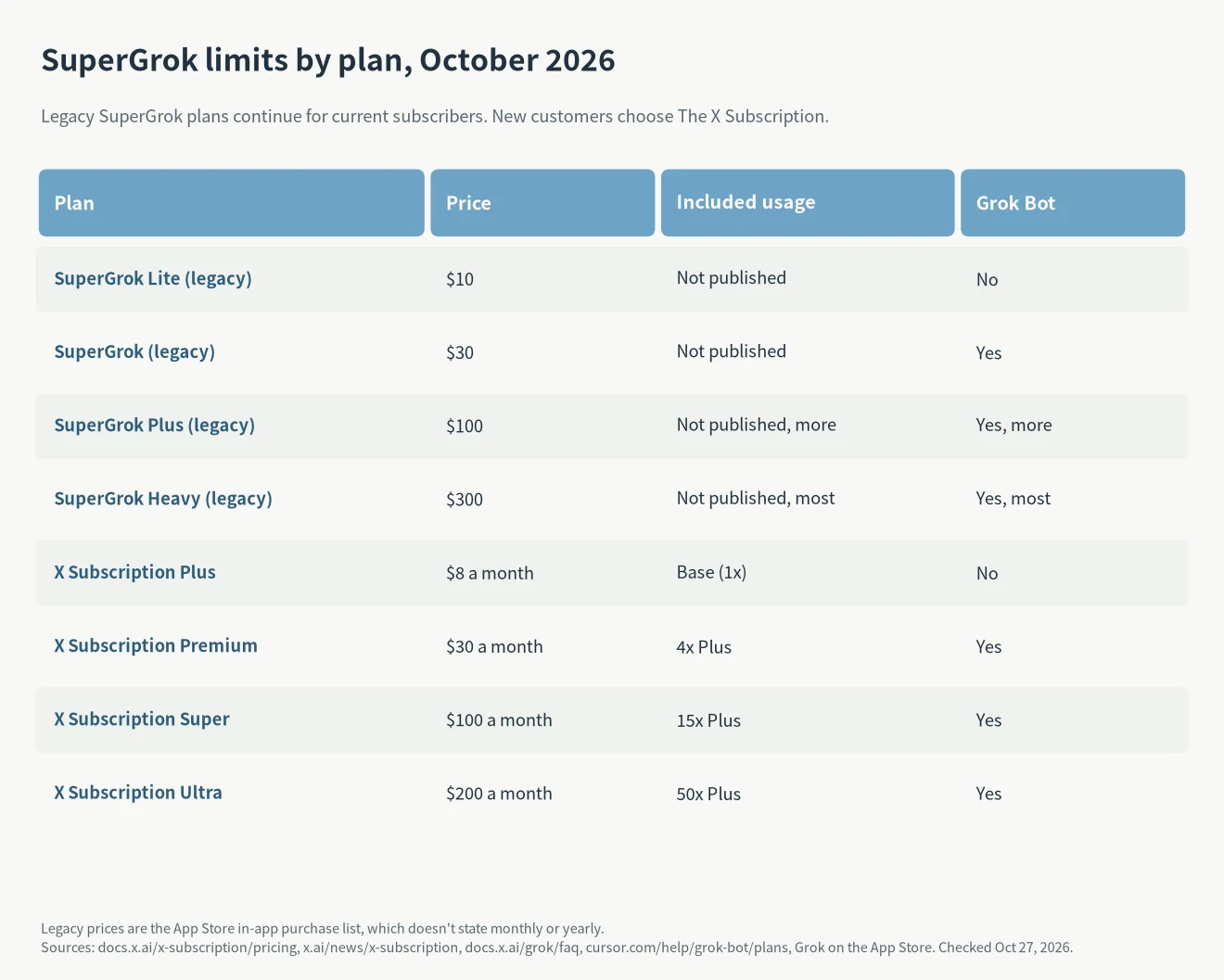
The legacy prices come from the Grok app’s in-app purchase list on the App Store: SuperGrok Lite $10, SuperGrok $30, SuperGrok Plus $100 and SuperGrok Heavy $300. Apple’s listing doesn’t say whether each price is monthly or yearly, and SuperGrok also appears at $300, which is likely the yearly option. xAI has never published a usage multiple for the legacy tiers, only that higher tiers get more.
The clearest official difference between SuperGrok Lite and SuperGrok is Grok Bot. Cursor’s Grok Bot plans page says Lite doesn’t include it, while SuperGrok, SuperGrok Plus and Heavy grant linked Grok Bot usage in rising amounts. The same page maps the tiers: SuperGrok equals Cursor Pro and X Premium+, SuperGrok Plus equals Pro+, and SuperGrok Heavy equals Ultra.
For new tiers the multiples are official. Plus is the base, Premium has 4x, Super 15x and Ultra 50x (pricing doc). Premium bundles the benefits of SuperGrok, Cursor Pro and X Premium+, which xAI says used to cost $90 a month combined (source). Plus doesn’t include Grok Bot; Premium and above do (Grok Bot on The X Subscription).
Which new tier gives the most usage per dollar?
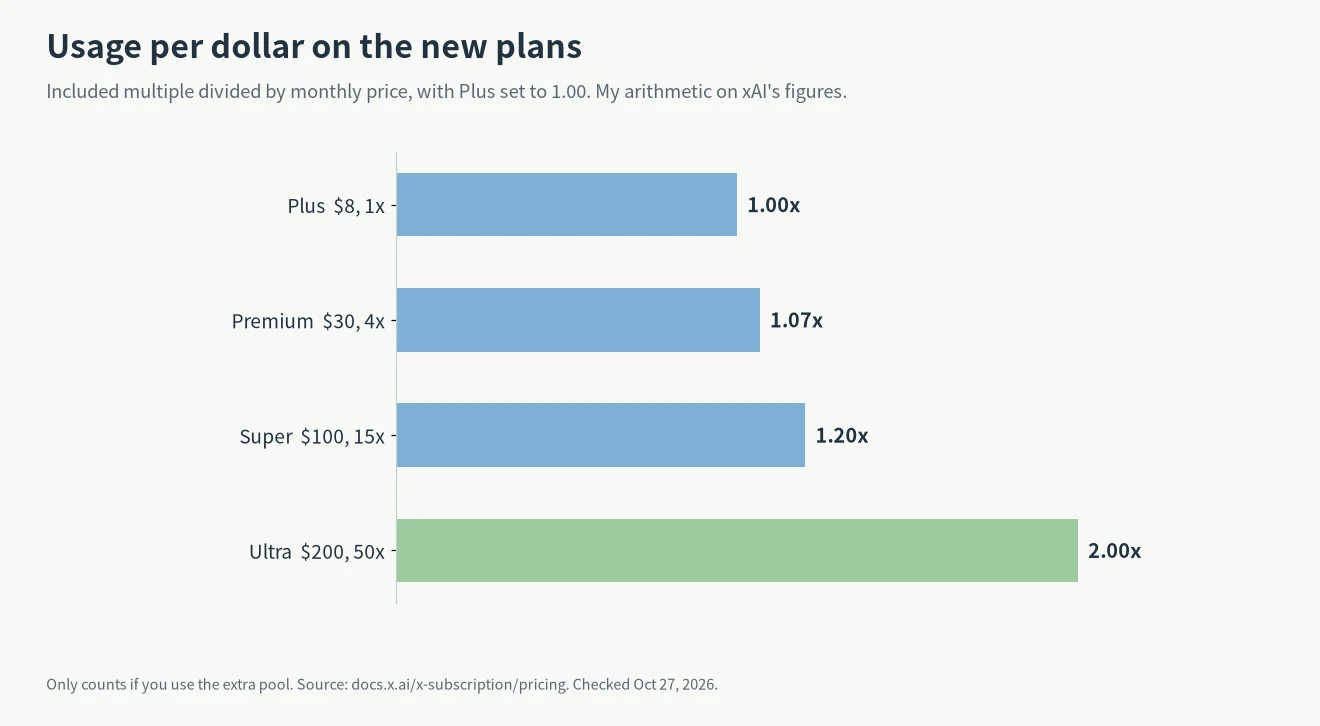
Divide the included multiple by the monthly price and set Plus to 1.00. Premium gives 1.07x as much usage per dollar, Super 1.20x and Ultra 2.00x. Ultra costs 25 times Plus and includes 50 times the usage. That is my own arithmetic on xAI’s published multiples, not a figure xAI states, and it assumes you actually use the extra pool.
What happens when you reach 100%
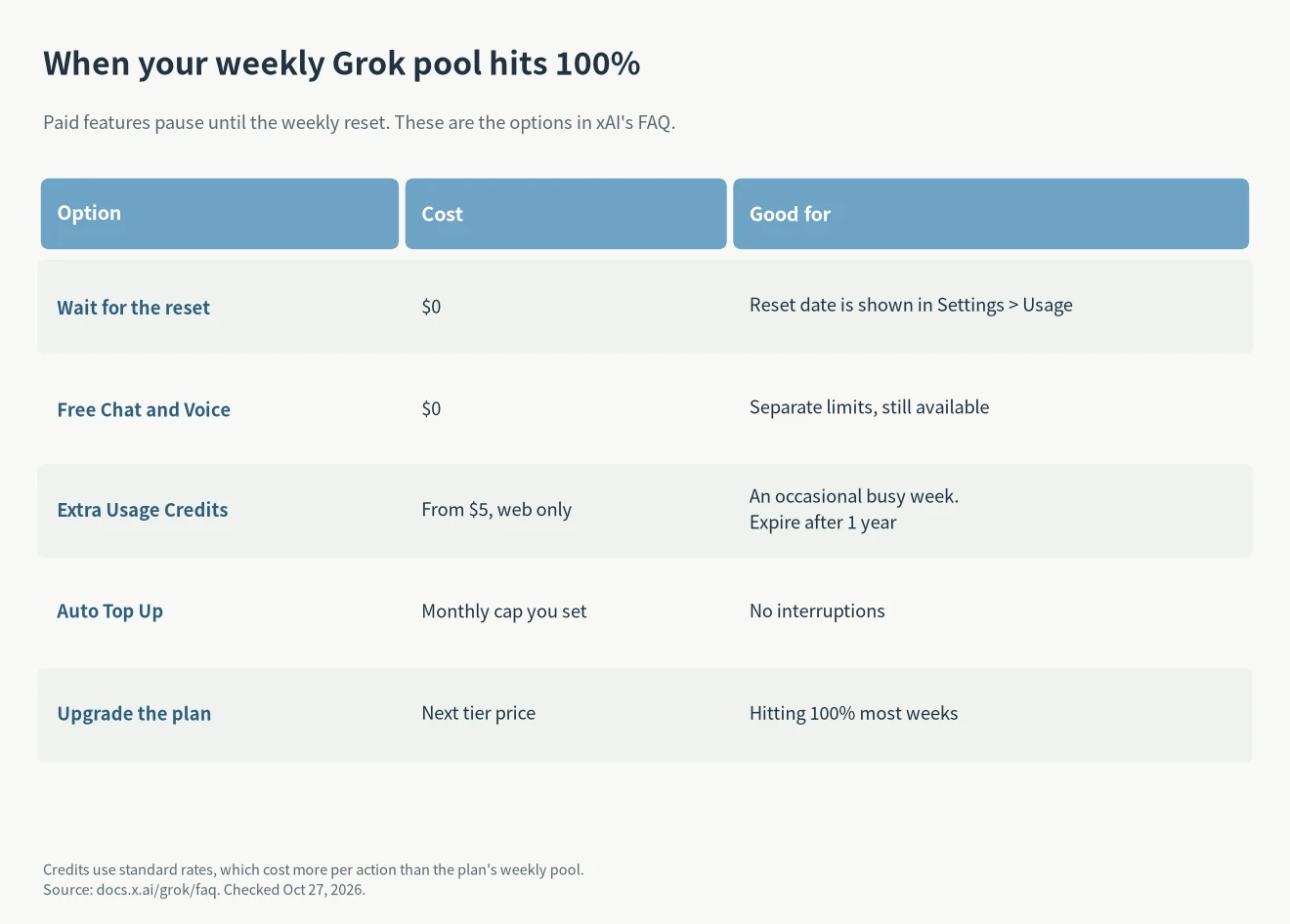
Hitting the weekly limit pauses paid features until the reset, but it isn’t a full stop. According to the FAQ:
- Free-tier Chat and Voice keep working. They have their own limits and reset schedule.
- Extra Usage Credits start at $5, are bought in the Usage tab on the web (not in the apps yet), and expire one year after purchase.
- Credits are charged at standard rates, so each action costs more than it does inside your plan’s weekly pool.
- Auto Top Up adds credit when your balance runs low, up to a monthly cap you set.
- Upgrading gives a bigger weekly pool at a lower cost per action than buying credits again and again.
Video has one extra rule worth knowing: 720p generations drop to 480p once you reach your tier’s 720p cap (source). On The X Subscription you can also set a monthly spending cap; adding credit doesn’t raise it (extra usage doc).
Which plan fits your SuperGrok limits
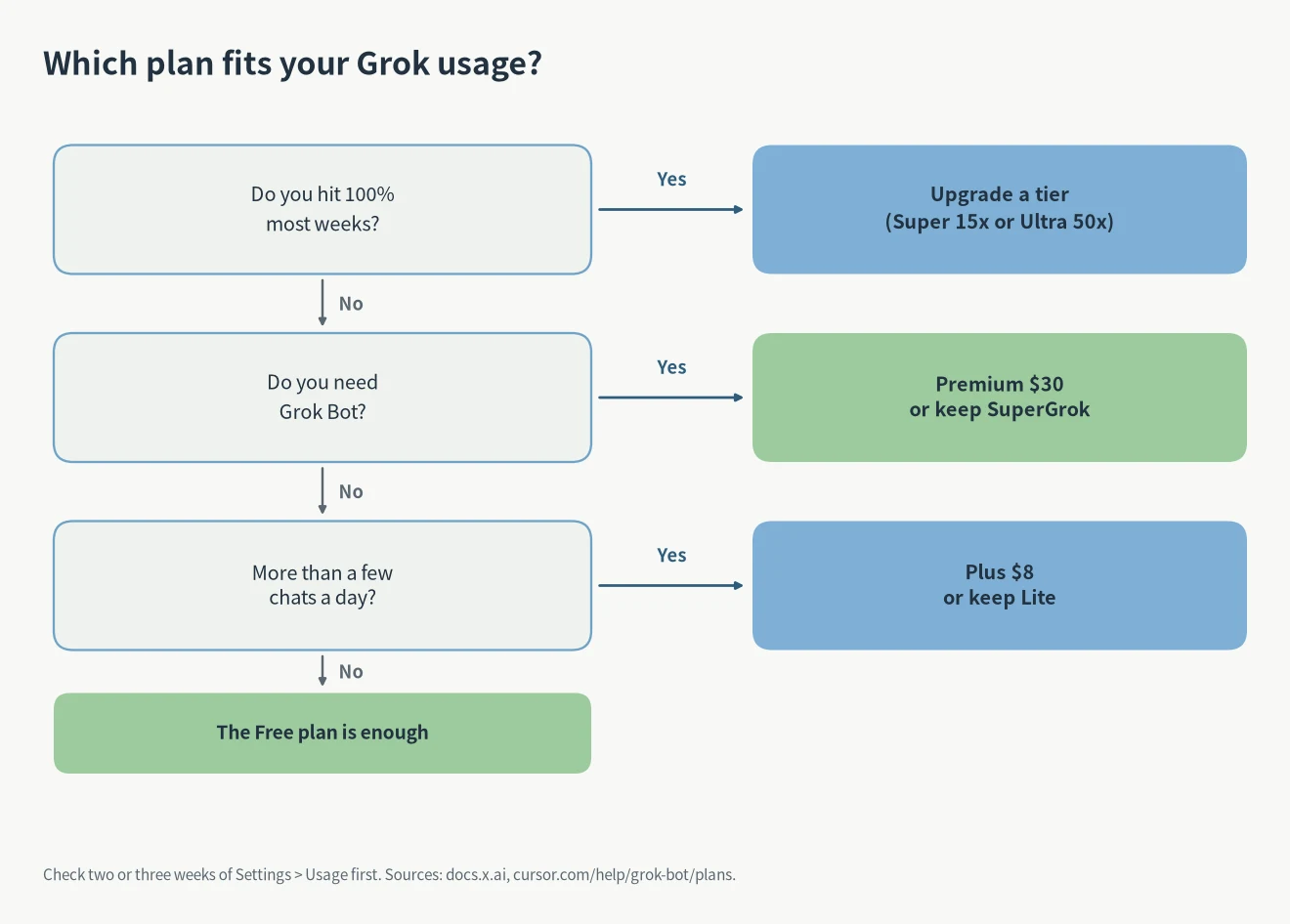
My rule of thumb: check the Usage tab at the end of two or three weeks before changing anything. If you rarely pass 60%, you are paying for headroom you don’t use, and the guide to cancelling or downgrading an AI subscription applies here as well. If you hit 100% most weeks, upgrading is cheaper than buying credits over and over, as xAI’s own FAQ says.
If you don’t need Grok Bot and mostly chat, Plus at $8 is the cheapest paid tier for new customers. An existing Lite plan keeps working at its old price. If you want Grok Bot, the entry point is SuperGrok or Premium at $30. For coding, Premium also includes Cursor, so compare it against Claude Code and Codex plans before paying for two tools.
Should you switch from SuperGrok?
You don’t have to. xAI says existing plans continue unless you change or cancel them (Do I have to switch?). If you do switch, eligible SuperGrok, Cursor and X Premium plans are cancelled with a prorated refund for unused time, sent back separately to your original payment method, and the new plan is charged in full (source). A completed switch is permanent; Support can’t undo it (source).
Switching makes sense when you pay for more than one of SuperGrok, Cursor Pro and X Premium+. Premium at $30 covers all three. If you only use Grok chat on Lite, there is little to gain. The same reasoning as in ChatGPT Go vs Plus vs Pro holds: pay for the tier your weekly usage actually reaches.
FAQ
How many messages does SuperGrok allow per day?
xAI doesn’t publish a number. Usage is a weekly pool, and each product costs a different amount (FAQ). Watch the percentage in Settings → Usage.
Does the Grok API use my SuperGrok pool?
No. API usage is billed at standard model rates and doesn’t draw from the plan’s pool (x.ai/pricing). If you mainly use the API, the comparison in subscription vs API explains when pay-per-token is cheaper.
Do unused SuperGrok credits roll over?
The weekly pool resets on schedule. Purchased Extra Usage Credits stay on your account and expire one year after purchase (source).