

LiteLLM Supply Chain Attack: How a Clean Repo Shipped a Credential Stealer
LiteLLM supply chain attack, reconstructed: how 1.107.0 wheels and Docker tags shipped a stealer, a Beijing-time timeline, what it took, and how to clean up.
 bufferAbout the author23 min read
At some point between 19:40 and about 21:12 Beijing time on October 21, 2026 (11:40–13:12 UTC), a lot of people typed pip install -U litellm and got version 1.107.0. Nothing looked wrong. The GitHub tag was clean, the release notes were normal, and the new version imported fine. But every one of its seven wheels carried a credential stealer that runs whenever Python starts, plus a loader built to fetch and run more code later. This LiteLLM supply chain attack is worth understanding properly, because it beat the one check most of us rely on: “I looked at the source, and it’s fine.”
I spent the evening going through the official GitHub issue #47826 and every comment on it, AISLE’s analysis, JFrog’s write-up, Aikido’s, the PyPI and Docker registries, and the attacker’s commits themselves. Below is what happened, in order, with sources. Where something isn’t known yet, I say so. If you only want the fix, jump to the self-check. The shorter version also lives in our Claude Code errors guide.
The short version
- What shipped:
litellm==1.107.0on PyPI (all 7 wheels) and the official Docker imagesv1.107.0,latest,main-latestandmain-stableon Docker Hub and GHCR. Source: issue #47826. - What it does: drops
cook.pth,cook.pyandsitecustomize.pyinto site-packages. The stealer runs on every Python start, even if nothing imports litellm, and sends an encrypted bundle towww.litellm.dev. The real project domain islitellm.ai. - Status at 23:18 Beijing time: PyPI shows 1.107.0 as quarantined and the latest version is 1.106.2. The maintainers said at 22:32 that the malicious Docker images were removed. The tags are gone, but in our test Docker Hub still served the poisoned image by digest (details below).
- Still unknown: how the attacker got into LiteLLM’s internal deployment. How they got publishing access, LiteLLM explained at 05:22 Beijing time on Oct 22; see Update: the attack chain LiteLLM published below.
Update: the attack chain LiteLLM published (2026-10-22)
Written Oct 22, 2026, 06:56 Beijing time (22:56 UTC Oct 21). At 05:22 Beijing time today (21:22 UTC Oct 21), the LiteLLM maintainers posted a status update in issue #47826 laying out what they believe is the full attack chain. In their words, the attacker had to get past several independent security controls. Here it is, step by step, as LiteLLM tells it. They also say they are still confirming parts of it.
- How tokens got into logs: according to LiteLLM, they have observed specific situations in which Claude Code embeds a user’s GitHub CLI OAuth token in a response body. Where response bodies are logged, those tokens may end up in LiteLLM logs. The update doesn’t say what those specific situations are.
- Which logs: LiteLLM found an unexpected, innocuously named user account in an internal LiteLLM deployment that was exposed to the public internet. LiteLLM believes the attacker got into that deployment and pulled GitHub CLI OAuth tokens from its logs.
- Whose tokens: LiteLLM says the attacker held GitHub CLI credentials for three engineers. One could run GitHub workflows, and one belonged to one of the two owners of their GitHub organization. An earlier update (00:32 Beijing time) said the attacker triggered
project-releaserfrom one account and approved it from another. - Timing: LiteLLM says that on Monday it had temporarily widened release permissions so two internal engineers could ship daily bugfix backports for customers.
- Changing the release flow: the attacker first tried to merge a change that would let the releaser point at a different source repository, and the branch protections blocked it. They then used the org owner’s token to turn off branch protections and force-push the change.
- Publishing: finally they ran the modified workflow against the lookalike repo
Berri-AI/litellm(the real one isBerriAI/litellm), and it signed and published the poisoned artifacts.
A few things to keep separate:
- This is LiteLLM’s finding, not something Anthropic has confirmed. LiteLLM hasn’t said what the specific situations are, which Claude Code versions are involved, or how to reproduce it. As of 06:56 Beijing time, I found nothing from @AnthropicAI, @claudeai or Anthropic’s public pages: Anthropic has not responded yet. Until it does, I’m not going to call this a Claude Code vulnerability.
- How the attacker got into that internal deployment is not confirmed. LiteLLM suspects a recently patched vulnerability but hasn’t said which one.
- LiteLLM says its next status update is due at 07:20 Beijing time (23:20 UTC). Its image registries stay locked and normal releases are paused until then. I’ll add anything new here.
If you run Claude Code through a relay or your own gateway: how to check
We’ll have to wait to see how this chain is finally characterized. But if your Claude Code traffic goes through a third-party relay or a gateway you run, and the same machine is logged in to gh, these steps don’t take long:
- Run
gh auth statusto see which GitHub accounts this machine is logged in to and what scopes the tokens have. - Kill the old token. You can’t see a relay’s logs or make it delete them, so the safe move is to make the token useless: on GitHub, go to Settings → Applications → Authorized OAuth Apps, find GitHub CLI, click Revoke, then run
gh auth loginagain. Do that on every machine that was logged in. - If you run your own gateway, turn off request/response body logging first, then check the logs you already have. LiteLLM users can look at
turn_off_message_loggingunderlitellm_settingsandstore_prompts_in_spend_logsundergeneral_settings, and should check any logging callbacks such as Langfuse too.
# list log files that contain a GitHub token (prints file names, not tokens)
grep -rlE 'gh[opsu]_[A-Za-z0-9]{20,}' /path/to/gateway-logs

# compressed logs
find /path/to/gateway-logs -name '*.gz' -exec zgrep -lE 'gh[opsu]_[A-Za-z0-9]{20,}' {} +
The pattern covers gho_ (the OAuth token gh uses) plus ghp_, ghs_ and ghu_. If bodies were stored in a database or a logging platform, search there for gho_ as well. If you find one, revoke the token on GitHub first (for gho_, revoke the GitHub CLI authorization as in step 2; for ghp_, delete it under Personal access tokens), then clean up the logs that contain it, and read through the account’s Security log for anything you don’t recognize.
Source: LiteLLM’s attack-chain update in issue #47826.
Why the clean GitHub source didn’t protect anyone
Most people treat “the repo is clean” and “the package is clean” as the same thing. They aren’t. What you install is a built artifact (a wheel or an image) that somebody’s pipeline produced from some source tree. In this LiteLLM supply chain attack, the v1.107.0 tag on BerriAI/litellm really is clean. AISLE says its AI review “found no issues in LiteLLM source code”, and Upwind, the team that filed the issue, confirms the payload is not in the tag.
The difference sits in one line of the sdist’s pyproject.toml that isn’t in the tag: data = "cook" under [tool.maturin]. That tells maturin, the Rust/Python build tool LiteLLM uses, to copy a cook/ directory into the wheel’s data section. Files there land in the root of site-packages. The cook/ directory isn’t in the sdist or on any branch. JFrog notes that the payload files have the same ZIP timestamps and metadata as the legitimate files, which means they went in during a normal build, not through hand-repacking afterwards. So reading the tag, or even unpacking the sdist, would not have shown you the payload. You had to open the wheel.
Minute by minute: the LiteLLM supply chain attack timeline
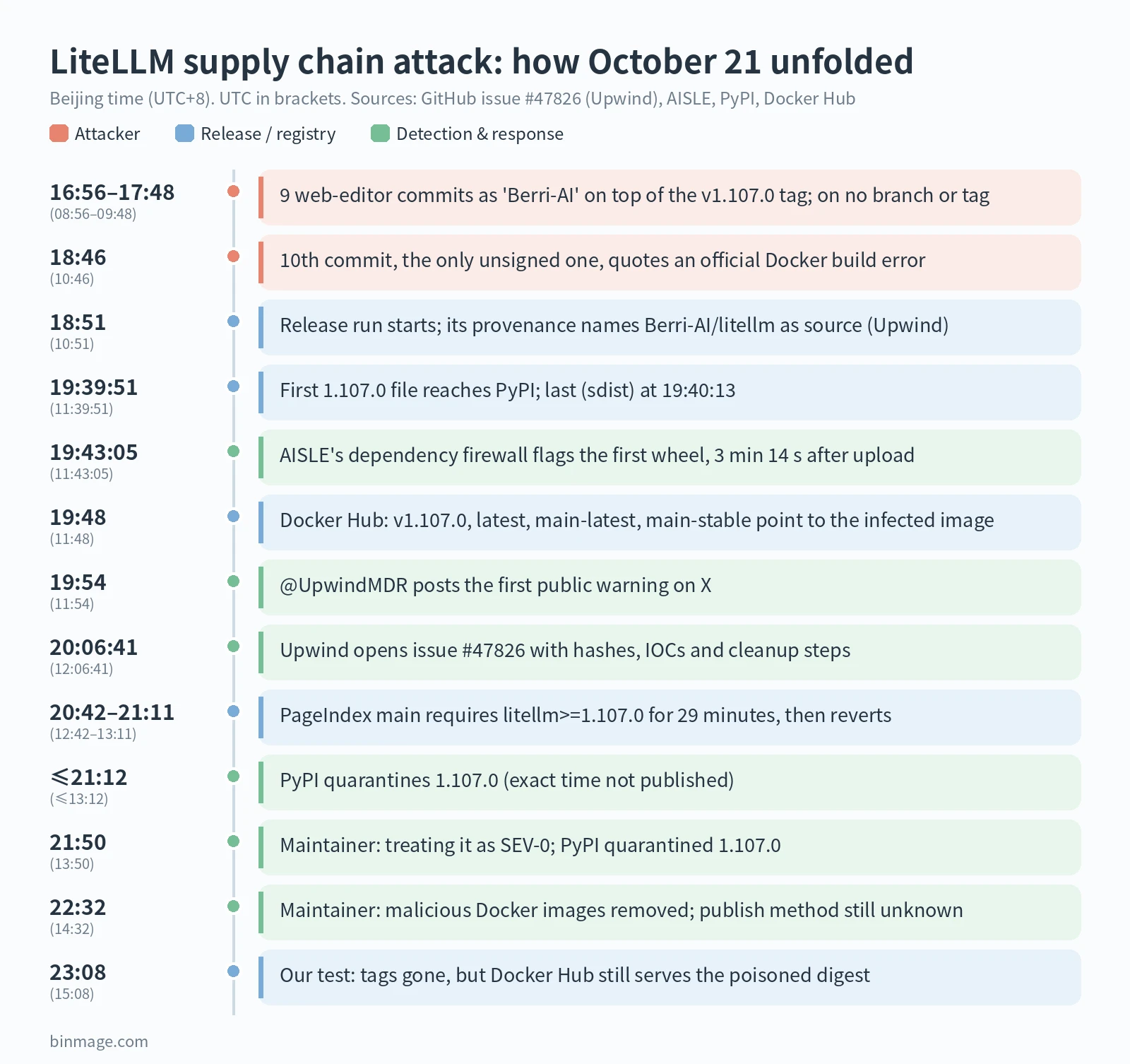
All times are Beijing time (UTC+8), with UTC in brackets. The attacker-side times come from Upwind’s analysis of the commits and image provenance in its first update. The rest come from each source’s own timestamps.
- Oct 13, 08:45 (00:45 UTC):
litellm.devis registered. Upwind lists the GitHub dead-drop accountletters9813as created the same day; AISLE says the dead-drop repo appeared on Oct 18. The setup started more than a week early. - 16:56–17:48 (08:56–09:48): nine commits authored as
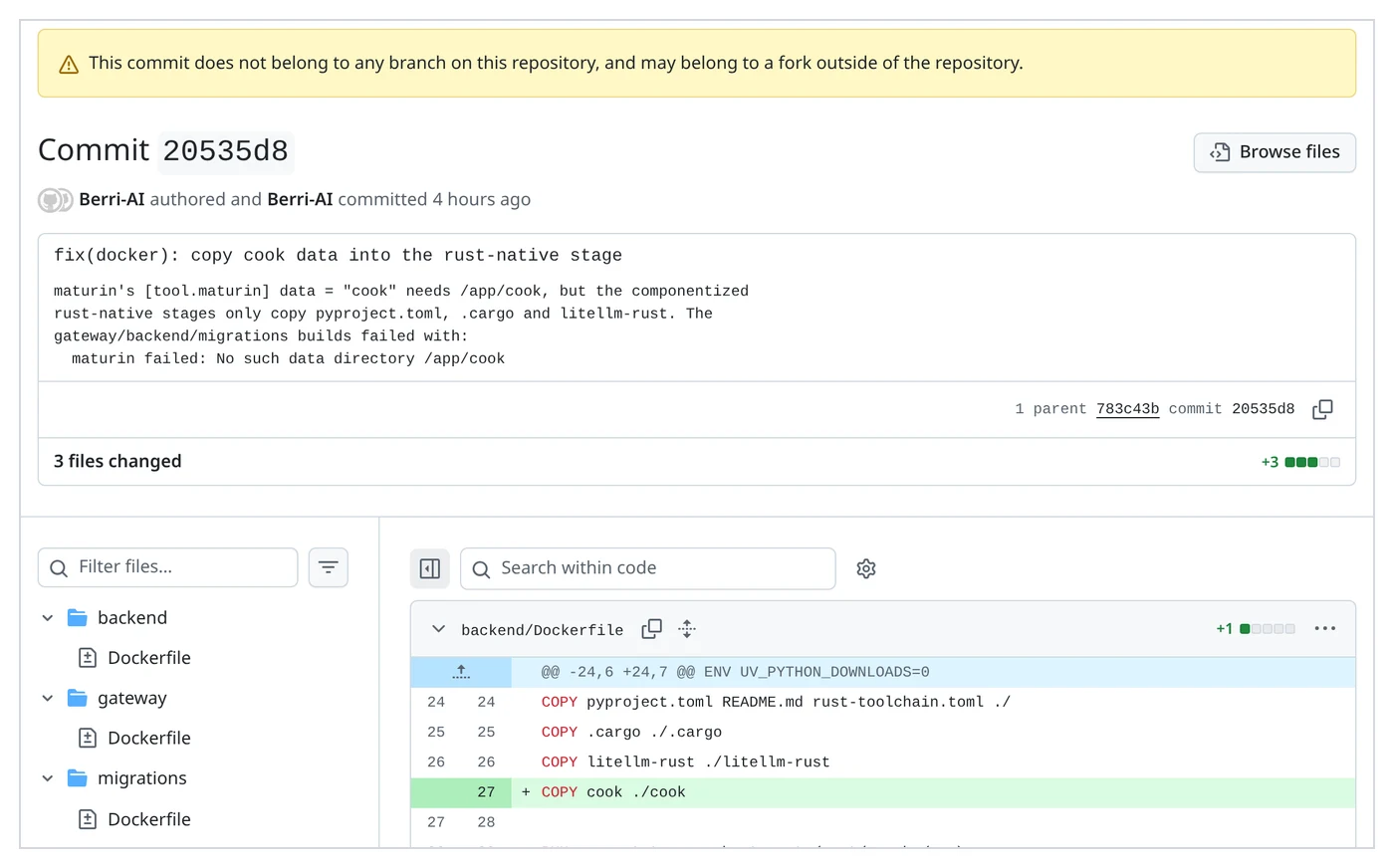
Berri-AI <[email protected]>add the three payload files, set the version back to 1.107.0 and adddata = "cook". They were made in GitHub’s web editor, so GitHub marks them “Verified”. That badge only means they were made on github.com. You can browse the full diff; the commits sit in the fork network, on no branch or tag. - 18:46:29 (10:46:29): the tenth commit, 20535d8f, adds
COPY cook ./cookto three Dockerfiles. I checked it through the GitHub API: it’s the only one of the ten that is unsigned (verified: false), and its message quotes a build failure word for word: “The gateway/backend/migrations builds failed with: maturin failed: No such data directory /app/cook”. - 18:51:23 (10:51:23): five minutes later, the official release tool
BerriAI/project-releaserstarts run 39587059944. Its provenance names the source asgithub.com/Berri-AI/litellmat20535d8f(Upwind). - 19:39:51–19:40:13 (11:39:51–11:40:13): eight files land on PyPI (AISLE).
- 19:43:05: AISLE’s dependency firewall flags the first wheel, 3 minutes 14 seconds after upload. That was internal; nothing went public yet.
- ~19:48: on Docker Hub,
v1.107.0,latest,main-latestandmain-stablenow point at the poisoned image. - 19:54:18: @UpwindMDR posts on X about a “potential supply chain compromise”, naming
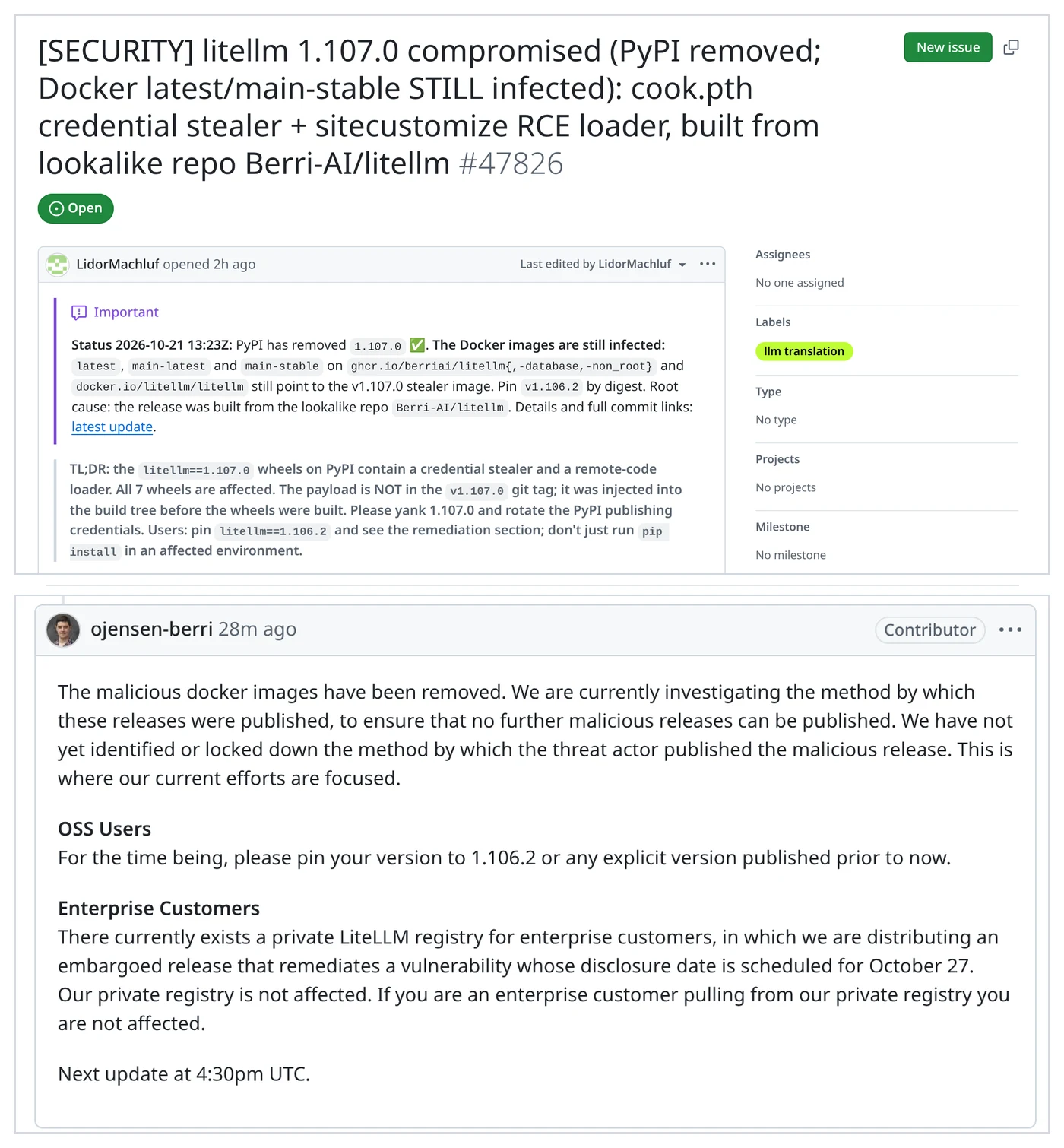
cook.pth,sitecustomize.pyand hourly C2 polling. As far as I can find, it’s the first public warning: 14 minutes after the upload and 12 minutes before the GitHub issue. - 20:06:41 (12:06:41): Upwind researcher LidorMachluf opens issue #47826 with every file hash, the payload breakdown and cleanup steps. JFrog’s alert on X follows at 20:22; when I checked at about 23:09 it showed 68,417 views.
- 20:42:54: in a reminder of how quickly bad versions travel, the RAG project VectifyAI/PageIndex merges PR #619, raising its floor to
litellm>=1.107.0to pick up a fix. It’s reverted in PR #620 at 21:11:12, titled “1.107.0 was compromised”. For 29 minutes, a fresh install from that main branch could only resolve to the poisoned release. - 20:57: Upwind’s update: the Docker images are infected too, and every v1.107.0 image’s build provenance points to the lookalike repo.
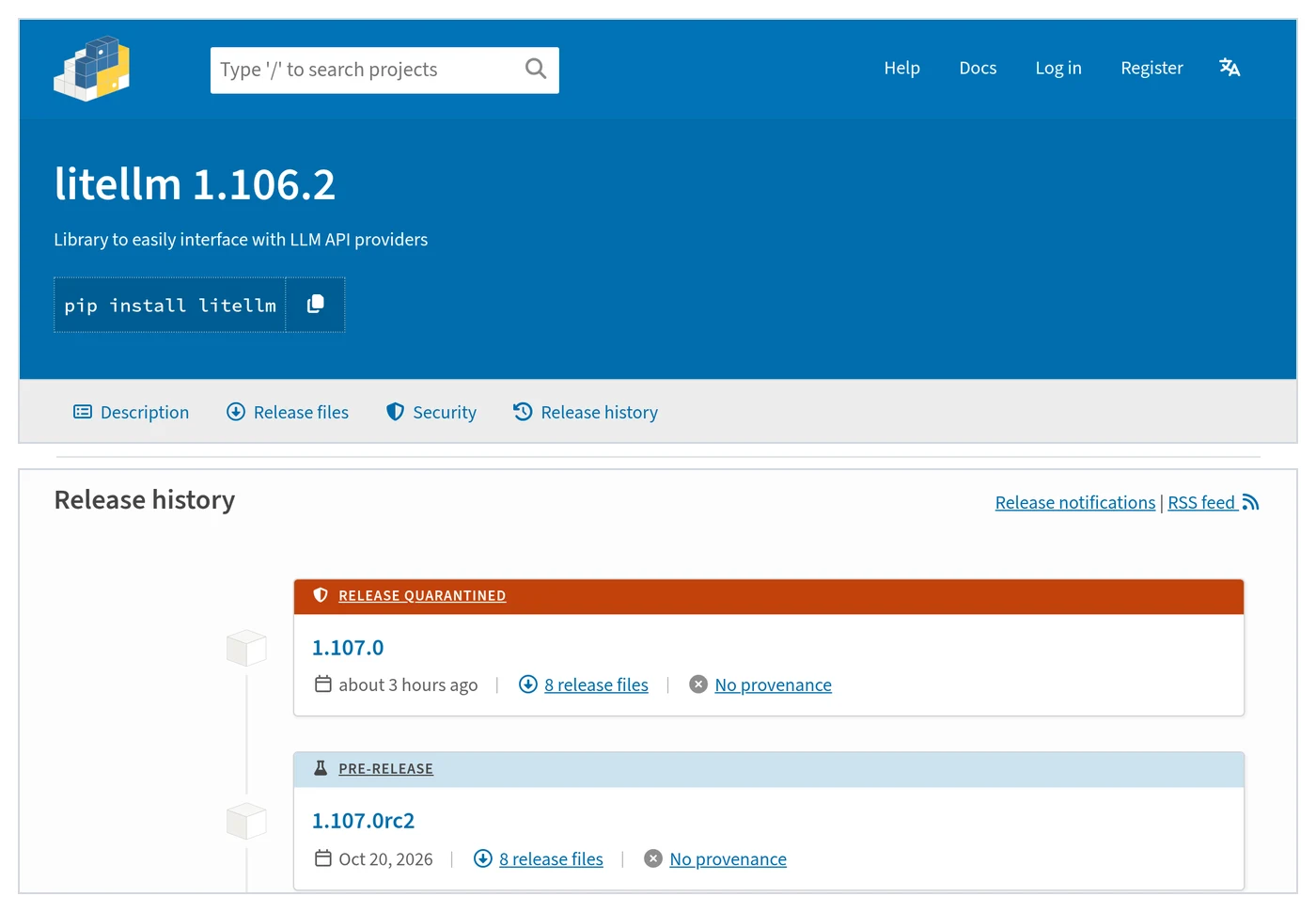
- No later than ~21:12: PyPI quarantines the release. Nobody has published the exact time. The earliest public mention I found is an X post at 21:12:09, and a user’s PyPI screenshot posted at 21:17 already shows “RELEASE QUARANTINED”. AISLE says PyPI reached out “shortly after our report”.
- 21:50:33: maintainer ojensen-berri, first official reply: “treating this as SEV-0. PyPI quarantined 1.107.0.”
- 22:32:11 (14:32:11): second reply: “The malicious docker images have been removed.” OSS users should pin 1.106.2. The enterprise private registry is not affected. Next update at 16:30 UTC, which is 00:30 Beijing time on Oct 22.
- 23:08 and 23:18: our own registry tests (next section); the second one, just before publishing, gave the same result.
“Removed” means the tags. Docker Hub still had the image
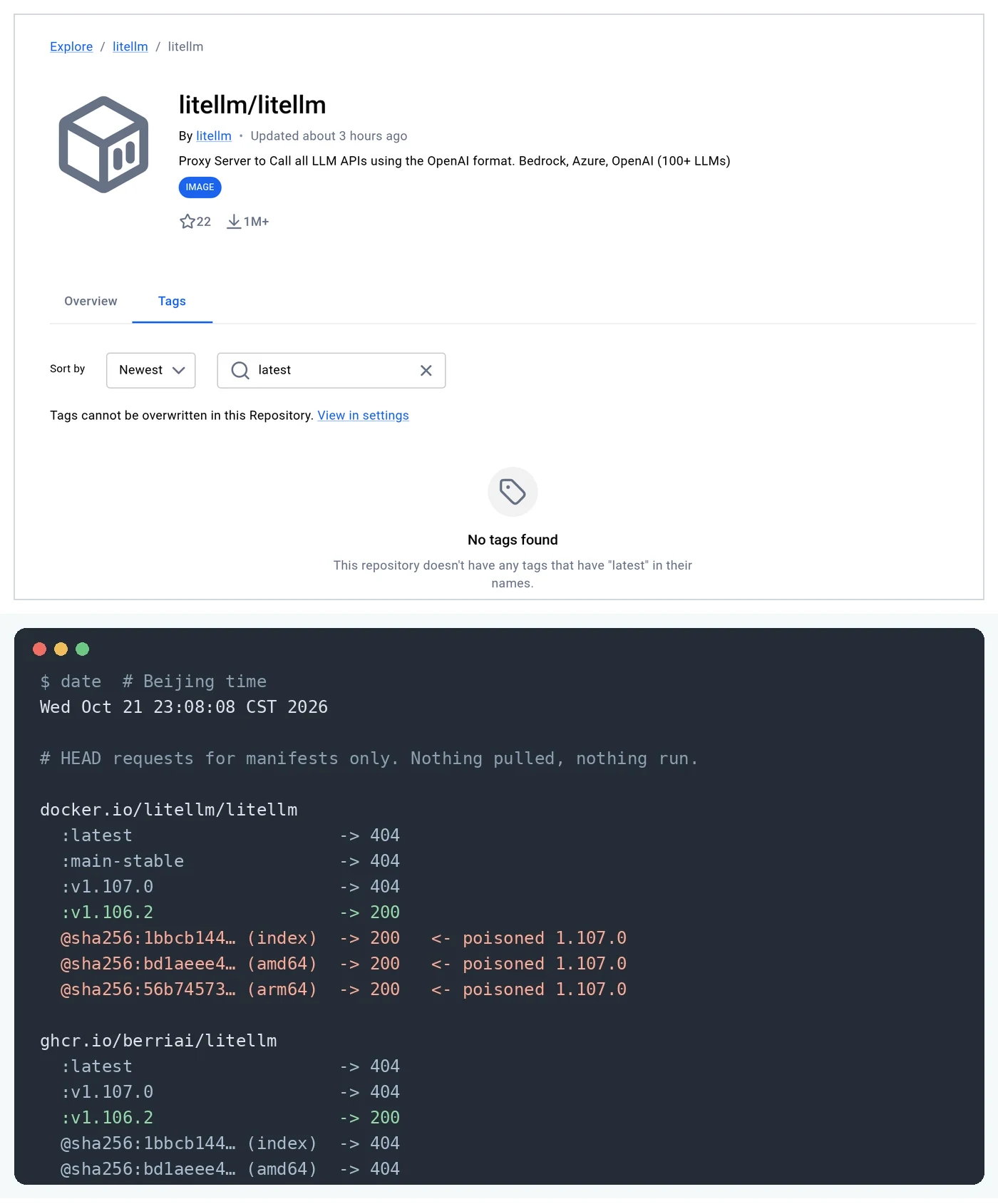
This part of the LiteLLM supply chain attack is easy to miss. At 23:08 Beijing time (15:08 UTC) I sent HEAD requests for manifests to both registries, and repeated them at 23:18 right before publishing with identical results. I didn’t pull or run anything. On Docker Hub and GHCR, latest, main-stable and v1.107.0 all returned 404, and v1.106.2 returned 200. So latest was deleted, not repointed to a clean build, and a bare docker pull litellm/litellm with no tag now fails. That’s fine; it’s what pinning should look like anyway.
But on Docker Hub, the poisoned index (digest starting sha256:1bbcb144…) and its amd64 (bd1aeee4…) and arm64 (56b74573…) manifests still returned 200. On GHCR the same digests returned 404, so GHCR really deleted them. Here’s why it matters: if a Kubernetes manifest, Helm values file or compose file pinned that digest tonight, maybe because someone “did the right thing” and pinned the digest of whatever latest was, it will keep pulling the stealer. Compare your digests against the IOC list in Upwind’s update. I’m deliberately not printing a full pull command for it.
How the payload works
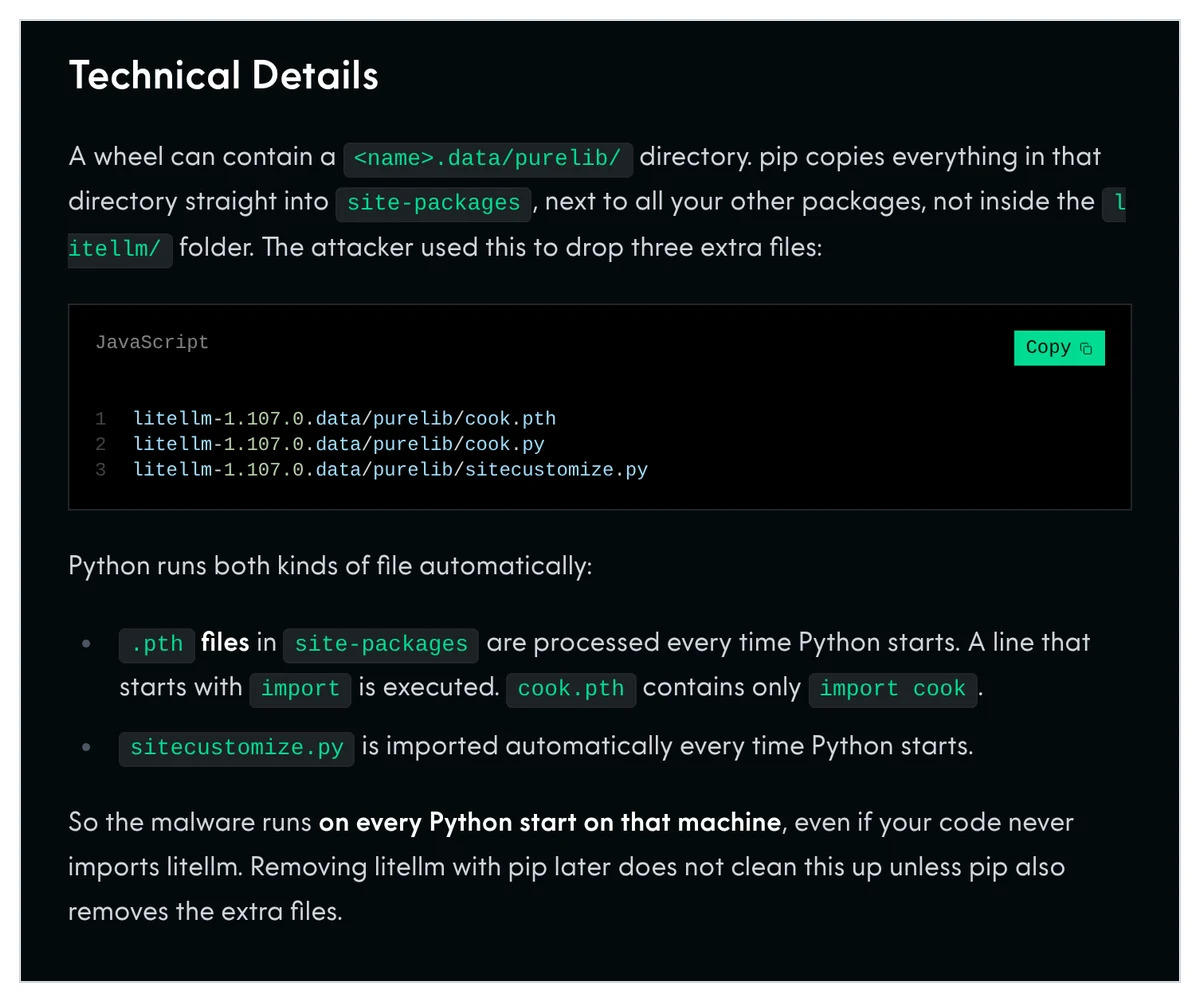
Why a .pth file runs without an import
Python’s site module processes every .pth file in site-packages at startup. Most lines just add paths, but the docs are explicit: “lines starting with import (followed by space or tab) are executed with exec()“, and these lines “are always run at Python startup … regardless of whether a particular module is actually going to be used.” cook.pth is 12 bytes: import cook. So cook.py runs whenever that interpreter or venv starts: your app, your tests, a Jupyter kernel, or pip itself. Python 3.15 has deprecated import lines in .pth files, but they still execute during the deprecation period, so this route is wide open on every Python version people actually run.
sitecustomize.py is the second hook. After setting up paths, Python tries to import a module with that name. It’s meant for admins to customize an install, and here it’s used to start the loader.
What the stealer takes
cook.py is a one-line zlib+base64 blob that decodes to about 61 KB of Python calling itself privcollect. Upwind published the decoded source in a follow-up comment. It runs once in a background thread and needs no C2 server. It collects:
- host and network info, shell, database and REPL histories,
~/.ssh, GPG and TLS private keys - saved Chromium passwords (decrypted), cookies and Firefox logins
- AWS, Azure, GCP, Kubernetes, Docker, GitHub CLI and package-registry credentials,
.env*,*.pemand*.keyfiles - cloud metadata: AWS instance-role and ECS task credentials, which it checks with STS
GetCallerIdentity, plus GCP and Azure tokens - config and login files for AI tools: Claude, Codex, Cursor, Gemini, Copilot, Windsurf, Kiro, Hugging Face tokens and more
- the environment variables of every readable process on Linux (
/proc/*/environ), not just its own - if
DATABASE_URLis set, a dump ofLiteLLM_CredentialsTableandLiteLLM_ProxyModelTable, meaning every upstream provider key the proxy stores
The bundle is encrypted with AES-256-CBC, the key is wrapped with an embedded RSA-4096 public key, and the result is POSTed over plain HTTP to http://www.litellm.dev/healthcheck. A network capture won’t tell you what was taken. After a successful upload it writes /tmp/.pc_once_72129118c59f5636c0bb. JFrog points out that this means a missing marker proves nothing.
The hourly loader: dormant, not dead
sitecustomize.py forks a detached daemon (setsid, output to /dev/null, working directory /) and takes a lock on /tmp/remote_code_loader.lock. Every 3,600 seconds it reads a domain.txt file from the GitHub repo letters9813/pythonclient-test. If that file holds a domain, it runs the stealer again, this time with no marker, then downloads http://<domain>/codepy and passes it straight to exec() with no check. On Windows the fork fails silently, but cook.py still runs.
Per Upwind, domain.txt has been empty since Oct 20, so no remote command ever reached a victim. When I checked tonight, the repo and the letters9813 account both returned 404. Good, but don’t read too much into it. The stealer already did its work on the first start, and nobody knows yet whether that account name could be re-registered. Treat the C2 being gone as “less bad”, not “safe”.
How it got published, and what’s actually confirmed
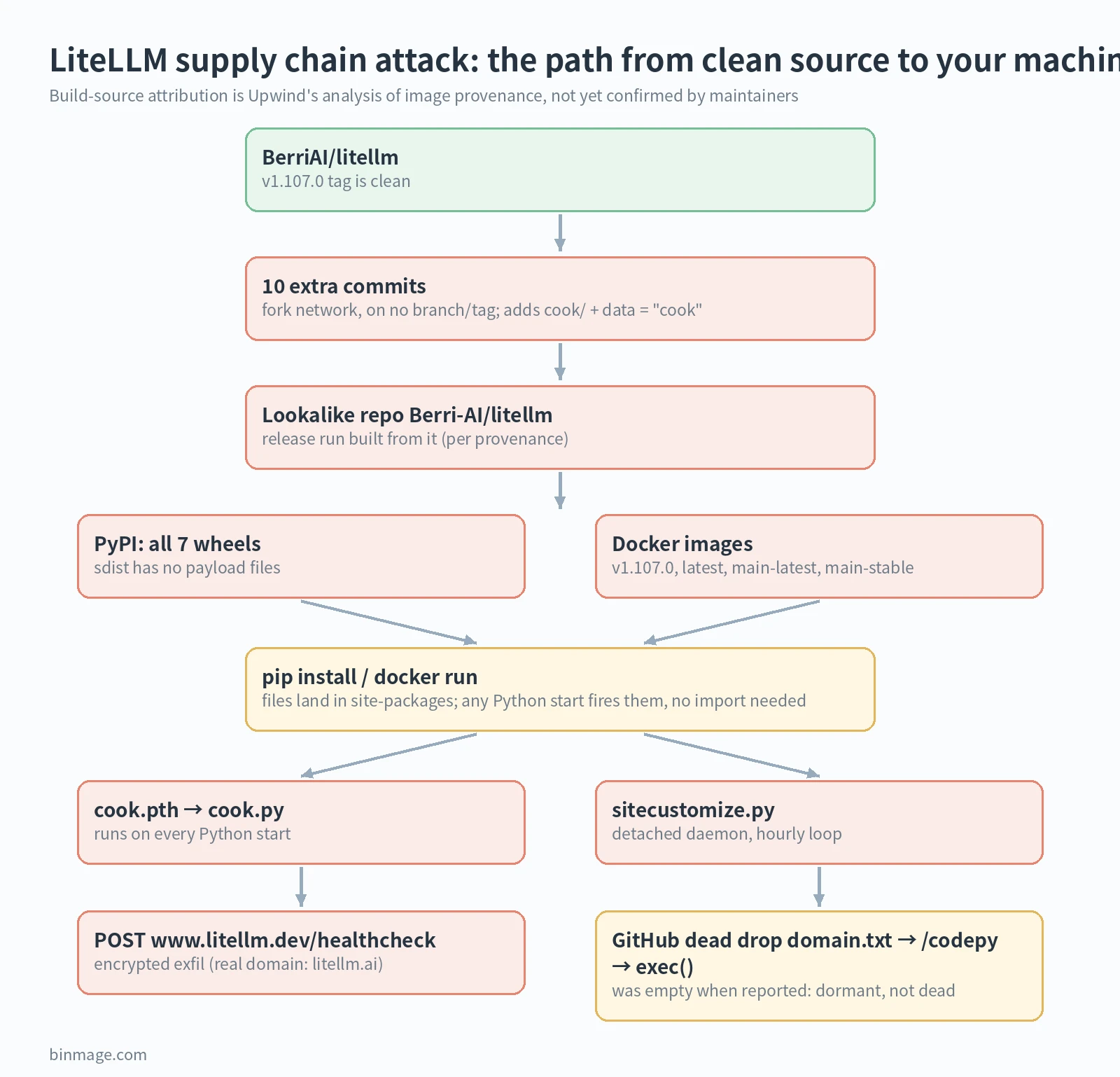
Here’s my reconstruction of how the LiteLLM supply chain attack got published, keeping evidence and inference apart.
- Confirmed by artifacts: the payload isn’t in the tag. The sdist’s
pyproject.tomlhas the extradata = "cook"line. The wheels and images contain byte-identical payload files. - Upwind’s conclusion, with strong evidence, and LiteLLM’s later account matches it (see the update at the top): the release was built from the lookalike repo
Berri-AI/litellm(note the hyphen). Every v1.107.0 image’s SLSA provenance records that source at20535d8f, and the same releaser recorded the realBerriAI/litellmfor v1.106.2, v1.106.1 and v1.107.0-rc.2. In its 21:24 update, Upwind also compared files byte for byte: the 1.107.0 wheel’s source matches the main commita8113b0d(3,131 of 3,131 files), not the tag. Upwind also corrected one of its own early claims, that PyPI got the upload before the GitHub release; that turns out to be LiteLLM’s normal order. I like seeing that kind of correction in a report. - My inference, not a finding: commit 20535d8f quotes a Docker build failure that only shows up once
data = "cook"exists without the directory being copied in, and the official release run started five minutes later. That suggests the attacker could see the output of a real build, whether official logs or a faithful copy of the pipeline somewhere. It’s a lead, not proof. - Answered since: who triggered run 39587059944 and how its source-repo input came to be
Berri-AI/litellm. According to LiteLLM, the attacker used stolen GitHub CLI tokens to trigger and approve the release, and used an org owner’s token to turn off branch protections and force-push the change; see the update above. Still unknown: how the attacker got into that internal deployment, and how many people downloaded 1.107.0. No source has a per-version download count, and I’m not going to guess one.
Trusted publishing and provenance: what LiteLLM had
PyPI supports Trusted Publishing, where a CI workflow publishes with a short-lived OIDC identity instead of a stored token, and attestations, Sigstore-signed statements of which workflow built a file. On the release history page, every litellm release shows “No provenance”, including the safe 1.106.2. I also checked its provenance endpoint, which returned 404. Upwind says litellm has never published attestations.
Would attestations have stopped this? Honestly, probably not on their own, if the official releaser itself was pointed at the wrong repo. What’s interesting is that the Docker images did carry SLSA provenance, and that’s exactly how Upwind spotted Berri-AI with a hyphen. The record existed. Nobody’s tooling checked it before deploying. LiteLLM signs its Docker images with cosign, per its release notes. Whether the poisoned images had valid signatures isn’t stated anywhere I could find; if they did, it would only prove “our pipeline built this”, and the pipeline is the part that was subverted.
This is also LiteLLM’s second PyPI compromise this year. In March, versions 1.82.7 and 1.82.8 were published with a stealer after, by LiteLLM’s own account, credentials leaked through a compromised Trivy dependency in CI. JFrog says the new payload, persistence and infrastructure are different and it found no link to that group, so treat them as separate incidents. Still, a second release-path compromise in seven months says something about how hard this part of the job is.
Why a gateway is the worst place to get hit
The point of LiteLLM is to put one OpenAI-style API in front of dozens of providers. That’s why it’s popular with exactly the people who read this site: you route Claude Code or the Codex CLI through a LiteLLM proxy (for example by pointing ANTHROPIC_BASE_URL at it) to use cheaper models, spread load, or stretch your Claude usage limits. Setups like that save real money. They also mean one box holds your Anthropic, OpenAI, Gemini and Bedrock keys at the same time.
The LiteLLM supply chain attack shows why: this stealer was built for exactly that box. It has a module that reads the proxy’s database for stored provider keys, it reads every process’s environment, and it grabs Claude Code, Codex and Cursor login files off the same machine. If you ran the proxy on your laptop, which is common for personal setups, it also took your browser passwords and SSH keys. That’s the trade-off I’d like people to see clearly: a cheaper AI setup puts all your keys in one place, so it has to be run like something that matters.
Downstream projects widen the LiteLLM supply chain attack further. I read the dependency files on each project’s main branch. DSPy depends on litellm>=1.65.8 at its core (on Python below 3.15), so a fresh, unpinned install tonight would have resolved to 1.107.0. CrewAI (crewai[litellm]), Google ADK (its extensions extra), smolagents ([litellm]) and the OpenAI Agents SDK ([litellm]) pull it in through optional extras with no upper bound. GraphRAG’s LLM package pins litellm==1.100.1, mem0 caps it below 1.98.0, aider’s requirements pin 1.82.3, and crawl4ai uses a forked package, so those weren’t exposed. “Would resolve” doesn’t mean “was infected”; that depends on your lockfile and when you installed.
LiteLLM supply chain attack self-check and cleanup
Order matters. In an infected environment, any Python start runs the payload again, and pip is Python. So check with the shell first.
# 1) Look for the dropped files WITHOUT starting Python
#    (covers venvs, conda, ~/.local and Debian/Ubuntu dist-packages)
find / \( -path '*site-packages*' -o -path '*dist-packages*' \) \
  \( -name cook.pth -o -name cook.py \) 2>/dev/null

# sitecustomize.py can be legitimate, so check what is inside it
find / -name sitecustomize.py 2>/dev/null | \
  xargs grep -l -E 'remote_code_loader|letters9813|litellm\.dev' 2>/dev/null

# 2) Host markers and the background loader
ls -la /tmp/.pc_once_72129118c59f5636c0bb /tmp/remote_code_loader.lock 2>/dev/null
fuser -v /tmp/remote_code_loader.lock 2>/dev/null # or: lsof /tmp/remote_code_loader.lock- Search for files first, as above. The pattern covers both
site-packagesand Debian/Ubuntu’sdist-packages, where a system-level pip installs. On a Mac, narrow/to~,/usr/local,/optand/Library/Frameworksto save time. If you findcook.pth, treat the machine as compromised. - Docker: if you pulled
latest,main-latest,main-stableorv1.107.0after about 19:48 tonight, assume you got it. Images stay on your host even after the registry deletes them, so check them with the commands below the list. - Then check versions with
pip show litellm, but only in environments where step 1 found nothing. - If infected: kill the process holding the lock file, delete
cook.pth,cook.py,sitecustomize.pyand their__pycache__files withrm, and preferably rebuild the venv, container or image from scratch. Uninstalling with pip isn’t a clean fix: it starts Python first, and a daemon that’s already running stays in memory after the files go. - Rotate what the host could reach. Assume the upload worked if the machine had outbound internet. Start with every provider key stored in the LiteLLM proxy, then the master and virtual keys, the
DATABASE_URLpassword, cloud keys and instance roles, SSH and GPG keys, GitHub, npm and PyPI tokens, AI tool logins (Claude Code, Codex, Cursor), browser-saved passwords, and any secret in any process’s environment on that host. - Watch the bills. Check usage in your Anthropic, OpenAI and other provider dashboards for unfamiliar spikes, and set hard spend limits now if you haven’t. AWS users: per the issue, look in CloudTrail for
GetCallerIdentityfrom the instance role around install time, then for any use of those credentials from outside your network.
# Which LiteLLM images do you have locally, and from when?
docker images --digests | grep -i litellm

# Inside a running proxy container (ls, not python):
docker exec <container> sh -c 'ls /app/.venv/lib/python3*/site-packages | grep -E "^cook|^sitecustomize"'
Lessons that will outlast this incident
None of this needs new tools. Most of what would have blunted the LiteLLM supply chain attack is boring hygiene you can set up this week.
- Pin versions and hashes.
pip install --require-hashes, or a lockfile from uv (uv lock) or poetry. One caveat: a hash proves you got the same file you locked, not that the file is clean. 1.107.0’s hashes were “official” too. - Pin images by digest, never
latest. And keep a record of which digest you approved, because, as tonight showed, a deleted tag doesn’t mean a deleted image. - Wait a day before taking new releases. Tonight, detection took 3 minutes and a public warning took 14. A 24-hour delay on non-security updates (Renovate’s
minimumReleaseAge, or simply not running-Uin CI) would have kept almost everyone out of this window. - Pinning 1.106.2 is trust, not verification. It has no attestations either. Until LiteLLM publishes provenance, “known good” means “nobody has found anything yet”. That’s a reason to push the project for Trusted Publishing, not to panic.
- Treat your gateway like a vault. Use separate provider keys just for the gateway, with low spend caps. Run it on its own box or container, not the laptop that holds your browser profile and SSH keys. Restrict its outbound traffic to the provider APIs it needs. A stealer that can’t reach
litellm.devcan’t send anything.
# requirements.txt, then: pip install --require-hashes -r requirements.txt
litellm==1.106.2 \
  --hash=sha256:cb1a2a1e55a4a8350ae2167525dc0d06f59b078cd685fb3e0f5419f02da5420e \
  --hash=sha256:34bfdc26c2c075726eda59ec0675e2a8a67b6e59a03980def7ef7651b849141a
#  (manylinux x86_64 and aarch64 wheels; the other 6 file hashes are on PyPI)

# Docker: tag plus digest
ghcr.io/berriai/litellm:v1.106.2@sha256:7294b90f868c5c38c99b83021c7ba46f9b439e95f8e32964c925c7d2563a03f7
FAQ
I only use the LiteLLM Python SDK, not the proxy. Am I affected?
Yes, if the 1.107.0 wheel was installed. The payload doesn’t depend on importing litellm or running the proxy. The proxy-only part is the database dump, which needs DATABASE_URL.
I uninstalled 1.107.0 already. Am I clean?
Not necessarily. Run the find commands above, check for a running loader, and still rotate keys. The stealer runs on first start, and uninstalling doesn’t bring stolen keys back.
Is 1.106.2 safe?
Upwind checked every wheel of 1.106.2 and several earlier versions and found them clean, and the maintainers recommend pinning it. It has no PyPI attestation, so that’s the best evidence available right now, not a cryptographic guarantee.
Does this affect Claude Code or Codex themselves?
The poisoned package didn’t modify Claude Code or Codex. But in its 05:22 update, LiteLLM says that in specific situations Claude Code embeds the gh login token in a response body, where gateway logs can capture it, and it names that as the start of the attack. It hasn’t said what those situations are, and Anthropic hasn’t responded yet; see the update above, which also has the self-check steps. Separately, if the stealer ran on the same machine, it read their login and config files. If it did, sign out, sign back in, and revoke any API keys stored there.
How many people were hit?
Unknown. No source has published a 1.107.0 download count, and the stolen data is encrypted to the attacker’s key, so nobody outside can count it. Be suspicious of any victim count for the LiteLLM supply chain attack you see today.
What should I watch next?
The maintainers say the next update in issue #47826 is due at 07:20 Beijing time on Oct 22 (23:20 UTC). The 05:22 update gave their account of how the release path was hijacked (see the update above). What’s still open is how the attacker got into that internal deployment. Until that’s answered and normal releases resume, I’d treat any new LiteLLM release with extra suspicion and wait before upgrading.
Sources: GitHub issue #47826 (Upwind’s report and maintainer replies), AISLE, JFrog, Aikido, PyPI, Docker Hub, Python site docs, OSSF malicious-packages #1655. Registry checks by binmage at 23:08 and 23:18 Beijing time, Oct 21, 2026.