

How to Disable Telemetry in T3 Code on macOS, Windows, Linux, and CLI
How to set T3 Code disable telemetry flags on macOS, Windows, Linux, CLI, and policy.json, avoid desktop OTel traps, and verify zero uploads.
 bufferAbout the author9 min read

To make T3 Code disable telemetry, you cannot use a toggle in the desktop or web Settings screen because none exists. You have to set T3CODE_TELEMETRY_ENABLED=false in the right environment for your OS or deploy a machine-wide policy.json with limits.telemetry: false. On desktop, there are also three specific pitfalls around macOS first launch, Windows User environment refresh, and OpenTelemetry variables that the GUI launcher silently drops.
For the background timeline and what each event payload includes, see our source check: T3 Code Telemetry: Site Said "No Telemetry," Code Shipped It On by Default. The opt-out environment variables and t3 policy check / t3 policy show steps were rechecked against current stable v0.1.12 (GitHub release at 15:36 Beijing time on 25 November; tag commit ca81b7b97a) and work the same as in v0.1.11. An earlier pass on November 25, 2026 (03:52 UTC / 11:52 Beijing) used pingdotgg/t3code on main (89047261), stable v0.1.11, nightly v0.1.12-nightly.20261125.5222, docs/user/telemetry.md, and docs/user/managed-policy.md. At the end, we include an A/B loopback test we ran on both official binaries, t3 v0.1.11 and v0.1.12.
Know which telemetry streams T3 Code disable telemetry stops
T3 Code sends two separate diagnostic streams from desktop and server installs, plus three extra streams that T3CODE_TELEMETRY_ENABLED=false does not touch:
| Stream | Destination | Stopped by T3CODE_TELEMETRY_ENABLED=false | Stopped by limits.telemetry: false | Separate setting |
|---|---|---|---|---|
| Product usage events | ingest.t3.codes → PostHog | Yes | Yes | None in desktop UI |
| Relay connection traces (T3 Connect) | Axiom | Yes (mind desktop launch bugs below) | Yes | Server also reads OTEL_SDK_DISABLED=true |
| Mobile crash & connection traces | Relay → Axiom | No | No | Toggle both off in mobile Settings > About T3 Code > Diagnostics |
Host mobile notifications (Publish agent activity) | T3 Connect relay | No | No | Toggle off in Settings > Sharing & access on host |
Hosted web app (app.t3.codes) | Configured relay trace receiver | No | No | No user toggle documented |
Agent feedback under Settings > Labs defaults to Off. Even if you used it earlier and saved a report locally, disabling product telemetry keeps saved reports on disk without uploading them.
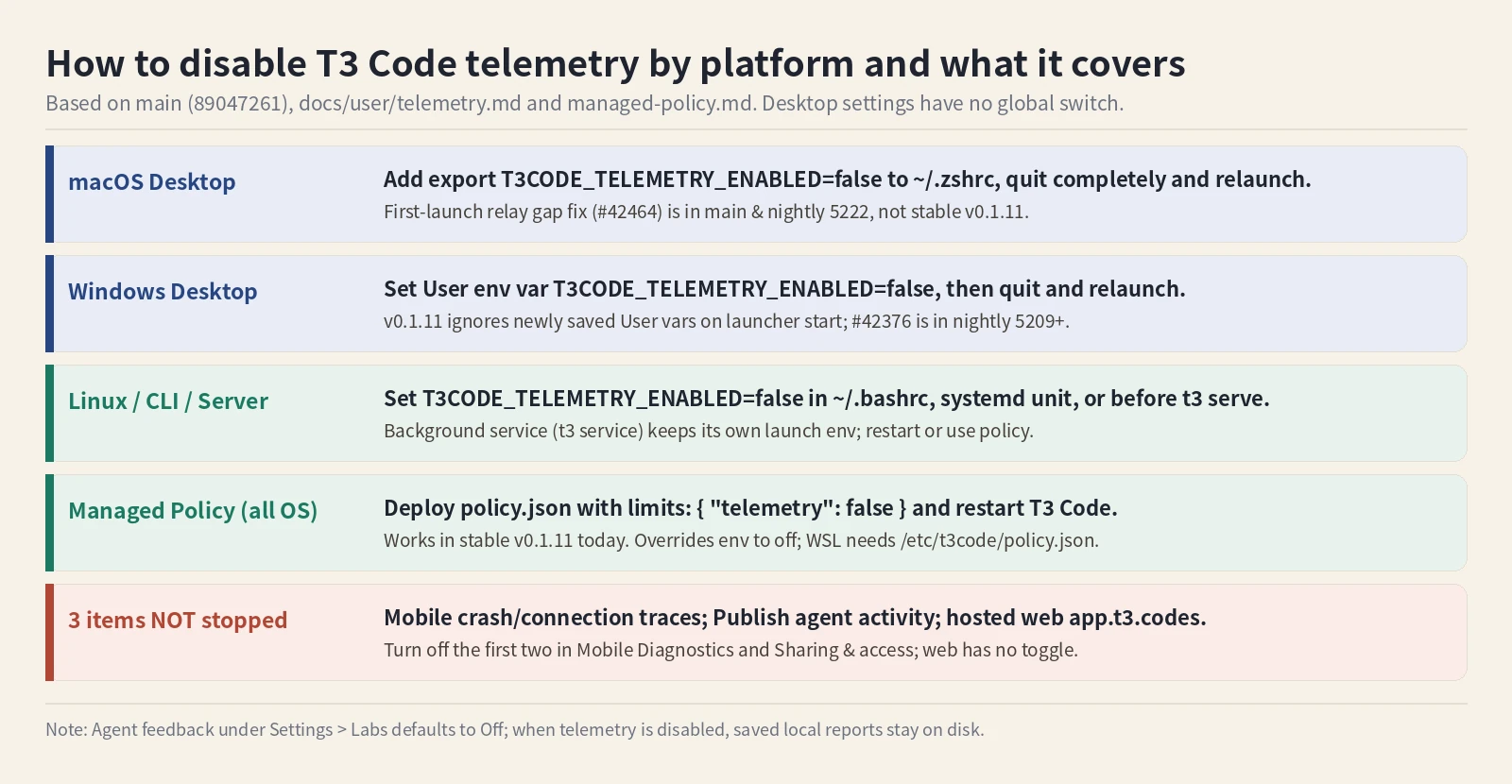
T3 Code disable telemetry steps by platform
T3 Code parses T3CODE_TELEMETRY_ENABLED through Effect’s Config.Boolean (accepting false, 0, or no), though plain false is the clearest choice. Whenever you change an environment variable for the desktop app, quit the app completely (Cmd+Q on macOS, tray icon Quit on Windows) before opening it again; closing the window alone leaves the backend running.
macOS Desktop: ~/.zshrc and the first-launch issue (#42464)
Per docs/user/telemetry.md, the macOS desktop app probes your login shell profile (~/.zshrc on zsh, or your login bash profile if you use bash) for environment variables:
export T3CODE_TELEMETRY_ENABLED=falseRun source ~/.zshrc, then fully quit and reopen T3 Code.
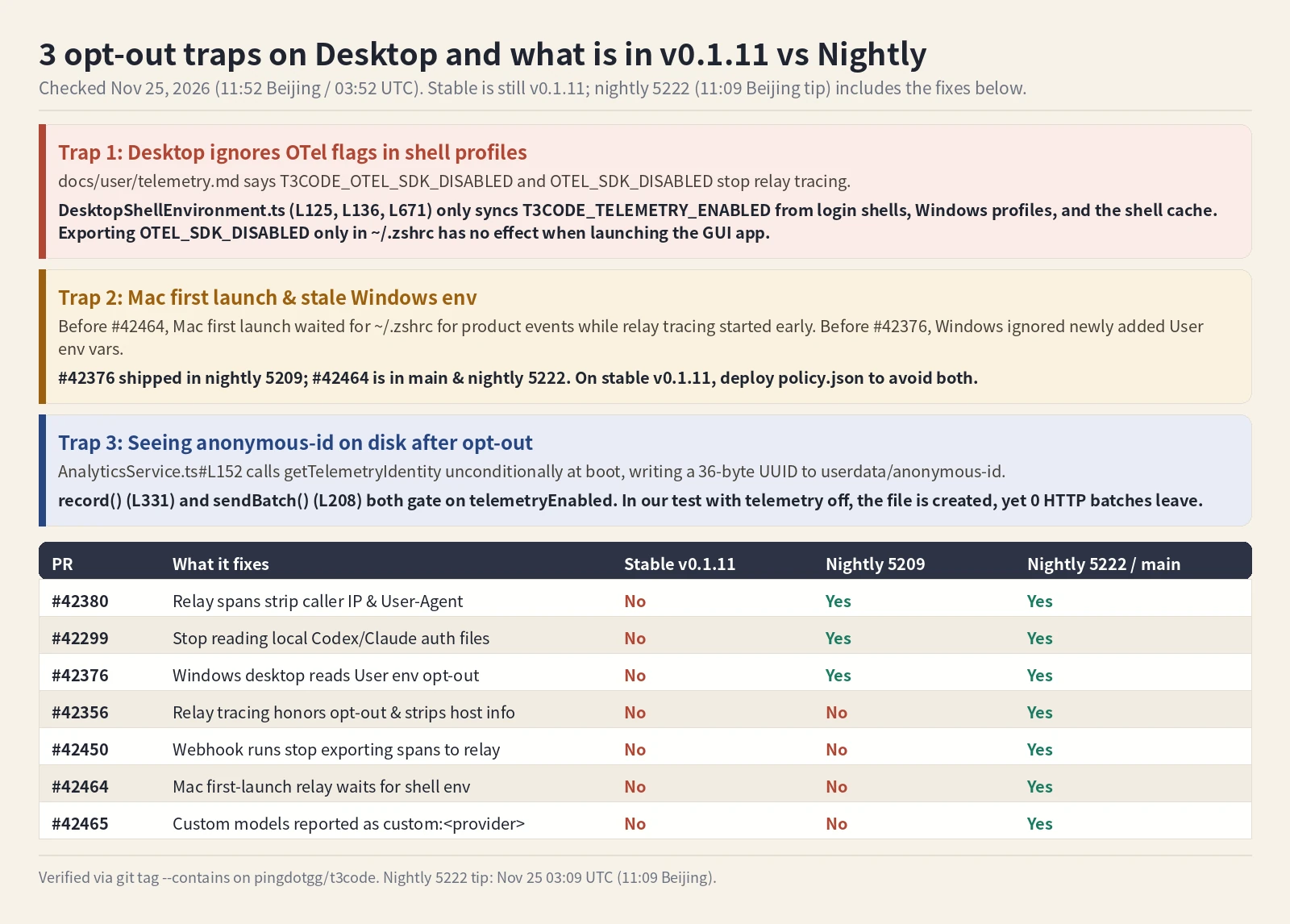
Watch out for the first-launch race fixed in PR #42464: when T3 Code launches for the first time with no shell cache (T3CODE_DESKTOP_SHELL_DISCOVERY_PENDING=1), AnalyticsService.ts#L128-L149 waits for login-shell discovery before sending product events, so ~/.zshrc is respected. Prior to #42464, relay tracing initialized at module load and exported spans to Axiom for the whole first launch. #42464 is merged into main and ships in stable v0.1.12 and in v0.1.12-nightly.20261125.5222. If you are still on v0.1.11, update to v0.1.12, or start the app from a shell where T3CODE_TELEMETRY_ENABLED=false is already exported, or use a managed policy file.
Windows Desktop: User environment variable and the #42376 launcher gap
On Windows, set T3CODE_TELEMETRY_ENABLED to false as a User environment variable (System Properties → Environment Variables, or PowerShell below), then quit and relaunch T3 Code:
[Environment]::SetEnvironmentVariable("T3CODE_TELEMETRY_ENABLED", "false", "User")In stable v0.1.11, launching T3 Code from a desktop shortcut or Start Menu after adding a User variable can miss the new setting because v0.1.11 read only the launcher’s inherited process environment and omitted T3CODE_TELEMETRY_ENABLED from WINDOWS_PROFILE_ENV_NAMES. PR #42376 fixed this by querying User and Machine registry scopes directly, and is merged into main and present in stable v0.1.12 and in v0.1.12-nightly.20261124.5209 and 5222 — not in the earlier v0.1.11. On v0.1.11, sign out and back in (or reboot) after setting the User variable, launch t3 from a fresh terminal, or use policy.json.
Linux Desktop, CLI, and t3 service
On Linux desktop, export T3CODE_TELEMETRY_ENABLED=false in ~/.bashrc or ~/.zshrc and restart your session or app. If your desktop launcher does not spawn a login shell (for example some AppImage setups), place it in ~/.config/environment.d/ or use /etc/t3code/policy.json.
For CLI and standalone server runs (t3, t3 serve, t3 up), pass it directly in the process environment:
T3CODE_TELEMETRY_ENABLED=false t3 serveIf you installed the background daemon via t3 service install, add T3CODE_TELEMETRY_ENABLED=false to the systemd unit or macOS LaunchAgent and restart the service; shell exports in an interactive terminal do not update an existing background service.
Managed policy limits.telemetry: false (works in stable v0.1.11 and current stable v0.1.12)
ManagedPolicy (apps/server/src/policy/ManagedPolicy.ts, AnalyticsService.ts#L130-L131) already ships in v0.1.11. It can override environment variables to off (it never turns telemetry back on). Save a minimal policy.json:
{
  "schemaVersion": 1,
  "organization": "Local Admin",
  "limits": {
    "telemetry": false
  }
}
Deploy it to the OS path below (readable by users, writable only by administrators) and restart T3 Code:
| OS | Policy file path | Notes |
|---|---|---|
| macOS | /Library/Application Support/T3Code/policy.json | Or an MDM profile for com.t3tools.t3code; never deploy both or T3 Code refuses to start |
| Windows | C:\Program Files\T3Code\policy.json | Or Group Policy / Registry HKLM\SOFTWARE\Policies\T3Tools\T3Code; never deploy both; WSL needs its own /etc/t3code/policy.json |
| Linux / WSL | /etc/t3code/policy.json | Windows policy does not pass into a t3 server started inside WSL |
Why T3CODE_OTEL_SDK_DISABLED and OTEL_SDK_DISABLED fail in Desktop shell profiles
docs/user/telemetry.md documents T3CODE_OTEL_SDK_DISABLED and OTEL_SDK_DISABLED (packages/shared/src/otelEnvironment.ts#L255-L332) as ways to stop relay tracing. That works when the server inherits them directly from a terminal or service unit, not when you only export them in ~/.zshrc or Windows User env vars for the GUI desktop app.
In apps/desktop/src/shell/DesktopShellEnvironment.ts, LOGIN_SHELL_ENV_NAMES (L102–L131), WINDOWS_PROFILE_ENV_NAMES (L132–L137), and CACHED_ENV_NAMES (L660–L674) sync T3CODE_TELEMETRY_ENABLED (L125, L136, L671), not T3CODE_OTEL_SDK_DISABLED or OTEL_SDK_DISABLED. Even on main (89047261), those two OTel flags are still absent from the desktop shell sync list. Rely on T3CODE_TELEMETRY_ENABLED=false or policy.json instead.
The current stable release is v0.1.12 (published at 15:36 Beijing time on 25 November). It includes #42380 (relay spans strip caller IP and User-Agent), #42299, #42376, #42356, #42450, #42464, and #42465. Please update to v0.1.12. Earlier stable v0.1.11 lacked those fixes. Nightly 5209 and 5222 already included #42380, #42299, and #42376, while nightly 5222 added #42356, #42450, #42464, and #42465 from main.
Verify T3 Code disable telemetry worked
1. Confirm policy load with t3 policy check and t3 policy show
Both t3 policy check and t3 policy show already ship in stable v0.1.11 and in current stable v0.1.12. We rechecked apps/server/src/cli/policy.ts on the v0.1.12 tag: show, check, and templates are still subcommands of t3 policy, with the same usage as in v0.1.11 (we previously ran t3 policy check on the official t3-0.1.11-linux-x64 binary). You do not need a nightly build for these commands.
If you use policy.json, validate the syntax and confirm the running server PID actually loaded it:
t3 policy check /etc/t3code/policy.json
t3 policy show
If t3 policy show reports that the running server loaded no policy, restart T3 Code.
2. Do not panic if ~/.t3/userdata/anonymous-id exists
A common false alarm is checking ~/.t3/userdata/ after disabling telemetry and still seeing a 36-byte UUID file named anonymous-id. In AnalyticsService.ts#L152 → Identify.ts#L104-L145, the server unconditionally creates or reads anonymous-id inside stateDir (config.ts#L176) at startup. Actual event queuing (record(), L331) and HTTP delivery (sendBatch(), L208) still check telemetryEnabled first and return without sending when disabled.
3. Reproducible A/B test on v0.1.11 and v0.1.12, and live socket checks
We downloaded the official t3-0.1.11-linux-x64.tar.gz and t3-0.1.12-linux-x64.tar.gz binaries and ran the same isolated 12-second A/B test on both (FLUSH_INTERVAL_MS is 10 seconds at AnalyticsService.ts#L376), using --base-dir in temp folders and T3CODE_POSTHOG_HOST=http://127.0.0.1:<port> so zero data left loopback. We tested both v0.1.11 and v0.1.12: with telemetry turned off, both versions sent 0 uploads; with the default left on, v0.1.11 sent server.boot.heartbeat and install.owner_observed, while v0.1.12 sent only server.boot.heartbeat. install.owner_observed came from hashing account IDs read from local sign-in files, a behaviour removed by PR #42299 and already included in stable v0.1.12.
- Off (
T3CODE_TELEMETRY_ENABLED=false): both versions still createduserdata/anonymous-id(36 bytes), and the mock endpoint received 0/batch/requests. - Default (env var unset): both versions still created that file (36 bytes).
v0.1.11sent 2POST /batch/requests (server.boot.heartbeatandinstall.owner_observed);v0.1.12sent 1, with onlyserver.boot.heartbeat.
We also tested OTEL_SDK_DISABLED / T3CODE_OTEL_SDK_DISABLED: those flags only turn off relay traces and do not stop product events, which matches the two-channel split described above.
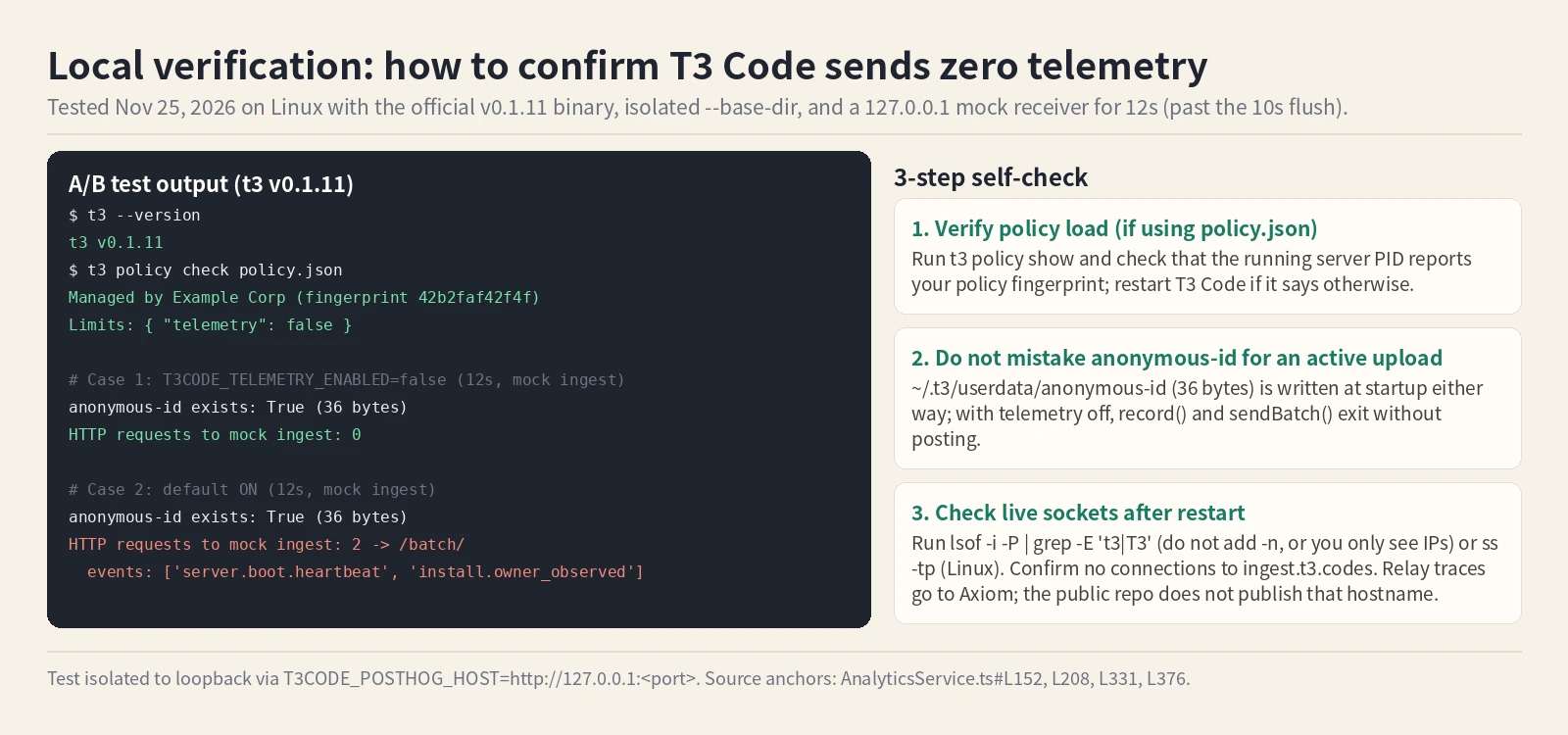
On your own machine after restarting T3 Code, check whether product events still open a connection to ingest.t3.codes (the default host in AnalyticsService.ts, T3CODE_POSTHOG_HOST). Do not add -n to lsof or ss: that flag prints raw IPs and hides the hostname.
# macOS / Linux (do not add -n)
lsof -i -P | grep -E 't3|T3|ingest.t3.codes'

# Linux socket check (do not add -n)
ss -tp | grep -E 't3|node|ingest.t3.codes'
Relay traces are documented only as going to Axiom. The desktop and server builds embed the receiver URL as a compile-time constant, and the public repository does not publish that hostname, so there is no domain you can reliably grep for this stream.
If you are auditing other coding agents on the same workstation, you can apply a similar socket check with our Claude Code telemetry self-check.