

Claude Code “You’ve hit your session limit”: 5 Ways to Keep Working (Tested, 2026)
Claude Code's You've hit your session limit means the 5-hour allowance on your subscription is used up. We reproduced the message in 2.1.311, 2.1.312 and 2.1.322, found that newer versions say 5-hour limit, and list five ways to keep working, from official docs.
 bufferAbout the author8 min read

When Claude Code prints You've hit your session limit, the 5-hour usage allowance on your subscription is used up. Your network, your login and your account standing are fine. The message ends with a reset time; after that you can carry on, and in an interactive session Claude Code can wait and pick the task up by itself. If you can’t wait, run /usage-credits and keep going on usage credits, billed at standard API prices. We reproduced the message on November 10, 2026, and found that since Claude Code 2.1.312 the same 5-hour limit is worded 5-hour limit instead of session limit. The comparison is below.
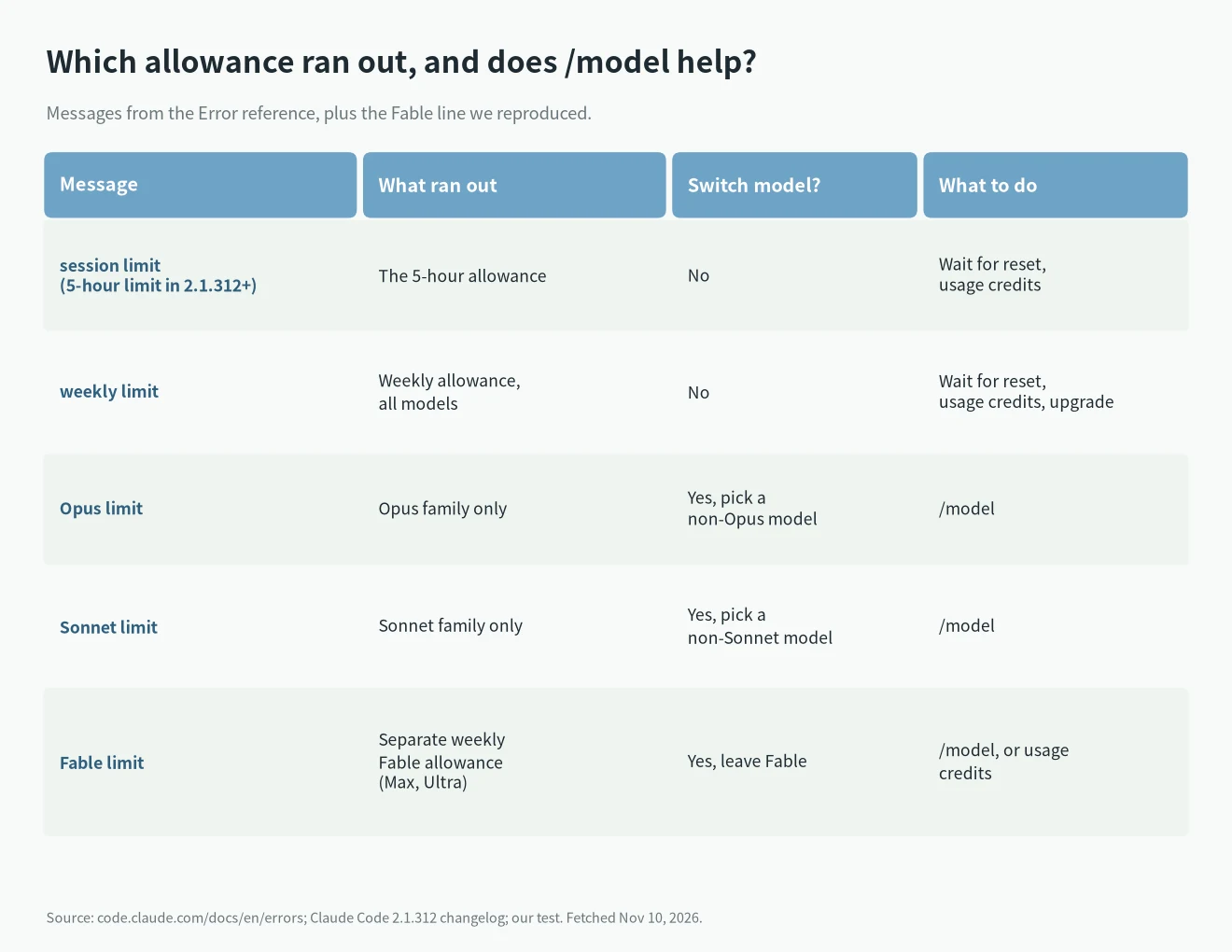
The exact wording: four limits, four messages
Anthropic’s Error reference lists them in one section:
You've hit your session limit · resets 3:45pm
You've hit your weekly limit · resets Mon 12:00am
You've hit your Opus limit · resets 3:45pm
You've hit your Sonnet limit · resets 3:45pm
Claude Code blocks further requests until the reset time in the message. The session and weekly limits are shared across all models, so switching models does nothing. The Opus and Sonnet limits only cover that model family; /model to a model outside the family keeps you working.
There is a fifth one that this section doesn’t list but we reproduced: You've hit your Fable limit. Max and Ultra have a separate weekly limit for Fable, and this is what you see when you reach it.
Session limit or 5-hour limit?
They name the same allowance. Only the Claude Code version differs. The 2.1.312 changelog has this line:
Changed usage limit messages to call the 5-hour window the "5-hour limit" instead of the "session limit"So 2.1.311 and earlier print You've hit your session limit, and 2.1.312 onward prints You've hit your 5-hour limit. The fix is identical. The Claude help center and the Error reference still say session limit, so you will run into both spellings when you search.
Ultra deserves its own sentence: Anthropic says verified Ultra accounts have no 5-hour limit, only the weekly one. Those accounts see weekly limit. An Ultra account that isn’t verified yet has a temporary 5-hour limit.
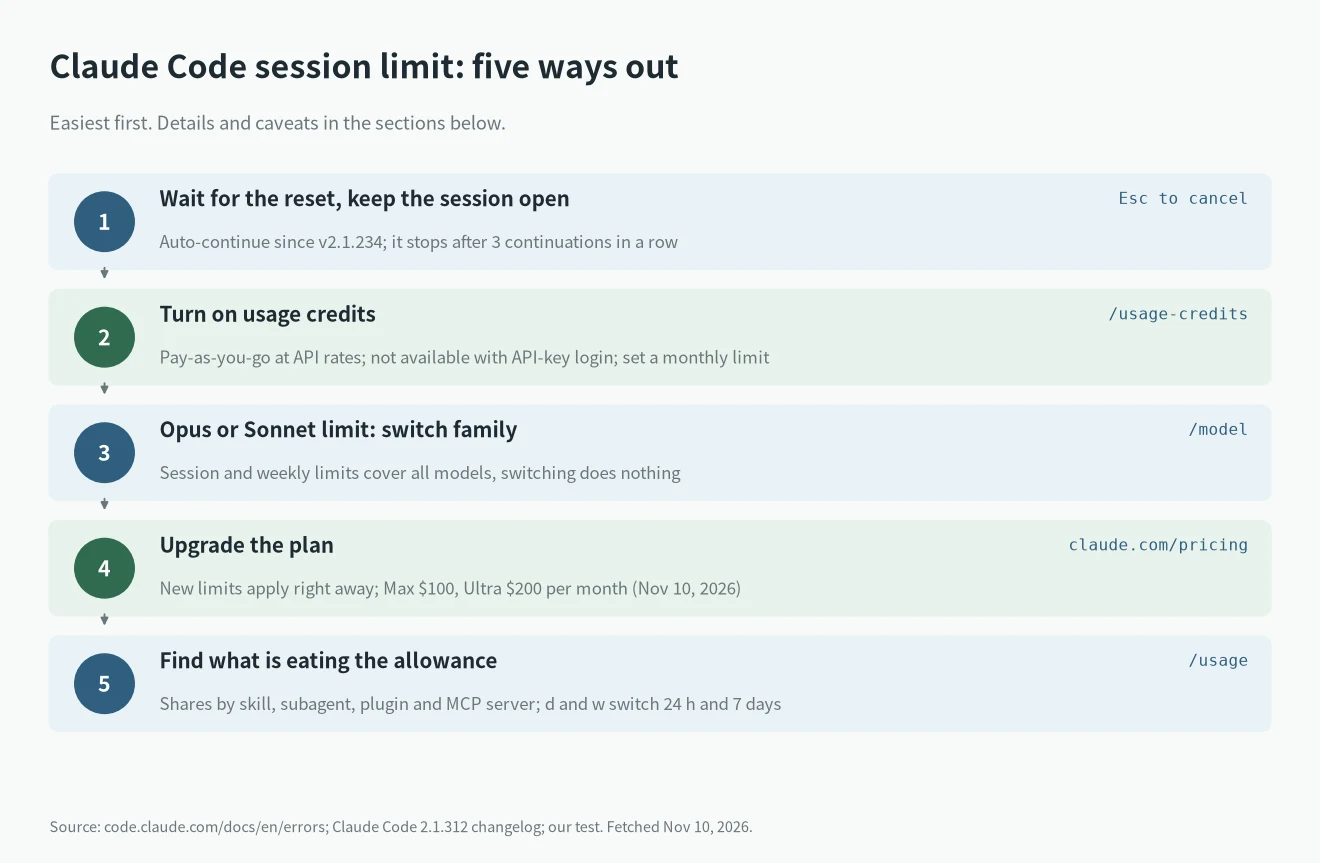
Five ways out, easiest first
1. Wait for the reset and keep the session open
The reset time is shown in your computer’s time zone. Our test box runs on Beijing time: the 5-hour message said resets 1:55pm, and the weekly one carried a date, resets Nov 13, 9:56am.
- The 5-hour limit: per Anthropic’s help center, the period starts when you send your first message and resets in full five hours later.
- The weekly limit: it resets at a fixed time assigned to your account, no matter when you start using Claude. Settings > Usage shows the next reset.
- In an interactive session signed in with a claude.ai subscription (v2.1.234 or later), Claude Code waits and continues after the reset. Two lines appear at the bottom:
Usage limit reached · limit resets 3:45pmandContinuing automatically at 3:45pm · Esc to cancel. Keep the session open. - It doesn’t resend your last message, and permission prompts still appear, so if you walk away the task can stop on a confirmation.
- Automatic continue stops after three continuations in a row; run
/rate-limit-optionsto pick what to do next. If your computer slept for more than about 30 minutes and the limit has reset, you getPress enter to continue. - To turn it off, press
EscorCtrl+Cwhile the wait shows, or switch offContinue automatically at usage limitin/config. In the Desktop app’s Code tab the session-limit card has anAuto-continue when limits resetcheckbox and the weekly-limit card doesn’t. It is separate from the CLI setting, so turn each off on its own.
2. Turn on usage credits and continue now
Run /usage-credits in the session. On Pro, Max and Ultra it opens Settings > Usage on claude.ai, where you switch usage credits on, set a monthly limit and buy credits. The command isn’t available when you sign in with an API key.
- With credits on, hitting the 5-hour limit, the weekly limit or the Fable weekly limit moves your requests to pay-as-you-go at standard API rates instead of blocking them.
- This is not the $100 or $200 monthly API credit that Max and Ultra include. That credit can’t pay for usage credits and doesn’t work in interactive Claude Code.
- Set the monthly limit. Anthropic says usage continues until you reach it or your balance runs out.
- Purchases are non-refundable. Anthropic also says credits bought on or after December 7, 2026 expire 12 months after purchase, and earlier ones don’t expire. It gives a date, not a time of day, so we can’t convert it to a clock time.
- If Claude Code is already waiting and you add credits with
/usage-credits, it checks right away and continues if usage is available.
3. Opus limit or Sonnet limit: switch models
These two cover one model family only. Run /model and pick a model outside it. Anthropic warns that each model has its own prompt cache, so the first request after the switch re-reads the whole conversation with no cache hits, which costs extra on a long session. For a session or weekly limit, switching models does nothing.
4. Upgrade the plan
The help center says your new plan’s limits apply right away. On claude.com/pricing on November 10, 2026: Max is $100 a month and gives 5x Pro every 5 hours and every week; Ultra is $200 a month and gives 10x Pro every week. Whether it is worth it is a separate question, covered in Claude Pro vs Max vs Ultra. If you hit the wall less than twice a week, don’t.
5. Find out what is eating the allowance
On Pro, Max and Ultra, /usage shows more than the bars. It lists recent usage split by skill, subagent, plugin and each MCP server, plus recommendations with a percentage. Press d or w to switch between the last 24 hours and 7 days. The numbers come from session history on this machine, so other devices and claude.ai chat aren’t counted.
Anthropic also warns that one burst of heavy activity, such as a large workflow fanning out into many agents, can use up the weekly allowance before the 5-hour window resets. If the wall you hit is the weekly one, look for that first.
Hitting the limit inside claude -p
We tested claude -p: the same line goes to stdout and the exit code is 1. With --output-format json, is_error is true, api_error_status is 429 and result holds the You've hit your ...limit · resets ... line. Script against those three, not against the word session, which became 5-hour in 2.1.312.
For unattended runs that should wait for the reset, the docs describe the CLAUDE_CODE_RETRY_WATCHDOG environment variable and, from v2.1.305, CLAUDE_CODE_RETRY_WATCHDOG_USAGE_LIMIT_RECHECK_MS (60000 to 10800000 ms, how often to check whether the limit was lifted early). We did not test that part; it is from the docs.
What we tested and what is from the docs
The method first, so it isn’t misread: we ran a fake server on the box that answers every request with HTTP 429 plus anthropic-ratelimit-unified-* response headers saying which limit was rejected and when it resets. Claude Code ran in subscription mode with a fake OAuth token and ANTHROPIC_BASE_URL pointed at that server. No real account’s allowance was used up.
So what we measured is what Claude Code prints and returns when it sees that kind of 429. When Anthropic’s servers decide you’re over the limit is something we didn’t and can’t test.
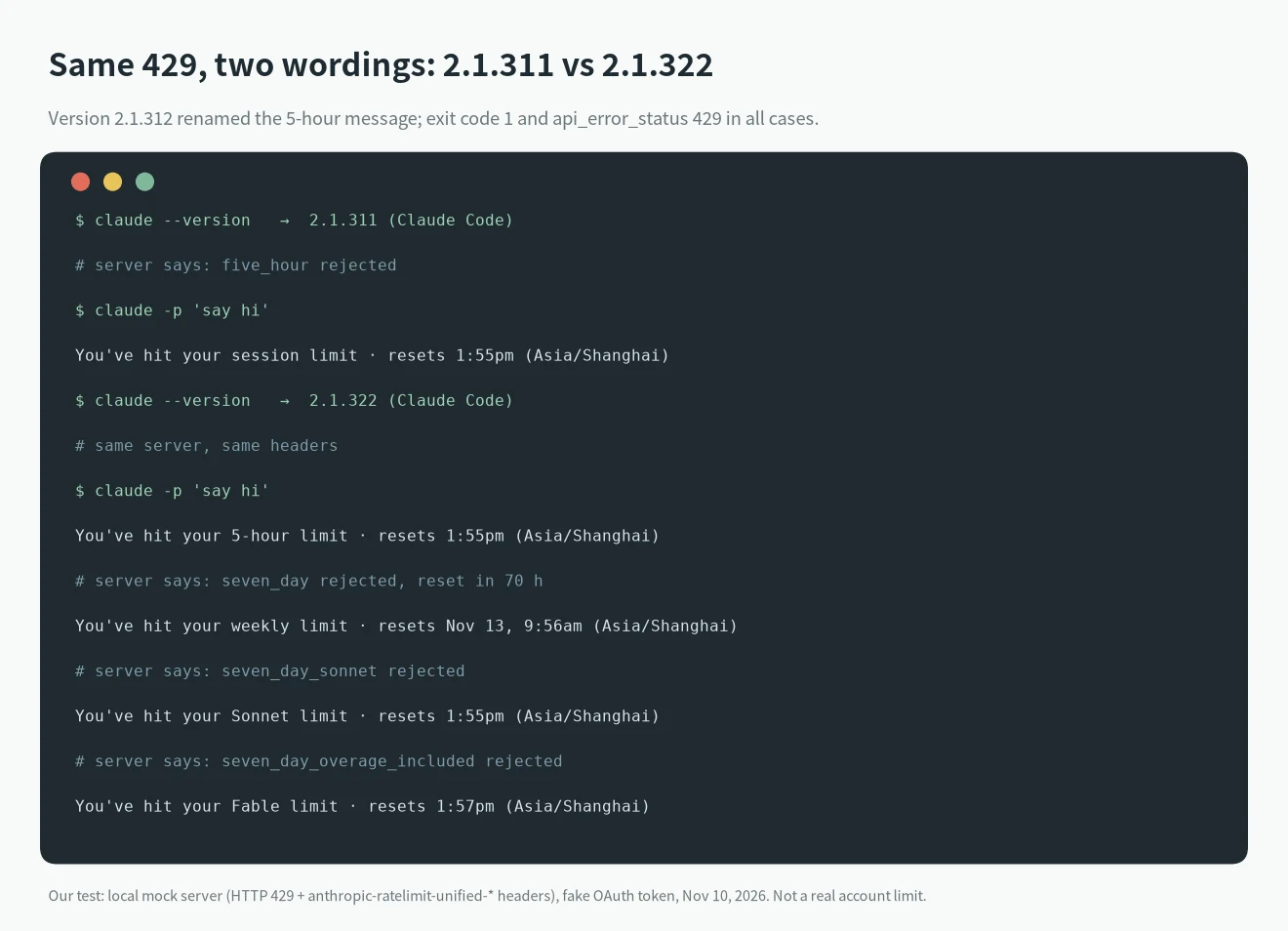
- Tested: the wording in 2.1.311, 2.1.312 and 2.1.322; the exit code and JSON fields of
claude -p; the session, weekly, Opus, Sonnet and Fable messages; the display format of a weekly reset that falls on another day. - Not tested, from the docs: interactive automatic continue and
Escto cancel; setting up and billing usage credits; the Desktop checkbox; whether an upgrade applies instantly; the/usagebreakdown. - Sources: the Error reference, Interactive mode, Manage costs, How do usage and length limits work?, Usage credits and the Claude Code CHANGELOG. Pages fetched November 10, 2026.
FAQ
Are session limit and 5-hour limit the same thing?
Yes, the same allowance that resets every five hours. Claude Code 2.1.312 changed the wording to 5-hour limit; the help center and the Error reference still say session limit.
Why did I hit it after such a short time?
Anthropic says what you get depends on conversation length, the model, attachments and the features you use, and there is no fixed message count. Chat on the web, desktop, mobile, Cowork and Claude Code all draw from one pool. Check the split in /usage, then go through step 5 above.
Is this a 429 rate limit?
Not the same thing. The Error reference lists Server is temporarily limiting requests (not your usage limit) separately: a short server-side throttle unrelated to your plan, so wait and retry. Request rejected (429) is the rate limit on an API key or cloud project. Both are covered in our Claude Code 429 guide.
How is it different from the monthly spend limit?
The monthly spend limit is a cap on usage credits or an organization budget, worded You've hit your monthly spend limit, and it has different fixes. See the monthly spend limit test.
How does the Claude allowance work overall?
The 5-hour and weekly limits and the Pro and Max differences are explained in Claude Usage Limits Explained. Official resets and bans are logged in the usage limit tracker. More errors are in the Claude Code error list. To watch the 5-hour and weekly numbers from the terminal, see the Claude Code usage monitor. If the session drops mid-reply instead, see Claude Code stream idle timeout.