

Ollama Context Length: How to Set num_ctx (5 Methods, Tested)
Ollama keeps forgetting the start of a long chat, or your coding agent loses track of files, because the context window is smaller than you think. We tested every way to set the Ollama context length on 0.40.13, which one wins when several are set, and what happens above the model limit.
 bufferAbout the author7 min read
You chat with a local model for a while and it forgets what you said at the start. You connect a coding tool like Claude Code and it loses track of a file it read a minute ago. Most of the time the model is fine and the Ollama context length is just smaller than you think. There are several places to change it, and it is easy to set one that another quietly overrides. We tried every method on a Linux machine with no GPU, using the current Ollama 0.40.13 and qwen2.5:0.5b, and checked the real value with ollama ps after each change.
What is the default Ollama context length?
The official Ollama FAQ says the default context window is 4096 tokens. The context length page is more specific: the default depends on VRAM. Under 24 GiB it is 4k, from 24 to 48 GiB it is 32k, and at 48 GiB or more it is 256k. Cloud models default to their maximum context.
Our test machine has no GPU, and the server start-up log has this line, which matches the docs:
msg="vram-based default context" total_vram="0 B" default_num_ctx=4096With nothing set, qwen2.5:0.5b ran with 4096 in the CONTEXT column of ollama ps. Note that ollama show qwen2.5:0.5b reports context length 32768. That is the most the model supports, not what Ollama gives it, and it misleads a lot of people.
One more inconsistency: the parameter table in the Modelfile docs still says “Default: 2048” for num_ctx. That does not match the FAQ, the context length page or the 4096 we measured, so go by the FAQ and ollama ps.
5 ways to set the Ollama context length
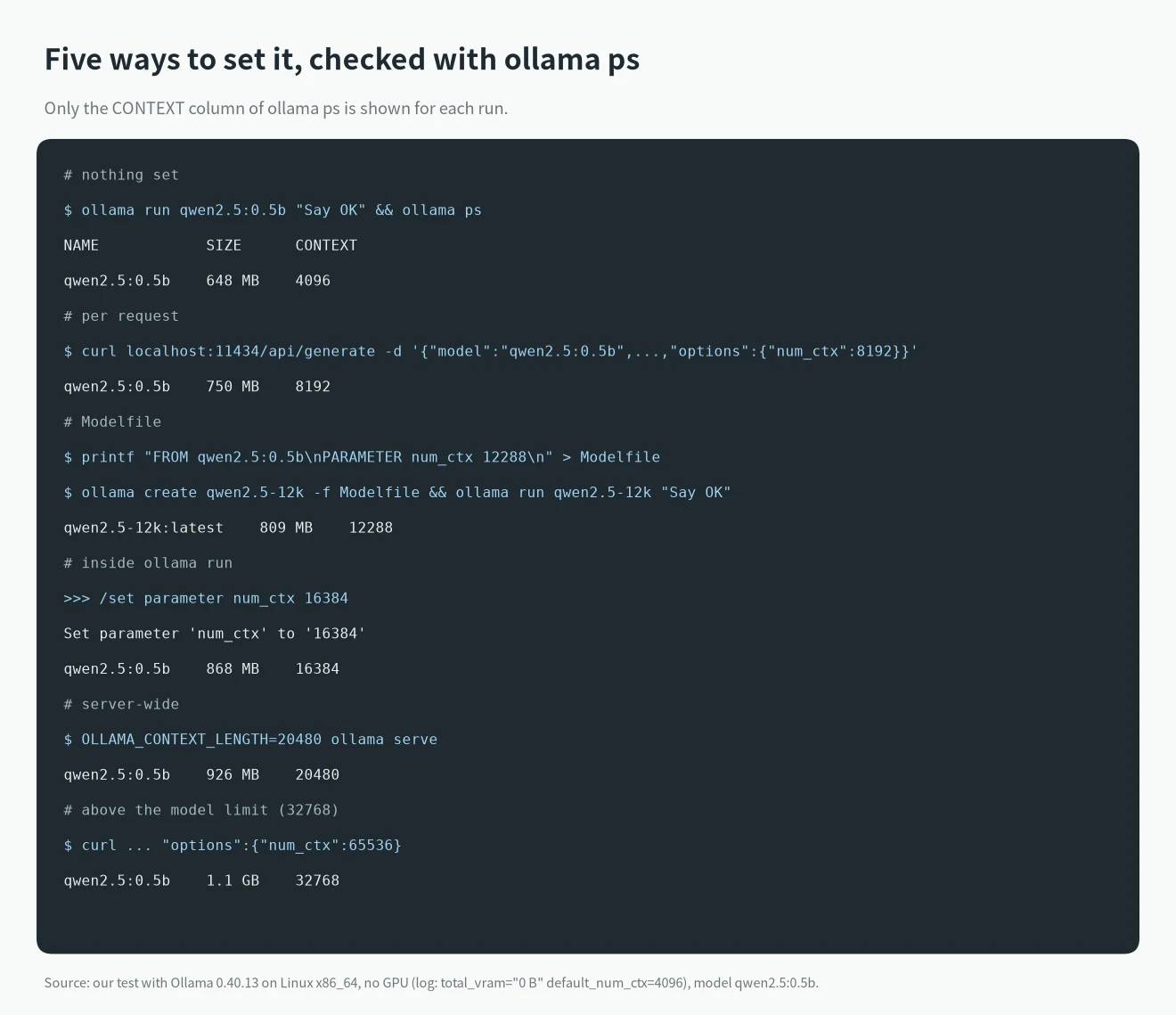
We tested each method on 0.40.13. The image shows what ollama ps reported after each change:
1. OLLAMA_CONTEXT_LENGTH: the whole server
To give every model and every client the same context, set this variable when you start the server. After we started it with OLLAMA_CONTEXT_LENGTH=20480 ollama serve, the start-up config line showed OLLAMA_CONTEXT_LENGTH:20480 and ollama run loaded the model with CONTEXT 20480.
OLLAMA_CONTEXT_LENGTH=64000 ollama serveIf Ollama runs as a service or desktop app, a variable you export in your terminal does not reach it. Set it the way the FAQ describes:
- Linux (systemd): run
systemctl edit ollama.service, addEnvironment="OLLAMA_CONTEXT_LENGTH=64000"under[Service], then runsystemctl daemon-reloadandsystemctl restart ollama. - macOS app: run
launchctl setenv OLLAMA_CONTEXT_LENGTH 64000, then restart Ollama. - Windows: quit Ollama from the taskbar, add
OLLAMA_CONTEXT_LENGTHunder “Edit environment variables for your account”, save, then start Ollama again from the Start menu.
The context length page also mentions a context length slider in the Ollama app settings. We tested on the Linux command line, so we did not try the slider.
2. num_ctx in an API request: that request only
When you call /api/generate or /api/chat, put num_ctx inside options:
curl http://localhost:11434/api/generate -d '{
  "model": "qwen2.5:0.5b",
  "prompt": "Say OK",
  "stream": false,
  "options": {"num_ctx": 8192}
}'
After this request, ollama ps showed CONTEXT 8192 and 750 MB. We then sent a request without num_ctx. The model reloaded and CONTEXT went back to 4096. You have to send the parameter with every request; leave it out and the other settings apply.
3. PARAMETER num_ctx in a Modelfile: tied to the model
To make a model always use the same context, the most reliable way is to build a new model from it:
FROM qwen2.5:0.5b
PARAMETER num_ctx 12288
ollama create qwen2.5-12k -f Modelfile
ollama run qwen2.5-12kAfter that, ollama show qwen2.5-12k --parameters printed num_ctx 12288, and ollama ps showed CONTEXT 12288 while it ran. Any client that asks for qwen2.5-12k gets that length.
4. /set parameter num_ctx in ollama run: this session only
Inside ollama run, type:
>>> /set parameter num_ctx 16384
Set parameter 'num_ctx' to '16384'
CONTEXT changed to 16384 in our test. When we quit and started ollama run qwen2.5:0.5b again, it was back to 4096. To keep it, type /save qwen2.5-16k after the /set. Ollama replies Created new model 'qwen2.5-16k', and running qwen2.5-16k gives CONTEXT 16384, the same result as method 3.
Slash commands only work when you type them in the interactive prompt. When we piped /set parameter num_ctx 16384 into ollama run, it was sent to the model as an ordinary prompt and the setting did not change. ollama run --help on 0.40.13 has no context flag either.
5. The OpenAI-compatible API (/v1): use method 1 or 3
Many tools talk to Ollama through /v1/chat/completions. Ollama’s OpenAI compatibility docs say the OpenAI API has no way to set the context size, so you create a model with a Modelfile and call it by its new name.
We also checked the server variable. With OLLAMA_CONTEXT_LENGTH=20480, a call to qwen2.5:0.5b through /v1/chat/completions loaded it with CONTEXT 20480. For tools that use /v1, method 1 or method 3 both work.
Which setting wins when several are set
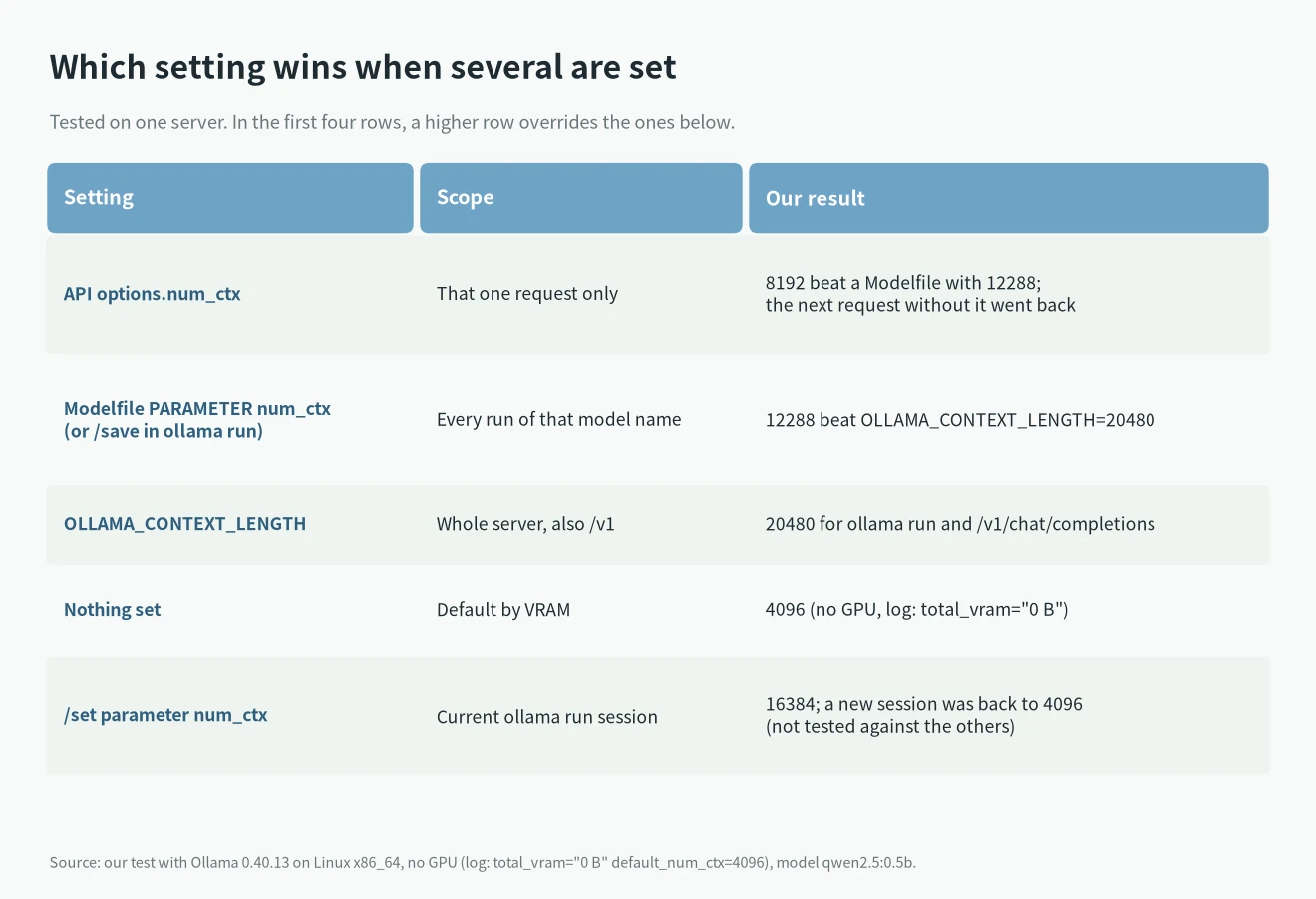
When a change seems to do nothing, another setting is usually overriding it. We stacked the settings on one server:
- With the server started as
OLLAMA_CONTEXT_LENGTH=20480,qwen2.5-12k(12288 in its Modelfile) loaded with CONTEXT 12288. The model’s own parameter beat the variable. - The same
qwen2.5-12kwith"num_ctx": 8192in the API request loaded with CONTEXT 8192. The request beat the Modelfile. - So the order is: num_ctx in the request, then num_ctx in the Modelfile, then OLLAMA_CONTEXT_LENGTH, then the VRAM-based default.
Check in that order. If you set OLLAMA_CONTEXT_LENGTH=64000 and ollama ps shows something else, look at whether the model carries its own num_ctx (ollama show MODEL --parameters) or whether your client sends num_ctx in its requests.
How to confirm it worked, and what happens if you set it too high
There is one place to read the real value: run ollama ps while the model is loaded and look at CONTEXT. The context length page recommends the same, and suggests watching the PROCESSOR column so the model does not get pushed onto the CPU.
Above the model’s limit, Ollama caps the value. qwen2.5:0.5b supports 32768. We sent "num_ctx": 65536, the request worked, ollama ps showed CONTEXT 32768 and the server log said n_ctx_slot = 32768. You get no error, and you do not get 65536 either.
More context uses more memory. For the same qwen2.5:0.5b we measured 648 MB at 4096, 750 MB at 8192, 868 MB at 16384, 926 MB at 20480 and 1.1 GB at 32768. A 0.5b model is tiny, so the growth is small. With a 14B model it grows by gigabytes, and if loading then fails with model requires more system memory, see how to fix Ollama model requires more system memory. To estimate memory for a model and context, use our VRAM calculator.
How much context should you set?
The context length page says tasks like web search, agents and coding tools should use at least 64000 tokens. For plain chat the 4096 default is usually enough; the docs give no finer numbers. For how much context fits on different GPUs when you use a local model with a coding tool, see the estimates in the best local LLM for coding. For other Ollama errors, search our Ollama and llama.cpp error list by the exact message.
FAQ
Why does ollama show say 32768 when I only get 4096?
The context length in ollama show is the most the model supports. What Ollama actually allocates follows the order above. With nothing set, it uses the VRAM-based default, which is 4096 under 24 GiB. ollama ps shows the real value.
I set OLLAMA_CONTEXT_LENGTH and nothing changed. Why?
First make sure the server process got the variable: the server config line in the start-up log should show OLLAMA_CONTEXT_LENGTH: followed by your value. For systemd, the macOS app and Windows, follow the steps in method 1 and restart Ollama. If the log is right and ollama ps still shows another number, the model’s Modelfile or your client’s request has its own num_ctx.
The Modelfile docs say the default is 2048. Which is it?
On 0.40.13, our test, the start-up log and the FAQ all say 4096 with under 24 GiB of VRAM. The 2048 in the Modelfile parameter table does not match the rest of the docs.