

ChatGPT Plus PayPal Payment? The Honest Answer and Easy “Payment Was Not Approved” Fixes (2026)
ChatGPT Plus with PayPal only works through the iPhone or Android app, billed by Apple or Google Play. On chatgpt.com, OpenAI lists cards and some local methods. Here are the official fixes for "payment was not approved". Checked October 28, 2026.
 bufferAbout the author6 min read
Short answer: if you subscribe on chatgpt.com, PayPal is not one of the payment methods OpenAI lists. ChatGPT Plus PayPal payment has one official route: subscribe inside the ChatGPT app on iPhone or Android, so Apple or Google Play bills you, and only if your Apple or Google account’s country already offers PayPal. If you see “payment was not approved” or your card is declined, the usual cause is your bank blocking the charge or an unfinished 3D Secure check. OpenAI says it usually doesn’t get the bank’s decline reason, so start with your bank. If you are in a country OpenAI doesn’t support, there is no official fix, and this guide doesn’t cover workarounds. Everything below comes from OpenAI, Apple and Google help pages, checked October 28, 2026.
Not sure Plus is even the right plan? Before you set up a ChatGPT Plus PayPal or card payment, compare it with Go and Pro in ChatGPT Go vs Plus vs Pro. The official PayPal answer is also on OpenAI’s payment methods help page.
Which payment methods ChatGPT accepts
OpenAI’s multi-currency billing page lists credit and debit cards for every country, plus local options in a few markets. PayPal is not on the list.
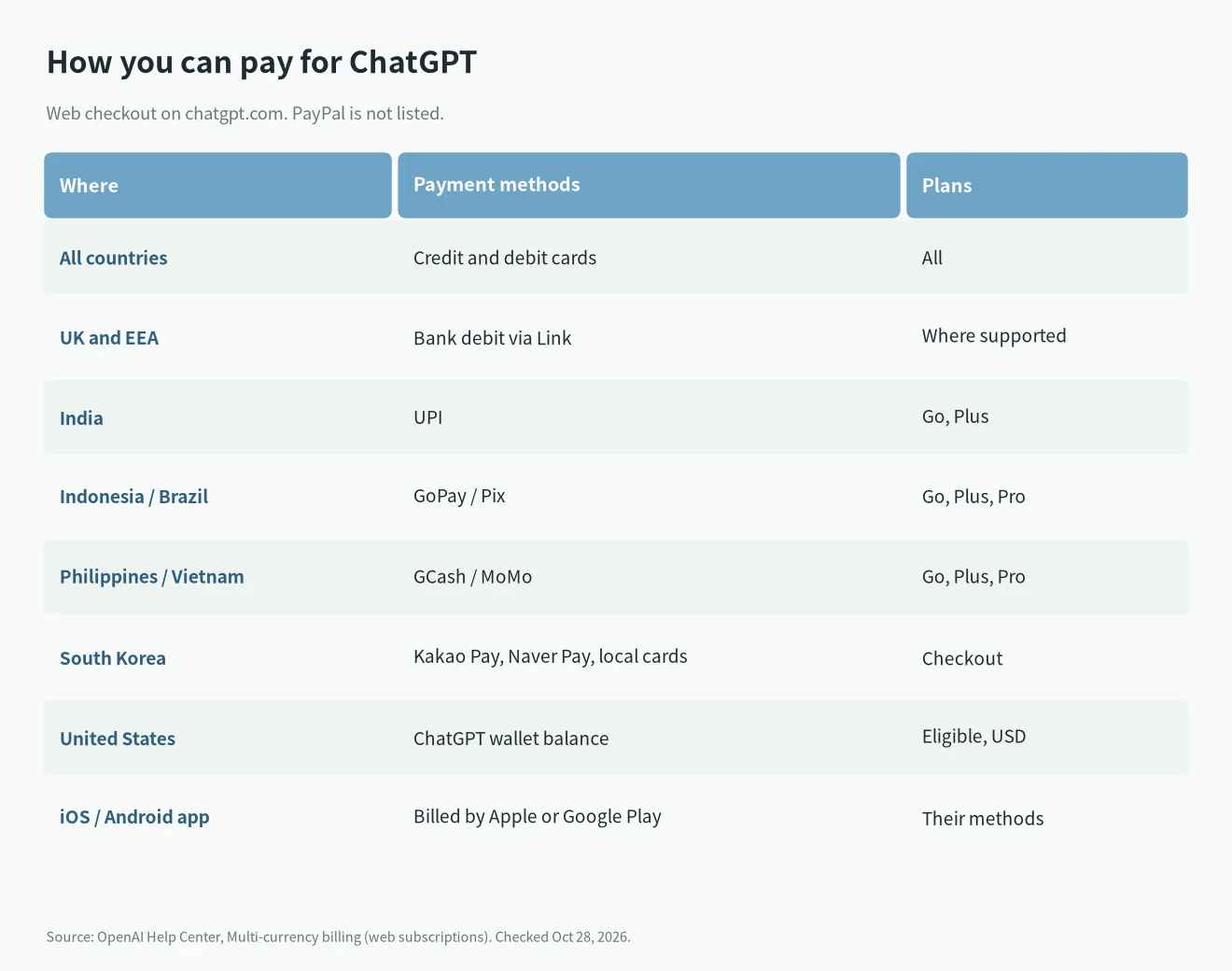
- All countries: credit and debit cards.
- UK and EEA: bank debit via Link, where supported.
- India: UPI, for Go and Plus only.
- Indonesia, Brazil, Philippines, Vietnam: GoPay, Pix, GCash and MoMo, for Go, Plus and Pro.
- South Korea: Kakao Pay, Naver Pay and local cards.
- United States: ChatGPT wallet balance (from gift cards) for eligible accounts paying in USD.
App subscriptions work differently. The same page says that if you subscribe in the iOS or Android app, Apple or Google Play manages the subscription and charges you in local currency. Which payment methods you can use is then up to Apple or Google.
The official ChatGPT Plus PayPal route
Since the web checkout doesn’t take PayPal, the app is the only way:
- iPhone or iPad: add PayPal to your Apple Account, then subscribe to Plus in the ChatGPT app. Apple’s payment methods page lists what works in each country. PayPal is there for the US, Canada, Mexico, Germany, France, Spain and others, but not everywhere.
- Android: add PayPal in Google Play, then subscribe in the app. Google’s accepted payment methods page is also sorted by country. If you have PayPal Security Key turned on, Google says you have to add PayPal from a browser, not the Play Store app.
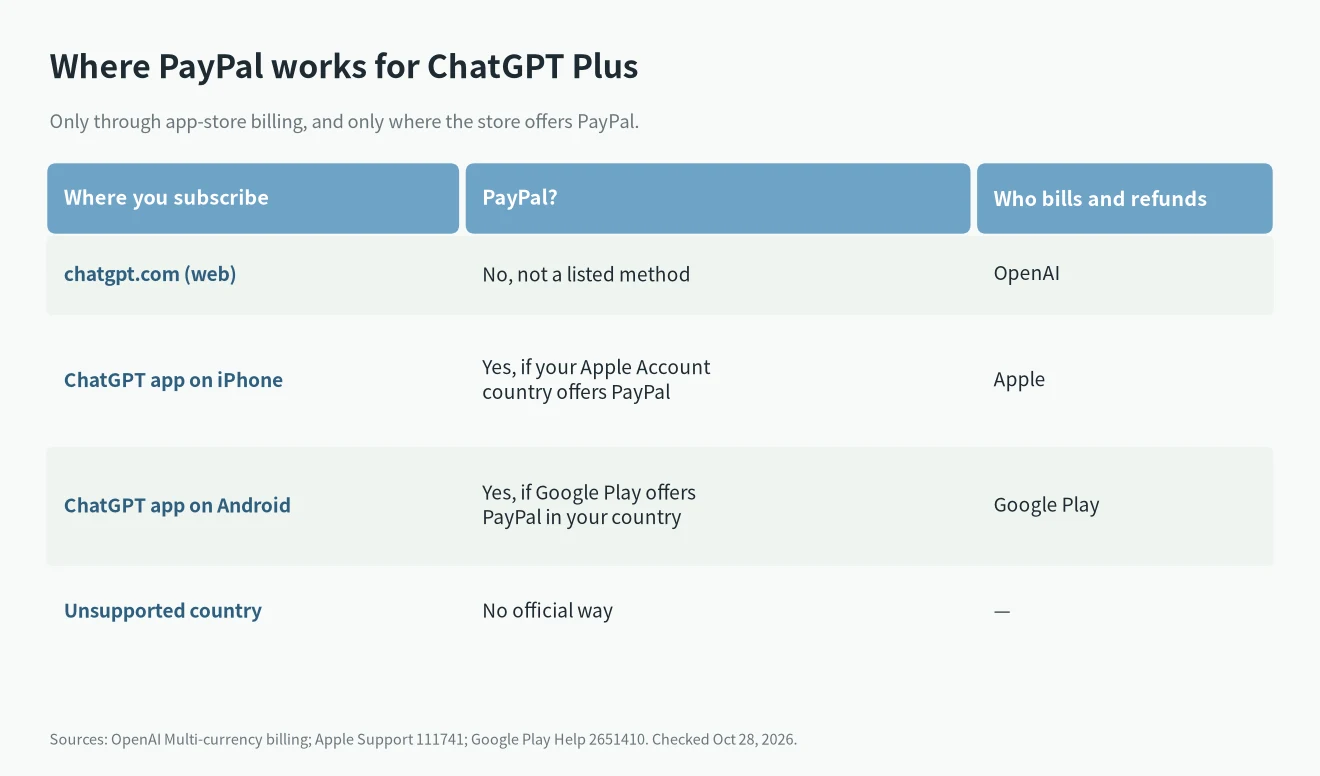
Three things to know before you pay this way:
- Apple or Google owns the subscription. You cancel and ask for refunds with them. I cover the steps in cancel or downgrade an AI subscription.
- Don’t subscribe twice. OpenAI’s billing management page says you can be billed through the web, the App Store or Google Play, and subscriptions on more than one platform can mean separate charges.
- Your account’s country decides. If Apple or Google doesn’t offer PayPal in your account’s country, that’s the answer. I don’t cover changing regions.
“Payment was not approved”: the official fix order
If the web checkout says “payment was not approved” or your card is declined, follow OpenAI’s declined card guide in order. OpenAI notes it typically doesn’t receive detailed decline reasons from banks, so calling your bank is often the quickest fix.
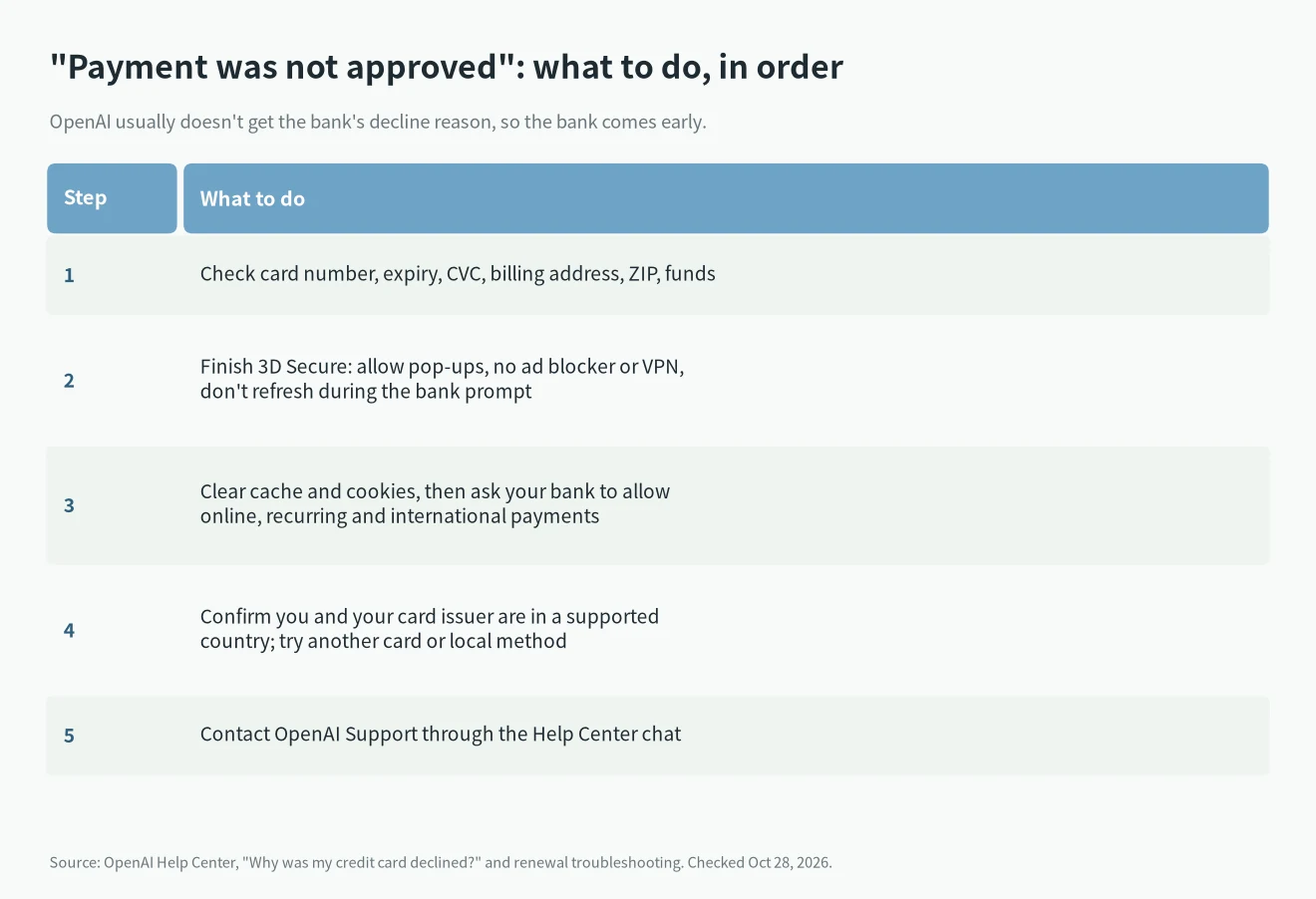
Step 1: Check the card details and funds
Card number, expiry date, CVC, billing address and ZIP or postal code all have to match. Make sure there’s enough money on the card. A wrong billing address is a common cause.
Step 2: Finish 3D Secure
Many cards need your bank’s 3D Secure (SCA in Europe) approval for online payments. OpenAI’s advice: allow pop-ups and redirects, turn off ad blockers, and turn off any VPN. If you see “authentication required” or “3D Secure attempt failed”, try an incognito window or another browser, device or network, and approve the OTP or bank app prompt without closing or refreshing checkout.
Step 3: Clear your cache, then call your bank
Clear your browser cache and cookies and try again. If it still fails, call your bank. Some banks block online or international payments by default. Ask them to allow online, recurring and international e-commerce transactions and to enable 3DS.
Step 4: Check your region, try another method
OpenAI requires both you and your card’s issuing bank to be in a supported country or region. If either one isn’t, the payment can fail. If your region is fine, try another card or a local method your country supports.
Step 5: Contact OpenAI Support
If nothing works, use the chat widget in the OpenAI Help Center.
One more official point: prepaid cards can’t buy API credits. OpenAI’s page doesn’t say whether prepaid cards work for subscriptions, and I couldn’t confirm it.
When a renewal payment fails
Renewal failures get the same treatment. OpenAI’s renewal troubleshooting page has four steps: clear cache and cookies; contact your bank about holds, funds or security blocks; confirm you and your card issuer are in a supported region; then contact support through the chat widget. Update a web subscription’s card under Settings → Billing. App subscriptions are updated in Apple or Google.
One detail from OpenAI’s promotions page: a failed charge may be retried later and go through. So before you subscribe again, check your status under Settings → Billing so you don’t pay twice.
If your country isn’t supported
OpenAI only sells subscriptions in supported countries, and your card must be issued there too. Mainland China and Hong Kong are not on the list. In that case there’s no official fix. Workarounds aren’t supported, may break the terms of use and put the account at risk, so I don’t cover them.
Pick the plan before you pay
Before you sort out payment, make sure Plus is the plan you want. If you mostly chat, Go may be enough. If you use Codex or long tasks a lot, look at Plus or Pro. I compare them in ChatGPT Go vs Plus vs Pro.
FAQ
Can I pay for ChatGPT Plus with PayPal?
Not on the web. PayPal isn’t one of OpenAI’s listed methods. You can only use it by subscribing in the iOS or Android app, billed by Apple or Google Play, where your account’s country offers PayPal.
What does “payment was not approved” mean?
The charge wasn’t approved. Common causes are a bank block, an unfinished 3D Secure check, wrong card details, or you or your card issuer being outside a supported region. OpenAI doesn’t see the bank’s reason, so ask your bank first.
Was I charged for a failed payment?
Check your bank statement. If a renewal failed, the system may retry it, so look at Settings → Billing before you subscribe again.
Can I switch from an app subscription to the web later?
Yes. Cancel with Apple or Google first, wait for the period to end, then subscribe on the web so you aren’t billed in both places.